Passcovery Suite: One GPU Password Recovery Tool for Office, PDF, Archives, iPhone Backups and TrueCrypt
Passcovery Suite is a $199-a-year Windows tool that finds lost passwords for Office documents, PDF files, RAR and ZIP archives, iPhone and BlackBerry backups, TrueCrypt volumes and Wi-Fi handshakes, using your CPU and an NVIDIA, AMD or Intel Arc graphics card. It's for people and IT staff who regularly face more than one kind of locked file and want one program instead of four.
A locked spreadsheet from a former colleague, an old project archive nobody remembers the password to, an encrypted iTunes backup you need before restoring a new phone: each one needs a different cracker, unless you buy the Suite. It doesn't break strong passwords by magic. It tries candidates very fast and gives you smart ways to try fewer of them.
Quick facts
- Version: 25.04, released April 2025
- Developer: Passcovery Co. Ltd., a small team in St. Petersburg building password recovery software since 2008
- Platform: Windows 10 and 11, 64-bit only. There's no Mac or Linux version
- Files: Microsoft Office and OpenOffice/LibreOffice, Adobe PDF, RAR3/RAR5, ZIP/WinZip, Apple iOS and BlackBerry backups, TrueCrypt 7.x volumes, WPA/WPA2 handshakes
- GPUs: NVIDIA GeForce GTX 750 to RTX 50, AMD Radeon HD 7000 to RX 9000, Intel Arc A-series and Battlemage
- Price: Standard license $199.00 for the first year on one PC (CPU plus one GPU), renewing at $59.00 a year
- Trial: free demo with every feature, but it shows only the first two characters of a found password, stops each attack after 30 minutes and uses one GPU
- Refunds: only for a confirmed software defect, not when a password can't be found
- What we checked: the installer Passcovery_Suite_25.04_x64.msi (18.3 MB) on the vendor's server, and the order page price of $199.00 with automatic renewal at $59.00 a year, both on November 8, 2026. We didn't run a recovery ourselves.
Before you buy
Run the free demo on your own locked file first. It runs at full speed and shows the first two characters of the password it finds, plus the time estimate for your hardware. If the estimate says years, a license won't change that: Passcovery refuses refunds when a password simply can't be recovered, and it only refunds a confirmed technical defect it can't fix within 30 days.
The license is an auto-renewing yearly subscription (card and PayPal payments renew automatically; you can switch to manual renewal at checkout). It lets you activate the program for one year from the first activation. A copy you've already activated keeps working after that; you only need the $59 renewal to activate again or get new versions.
Download Free TrialBuy Now
Overview
Passcovery sells five separate recovery tools: Accent OFFICE, PDF, RAR, ZIP and the Excel/Word-only versions. Passcovery Suite puts all of their engines in one window and adds formats none of them handle: Apple iOS and BlackBerry backups, TrueCrypt volumes and WPA/WPA2 Wi-Fi handshakes. It also gets GPU acceleration for PDF files, which the stand-alone PDF tool only cracks on the CPU.
The program opens the locked file, tells you what protection it uses and how fast recovery will be, then runs the attack you choose. Weak protection, such as Excel sheet protection or an Office "password to modify", is removed instantly. Real encryption, such as a modern .xlsx open password, a RAR5 archive or an iPhone backup, has to be attacked by trying passwords, and that's where the GPU support and the attack options matter.

The Passcovery Suite main window (version 24.09, Ultimate Edition, from the user guide), with the menu, toolbar, file information area and the speed and time panel at the bottom.
Features
Many file types in one program
Passcovery Suite covers Word, Excel, PowerPoint and Access from version 6.0 up to Microsoft 365, OpenOffice 1.1 to 4.x and LibreOffice 3.3 to 26.x, Adobe PDF with RC4 and AES encryption, RAR3 and RAR5 archives (WinRAR 2.90 to 7.x), ZIP archives with classic ZipCrypto or WinZip AES encryption, iOS backups from iOS 4 to 18, BlackBerry 5 and 6 backups, TrueCrypt 7.x volumes and WPA/WPA2 handshakes. The file type and protection are detected when you open the file.
Instant removal of weak Office protection
Passcovery Suite strips Excel and Word protections that don't encrypt the file in a fraction of a second, whatever the password length: the password to modify, sheet and workbook protection, VBA project passwords, and Access 97-2003 database passwords. For Word and Excel 97-2003 files with 40-bit encryption, it can search the encryption key instead of the password, which guarantees access no matter how long the password was.
GPU acceleration on NVIDIA, AMD and Intel Arc
Passcovery Suite moves the password search onto your graphics card, which checks thousands of candidates in parallel. Passcovery's own figures for its engines: an RTX 5070 Ti tries about 35,000 Office 2013-365 passwords a second against roughly 1,800 on a Ryzen 9 9950X, about 137,000 RAR5 passwords a second against 7,182 on a Core Ultra 9 285K, and 10.9 million WinZip AES passwords a second. The Standard license uses one graphics card; Professional uses two and Ultimate all of them.
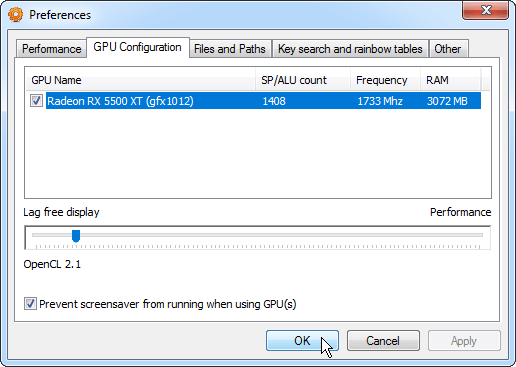
The GPU Configuration tab, where you pick which graphics cards to use and trade display responsiveness for speed.
Positional masks that cut the search
Passcovery Suite's extended mask lets you set a separate character set for each position of the password. If you know it started with a capital letter and ended in four digits, every other combination is skipped. Passcovery's example: an eight-character letters-and-digits password has 218 trillion combinations, but knowing that four characters are lowercase and four are digits shrinks that to 4.57 billion.
Dictionary attacks with mutation rules
Passcovery Suite blends up to four word lists and changes each candidate with rules you write in its macro language: capitals, appended digits, letter-for-symbol swaps and more. The Rules editor shows the result on test words as you type, so you can check a rule before a long run. Dictionaries can be UTF-8, Unicode or ANSI, so non-English passwords work.

The Rules editor: rules on the left, four test words at the top, and the passwords those rules generate on the right (numbered callouts are from the user guide).
Attack scenarios, saved sessions and a command line
Passcovery Suite can chain attacks into a scenario, for example a dictionary with mutations, then a six-character mask, then seven, then eight, written once in a plain text file and run unattended. Progress is saved automatically, so a multi-day search survives a reboot, and a command-line interface lets you script it. A built-in benchmark measures the real speed of every format on your hardware before you commit.

Benchmark results listing the passwords-per-second rate for TrueCrypt, Word 97/2003 and PDF protection types on the test machine.
Benefits
- One purchase instead of several. The Standard Suite costs $199; the Standard editions of the Office, RAR and ZIP tools together cost $240 and still miss PDF, iPhone backups and TrueCrypt.
- Realistic expectations up front. The program shows the total number of candidates and an estimated time before you wait, so you know early whether a search is worth running.
- Your files stay on your PC. Recovery runs offline; the only internet connection needed is the one-time activation.
- The hardware you already own counts. A gaming graphics card turns a weeks-long CPU search into days or hours.
Real-World Uses
- An employee left and took the passwords. IT gets a protected Excel workbook, a RAR archive of project files and a PDF contract. Sheet protection disappears instantly, and the archive and PDF go into a scenario that runs overnight.
- A forgotten iPhone backup password. You can't restore your old backup onto a new phone. If you remember the password was a pet's name plus a year, a dictionary attack with a digit-appending rule tries exactly that family of passwords.
- An old Word 97 document. The 40-bit key search opens a .doc file with a guaranteed result, without ever finding the password.
- A TrueCrypt volume from years ago. If you remember the password's structure, a positional mask keeps the search to a size a GPU can finish.
- Security audits. Testing how long the company's archive or Wi-Fi passwords would hold up against a GPU attack.
Who It's For, and Who Should Skip It
It's for IT departments, system administrators, data recovery shops and forensic examiners who meet many file types, and home users who have locked files of several kinds and a decent graphics card.
Skip it if you only have one kind of locked file: the single-format Accent tools cost $60 to $120 for the same engine. Skip it on a Mac, since it's Windows only. Skip it if your password was long and random, because no tool can try enough combinations. And if you need VeraCrypt, 7-Zip (.7z) or modern Windows login passwords, the Suite doesn't cover them; a free command-line cracker such as hashcat covers more formats if you're comfortable without a graphical interface.
Usage Guide
- Install the demo. Download the 64-bit installer from Passcovery and run it on the PC with your best graphics card.
- Open the locked file. Use File, Open or the green arrow button. The wizard shows the file type, the protection, the expected recovery speed and the maximum password length.
- Remove what can be removed instantly. For sheet, workbook, VBA or modify passwords, the program shows or removes them at once.
- Choose an attack. Pick a ready-made scenario if you remember nothing, a mask if you remember the structure, or a dictionary if the password was a word.
- Check the estimate. The bottom panel shows the current speed and estimated time. If it's unrealistic, narrow the mask or character set.
- Buy and activate. Enter the registration key and your email under Register (Ctrl+R). Activation is tied to the PC's hardware ID and needs the internet once.
Tips
- Write down everything you remember about the password before you start: length, first letter, whether it had digits at the end. Each fact shrinks the mask.
- Run the built-in benchmark first. It tells you whether your GPU is worth using for that format.
- For Word or Excel 97-2003 files, try the key search before any brute force.
- Rainbow tables for Excel/Word 97-2003 decryption are only included in the Ultimate license.
Where it falls short
- Strong passwords stay out of reach. Passcovery's own example: an eight-character letters-and-digits RAR5 password would take about 50 years on an RTX 5070 Ti. TechRadar found a seven-character AES-encrypted ZIP password estimated at almost three years.
- Some protection types run on the CPU only. PDF files with AES-256 (Acrobat 9 and later) and Office 97-2003 RC4 files get no GPU speed-up.
- Gaps in format support. Old RAR 2.x archives, ZIP files using classic encryption with PPMd or WavPack compression, .7z archives and VeraCrypt volumes aren't supported.
- Dated-looking interface. The classic Windows window and wizard work, but they look like software from a decade ago.
What Users Say
Independent reviews of Passcovery's software are scarce. The one detailed test is TechRadar's; most other feedback comes from customer testimonials published by Passcovery itself, and G2 lists a single review.
TechRadar (John Faulds, January 2021): 3.5 out of 5
TechRadar tested the ZIP engine on an i3-3160 CPU with a GTX 1060 and liked the breadth of formats:
"Passcovery can recover passwords from a wider range of apps than the competition, but it's only a viable solution if your passwords aren't too long or complicated."
On speed, short passwords fell fast: "A slightly longer password like "paZs6" took two seconds for a normal zip password." A dictionary-word password, "houseletterdrink", "took 50 minutes", and "defense19" "took about 10 minutes". With AES-256 the picture changed: "A maximum length of five characters would take two hours 46 minutes, six characters 11 days and two hours, and seven characters two years and 337 days."
On the Suite itself: "Passcovery is unique in offering a single product that can recover passwords from so many different apps." The criticism was about transparency: "it's a little disappointing that there's so little information provided by Passcovery about its security practices on its website."
Verdict: "Passcovery is a good tool for quickly recovering passwords from a wide range of different applications if—and it's a pretty big if—your passwords aren't too long, complicated, or have been encrypted."
Customers on Passcovery's own site
Passcovery publishes customer comments on its feedback page (they're selected by the company, so expect only positive ones). About the Suite:
- Ivan, Ukraine: "I kept getting "incorrect password" for my iTunes backup. So I used the online form to contact support team. They responded swiftly and turned out really HELPFUL."
- David, Israel: "Good software, good customer support. Those guys know what they are doing."
- Jose Moreira: "Thank you, I would recommend this software for anyone that needs a file password recovered."
About the engines the Suite shares with the single-format tools:
- Mike P., Australia (RAR): "Very effective. I had a RAR file with a 6 character password. Told software to select method automatically. Found password inside 5 minutes!"
- Francois Lamoureux, Canada (RAR): "This product is very good for short passwords and for dictionnaries attacks." He also warned: "don't expect to find passwords of length > 7 using brutal force, because it will take you years of calculation."
- Andrew Mayne, United Kingdom (ZIP): "Found my forgotten password quickly using a Geforce GTX650 GPU and clever combinations of attacks of AccentZPR."
- Randell Canady (Excel): "It was a long process, but it did recover the password that was set to open the file. ... But a warning of the time should be made up front."
G2
Passcovery Suite has no reviews on G2. The company's only G2 review is of Accent OFFICE Password Recovery, rated 4.0 out of 5, and its complaint is that detecting the protection and searching for the password take a lot of the PC's resources.
The pattern across all of it is consistent: people praise the speed on short and dictionary-based passwords, the instant removal of weak Office protection and the responsive support. The recurring warning, from TechRadar and from customers alike, is time: long or random passwords on strong encryption can take years, and the demo's time estimate is the honest answer to whether yours is recoverable.
Comparisons
Passcovery Suite vs the single-format Accent tools
Passcovery Suite uses the same recovery engines and interface as Accent OFFICE, PDF, RAR and ZIP Password Recovery. The single tools are cheaper for one job (Accent RAR or ZIP Standard is $60, Accent OFFICE Standard $120). The Suite wins once you need two or three of them, and it's the only Passcovery product for iPhone and BlackBerry backups, TrueCrypt and WPA/WPA2, and the only one with GPU-accelerated PDF recovery.
Passcovery Suite vs hashcat
hashcat is a free, open-source GPU password cracker that supports far more formats, but it's a command-line tool: you extract the hash from the file yourself and write the attack as command arguments. Passcovery Suite does the extraction, the time estimate and the attack setup in a Windows interface, and comes with support. Pick hashcat if you're comfortable in a terminal; pick the Suite if you want a guided tool.
Editions and Pricing
All three licenses include every supported format, a year of free updates, support and commercial use on one PC. They differ in how many graphics cards they use. Prices are for the first year, read on the order page on November 8, 2026; renewal is about 30% of the price.
| License | First year | Yearly renewal | Graphics cards | Extra |
|---|
| Standard | $199.00 | $59.00 | CPU + 1 GPU | - |
| Professional | $299.00 | $90.00 | CPU + 2 GPUs | - |
| Ultimate | $399.00 | $119.00 | CPU + all GPUs | Rainbow tables for Excel/Word 97-2003 |
Most people have one graphics card, so Standard is the license to buy. Professional and Ultimate only pay off on a machine with two or more GPUs.
Buy Standard ($199.00)
FAQs
Does Passcovery Suite work without a graphics card?
Yes. Passcovery Suite runs every attack on the CPU with hand-optimized code, and instant removals and key searches don't need a GPU at all. A supported NVIDIA, AMD or Intel Arc card only makes brute-force and dictionary attacks on strong encryption much faster.
Can Passcovery Suite recover an iPhone backup password?
Passcovery Suite attacks the password of encrypted iTunes/Finder backups of iOS 4 through iOS 18, on CPU and GPU. It needs the backup files on a Windows PC, and success depends on how complex the password is. It doesn't remove the iPhone's screen passcode.
What happens when the Passcovery Suite license year ends?
A copy of Passcovery Suite you've already activated keeps working. The year only limits new activations and free updates; renewing costs about 30% of the license price ($59 for Standard). The license renews automatically if you paid by card or PayPal unless you switch to manual renewal.
Can I get a refund if Passcovery Suite doesn't find my password?
No. Passcovery's refund policy excludes failing to recover a specific password and software that doesn't meet your expectations. A full refund is only guaranteed for a confirmed technical defect that Passcovery can't fix within 30 days, and requests must come within 30 days of purchase. Test with the demo first.
Can I install Passcovery Suite on two computers?
A Passcovery Suite license is for one PC: activation records the computer's hardware ID. For a second machine you need a second license.
Does Passcovery Suite upload my files?
No. Passcovery Suite works offline on your PC; the internet is only needed once, for automatic activation, and manual activation is available behind a firewall.
Does Passcovery Suite support VeraCrypt or 7-Zip archives?
No. Passcovery Suite handles TrueCrypt 7.x volumes and ZIP/RAR archives, but not VeraCrypt volumes or native .7z archives.
System Requirements
- Windows 10 or Windows 11, 64-bit
- Any modern Intel or AMD processor (SSE to AVX and AES-NI are used when present)
- Optional GPU: NVIDIA GeForce GTX 750 to RTX 50 and Tesla, AMD Radeon HD 7000 to RX 9000 and FirePro, Intel Arc A310 to A770 and Battlemage
- About 18 MB for the installer
- Internet connection once, for activation
Conclusion
Passcovery Suite is worth $199 if you deal with locked files of several kinds, especially at work: it's the only Passcovery product that covers iPhone backups, TrueCrypt and Wi-Fi handshakes, and it costs less than buying the Office, RAR and ZIP tools separately. The best reason to buy it is a GPU-backed search with masks and mutation rules in a program that does the setup for you. The main reason not to is that no tool beats a long, random password on strong encryption, and Passcovery won't refund you when that happens. Run the demo on your file, read the time estimate, and buy only if the answer is hours or days, not years.
Download Free TrialBuy Now