Kernel for PDF Restriction Removal: A $29 One-Click Fix for PDFs You Can't Print or Copy
Kernel for PDF Restriction Removal is a $29 Windows utility from KernelApps that makes an unrestricted copy of a PDF whose author blocked printing, copying, editing or text extraction. It's for office workers, students and anyone holding a document they're allowed to use but can't, and it works only on PDFs that use the older RC4 encryption (PDF 1.1 to 1.5).
You know the situation: a supplier's price list, a scanned form or an old user manual opens fine, but Print is greyed out and you can't copy a single line of text. This tool has one window and one button. You choose the file and a folder, click Remove Restrictions, and get a new PDF without the lock.
Quick facts
- Version: 13.01.01, released February 19, 2013
- Developer: KernelApps Pvt. Ltd. (Kernel Data Recovery, formerly Lepide Software), Noida, India
- Runs on: Windows 11, 10, 8.1, 8, 7, Vista and XP, and Windows Server 2022, 2019 and older
- Handles: PDF 1.1 to 1.5 files with 40-bit or 128-bit RC4 encryption
- Removes: print, copy, edit and extraction restrictions (the "local" restrictions)
- Needs Acrobat? No, it's stand-alone
- Price: $29 for the Home license, one-time payment
- Free trial: full function on PDF files up to 200 KB
- What we checked: the trial installer (pdfrestriction.exe, 1.5 MB, file version 13.01.01, signed by Lepide Software Pvt. Ltd.) downloaded from the vendor, and the $29 one-time Home license price on the order page, both on November 4, 2026. We didn't unlock a PDF with it.
Before you buy
- Check the PDF's encryption first. The program supports RC4-encrypted PDFs up to version 1.5. Acrobat has offered AES encryption since version 7, and many PDFs made by current software use it. Run the trial on your actual file before paying.
- The 200 KB trial limit is small. Most text-only PDFs of a few pages fit, but anything with images won't. If your file is larger, the trial can't prove it works on that exact file.
- It hasn't been updated since 2013. Version 13.01.01 is still the current one, so there's no support for newer PDF security added since then.
- Use it on documents you have the right to use. Removing restrictions from someone else's copyrighted PDF can break its license terms.
Download Free TrialBuy Now
Overview
PDFs can carry two kinds of protection. An open password stops you from viewing the file at all. A permissions password lets anyone open the file but tells PDF readers to block printing, copying, editing, commenting or form filling. Kernel for PDF Restriction Removal deals with the second kind, which the vendor calls local restrictions.
The program reads the protected PDF, drops the permission flags and encryption, and writes a fresh copy to the folder you choose. The copy gets the prefix "Unlock_" (name.pdf becomes Unlock_name.pdf), so your original stays exactly as it was. Text, layout and images are carried over without conversion, so the new file looks the same as the old one.
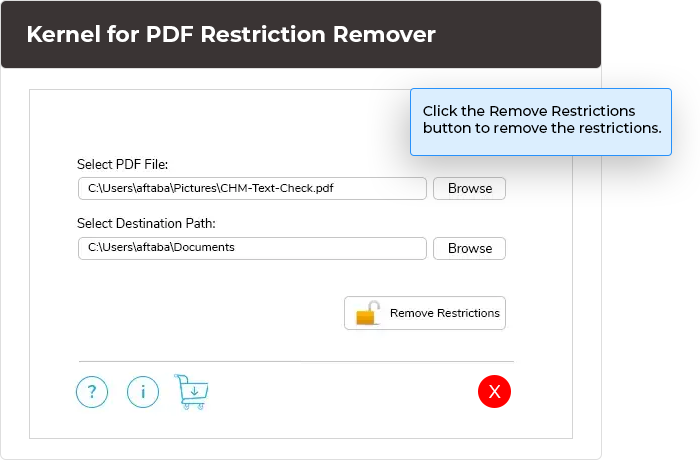
The whole program: a PDF file box, a destination folder box and the Remove Restrictions button (vendor screenshot with its own callout).
Features
Removes print, copy, edit and extraction locks
Kernel for PDF Restriction Removal clears the permission settings that stop you printing a PDF, selecting and copying its text, editing it, or pulling text and images out of it. After that, any PDF reader or editor treats the copy as an ordinary file.
Works without Acrobat
Kernel for PDF Restriction Removal is a stand-alone program. It doesn't use Adobe Acrobat or Reader to open the file, so it runs on a PC with no PDF software installed at all.
Keeps the original and the formatting
Kernel for PDF Restriction Removal never overwrites the source file. It saves a new copy with the Unlock_ prefix and, according to the vendor, leaves the document's structure, properties and content unchanged.
Shows you where the new file went
When Kernel for PDF Restriction Removal finishes, a message gives the full path of the unlocked copy as a link, so you can open it straight away.
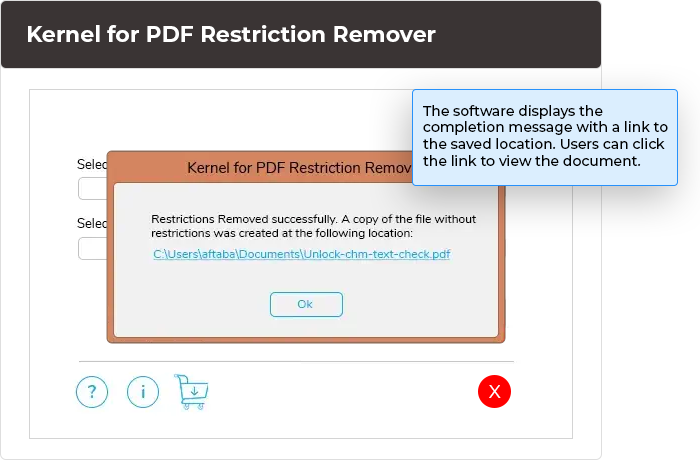
The success message, with a link to Unlock-chm-text-check.pdf in the chosen folder.
Benefits
- No learning curve. Two boxes and a button. Anyone in an office can use it after one look.
- Cheap for a one-off need. $29 once is less than a month or two of a PDF editor subscription.
- Safe with the source. Because it writes a copy, a failed attempt costs you nothing.
Real-World Uses
- Printing a manual. An older product manual or e-book you bought won't print. Unlock a copy and print the pages you need.
- Quoting a report. You need a table or paragraph from a locked PDF for your own document. The unlocked copy lets you select and copy it instead of retyping.
- Your own old files. Someone in your company locked PDFs years ago and nobody remembers the permissions password.
- Filling or annotating a form. Comments and form filling were switched off. The copy lets you add them.
Who It's For, and Who Should Skip It
It's for Windows users who run into the odd locked PDF, especially older files made with RC4 encryption, and who want a tiny program that does one thing.
Skip it if your PDFs need a password just to open: this tool is sold for removing restrictions, not for recovering open passwords. Skip it too if you mostly handle recent PDFs with AES encryption, if you use a Mac, or if you'd rather have a full PDF editor that can also remove permissions when you know the password.
Usage Guide
- Download the trial and run the installer. Start the program from the Start menu.
- Click the first Browse button and pick the restricted PDF.
- Click the second Browse button and pick the folder for the unlocked copy.
- Click Remove Restrictions.
- Click the link in the success message to open Unlock_<name>.pdf and check that printing and copying work.
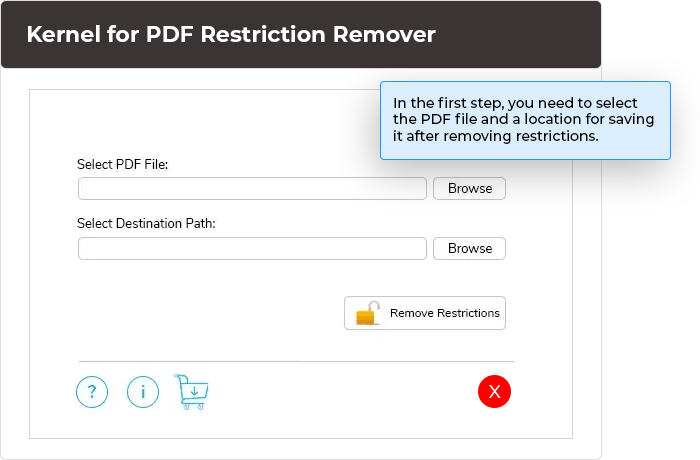
The starting window, with the help, about and buy buttons along the bottom.
Where it falls short
- Stuck on 2013's PDF security. Support stops at PDF 1.5 with RC4. Files from newer tools that use AES encryption are outside what it's built for.
- One file at a time. The window takes a single PDF per run, so a folder of locked files means repeating the steps.
- Few outside reviews. The vendor's page shows a 4.9 out of 5 average from 544 reviews, but there are no detailed hands-on reviews on independent sites.
What Users Say
On the vendor's product page
The product page shows an average of 4.9 out of 5 from 544 reviews. The featured one, from Tyra Martin, is titled "Unlocked multiple PDFs lightning fast!":
"An absolute lifesaver! This tool rescues me from the frustration of dealing with restricted PDFs. It is a game-changer, and I am thrilled to have found it!"
Reviews collected on a vendor's own site are hand-picked and skew positive. Outside it, the product mostly appears in download-site listings without user comments, so the free trial on your own file is the most reliable test.
Editions and Pricing
All three licenses include the same program and are perpetual. They differ in who may use it.
| License | Price | Meant for |
|---|
| Home | $29 | Home users |
| Corporate | $99 | Business use within one organization |
| Technician | $199 | Companies that unlock files for their customers |
The Buy Now button on this page is for the $29 Home license.
FAQs
Can Kernel for PDF Restriction Removal open a PDF that asks for a password?
Kernel for PDF Restriction Removal is built to remove restrictions on PDFs that already open, such as blocked printing or copying. Recovering a forgotten open password isn't what it's sold for, so use a PDF password recovery tool for that.
How do I know if my PDF will work with Kernel for PDF Restriction Removal?
Kernel for PDF Restriction Removal works on PDF 1.1 to 1.5 files with RC4 encryption. In Acrobat or many PDF readers, the document properties show the PDF version and the security method. If it says AES, the file is outside the supported range. The quickest test is the trial on a file under 200 KB.
Is Kernel for PDF Restriction Removal a subscription?
Kernel for PDF Restriction Removal is a one-time purchase. The vendor sells it with a perpetual license, and the Home license is $29 on the order page with no renewal.
Does Kernel for PDF Restriction Removal work on Windows 11?
Kernel for PDF Restriction Removal lists Windows 11 and Windows Server 2022 among its supported systems, along with every Windows version back to Windows 95.
Is there a Mac version of Kernel for PDF Restriction Removal?
Kernel for PDF Restriction Removal is Windows only. There's no Mac edition.
Can I get a refund if Kernel for PDF Restriction Removal doesn't unlock my file?
KernelApps publishes a refund policy on its site that sets the conditions for a refund. Test your file with the trial first, since a file over 200 KB can only be tested after buying.
System Requirements
- Windows 11, 10, 8.1, 8, 7, Vista, XP, 2000, 98, NT or 95, or Windows Server 2022, 2019 and older
- Intel Pentium-compatible processor (x86 or x64)
- 64 MB of RAM
- 50 MB of disk space
Conclusion
Kernel for PDF Restriction Removal is worth $29 if you have a specific locked PDF that the trial can handle. It's about as simple as software gets, it never touches your original, and you pay once. The reason to hesitate is age: it hasn't changed since 2013 and only covers RC4-encrypted files up to PDF 1.5, so newer AES-protected documents may be beyond it. Try it on a small file of the same kind first, and buy if that works.
Download Free TrialBuy Now