Kernel Lotus Notes to Office 365: Migrate NSF Mail Straight into Microsoft 365
Kernel Lotus Notes to Office 365 (sold as Kernel Office 365 Migration for Lotus Notes) is a Windows migration tool from KernelApps, from $249 for up to 25 NSF files, that moves HCL (formerly IBM Lotus) Notes mail, contacts, calendars and tasks directly into Microsoft 365 mailboxes, with no PST files in between. It's for administrators and consultants retiring a Domino server in favour of Microsoft 365.
The usual two-step route, NSF to PST and then a PST import, doubles the work and the disk space and leaves a pile of PST files to clean up. A direct migration maps each Notes database to its new Microsoft 365 mailbox and writes into it.
Quick facts
- Version: 26.0 (installer dated September 10, 2026)
- Developer: KernelApps Pvt. Ltd. (Kernel Data Recovery), Noida, India
- Platform: Windows 11, 10, 8.1, 8, Windows Server 2025 back to 2008 R2
- Sources: local NSF files, Domino Server, HCL SmartCloud Notes and Verse, Notes Groups
- Destinations: Microsoft 365 user mailboxes, archive mailboxes, public folders and Microsoft 365 Groups
- Needs installed: a 32-bit Notes client
- Price: $249 for up to 25 NSF files on the order page
- Trial: migrates 10 items from each folder
- Guarantee: 30 days money back
What we checked: installer file version 26.0 and size 27 MB, downloaded from the vendor's site, and the order page, which showed $249 for Kernel Office365 Migrator for Lotus Notes (up to 25 NSF files), on November 11, 2026. We didn't run a migration into a Microsoft 365 tenant, so results here are the vendor's and its users' claims.
Download Free TrialBuy Now
Overview
Kernel Lotus Notes to Office 365 follows three steps shown on the left of its window. Add local NSF files, Domino Server files or SmartCloud Notes/Verse mailboxes, preview a local NSF file if you like, then click Migrate, sign in to Microsoft 365 and map each source to its destination mailbox. Filters and a log round it off.
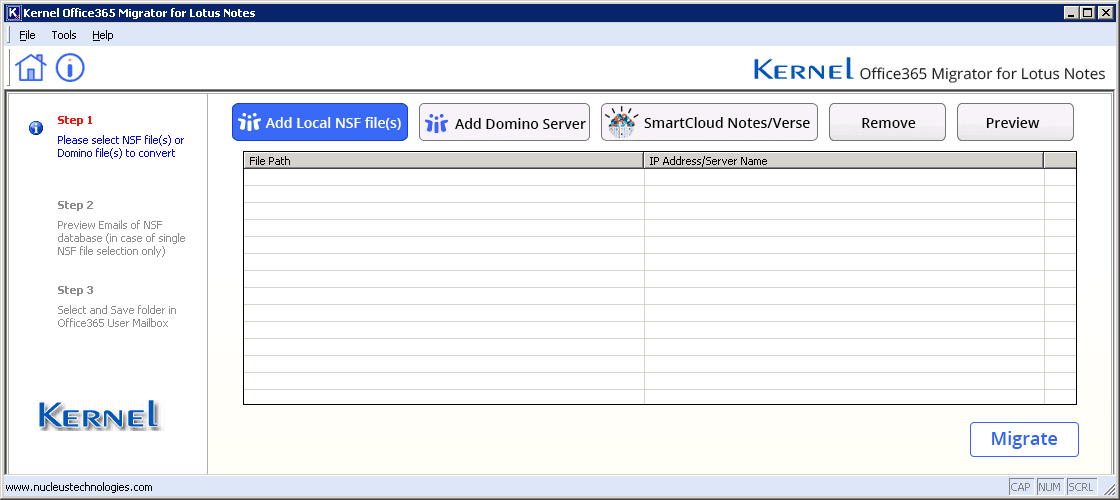
The main window: add local NSF files, Domino Server files or SmartCloud Notes/Verse, then Migrate.
Version 26.0 adds compatibility with HCL Domino 14.5.0, a refreshed interface and faster migration, according to the vendor's release notes.
Features
Direct to mailbox, archive, public folder or group
Kernel Lotus Notes to Office 365 writes NSF data into a user's primary mailbox, the archive mailbox, a public folder or a Microsoft 365 Group, keeping the original folder hierarchy. An option saves the whole mailbox under a new folder in the destination so it doesn't mix with existing mail.
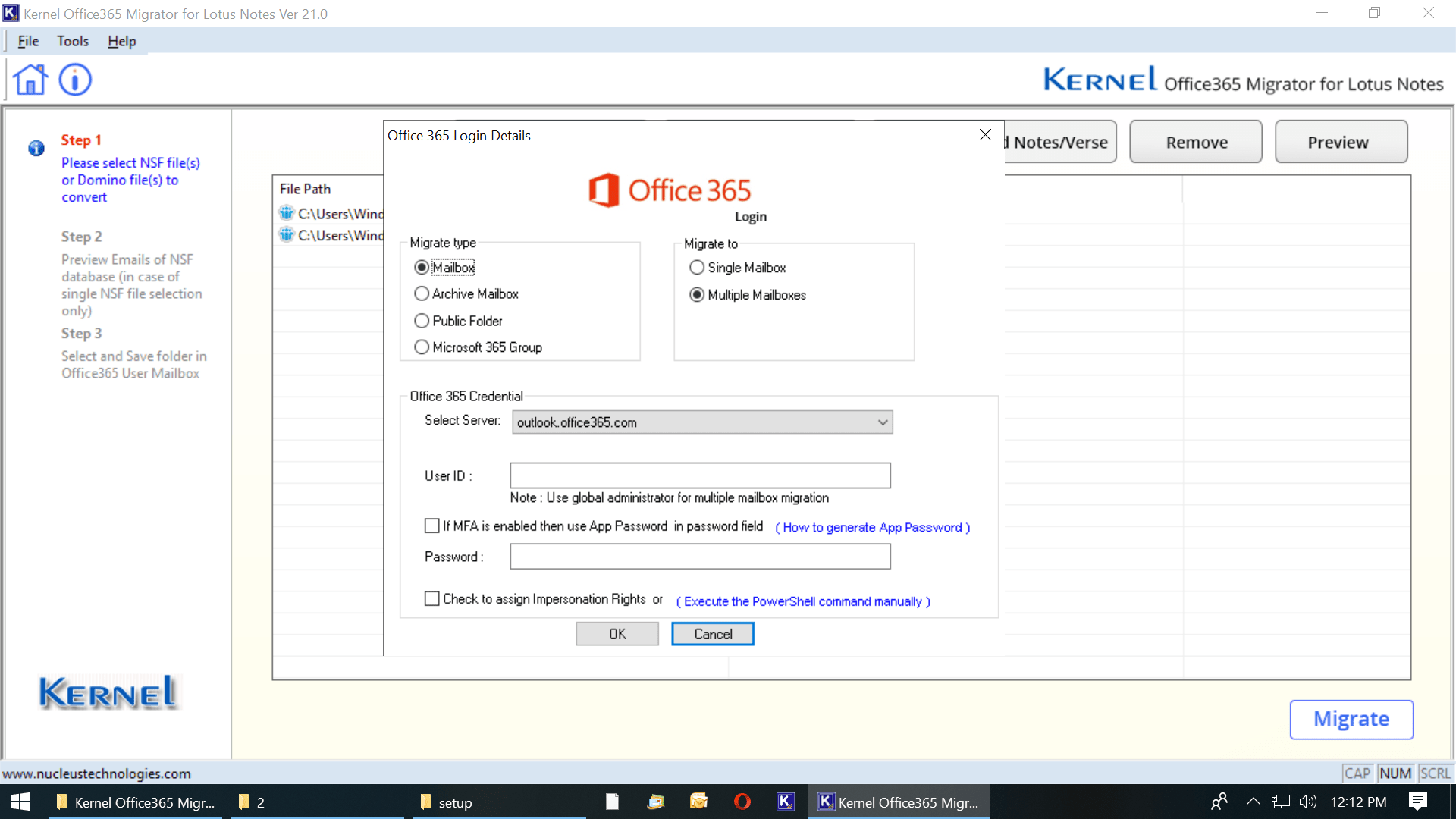
Signing in to Microsoft 365: choose Mailbox, Archive Mailbox, Public Folder or Microsoft 365 Group, and a single or multiple mailboxes.
Many mailboxes in one run
Kernel Lotus Notes to Office 365 maps any number of NSF files to their Microsoft 365 accounts through a CSV file. You can download a ready-made CSV template from the tool, and mix local NSF and Domino Server files in the same batch.
Modern Authentication and impersonation
Kernel Lotus Notes to Office 365 signs in with Basic or Modern Authentication, including MFA, and can assign the impersonation rights needed for multi-mailbox migration with one click. The PowerShell commands are linked if you'd rather do it yourself.
Filters and duplicate control
Kernel Lotus Notes to Office 365 filters by date range and item type (mail, contacts, calendars, tasks), includes or excludes folders by name, skips duplicates, maps source folders to destination folders, and can mark migrated mail as read or unread.
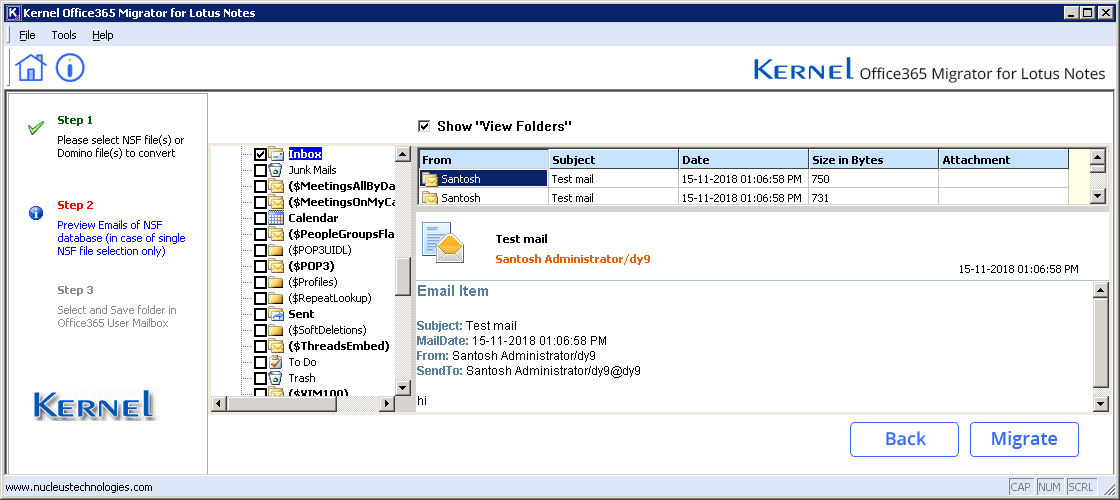
Previewing a local NSF file before migration. Preview isn't available for Domino Server files.
Migration logs
Kernel Lotus Notes to Office 365 logs each file's items, migration status and the reason for any failure, so you can re-run what didn't make it.
Benefits
Skipping the PST stage is the main gain: one pass, no intermediate files to store, import and delete, and less chance of a mailbox going to the wrong person, since the CSV mapping is explicit. The Domino Server can keep running during the migration, so users aren't cut off while you work.
Real-World Uses
- Domino retirement: migrate 25 users' mailboxes into their new Microsoft 365 accounts in one CSV-mapped batch over a weekend.
- Archive-only move: send old NSF archives into users' Microsoft 365 archive mailboxes instead of their main inbox.
- Shared databases: move a team's Notes mail-in database into a public folder or Microsoft 365 Group.
- SmartCloud exit: move HCL SmartCloud Notes or Verse users to Microsoft 365.
Who It's For, and Who Should Skip It
Kernel Lotus Notes to Office 365 suits Notes, Domino and Microsoft 365 administrators and migration consultants with a defined number of mailboxes to move.
Skip it if you need PST files, for archiving or for on-premises Exchange; Kernel's separate Lotus Notes to Outlook tool does that. Skip it too if you have no machine with a Notes client, since a 32-bit Notes client is required. For hundreds of mailboxes, the per-file licensing means talking to the vendor's sales team.
Usage Guide
- Install a 32-bit Notes client (8.5 to 12.0.2) on a Windows PC, then download and install the trial.
- Add local NSF files, Domino Server files or SmartCloud Notes/Verse, or load them from a CSV file.
- Preview a local NSF file if you want to check its contents.
- Click Migrate, choose Basic or Modern Authentication and sign in to one or many Microsoft 365 mailboxes.
- Map each NSF file to its destination mailbox and set filters.
- Start the migration and check the migration log.
Before you buy
Licenses are priced by the number of NSF files: $249 for up to 25, $999 for up to 100 and $1,749 for up to 250, one-time. Non-profits get 20% off, and for more files the vendor quotes by email or chat. The Notes Conversion Suite, from $499 for 25 files, adds NSF to PST conversion. Run the trial against one real mailbox first: it moves 10 items from each folder.
Where it falls short
- A 32-bit Notes client must be installed on the PC running the migration.
- Domino Server files can't be previewed before migration.
- Licensing counts NSF files, so large organizations pay per batch of mailboxes.
- Windows only.
What Users Say
On the vendor's page
Kernel's page shows 4.9 out of 5 from 476 reviews, collected on its own site, so read that as the vendor's tally. Devon Dalio wrote: "Gets all data as it is in Office 365. Maintaining the original data hierarchy. The graphical user interface (GUI) is excellent."
Independent sites
We found no independent hands-on review of this tool. On Trustpilot, KernelApps as a whole holds 4.9 out of 5 from 166 reviews, most of them about its migration tools, and support comes up again and again. Marco Cecchelani wrote about a support session that "Vikram arrived well-prepared and on time."
Comparisons
Trial or full version
Both add local NSF, Domino and SmartCloud sources, preview, filter, map and migrate to Microsoft 365. The trial moves only 10 items from each folder; the license moves everything.
Lotus Notes to Office 365 or Lotus Notes to Outlook
Kernel Lotus Notes to Office 365 migrates directly into Microsoft 365. Kernel for Lotus Notes to Outlook converts to PST files or on-premises Exchange, at the same $249 starting price. Choose by destination; the Notes Conversion Suite includes both.
Editions and Pricing
| License | Price | NSF files | Term |
|---|
| Lotus Notes to Office 365 | $249 | Up to 25 | Lifetime |
| Lotus Notes to Office 365 | $999 | Up to 100 | Lifetime |
| Lotus Notes to Office 365 | $1,749 | Up to 250 | Lifetime |
| Notes Conversion Suite (Office 365 + PST) | from $499 | Up to 25 | Lifetime |
FAQs
Does Kernel Lotus Notes to Office 365 work with MFA-protected Microsoft 365 accounts?
Yes. Kernel Lotus Notes to Office 365 supports Modern Authentication with MFA as well as Basic Authentication.
Do I have to shut down the Domino Server during migration with Kernel Lotus Notes to Office 365?
No. Kernel says the Domino Server should stay running while Kernel Lotus Notes to Office 365 migrates its files.
Which Microsoft 365 plans does Kernel Lotus Notes to Office 365 support?
Kernel Lotus Notes to Office 365 supports all Microsoft 365 plans, including Enterprise E1, E3 and E5, Exchange Online Plan 1 and 2, Business Premium, Business Essentials, F1 and the A1, A3 and A5 education plans.
Can Kernel Lotus Notes to Office 365 migrate to archive mailboxes?
Yes. Kernel Lotus Notes to Office 365 can send NSF data to user mailboxes, archive mailboxes, public folders and Microsoft 365 Groups.
How do I migrate SmartCloud Notes mailboxes with Kernel Lotus Notes to Office 365?
Configure SmartCloud Notes in your Notes client, then choose the SmartCloud Notes server in Kernel Lotus Notes to Office 365, select the NSF files and map each user to their Microsoft 365 mailbox.
Which Notes versions does Kernel Lotus Notes to Office 365 support?
Kernel Lotus Notes to Office 365 supports HCL Notes and Domino 14, 12.0.2, 12.0.1 and 11, and IBM Notes and Domino 10, 9, 8.5.3 and earlier, plus SmartCloud Notes and Verse.
System Requirements
- Windows 11, 10, 8.1 or 8, or Windows Server 2025, 2022, 2019, 2016, 2012 or 2008 R2
- Intel Pentium-compatible processor (x86 or x64)
- 4 GB RAM, 16 GB recommended
- 500 MB of free disk space
- 32-bit Notes client 8.5 to 12.0.2 installed
Conclusion
Kernel Lotus Notes to Office 365 is worth $249 for a small organization moving up to 25 Notes mailboxes into Microsoft 365: it writes straight into the right mailboxes with CSV mapping, MFA sign-in and logs, and skips the PST round trip. It isn't the tool if you need PST files, and you'll need a Notes client on the migration PC. Try one mailbox with the trial first.
Download Free TrialBuy Now