Short answer
Short answer: for a company moving Notes mailboxes into Outlook or Exchange, Kernel for Lotus Notes to Outlook is the most complete: CSV-mapped batches, Domino and SmartCloud sources, Notes up to HCL 14, $249 one-time for 25 NSF files. Going straight to Microsoft 365, use Kernel Lotus Notes to Office 365 (same price, no PST files in between). For a few old NSF archives, Stellar Converter for NSF Corporate is the cheapest at $149 for a year and doesn't need Outlook; SysInfo NSF to PST Converter ($149 personal, $399 business) does PST, PDF and Microsoft 365 in one tool with the most generous demo.
All four need HCL (formerly IBM Lotus) Notes installed on the PC that does the conversion. If you no longer have a Notes client you can install, none of them will run.
At a glance: four NSF converters compared
| Kernel for Lotus Notes to Outlook | Kernel Lotus Notes to Office 365 | Stellar Converter for NSF Corporate | SysInfo NSF to PST Converter |
|---|
| Price | $249 one-time, up to 25 NSF files | $249 one-time, up to 25 NSF files | $149 for 1 year, up to 50 mailboxes | $149 Single User (personal use, 25 NSF files); $399 Administrator for business |
| Saves to | PST, live Exchange mailboxes | Microsoft 365 mailboxes, archives, public folders, Groups | PST; single items as MSG, EML, RTF, HTML, PDF | PST, EML, PDF, Microsoft 365; contacts as VCF/MSG |
| Batch of NSF files | ✓ with CSV mapping | ✓ with CSV mapping | ✗ one at a time (Technician only) | ✓ Add Folder |
| Reads Domino Server / SmartCloud | ✓ / ✓ | ✓ / ✓ | ✗ local NSF | ✗ local NSF |
| Needs Notes installed | ✓ 32-bit client 8.5 to 12.0.2 | ✓ 32-bit client | ✓ Notes 6.0 to 10.0.1 | ✓ with a profile (dummy works) |
| Needs Outlook installed | ✓ | ✗ | ✗ | ✗ |
| Free trial | 10 items per folder | 10 items per folder | Converts and previews everything; saving needs a licence | 50 items per folder |
| Windows | 11, 10, 8.1, 8, Server 2025 to 2008 R2 | 11, 10, 8.1, 8, Server 2025 to 2008 R2 | 64-bit 11, 10, 8.1, 8 | 11 to 7, Server 2008/2012 |
What we checked
- We compared the four Lotus Notes migration tools on this site on what they read (local NSF, Domino, SmartCloud), where they write (PST, Exchange, Microsoft 365), batch handling, what each needs installed, trial limits and licence terms.
- We took features and requirements from each vendor's product pages, buy pages, FAQs and the trial installers.
- We gathered the reviews we could find, which for this kind of tool are few.
- What we checked: the prices on each vendor's buy page and order page on November 28, 2026: Kernel $249 for up to 25 NSF files (both tools), Stellar Converter for NSF Corporate $149 a year (50 mailboxes), $199 (100 mailboxes) and Technician $399, SysInfo $149 Single User and $399 Administrator, in USD.
We compared features, prices and trials. We didn't migrate a Notes mailbox ourselves; conversion quality on your files is what the trials are for.
Before you pick: the free route and why it falls short
Notes can export a view to a CSV or text file, and Outlook can import CSV, so a free route exists, but it loses most of the mailbox. As the vendors' own comparisons point out, the CSV route drops attachments, formatting and calendar items and works one view at a time. It's fine for an address book; for mail with attachments and years of folders, a converter that writes a real PST (or writes straight into Exchange or Microsoft 365) is the practical way.
Two questions decide which tool fits: where is the mail going (PST files, on-premises Exchange or Microsoft 365), and how many NSF files do you have. The licences below are priced by NSF file or mailbox count.
Prices compared
Entry licence price (USD)
Stellar Converter for NSF Corporate (1 year, 50 mailboxes)$149
SysInfo NSF to PST Converter Single User (personal use, 25 files)$149
Kernel for Lotus Notes to Outlook (25 files, one-time)$249
Kernel Lotus Notes to Office 365 (25 files, one-time)$249
SysInfo NSF to PST Converter Administrator (business, 150 files)$399
Buy and order page prices on November 28, 2026. Kernel's Notes Conversion Suite (both Kernel tools, 25 files) is $499.
Free trial: items converted per folder
Kernel for Lotus Notes to Outlook10 items
Kernel Lotus Notes to Office 36510 items
SysInfo NSF to PST Converter50 items
From the vendors' trial limits. Stellar's trial converts and previews the whole NSF file but saves nothing until you buy.
1. Kernel for Lotus Notes to Outlook: best for an office migration
- Price: $249 one-time for up to 25 NSF files; larger file counts and the Notes Conversion Suite ($499, adds the Office 365 tool) on Kernel's buy page; non-profits get 20% off
- Version: 26.0 (September 2026)
- Best for: IT staff moving several users from Notes to Outlook PST or on-premises Exchange
Kernel for Lotus Notes to Outlook reads local NSF files, NSF files on a Domino Server and HCL SmartCloud Notes or Verse accounts, and writes Outlook PST files or straight into live Exchange mailboxes (2019 and earlier). It converts mail with attachments, contacts, calendars, tasks and journals with the folder tree kept, and maps dozens of sources to targets through a CSV file. Filters cover date range, item type and folders; it splits large PSTs at a size you set and writes a migration report with NSF and PST item counts.
Where it falls short: it needs both a 32-bit Notes client (8.5 to 12.0.2) and Outlook installed on the PC that runs it, and per-file licensing adds up for big estates. We found no independent hands-on review; KernelApps holds 4.9 out of 5 from 166 Trustpilot reviews for the company as a whole.
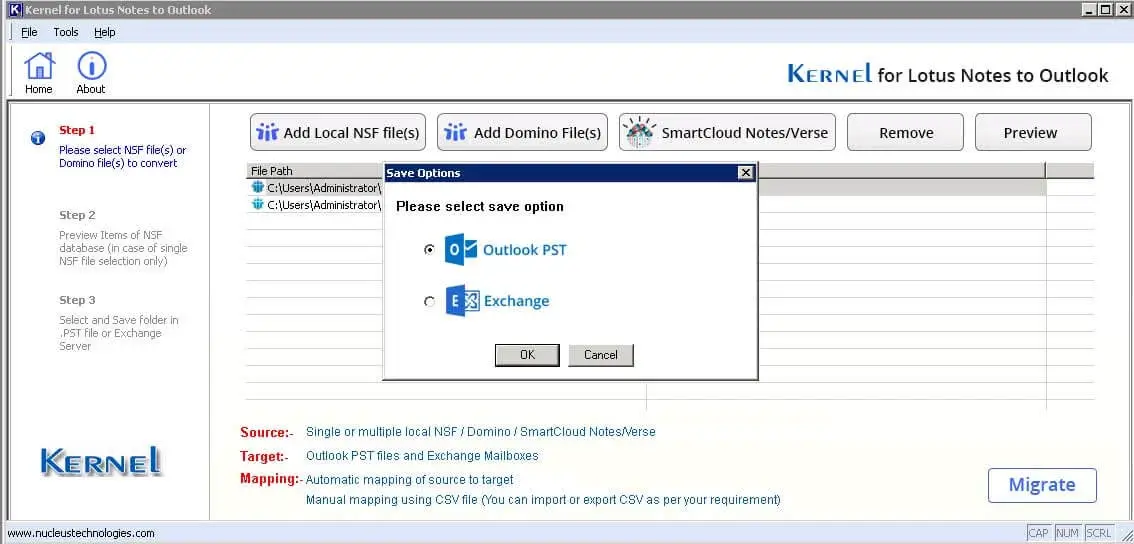
Kernel for Lotus Notes to Outlook: choosing the target, Outlook PST or Exchange. The buttons above add local NSF files, Domino files or SmartCloud Notes/Verse.
What we like
- Local NSF, Domino Server and SmartCloud sources
- PST or live Exchange in one tool
- CSV mapping and migration report for batches
- Supports HCL Notes and Domino up to 14
- Lifetime licence
Watch out for
- Needs Notes and Outlook on the same PC
- Priced per NSF file
- Trial converts only 10 items per folder
- No independent hands-on reviews
"We recently shifted towards Outlook from Lotus Notes, & this converter saved our countless hours."
Emily Williams, IT administrator, review on KernelApps' site (4.9 out of 5 from 507 reviews there)
"Does exactly what is says, easy to use, and excellent support."
Andrew Murdoch, Trustpilot (KernelApps, all products)
Download Kernel for Lotus Notes to OutlookBuy Kernel for Lotus Notes to Outlook
2. Kernel Lotus Notes to Office 365: best for going straight to Microsoft 365
- Price: $249 one-time for up to 25 NSF files
- Version: 26.0 (September 2026), with HCL Domino 14.5.0 support per the release notes
- Best for: retiring a Domino server in favour of Microsoft 365 without PST files in between
Kernel Lotus Notes to Office 365 writes Notes mail, contacts, calendars and tasks directly into Microsoft 365 user mailboxes, archive mailboxes, public folders or Microsoft 365 Groups, keeping the folder hierarchy. It signs in with Basic or Modern Authentication including MFA, can set the impersonation rights for multi-mailbox migration with one click, maps users through a CSV template, skips duplicates and logs every file. Unlike the Outlook tool, it doesn't need Outlook installed.
Where it falls short: you still need a 32-bit Notes client, Domino Server files can't be previewed before migration, and the licence counts NSF files. If some users need PST files too, the $499 Notes Conversion Suite covers both Kernel tools.
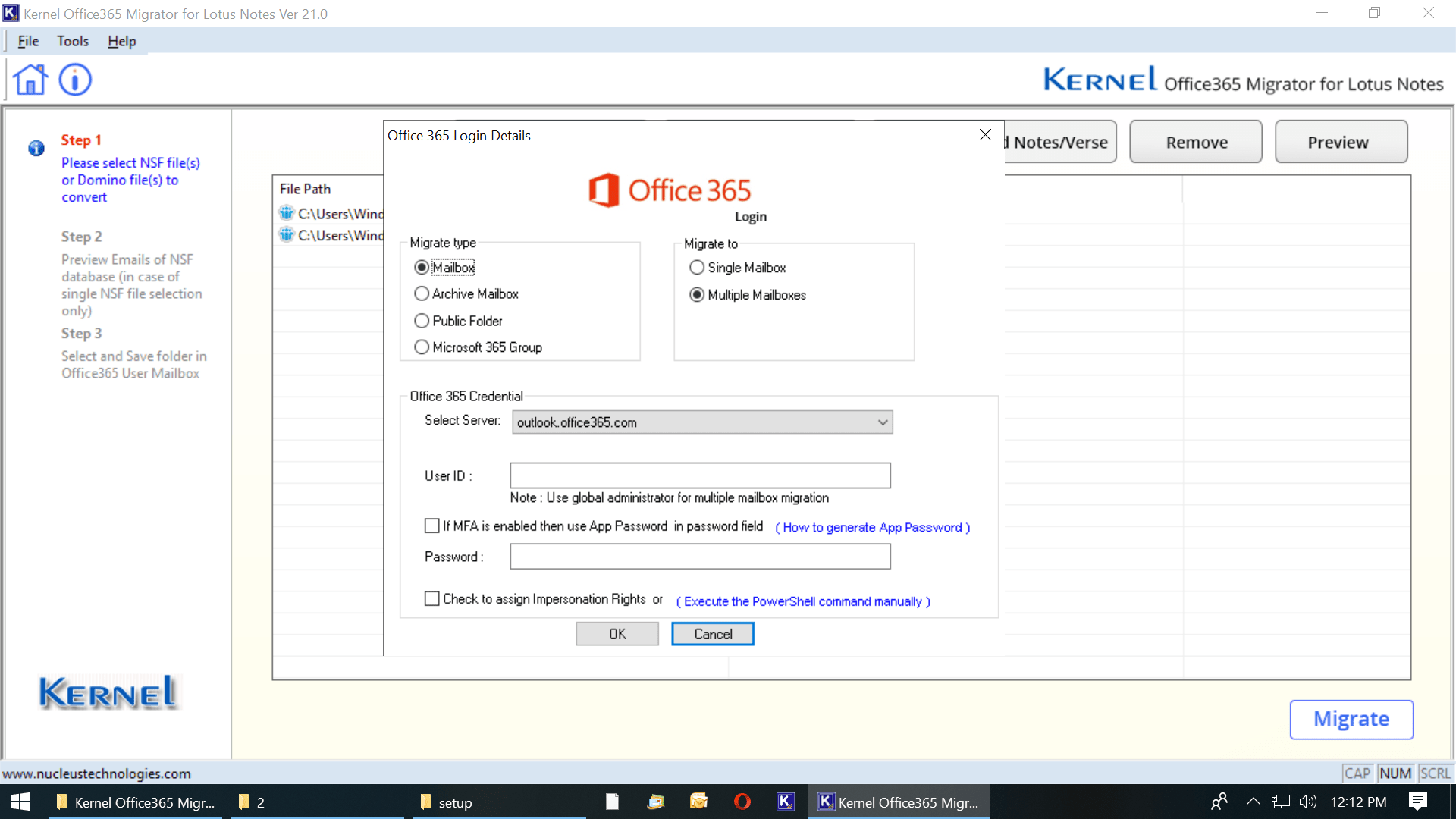
Signing in to Microsoft 365 in Kernel Lotus Notes to Office 365: choose Mailbox, Archive Mailbox, Public Folder or Microsoft 365 Group, and a single or multiple mailboxes.
What we like
- Direct to Microsoft 365: no PST import stage
- Archive mailboxes, public folders and Groups as targets
- Modern Authentication with MFA
- Domino can keep running during the move
Watch out for
- Needs a 32-bit Notes client
- No preview of Domino Server files
- Microsoft 365 only (no PST output)
- Priced per NSF file
"Gets all data as it is in Office 365. Maintaining the original data hierarchy. The graphical user interface (GUI) is excellent."
Devon Dalio, review on KernelApps' site (4.9 out of 5 from 476 reviews there)
Download Kernel Lotus Notes to Office 365Buy Kernel Lotus Notes to Office 365
3. Stellar Converter for NSF Corporate: cheapest for a few archives
- Price: $149 for 1 year, up to 50 mailboxes; $199 for 100 mailboxes; Technician (batch, Microsoft 365 export, unlimited mailboxes) $399 a year
- Version: 6.0.0.0 (August 2026), 64-bit Windows 11, 10, 8.1, 8
- Best for: a handful of old NSF archives you want to open in Outlook, on a PC without Outlook
Stellar Converter for NSF converts mail with attachments, contacts, calendar entries, to-do lists, journals and discussion notes into a PST with the folder tree intact, and writes the PST itself, so the converting PC doesn't need Outlook. Its trial converts the whole file and shows it in an Outlook-like preview before you pay, which is the most complete look at the result of the four. Filters by date and sender, auto-split for oversized PSTs and a log report are included; single items can also be saved as MSG, EML, RTF, HTML or PDF.
Where it falls short: the Corporate edition converts one NSF at a time, Stellar lists Notes versions only up to 10.0.1, and the licence runs for one year. Stellar doesn't refund purchases made without trying the trial, and renewals aren't refundable.
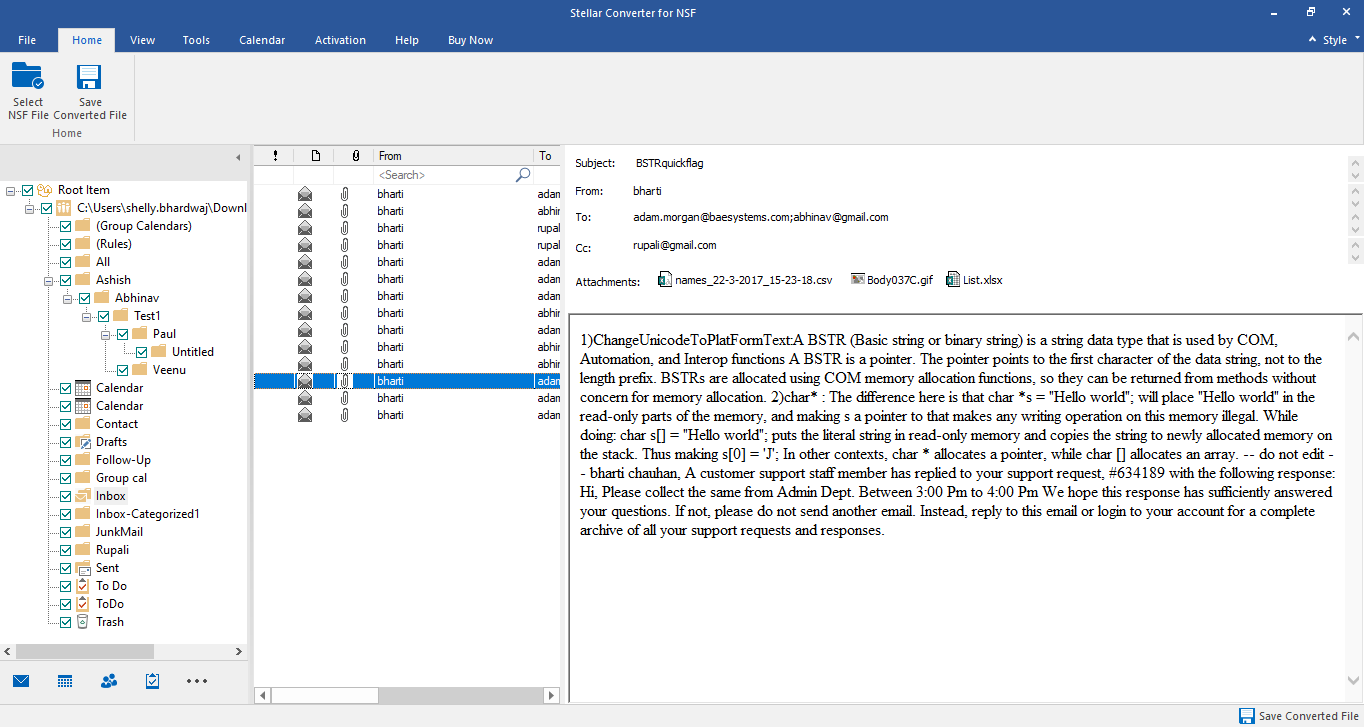
Stellar Converter for NSF: the preview after conversion, with the Notes folders, the message list and the selected message.
What we like
- Lowest price at $149
- Full preview of the converted mailbox in the trial
- No Outlook needed on the converting PC
- Up to 50 mailboxes on the entry licence
Watch out for
- One NSF at a time in Corporate
- Notes 6.0 to 10.0.1 only
- 1-year licence
- Microsoft 365 export is Technician only
"I have got the NSF converter and I was able to export my emails from Lotus Notes 6.5 to pst files."
Houssem Gazzeh, Trustpilot, October 2021
"The support staff from Stellar (Swatantra) guided me through the program, so I was able to open and convert my NSF files successfully."
Karl, Trustpilot, January 2024
Download Stellar Converter for NSFBuy Stellar Converter for NSF Corporate
4. SysInfo NSF to PST Converter: most output options, biggest demo
- Price: $149 Single User (personal, non-commercial use, 25 NSF files, 1 year of updates); $399 Administrator (business, 150 files); $799 Technician; $999 Enterprise; one payment, no renewal
- Version: 24.12 (December 2024)
- Best for: one tool for PST, PDF and Microsoft 365, and incremental runs
SysInfo NSF to PST Converter converts Notes mail, contacts, calendars and tasks to PST, EML or PDF, saves the names.nsf address book as VCF or MSG, or migrates straight into Microsoft 365 (primary mailbox, archive or a custom folder) with modern authentication. Options include a date filter, duplicate removal, skipping attachments, PST splitting and "skip previously migrated data", which allows a second pass for mail that arrived during the move. Its demo converts 50 items from every folder, the most of the four.
Where it falls short: the $149 licence is for personal, non-commercial use, so a business pays $399. Locally encrypted NSF files aren't converted until decrypted, batch mode has no preview, and the vendor lists IBM Notes 9.0 without naming newer HCL releases. SysInfoTools' refund policy excludes discounted purchases and requires sharing the problem file or remote access, so rely on the demo.

SysInfo NSF to PST Converter's options screen: PST, EML, PDF and Office 365 on the left; duplicate removal, exclude folders, PST split, custom folder name, HTML formatting, skip previously migrated data, date filter and skip attachments on the right.
What we like
- PST, EML, PDF and Microsoft 365 in one licence
- Demo converts 50 items per folder
- Incremental "skip previously migrated" runs
- One payment, no renewal
Watch out for
- Business use needs the $399 licence
- Encrypted NSF files must be decrypted first
- No preview in batch mode
- Narrow refund policy
"I ended up with a single searchable PST file that had all of my e-mails and attachments without any loss of information."
Jessica Williams, testimonial on SysInfoTools' page
"Refused a refund 4 hours after purchasing the software despite proof it would not work."
Darren Casey, Trustpilot (SysInfoTools, all products), February 2025
Download SysInfo NSF to PST ConverterBuy SysInfo NSF to PST Converter
How to convert an NSF file to PST, step by step
The process is the same with any of the four tools:
- Install HCL or Lotus Notes on a Windows PC and give it a profile (SysInfo says a dummy profile works). For Kernel for Lotus Notes to Outlook, install Outlook too.
- Copy the NSF files to that PC. Remove local encryption first if the files are encrypted.
- Install the trial and add one NSF file. Check the preview: mail, attachments, calendar and contacts.
- Run the trial conversion and open the result in Outlook (or check the Microsoft 365 mailbox).
- If it looks right, buy the licence for the number of NSF files you have, then convert everything with filters and PST splitting set.
- Compare the item counts in the tool's log with the PST or mailbox before retiring the Notes server.
Which NSF converter should you choose?
| Your situation | Pick | Why |
|---|
| Office of 10-25 users moving to Outlook or on-premises Exchange | Kernel for Lotus Notes to Outlook | CSV batches, Domino source, Exchange target, lifetime licence |
| Domino retirement straight into Microsoft 365 | Kernel Lotus Notes to Office 365 | Direct to mailboxes, archives, public folders and Groups |
| Some users to PST, others to Microsoft 365 | Kernel Notes Conversion Suite | Both Kernel tools for $499 |
| A few old NSF archives to read in Outlook | Stellar Converter for NSF Corporate | $149, full trial preview, no Outlook needed |
| Need PDFs of old mail for legal or records | SysInfo NSF to PST Converter | Date filter plus PDF output |
| Users keep working in Notes during the move | SysInfo NSF to PST Converter | "Skip previously migrated data" for a second pass |
| Running HCL Notes 11, 12 or 14 | Kernel | The only one that lists those versions |
Who should skip each tool
What commonly goes wrong
- No Notes client. Every tool here reads NSF files through Notes. Once the last Notes installation is gone, so is this route; convert before you decommission.
- Encrypted NSF files. Locally encrypted databases are skipped or fail. Decrypt them first (SysInfo and Kernel both sell local security removal tools).
- Buying too small a licence. Kernel and SysInfo count NSF files, Stellar counts mailboxes. Count your files before you pay.
- Huge PST files. A 50 GB mailbox in one PST makes Outlook slow. Use the split option in Kernel, SysInfo or Stellar.
- Skipping the trial check. Look at attachments and calendar entries in the trial output, not just the inbox; that's where conversions most often differ.
- Using a personal licence at work. SysInfo's Single User licence is for personal, non-commercial use.
FAQs
What is the best NSF to PST converter?
Kernel for Lotus Notes to Outlook is the best for business migrations: it reads local NSF, Domino and SmartCloud, writes PST or Exchange, supports HCL Notes up to 14 and maps batches by CSV, for $249 one-time (25 files). Stellar Converter for NSF Corporate is the cheapest for a few archives at $149 a year.
Can I convert NSF to PST without Lotus Notes installed?
Not with these tools. Kernel for Lotus Notes to Outlook, Kernel Lotus Notes to Office 365, Stellar Converter for NSF and SysInfo NSF to PST Converter all need HCL or Lotus Notes installed on the PC that does the conversion.
Do I need Outlook installed to convert NSF to PST?
Only for Kernel for Lotus Notes to Outlook. Stellar Converter for NSF and SysInfo NSF to PST Converter write PST files without Outlook, and Kernel Lotus Notes to Office 365 writes straight into Microsoft 365.
How do I migrate Lotus Notes to Microsoft 365?
Use a tool that writes directly into Microsoft 365, such as Kernel Lotus Notes to Office 365 or SysInfo NSF to PST Converter, or convert to PST and import the PST files with Microsoft's tools. Stellar Converter for NSF exports to Microsoft 365 only in its Technician edition.
Can I convert NSF to PST for free?
Partly. Notes can export views to CSV and Outlook can import CSV, but that loses attachments, formatting and calendar items. The free trials convert a sample: 10 items per folder in Kernel, 50 in SysInfo, and a full preview without saving in Stellar.
Does NSF to PST conversion keep calendars and contacts?
Yes. All four tools carry Notes calendars, contacts and tasks across; SysInfo NSF to PST Converter can also save the names.nsf address book as VCF or MSG contacts.
Which converter supports HCL Notes 12 or 14?
Kernel for Lotus Notes to Outlook lists HCL Notes and Domino 14, 12.0.2, 12.0.1 and 11. Stellar Converter for NSF lists Notes up to 10.0.1, and SysInfo lists IBM Notes 9.0, so test their trials on a newer installation.
How long does a Kernel or Stellar licence last?
Kernel's Lotus Notes licences are lifetime, limited by NSF file count. Stellar Converter for NSF is a 1-year licence. SysInfo NSF to PST Converter is a one-time payment with 1 or 2 years of updates.
Moving mail from other systems too? See Best MBOX to PST Converter and Best EDB to PST Converter and Exchange Recovery Software, or browse e-mail tools.