Stellar Converter for NSF Corporate: Move Lotus Notes Mail into Outlook
Stellar Converter for NSF Corporate is a $149 one-year Windows program that converts HCL (formerly IBM Lotus) Notes NSF mailbox files into Outlook PST files, with mail, attachments, contacts, calendars, to-dos and journals. It's for small businesses and IT staff leaving Notes, or anyone with old NSF archives to open in Outlook, covering up to 50 mailboxes, and the free trial converts and previews before you pay.
Notes and Outlook don't share a format, and there's no Microsoft tool that reads NSF files. The manual route, exporting to CSV and importing into Outlook, loses attachments, calendars and folder structure. Stellar's converter reads the NSF and writes a PST that Outlook opens directly, without Outlook even needing to be installed.
Quick facts
- Version: 6.0.0.0, released August 2026 (formerly Stellar NSF to PST Converter)
- Developer: Stellar Data Recovery
- Runs on: 64-bit Windows 11, 10, 8.1 and 8
- Notes versions: HCL Notes 10.0.1, 9.0.1, 9.0, 8.5, 8.0.2, 7.0, 6.5 and 6.0
- Needs: Lotus/HCL Notes installed on the PC; Outlook isn't required
- Saves to: PST, plus MSG, EML, RTF, HTML and PDF
- Price: $149 for one year, up to 50 mailboxes
- Free trial: converts and previews; saving needs a license
- What we checked: the trial installer (40.5 MB, file version 6.0.0.0, dated August 21, 2026), the edition limits and requirements on Stellar's product and buy pages, Stellar's refund policy, and the $149 one-year price on the order page on November 11, 2026. We didn't convert an NSF ourselves.
Before you buy
- Install Notes first. Stellar's FAQ says Lotus Notes must be installed on the PC doing the conversion.
- Corporate converts one NSF at a time. Batch conversion, export to Microsoft 365, export into an Outlook profile and PST splitting by size or date are Technician features.
- Try your own file. Stellar doesn't refund purchases made without trying the trial, and renewals aren't refundable.
Download Free Trial Buy Now
Overview
You select an NSF file (or use Find to locate one on a drive), click Convert, and the program shows the converted mailbox in an Outlook-like window: folders on the left, messages in the middle, the open message on the right. Calendars, contacts, to-do lists, journals and discussion notes get their own views. Then you save everything, or a selection, to a new or existing PST.
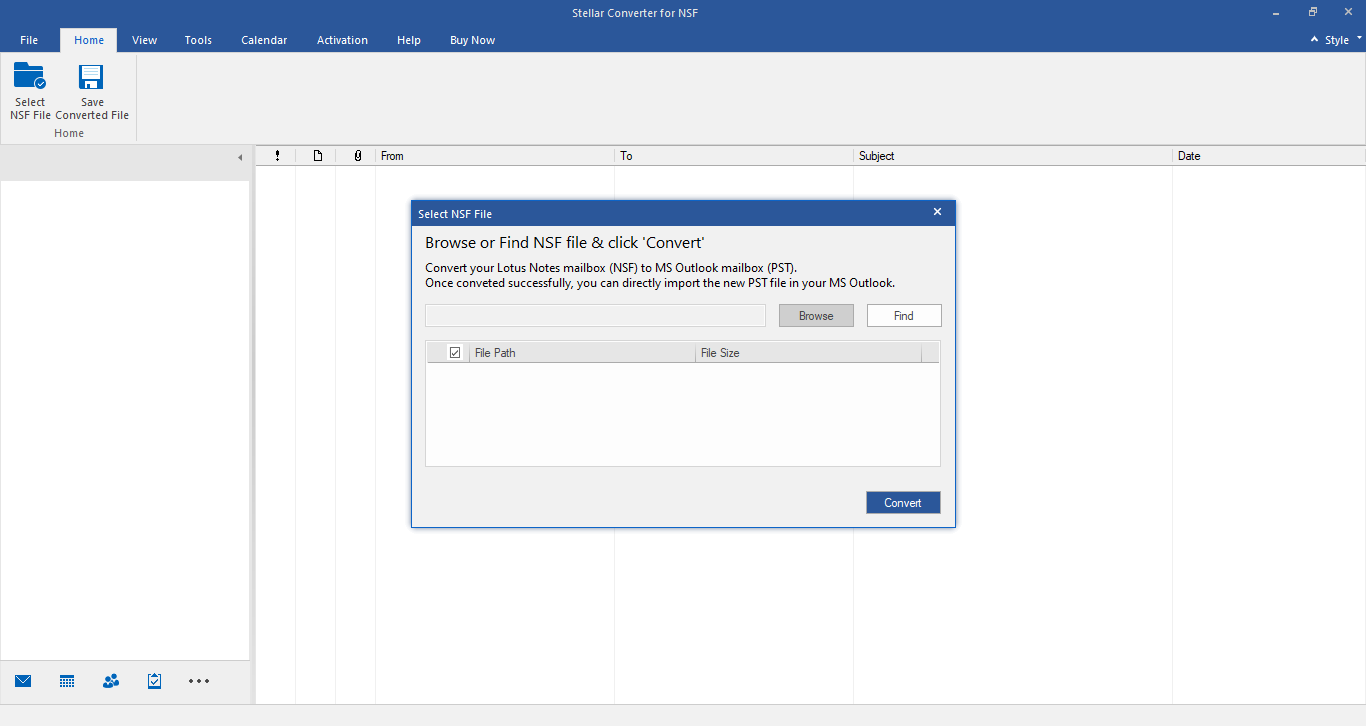
The first step: browse to the NSF or search for it, then click Convert.
Features
Every Notes item type
Stellar Converter for NSF converts mails with attachments, contacts, calendar entries, to-do lists, personal journals and discussion notes, and keeps the folder tree, so the PST looks like the Notes mailbox did.
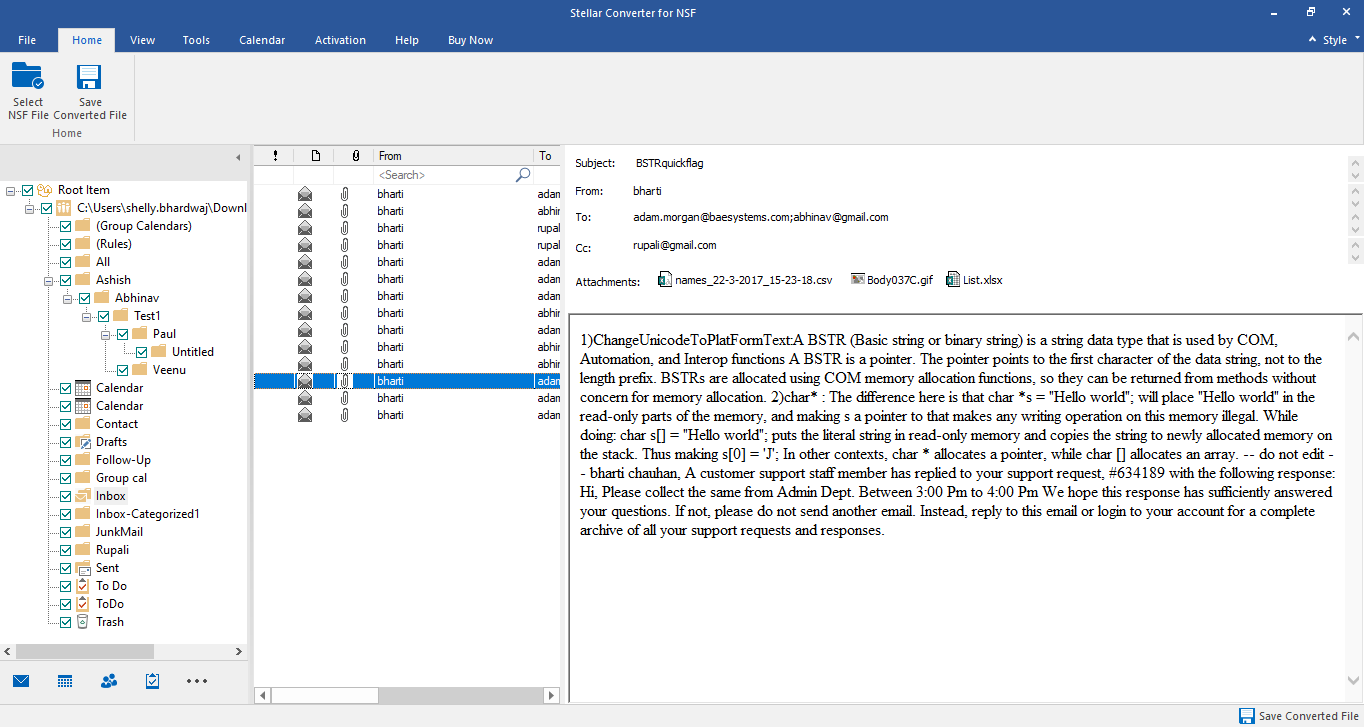
The preview after conversion: the Notes folders, the message list and the selected message.
No Outlook needed to convert
Stellar Converter for NSF writes the PST itself, so you can run it on a machine that has Notes but not Outlook and carry the PST to the users' PCs.
Filters and auto-split
Stellar Converter for NSF filters by date range and can exclude chosen senders, so you migrate only recent mail or leave newsletters behind. Auto-split keeps an oversized PST from becoming a problem in Outlook.
Other formats for single items
Stellar Converter for NSF also saves to MSG, EML, RTF, HTML and PDF. Stellar's FAQ notes that these formats save a single mail at a time, which suits pulling out one message for a record or a lawyer.
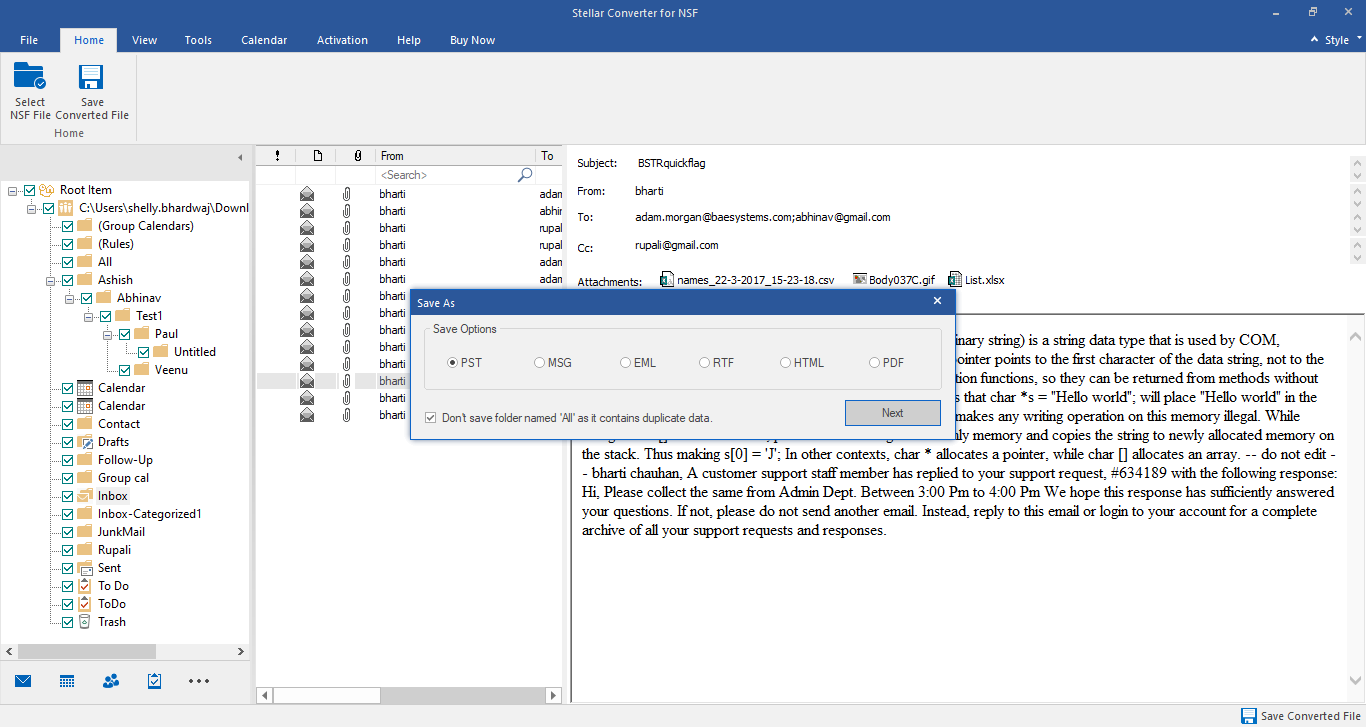
The save options: PST, MSG, EML, RTF, HTML or PDF.
A log you can check
Stellar Converter for NSF writes a log report with the NSF's name, location and size, start and finish times and the status of converted items, so you can confirm counts before retiring the Notes server.
Benefits
It saves the most painful part of leaving Notes: getting years of mail, calendars and contacts into a form your Outlook users can open, without paying a migration consultant. And because you see the converted mailbox before paying, you know the attachments and calendar entries came through.
Real-World Uses
- A 20-person office moving from Domino to Outlook: convert each user's NSF to a PST and open it in their new Outlook profile.
- Old archives: a box of NSF backups from a retired Notes system, converted so they can be searched in Outlook.
- One person's history: a departing employee's Notes mailbox kept as a PST for records.
- A single invoice email: one Trustpilot user used the converter to recover a missing invoice.
Who It's For, and Who Should Skip It
Corporate suits small migrations and archive jobs of up to 50 mailboxes, done one NSF at a time.
Skip Corporate if you want to send mailboxes straight into Microsoft 365, convert many NSF files in batches or append directly to Outlook profiles: those need Technician ($399 a year on Stellar's site). Skip it too if you no longer have a Notes client to install, since the converter needs one. For a large Domino estate with shared databases and applications, a full migration product or consultant is a better fit; this tool handles mail files.
Usage Guide
- Install HCL/Lotus Notes on a 64-bit Windows PC, then install the trial.
- Open Stellar Converter for NSF and click Select NSF File. Browse to the file or use Find.
- Click Convert and wait for the preview.
- Check mail, attachments, calendar and contacts.
- Buy and activate the license.
- Click Save Converted File, choose PST (new or existing), apply filters if needed, pick the destination and save.
- Open the PST in Outlook and compare item counts with the log report.
Where it falls short
- Notes must be installed. Not a problem mid-migration, but awkward years later.
- Older Notes versions only up to 10.0.1. Stellar doesn't list Notes 11, 12 or 14.
- One file at a time in Corporate, which gets tedious past a handful of users.
- Help may be needed. One Trustpilot reviewer needed a support engineer to walk him through opening and converting his NSF files.
What Users Say
Trustpilot
The few reviews that mention the NSF converter are positive, and most credit support. We read Trustpilot through a summarizer, since it blocks direct downloads; Stellar as a company scored 4.8 out of 5 from about 5,600 reviews across all its products.
Houssem Gazzeh (October 29, 2021, 5 stars): "Good software, Do what it's supposed to do." and "I have got the NSF converter and I was able to export my emails from Lotus Notes 6.5 to pst files."
Karl (January 10, 2024, 5 stars): "The support staff from Stellar (Swatantra) guided me through the program," "so I was able to open and convert my NSF files successfully."
Lou King (March 20, 2020, 5 stars): "Product (nsf converter) is really useful, and staff were very helpful in assisting me with recovery of missing invoice."
We found no independent hands-on reviews or critical user reviews of this product, so the trial on your own NSF file is the real test.
Comparisons
Stellar Converter for NSF vs the CSV export route
Notes can export to CSV and Outlook can import CSV, which costs nothing. It loses attachments, formatting and calendar items, and handles one view at a time. Stellar keeps the full mailbox and folder tree in one pass.
Corporate vs Technician
Technician adds unlimited mailboxes, batch conversion of many NSF files, direct export to Microsoft 365 and to an Outlook profile, and PST splitting by size or date. For a one-off archive, Corporate is enough.
Editions and Pricing
| Edition | Price | License | Mailboxes | Adds |
|---|
| Corporate (this listing) | $149 | 1 year | 50 | NSF to PST and other formats, filters, preview |
| Corporate, 100 mailboxes | $199 | 1 year | 100 | Same features |
| Technician | $399 | 1 year | Unlimited | Batch conversion, Microsoft 365 and Outlook profile export, PST split |
The $149 price is from the order page; the other editions from Stellar's buy page, all on November 11, 2026.
FAQs
Do I need Outlook installed to use Stellar Converter for NSF?
Stellar Converter for NSF doesn't need Outlook to convert NSF files to PST. It does need HCL/Lotus Notes installed on the same PC.
Can Stellar Converter for NSF Corporate export to Microsoft 365?
Stellar Converter for NSF exports to Microsoft 365 only in the Technician edition. Corporate saves PST files, which you can then import into Microsoft 365 with Microsoft's own tools.
Which Notes versions does Stellar Converter for NSF support?
Stellar Converter for NSF supports HCL/Lotus Notes 10.0.1, 9.0.1, 9.0, 8.5, 8.0.2, 7.0, 6.5 and 6.0, and Outlook 2019, 2016, 2013 and older for opening the result.
Can Stellar Converter for NSF handle a large NSF file?
Stellar Converter for NSF has no stated file size limit. Corporate auto-splits oversized PSTs; splitting by a chosen size or date is in Technician.
What does the Stellar Converter for NSF trial let me do?
Stellar Converter for NSF's trial converts the file and previews mails, calendar, contacts, to-do lists, journals and discussion notes. Saving the converted items needs a license.
Can I convert several NSF files into one PST with Corporate?
Stellar Converter for NSF's batch conversion, which merges multiple NSF files into PSTs in one run, is a Technician feature. With Corporate you convert the files one by one.
System Requirements
- 64-bit Windows 11, 10, 8.1 or 8
- Intel-compatible x64 processor
- 4 GB of RAM minimum, 8 GB recommended
- 250 MB of free disk space, plus room for the PST
- HCL/Lotus Notes 6.0 to 10.0.1 installed
Conclusion
Stellar Converter for NSF Corporate is worth $149 if you have a modest number of Notes mailboxes or old NSF archives to bring into Outlook and still have a Notes client to install. The one reason to buy it is a complete PST, attachments, calendars and folders included, that you can preview before paying. The main reason not to is scale: for many mailboxes or a direct move into Microsoft 365, Technician is the edition to buy.
Download Free Trial Buy Now