Stellar Splitter for Outlook: Break an Oversized PST into Smaller Files by Date, Size, Sender or Folder
Stellar Splitter for Outlook is a $39-a-year Windows tool that splits a large Outlook PST data file into smaller PST files, by date range, by size, by email address or by the folders you pick, and can split many PST files in one batch. It's meant for Outlook users and IT staff whose mailbox file has grown to tens of gigabytes and is slowing Outlook down or getting hard to back up and move.
Outlook keeps every email, contact and calendar item of a POP or archive mailbox in one PST file, and over years that file can reach 30, 50 or more gigabytes. Outlook itself has no split command: the usual workaround is creating new PST files and dragging folders or running the Import/Export and Archive features by hand. This tool does the job in a few clicks and leaves the original PST untouched.
Quick facts
- Version: 10.0.0.0, released May 2025
- Developer: Stellar Information Technology (Stellar Data Recovery)
- Platform: Windows 11, 10, 8.1 and 8, 64-bit only
- Needs: Microsoft Outlook 2024, 2021, 2019, 2016, 2013, 2010 or 2007 installed on the same PC
- Split by: date range, size (5, 10, 20, 30 or 50 GB), mail ID, or selected folders; batch splitting of many PSTs by date or size
- Languages: English, German, French, Italian, Spanish and Japanese
- Price: $39 for a 1-year license on one PC
- Trial: free download; in the demo each split PST is capped at 250 MB, and full splitting needs the activation key
- Refund: Stellar's policy allows a refund request within 30 days of a first purchase, mainly when the product can't do its job and support can't fix it; it doesn't cover renewals or buyers who skipped the trial
- What we checked: the installer downloaded from Stellar is version 10.0.0.0 (17.4 MB), digitally signed by Stellar Information Technology Private Limited, and the order page charged $39 for Stellar Splitter for Outlook with a 1-year license, on November 19, 2026. We didn't split a PST with it
Download Free Trial Buy Now
Overview
The program has an Office-style ribbon (Home, View, Tools, Activation, Help, Buy Now). You drag a PST file onto the window, click Add PST, or use Find PST to search a drive for PST files you can't locate. The window then shows three panes: the PST files on the left, the splitting option in the middle, and the settings for that option on the right. You choose a destination folder, click Split, and a Split Complete message appears when the new PST files are written.
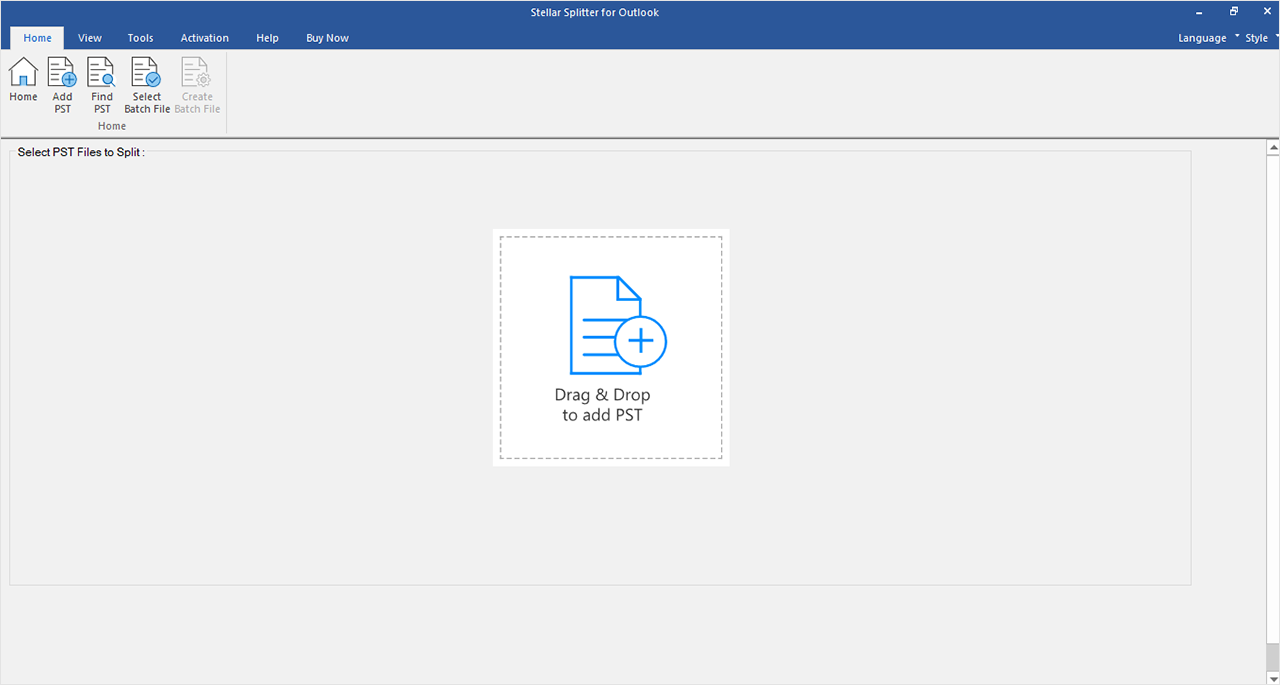
The empty main window: the Home ribbon with Add PST, Find PST, Select Batch File and Create Batch File, and the Drag & Drop area for adding a PST.
Every split creates new PST files. The original PST is read but not changed, so you can check the results in Outlook before you delete or archive the big file. A log report records the item counts of the original and the split files, and you can save it from the View ribbon.
Features
Split by date range
Stellar Splitter for Outlook creates a new PST with the items sent or received in the last N months, or between two dates you pick. It's the most common way to move old years out of a working mailbox: the new PST becomes an archive you can open in Outlook when you need it. When splitting by date, contacts and calendar items are copied into the new PST too.
Split by size
Stellar Splitter for Outlook cuts a PST into pieces of 5, 10, 20, 30 or 50 GB each. With very large sources the output size also depends on your Outlook version: about 18 GB per file with Outlook 2007, and about 45 to 48 GB with Outlook 2010 and later. When splitting by size, contacts and calendar items go into one of the new files, and the log tells you which.
Split by mail ID
Stellar Splitter for Outlook scans the PST, lists every email address it finds in the To, Cc and Bcc fields, and creates a new PST with the messages of the addresses you tick. That's useful for handing one client's or one colleague's correspondence over as a separate file.
Select & Split by folder
Stellar Splitter for Outlook lets you tick one or more folders of the PST and save just those into a new PST, for example a project folder that has outgrown the main mailbox.
Batch splitting and batch files
Stellar Splitter for Outlook can split several PST files in one run, by date or by size, each with its own dates, size and destination in a table. An Apply Upto File Index option copies one setting down to several rows. The settings can be saved as a batch file (.DAT), or you can write one by hand in Notepad (.TXT) with each file's source, destination and dates or size separated by semicolons, and reuse it to repeat the same split on many PCs.

One PST added (aziza.pst, 514.18 MB): the splitting options By Date, By Size, By Mail ID and Select & Split, with the Date Range settings on the right.

Two PST files split by date in one run. The Customize Split Options table sets each file's start date, end date and destination; By Mail ID and Select & Split work on a single PST only.
Benefits
- A faster Outlook. A smaller active PST loads, searches and syncs quicker.
- Smaller blast radius. If one PST is damaged later, only that part of the mail is affected.
- Easier backups and moves. 10 GB files copy to a USB drive or a new PC more reliably than one 60 GB file.
- No risk to the original. The source PST is left as it was, so a bad split costs nothing but time.
Real-World Uses
- Archiving old years. A small-office user moves everything older than three years into an archive PST and keeps a lean working file.
- Before a migration. An IT technician splits a 70 GB PST into pieces before importing them into a new mailbox or a new PC.
- Handing over a client's mail. A consultant leaving a project splits out every message to and from that client's addresses into its own PST.
- Many users at once. An administrator writes one batch file that splits the PSTs of a whole department by date in a single run.
Who It's For, and Who Should Skip It
It suits Outlook users on Windows with one or more big PST files (POP accounts, old archives, PSTs exported from a former job) and the IT people who look after them. The batch mode makes it most useful to technicians handling several PCs.
Skip it if your mail lives in Microsoft 365 or Exchange online with no PST files, since mailbox size there is managed on the server. Skip it too if you only have to move one old year out once: creating a new PST in Outlook and dragging folders, or Outlook's Archive feature, does that free. It doesn't run on a Mac, and it won't open a damaged PST, which has to be repaired first.
Usage Guide
- Download the installer from Stellar, run it and pick the setup language. Outlook must already be installed on the PC.
- Launch Stellar Splitter for Outlook and, after buying, click Activation and enter the key from the order email (an Internet connection is needed).
- Add the PST by drag and drop, Add PST, or Find PST to search a drive or folder.
- Choose By Date, By Size, By Mail ID or Select & Split, set the dates, size, addresses or folders, and Browse to a destination folder.
- Click Split. When Split Complete appears, save the log, then open the new PST files in Outlook to check them before you remove anything from the original.

The Split Complete dialog at the end of a split by date, with the destination folder shown above it.
Before you buy
Microsoft Outlook has to be installed on the PC where you split, and the program runs on 64-bit Windows only. For large PSTs Stellar recommends 64-bit Outlook and at least 8 GB of RAM (16 GB is better). If the big PST already shows errors in Outlook, repair it first (Outlook's own Inbox Repair Tool, or a repair product) and then split the repaired file. Try the demo on your own PST first: Stellar's refund policy expects you to have tested it.
Where it falls short
- Dated interface. Softpedia's reviewer called the interface outdated, and it does look like an older Office program.
- Size choices are coarse. Size splits come only in 5, 10, 20, 30 or 50 GB pieces, so you can't make, say, 2 GB files for email or old FAT32 drives.
- Contacts and calendars aren't split. By date they're copied into the new PST, by size they land in just one of the pieces.
- Some options are single-file only. By Mail ID and Select & Split can't run in batch mode.
- A yearly fee for an occasional job. Many buyers need a split once or twice; the license is sold by the year.
What Users Say
Stellar Splitter for Outlook is a small utility, so it has collected few reviews, and the ones that exist are short.
Softpedia
Softpedia's editor rates Stellar Splitter for Outlook 3.5 out of 5, calling it a simple, easy-to-use way to create several PST files from one large database with the help of Outlook, and suitable for first-time users. The criticism is the rather outdated interface. Softpedia's visitors rate it 3.4 out of 5 from 11 votes.
Software Informer
On Software Informer, users give Stellar Splitter for Outlook 3.4 out of 5 from 61 votes. The comments there describe the interface as straightforward and point to the batch splitting of several files and the log report after each split.
Experts Exchange (quoted by Stellar)
Stellar's order page carries an Experts Exchange award and the comment: "It is a worthwhile purchase for IT Support technicians who tend to do a lot of repair work for Outlook users."
GBHackers (Stellar Toolkit for Outlook)
GBHackers reviewed Stellar Toolkit for Outlook, which includes the Splitter, and rated the toolkit 4.5 out of 5. It describes the Splitter as splitting oversized PST files "based on Date, Size, Email ID, or Folder" and recommends it for "long-term Outlook users with multi-GB mailboxes that slow down operations." On the minus side it notes that the toolkit's "Demo version allows only preview; saving requires a paid license" and that large PST scanning "can be time-intensive on slower hardware."
Recurring themes
Reviewers agree that Stellar Splitter for Outlook is easy to use and does what it says: date and size splits, a log, and batch runs. The complaints are about how it looks, not how it works, plus the price for what is often a one-off task. There are no reports of it damaging an original PST, which matches how it works: it only writes new files.
Comparisons
Stellar Splitter vs splitting by hand in Outlook
In Outlook you can create a new PST, then drag folders or use Archive to move items older than a date into it. That's free and fine for one mailbox and one cut-off date. The Splitter adds size-based and per-address splits, many PSTs in one run, reusable batch files and a log, and it never moves items out of the original.
Stellar Splitter vs Stellar Toolkit for Outlook
Stellar's Toolkit for Outlook bundles the Splitter with PST repair, OST-to-PST conversion, compacting, merging, deleted-email recovery and PST password recovery; Stellar's buy page lists it at $199 a year for up to three PCs. If you also need to repair or convert Outlook files, the Toolkit is the better buy; for splitting alone, the $39 Splitter is enough.
Editions and Pricing
| Edition | Price | Term | What you get |
|---|
| Stellar Splitter for Outlook (Standard) | $39 | 1 year, one PC | All splitting options, batch splitting, batch files, log report |
| Stellar Toolkit for Outlook | $199 on Stellar's buy page | 1 year, up to 3 PCs | The Splitter plus repair, OST conversion, compacting, merging, undelete and password recovery |
Buy Now orders Stellar Splitter for Outlook at $39 for one year, the price we saw at checkout on November 19, 2026. The activation key arrives by email after the order.
FAQs
Does Stellar Splitter for Outlook need Outlook installed?
Yes. Stellar Splitter for Outlook uses Microsoft Outlook to write the new PST files, so Outlook 2007 or later (up to Outlook 2024) must be installed on the PC where you split.
Can Stellar Splitter for Outlook split an OST file?
No. Stellar Splitter for Outlook works on PST files. An OST (the offline cache of an Exchange or Microsoft 365 mailbox) has to be converted to PST first, which Stellar sells as a separate converter and includes in its Toolkit for Outlook.
Will Stellar Splitter for Outlook change or delete my original PST?
No. Stellar Splitter for Outlook only reads the original PST and writes new PST files to the folder you choose. You decide afterwards whether to delete items from the original or keep it as a backup.
What can the free trial of Stellar Splitter for Outlook do?
The demo of Stellar Splitter for Outlook offers every option, but according to Stellar's manual each split PST it creates is limited to 250 MB. Enter the activation key from your order to split without the cap.
Can Stellar Splitter for Outlook split a damaged PST?
Stellar Splitter for Outlook isn't a repair tool. Stellar recommends repairing a damaged or very large PST first and then splitting the repaired file; Outlook's free Inbox Repair Tool (scanpst.exe) is the first thing to try.
Does Stellar Splitter for Outlook work with 32-bit Windows or a Mac?
No. Stellar Splitter for Outlook version 10 runs on 64-bit Windows 11, 10, 8.1 and 8 only, and there's no Mac version.
What happens when the 1-year license of Stellar Splitter for Outlook ends?
The license of Stellar Splitter for Outlook is sold for one year. A split PST you've already made is an ordinary Outlook data file and keeps working without the program; you only need a renewal to keep splitting.
System Requirements
- Windows 11, 10, 8.1 or 8, 64-bit edition only
- Intel-compatible x64 processor
- 8 GB RAM minimum, 16 GB recommended (the product page lists 4 GB minimum, 8 GB recommended)
- 250 MB of disk space for the program, plus room for the new PST files
- Microsoft Outlook 2024, 2021, 2019, 2016, 2013, 2010 or 2007 installed
Conclusion
Stellar Splitter for Outlook is worth $39 if you have a bloated PST, or several, and want it cut by date, size, sender or folder without touching the original. The batch files make it a real time-saver for technicians who handle many PCs. If you only need to move one old year into an archive once, Outlook's own Archive or a new PST and some dragging does that free, and if you also repair or convert Outlook files, Stellar's Toolkit for Outlook covers more. Try the demo on your own PST before buying.
Download Free Trial Buy Now