Stellar Converter for GroupWise: Move GroupWise Mailboxes to Outlook PST or Microsoft 365
Stellar Converter for GroupWise is a Windows tool that converts GroupWise mailboxes, with their emails, attachments, address books, calendars, tasks and notes, into Outlook PST files, and in the Technician edition straight into Microsoft 365. It costs $199 a year (Corporate, up to 500 mailboxes) or $399 a year (Technician, unlimited mailboxes and batch conversion) at checkout, and the free trial previews whole mailboxes.
GroupWise shops moving to Outlook and Microsoft 365 soon find there's no built-in export path: GroupWise keeps its own mailbox format, and Outlook can't read it. A converter that logs in to the post office and writes the data out as PST is the usual answer, and Stellar's is one of the established ones.
Quick facts
- Version: 5.0.0.0, released April 2023
- Developer: Stellar, a data recovery company founded in 1993
- Converts: emails, attachments, address books, contacts, documents, calendars, appointments, tasks, reminders and notes
- Sources: GroupWise 2018, 2014, 2012, 8.0, 7.0, 6.5 and 6.0 mailboxes in Online, Remote, Caching and Archive modes
- Saves to: PST, MSG, EML, RTF, PDF and HTML (contacts also to CSV); Technician adds Microsoft 365, an existing PST and an Outlook profile
- Platform: Windows 11, 10, 8.1 and 8, with the GroupWise client and Microsoft Outlook installed
- Price: Corporate $199 a year, Technician $399 a year
- Trial: free download that previews the converted mailboxes; saved emails keep only the subject and body
- What we checked: the Corporate trial installer (13.5 MB, file version 5.0.0.0, signed by Stellar Information Technology) and checkout prices of $199.00 (Corporate) and $399.00 (Technician), both 1-year licenses, on November 18, 2026. We didn't convert a live GroupWise mailbox
Before you buy
Stellar Converter for GroupWise reads mailboxes through the GroupWise client, so the client has to be installed on the PC and able to connect to your GroupWise post office, and Microsoft Outlook has to be installed to write PST files. Plan to run it on a workstation that has both, signed in with an account that can open the mailboxes you're converting.
Download Free Trial Buy Corporate License Buy Technician License
Overview
You start Stellar Converter for GroupWise, click Connect to Mailbox and choose the conversion type: an online mailbox through the post office (user name, password, IP address and port), a remote or caching copy on the local disk, or an archive. The program reads the mailbox and shows it in an Outlook-style window: the folder tree on the left, the message list and a full preview with attachments on the right. You tick the folders or mailboxes you want, pick a format and a destination, and save.
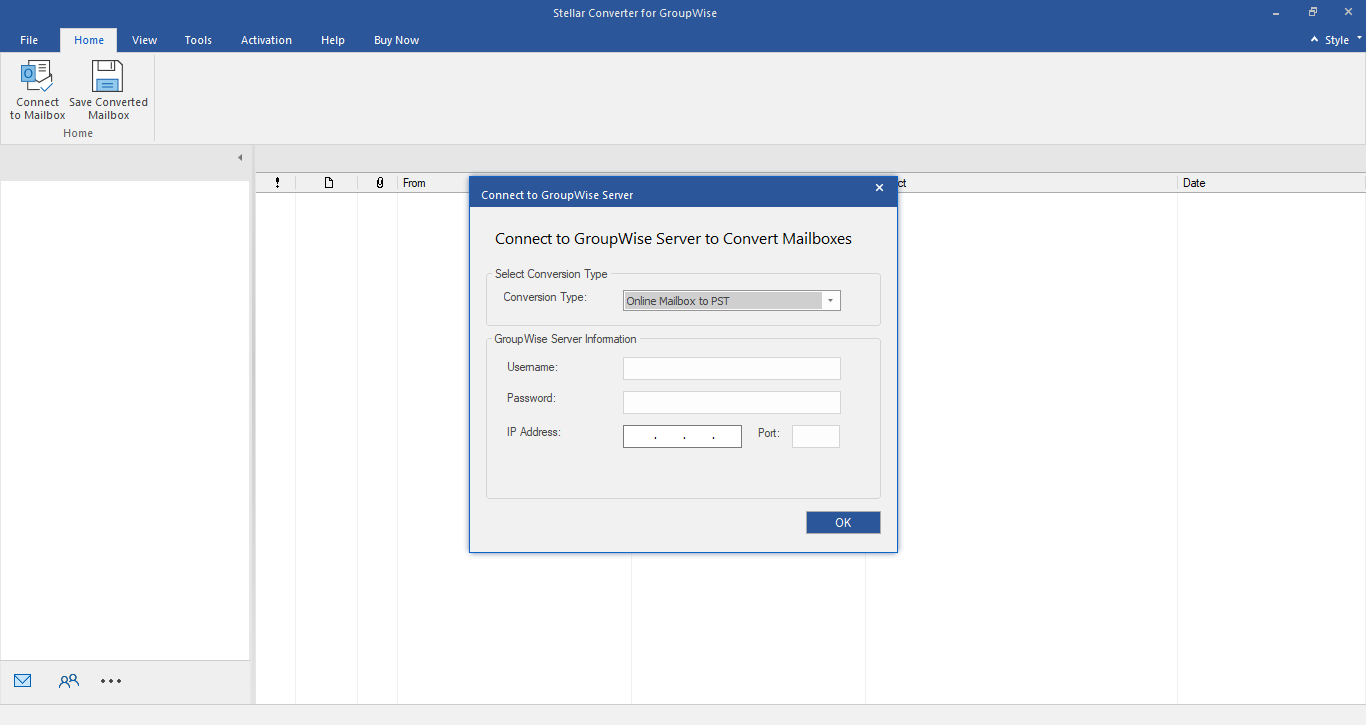
The Connect to GroupWise Server dialog: choose the conversion type (here Online Mailbox to PST), then enter the user name, password, IP address and port of the post office.
Features
Converts every GroupWise item type
Stellar Converter for GroupWise carries over emails with attachments, the GroupWise address book (as a distribution list in the PST), contacts, documents, calendars, appointments, tasks, reminders and sticky notes, keeping the folder structure.
Four ways to reach a mailbox
Stellar Converter for GroupWise converts mailboxes in Online mode through the post office, Remote and Caching mode from the local copies GroupWise keeps on disk, and Archive mode from archived items. Remote mode works offline, which helps when the GroupWise server is already being retired.
Preview before saving
Stellar Converter for GroupWise shows each converted item in a preview pane after the scan, attachments included, so you can check the mailbox is complete before you write anything out. The free trial shows this preview for the whole mailbox.
Six output formats and filters
Stellar Converter for GroupWise saves to PST, MSG, EML, RTF, PDF or HTML, and saves contacts to CSV. Filters skip the Junk and Deleted folders, limit a date range, or exclude mail from particular addresses.
Microsoft 365 and batch conversion (Technician)
The Technician edition of Stellar Converter for GroupWise converts several mailboxes in one run and exports them straight to Microsoft 365, to an existing PST or into an Outlook profile, which saves a separate PST import step per user.
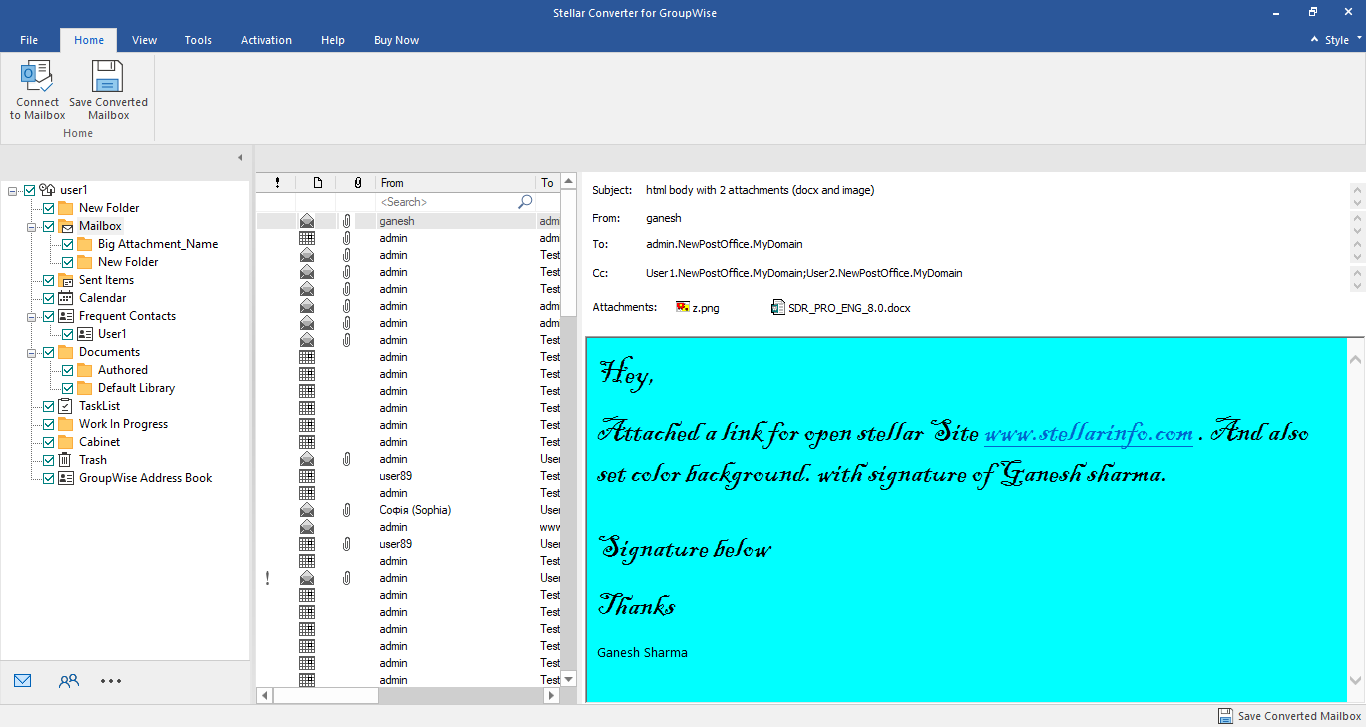
A converted mailbox: the GroupWise folder tree (Mailbox, Sent Items, Calendar, Contacts, Documents, Address Book) on the left, the message list and a full message preview with attachments.
Benefits
- No GroupWise-to-Outlook gap. Mail, calendars and contacts end up in a format Outlook and Microsoft 365 open directly.
- Nothing changes on the server. The conversion only reads the mailboxes; the originals stay in GroupWise.
- Check before you pay. The trial converts and previews the full mailbox, so you see whether it reads your data.
- Works after the server is gone. Remote, Caching and Archive modes convert the local copies users already have.
Real-World Uses
- A GroupWise to Microsoft 365 move. An IT admin exports each user's mailbox with the Technician edition straight into the new 365 accounts.
- One user's history. A departing employee's GroupWise mailbox becomes a PST that HR or legal can open in Outlook.
- Old archives. Years of GroupWise archive mailboxes become PST or PDF files for records retention.
- An MSP project. A consultant converts a client's post office in batches, then hands back PST files per user.
Who It's For, and Who Should Skip It
Stellar Converter for GroupWise suits organizations and consultants leaving GroupWise for Outlook or Microsoft 365, especially those with dozens or hundreds of mailboxes, or with local archives that a server-side migration would miss.
Skip it if you have only a handful of messages to keep: forwarding them or printing to PDF from the GroupWise client costs nothing. Large server-to-server migrations with scheduling and delta syncs are better served by dedicated migration services. The Corporate edition also has no Microsoft 365 export, so a 365 move needs the Technician license.
Usage Guide
- Install the GroupWise client and Outlook on a Windows PC and make sure the client can open the mailboxes.
- Download and install Stellar Converter for GroupWise, then launch it.
- Click Connect to Mailbox, choose Online, Remote, Caching or Archive mode, and enter the login details or the mailbox path.
- Wait for the scan, then browse the folder tree and preview the items.
- Tick the mailboxes or folders to convert and click Save Converted Mailbox.
- Choose PST (or MSG, EML, RTF, PDF, HTML; Technician also Microsoft 365), set any filters and the destination, and start the conversion.
- Open the PST in Outlook, or sign in to Microsoft 365, and check the folders.
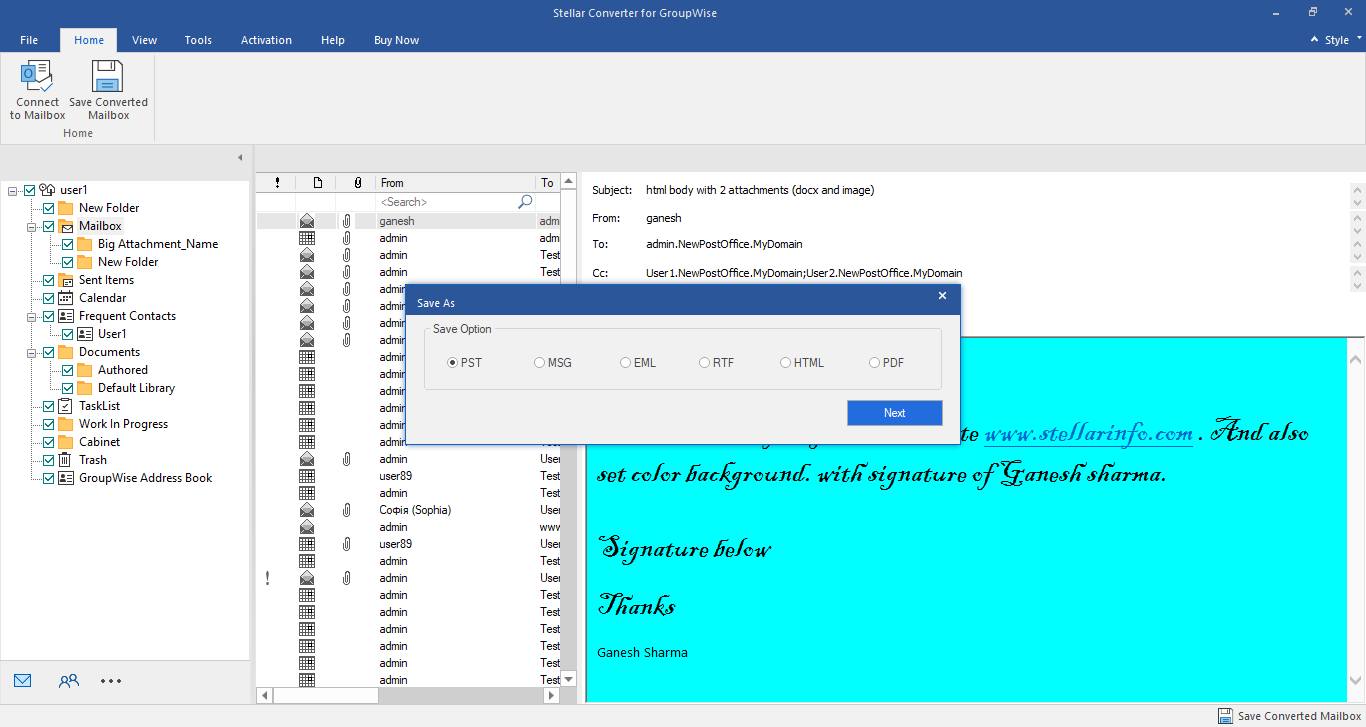
The Save As dialog with its six formats: PST, MSG, EML, RTF, HTML and PDF.
Where it falls short
- Needs the GroupWise client and Outlook. It won't run on a bare PC; both programs must be installed and working.
- Older Outlook and GroupWise lists. Stellar's pages list GroupWise up to 2018 and Outlook up to 2019 on the product page (2024 in the help pages), so newer setups are outside what's tested.
- Not updated often. Version 5.0 dates from April 2023.
- Microsoft 365 export only in Technician. The Corporate license stops at PST and file formats.
- Yearly license. Both editions are 1-year licenses, though most migrations are one-off jobs.
What Users Say
Stellar Converter for GroupWise serves a shrinking niche, so there are few reviews of it anywhere.
G2
G2 shows a single review of Stellar Converter for GroupWise, rated 4.5 out of 5, which praises the conversion speed and the direct save to Office 365. G2 itself says there aren't enough reviews to give buying insight.
AlternativeTo
AlternativeTo lists Stellar Converter for GroupWise but has no user reviews or comments for it.
Trustpilot (Stellar as a company)
Stellar scores 4.8 out of 5 from 5,609 reviews across all its products (November 18, 2026), with 89% five-star and 4% one-star reviews. One customer, John Backer, called a Stellar recovery tool "a game changer for me", while Nick wrote "Do not purchase. Software is terrible and customer service worse." None of these reviews names the GroupWise converter.
Recurring themes
Where reviewers comment on Stellar's email converters, they like the preview and the speed; complaints across Stellar's line come from conversions that didn't fully work. The free trial preview is the best test: if your mailboxes show up complete there, the paid version saves them.
Comparisons
Corporate vs Technician
Both editions of Stellar Converter for GroupWise convert GroupWise mailboxes in all four modes and save to PST and the other file formats. Corporate covers up to 500 mailboxes. Technician adds unlimited mailboxes, batch conversion, and export straight to Microsoft 365, an existing PST or an Outlook profile.
Stellar Converter for GroupWise vs exporting from the GroupWise client
The GroupWise client can forward messages or save individual items, which works for a few emails. It can't produce a PST with folders, calendars and contacts intact, which is what the converter does.
Editions and Pricing
| Edition | Price at checkout | Term | What it adds | Buy |
|---|
| Corporate | $199 | 1 year | Up to 500 mailboxes, PST, MSG, EML, RTF, PDF, HTML | Buy Corporate |
| Technician | $399 | 1 year | Unlimited mailboxes, batch conversion, export to Microsoft 365, existing PST or Outlook profile | Buy Technician |
Prices checked on the order page on November 18, 2026. Each button orders that edition. Stellar's own buy page shows the Technician edition at $399 against a struck-through $699.
FAQs
Does Stellar Converter for GroupWise need GroupWise installed?
Yes. Stellar Converter for GroupWise reads mailboxes through the GroupWise client, which must be installed and able to connect to the post office. Outlook must be installed too.
What does the free trial of Stellar Converter for GroupWise save?
The trial of Stellar Converter for GroupWise previews the entire converted mailbox. It can save emails, but only their subject and body; attachments, contacts, calendars, tasks and the To, Cc and Bcc fields need the full version.
Can Stellar Converter for GroupWise move mailboxes to Microsoft 365?
Yes, in the Technician edition. Stellar Converter for GroupWise Technician exports converted mailboxes straight to Microsoft 365, to an existing PST or into an Outlook profile; Corporate saves PST and file formats only.
Does Stellar Converter for GroupWise change anything on the GroupWise server?
No. Stellar Converter for GroupWise only reads the mailboxes; the originals stay on the GroupWise server.
Can it convert GroupWise archives?
Yes. Stellar Converter for GroupWise has an Archive mode: you enter the archive path and it converts the archived mailbox to PST like any other.
How many mailboxes can I convert?
The Corporate license of Stellar Converter for GroupWise converts up to 500 mailboxes; Technician has no limit and can convert several at once.
Can I get a refund?
Stellar's refund policy gives 30 days on a first purchase when the product can't do its job and support can't fix it. It doesn't cover buyers who didn't try the trial first, special-offer prices or renewals.
System Requirements
- Windows 11, 10, 8.1 or 8
- Intel-compatible processor, 8 GB RAM minimum (16 GB recommended), 250 MB of disk space
- GroupWise client connected to a GroupWise 2018, 2014, 2012, 8.0, 7.0, 6.5 or 6.0 post office
- Microsoft Outlook 2024, 2019, 2016, 2013, 2010, 2007 or 2003
Conclusion
Stellar Converter for GroupWise is worth it for anyone leaving GroupWise with more than a few mailboxes to carry over. The one reason to buy it: it turns GroupWise mailboxes, calendars and address books into PST files Outlook opens directly, and the Technician edition skips the PST step for Microsoft 365. Corporate at $199 suits one-office moves; take Technician at $399 for a 365 migration or many mailboxes.
The main reason not to: it depends on a working GroupWise client and Outlook on the same PC, and the product hasn't been updated since 2023. Run the trial on your own post office first; the preview shows whether it reads your mailboxes.
Download Free Trial Buy Corporate License Buy Technician License