Stellar Log Analyzer for MS SQL: See What Happened in a SQL Server Transaction Log
Stellar Log Analyzer for MS SQL is a $399 Windows tool that reads a SQL Server transaction log (LDF) with its MDF and shows every insert, update, delete, create and drop it recorded, with the time, user, table and query. It's for DBAs and investigators who need to find out who changed or deleted what, and to get deleted rows back, without restoring the whole database. The free trial shows the full analysis before you buy.
SQL Server writes every change to the transaction log, but in a binary format nobody can read without undocumented functions like fn_dblog. When rows vanish or a table is dropped, that log is usually the only witness. This tool turns it into a sortable list of transactions you can read, search and export.
Quick facts
- Version: 2.0.0.2, released October 2026
- Developer: Stellar Data Recovery
- Runs on: 64-bit Windows 11, 10, 8.1 and 8, and Windows Server 2012
- Databases: SQL Server 2025, 2022, 2019, 2017, 2016 and earlier
- Shows: INSERT, UPDATE, DELETE, CREATE and DROP transactions with time, user, transaction name, table and query
- Saves: table data to a new or live database, MDF, CSV, HTML or XLS; transactions to CSV, HTML or XLS
- Price: $399, sold at checkout with no renewal term
- Free trial: full analysis and preview; saving needs a license
- What we checked: the trial installer (7.6 MB, file version 2.0.0.2, dated October 21, 2026), the demo limits and workflow in Stellar's online manual, Stellar's refund policy, and the $399 price with no renewal on the order page on November 11, 2026. We didn't analyze a log ourselves.
Before you buy
- Work on copies. Stellar's manual says the program won't run on a database that's attached to SQL Server, so detach it or copy the MDF and LDF from a backup or snapshot.
- It can only show what the log still holds. Under the simple recovery model, or after log backups truncate the log, older transactions may be gone. Run the trial and check the date range you need is there.
- Check the server OS list. Stellar lists Windows Server 2012 only among server versions; run it on a Windows 10 or 11 workstation if in doubt.
Download Free Trial Buy Now
Overview
You select an LDF (or use Find to search drives for one). If the MDF sits in the same folder it's picked up automatically; otherwise you point to it with Select MDF. Click Analyze, and when it's done the left pane lists the database's tables and objects. Pick a table and the right pane lists its transactions, sortable by type, time, user, transaction name, table and query. A Data View pane at the bottom shows the row values, including the before and after values of an update.
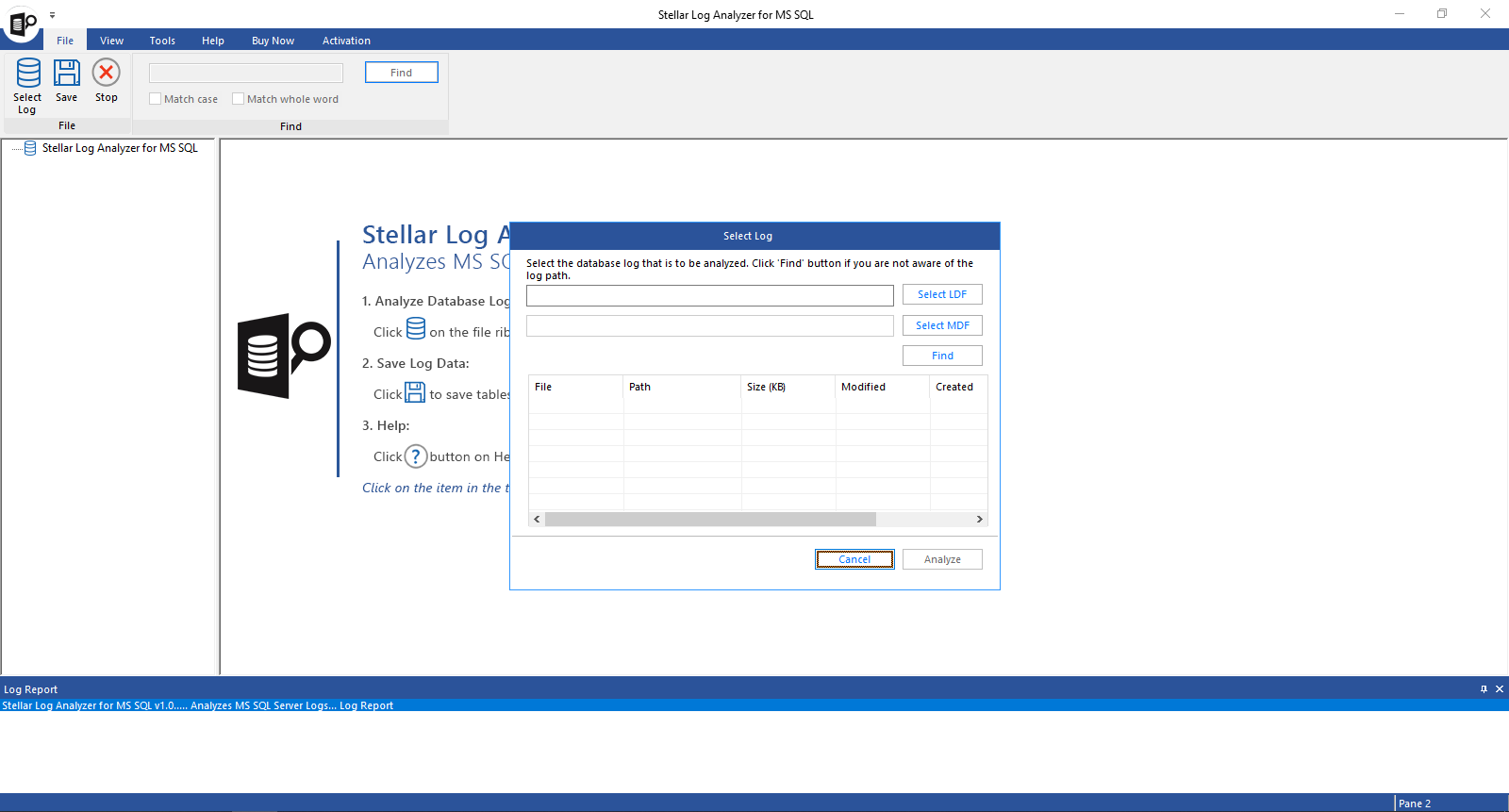
The first step: select the LDF, its MDF, or search for log files.
Features
Every change, in plain view
Stellar Log Analyzer for MS SQL lists data changes (INSERT, UPDATE, DELETE) and schema changes (CREATE, DROP) from the log, with transaction start and end time, the user, the table and the query that made the change.

An analyzed log: tables on the left, each transaction's type, time, user, table and query on the right.
Query detail for any transaction
Stellar Log Analyzer for MS SQL opens a Query Detail window when you double-click a transaction, showing its type, name, time, table and the full statement with values. That's the evidence you need when reconstructing an incident.

The Query Detail window for one insert, with the Data View of the row below.
Get deleted and dropped data back
Stellar Log Analyzer for MS SQL can save the data of deleted or dropped tables to a new database it creates, or into an existing database on a connected server, without restoring the whole database. You choose which transaction types to include.
Date ranges, search and exports
Stellar Log Analyzer for MS SQL filters by date range so you save only the window around an incident, searches the tree with Match Case and Match Whole Word, and exports log transactions to CSV, HTML or XLS for a report. A log report records each save, with start and end times.
Benefits
The usual alternatives are a point-in-time restore, which means restoring a full backup plus every log backup to a side server just to look at a few rows, or digging through fn_dblog output by hand. This tool gives you the same history as a readable table in minutes, and lets you lift out only the rows you need.
Real-World Uses
- "Who deleted the orders?" Filter the Orders table's DELETE transactions by date, see the user and the statement, and save the deleted rows to a new database.
- An UPDATE without a WHERE: the Data View shows each row's old values, so you can rebuild what was overwritten.
- A dropped table: recover its data from the log instead of restoring last night's backup over today's work.
- An audit or security review: export a date range of transactions to XLS for the report.
Who It's For, and Who Should Skip It
It's for SQL Server DBAs, IT auditors and consultants who investigate data changes after the fact, especially on databases without built-in auditing or change tracking.
Skip it if your database already runs SQL Server Audit, Change Data Capture or temporal tables, which record this history for free going forward. Skip it if the database is corrupt: you need Stellar Repair for MS SQL first. If you'd use log analysis alongside repair and backup recovery, Stellar Toolkit for MS SQL includes this tool and costs less than buying two products separately. And for databases in the simple recovery model, the log rarely holds much history.
Usage Guide
- Copy the LDF and MDF files (detached, or from a snapshot) to a 64-bit Windows PC. Keep SQL Server running if you'll save to a database.
- Install the trial and open Stellar Log Analyzer for MS SQL.
- Click Select LDF, browse to the log, and add the MDF with Select MDF if it's elsewhere.
- Click Analyze and wait for "Analysis of selected log completed".
- Pick a table, sort the transactions, double-click one for its query, and check the Data View.
- Buy and activate the license, then Save: choose Log Tables Data or Log Transaction, the transaction types, a date range, and the format or target database.
Where it falls short
- No live monitoring. It reads files after the fact; it's not an auditing service.
- No independent track record. We found no third-party reviews or user ratings for this product, so you're relying on the free trial to judge it.
- Narrow server support. Only Windows Server 2012 is listed among server OSes.
- Saving needs SQL Server running when the target is a new or live database, according to the manual.
What Users Say
Few reviews so far
We couldn't find independent reviews or user ratings of Stellar Log Analyzer for MS SQL on G2, Capterra or Trustpilot when we looked. G2 says there aren't enough reviews of Stellar Toolkit for MS SQL, which includes it, to give buying insight. Stellar as a company scored 4.8 out of 5 on Trustpilot from about 5,600 reviews across all its products. Reviews of Stellar's SQL repair tool are covered on our Stellar Repair for MS SQL page. For this tool, the free trial is the review that counts: it shows the full analysis of your own log.
Comparisons
Stellar Log Analyzer vs fn_dblog
fn_dblog is free and built in, but undocumented, returns raw log records, and needs real expertise to turn into row values. Stellar decodes the same history into readable transactions and row data and can save it straight to a database.
Log Analyzer vs Stellar Toolkit for MS SQL
The Toolkit includes this analyzer plus database repair, .BAK extraction, password reset and database conversion for $549 a year at checkout. Buy the analyzer alone only if forensics is all you need.
Editions and Pricing
| Product | Price | License | What you get |
|---|
| Log Analyzer for MS SQL (this listing) | $399 | No renewal at checkout, single user | Transaction log analysis and data recovery from the log |
| Toolkit for MS SQL | $549 | 1 year | This tool plus repair, backup extraction, password reset, conversion |
Prices from the order page on November 11, 2026.
FAQs
Can Stellar Log Analyzer for MS SQL read an LDF without SQL Server installed?
Stellar Log Analyzer for MS SQL views LDF contents without SQL Server installed, according to Stellar. You need a SQL Server connection only to save the results into a new or live database.
Why does Stellar Log Analyzer for MS SQL need a copy of the database?
Stellar Log Analyzer for MS SQL can't run against a database that's attached to SQL Server, so you analyze a detached copy of the MDF and LDF.
Does Stellar Log Analyzer for MS SQL show the old values of an update?
Stellar Log Analyzer for MS SQL shows the original and modified data of an UPDATE transaction in its Data View pane.
What does the Stellar Log Analyzer for MS SQL demo do?
Stellar Log Analyzer for MS SQL's demo analyzes the log and previews all transactions and transaction data. Saving the results needs a license.
Can I save only one day of transactions with Stellar Log Analyzer for MS SQL?
Stellar Log Analyzer for MS SQL has an Apply date range option when saving, so you can export just the transactions or table data between two dates.
Can I get a refund on Stellar Log Analyzer for MS SQL?
Stellar Log Analyzer for MS SQL falls under Stellar's 30-day refund policy on a first purchase, for cases where it can't do the job and support has no fix, or the result differs from the trial. Purchases made without trying the trial aren't refundable.
System Requirements
- 64-bit Windows 11, 10, 8.1 or 8, or Windows Server 2012
- Intel-compatible x64 processor
- 4 GB of RAM minimum, 8 GB recommended
- 250 MB of free disk space
- Logs from SQL Server 2025, 2022, 2019, 2017, 2016 and earlier
Conclusion
Stellar Log Analyzer for MS SQL is worth $399 if you need to answer "what changed, when and by whom" on SQL Server databases that don't have auditing switched on, and to pull deleted rows out without a full restore. The one reason to buy it is that the free trial shows the complete decoded history of your own log before you pay. The main reason not to is that it can only show what the log still holds, and with almost no independent reviews, the trial is your only proof; if you also need repair tools, the Toolkit for MS SQL is the better buy.
Download Free Trial Buy Now