Stellar Repair for Access: Rebuild a Corrupt MDB or ACCDB Database When Compact and Repair Fails
Stellar Repair for Access is a Windows tool from Stellar that repairs corrupt Microsoft Access databases (.mdb and .accdb, Access 2002 to Access 2024 and Microsoft 365) and saves the tables, queries, forms, reports, macros, modules and even deleted records into a new, working database. The Professional license is $99 a year and the Technician license $149 a year (both renew automatically); the free download scans the database and previews everything it can recover.
It's for the office whose Access database suddenly says "Unrecognized database format" or "The database is in an inconsistent state", where Access's own Compact and Repair has failed and the last good backup is old.
Quick facts
- Price: Professional $99 a year (one PC); Technician $149 a year (several PCs at one location). Both renew automatically.
- Developer: Stellar Information Technology (Stellar Data Recovery)
- Version: 7.4.0.0 (October 2026)
- Runs on: Windows 11, 10, 8.1 and 8, 64-bit only
- Repairs: .mdb and .accdb from Access 2002 to Access 2024 and Microsoft 365, including split databases
- Recovers: tables, queries, forms, reports, macros, modules, indexes, relationships, linked tables, attachment fields and deleted records
- Free version: scans and previews recoverable objects; saving needs a license
- What we checked: the trial installer from the download link (StellarRepairForAccess.exe, "Stellar Repair for Access", file version 7.3.0.4, 14 MB, validly signed by Stellar Information Technology Private Limited, file dated April 9, 2025; Stellar's page lists 7.4.0.0 as current) and the prices on the order page (Professional $99 and Technician $149, each a 1-year subscription that renews automatically) on November 27, 2026. We didn't repair a damaged database ourselves.
Before you buy
- Work on a copy. Copy the damaged .accdb or .mdb file before running any repair tool, including Access's own.
- Try Compact and Repair first. Access's built-in Database Tools, Compact and Repair Database is free and fixes many minor problems.
- Check the free preview. If your tables and records show up there, the paid version will save them.
- It's a subscription. Both licenses renew yearly unless you switch renewal off after buying.
Download Free TrialBuy ProfessionalBuy Technician
Overview
Access databases run small businesses, labs and departments all over the world, often on a shared network drive where a dropped connection or a crash mid-write can corrupt the file. Once Access refuses to open it, the data is stuck. Stellar Repair for Access reads the damaged MDB or ACCDB directly, rebuilds its objects, shows them in a tree with live table previews, and writes them into a fresh database that Access can open.
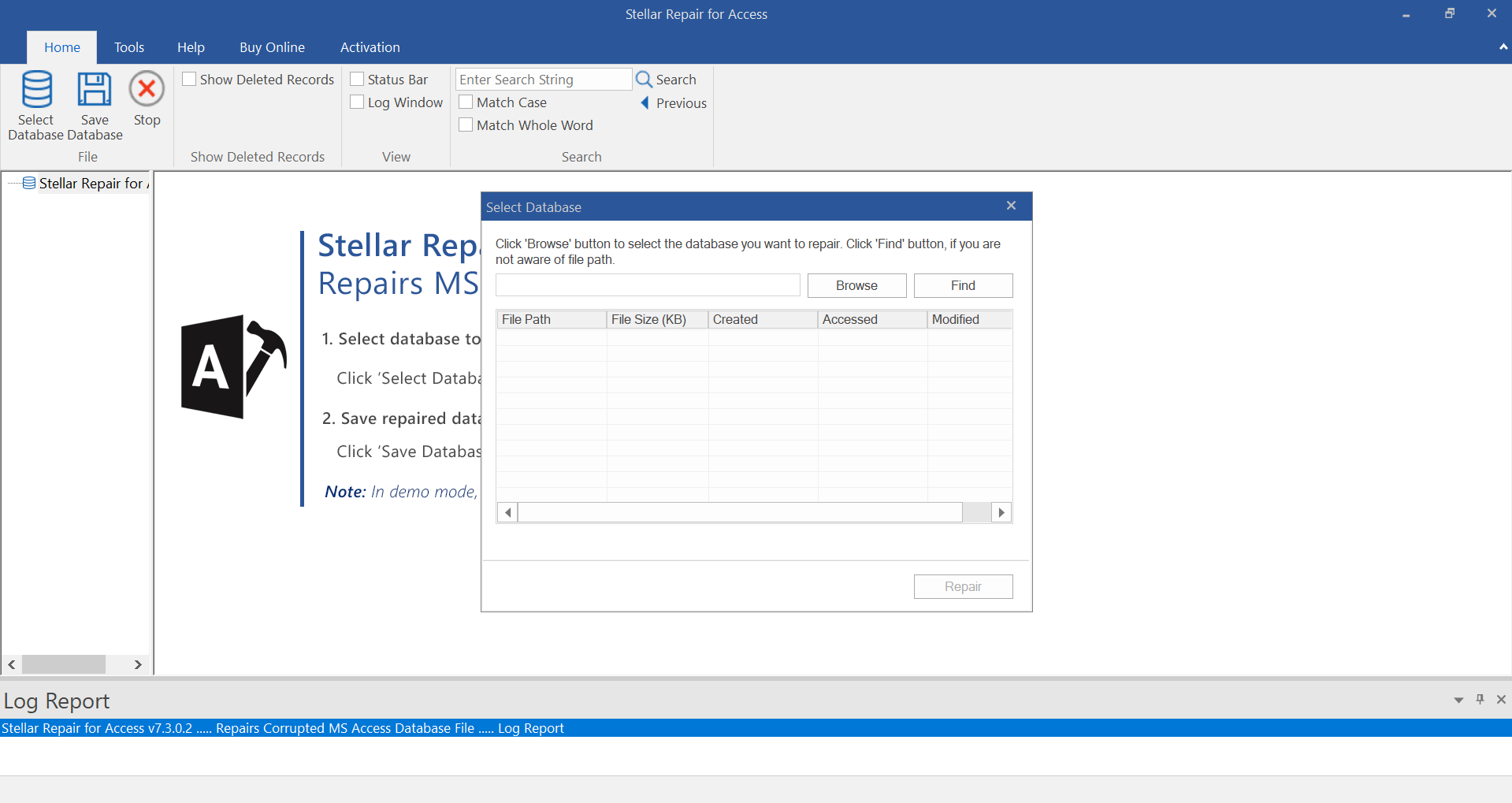
The main window with the Select Database dialog: Browse or Find a database, then click Repair. The log bar shows version 7.3.0.2 in this screenshot.
Features
Rebuilds every kind of Access object
Stellar Repair for Access recovers tables, queries, forms, reports, macros, modules, indexes and relationships, plus linked tables and attachment fields. It also repairs password-protected forms and modules, and keeps non-English text in tables intact.
Preview before saving
Stellar Repair for Access lists the repaired database as a tree of tables, forms and reports, and shows each table's data and column information, with a search box to find objects or values. You can tick only the objects you want and save a selection.
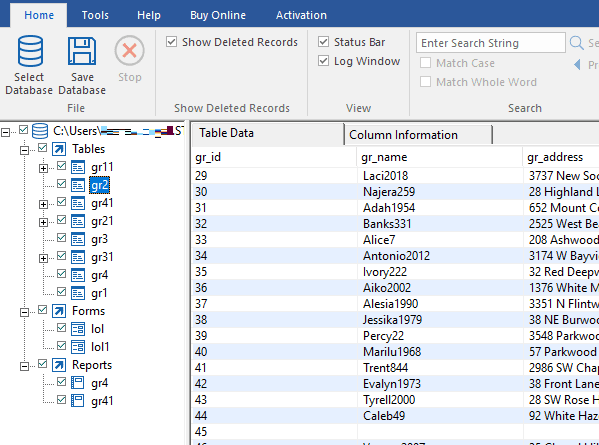
The preview: the repaired database's tables, forms and reports in a tree, and the selected table's records in the Table Data tab.
Recovers deleted records
Stellar Repair for Access can bring back records that were deleted from tables, which Access itself can't do without a backup. Tick Save Deleted Records when saving; recovery of deleted rows isn't guaranteed and depends on whether the space has been reused.
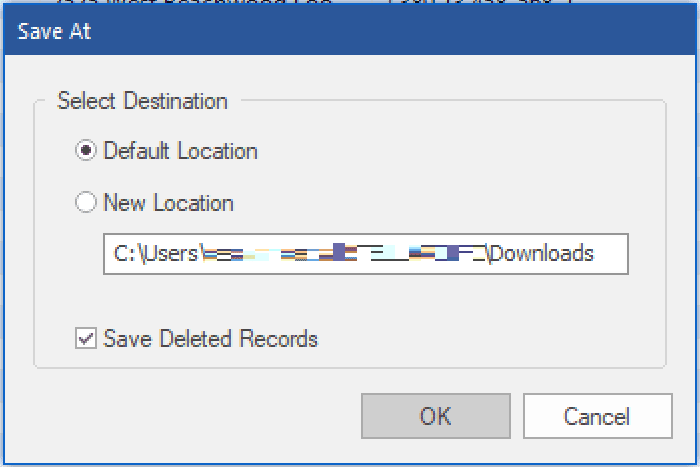
The Save At dialog: default or new location, and the Save Deleted Records checkbox.
Split databases and batch repair
Stellar Repair for Access repairs split databases (a front end linked to a back-end data file) and recovers corrupt linked tables. Stellar lists batch repair of several database files in the latest version.
Fixes the classic Access errors
Stellar Repair for Access is aimed at errors such as "Unrecognized database format", "Database is in an inconsistent state" (error 9505), "ID is not an index in this table", "MS Access cannot open the database" and error 2950, the cases where Compact and Repair gives up.
Benefits
- Days of data entry saved when the backup is old or missing.
- The whole application comes back, forms, reports and VBA included, not just the raw tables.
- Low risk to try: the free preview shows what's recoverable.
- Deleted-record recovery that Access lacks.
Real-World Uses
- Shared back-end on a network drive corrupted after a power cut while users were editing.
- An old MDB from Access 2003 that newer Access versions call unrecognized.
- Records deleted by mistake from a customer table with no recent backup.
- An IT consultant repairing databases at several client workstations in one office (Technician license).
Who It's For, and Who Should Skip It
Good fit: Access users and IT staff with a corrupt MDB or ACCDB that Compact and Repair can't fix, especially when forms, reports and code matter as much as the data.
Skip it if: Compact and Repair works, or you have a recent backup; the database is password-encrypted and you've lost the password (that's a password recovery job); the file is deleted rather than damaged; or you're on a Mac or 32-bit Windows, which it doesn't support.
Usage Guide
- Copy the damaged database, close Access, then install and launch Stellar Repair for Access.
- In Select Database, click Browse (or Find to search a drive) and pick the .mdb or .accdb file.
- Click Repair, then OK when the repair completes.
- Browse the tree and check tables, forms and reports in the preview.
- Activate the license, click Save Database, choose a location and tick Save Deleted Records if you want them.
- Open the new database in Access and check it, then re-link front ends to the repaired back end if needed.
Where it falls short
- Subscription only. Both licenses renew yearly, which feels heavy for a one-time emergency.
- Windows 64-bit only, and Windows 7 isn't on the current list.
- Deleted records aren't always recoverable. Independent testers note this works "in some cases".
- The trial download lags the page. The installer we downloaded was version 7.3.0.4 while the page lists 7.4.0.0.
What Users Say
Independent reviews
ComputingForGeeks (Josphat Mutai, updated January 2024) rated it 4.8 out of 5: "Stellar Repair for Access is one of the best tools to repair corrupted Microsoft Access database files." The reviewer reported: "We ran a 700 MB file which took merely 2 minutes to scan," and listed one disadvantage, "Only available for Windows OS."
TutorialsTeacher deliberately corrupted a sample database that then gave the "Unrecognized database format" error, and reported that the software "successfully detected the damage, reconstructed the database structure," calling it "a reliable and time-saving option" when Microsoft's built-in tools fail. It also listed deleted-record recovery as working "in some cases" and noted that exporting the repaired data requires a license.
On Stellar's product page
Stellar's page features customer comments such as: "I bought single user license of this software to repair .accdb file and it worked well. The interface of the software is easy to operate." and "For MDB repair free tool didn't worked, so tried software and it worked very well and helped to repair my files."
A case study quotes Jeffrey Tabler of Technology Management Partners: "It allowed us to work with specific tables, resolve indexing issues, and ultimately restore the lost key that was causing the database problems." These are vendor-selected testimonials.
On Trustpilot (Stellar, all products)
Stellar scores 4.8 out of 5 on Trustpilot from about 5,600 reviews: 89% five stars and 4% one star. The reviews are about Stellar's whole range, mostly its data recovery software, and most praise named support agents:
"Within one minute in the chat I was contacted by Swatantra." (Frank Moerdijk, August 2026)
"Akshay Sahu was excellent at providing information and alternatives to the online repair tool" (Diego De La Vega, November 2026)
The one-star reviews are blunt: "Do not purchase. Software is terrible and customer service worse." (Nick, November 2026). Most of the negative ones are about photo and phone recovery that didn't bring files back, not about the file repair tools.
The pattern: independent testers found it fast and effective on corrupted databases, with deleted-record recovery the less certain part, and the only consistent criticism is that it runs on Windows only. Stellar's support gets steady praise. Run the free preview on a copy of your database before buying.
Comparisons
Stellar Repair for Access vs Access's Compact and Repair
Compact and Repair is free and built in, and fixes many small problems, but it can fail on severe corruption and can't preview or recover deleted records. Stellar rebuilds the database independently, previews every object and recovers deleted rows where possible.
Professional vs Technician
Both editions repair the same files. Professional ($99 a year) is licensed for one PC; Technician ($149 a year) lets you repair databases on several systems at one location, which suits an IT department or consultant.
Editions and Pricing
| Edition | Price | Term | Use | Buy |
|---|
| Professional | $99 | 1 year, renews automatically | One PC | Buy Professional |
| Technician | $149 | 1 year, renews automatically | Several PCs at one location | Buy Technician |
Prices are from the order page on November 27, 2026. Stellar's store shows them as discounts from $129 and $349. Each button orders that edition.
FAQs
Is Stellar Repair for Access free?
Stellar Repair for Access is free to download, scan and preview. Saving the repaired database needs the Professional or Technician license.
Can Stellar Repair for Access fix "Unrecognized database format"?
Yes. Stellar Repair for Access is built for that error and similar ones such as "database is in an inconsistent state" and error 2950, and independent testers repaired a database showing exactly that error.
Does it repair Access 2024 and Microsoft 365 databases?
Yes. Stellar Repair for Access supports databases from Access 2002 through Access 2024 and Microsoft 365, in both MDB and ACCDB format.
Will Stellar Repair for Access change my original database?
No. Stellar Repair for Access saves the repaired objects into a new database; keep the original until you've checked the result.
Can it recover VBA code and forms?
Yes. Stellar Repair for Access recovers forms, reports, macros and modules, including password-protected forms and modules.
Does it run on Mac or 32-bit Windows?
No. Stellar Repair for Access needs 64-bit Windows 11, 10, 8.1 or 8.
System Requirements
- Windows 11, 10, 8.1 or 8 (64-bit only)
- Intel-compatible x64 processor
- 4 GB RAM minimum (8 GB recommended)
- 250 MB free disk space
- MDB or ACCDB files from Access 2002 to Access 2024 or Microsoft 365
Conclusion
Stellar Repair for Access is worth it when an Access database that matters won't open and Compact and Repair has failed: it rebuilds the whole application, not just the tables, recovers deleted records when it can, and the free preview shows the result before you pay. Professional at $99 suits a one-PC rescue; Technician at $149 suits IT staff. The reasons to hesitate are the yearly subscription for what's often a one-time job, and Windows 64-bit only. Always work on a copy of the file.
Download Free TrialBuy ProfessionalBuy Technician