Stellar Password Recovery for Windows Server: Reset a Lost Server or Domain Admin Password From a Boot Disk
Stellar Password Recovery for Windows Server resets the forgotten login password of a Windows Server local administrator, local user or domain administrator account, including servers that act as domain controllers and servers on RAID. It runs from a bootable USB drive or CD/DVD, supports Windows Server 2000 through 2022, and costs $199 for a one-year license at checkout.
Losing the only administrator password on a server is worse than on a PC: you can't just reinstall, and on a domain controller the account lives in Active Directory rather than in a local user list. The usual free way back in needs the Windows Server setup disk and a series of command-line steps. Stellar packages that job into a boot disk with guided screens and a small reset program.
Quick facts
- Version: 8.0.0.1, released April 2025
- Developer: Stellar, a data recovery company founded in 1993
- Resets: local user, local administrator and domain administrator passwords on Windows Server 2022, 2019, 2016, 2012, 2008, 2003 and 2000
- Special cases: domain controllers, RAID servers (with the RAID card driver loaded from the boot screen), BIOS and UEFI boot
- How it runs: from a bootable CD, DVD or USB drive made from Stellar's ISO image; nothing is installed on the server beforehand
- Price: $199 for a 1-year subscription license (Stellar lists the edition as Technician)
- Trial: none; the ISO download link comes by email after purchase
- Languages: English, German, French, Italian and Spanish
- What we checked: the product page, spec sheet and the 49-page user manual for version 8.0.0.1, the bootable ISO image (511 MB, a Windows PE boot disk dated April 11, 2025), and a checkout price of $199.00 for the 1-year license on November 18, 2026. We didn't reset a server password ourselves
Before you buy
Check two things first. If the server's system drive is BitLocker-encrypted, a boot-disk tool can't write to it without the recovery key. And if another domain controller in the same domain is still running and you know any domain admin password, you can reset the account from Active Directory Users and Computers for free; this tool is for when no admin login works at all.
Buy Now
Overview
Stellar Password Recovery for Windows Server works in two stages. First you boot the server from Stellar's disk and pick the Windows Server installation from a drop-down. The program copies a small ResetPassword.exe to the root of that system drive and shows the steps that come next, which you can save to a USB stick or photograph. Then you reboot into Directory Services Restore Mode (Server 2008 and older) or Directory Services Repair Mode (Server 2012 to 2022), sign in as Administrator with a blank password, run the reset program, type the user name and a new password that meets the server's password policy, and reboot. You then sign in to the domain with the new password.
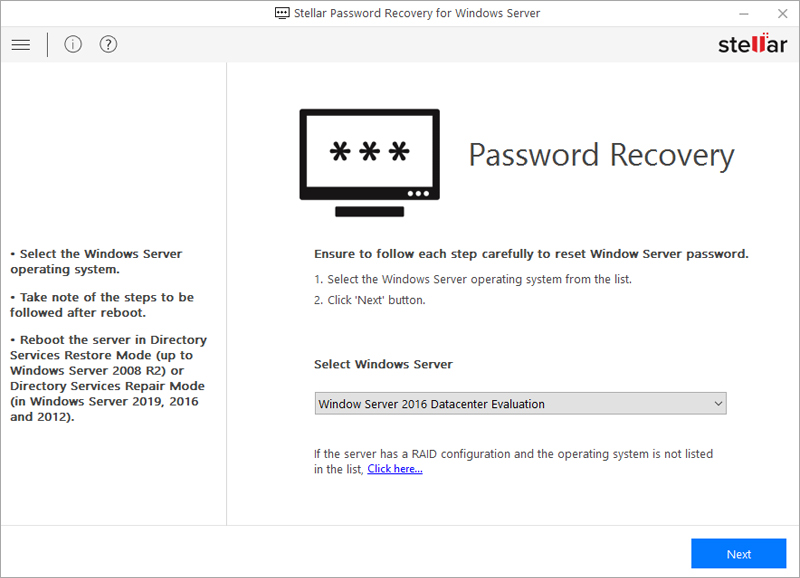
The first screen after booting from Stellar's disk: pick the Windows Server installation (here Windows Server 2016 Datacenter Evaluation) and click Next. The link under the list loads a RAID card driver.
Features
Resets domain administrator passwords
Stellar Password Recovery for Windows Server can reset the password of a domain administrator on a server working as a domain controller, the case that local-account tricks don't cover. The reset runs inside Directory Services Restore or Repair Mode, so Windows itself makes the change.
Works on RAID servers
Stellar Password Recovery for Windows Server lists the Windows Server installations it finds. When a RAID volume doesn't appear, a link on the main screen loads the RAID card driver from a CD, DVD or USB drive, and the server then shows up in the list.
Boots in BIOS or UEFI mode
Stellar Password Recovery for Windows Server starts from CD, DVD or USB on older BIOS servers and on UEFI machines. The manual walks through the boot-order changes for both.
Follows the server's password policy
Stellar Password Recovery for Windows Server asks for a new password rather than blanking the old one, and the new password must meet the server's policy (by default 7 to 16 characters with an upper-case letter, a lower-case letter, a digit and a special character). A Password matched note confirms the two entries agree.
Saves the steps for you
Stellar Password Recovery for Windows Server shows the full list of reboot-and-reset steps before restarting and can save them as a text file on a USB drive. That helps, because the second half happens after the boot disk is removed.
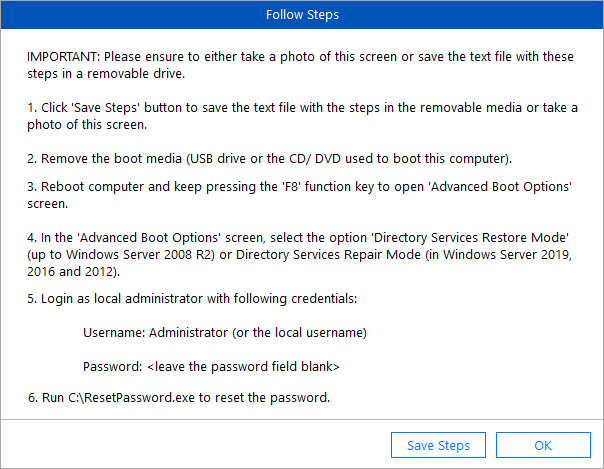
The Follow Steps screen lists what to do after the reboot: Directory Services Restore or Repair Mode, sign in as Administrator with no password, then run C:\ResetPassword.exe.
Benefits
- No rebuild. The server, its roles and Active Directory stay as they were.
- No setup disk needed. The free setup-disk method needs the Windows Server installation media; Stellar's boot disk replaces it.
- One tool for old and new servers. The same ISO covers Server 2000 up to Server 2022.
- Guided screens. Each stage tells you what comes next, which matters at 2 a.m. in a server room.
Real-World Uses
- Small office, one server. The IT contractor who set up the domain controller has left and nobody has the Administrator password.
- Inherited hardware. A second-hand or decommissioned server needs to be opened up to check or retrieve its data.
- Lab and test servers. An evaluation install whose admin password was never written down.
- Repair shops and MSPs. A customer's standalone server is locked and you need back in without wiping it.
Who It's For, and Who Should Skip It
Stellar Password Recovery for Windows Server suits small businesses, MSPs and IT technicians locked out of a Windows Server, especially a single domain controller where no other admin account works and the system drive isn't encrypted.
Skip it if another working domain controller and admin account exist (reset the password in Active Directory for free), if the server's system drive is BitLocker-encrypted and the recovery key is gone, or if the server is a cloud VM: Azure and AWS have their own console tools for resetting the admin password, and you can't boot a cloud VM from a USB stick. For desktop Windows 11 or 10 PCs, Stellar's cheaper Password Recovery for Windows is the right product.
Usage Guide
- Buy the license and download the ISO image from the link in Stellar's email on a working computer.
- Burn the ISO to a CD or DVD, or write it to a USB drive with an ISO tool.
- Set the server to boot from that drive in BIOS or UEFI settings (often F2 or Delete at power-on), then boot from it.
- Pick the Windows Server installation from the Select Windows Server list. If a RAID volume is missing, click the link under the list and load the RAID card driver.
- Click Next, save or photograph the steps, tick I have saved the steps for resetting password and click Reboot. Remove the boot disk.
- At restart, press F8 for Advanced Boot Options and choose Directory Services Restore Mode (Server 2008 and older) or Directory Services Repair Mode (Server 2012 to 2022).
- At the sign-in screen choose Switch User / Other user, enter Administrator with no password, and run
C:\ResetPassword.exe. - Enter the user name, type the new password twice, click Reboot, and sign in normally with the new password.
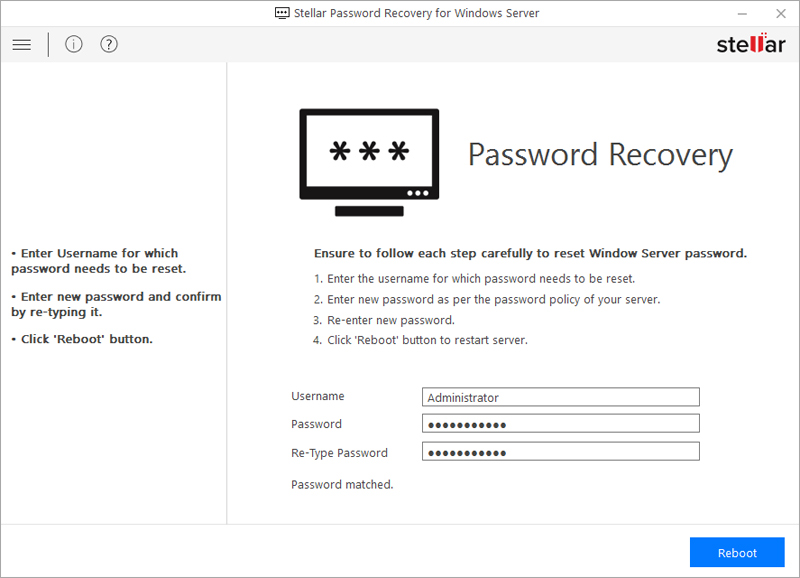
The reset program inside Directory Services Repair Mode: enter the user name, the new password and its confirmation, then click Reboot.
Where it falls short
- No trial. You find out whether the server boots from the disk only after you've paid, and Stellar's refund policy excludes purchases made without first using an evaluation version.
- Several manual steps. The reset spans two boots and the F8 boot menu, which can be hard to reach on fast UEFI servers.
- Encrypted drives. BitLocker on the system drive blocks the tool without the recovery key.
- Version list lags. Stellar's pages list up to Windows Server 2022; Server 2025 isn't mentioned.
- Yearly price for an occasional job. $199 a year is steep if you need it once, and there's no lifetime license for this product.
What Users Say
Independent reviews of Stellar Password Recovery for Windows Server are scarce: it's a niche tool that people buy once, in an emergency. There are no user reviews of it on AlternativeTo, Capterra or G2.
Windows Report
Tashreef Shareef's roundup of Windows Server password reset tools on Windows Report lists Stellar Password Recovery for Windows Server among its picks and notes that "it supports Legacy BIOS as well as UEFI", along with Windows Server 2019 to 2000 support, a "Simple user interface" and multi-language support. It's a feature summary, not a hands-on test.
Trustpilot (Stellar as a company)
Stellar scores 4.8 out of 5 from 5,609 reviews across all its products (November 18, 2026), with 89% five-star and 4% one-star reviews. John Backer wrote that a Stellar recovery tool "is a game changer for me as I could lose many years of memories and data," while Nick wrote "Do not purchase. Software is terrible and customer service worse." None of these reviews names the server password tool.
Recurring themes
Across Stellar's products, buyers praise the guided screens and the support team, and the complaints come from cases the software couldn't handle. For this tool, rule out the known blockers first: an encrypted system drive, or a server that can't boot from external media.
Comparisons
Stellar Password Recovery for Windows Server vs the free setup-disk method
The usual free route uses the Windows Server installation media and the command line to get an admin prompt, which is free if you have the disk and are comfortable with it. Stellar's tool replaces the setup disk with its own boot disk, walks you through each step, and adds RAID driver loading.
Server edition vs Stellar Password Recovery for Windows
Stellar Password Recovery for Windows ($49) is for desktop Windows 11, 10, 8.1, 8 and 7 local accounts. The Server edition handles Windows Server versions, domain controllers and RAID, and costs $199 a year.
Editions and Pricing
| License | Price at checkout | Term | Covers |
|---|
| Windows Server (Technician) | $199 | 1 year | Windows Server 2022 to 2000, domain controllers and RAID servers |
Price checked on the order page on November 18, 2026. Stellar's own buy page shows the same $199 against a struck-through $299 and lists 24x5 technical support.
FAQs
Can Stellar Password Recovery for Windows Server reset a domain controller password?
Yes. Stellar Password Recovery for Windows Server resets the domain administrator password on a server acting as a domain controller. The reset runs after a reboot into Directory Services Restore Mode or Repair Mode.
Does Stellar Password Recovery for Windows Server work on Windows Server 2025?
Stellar's pages and manual list Windows Server 2022, 2019, 2016, 2012, 2008, 2003 and 2000. Server 2025 isn't listed, so treat it as unsupported.
Do I install Stellar Password Recovery for Windows Server on the server?
No. Stellar Password Recovery for Windows Server can't be installed on a locked server. You make a bootable CD, DVD or USB drive from its ISO image on another computer and start the server from it.
What password can I set with Stellar Password Recovery for Windows Server?
Stellar Password Recovery for Windows Server sets the new password you type, and it must meet the server's password policy. With the default policy that's 7 to 16 characters including an upper-case letter, a lower-case letter, a digit and a special character.
Will Stellar Password Recovery for Windows Server work on a BitLocker-encrypted server?
Not without the BitLocker recovery key. Stellar Password Recovery for Windows Server has to write a file to the system drive, and an encrypted drive is closed to any boot disk.
Can I get a refund for Stellar Password Recovery for Windows Server?
Stellar's refund policy gives 30 days on a first purchase when the product can't do its job and support can't fix it, but it excludes purchases made without first using an evaluation version, purchases from other stores and special-offer prices. Read it before ordering.
What happens when the one-year license ends?
Stellar Password Recovery for Windows Server is sold as a 1-year subscription that renews unless you turn renewal off. A password reset is usually a one-time job, so many buyers won't need the renewal.
System Requirements
- A Windows Server 2022, 2019, 2016, 2012, 2008, 2003 or 2000 machine that can boot from CD, DVD or USB in BIOS or UEFI mode
- Intel-compatible x64 processor, 4 GB RAM minimum (8 GB recommended)
- 250 MB of disk space
- A working Windows computer, a blank CD/DVD or USB drive, and the RAID card driver if the server uses RAID
Conclusion
Stellar Password Recovery for Windows Server is worth $199 when a Windows Server, and especially a lone domain controller, has no working admin login and its system drive isn't encrypted. The one reason to buy it: it turns a setup-disk-and-command-line recovery into guided screens, and it handles domain controllers and RAID servers.
The main reason not to: there's no trial and the license is yearly, for a job you'll likely do once. If you have the Windows Server media and know your way around the command line, the free setup-disk method gets you to the same place.
Buy Now