Stellar Data Recovery for Android: Get Deleted Photos, Messages and WhatsApp Chats Back From Your Phone
Stellar Data Recovery for Android is a Windows program that recovers deleted photos, videos, messages, contacts, call history and WhatsApp data from an Android phone's internal memory, without rooting it. At checkout it's $29.99 for a lifetime license covering 3 devices. It's for anyone who deleted something by mistake, lost data after a reset or update, or has a phone with a broken screen that still turns on.
Android's Recently Deleted folder only keeps files for a while, and once it's emptied the phone offers no way back. Deleted data often stays in the phone's memory until new files overwrite it. This program connects to the phone over USB, scans that memory, and lets you preview and save what it finds to your PC.
Quick facts
- Version: 5.0.0.1, released August 2026
- Developer: Stellar, a data recovery company founded in 1993
- Runs on: 64-bit Windows 11, 10 and 8.1 (no Mac version)
- Phones: Android 6 to Android 17, including Samsung, Xiaomi, OPPO, Vivo and OnePlus; no root needed
- Recovers: photos, videos, audio, documents, messages, contacts, call history, WhatsApp chats and media, WhatsApp Business media, and WhatsApp data from Google Drive
- Price: $29.99 at checkout, a lifetime license for 3 devices; a 5-device license is $39.99 a year
- Free version: scans, previews and saves up to 10 photos or videos of up to 10 MB each
- What we checked: the installer (version 5.0.0.1, 391 MB, signed by Stellar Information Technology Private Limited) downloaded from the vendor, and checkout prices of $29.99 for the lifetime 3-device license and $39.99 a year for 5 devices on November 17, 2026. We didn't run a recovery on a phone ourselves.
Before you buy
Stop using the phone as soon as you notice the loss: every new photo, app update or message can overwrite what you want back. Then run the free version. It scans and previews, and saves up to 10 photos or videos, which shows whether your files are recoverable before you pay. Stellar's refund policy gives 30 days on a first purchase, but not if you skipped the trial.
You need a Windows PC, a working USB cable and USB debugging turned on, and the phone must power on and stay unlocked. WhatsApp chat recovery doesn't work on Android 15 and 16 (media still does).
Download Free TrialBuy 3-Device LifetimeBuy 5-Device License
Overview
The program walks you through four steps. First you pick where to recover from: Android Phone, WhatsApp, WA Business or Google Drive. Then you choose the data types, connect the phone, and click Scan. The results appear by category (Photos, Videos, Audio, Contacts, Messages, Call History, Documents) with thumbnails and previews, and a Deleted view that shows only what was removed.
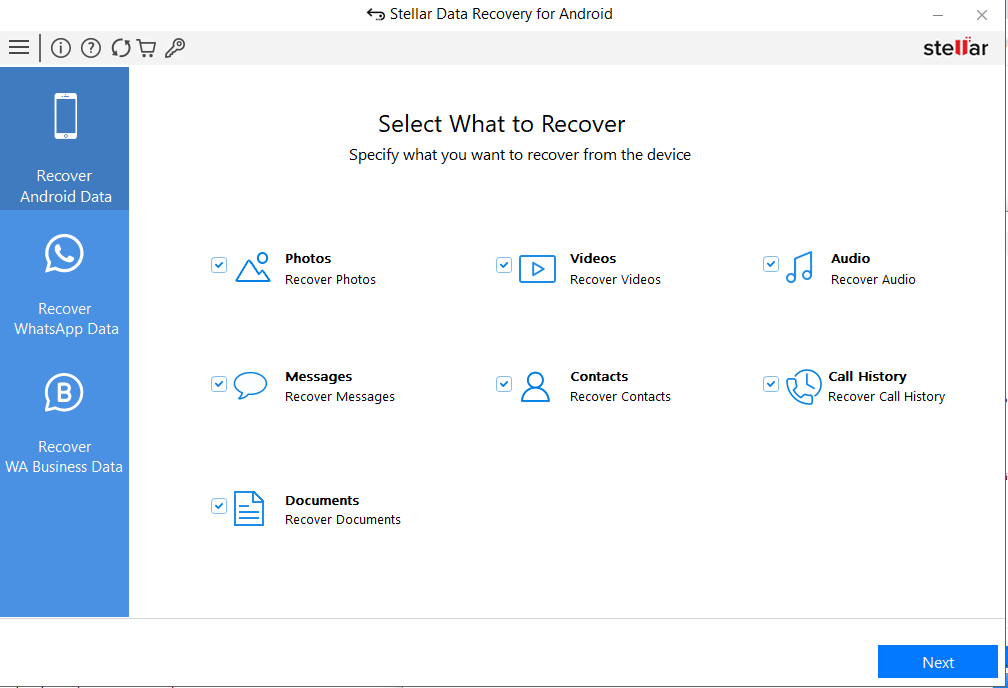
Step 1: choose the source. The phone itself, WhatsApp, WhatsApp Business, or a WhatsApp backup in Google Drive.
Features
Recovers deleted photos, videos and audio
Stellar Data Recovery for Android scans the phone's internal memory for photos, videos and audio deleted from the Gallery or file manager, including files already gone from the Recently Deleted folder, as long as they haven't been overwritten.
Messages, contacts and call history
Stellar Data Recovery for Android recovers text messages, contacts and call logs without root, previews them before saving, and saves contacts as a CSV file you can import elsewhere.
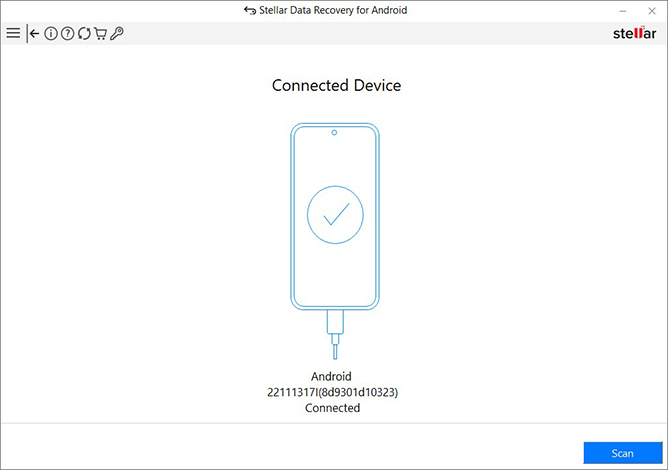
Step 3: the connected phone is detected, and Scan lists the data on the device.
WhatsApp, WhatsApp Business and Google Drive
Stellar Data Recovery for Android recovers WhatsApp chats, photos, videos, audio, documents and stickers, deleted or not, and the media and stickers of WhatsApp Business. It can also pull WhatsApp data from a Google Drive backup. On Android 15 and 16, WhatsApp chats (from the phone or Google Drive) are not recoverable.
Works on phones with a broken screen
Stellar Data Recovery for Android can scan a phone with a cracked or unresponsive screen, as long as it powers on, is unlocked and is detected by the PC with USB debugging already enabled.
Preview and pick what to save
Stellar Data Recovery for Android shows thumbnails of photos and videos and previews messages, contacts, call history and documents. Tick only what you need and save it to a folder on your PC.
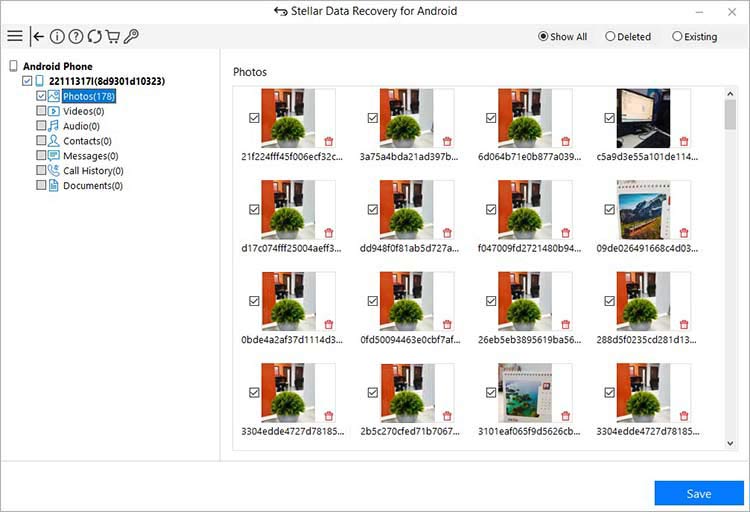
Scan results: categories with counts on the left, thumbnails on the right, then Save.
Benefits
- No rooting. Your phone's warranty and security settings stay as they are.
- Nothing installed on the phone. The program runs on the PC, so it doesn't write data to the phone that could overwrite what you're trying to recover.
- A lifetime license at checkout. $29.99 once, for up to 3 phones.
- Try before you buy. The free version recovers a few photos so you can see it work.
Real-World Uses
- A cleared gallery. You emptied Recently Deleted to free space and lost a month of photos. Scan for Photos and save the ones that come back.
- A deleted WhatsApp conversation. Recover the chat and its attachments from the phone, or from your Google Drive backup.
- Contacts gone after a reset or sync mistake. Recover them and save a CSV to import again.
- A dropped phone with a black screen. If it still powers on and USB debugging was on, the PC can reach its data.
- A small business on WhatsApp Business. Customer photos and documents sent through it can be recovered.
Who It's For, and Who Should Skip It
It suits Android users with a Windows PC who lost photos, messages or WhatsApp data, and families who want one license for up to three phones.
Skip it if:
- You only have a Mac. The program is Windows only.
- The phone won't power on. It needs a working phone that the PC can detect; a dead phone needs a repair lab.
- You need WhatsApp chats on Android 15 or 16. Chat recovery isn't supported there.
- Your photos are in Google Photos. Check its Trash first: items stay there for 30 days, or 60 for backed-up items, and restoring them is free.
- You have an iPhone. Stellar sells a separate iPhone recovery program.
Usage Guide
- Install Stellar Data Recovery for Android on a 64-bit Windows PC.
- Turn on USB debugging on the phone (Developer options) and connect it with a good USB cable. Choose File Transfer/MTP if asked, and tick "Always allow from this computer".
- Choose the source: Android Phone, WhatsApp, WA Business or Google Drive, then the data types you want.
- Scan. Keep the phone unlocked. Phones on Android 7 to 9, and all Samsung phones, restart during the scan; that's expected.
- Preview. Browse the categories, or switch to the Deleted view to see only removed items.
- Activate and save. Enter your activation key, tick the items and click Save to store them on your PC.
Where it falls short
- WhatsApp chats on Android 15 and 16. Not recoverable, from the phone or from Google Drive; media still is.
- Overwritten data is gone. The longer the phone was used after the loss, the less comes back.
- Scans take time. Large phones and big video libraries mean long scans.
- Setup can be fiddly. USB debugging, drivers and the "Allow" prompt must all be right before the phone is detected.
- Locked apps get in the way. A locked WhatsApp Business app can't be scanned until the lock is removed.
What Users Say
Techweez (July 2025)
Naftary Thitu highlighted the no-root approach: "Stellar lets you scan and recover lost files without rooting." He also noted it can help when "your phone is broken or the screen is unresponsive but still powers on." His two cons were platform and speed: "The tool requires a Windows PC to run, meaning macOS users and Linux users are out of luck," and "the scanning process can take some time".
Trustpilot (Stellar as a company)
Stellar scores 4.8 out of 5 on Trustpilot from about 5,600 reviews across all its products (November 17, 2026), with 4% one-star reviews. Not every Android recovery succeeds: in November 2026 Geetha Jawalkar gave one star because "the team was not helpful in recovering my deleted photos and videos", and Stellar's reply named this program. Others praise the support staff, such as Diego De La Vega, who wrote that an agent "stuck with me until I had gotten them fully answered."
The recurring themes: no root, easy steps and good support; the complaints are about files that had already been overwritten and about slow scans. Use the free version first to see what your phone still holds.
Comparisons
Stellar Data Recovery for Android vs phone recovery apps
Recovery apps installed on the phone write data to the same memory you're trying to recover from, and many need root to reach deleted files. This program runs on the PC and needs neither.
Stellar Data Recovery for Android vs Google Photos Trash and backups
If your photos were backed up, Google Photos Trash or a WhatsApp Google Drive backup restore is free and quicker. This program is for what those don't have: unbacked-up files, messages, call logs and chats.
Editions and Pricing
| License | Price at checkout | Covers | Buy |
|---|
| Standard, 3 devices | $29.99, lifetime | Up to 3 Android devices | Buy 3-Device |
| Standard, 5 devices | $39.99 a year | Up to 5 Android devices | Buy 5-Device |
Prices checked on November 17, 2026. Stellar's own store sells the 3-device license at $29.99 for one year. Both licenses have the same features; they differ only in device count and term.
FAQs
Do I need to root my phone to use Stellar Data Recovery for Android?
No. Stellar Data Recovery for Android recovers data without root. You only need USB debugging turned on so the PC can talk to the phone.
Can Stellar Data Recovery for Android recover WhatsApp chats on Android 15 or 16?
No. Stellar Data Recovery for Android can't recover WhatsApp chats on Android 15 and 16, from the phone or from a Google Drive backup. WhatsApp photos, videos, audio, documents and stickers are still recoverable.
Does Stellar Data Recovery for Android work with Samsung phones?
Yes. Stellar Data Recovery for Android supports Samsung and other brands on Android 6 to 17. Samsung phones restart during the scan, which is normal.
Is there a Mac version of Stellar Data Recovery for Android?
No. Stellar Data Recovery for Android runs only on 64-bit Windows 11, 10 and 8.1.
What can I recover with the free version of Stellar Data Recovery for Android?
The free version of Stellar Data Recovery for Android scans and previews everything, and saves up to 10 photos or videos of up to 10 MB each. Contacts, messages, documents and WhatsApp data need a license.
Can Stellar Data Recovery for Android recover data from a phone that won't turn on?
No. Stellar Data Recovery for Android needs the phone to power on and be detected by the PC. A broken screen is fine; a dead phone isn't.
System Requirements
- 64-bit Windows 11, 10 or 8.1
- Intel-compatible x64 processor
- 4 GB RAM minimum, 8 GB recommended
- 250 MB of free disk space, plus room for recovered files
- An Android 6 to 17 phone or tablet with USB debugging enabled, and a USB cable
Conclusion
Stellar Data Recovery for Android is worth $29.99 if you lost photos, messages or WhatsApp media that weren't backed up and you have a Windows PC. The one reason to buy it: a lifetime license for three phones at checkout, with a free version that proves it can see your files first.
The main reason not to: it can't bring back what's been overwritten, it can't do WhatsApp chats on Android 15 and 16, and Mac owners can't use it. Stop using the phone, run the free scan, and buy only if the preview shows what you're missing.
Download Free TrialBuy 3-Device LifetimeBuy 5-Device License