Stellar Repair for MS SQL: Rebuild a Corrupt SQL Server Database from the MDF
Stellar Repair for MS SQL is a Windows tool that repairs corrupt SQL Server database files (MDF and NDF) and saves the recovered tables, indexes, views, procedures and even deleted records to a new or live database. It costs $349 for a lifetime license on the order page, it's aimed at DBAs and IT staff with a database stuck in suspect or recovery pending state, and the free trial runs the full repair and shows every recoverable object before you pay.
When DBCC CHECKDB reports errors and there's no clean backup, Microsoft's last resort is REPAIR_ALLOW_DATA_LOSS, which does exactly what its name says. Stellar's tool works on a copy of the MDF instead, without needing the log file, and you see the repaired rows in a preview before anything is written.
Quick facts
- Version: 11.0.0.3, released October 2026
- Developer: Stellar Data Recovery (formerly sold as Stellar Phoenix SQL Database Repair)
- Runs on: 64-bit Windows 11, 10, 8.1 and 8, and Windows Server 2022, 2019, 2016 and 2012
- Databases: SQL Server 2025, 2022, 2019, 2017, 2016, 2014 and earlier
- Saves to: a new database, the live database, or CSV, HTML, XLS and SQL script files
- Price: $349, lifetime license
- Free trial: scans, repairs and previews everything; saving needs a license
- Refund: 30 days from the first purchase, with conditions
- What we checked: the trial installer (8.7 MB, file version 11.0.0.3, dated October 21, 2026), the trial limits and editions on Stellar's product page, Stellar's refund policy, and the $349 lifetime price on the order page on November 11, 2026. We didn't repair a database ourselves; results come from the reviewers and users quoted.
Before you buy
- This is the database repair tool, not the backup tool. Restoring from a corrupt .BAK file and resetting SA passwords are Technician and Toolkit features. If your backup is what's broken, see Stellar Toolkit for MS SQL.
- It needs a strong PC. Stellar asks for 16 GB of RAM minimum and recommends 32 GB.
- Trust the preview, but check row counts. One Trustpilot buyer said the trial suggested recovery was feasible and the result disappointed. Compare tables and counts carefully before you pay, since Stellar refunds only on its conditions.
Download Free Trial Buy Now
Overview
The program is three steps: select the MDF, repair it, then preview and save. The left pane lists the repaired database as a tree of tables, views, procedures, functions, triggers and other objects; click a table and its rows appear on the right, so you can check real data rather than a count. A log pane along the bottom records every step, which is useful when you have to explain the incident later.
It's also a way out of the common error states: a database marked SUSPECT, one stuck in Recovery Pending, error 5172 from a damaged file header, and consistency errors that DBCC CHECKDB can't fix without data loss.
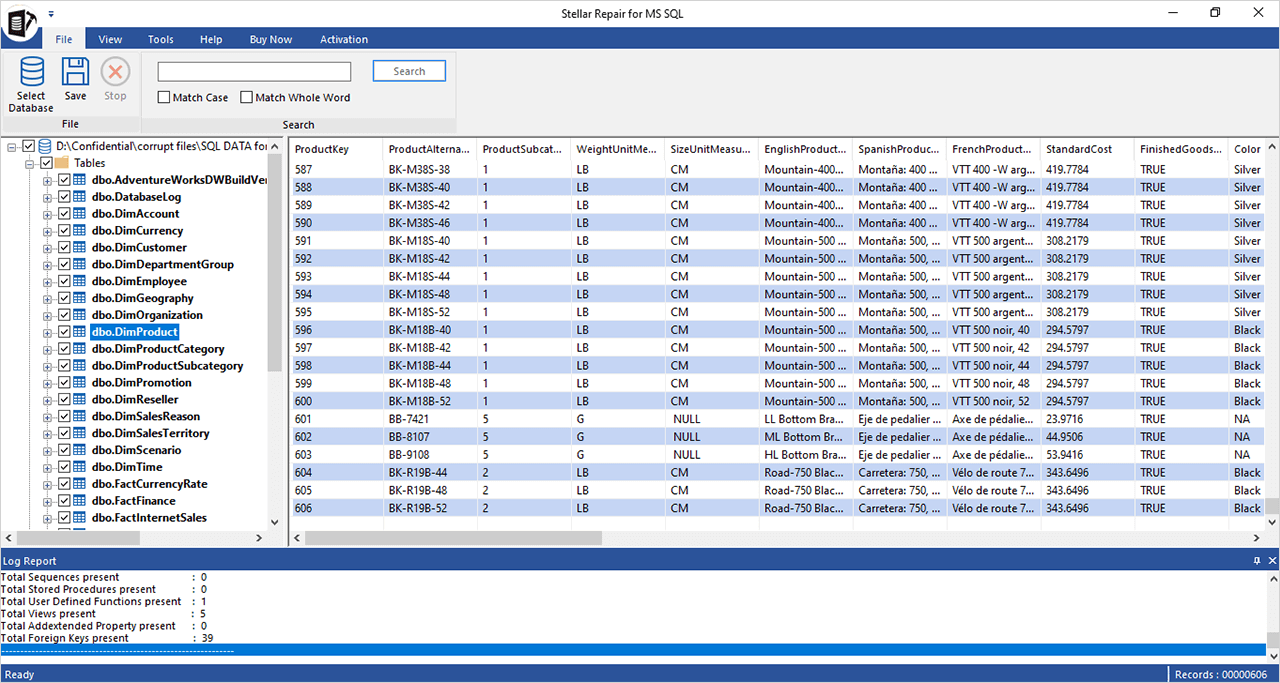
After the repair: the database's tables on the left and the selected table's rows on the right, with the log report below.
Features
Repairs MDF and NDF files without the log
Stellar Repair for MS SQL repairs primary and secondary data files and rebuilds tables, indexes, keys, views, stored procedures, triggers and rules. If the LDF is missing or damaged, it repairs from the MDF alone. Use Find to list every MDF and NDF on a drive, then pick the primary file to repair.
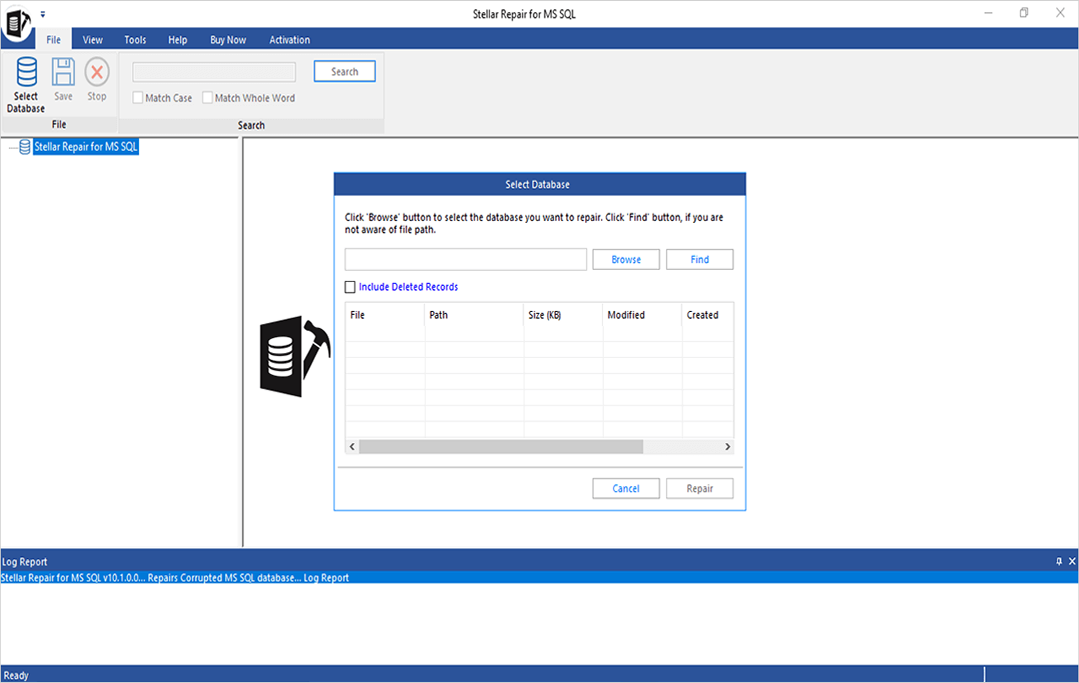
Choosing the database: browse to the MDF or search for it, and tick Include Deleted Records to bring back deleted rows.
Brings back deleted records
Stellar Repair for MS SQL has an Include Deleted Records option that recovers deleted rows it can still find and saves them as a separate table next to the original, so you can compare the two and check referential integrity before merging anything.
Standard and Advanced scans
Stellar Repair for MS SQL recommends the Standard Scan for most damage and the slower Advanced Scan when data seems to be missing after a standard pass. Parallel processing uses all the CPU cores, and Stellar claims up to eight times faster repairs on multicore machines.
Save to a new or live database, or to files
Stellar Repair for MS SQL saves the repaired data into a new database, straight into the live database, or out to CSV, HTML, XLS or a SQL script. It connects with Windows or SQL Server authentication. Fast Saving writes the data first and the indexes after, which Stellar recommends for large databases; Standard Saving writes both together. You can tick only the tables you need.
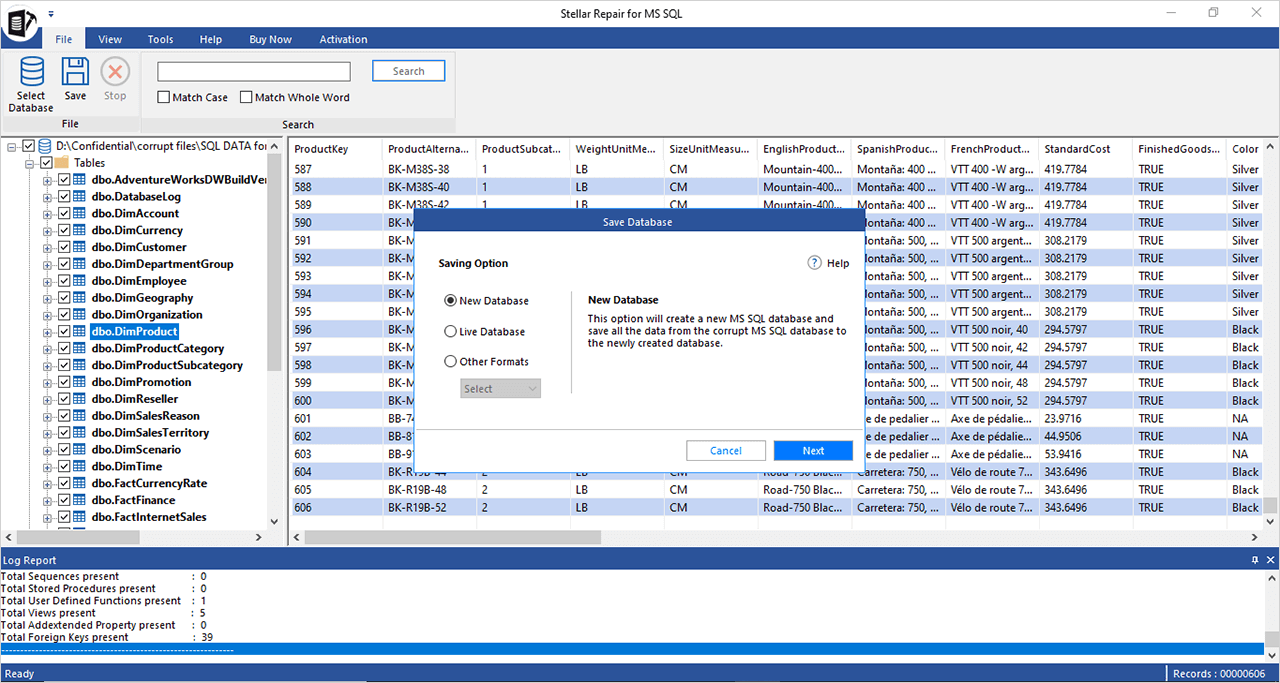
The save options: a new database, the live database, or other formats.
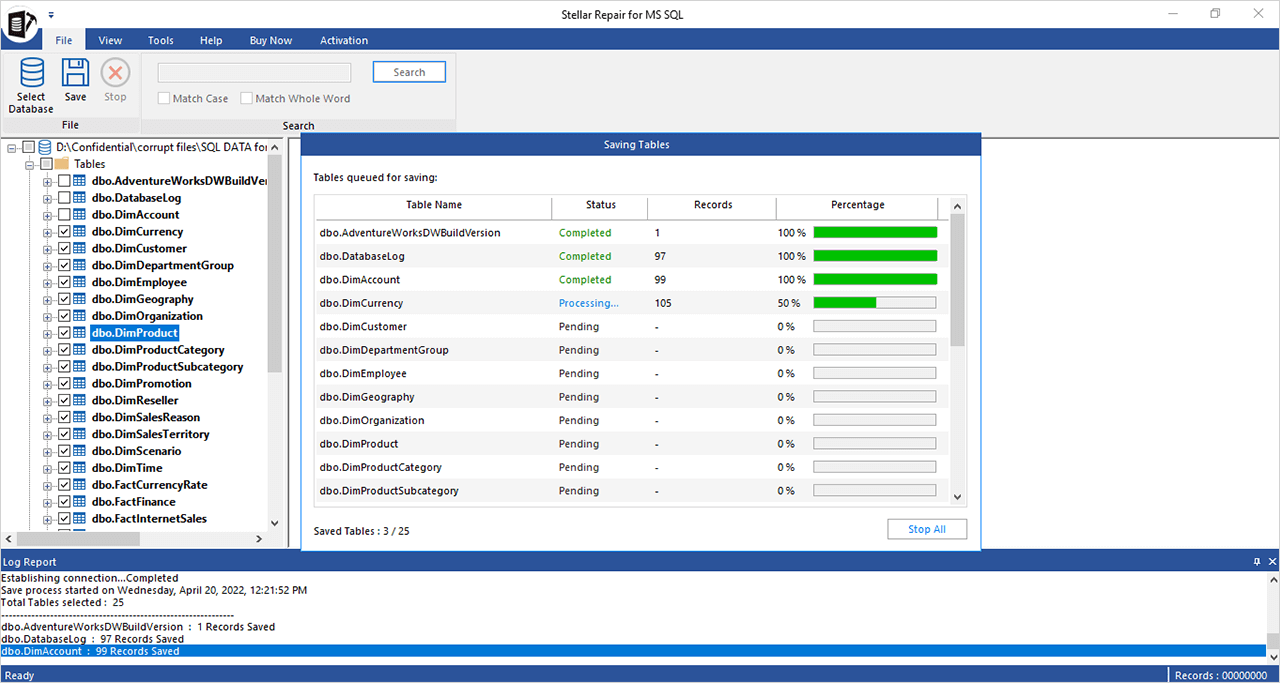
Saving: each table shows Completed, Processing or Pending, with its record count.
Linux databases too
Stellar Repair for MS SQL repairs database files from SQL Server on Linux. Stellar lists Ubuntu 16.04, 18.04 and 19.10, CentOS 7 and Red Hat Enterprise Linux 7 (all 64-bit) as sources; the program itself runs on Windows.
Benefits
The difference from DBCC CHECKDB's repair options is control. REPAIR_ALLOW_DATA_LOSS deallocates whatever it can't fix and tells you afterwards. Here, you see the recovered rows table by table first, and the original MDF is left alone. If the result isn't good enough, you've lost nothing but time.
The lifetime license is the other benefit. Stellar's own store now sells this product as a yearly subscription, so a one-off $349 that never renews is the cheaper way to keep it on the shelf for the next incident.
Real-World Uses
- A database marked SUSPECT after a disk failure: copy the MDF off the bad volume, repair it, and save to a new database on a healthy server.
- Ransomware hit the SQL host: Stellar's case studies describe repairing databases after a Mallox attack, though how much comes back depends on what the ransomware touched.
- Someone ran a DELETE without a WHERE: repair with Include Deleted Records and pull the lost rows from the side table.
- A small business's accounting or ERP database won't attach: the free trial shows within one run whether the data is there before anyone pays a consultant.
Who It's For, and Who Should Skip It
It's for DBAs, IT generalists and consultants who look after SQL Server and want a repair tool ready for the day backups fail. The DIY interface also suits an IT person who isn't a SQL specialist.
Skip it if you have a recent, tested backup: a restore is faster and complete. Skip this edition if the backup file itself is corrupt or you've lost the SA password, because those need Technician or the Toolkit. If you need to see who changed or deleted what, that's Stellar Log Analyzer for MS SQL. And on Azure SQL Database or another managed service you don't have an MDF to repair at all.
Usage Guide
- Stop the SQL Server service or take the database offline, then copy the MDF (and NDF files) to the repair PC. Work on the copy.
- Install the trial on a 64-bit Windows machine with at least 16 GB of RAM and launch Stellar Repair for MS SQL.
- In Select Database, browse to the MDF or use Find. Tick Include Deleted Records if you need them, then click Repair.
- Choose Standard Scan. If tables look incomplete afterwards, run Advanced Scan.
- Click through the tables in the tree and check rows and counts against what you expect.
- Buy and activate the license, click Save, choose New Database, Live Database or Other Formats, enter the server and authentication, pick Fast Saving for a large database and click Next.
- Run DBCC CHECKDB on the new database before you point applications at it.
Where it falls short
- Some databases are beyond it. Stellar itself offers a repair service for cases where "the tool may not perform the intended task due to severe damage to the database." Several Trustpilot reviewers say it couldn't fully fix their corruption.
- Preview versus result. A few buyers say what they got after paying didn't match the preview. Check the specific tables you care about, not just the tree.
- One file at a time. Find lists all primary and secondary files, but you repair one database's primary file per run.
- Hardware hungry. The 16 GB RAM minimum rules out many admin laptops.
What Users Say
Ratings are high, and the criticism is about databases it couldn't fully recover. Trustpilot's product page for Stellar Repair for MS SQL showed 4.9 out of 5 from 294 reviews when we looked (read through a summarizer, since Trustpilot blocks direct downloads). G2 showed 4.7 out of 5 from four reviews, and Capterra 4.5 from two.
Trustpilot: recovered
Miller (November 2, 2026, 5 stars): "The software successfully rebuilt our database and recovered our valuable data."
Bowe (August 6, 2026, 5 stars): "Using Steller Repair, I was able to recover corrupt customer databases on two occasions."
Döring (August 21, 2026, 4 stars): "The software has been useful in datbase repair previously. good support!"
Kyle (March 28, 2025, 5 stars): "Deepak was incredibly helpful in figuring out my next steps in getting our SQL server up and running again."
Paolo P. (May 27, 2021, 5 stars): "We are facing to process a lot of databases (~80) so it is important to have a perfectly running tool."
Trustpilot: not fully recovered
Georgios (December 1, 2025, updated January 20, 2026, 3 stars): "I purchased Stellar Repair for MS SQL based on the evaluation/preview, which indicated that recovery was feasible."
Ian McNeilage (February 20, 2019, 5 stars): "The software was unfortunately not able to completely fix my SQL corruption on this occasion".
Alejandro Gustavo Kainer (January 18, 2023, 5 stars): "trying to recover a SQL Server file, which I finally couldn't, I suppose because it was defective from the very beginning".
Laurent Masse (June 19, 2021, 1 star), about Stellar's backup and SQL tools: "With Stellar Backup and sql recovery, what you see in preview is not what you get."
SQLServerCentral and MVPs
SQLServerCentral (Nelson Aloor, January 5, 2021) walked through an older version and concluded that it "provides that enterprise-level SQL Server database repair solution that saves tremendous hours of administrative work of recovering a corrupt database." He found the install "very easy and user friendly" and singled out the Include Deleted Records option and the log report.
Steve Mann, quoted on Stellar's page, put the caveat well: a third-party tool "takes the headaches of restoring backups and logs out of the mix. While there is always a chance of lost data or incomplete records."
The themes: people like the preview, the simple three-step flow, and quick help from support. The complaints come from badly damaged files where the paid result fell short of the hope. Note that two reviewers gave five stars even when the repair didn't fully work, because support was good, so read the text, not just the stars.
Comparisons
Stellar Repair for MS SQL vs DBCC CHECKDB REPAIR_ALLOW_DATA_LOSS
DBCC is free and built in, and it's the right first step after a restore isn't possible. But it modifies the database and discards what it can't fix. Stellar works on a copy, shows recovered rows first, and can recover deleted records, which DBCC never does.
Repair for MS SQL vs Stellar Toolkit for MS SQL
The Toolkit adds .BAK backup extraction, SA and user password reset, transaction log analysis and a database format converter. If you only ever expect corrupt MDF files, this product is enough.
Editions and Pricing
| Edition | Price | License | What it covers |
|---|
| Stellar Repair for MS SQL (this listing) | $349 | Lifetime | MDF and NDF repair, deleted records, save to database or files |
| Corporate on Stellar's site | $299 | 1 year | The same database repair |
| Technician on Stellar's site | $399 | 1 year | Adds corrupt .BAK restore and SA/user password reset |
| Toolkit for MS SQL | $549 at checkout | 1 year | Adds log analysis and database conversion |
Prices checked on November 11, 2026. All editions repair unlimited databases, according to Stellar's FAQ.
FAQs
Can Stellar Repair for MS SQL fix a database in Recovery Pending state?
Stellar Repair for MS SQL repairs databases stuck in Recovery Pending or marked SUSPECT, by repairing the MDF and saving a clean copy to a new or live database.
Does Stellar Repair for MS SQL work with SQL Server 2025?
Stellar Repair for MS SQL supports databases from SQL Server 2025, 2022, 2019, 2017, 2016 and 2014, and earlier versions, and can save the repaired database into SQL Server 2025.
Is there a database size limit in Stellar Repair for MS SQL?
Stellar Repair for MS SQL has no stated file size limit. Stellar's case studies include a 200 GB database. Large files need the Fast Saving mode and plenty of RAM and disk.
How many databases can I repair with one Stellar Repair for MS SQL license?
Stellar Repair for MS SQL repairs unlimited databases in every edition, according to Stellar. The license is for a single system.
Does Stellar Repair for MS SQL need the LDF log file?
Stellar Repair for MS SQL can repair a database when the LDF is missing or corrupt, working from the MDF alone.
Why is the lifetime license different from Stellar's own store?
Stellar Repair for MS SQL is sold as a lifetime license at checkout here, while Stellar's own buy page now lists one-year Corporate and Technician licenses. Both are the same repair program; the lifetime license simply never needs renewing.
Can I run Stellar Repair for MS SQL in a virtual machine?
Stellar Repair for MS SQL supports VMware vSphere, ESX/ESXi, Workstation Pro, Hyper-V and VirtualBox, as long as the VM meets the 64-bit and memory requirements.
System Requirements
- 64-bit Windows 11, 10, 8.1 or 8, or Windows Server 2022, 2019, 2016 or 2012
- Intel-compatible x64 processor
- 16 GB of RAM minimum, 32 GB recommended
- 250 MB for installation, plus space for the repaired database
- A reachable SQL Server instance to save to a new or live database
Conclusion
Stellar Repair for MS SQL is worth $349 if you run SQL Server and want something better than REPAIR_ALLOW_DATA_LOSS for the day your backups let you down, and the lifetime license makes it a sensible thing to own before you need it. The one reason to buy it is that the free trial does the whole repair, so you see your actual rows before paying. The main reason not to is a corrupt backup or lost password: this edition doesn't cover those, and the Toolkit does.
Download Free Trial Buy Now