Short answer
If a SQL Server database is corrupt and you have no clean backup, Stellar Repair for MS SQL is the best all-round pick: its free trial runs the whole repair and shows your actual rows before you pay, it recovers deleted records, and the order page sells it as a $349 lifetime license. Choose Stellar Toolkit for MS SQL ($549 a year) if the backup file is damaged too or you've lost the SA password. Kernel for SQL Database Recovery is the budget pick at $259 and covers up to 10 systems, and DataNumen SQL Recovery ($499.95) is the specialist for databases inside damaged virtual machine disks, with a demo that writes a real recovered database you can inspect.
Before buying any of them, try the free route below: a restore and DBCC CHECKDB fix many cases.
At a glance: four SQL Server repair tools
| Stellar Repair for MS SQL | Stellar Toolkit for MS SQL | Kernel for SQL Database Recovery | DataNumen SQL Recovery |
|---|
| Price at checkout | $349, lifetime | $549, one year | $259, Corporate (2 years of updates) | $499.95, one user, one-time |
| Current version | 11.0.0.3 (October 2026) | 11.0.0.3 (October 2026) | 26.0 (September 2026) | 7.3 (February 2025) |
| SQL Server versions | 2025 and earlier | 2025 and earlier | 2000 to 2025 | 2005 to 2022 |
| What the free trial does | Full repair and preview; saving needs a license | Repair and preview; saving needs a license | Scan and preview; saving needs a license | Full recovery into a new database, with demo text in some fields |
| Works without the LDF | ✓ | ✓ | ✓ | ✓ |
| Deleted records | ✓ | ✓ | ✓ | ✓ |
| Corrupt .BAK backups | ✗ | ✓ | ✗ (sold as a bundle) | ✗ |
| SA password reset | ✗ | ✓ | ✗ | ✗ |
| Needs a SQL Server instance | Only to save into a database | Only to save into a database | Only to save to a server | ✓ always (writes straight to an instance) |
| Minimum memory | 16 GB (32 GB recommended) | 16 GB (32 GB recommended) | 8 GB | 32 MB (2 GB recommended) |
| Windows | 64-bit Windows 11, 10, 8.1, 8; Server 2012 to 2022 | 64-bit Windows 11, 10, 8.1, 8; Server 2012 to 2022 | Windows 11, 10 and earlier; Server 2022 and earlier | 32-bit or 64-bit Windows |
How we picked
- We included only repair tools listed on this site that are still sold and updated, support current SQL Server versions, and read the MDF directly. We left out an older tool whose latest version supports only SQL Server 2019 and Windows 10.
- We checked each price on the order page in US dollars, and Stellar's and KernelApps' own store prices for comparison.
- We checked each trial installer's version and date, and what each trial lets you do without paying.
- We gathered reviews from Trustpilot, G2, SQLServerCentral, Softpedia and the vendors' pages.
What we checked: order page prices on November 18, 2026: Stellar Repair for MS SQL $349 (lifetime), Stellar Toolkit for MS SQL $549 (one year), Kernel for SQL Database Recovery $259 (Corporate License) and DataNumen SQL Recovery $499.95; trial installers Stellar 11.0.0.3 (dated October 21, 2026), Kernel 26.0 (September 16, 2026) and DataNumen 7.3 (February 19, 2025). We compared features, prices and trials; we didn't repair a damaged database with any of them, so recovery results come from the vendors, reviewers and users quoted.
Try this first: the free route
A recovery tool is the last step, not the first. SQL Server comes with two free options, and both should be tried on a copy before you buy anything:
- Restore from backup. A recent, tested full backup plus log backups beats every tool in this list: it's complete and it's supported. Check that the backup itself restores before relying on it.
- Run DBCC CHECKDB. It reports the damage, and its
REPAIR_REBUILD option fixes some errors (mostly in indexes) without losing data. The last resort, REPAIR_ALLOW_DATA_LOSS, makes the database consistent by throwing away whatever it can't fix, and it tells you what was lost only afterwards.
The tools below are for the cases those can't handle: the database won't attach at all, it's stuck in SUSPECT or Recovery Pending, the header is damaged, the backup is missing or corrupt, or REPAIR_ALLOW_DATA_LOSS would discard rows you need. All four read the MDF file directly and leave the original alone, and all four let you see what's recoverable before you pay.
1. Stellar Repair for MS SQL: best overall
- Price: $349 lifetime license at checkout (Stellar's own store sells one-year licenses: Corporate $299, Technician $399)
- Runs on: 64-bit Windows 11, 10, 8.1, 8 and Windows Server 2012 to 2022; 16 GB of RAM minimum
- Best for: a suspect or corrupt database with no clean backup, when you want to see the recovered rows before paying
Stellar Repair for MS SQL works in three steps: select the MDF, repair it, preview and save. After the repair, the left pane shows the database as a tree of tables, views, procedures, functions and triggers, and clicking a table shows its rows, so you check real data rather than a count. The trial does all of this; only saving needs a license. It repairs primary and secondary files (MDF and NDF) without the LDF, has a Standard and a slower Advanced scan, and its Include Deleted Records option saves recovered deleted rows as a separate table so you can compare before merging. It saves to a new database, the live database, or CSV, HTML, XLS and SQL script files, and it also repairs database files from SQL Server on Linux.
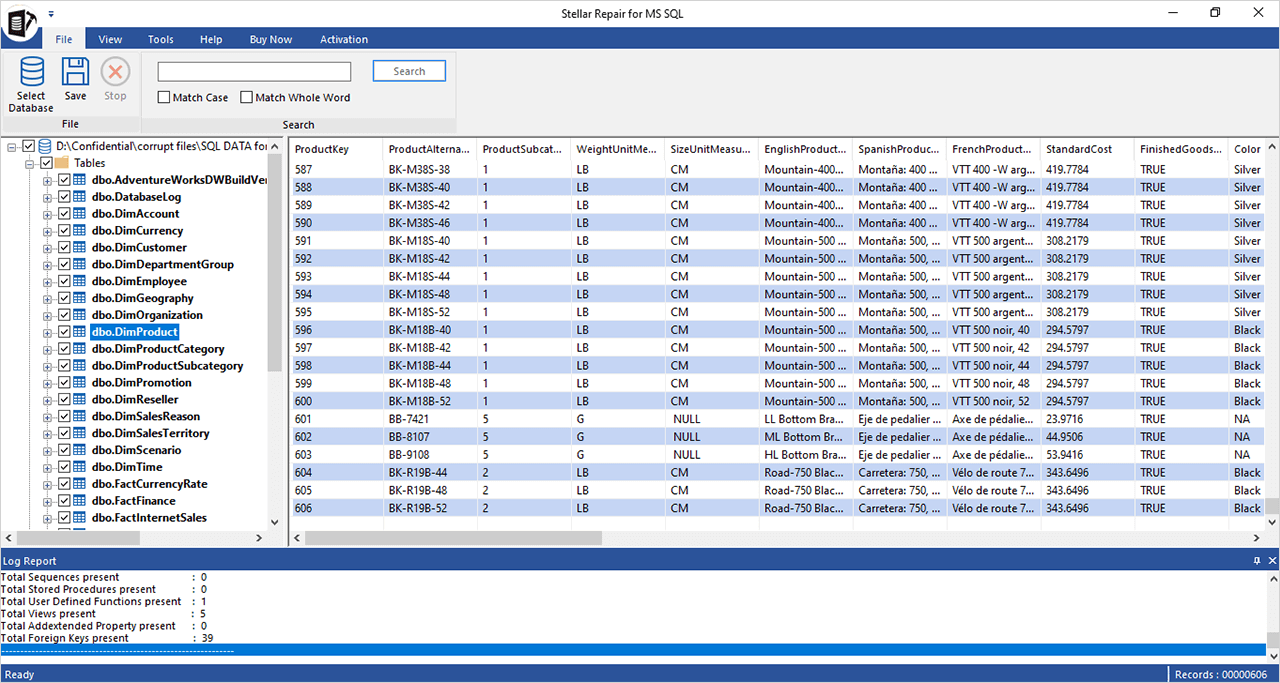
Stellar Repair for MS SQL after a repair: the tables of an AdventureWorks data warehouse on the left, the rows of dbo.DimProduct on the right, and the log report counting views and foreign keys below.
The lifetime license is the reason it leads this list. Stellar's own store now sells the same repair program as a one-year subscription, so a one-off $349 that never renews is a sensible thing to keep on the shelf for the next incident. The drawback is hardware: Stellar asks for 16 GB of RAM and recommends 32 GB, which rules out many admin laptops.
What we like
- Free trial runs the complete repair and shows every recoverable row
- Lifetime license at checkout, unlimited databases
- Recovers deleted records into a side table
- Supports SQL Server 2025 databases and Linux database files
Watch out for
- 16 GB of RAM minimum
- No corrupt .BAK extraction or password reset in this edition
- Some buyers say the paid result fell short of the preview on badly damaged files
- Refunds only on Stellar's conditions
What users say
Trustpilot's page for Stellar Repair for MS SQL showed 4.9 out of 5 from 294 reviews (read through a summarizer, since Trustpilot blocks direct downloads); G2 showed 4.7 out of 5 from four reviews.
Miller (Trustpilot, November 2, 2026, 5 stars): "The software successfully rebuilt our database and recovered our valuable data."
Bowe (Trustpilot, August 6, 2026, 5 stars): "Using Steller Repair, I was able to recover corrupt customer databases on two occasions."
Georgios (Trustpilot, December 1, 2025, 3 stars): "I purchased Stellar Repair for MS SQL based on the evaluation/preview, which indicated that recovery was feasible."
SQLServerCentral (Nelson Aloor, January 5, 2021) reviewed an older version and concluded that it "provides that enterprise-level SQL Server database repair solution that saves tremendous hours of administrative work of recovering a corrupt database."
Download Stellar Repair for MS SQL TrialBuy Stellar Repair for MS SQL
2. Stellar Toolkit for MS SQL: when the backup is broken too
- Price: $549 for one year at checkout ($499 a year on Stellar's own store on November 18, 2026)
- Runs on: the same 64-bit Windows versions and 16 GB of RAM as Stellar Repair
- Best for: DBAs who want every common SQL Server rescue covered: MDF repair, corrupt .BAK files, log analysis, lost passwords
Stellar Toolkit for MS SQL bundles five programs behind one launcher: the same Stellar Repair for MS SQL, a Backup Extractor that repairs damaged .BAK files and pulls the database out of full, differential and transaction log backups, a Log Analyzer that lists the inserts, updates, deletes and DDL operations in an LDF, a Password Recovery tool that resets a lost SA or user password from master.mdf, and a Converter for Database between SQL Server, MySQL, Access, SQLite and SQL Anywhere.
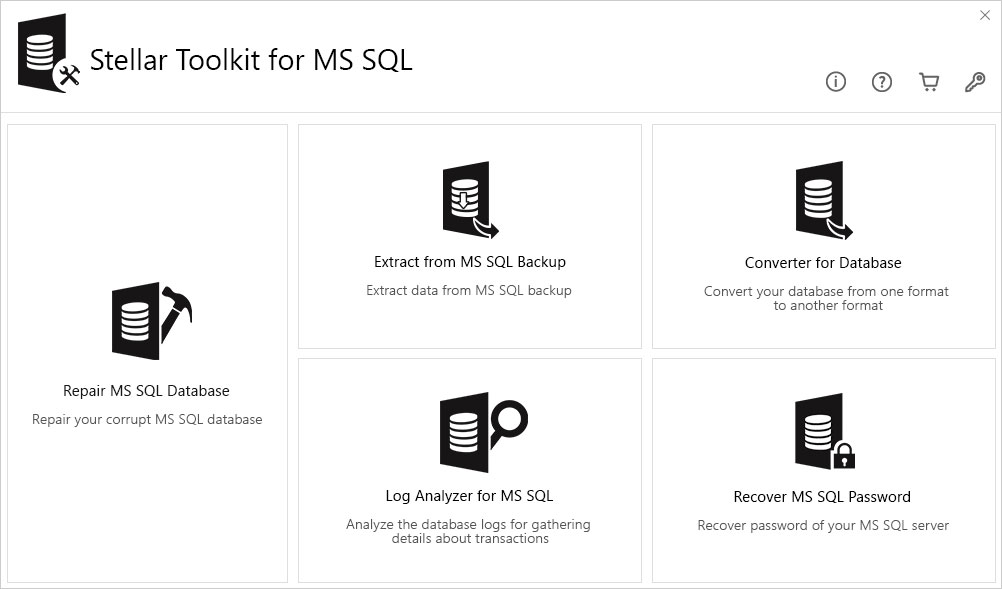
The Stellar Toolkit for MS SQL launcher: Repair MS SQL Database, Extract from MS SQL Backup, Converter for Database, Log Analyzer for MS SQL and Recover MS SQL Password.
SQL Server failures often come in pairs: the database goes suspect, then the latest backup turns out to be damaged as well. That's the case for the toolkit. If you only ever expect a corrupt MDF, Stellar Repair alone is $200 cheaper and never renews. Note the price gap too: the order page here charges $549 a year, while Stellar's own buy page listed the toolkit at $499 a year when we checked.
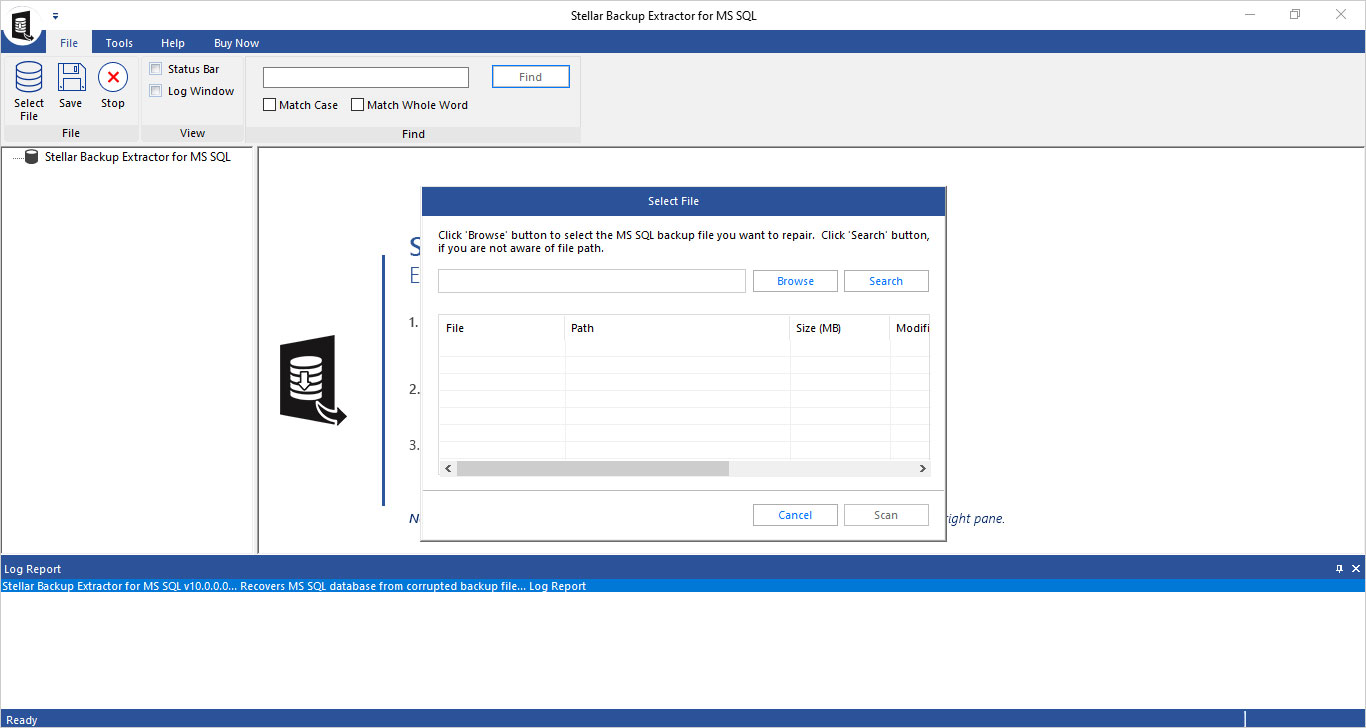
The toolkit's Backup Extractor: browse to the damaged .BAK file, or search the drive for it, then scan.
What we like
- Covers corrupt backups, lost SA passwords and transaction log forensics as well as MDF repair
- Same repair engine and preview as Stellar Repair
- Backup extraction from full, differential and log backups
Watch out for
- Yearly license, $200 more than Stellar Repair's lifetime license
- Cheaper on Stellar's own store than at this checkout
- Same 16 GB RAM requirement
- Password tool lists SQL Server 2022 and older
What users say
SQLServerCentral (Nelson Aloor, January 5, 2021): "The entire suite called the Toolkit opens up all the amazing features of SQL Server password reset and SQL database backup recovery."
Laurent Masse (Trustpilot, June 19, 2021, 1 star): "With Stellar Backup and sql recovery, what you see in preview is not what you get."
Download Stellar Toolkit for MS SQL TrialBuy Stellar Toolkit for MS SQL
3. Kernel for SQL Database Recovery: best on a budget
- Price: $259 for the Corporate License at checkout: 2 years of validity and updates, up to 10 systems in one organization
- Runs on: Windows 11, 10 and earlier, Windows Server 2022 and earlier; 8 GB of RAM and 5 GB of disk
- Best for: one organization with several SQL Servers, a smaller budget, or very old databases (SQL Server 2000 onwards)
Kernel for SQL Database Recovery from KernelApps scans an MDF (plus any NDF files) with a Standard or Advanced scan, detects the SQL Server version and collation, and shows the recovered tables, views, triggers, procedures and keys in a preview grid. It needs no running SQL Server to scan, so a detached file on a workstation is enough. It saves to a live SQL Server, to SQL script files you can run on any instance later, or to CSV, and it can recover deleted records and dropped or truncated tables if the data hasn't been overwritten.
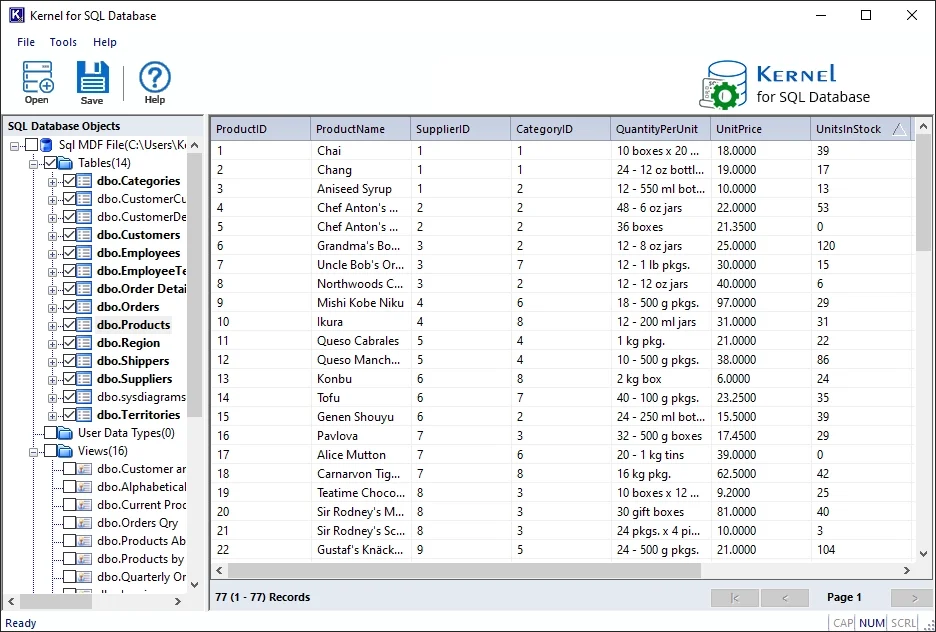
Kernel for SQL Database after a scan: 14 tables and 16 views on the left, the Products table's 77 records on the right.
It's the cheapest tool here and the license is the most generous for a single organization: 10 systems and 2 years of updates for $259. Consultants serving other companies need the Technician License ($399, 25 systems, 5 years). The weak spot is evidence: KernelApps shows 4.9 out of 5 from 508 reviews collected on its own site, but the only independent review we found, on Softpedia, rated it 3.0 out of 5.
What we like
- $259 covers up to 10 systems for 2 years
- Scans without SQL Server; saves to a server, SQL scripts or CSV
- Widest version range: SQL Server 2000 to 2025
- Lower hardware needs than Stellar
Watch out for
- Demo previews only, so you can't check the saved output before paying
- Very little independent review coverage
- CSV output carries rows only, not keys or triggers
What users say
Mike Willey, AU (KernelApps' site): "After failing to fix header corruption in my MDF file with DBCC CHECKDB, I tried the Kernel for SQL Database Recovery tool. This tool easily scanned the SQL file and allowed me to save the tables in my original live SQL Server database."
Softpedia's reviewer, Catalin Chelariu, rated it 3.0 out of 5 (seen through a search summary): the program does its job quite well, but at the time didn't support the newest SQL Server releases. The current version lists SQL Server 2025.
Download Kernel for SQL Database Recovery TrialBuy Kernel for SQL Database Recovery
4. DataNumen SQL Recovery: best for databases inside damaged disk images
- Price: $499.95 for one user, one-time, at checkout; lower per-license prices for 2 or more
- Runs on: 32-bit or 64-bit Windows; needs a SQL Server instance, local or on the network, to write the recovered database to
- Best for: large, multi-file or virtual-machine databases, and buyers who want to inspect a real recovered database before paying
DataNumen SQL Recovery doesn't attach your damaged database. It reads the MDF and NDF files page by page in six stages and writes everything it finds into a brand-new database on the SQL Server you connect to: schemas, records in every data type, indexes, keys, views, triggers, procedures and functions, with encrypted objects decrypted. It works without the LDF, with an MDF alone when NDF files are missing, and it can read SQL Server data straight out of VMware VMDK, Virtual PC VHD, Acronis TIB, Norton Ghost, NTBackup BKF and ISO image files.

The DataNumen SQL Recovery 7.3 demo: MDF and NDF file selection, the source format, the output file and the six-stage progress bar with its log.
The demo is the most honest test in this list: it runs the same recovery engine and creates a real database you can open in Management Studio, only with demo text inserted into some fields. The costs are time and space. DataNumen's rule is at least 2 x (source size x 110%) of free disk for the output, customers on its own page mention runs of several days with no pause and resume, and free upgrades last one month. The 7.3 release dates from February 2025 and lists SQL Server 2005 to 2022 files, so check the demo against a SQL Server 2025 database before buying.
What we like
- Demo writes a real recovered database you can query
- Reads MDF data from VMDK, VHD, Acronis and other image files
- Rebuilds programmable objects and decrypts encrypted ones
- Batch recovery for several database files
Watch out for
- Needs a working SQL Server instance and a login that can create databases
- Slow on big databases, with no pause and resume
- Version 7.3 is from February 2025; SQL Server 2025 isn't listed
- No independent user reviews; the ratings are DataNumen's own
What users say
DataNumen's product page shows 4.90 out of 5 from 1,646 votes, its own count; SourceForge and Slashdot list the product with no ratings. Some of the testimonials it publishes are frank about the downsides.
Jude Elwes, United Kingdom, April 2019: "We have a huge SQL database file which is about 700GB. Yesterday it cannot be opened any more. With this piece of software, we are able to retrieve most of the data back!"
Hwan Moon, South Korea, June 2021: "The main disadvantages are its high price and slow recovery speed. Anyway, as long as it can recover the important data, these drawbacks are acceptable."
Download DataNumen SQL Recovery TrialBuy DataNumen SQL Recovery
Price compared
Price at checkout for one license (USD)
Kernel for SQL Database Recovery (Corporate, 2 years of updates)$259
Stellar Repair for MS SQL (lifetime)$349
DataNumen SQL Recovery (one-time, 1 month of upgrades)$499.95
Stellar Toolkit for MS SQL (one year)$549
Order page prices checked on November 18, 2026.
Minimum memory the vendor asks for (GB)
DataNumen SQL Recovery (2 GB recommended)32 MB
Kernel for SQL Database Recovery8 GB
Stellar Repair for MS SQL (32 GB recommended)16 GB
Stellar Toolkit for MS SQL (32 GB recommended)16 GB
From each vendor's system requirements. DataNumen's minimum is 32 MB.
Which should you choose?
Who should skip all four: anyone with a recent backup that restores cleanly (restore it), anyone whose DBCC CHECKDB ... REPAIR_REBUILD run fixes the errors, and anyone on Azure SQL Database or another managed service, where there's no MDF file to hand to a tool. Skip the Toolkit if a corrupt MDF is the only failure you plan for, and skip DataNumen if you can't get a SQL Server login that creates databases.
What commonly goes wrong
- Working on the original file. Stop the SQL Server service or take the database offline, copy the MDF, NDF and LDF files somewhere safe, and point every tool and every
DBCC repair at the copy.
- Running REPAIR_ALLOW_DATA_LOSS first. It changes the database for good. If you run a tool afterwards, it sees the already-trimmed file.
- Trusting the tree, not the rows. Several Stellar buyers say the result didn't match what they hoped from the preview. In any trial, open the tables you care about and compare row counts with what you expect.
- Running out of disk or memory. DataNumen asks for free disk space of about 2.2 times the database size for the output; Stellar wants 16 GB of RAM. Plan the repair machine before you start a long run.
- Expecting deleted rows that were overwritten. Every tool here recovers deleted records only while their pages haven't been reused, so stop writing to the database as soon as you notice the loss.
- Skipping the check afterwards. Run
DBCC CHECKDB on the recovered database, and rebuild any index that failed because recovered rows broke a unique constraint, before applications use it.
FAQs
What is the best software to repair a corrupt SQL Server MDF file?
Stellar Repair for MS SQL is our pick for most people: the free trial repairs the MDF and shows every recoverable table and row, it recovers deleted records, and the order page sells it as a $349 lifetime license. Kernel for SQL Database Recovery ($259) is the cheaper alternative, and DataNumen SQL Recovery ($499.95) suits databases inside damaged VM disk images.
Can I repair a SQL Server database for free?
Sometimes. Restoring a good backup is free and complete, and DBCC CHECKDB with REPAIR_REBUILD fixes some errors without data loss. REPAIR_ALLOW_DATA_LOSS is free too, but it deletes whatever it can't fix. The trials of Stellar Repair for MS SQL, Kernel for SQL Database Recovery and DataNumen SQL Recovery show what's recoverable for free, but saving full data needs a license.
How do I fix a SQL Server database stuck in Recovery Pending or Suspect?
First copy the MDF and LDF files, then check the SQL Server error log for the cause and try a backup restore. If the database file itself is damaged and there's no usable backup, Stellar Repair for MS SQL, Kernel for SQL Database Recovery and DataNumen SQL Recovery all read the MDF directly and rebuild the data into a new database.
Can these tools recover a SQL Server database without the LDF log file?
Yes. Stellar Repair for MS SQL, Stellar Toolkit for MS SQL, Kernel for SQL Database Recovery and DataNumen SQL Recovery all work from the MDF (and any NDF files) without the transaction log.
Which SQL repair tool can recover data from a corrupt .BAK backup file?
Stellar Toolkit for MS SQL. Its Backup Extractor repairs damaged .BAK files and extracts the database from full, differential and transaction log backups. Kernel sells a separate SQL Backup Recovery tool in a $569 bundle with Kernel for SQL Database Recovery.
Do these SQL Server repair tools support SQL Server 2025?
Stellar Repair for MS SQL, Stellar Toolkit for MS SQL and Kernel for SQL Database Recovery list SQL Server 2025. DataNumen SQL Recovery 7.3 lists SQL Server 2005 to 2022, so run its demo on your file first.
Can I recover deleted rows from a SQL Server table?
Often, if the space hasn't been reused. Stellar Repair for MS SQL, Kernel for SQL Database Recovery and DataNumen SQL Recovery each have an option to include deleted records. To see who deleted what and when, the Log Analyzer in Stellar Toolkit for MS SQL reads the transaction log.
Is a lifetime license better than a yearly one for a repair tool?
For a tool you hope to use rarely, usually yes. Stellar Repair for MS SQL is sold as a $349 lifetime license at checkout, while Stellar's own store sells the same program for one year at a time. Kernel's $259 Corporate License includes 2 years of updates, and DataNumen's one-time $499.95 includes one month of free upgrades.