Kernel for SQL Database Recovery: Rescue Tables From a Corrupt MDF File
Kernel for SQL Database Recovery is a $259 Windows tool from KernelApps that recovers tables, views, triggers, stored procedures and keys from corrupt, suspect or inaccessible SQL Server MDF and NDF files. It's for database administrators facing a database DBCC CHECKDB can't repair, with no usable backup.
The free demo scans your actual MDF and shows every recoverable object, so you find out what can be saved before paying. It needs no running SQL Server to do that.
Quick facts
- Version: 26.0, updated September 2026
- Developer: KernelApps Pvt. Ltd. (Kernel Data Recovery)
- Platform: Windows 11, 10 and earlier, Windows Server 2022, 2019, 2016 and earlier
- Works with: SQL Server 2025, 2022, 2019, 2017, 2016, 2014, 2012, 2008 R2, 2008, 2005 and 2000 databases
- Price: $259 for the Corporate License on the order page
- Demo: scans the database and previews recoverable objects
- Guarantee: money-back guarantee listed on the vendor's buy page
What we checked: installer file version 26.0 (14.9 MB, digitally signed by KernelApps Private Limited), and the order page, which showed $259 for the Corporate License, on November 9, 2026. We didn't repair a damaged database ourselves, so recovery results here are the vendor's and its customers' claims.
Download Free TrialBuy Now
Overview
When SQL Server marks a database SUSPECT, reports error 5171 or 824, or refuses to attach an MDF, the first move is a backup restore and then DBCC CHECKDB. When there's no backup and CHECKDB fails or wants to deallocate data, you need something that reads the file itself.
Kernel for SQL Database Recovery does that. You point it at the MDF, along with any secondary NDF files, choose a scan mode and let it build a list of objects. You check the tables in the preview, then write what you want to a live SQL Server, to SQL scripts or to CSV. It needs neither a .bak file nor the LDF log.
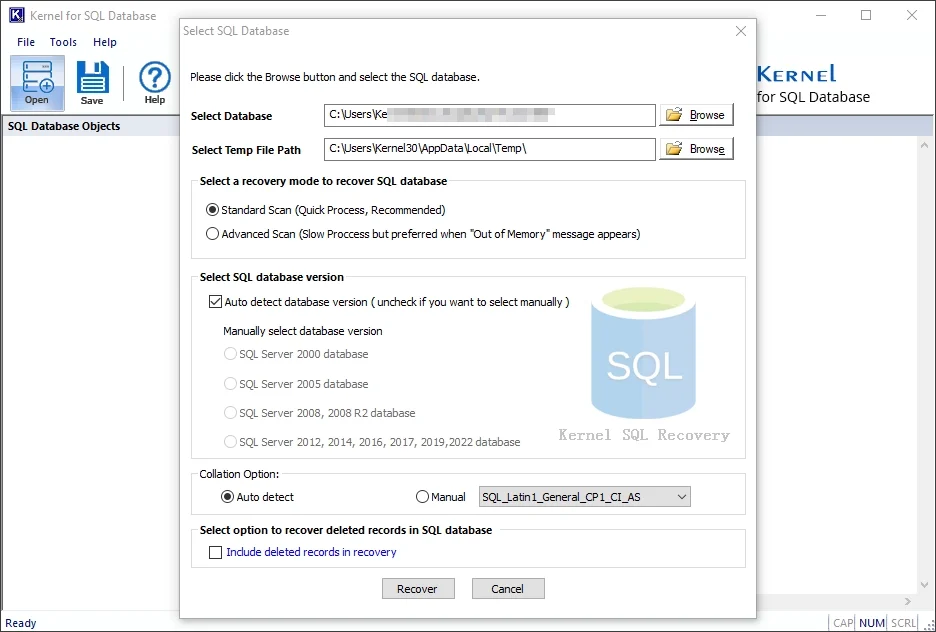
Selecting the database: Standard or Advanced scan, automatic or manual version detection, collation, and the option to include deleted records.
Features
Two scan modes for different damage
Kernel for SQL Database Recovery offers Standard Scan for minor corruption and Advanced Scan for severe damage, which the program's own dialog also recommends when an Out of Memory message appears. It handles MDF header corruption and page-level errors, and detects the SQL Server version and collation automatically, with manual settings when that fails.
Recovers every kind of database object
Kernel for SQL Database Recovery restores tables, views, triggers, rules, functions, stored procedures, indexes, defaults, checks and primary and foreign keys. It also recovers BLOB columns holding documents and images, and keeps Unicode text intact.
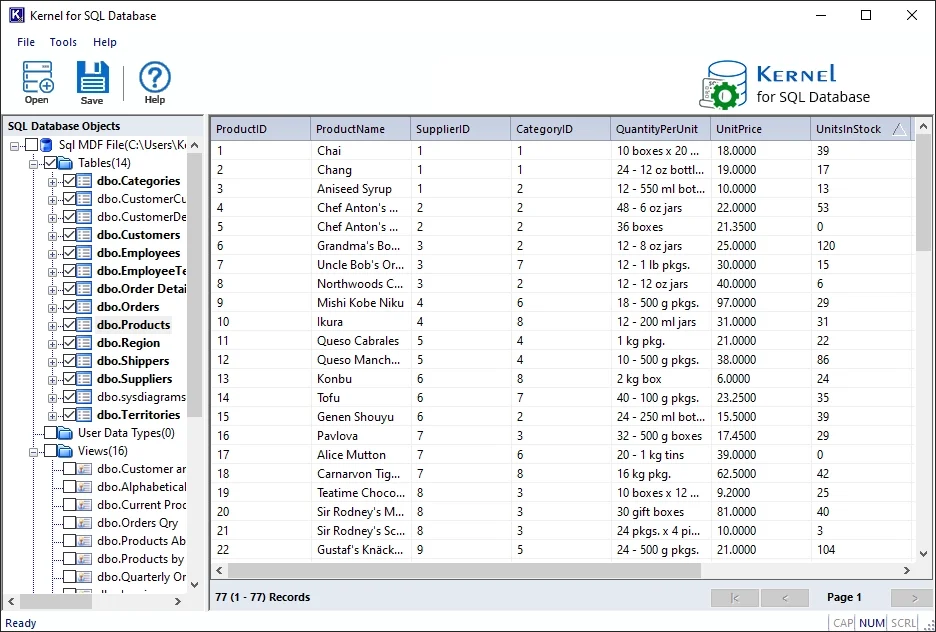
The preview after a scan, with database objects on the left and a table's rows on the right. The grid shows up to 1,000 records per page.
Finds deleted records and dropped tables
Kernel for SQL Database Recovery has a separate option to include deleted records, and can recover dropped or truncated tables. The vendor's own caveat is that this depends on the data not having been overwritten, so stop writing to the database as soon as you notice the loss.
Saves to a server, a script or CSV
Kernel for SQL Database Recovery writes to a new or existing database on a live SQL Server, or to SQL script files you can run on any instance later. It can also export selected tables to CSV, though CSV output carries only rows and columns, not keys, indexes or triggers.
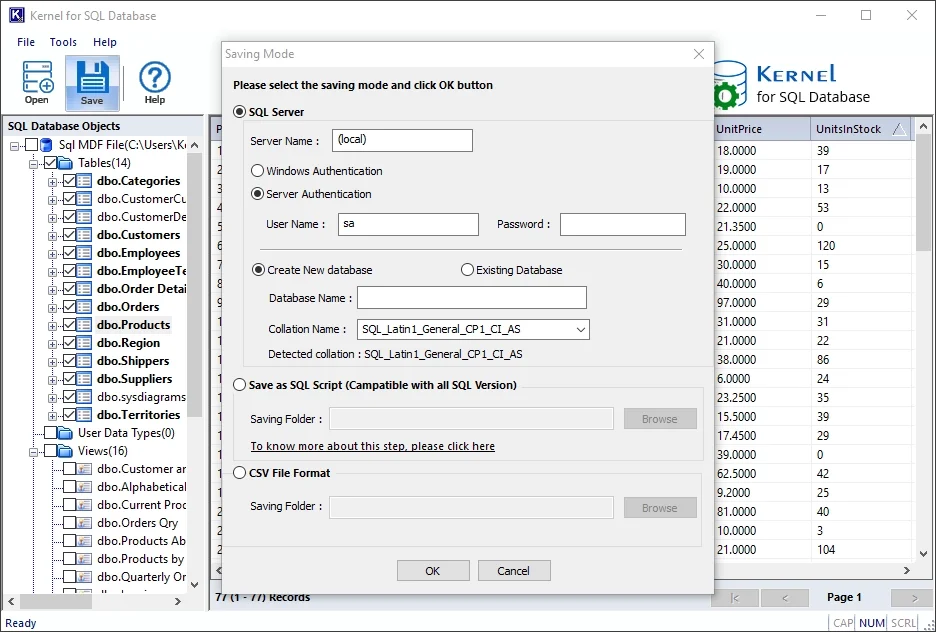
The three saving modes: a live SQL Server, a SQL script or CSV.
Benefits
- You see the outcome first. The demo's preview shows which tables are readable.
- No server needed to scan. A detached MDF on a workstation is enough.
- Partial recovery is possible. If you only need the orders table, you can save only that.
Real-World Uses
- A suspect database: SQL Server has marked it SUSPECT and it won't come online.
- A failed attach: an MDF moved during a power failure no longer attaches.
- A CHECKDB dead end: repair options would lose too much data.
- An accidental delete: a table was truncated or dropped with no recent backup.
- A detached old file: pull one table's history out of an archived MDF.
Who It's For, and Who Should Skip It
Buy it if you have a corrupt database, no good backup, and the demo shows your tables. Compared with re-keying a line-of-business database, $259 is cheap.
Skip it if a recent backup restores cleanly, because that's always faster and safer. If DBCC CHECKDB can repair the database without data loss, use that. Consultants serving several clients need the Technician license. Cloud Azure SQL databases aren't files you can hand to this tool.
Usage Guide
- Copy the MDF and NDF files and work on the copies.
- Install the free demo, ideally on a machine with 8 GB of RAM and 5 GB of free disk space.
- Click Open, browse to the MDF, and add any NDF files.
- Pick Standard or Advanced scan, and tick the deleted-records option if you need it.
- Click Recover, then review the tables and objects in the preview.
- Buy a license and activate it through Help > Activate product.
- Select the objects, click Save and choose SQL Server, SQL Script or CSV.
Before you buy
- Use the demo on the real file. It previews the recoverable objects, which is what you're paying for.
- Check the machine. The vendor asks for 8 GB of RAM and 5 GB of disk space.
- Know the update term. Corporate includes 2 years of validity and updates on up to 10 systems. Technician includes 5 years on up to 25.
Where it falls short
- Independent coverage is minimal. Only one tested review turned up, and directories such as SourceForge list it with no ratings.
- Deleted data has limits. Anything overwritten is gone, as the vendor states.
- CSV is table data only. Choose a SQL Server or script output to keep keys and triggers.
- No proof on your scale. Claims of 650 GB and 800 GB recoveries come from the vendor's page.
What Users Say
Reviews of this tool are nearly all on the vendor's site, so weigh them accordingly. The one outside review we found is cooler.
Softpedia
Softpedia's reviewer, Catalin Chelariu, rated it 3.0 out of 5, seen through a search summary. His view was that the program does its job quite well but didn't support the newest SQL Server releases. The current version lists SQL Server 2025, so test that against your own setup.
On the vendor's page
KernelApps shows 4.9 out of 5 from 508 reviews, collected on its own site.
"I am a database administrator, and I needed a reliable tool that could handle small as well as massive corrupted databases. I tried this tool to repair a 650 GB database. The tool recovered all 100+ tables while preserving all the data types." - Sarah Muller, US
"After failing to fix header corruption in my MDF file with DBCC CHECKDB, I tried the Kernel for SQL Database Recovery tool. This tool easily scanned the SQL file and allowed me to save the tables in my original live SQL Server database." - Mike Willey, AU
"While moving my old database to a USB, the MDF file got corrupted due to a power failure. Kernel for SQL database recovery tool recovered all my tables with all the rows and columns intact." - David Clark, US
"The best part for me is how good it is at recovering binary large objects while keeping the database schema intact." - Lance Walter, FR
Kernel Data Recovery on Trustpilot
The company's Trustpilot page shows 4.9 out of 5 from 166 reviews, read through a page summarizer. Those reviews cover the company as a whole, and none we could read was about the SQL product.
The pattern: customers on the vendor's site praise full table recovery after CHECKDB failed, while the only outside reviewer was lukewarm. With so little independent evidence, the demo's preview is what should decide this.
Comparisons
Kernel for SQL Database Recovery vs DBCC CHECKDB
DBCC CHECKDB is built into SQL Server and free, so run it first. Its REPAIR_ALLOW_DATA_LOSS option can remove damaged data to bring the database back. Kernel for SQL Database Recovery extracts the objects to a new location instead and works without a server, which helps when the database can't be attached at all.
Corporate vs Technician vs Bundle
Corporate covers one organization on up to 10 systems. Technician covers consultants and service companies working across organizations on up to 25 systems, with 5 years of updates. The Bundle adds SQL Backup Recovery, for when your problem is a damaged .bak file too.
Editions and Pricing
| License | Price | Validity and updates | Installs | For |
|---|
| Corporate (this listing) | $259 | 2 years | 10 systems | One organization |
| Technician | $399 | 5 years | 25 systems | Consultants and service companies |
| Bundle with SQL Backup Recovery | $569 | 1 year | 10 systems | One organization |
FAQs
Does Kernel for SQL Database Recovery need SQL Server installed?
Not for scanning and previewing. Kernel for SQL Database Recovery reads the MDF directly, and needs a live SQL Server only if you save the output to one.
Does Kernel for SQL Database Recovery need the LDF log or a backup?
No. Kernel for SQL Database Recovery works from the MDF, plus any NDF files, without a .bak file or the LDF log.
Can Kernel for SQL Database Recovery save data from SQL Server 2012 into SQL Server 2025?
Yes, subject to compatibility between the objects and the destination. Kernel for SQL Database Recovery supports exporting to SQL Server 2012 through 2025.
Is there a database size limit in Kernel for SQL Database Recovery?
No. KernelApps says Kernel for SQL Database Recovery has no file size restriction on MDF and NDF files.
Can Kernel for SQL Database Recovery extract just one table?
Yes. Kernel for SQL Database Recovery lets you select specific tables from a detached MDF and save only those, including to CSV.
How do I activate Kernel for SQL Database Recovery after buying?
KernelApps emails activation details after the order. In the program, go to Help > Activate product and enter them to turn on the full version.
System Requirements
- Windows 11, 10 and earlier, Windows Server 2022, 2019, 2016 and earlier
- Intel Pentium compatible processor (x86 or x64) or equivalent
- 8 GB RAM minimum and 5 GB of disk space, plus room for the recovered data
Conclusion
Kernel for SQL Database Recovery is worth $259 when a database is corrupt, the backup is missing or bad, and the demo shows your tables. The reason to buy is that it can read an MDF that SQL Server refuses to attach and save it object by object. The reason not to is any working backup, which beats every recovery tool. Outside reviews are few, so let the free scan decide.
Download Free TrialBuy Now