dbForge SQL Complete: Smarter IntelliSense, Formatting and Refactoring Inside SSMS
dbForge SQL Complete is Devart's add-in for SQL Server Management Studio and Visual Studio that replaces the built-in T-SQL IntelliSense with context-aware completion, JOIN generation, snippets, a configurable formatter and, in the higher editions, refactoring, a debugger and a code analyzer. Professional costs $149.95 a year, Standard $129.95 and Enterprise $199.95, and a basic Express edition is free. It's for SQL Server developers, DBAs and analysts who spend their day in SSMS and are tired of typing every column name by hand.
If SSMS has ever offered you nothing after you typed INNER JOIN, or you've spent ten minutes re-indenting a colleague's 300-line stored procedure before you could read it, those are the two jobs SQL Complete is built for.
Quick facts
- Version: 2026.2.96, released November 9, 2026
- Developer: Devart
- Works in: SSMS 2016, 17, 18, 19, 20, 21 and 22, and Visual Studio 2015 to 2026
- Databases: SQL Server 2000 to 2025 (2000 with limited support), SQL Server on Linux, Azure SQL Database, Azure SQL Managed Instance, Azure Synapse, Microsoft Fabric
- Platform: Windows 7 to 11 and Windows Server 2008 to 2025, with .NET Framework 4.7.2
- Editions: Express (free), Standard, Professional, Enterprise
- Installer size: 54.78 MB
- Price: Professional $149.95 a year or $299.95 perpetual; Standard $129.95 a year or $249.95 perpetual; Enterprise $199.95 a year or $399.95 perpetual
- Trial: 14 days with every feature, after which it falls back to the free Express edition (the download asks you to sign in with a free Devart account)
- Refund: 30-day money-back guarantee on annual and perpetual licenses
- What we checked: version 2026.2.96 and its November 9, 2026 date on Devart's download page and revision history, the 54.78 MB installer size listed there, the edition feature matrix, and the order page prices for all three paid editions, both as a 1-year subscription and as a perpetual license, on November 13, 2026. We didn't install it into our own SSMS.
Before you buy
- Standard is mostly completion and formatting. Refactoring, the T-SQL debugger, Find Invalid Objects, results-grid aggregates and search, tab coloring, session restore and the command-line formatter are Professional and up. The T-SQL Code Analyzer is Enterprise only.
- The order page opens on Professional, 1-year subscription, at $149.95. The edition, the perpetual license and 2- or 3-year terms are options on the same page.
- A subscription stops working when it lapses. A perpetual license keeps working and comes with a period of updates you can extend.
- Windows only, because SSMS and Visual Studio for Windows are.
Download Free TrialBuy Now
Overview
SQL Complete doesn't replace SSMS. It installs into it (and into Visual Studio), adds a SQL Complete menu and an AI Assistant button to the toolbar, and takes over the suggestion box. Everything else about your SSMS stays the same, which is the point: you keep the tool your team already uses and get a smarter editor inside it.
It's one of the longest-running products in Devart's SQL Server line, with a revision history going back through version 1.0, and it's still updated every few weeks. The December 2025 release added the AI Assistant and support for SSMS 22 and Visual Studio 2026. The September 2026 release gave the assistant file attachments, model selection and a free Express tier, and added wildcard expansion and name qualification to refactoring. The October build fixed a long-reported tab-coloring bug and improved copying results into Excel so numbers stay numbers.
Features
Completion that knows your schema, including JOIN conditions
dbForge SQL Complete suggests tables, columns, keywords and functions based on where the cursor is and which database you're connected to, and it goes a step further than SSMS: after INNER JOIN it offers whole join clauses built from foreign keys, with the ON condition already filled in. A column picker builds select lists, * expands to the full column list, INSERT, EXEC and UPDATE statements expand into templates, and table aliases are generated as you type. The free Express edition has the basic suggestions only; JOIN generation, statement expansion, snippets and alias mapping start at Standard.
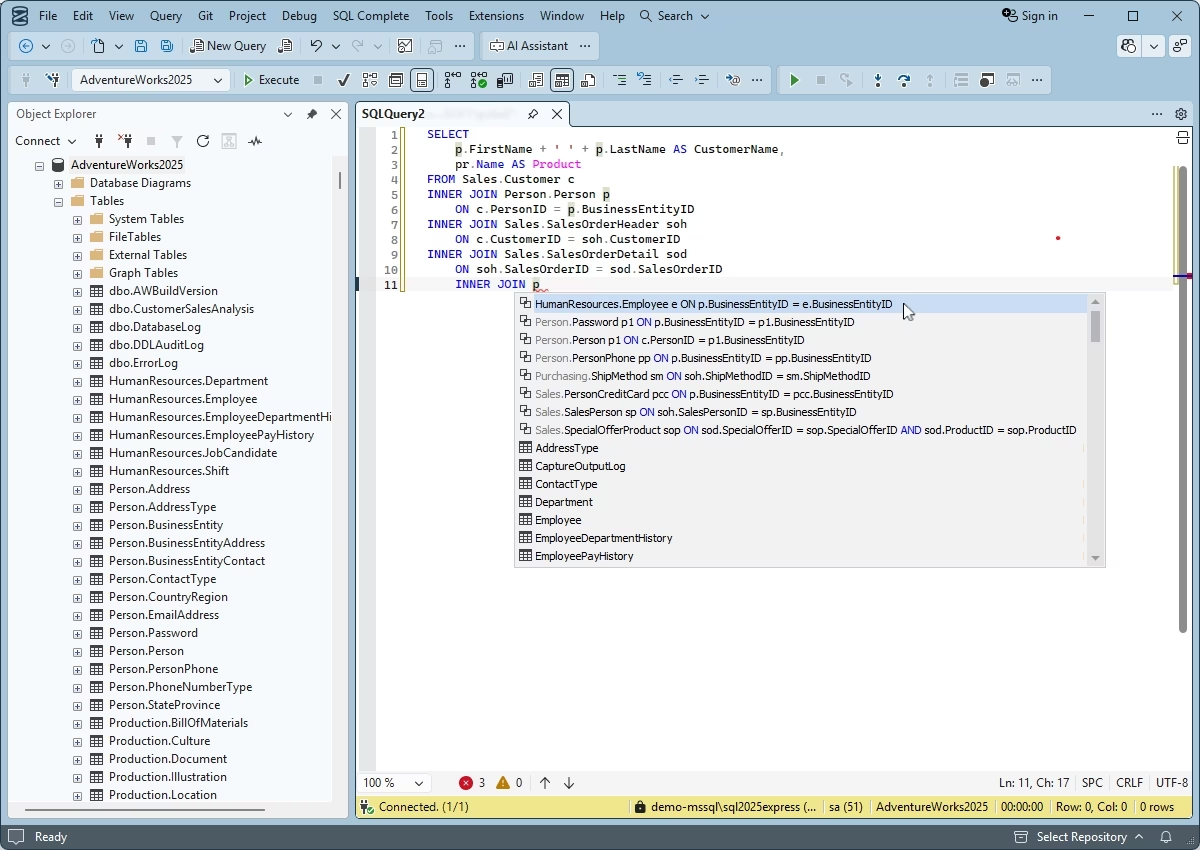
SQL Complete in SSMS: after typing INNER JOIN, the suggestion list offers complete join clauses with their ON conditions for the AdventureWorks2025 database.
A formatter you can set rule by rule
dbForge SQL Complete formats T-SQL to a profile you choose: several predefined styles (Default, Collapsed, Extended, Indented, Right aligned, Stack compact) or your own, edited rule by rule with a live preview. It can format as you type, on paste, or across whole folders of .sql files, and a noformat tag protects a block you've laid out by hand. Profiles can be exported, so a team can share one style. The command-line formatter, useful in a build pipeline, is Professional and Enterprise only.
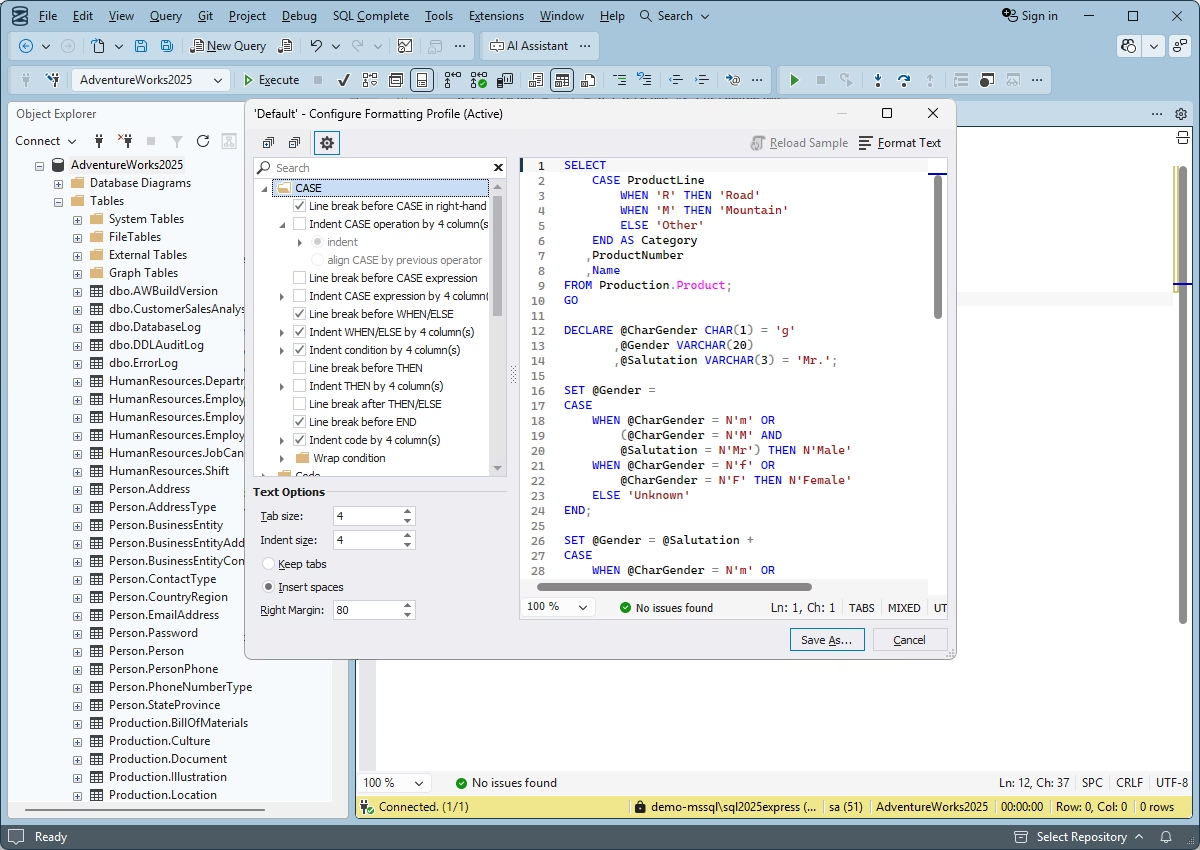
The Configure Formatting Profile window: CASE expression rules on the left, a live preview of the formatted code on the right.
Refactoring, a T-SQL debugger and a search for broken objects (Professional)
dbForge SQL Complete Professional renames aliases, variables and database objects and corrects the references to them, inserts missing semicolons and adds brackets to identifiers. Its T-SQL debugger steps through stored procedures, triggers, functions and scripts from inside SSMS. Find Invalid Objects scans one or more databases for procedures and views that reference columns or tables that no longer exist, which is exactly what breaks after a careless rename.
T-SQL Code Analyzer (Enterprise)
dbForge SQL Complete Enterprise checks your code against more than 180 rules and best practices: likely performance problems, deprecated syntax, risky constructs and naming consistency, with profiles you can tailor. Warnings appear in the Output window with the file, line and rule, so you can work through them like compiler warnings.
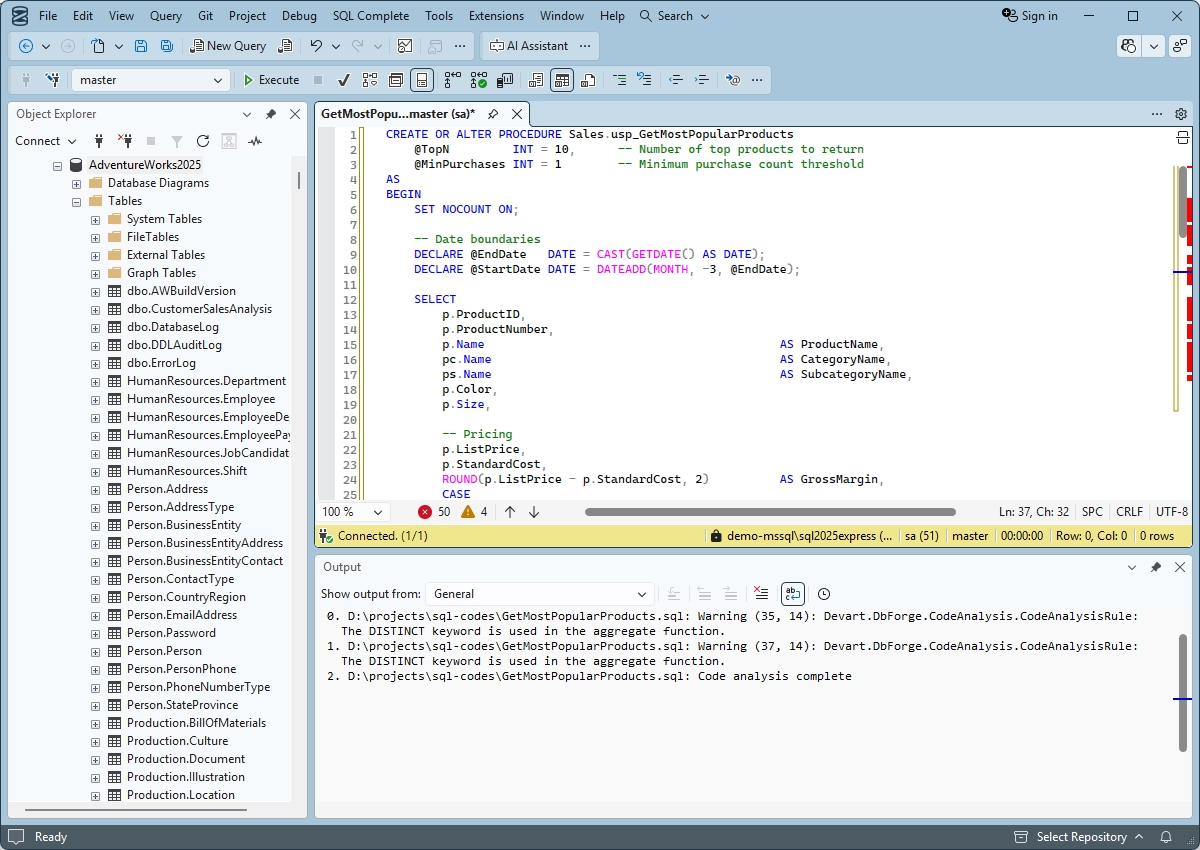
Code analysis of a stored procedure: the Output window lists two rule warnings about DISTINCT inside an aggregate function, with line and column numbers.
A more useful results grid (Professional)
dbForge SQL Complete Professional adds a status line under the SSMS results grid that shows MAX, MIN, AVG, SUM, COUNT and DISTINCT for whatever cells you select, so you don't need to paste them into Excel to check a total. You can also search inside the results, copy data as CSV or Excel, generate INSERT or UPDATE scripts from selected rows, and open long values in a Data Viewer that shows them as text, hex, XML, HTML, JSON, PDF or an image.
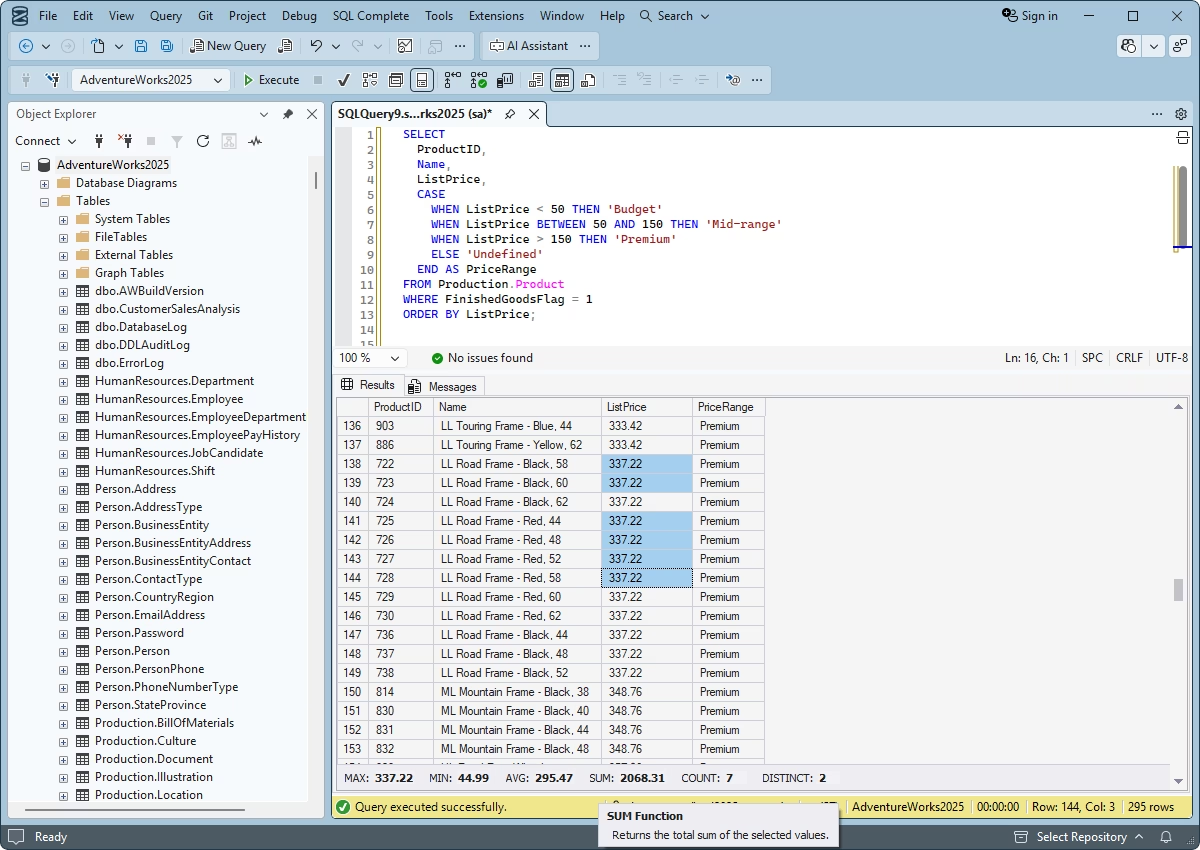
Seven ListPrice cells selected in the results grid; the bar below shows their MAX, MIN, AVG, SUM, COUNT and DISTINCT values.
Safety nets: execution warnings, query history and session restore
dbForge SQL Complete keeps a searchable history of the queries you've run in every edition, including Express. Professional adds execution warnings that stop a DELETE, UPDATE, DROP or TRUNCATE without a WHERE clause on the environments you mark (production, say), reminders about open transactions, colored tabs and status bars per server (so production looks different from test), and restoring the last session or a closed tab after SSMS crashes.
A built-in AI Assistant
dbForge SQL Complete includes dbForge AI Assistant in a panel inside SSMS. Given a connected database as context, it writes queries from a plain-English request, checks and explains existing queries, suggests optimizations and explains error messages. It's in every edition. The assistant is a separate Devart service with its own plans, and a free Express tier was added in September 2026.
Benefits
- Less typing on every query. JOIN clauses from foreign keys and column lists from a picker save the keystrokes you repeat dozens of times a day, and fewer typos in column names means fewer failed runs.
- Code your team can read. One shared formatting profile ends the arguments about comma placement and makes code reviews about logic, not layout.
- Fewer production accidents. A red tab for the production server and a warning before an unfiltered DELETE are cheap insurance.
- No new tool to learn. It lives in SSMS, so there's no switch to a new IDE for you or your team.
Real-World Uses
- Reporting queries on an unfamiliar database. You've inherited a 400-table ERP schema. Foreign-key JOIN suggestions and Quick Info on hover let you write the five-table report query without opening the database diagram.
- Cleaning up legacy procedures. Bulk-format a folder of old stored procedures to the team's profile, then rename a confusing column alias everywhere it's used with refactoring.
- Checking after a schema change. After dropping a column, Find Invalid Objects lists every view and procedure that still references it, before users find them for you.
- Quick sanity checks on results. Select a column of amounts in the grid and read the SUM and COUNT at the bottom instead of writing a second query.
- Enforcing standards in CI (Professional and Enterprise). Run the command-line formatter or the invalid-object search in a build step.
Who It's For, and Who Should Skip It
It's for anyone who writes T-SQL in SSMS or Visual Studio most of the working day: database developers, BI and report writers, DBAs who script a lot, and teams that want one code style. Developers who want something like Redgate SQL Prompt for less money are its most obvious buyers.
Skip it if you write a few queries a month (the free Express edition or plain SSMS IntelliSense is enough), if you work mainly on MySQL, PostgreSQL or Oracle (it's SQL Server only; Devart's Studios cover those), or if you're on a Mac or Linux without a Windows machine. If you want a full IDE with schema compare and data tools rather than an add-in, look at Devart's dbForge Studio for SQL Server, a full IDE with its own code completion and formatting.
Usage Guide
- Install. Download the installer (you'll sign in with a free Devart account), close SSMS and Visual Studio, and run it. It installs into the SSMS and Visual Studio versions it finds on the machine.
- Start the trial. Open SSMS and start the 14-day trial from the activation wizard. Since September 2026, activation works by signing in to your Devart account.
- Connect and type. Open a query window on a database and start typing. The suggestion box replaces SSMS's own. Ctrl+Space brings the list back if you've closed it.
- Pick a format style. In SQL Complete > Options > Formatting, choose a profile or copy one and edit its rules. Then format the current document from the SQL Complete menu.
- Set up safety features (Professional). Assign tab colors to your production servers and turn on execution warnings.
- Decide before day 14. If you don't buy, SQL Complete keeps running as the free Express edition with basic completion and formatting.
Where it falls short
- Updates sometimes break things. Devart releases often, and its own revision history shows the cost: the October 2026 build fixed a tab-coloring bug that had collected nearly 30 user reports, and a February 2026 build fixed slow SSMS and Visual Studio startup with logging on and SSDT documents that didn't reopen after a Visual Studio restart. If SSMS is mission-critical, wait a week before taking a new build.
- Metadata caching on large servers. SQL Complete reads the schema to make its suggestions; on servers with many databases users report a delay while it re-caches, and suggestions can lag behind schema changes until you refresh.
- It can clash with other add-ins. Running it next to another completion add-in such as SQL Prompt means two suggestion engines fighting over the same keystrokes. Pick one.
- The editions are split finely. Popular extras like grid aggregates, tab coloring and execution warnings are Professional only, so Standard often isn't the bargain it looks.
What Users Say
SoftwareSuggest (4.9/5 from 10 reviews)
SoftwareSuggest's verified reviewers are mostly long-time users. Its own summary of the complaints lists linked-server limitations, the price for some users, a delay while metadata re-caches, formatting flexibility and partial case sensitivity.
Joshua B. (December 2021, 5/5), who came from SQL Prompt: "It has everything I was missing from SQL Prompt, along with additional features. Considering it comes at a fraction of the price, this is a no-brainer for me." What he disliked: "Needs join clause suggestions." (Foreign-key JOIN suggestions are in the current Standard edition.)
Martin I. (November 2021, 4/5): "SQL Complete is a good extension for SQL Management Studio with many useful features. It is easy to use and of high quality. As far as I have seen, there have been no bugs." His favorite: "Join suggestions based on foreign keys."
Nick (November 2021, 5/5): "Yes, it is pricey—roughly 40 cents a day. Does it save me at least 30 minutes a day in writing short SQL statements? Yes!" He likes that the "Search data grid is highly useful and surprisingly fast," but asks Devart to "make it stop calculating sums when I highlight a lengthy column/dataset. If its over 50k records, make the sums at the bottom some sort of opt-in click."
SQLServerCentral: a three-way comparison
Sheldon Hull compared ApexSQL Complete, Redgate SQL Prompt and SQL Complete in a SQLServerCentral blog post in April 2013, so the details are old, but his reasons still describe the product: "For me, the best tool ended up being DbForge SQL Complete." On formatting: "The amount of customization offered was incredible and the end result was a powerful formatting tool with amazing results." On support: "One bug I found in the formatting was addressed with a new update within 2 weeks. That's a responsive company!" His view of SQL Prompt at the time was that "the customization offered in the formatting profiles was very limited."
G2 reviews quoted on Devart's page
Devart shows these G2 quotes on the product page, so read them as the vendor's picks.
Mark L. (Enterprise): "[dbForge] SQL Complete was a game changer. The search function added in 2023 was huge in figuring out where data resides in unfamiliar tables. Simply a great tool."
Bernard D. (Small-Business): "It's an essential tool to write T-SQL with efficiency and simplicity. My company has been using it since 2010."
David S., BI Developer (Mid-Market): "Excellent options, fast support, great value. I like the amount of customization that is offered. I can create different profiles, and because I work on multiple client systems, this comes in handy."
Ryan V., Software Developer (Small-Business): "SQL is not complete without [dbForge] SQL Complete. It is now essential to our IDE, enhancing SSMS's flexibility significantly."
The recurring themes
People keep coming back to the same three things: the JOIN and column suggestions, the depth of the formatter's settings, and value for money next to SQL Prompt. Many reviewers have used it for years. The complaints are just as consistent: it costs money where SSMS IntelliSense doesn't, metadata caching can lag on big servers, the grid aggregates can be slow on huge selections, and some updates have introduced bugs that a later build fixed.
Comparisons
dbForge SQL Complete vs. native SSMS IntelliSense
SSMS IntelliSense is free and suggests object names, but it doesn't build JOIN conditions, expand * or INSERT statements, format code, refactor or analyze it, and it often loses track of temp tables, CTEs and cross-database references. If you only need names, it's enough; if you write T-SQL all day, SQL Complete's free Express edition is a reasonable first step and Standard is the real upgrade.
dbForge SQL Complete vs. Redgate SQL Prompt
Both are SSMS and Visual Studio add-ins aimed at the same job: smarter completion, formatting, snippets and refactoring. Reviewers who've used both usually choose SQL Complete for its formatting options and its price; SQL Prompt is the better-known name in larger shops. Try both on your own code before committing a team to one.
Standard vs. Professional vs. Enterprise
Standard gives you the full completion engine, JOIN generation, snippets, alias mapping and the formatter. Professional adds refactoring, the debugger, Find Invalid Objects, results-grid aggregates, search and export, tab coloring, execution warnings, session restore and the command-line tools. Enterprise adds the T-SQL Code Analyzer. For most daily SSMS users Professional is the edition to get, which is why the order page starts there.
Editions and Pricing
All three paid editions are sold on one order page. It opens on Professional with a 1-year subscription; you pick the edition, subscription or perpetual license, and 1, 2 or 3 years of updates there.
| Edition | 1-year subscription | Perpetual license | What it adds |
|---|
| Express | Free | Free | Basic completion and formatting, Quick Info, query history, AI Assistant |
| Standard | $129.95 | $249.95 | Full completion, JOIN generation, statement expansion, snippets, alias mapping, full formatter |
| Professional | $149.95 | $299.95 | Refactoring, T-SQL debugger, Find Invalid Objects, grid aggregates and search, tab coloring, execution warnings, CLI |
| Enterprise | $199.95 | $399.95 | T-SQL Code Analyzer with 180+ rules and custom profiles |
Prices are per user. Devart takes 5% off for 5 to 9 licenses, 10% for 10 to 19 and 15% for 20 or more, and priority support is an extra option at checkout. If you also need schema and data compare, the dbForge SQL Tools bundle includes SQL Complete with 14 other SQL Server tools.
FAQs
Does dbForge SQL Complete work with SSMS 21 and 22?
Yes. dbForge SQL Complete supports SSMS 16 through 22 and Visual Studio 2015 through 2026. Since version 7.0 it no longer installs into SSMS 2012 or 2014, though older versions of the add-in still work there.
What happens to dbForge SQL Complete when the 14-day trial ends?
dbForge SQL Complete turns into the free Express edition: you keep basic completion, formatting, Quick Info and query history, and lose the paid features until you activate a license.
Does dbForge SQL Complete work with Azure SQL and Microsoft Fabric?
Yes. dbForge SQL Complete works with Azure SQL Database, Azure SQL Managed Instance, Azure Synapse dedicated and serverless pools, and Microsoft Fabric's SQL database, Data Warehouse and OneLake, including Microsoft Entra multi-factor sign-in, in every edition.
Is a SQL Complete subscription or a perpetual license better?
For dbForge SQL Complete, a perpetual license costs about two years of subscription and keeps working forever, with the updates included for the period you bought. A subscription is cheaper up front but stops working if you don't renew. If you expect to use it for more than two years, perpetual usually works out cheaper.
Can I use dbForge SQL Complete alongside Redgate SQL Prompt?
dbForge SQL Complete can be installed next to SQL Prompt, but both take over the suggestion box and formatting shortcuts, so in practice you'll want to turn one of them off. Use the trial to decide which you prefer rather than running both.
Is the AI Assistant in dbForge SQL Complete free?
dbForge SQL Complete includes the AI Assistant panel in every edition, and Devart added a free Express edition of the assistant in September 2026. The assistant is a separate Devart product with its own paid plans for heavier use.
Can I get a refund on dbForge SQL Complete?
Yes. Devart refunds dbForge SQL Complete within 30 days on an annual subscription or a perpetual license, and within 7 days on a monthly subscription.
System Requirements
- Windows 7, 8, 8.1, 10 or 11, or Windows Server 2008, 2012, 2016, 2019, 2022 or 2025
- .NET Framework 4.7.2 or later
- SQL Server Management Studio 2016, 17, 18, 19, 20, 21 or 22, or Visual Studio 2015, 2017, 2019, 2022 or 2026
- SQL Server 2005 to 2025 (2000 with limited support), SQL Server on Linux, LocalDB, Azure SQL, Azure Synapse, Microsoft Fabric
Conclusion
dbForge SQL Complete is worth $149.95 a year if you write T-SQL in SSMS every day. The JOIN suggestions and the formatter alone pay for themselves in saved minutes within weeks, and Professional's tab coloring and execution warnings protect you from the kind of mistake that ruins a Friday. The one reason to buy it is that it makes SSMS feel like a modern editor without making you leave SSMS. The main reason not to is cost against a free tool: if you write a handful of queries a week, keep the free Express edition and plain SSMS. Use the 14-day trial on your real databases, and if you buy, take Professional rather than Standard.
Download Free TrialBuy Now