DataNumen Exchange Recovery: Turn a Corrupt or Orphaned OST File Into a PST You Can Open
DataNumen Exchange Recovery is a $199.95 Windows tool that recovers mail, calendars and contacts from corrupt or orphaned Outlook OST files and saves them to a new PST file that Outlook can open. Despite the name, it doesn't touch the Exchange server: it's for the person holding an OST file from a dead mailbox, a crashed PC or a broken sync, with no other way to read it.
Outlook can't open an OST file on its own. When the mailbox it belonged to is gone, the account was removed, or the file is damaged, those years of mail are locked inside. This tool gets them out without needing the server.
Quick facts
- Version: 10.01 installer dated November 27, 2023 (the product page shows 10.0, released October 20, 2023)
- Developer: DataNumen, Inc. (formerly sold as Advanced Exchange Recovery)
- Platform: Windows, 32-bit and 64-bit editions
- Files: OST from Outlook 97 to 2021, Outlook for Office 365 and Microsoft 365, for Exchange, Microsoft 365 and IMAP accounts (Outlook.com, Gmail, Hotmail)
- Output: a new PST in Outlook 97-2002 or 2003+ format
- Price: $199.95 for one user, one-time at checkout
- Trial: free demo that writes a PST with every recovered item, but with each message body replaced by demo text
- Guarantee: 30 days
- What we checked: installer file version 10.01 (22.0 MB, digitally signed by DataNumen, Inc.) downloaded from the vendor, with a November 27, 2023 file date; the $199.95 order page price, with no auto-renewal shown. We didn't run a recovery on a damaged OST file. Checked on November 8, 2026.
Before you buy
- Try Outlook's export first. If the account still works in Outlook, File, Open & Export, Import/Export, Export to a file, Outlook Data File (.pst) does the job for free. This tool is for when Outlook can't get at the data.
- Healthy OST, no server? DataNumen also sells a separate, newer OST to PST Converter for undamaged files. For a damaged OST, the vendor points you to Exchange Recovery.
- The demo shows structure, not content. You'll see your folders, subjects and items in the demo PST, but the message bodies are replaced. That tells you what will come back, not how well each email will read.
- Upgrades and support run for one month. After that you need the Annual Support and Maintenance Plan or a paid upgrade.
- A refund needs a reason. Refunds run for 30 days, but you must explain why in detail, and DataNumen may ask for the original OST file. With a mailbox that's sensitive, note the company offers to sign an NDA.
Download Free Trial Buy Now
Overview
An OST is Outlook's local, synchronized copy of a mailbox for Exchange, Microsoft 365 and IMAP accounts. It's tied to the profile and account that created it, so on its own it's unreadable. DataNumen Exchange Recovery scans the file in twelve stages and writes everything it finds to a new PST, by default Source_recovered.pst, putting items back in their original folders where it can and collecting the rest in folders named Recovered_Group1, Recovered_Group2 and so on.
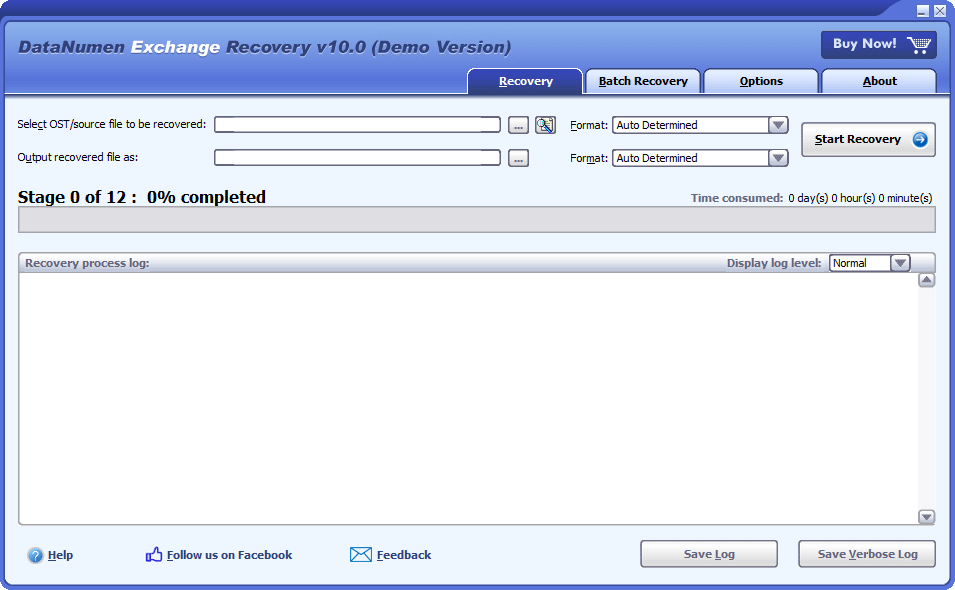
The Recovery tab in the version 10.0 demo: the OST source and the PST output, each with a format selector, and a twelve-stage progress bar.
Features
Recovers every kind of Outlook item
DataNumen Exchange Recovery brings back email messages with attachments and embedded objects, folders, posts, calendar items and meeting requests, contacts and distribution lists, tasks and task requests, journals and notes. It also recovers deleted items still in the file.
No Exchange server needed
DataNumen Exchange Recovery reads the OST file directly and never connects to the server. That's the whole point for an orphaned file: a former employee's mailbox that's been deleted, a server that crashed, or an account you can no longer sign in to.
Handles huge and oversized files
DataNumen Exchange Recovery handles OST files past the old 2 GB limit of early Outlook versions, has an optimization for huge files, and can split the output PST into parts of a size you choose. The vendor's estimate is 2 to 3 hours for a 10 GB OST on a modern 64-bit PC.
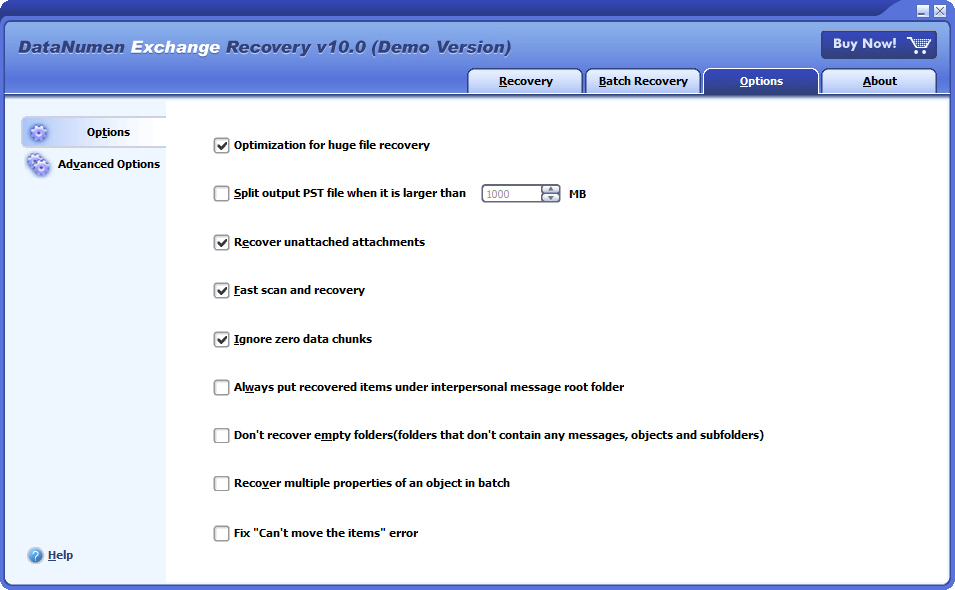
The Options tab: huge-file optimization, splitting the output PST above a set size, unattached attachments, fast scan, and a fix for Outlook's "Can't move the items" error.
Reads OST data from disk images and temporary files
DataNumen Exchange Recovery can recover OST data from disk image files and from temporary files, and it supports password-protected OST files. That helps when the original PC is gone and all you have is an image or a backup of its drive.
Batch recovery for several mailboxes
DataNumen Exchange Recovery's Batch Recovery tab takes a list of OST files, with source and target formats set once, and recovers them one after another. It's useful for IT staff clearing out the files of several departed users. The vendor also lists a command-line version that one e-discovery company built into its platform.
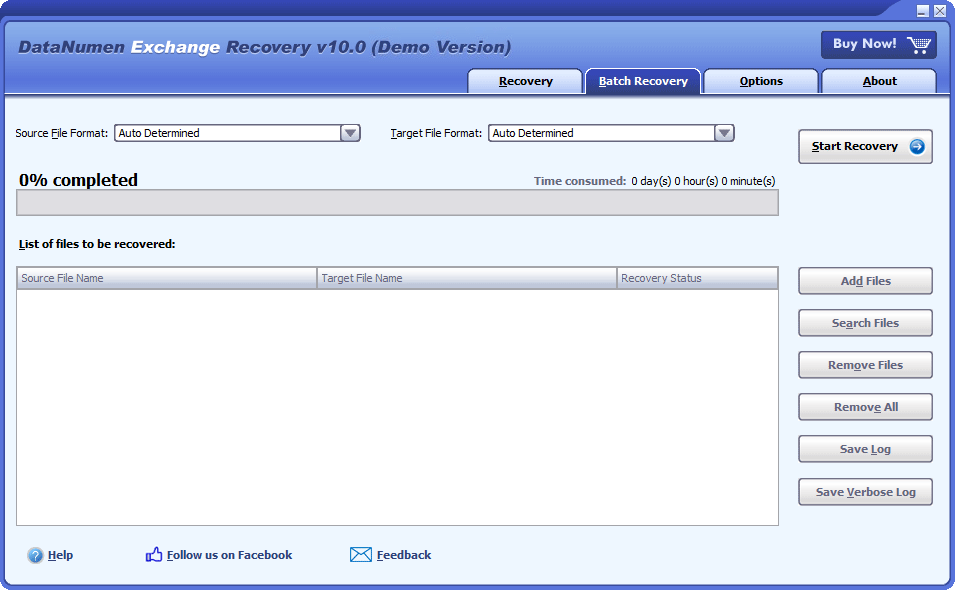
The Batch Recovery tab, with source and target file formats and the list of OST files to recover.
Benefits
- Access without the account. You don't need the original profile, password or server, just the file.
- A standard result. The output is a normal PST that any recent Outlook opens and that you can import, archive or hand to someone else.
- More than mail. Calendars and contacts often matter as much as email, and they come back too.
Real-World Uses
- A departed employee's mailbox. The account was deleted from Exchange or Microsoft 365, but the old laptop still has the OST. Recover it to PST and archive it.
- A new PC. The old computer was replaced and the OST came along, but Outlook won't use it. Convert it to PST and open it in the new profile.
- A sync that went wrong. Items vanished from the server and the OST is the only copy left. Recover it before Outlook resyncs and overwrites it.
- Calendar data in the wrong place. Appointments that should have been in a PST were only ever in the OST.
Who It's For, and Who Should Skip It
It suits IT administrators, help desks and individuals with an OST file holding mail that's gone from the server, or a damaged OST they can't open.
Skip it if the mailbox still exists on the server: Outlook will rebuild the OST from the server for free, and its export wizard makes a PST. Skip it if your problem file is a PST rather than an OST, since that's DataNumen Outlook Repair's job. And if your OST is healthy and you just need a PST, look at DataNumen's separate OST to PST Converter first. Exchange Recovery doesn't repair an Exchange server's own EDB database files.
Usage Guide
- Install the demo and close Outlook and anything else that might use the OST file.
- Copy the OST file somewhere safe and work on the copy.
- On the Recovery tab, type the path, browse, or use the search button to find OST files on the PC. Leave Format on Auto Determined unless you know the Outlook version (detection takes a little longer).
- Check the output PST name and pick its format, or leave Auto Determined to match the Outlook installed on the PC.
- Click Start Recovery and follow the stages.
- Open the demo PST in Outlook and check that your folders and items are there. If they are, order the full version and run the recovery again.
- Look through the
Recovered_Group folders for items whose original folder couldn't be identified.
Where it falls short
- Some items end up loose. Lost-and-found items land in Recovered_Group folders, so a badly damaged file may need sorting afterwards.
- PST only. There's no direct export to MSG, EML, MBOX or vCard. The vendor's own FAQ has you convert to PST and then use Outlook, MFCMAPI or Thunderbird for those.
- A confusing name. "Exchange Recovery" suggests a server tool, and DataNumen now sells an OST to PST Converter alongside it, so check which one fits your case.
- No independent reviews. Softpedia lists it with no user reviews, and its 96.78% recovery rate is the vendor's own test.
What Users Say
We found no independent user reviews of this product. DataNumen's product page shows 4.90 out of 5 from 1,635 votes, which is its own count, and the quotes below are all testimonials it publishes.
Testimonials on DataNumen's page
Peter Keating, ex CIO, now retired, Melbourne, Australia, July 15, 2019: "This is a great piece of software. It recovered a broken OST file first time and it then opened first time in Outlook 2019. I had tried 3 other pieces of repair software without success and was about to accept the old mail had been lost. Thanks heaps DataNumen!"
Christopher Baber, Asheville, NC, May 10, 2019: "I just wanted to say thank you for providing this program. I just used it to successfully convert a large OST file which is allowing me to recover 150 emails that went missing."
Roberto Baldassar, Italy, March 7, 2020: "After the replacement of my personal PC, I needed to recover for personal use the old UST file converting it to PST. Among a lot of softwares, I have found DEXR.EXE that fitted exactly my purpose. Whilst the UI looks very simple, DEXR was able to recover all my emails, contacts and contact groups with no errors."
Gene Rovinsky, April 5, 2019: "Now i can get my calendar info from an incorrecty setup OST (should have had calendar info split into a pst instead of included in ost)"
Michael Wilhelm, Cygnet Energy Ltd., Calgary, Canada, November 12, 2022: "Great product. Email repaired perfectly. Alan and team had me up and running with the product again when I replaced my tired old computer."
Daniel Navarro, April 29, 2019: "We made the decision of buying Datanumen Exchange Recovery tool yesterday, and one of the things we based our decision was the excellent technical service that you provided while we were testing."
After Microsoft support gave up
RJ Collins, founder, V360, San Diego, May 15, 2015: "After over 10 hours of active time wasted to educate MS on what the problem is when I upgraded my Outlook 2010 to 2013 and the autogeneration of mutiple .ost files I finally gave up. when they told me they cannot open the original .ost file. I then got the bright idea to do a quick search on .ost to .pst conversion and boom - 3.8GB of data that was very valuable to me was back in my hands"
The pattern: most buyers had an orphaned OST after a PC replacement or an Outlook upgrade, had already tried other tools, and got their mail, contacts and calendar back. Several mention the vendor's support during the trial. There's no independent criticism to weigh, so the demo has to stand in for a review.
Comparisons
DataNumen Exchange Recovery vs. Outlook's own tools
Outlook's export wizard is free but only works while the account is still connected. Scanpst, Outlook's Inbox Repair Tool, is also free and fixes minor damage, but it can't make an orphaned OST usable. DataNumen Exchange Recovery is for the OST that Outlook can no longer use.
Exchange Recovery vs. DataNumen's other Outlook tools
DataNumen Outlook Repair fixes corrupt PST files. The newer DataNumen OST to PST Converter converts healthy OST files. Exchange Recovery covers the damaged or orphaned OST.
DataNumen's own recovery test
The vendor's chart gives its tool a 96.78% average recovery rate, against 51.81% for DiskInternals Outlook Recovery, 7.72% for Scanpst, under 5% for Stellar Phoenix Mailbox Exchange Desktop, Kernel Recovery for OST and Recovery ToolBox for Outlook, and 0% for OST2PST. These are DataNumen's own results on its own test files, so check them with the demo on yours.
Editions and Pricing
There's one edition. The $199.95 price on the order page is for a single user. DataNumen's own buy page lists lower per-license prices for larger orders:
| User licenses | Price per license (US$) |
|---|
| 1 | 199.95 |
| 2 - 9 | 149.95 |
| 10 - 24 | 119.95 |
| 25 - 49 | 99.95 |
| 50 - 99 | 69.95 |
| 100 - 199 | 49.95 |
| 200 - 499 | 39.95 |
| 500+ | 29.95 |
FAQs
Does DataNumen Exchange Recovery need to connect to the Exchange server?
No. DataNumen Exchange Recovery works on the OST file alone, so it can recover mailboxes that no longer exist on the server.
Can DataNumen Exchange Recovery handle a Gmail or Outlook.com OST?
Yes. DataNumen Exchange Recovery supports OST files for IMAP accounts such as Outlook.com, Gmail and Hotmail, as well as Microsoft 365 and Exchange accounts.
Will I lose any data converting a healthy OST with DataNumen Exchange Recovery?
For an undamaged OST, DataNumen Exchange Recovery converts every item to the PST. For a damaged one, unaffected items convert normally and damaged ones are recovered as far as possible.
Can DataNumen Exchange Recovery save emails as MSG or EML files?
Not directly. DataNumen Exchange Recovery outputs a PST. Open that in Outlook to save single messages as MSG, then use Microsoft's free MFCMAPI to turn MSG into EML. For MBOX, import the PST into Thunderbird.
Can DataNumen Exchange Recovery repair an Exchange server EDB database?
No. DataNumen Exchange Recovery works on Outlook's OST files on the client PC, not on the Exchange server's mailbox database.
My PST will be very large. Can DataNumen Exchange Recovery split it?
Yes. In DataNumen Exchange Recovery's Options tab, turn on "Split output PST file when it is larger than" and set a size in MB.
Do I get updates after buying DataNumen Exchange Recovery?
Free upgrades last one month from purchase. After that, a new version of DataNumen Exchange Recovery needs the Annual Support and Maintenance Plan or an upgrade fee.
System Requirements
- Windows, 32-bit or 64-bit
- Intel or equivalent processor, x86 or x64
- 64 MB of memory minimum, 4 GB recommended
- 36.5 MB of disk space, plus room for the output PST
- Microsoft Outlook to open the recovered PST
Conclusion
Worth $199.95 when an OST file holds mail, calendars or contacts that exist nowhere else and Outlook can't open it. The reason to buy is that it needs nothing but the file, works on damaged and oversized OSTs, and the demo shows which folders and items will come back before you pay. The main reason not to is a mailbox that still exists on the server, where Outlook's free resync and export do the job. The confusing name aside, it does one thing: OST in, PST out.
Download Free Trial Buy Now