Short answer
For most people moving Thunderbird, Apple Mail or Gmail Takeout mail into Outlook on Windows, Kernel for MBOX to PST ($39) is the pick: its trial writes a real PST with 25 items per folder, it doesn't need Outlook installed, and it filters by sender and date. Softaken MBOX to PST Converter ($29) is the cheapest. Stellar Converter for MBOX ($39) previews contacts and calendars too, but needs Outlook to save. 4n6 Email Converter ($49) handles many formats besides MBOX, and Kernel Mac MBOX Converter ($39) does the job on an Intel Mac.
If the old mailbox still exists on a mail server, you may not need any of them: adding the account to Outlook moves the mail for free.
At a glance
| Converter | Price at checkout | Runs on | Free trial | Outlook needed |
|---|
| Kernel for MBOX to PST | $39 Home | Windows | 25 items per folder | ✗ |
| Softaken MBOX to PST Converter | $29 Personal (1 year) | Windows (Mac and Linux versions) | 10 items per folder | ✗ |
| Stellar Converter for MBOX | $39 for 12 months | 64-bit Windows | Preview only, no saving | ✓ to save PST |
| 4n6 Email Converter | $49 Personal, lifetime | Windows | 10 items per folder | ✗ |
| Kernel Mac MBOX Converter | $39 Home (1 year, 25 files) | macOS, Intel Mac with a JDK | 25 items per folder | ✗ |
How we picked
- We looked for MBOX to PST converters that are current, sold with a free trial, and listed on this site, and left out the dozens of near-identical single-purpose tools that haven't been updated in years.
- We put each converter in the cart and read the price at checkout, then compared the license terms (one year or lifetime, personal or business).
- We compared what each trial lets you do, whether Outlook has to be installed, the platforms, the outputs and the filters, from the vendors' product pages, buy pages and manuals.
- We gathered ratings and reviews from Trustpilot, independent review sites and the vendors' own pages.
- What we checked: on November 25, 2026 the order pages charged $39 for Kernel for MBOX to PST (Home), $29 for Softaken MBOX to PST Converter (Personal), $39 for Stellar Converter for MBOX, $49 for 4n6 Email Converter (Personal) and $39 for Kernel Mac MBOX Converter, with no Black Friday discount on any of them.
We compared prices, trials, features and terms. We didn't convert a mailbox with these tools, so output quality comes from the vendors and the reviewers quoted.
How many emails per folder the free trial converts
Kernel Mac MBOX Converter25
Softaken MBOX to PST Converter10
Stellar Converter for MBOX (preview only)0
Trial limits from each vendor's product page and manual, November 2026. A trial that writes a real PST lets you open the result in Outlook before you pay.
Before you buy: the free way
Outlook has no MBOX import, which is why these converters exist. But if the old mailbox still lives on a server (a Gmail account, an IMAP account at your old provider), you don't need a converter: add that account to Outlook, let it download, and drag the folders into your new mailbox. The same trick works the other way round when Thunderbird is still installed: add your new Outlook or Microsoft 365 account to Thunderbird by IMAP and drag the local folders into it. It's slow for large archives, and it moves mail only, not Thunderbird's address book.
You need a converter when there's no server left: a Google Takeout download of a closed account, a Thunderbird profile copied off an old PC, Apple Mail mailboxes exported from a Mac, or mail too large to push through IMAP.
1. Kernel for MBOX to PST: best overall on Windows
- Price: $39 Home (personal use); Corporate $199, Technician $299
- Platform: Windows 11 back to Windows 7 and older, Windows Server 2022 and older; version 26.0
- Trial: converts 25 items per folder into a real PST
- Best for: anyone moving an MBOX archive into Outlook on a Windows PC
Kernel for MBOX to PST reads MBOX files from more than 20 mail programs (Thunderbird, Apple Mail, Google Takeout, Entourage, Eudora, Postbox, SeaMonkey, The Bat! and others), shows them in their original folder tree with a message preview, and saves them to PST without Outlook or the old mail program on the PC. It's the most generous trial here: 25 items from every folder, written to a PST you can open in Outlook and check before paying.
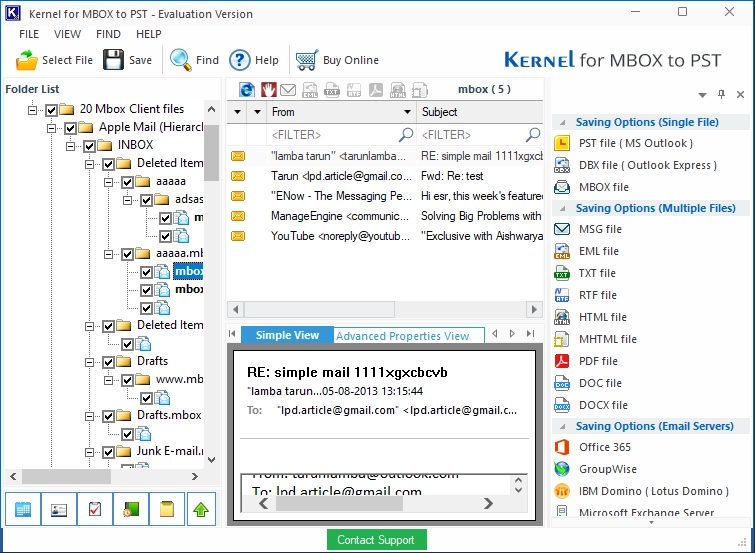
Kernel for MBOX to PST (evaluation version): the folder tree of loaded MBOX files, the message list and preview, and the saving options on the right, from PST to Office 365 and IBM Domino.
It also does the most once the mail is loaded: filters by sender, recipient, subject, folder and date range, PST splitting from 1 GB to 45 GB for older Outlook versions, and direct upload to Office 365, Gmail, GroupWise, IBM Domino or Exchange. PST is the headline, but the same window saves MSG, EML, PDF, HTML and DOC.
What we like
- Trial writes a real PST, 25 items per folder
- No Outlook needed on the converting PC
- Filters by sender, subject and date; PST splitting
- Direct upload to Office 365 and Gmail
Watch out for
- Home is for personal use only; business use starts at $199
- Most of its high ratings are collected on the vendor's own site
What users say
KernelApps shows 4.9 out of 5 from 573 reviews collected on its own site, and the company holds 4.9 from 167 reviews on Trustpilot, mostly about its support staff. One Trustpilot reviewer thanked support for "helping us solve an installation problem with Kernel MBOX to PST" (mckr, April 30, 2026).
On AlternativeTo, Zarifmoore called it an "Excellent tool for error free conversion of Thunderbird mailbox to Outlook PST" (November 6, 2019), while TommyBernard wrote "I'm so sorry I ever bought this product. How can I get them to offer me a refund?" (December 15, 2014, about a much older version).
Download Kernel for MBOX to PSTBuy Kernel for MBOX to PST
2. Softaken MBOX to PST Converter: the cheapest
- Price: $29 Personal (1 PC, one year, non-commercial); Business $169 lifetime
- Platform: Windows 11 to 7, 32 and 64-bit; separate Mac and Linux versions; version 11.0
- Trial: converts the first 10 items of each folder
- Best for: a one-off personal move into Outlook on a budget
Softaken MBOX to PST Converter is the lowest price here at $29, and its 3.3 MB program is the most modern-looking of the Windows tools. It finds installed Thunderbird profiles on its own, loads many MBOX files at once with their message counts, and exports them to one PST or one PST per MBOX file, without Outlook installed. Extras the others lack: duplicate removal, an SPF and DKIM check that flags suspicious mail, and a basic or deep repair for a damaged MBOX before conversion.

Softaken MBOX to PST Converter 11.0 with a dozen MBOX files loaded and their message counts, the message list and the preview pane with Overview, HTML, Headers and Attachments tabs.
What we like
- $29, the lowest price here
- Repairs a damaged MBOX before converting
- Duplicate removal and date filter
- No Outlook needed
Watch out for
- Personal license expires after a year and excludes office use
- Business license jumps to $169
- Almost no independent reviews
What users say
There are no independent reviews of this Softaken tool on G2, Capterra or Trustpilot. Softaken's related OST to PST Converter averages 4.8 on G2 and 5.0 on Capterra from two reviews each, praised for a simple interface and intact data, with one note that large files take time. That's too little to rate the product, so the 10-item demo on your own mailbox is the real test.
Download Softaken MBOX to PST ConverterBuy Softaken MBOX to PST Converter
3. Stellar Converter for MBOX: best preview, contacts and calendars
- Price: $39 for 12 months; Technician $99 for many mailboxes and direct Office 365 upload
- Platform: 64-bit Windows 11, 10, 8.1 and 8; version 6.3.0.0 (June 2026)
- Trial: previews converted mail; opening attachments and saving need a license
- Best for: a PC that already has Outlook, when you want to read everything before you pay
Stellar Converter for MBOX has the most Outlook-like preview of the group: a three-pane window with folders, messages and the open message, plus separate views for contacts, calendar entries and tasks where the source stored them. It reads 18 kinds of mailbox, including MBX from Eudora and PocoMail and RGE from Entourage, and splits a new PST at about 45 GB.

Stellar Converter for MBOX: a converted Thunderbird profile in the folder tree, the message list, and an open message with its attachments listed.
Two limits push it to third place. Outlook must be installed to save a PST, and the free version only previews, so you can't open a test PST in Outlook before buying. Stellar's refund policy also turns away buyers who skipped the evaluation version and excludes renewals, so switch auto-renewal off at checkout if this is a one-time move.
What we like
- Full preview of mail, contacts and calendars
- Reads old Eudora, PocoMail and Entourage formats
- Date and sender filters when saving
Watch out for
- Needs Outlook installed to save a PST
- Trial can't save anything
- 12-month license that renews; strict refund terms
- Converts whole MBOX files only
What users say
Geek Dashboard, which tested it, concluded: "Stellar Converter for MBOX is fast and adequately delivers on all the features it advertises", and listed as cons "Takes little more time with Large MBOX file" and "Only the preview option is available in the free version."
Stellar as a company scored 4.8 out of 5 from 5,601 Trustpilot reviews across all its products. The complaints there center on refunds: "Stellar software's refund policy is a trap." (unhappy consumer, November 18, 2025, 1 star).
Download Stellar Converter for MBOXBuy Stellar Converter for MBOX
4. 4n6 Email Converter: best when MBOX isn't the only format
- Price: $49 Personal (2 PCs), $99 Business (10 PCs), $299 Enterprise (50 PCs), all one-time with lifetime upgrades
- Platform: Windows 11 to 7, Windows Server 2008 to 2019; version 6.5
- Trial: converts the first 10 items of each folder
- Best for: mixed or unknown mail formats, and uploads straight into Gmail or Office 365
4n6 Email Converter isn't an MBOX specialist: it opens data files, desktop mail client profiles, email accounts and (with Business) mail servers, and exports to PST, MBOX, EML, PDF, HTML, CSV, Thunderbird, or directly into Gmail, Office 365 and IMAP accounts. That breadth is the reason to pick it when you're not sure what format an old archive is in, or when the next job is EML or a crashed eM Client profile rather than MBOX. Its Personal license is the only one here that's lifetime and covers two PCs.

The 4n6 Email Converter Export menu over loaded mailboxes: email files, document files, email services and Thunderbird (from the vendor's version 4.7 demo).
What we like
- One tool for many source and target formats
- Lifetime license for 2 PCs at $49
- Header, hex and raw views for evidence work
Watch out for
- Gmail and Office 365 upload need the $99 Business license
- Vendor's site and order page disagree on prices and license names
- Refunds only when support can't fix a problem
What users say
Independent reviews of 4n6 Email Converter are scarce: Slashdot and SourceForge list it with no user ratings. With so little to go on, the 10-item demo on your own mailbox is the review that counts.
Download 4n6 Email ConverterBuy 4n6 Email Converter
5. Kernel Mac MBOX Converter: for doing it on the Mac
- Price: $39 Home (one year, 25 files); Corporate $199 (100 files, lifetime); Technician $299 (unlimited, lifetime)
- Platform: macOS Tahoe back to Mac OS X 10.8; the vendor lists an Intel processor and a JDK; version 26.0
- Trial: converts 25 items per folder
- Best for: Apple Mail users who want PST or PDF files made on the Mac itself
Kernel Mac MBOX Converter is the only Mac app in this list, and it saves to eight formats: PST, PDF, EML, MSG, DOC, DOCX, MHT and HTML. You add an MBOX file or a folder of them, set a date range if you like, and it writes the output into a dated folder, splitting large PSTs at the size you choose. Its "preview" is the folder tree, not a message reader, and the only filter is by date.
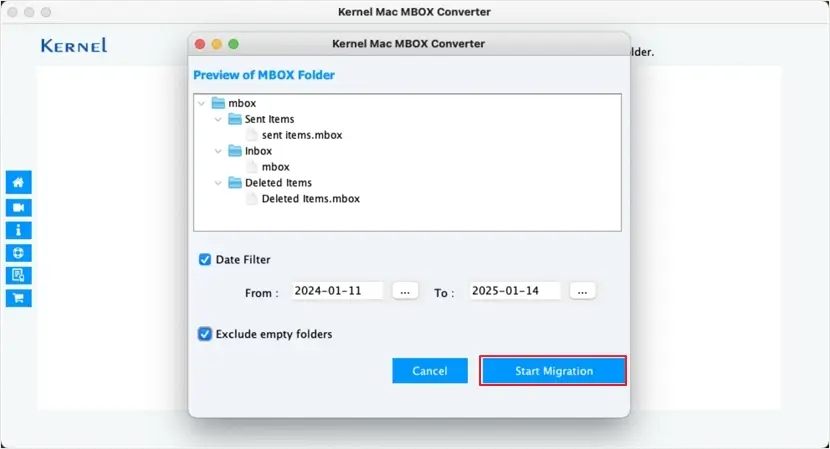
Kernel Mac MBOX Converter's Preview of MBOX Folder window, with the Date Filter and Exclude empty folders options and the Start Migration button.
What we like
- Runs where Apple Mail's files already are
- Eight output formats, PDF and DOCX included
- 25-item trial with real output
Watch out for
- Vendor lists an Intel Mac and a JDK as requirements
- Home license: one year and 25 files
- No message preview, no sender or subject filter
What users say
Kernel prints two testimonials for the app, among them Barry Walker, Email Migration Consultant: "When I switched from Mac to Windows, I struggled to open my old MBOX files in Outlook. Kernel Mac MBOX Converter fixed my issue in minutes." There's no independent hands-on review, and none of KernelApps' 167 Trustpilot reviews names the Mac app.
Download Kernel Mac MBOX ConverterBuy Kernel Mac MBOX Converter
Price for one user (USD)
Entry license at checkout
Softaken MBOX to PST Converter (Personal, 1 year)$29
Kernel for MBOX to PST (Home)$39
Stellar Converter for MBOX (12 months)$39
Kernel Mac MBOX Converter (Home)$39
4n6 Email Converter (Personal, lifetime)$49
Order-page prices on November 25, 2026. Business licenses cost $99 to $199.
Which should you choose?
| Your situation | Pick | Why |
|---|
| Thunderbird or Takeout mail into Outlook on Windows | Kernel for MBOX to PST | Biggest real trial, no Outlook needed, best filters |
| Personal move, lowest price | Softaken MBOX to PST Converter | $29, and it can repair a damaged MBOX first |
| Contacts and calendars matter, Outlook already installed | Stellar Converter for MBOX | Separate contact, calendar and task views |
| Mixed formats, or straight into Gmail or Office 365 | 4n6 Email Converter (Business) | Many sources and targets, lifetime license |
| Apple Mail archive, working on an Intel Mac | Kernel Mac MBOX Converter | The only Mac app here; PST, PDF and DOCX output |
| Office or company use | 4n6 Email Converter Business ($99) | $99 for 10 PCs, lifetime, with Gmail and Office 365 upload |
Who should skip all five: anyone whose old mailbox is still on an IMAP server (add it to Outlook for free), and anyone moving to a mail program other than Outlook. On an Apple silicon Mac, copy the MBOX files to a Windows PC and use a Windows converter rather than relying on Kernel's Mac app.
What commonly goes wrong
- Loading the ZIP. Google Takeout downloads a ZIP; extract it first and load the .mbox file inside, often called "All mail Including Spam and Trash.mbox".
- Not finding Thunderbird's mail. Thunderbird keeps each folder as a file with no extension in its profile folder, next to an .msf index file. Load the file without the extension.
- Buying the wrong license. Kernel's Home and Softaken's Personal licenses are for personal use only, and Kernel Mac's Home license covers 25 files. A company move needs a business license.
- Trusting a preview. Open the trial's PST in Outlook and check attachments and non-English text on your own mail before paying, especially with Stellar, whose free version can't save.
- Forgetting auto-renewal. Stellar's license runs for 12 months; switch auto-renewal off at checkout for a one-time job.
Moving from a desktop Outlook profile rather than to one? See How to Convert an OST File to PST, and for Exchange databases, Best EDB to PST Converter and Exchange Recovery Software.
FAQs
Can Outlook open or import an MBOX file?
No. Outlook for Windows has no MBOX import, so an MBOX file has to be converted to PST first, with a tool such as Kernel for MBOX to PST, or moved through an IMAP account.
Is there a free way to convert MBOX to PST?
Only through a mail server. If the mailbox still exists online, add it to Outlook; if Thunderbird still holds the mail, add your Outlook or Microsoft 365 account to Thunderbird by IMAP and drag the folders across. For files with no server behind them, the free trials of Kernel for MBOX to PST (25 items per folder) and Softaken (10) cover only small mailboxes.
How do I move Gmail into Outlook as a PST?
Export the mail with Google Takeout, unzip the download, and load the .mbox file into Kernel for MBOX to PST, Softaken or Stellar, all of which list Google Takeout as a source. Then open the PST in Outlook with File, Open & Export, Open Outlook Data File.
Do I need Outlook installed to convert MBOX to PST?
Not with Kernel for MBOX to PST, Softaken MBOX to PST Converter or 4n6 Email Converter, which write the PST themselves. Stellar Converter for MBOX needs Outlook installed to save a PST.
Can I convert Apple Mail to PST on a Mac?
Yes, with Kernel Mac MBOX Converter, which saves Apple Mail's exported mailboxes as PST on the Mac. Kernel lists an Intel processor and a JDK as requirements, so on an Apple silicon Mac it's safer to copy the files to a Windows PC and use a Windows converter.
Will attachments and folders survive the conversion?
All five converters say they keep attachments and the folder hierarchy. Check it yourself: the trials of Kernel for MBOX to PST, Softaken, 4n6 and Kernel Mac write real output you can open.
Which MBOX converter can repair a damaged MBOX file?
Softaken MBOX to PST Converter has a basic and a deep repair option for a damaged MBOX before conversion. With any of these tools, run the free trial on the damaged file first and check what comes out.
Are these licenses subscriptions?
Mostly not. Kernel, Softaken and 4n6 charge once at checkout; Softaken's Personal and Kernel Mac's Home licenses run for one year. Stellar Converter for MBOX is a 12-month license that can renew automatically.
Conclusion
Kernel for MBOX to PST is the converter to start with: for $39 it reads more than 20 mail programs, needs neither Outlook nor the old client, filters by sender and date, and its 25-item trial produces a real PST you can check in Outlook before paying. Choose Softaken at $29 for a cheap personal move, 4n6's Business license for company use or mixed formats, Stellar if you already have Outlook and want contacts and calendars, and Kernel's Mac app only on an Intel Mac. And if your old mail is still on a server, try the free IMAP route first.
Download Kernel for MBOX to PSTBuy Kernel for MBOX to PST