Kernel for MBOX to PST: Move Thunderbird, Apple Mail or Gmail Archives Into Outlook
Kernel for MBOX to PST is a $39 Windows tool from KernelApps that converts MBOX mail files from more than 20 email clients into Outlook PST files. It's for people moving from Thunderbird, Apple Mail or a Google Takeout archive to Outlook, and it doesn't need Outlook or the original mail program installed.
Outlook has no MBOX import, so switching mail programs usually means losing the old archive or doing something awkward with an intermediate app. The trial converts 25 items per folder, which is enough to open the result in Outlook and see that your mail arrived properly.
Quick facts
- Version: 26.0, updated December 2025
- Developer: KernelApps Pvt. Ltd. (Kernel Data Recovery)
- Platform: Windows 11, 10, 8.1, 8, 7 and older, Windows Server 2022, 2019 and older
- Works with: MBOX, MBX, MBS and MSF files; PST output for Outlook 2021, 2019, 2016, earlier versions and Office 365
- Price: $39 for the Home License on the order page
- Trial: converts 25 items per folder
- Guarantee: 30 days money back
What we checked: installer file version 26.0 (40.0 MB, digitally signed by KernelApps Private Limited), and the order page, which showed $39 for the Home License, on November 9, 2026. We didn't run a conversion ourselves, so results here are the vendor's and its users' claims.
Download Free TrialBuy Now
Overview
MBOX is the plain mailbox format behind Thunderbird, Apple Mail and Gmail's Takeout export. Kernel for MBOX to PST reads those files directly. You add files or a folder, browse the mail in its original folder tree with a message preview, then choose PST as the output, apply any filters and pick a location.
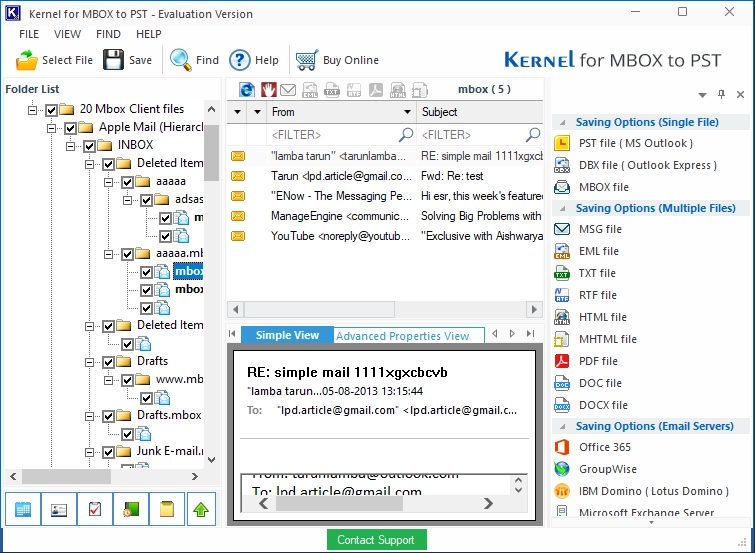
The main window: the MBOX folder tree, a message list and preview, and the output choices on the right.
PST is the headline, but the same window saves to MSG, EML, TXT, RTF, HTML, MHTML, PDF and DOC, and sends mail straight to Office 365, Gmail, GroupWise, IBM Domino or Exchange.
Features
Reads more than 20 mail clients
Kernel for MBOX to PST accepts files from Thunderbird, Apple Mail, Google Takeout, Entourage, Eudora, Opera, PocoMail, Postbox, SeaMonkey, The Bat! and others, including MBOX files without an extension.
Batches and nested folders
Kernel for MBOX to PST converts any number of files at once and can take a parent folder and find the MBOX files in its subfolders, which suits Thunderbird profiles. Files can go to one PST or to separate ones.
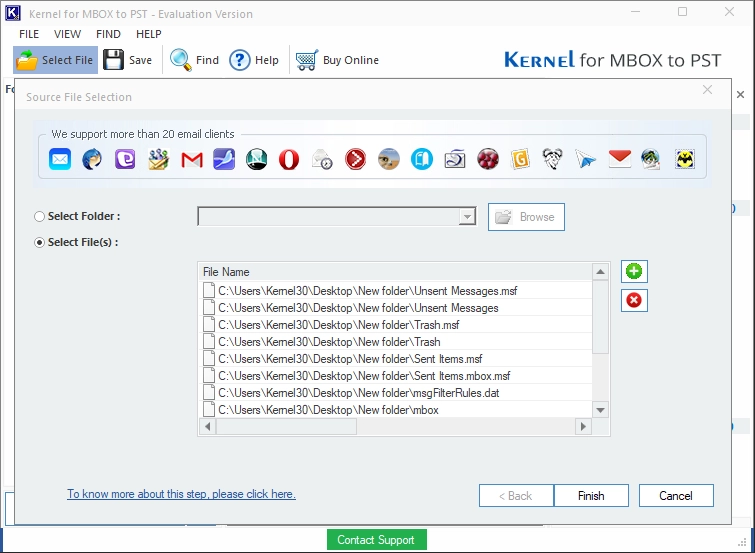
Adding source files, or a whole folder, from any supported client.
Filters before you convert
Kernel for MBOX to PST filters on From, To, Subject, folder name, item type and date range, so you can move one person's mail from one year rather than the whole archive.
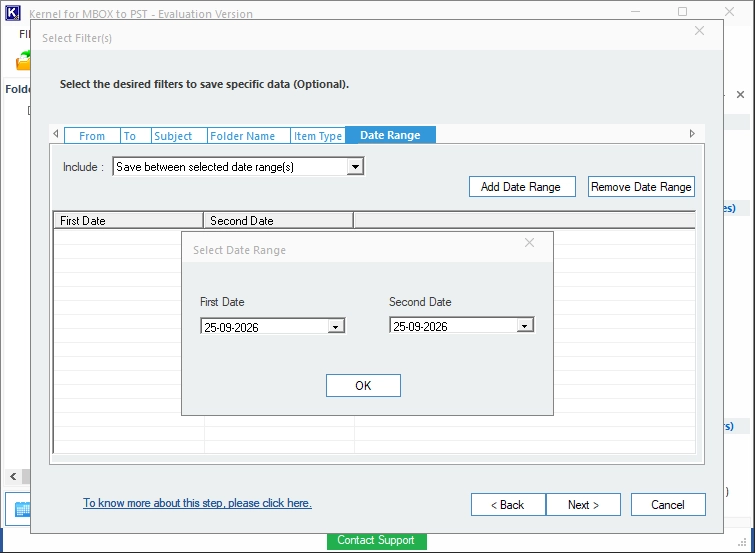
The filter step, here setting a date range.
Keeps headers and folder structure
Kernel for MBOX to PST preserves attachments, the folder tree, and header data such as Message ID and Return-Path. Its Advanced Properties View shows a message's complete header.
Splits big output
Kernel for MBOX to PST can break the result into smaller PST files from 1 GB up to 45 GB, which helps with older versions of Outlook and slow network shares.
Mail analysis reports
Kernel for MBOX to PST draws graphic reports on item types, mail flow by date and by sender, and interaction between users, and exports a list of mail to HTML.
Benefits
- You don't need the old program. A Takeout archive or a copied profile folder is enough.
- You don't need Outlook on that PC either, so the conversion can happen on any Windows machine.
- You can test the actual output. The trial writes a real PST, which is more useful than a preview.
Real-World Uses
- Thunderbird to Outlook when a new job standardizes on Microsoft 365.
- A Google Takeout archive of a closed Gmail account.
- Apple Mail to Windows after leaving a Mac.
- Legal or HR requests where only mail from one sender and period is wanted.
Who It's For, and Who Should Skip It
Buy it if you have MBOX files to bring into Outlook and more than a handful of messages. Skip it if your account still exists on an IMAP server: adding it to Outlook moves the mail for free. Consultants and companies need Technician or Corporate, since Home is for personal use only. This listing is the Windows program, and KernelApps sells a separate Mac MBOX converter.
Usage Guide
- Download and install the demo, then launch it.
- Click Select File, and add your MBOX files or their folder.
- Browse the folder tree and open a few messages to check them.
- Tick what you want, click Save and choose PST as the output.
- Apply any filters, then click Next.
- Choose a location and click Finish, then open the PST in Outlook.
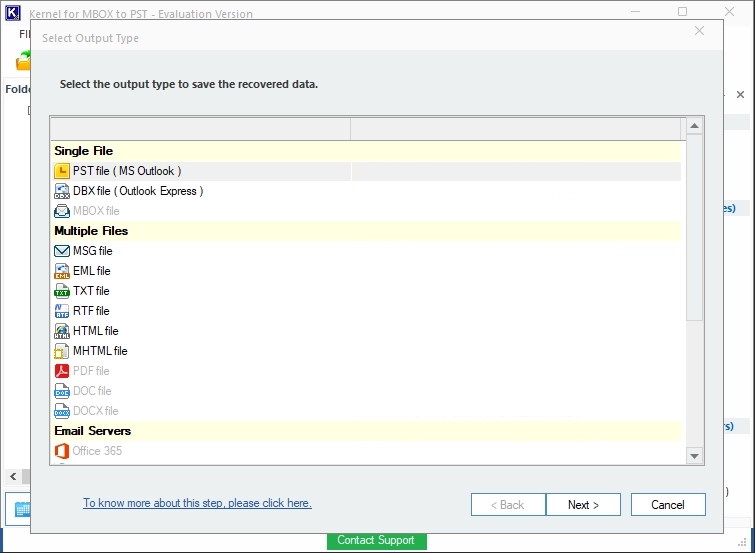
Choosing the output: single PST, individual files or a mail server.
Before you buy
- Open the trial PST in Outlook. Check attachments and non-English text on your own mail.
- Find your mail files first. Thunderbird keeps them in its profile folder as files without an extension, alongside MSF index files.
- Budget for the license tier. Corporate is $199 and Technician is $299, so a company pays far more than the $39 headline.
Where it falls short
- Independent evidence is thin. Its high ratings are mostly on the vendor's site.
- At least one buyer regretted it. An AlternativeTo commenter complained about quality and asked how to get a refund, without saying what went wrong.
- It's a one-way job for most people. Once your mail's in Outlook, you won't need it again, so check whether a free IMAP route would do.
What Users Say
Reviews lean heavily positive, but most come from channels the vendor promotes, and outside feedback is sparse.
Praise on the vendor's page
KernelApps shows 4.9 out of 5 from 573 reviews collected on its own site, with 97% rated Excellent.
"I tried many software to convert specific data from my MBOX files to PST format. Then, I found Kernel MBOX to PST Converter tool. I can proudly say that it is one of the best, reliable, and professional tools. It converts my MBOX data as per my needs. With its multiple filter options, I save my essential data." - Peter Bruzzese
"I used Kernel MBOX to PST to convert my Thunderbird mailboxes. The tool was easy to use and converted all my MBOX files without any lag or issue. The support team was also very responsive." - MC, Trustpilot reviewer, as quoted by KernelApps
"I first tested the trial version. Then bought the license. I really liked the instant delivery of the tool's license to my email. I did not have to wait for days. Also, the tool did a great job of saving my inbox.mbox file to the PST." - Galip Ermis, Trustpilot reviewer, as quoted by KernelApps
Kernel Data Recovery on Trustpilot
Kernel Data Recovery's Trustpilot page shows 4.9 out of 5 from 166 reviews, read through a page summarizer. Those reviews rate the company rather than this product, and about 2% of them are one-star.
One reader mentions this product directly, thanking support for "helping us solve an installation problem with Kernel MBOX to PST" - mckr, April 30, 2026.
AlternativeTo (both from low-activity accounts)
"Excellent tool for error free conversion of Thunderbird mailbox to Outlook PST." - Zarifmoore, November 6, 2019
"I'm so sorry I ever bought this product. How can I get them to offer me a refund?" - TommyBernard, December 15, 2014, about a much older version
The pattern: people like the filters, the fast license delivery and the support. There's no independent test, so let the 25-item trial settle it.
Comparisons
Kernel for MBOX to PST vs adding the account by IMAP
When the mailbox still exists on a server, adding it to Outlook by IMAP moves it for free. Kernel for MBOX to PST is for archives with no server behind them: a Takeout download, a copied Thunderbird profile or mail from a closed account.
Editions and Pricing
| License | Price | For |
|---|
| Home (this listing) | $39 on the order page | Personal use only |
| Corporate | $199 | A single organization |
| Technician | $299 | Consultants and service companies, for several organizations |
FAQs
Will PSTs from Kernel for MBOX to PST open in New Outlook?
KernelApps says the PST from Kernel for MBOX to PST works in classic Outlook, including 365, 2024, 2021 and 2019, and in New Outlook. Convert a sample in the trial and check it on your own setup.
Can Kernel for MBOX to PST merge several accounts into one PST?
Yes. Kernel for MBOX to PST can combine MBOX files from different email clients into a single PST.
Does Kernel for MBOX to PST change my MBOX files?
No. KernelApps says Kernel for MBOX to PST doesn't modify or delete the source files.
Is there a file size limit in Kernel for MBOX to PST?
No. KernelApps lists no MBOX size limit for Kernel for MBOX to PST, and the trial's limit is 25 items per folder.
Can Kernel for MBOX to PST send mail straight to Gmail?
Yes. Kernel for MBOX to PST can save MBOX mail directly into a Gmail or Office 365 mailbox as well as into a PST.
Does Kernel for MBOX to PST support non-English mail?
Yes. KernelApps lists full Unicode support for Kernel for MBOX to PST, so messages in other languages keep their characters.
System Requirements
- Windows 11, 10, 8.1, 8, 7, XP and older, Windows Server 2022, 2019 and older
- Intel Pentium compatible processor (x86 or x64) or equivalent
- 512 MB RAM minimum and 1 GB of disk space, plus room for the converted mail
Conclusion
Kernel for MBOX to PST is worth $39 if you have an MBOX archive and no server to fetch it from. The reason to buy is that Outlook can't import MBOX on its own, and this needs neither the old client nor Outlook to do the job. The reason not to is a live IMAP account, which moves your mail for free. The 25-item trial writes a real PST, so test before you pay.
Download Free TrialBuy Now