Short answer: if the mailbox still exists on the server, you don't need a converter: let Outlook download it again and use classic Outlook's Export to write a free PST. You only need software when the account is gone or the OST won't open. Then choose Stellar Converter for OST Corporate ($79 for a year) for a single file, because its free version shows your mail before you pay, or DataNumen OST to PST Converter ($199.95 one-time) for several files in a batch.
At a glance
| Outlook export (free) | Stellar Converter for OST Corporate | DataNumen OST to PST Converter |
|---|
| Price at checkout | Included with Outlook | $79 for 12 months | $199.95 one-time |
| Needs the original account | ✓ | ✗ | ✗ |
| Outlook during conversion | Must be running | Must be installed to save a PST | Must be closed |
| Batch conversion | ✗ | ✗ Technician edition ($149) | ✓ |
| Free trial | Not applicable | Scans and previews everything, saves nothing | Demo, with the full version writing the complete PST |
| Saves to | PST | PST, MSG, EML, RTF, HTML, PDF | PST |
| Refund | Not applicable | 30 days, first purchase, with conditions | 30 days, you must explain why |
How we picked
- We looked through the OST converters we list and kept the two we could confirm are sold and current today.
- We read both order pages for the price and renewal terms.
- We read each vendor's manual and refund policy for the limits that catch buyers out.
What we checked: prices on the order pages and the trial download links on November 9, 2026. We didn't convert an OST file with either program, so results come from the reviews quoted below.
First, do you need a converter at all?
An OST file is Outlook's offline copy of a mailbox that lives on a server. It's tied to one Outlook profile, and Outlook won't open it anywhere else. A PST is a portable file that opens in any Outlook. Whether you need software comes down to one question: does the mailbox still exist?
| Your situation | What to do | Cost |
|---|
| The account still signs in | Export a PST from classic Outlook | Free |
| The account works, but the OST is broken | Delete or rename the OST, and Outlook downloads a fresh copy | Free |
| The account was deleted, or the Exchange server is gone | Use a converter, because the OST is now the only copy | $79 or more |
| An old PC's OST, no profile left | Use a converter | $79 or more |
The free way: export a PST from classic Outlook
- In classic Outlook, choose File, then Open & Export, then Import/Export.
- Choose Export to a file, then Outlook Data File (.pst).
- Pick the mailbox or folders to export, tick Include subfolders, and choose where to save the file.
Using the new Outlook for Windows?
Switch back to classic Outlook for this job. The Import/Export wizard above is in classic Outlook, and PST support in the new app has been changing.
Stellar Converter for OST Corporate: see your mail before you pay

Stellar's preview after a scan: the mailbox folder tree, the message list and the selected email with its attachments.
Stellar Converter for OST Corporate reads an OST without the profile that created it, including orphaned and encrypted files, and saves the mail, contacts and calendars to PST or to MSG, EML, RTF, HTML and PDF. The free version scans and previews the whole mailbox and saves nothing, which is the most useful trial you can get here: you know what you're buying before you pay. Version 14.0.0.1 was released in July 2026.
What we like
- Free preview of the whole mailbox
- Handles orphaned, encrypted and IMAP OST files
- Saves to six formats
- Actively updated, with a lower first-year cost
Watch out for
- Outlook must be installed to save a PST
- Yearly license, with an auto-renewal option at checkout
- No batch mode or direct export to Microsoft 365, which are in Technician ($149 on Stellar's site)
- Some buyers report trouble on large files
What users say
Stellar as a company scored 4.8 out of 5 on Trustpilot from 5,601 reviews when we looked, across all its products.
Vigneshwaran Vijayakumar, June 20, 2025, 5 stars: "We manually loaded large OST files (over 3 GB), and the software handled the conversion without slowing down or crashing."
The critical side is real. ReviewerThree, May 19, 2026, 1 star: "I purchased Stellar Converter for OST. It did not work. I contacted support and asked for refund." Damon Kennish, December 8, 2025, 5 stars, still noted: "I still need to finish the conversion of a larger ost file. The software has just crashed during an attempt for this."
TechyGeeksHome tested it and called it "reliable, fast, and accurate". Its only listed con: "The free version only allows preview, not PST export."
Run the free version on your real file before buying. Stellar's refund policy refuses a refund if you bought without trying the evaluation version, and it also excludes "Special Offer" purchases.
Download Stellar Converter for OST TrialBuy Stellar Converter for OST
DataNumen OST to PST Converter: one-time price, built for batches
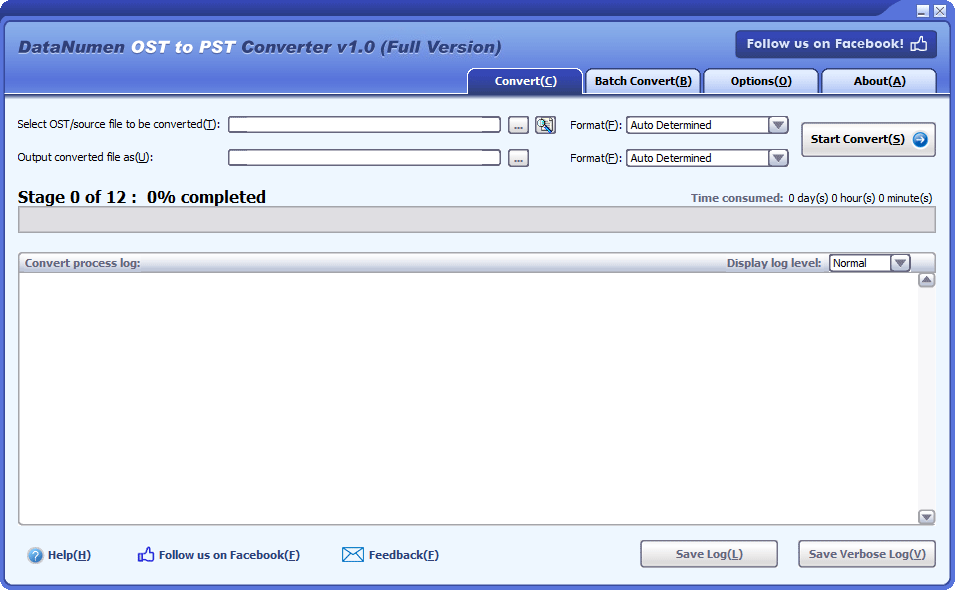
The DataNumen OST to PST Converter window: source and output file boxes, tabs for Convert, Batch Convert and Options, and a 12-stage progress bar.
DataNumen OST to PST Converter works from the file alone and writes a PST in Outlook 97-2002 or Outlook 2003 and later format. A Batch Convert tab can search a drive for OST files and convert the whole list in one run, and the Options tab offers PST splitting at a set size. If your OST is damaged, DataNumen's own page steers you to DataNumen Exchange Recovery, sold at the same price, so ask before you buy.
What we like
- Batch conversion is included in the price
- One-time payment with no auto-renewal
- Splits the PST at a size you set
- Also converts deleted items it finds
Watch out for
- Version 1.0, from October 2024, is the only release so far
- Upgrades and support run for one month
- The vendor's range overlaps, so damaged files may need Exchange Recovery
- A refund needs a detailed reason
What users say
We found no independent reviews of this converter. DataNumen's product page shows 4.90 out of 5 from 1,685 votes, a figure the vendor collects itself, so don't read too much into it.
Download DataNumen OST to PST TrialBuy DataNumen OST to PST
Prices side by side
Price for one user at checkout (USD)
Stellar Converter for OST Corporate (12 months)$79.00
DataNumen OST to PST Converter (one-time)$199.95
Checkout prices checked on November 9, 2026. Stellar's Technician edition, with batch conversion, is $149 on Stellar's site.
Which should you choose?
| Your situation | Pick | Why |
|---|
| Mailbox still on the server | Classic Outlook export | Free, and no third-party tool touches your mail |
| One OST, account gone | Stellar Converter for OST Corporate | See every message first, for $79 |
| You also want MSG, EML or PDF | Stellar Converter for OST Corporate | DataNumen writes only PST |
| Many OST files from retired PCs | DataNumen OST to PST Converter | Batch is included, one-time price |
| A corrupt OST | Stellar's free preview first | If it shows your mail, you know it can read the file |
Who should skip these: skip both if the account still works. Skip Stellar Corporate if you need batch conversion or a direct push into Microsoft 365. Skip DataNumen if you want a product with a track record and independent reviews.
What commonly goes wrong
- Buying before checking the server. A converter is wasted money when re-adding the account would bring back everything.
- Deleting the OST too early. If the account is gone, the OST may be your only copy. Make a backup before you try anything.
- Leaving Outlook open. DataNumen needs Outlook and anything else that may hold the OST shut down before it starts.
- Assuming every file can be saved. Stellar's manual says an Invalid OST file error can mean the file is too badly damaged to convert. Trust the preview, not the marketing.
- Missing contacts after import. Stellar's manual has a whole FAQ on finding them, through Outlook's Advanced Find.
FAQs
How do I convert an OST file to PST for free?
Classic Outlook can export a PST for free while the account still works: use File, Open & Export, Import/Export, then Export to a file. If the account is gone, Outlook can't open the OST, and you need a converter such as Stellar Converter for OST.
Can I open an OST file without Outlook?
Stellar Converter for OST opens and previews an OST file without Outlook, and its manual says Outlook only has to be installed when you save the results. DataNumen OST to PST Converter also works from the file alone.
Can I convert an OST from a deleted account?
Stellar Converter for OST and DataNumen OST to PST Converter both work without the original profile, so a deleted account isn't a barrier as long as the file itself is readable. Keep a backup copy of the OST first.
Is there a file size limit for OST to PST conversion?
Stellar Converter for OST has no stated size limit, and its manual covers files over 50 GB with the new PST split at about 45 to 48 GB. Some users do report trouble on large files, so scan yours in the free version first. DataNumen OST to PST Converter can split the PST at a size you choose.
Does the Stellar free version save the PST?
The free version of Stellar Converter for OST scans and previews the whole mailbox but saves nothing. You need a license to write the PST.
What is the difference between DataNumen OST to PST Converter and DataNumen Exchange Recovery?
DataNumen positions OST to PST Converter for turning OST files into PST, and Exchange Recovery for corrupt, oversized or unusable OST files, both at $199.95. If your file is damaged, ask DataNumen which one it recommends before you pay.
Does new Outlook export to PST?
Classic Outlook is the reliable way to export a PST, through its Import/Export wizard. PST support in the new Outlook for Windows has been changing, so switch back to classic for this job.