At a glance: four EDB to PST tools compared
| Stellar Repair for Exchange | Stellar Converter for EDB | Kernel for Exchange Server Recovery | Stellar Toolkit for Exchange |
|---|
| Best for | A corrupt or dismounted database | Exporting a healthy EDB | Testing on your own EDB before you buy | MSPs and repeat jobs |
| Price at checkout | $399 (1 year) | $299 (1 year) | $299 (Corporate, perpetual, 1 year of upgrades) | $699 (1 year) or $999 (lifetime) |
| Mailboxes | Up to 100 | Up to 50 | No mailbox cap listed; one organization, up to 100 systems at one office | Unlimited |
| Repairs a corrupt EDB | ✓ | ✗ Converts only | ✓ | ✓ |
| Needs the transaction logs | ✗ | ✗ | ✗ | ✗ |
| Free trial saves | Nothing (scan and preview only) | Nothing (scan and preview only) | 25 items per folder | Nothing (scan and preview only) |
| Exports to | PST, live Exchange, Microsoft 365, MSG, EML, PDF and more | PST, live Exchange, Microsoft 365, public folders, MSG, EML, PDF and more | PST, live Exchange, Outlook profile, Office 365, public folders | All of the Repair and Converter targets |
| Exchange versions | 5.5 to 2019 and Subscription Edition | 5.5 to 2019 and Subscription Edition | 5.0 to 2019 | 5.5 to 2019 and Subscription Edition |
| Windows | 64-bit only, 8 to 11, Server 2012 to 2022 | 64-bit only, 8 to 11, Server 2012 to 2022 | 32-bit or 64-bit, XP to 11, Server 2003 to 2022 | 64-bit only, 8 to 11, Server 2012 to 2022 |
| Refund | 30 days, with conditions | 30 days, with conditions | 30 days money back | 30 days, with conditions |
How we picked
- We looked only at desktop tools that open an offline EDB file without a running Exchange server, since that's the situation behind most "EDB to PST" searches: a dead server, a database that won't mount, or an old EDB nobody can read.
- We checked each product's price on the order page, every edition's mailbox limit and license term, and what the free trial will actually save.
- We checked the trial installers on the vendors' servers and the supported Exchange and Windows versions on the vendors' product pages.
- We read the refund policies, and reviews from Trustpilot, G2, Softpedia and hands-on tests by Exchange admins.
What we checked: order-page prices on November 13, 2026: Stellar Repair for Exchange Corporate $399 and Technician $599, Stellar Converter for EDB Corporate $299, Stellar Toolkit for Exchange $699 (1 year) and $999 (lifetime), Kernel for Exchange Server Recovery Corporate $299 and Technician $499; trial installers on the vendors' servers the same day (Stellar Repair 104 MB and Converter 116 MB, both dated June 30, 2026; Stellar Toolkit 79 MB, dated August 21, 2026; Kernel 137 MB, version 25.0). We compared features, prices, trials and reviews, and didn't run a recovery on a damaged Exchange database ourselves, so results come from the admins and reviewers quoted.
First: do you need software at all?
An EDB tool isn't always the first step. Microsoft gives you two free options, and both are worth trying when they apply:
- The database is mounted and healthy: Exchange's own
New-MailboxExportRequest exports a mailbox to PST for free. It needs the Mailbox Import Export role and a working server, and it doesn't export public folders.
- The database won't mount but the logs are intact: try a soft recovery with
eseutil /r first. Avoid the hard repair, eseutil /p, unless you accept losing data: it throws away the pages it can't fix.
- Your file ends in .ost, not .edb: that's an Outlook cache, not an Exchange database. See our guide on how to convert an OST file to PST instead.
- Your mail is in Exchange Online (Microsoft 365): there's no EDB file to convert, and none of these tools apply.
The tools below are for everything else: logs that are gone, a dirty shutdown that ESEUTIL won't clear, an old server that's been switched off, or an EDB copied from a backup with no Exchange left to mount it on.
Price chart: what each license costs
Entry license at checkout (USD)
Stellar Converter for EDB Corporate (1 year, 50 mailboxes)$299
Kernel for Exchange Server Recovery Corporate (perpetual)$299
Stellar Repair for Exchange Corporate (1 year, 100 mailboxes)$399
Stellar Toolkit for Exchange (1 year, unlimited)$699
License with no mailbox cap or no expiry (USD)
Kernel for Exchange Server Recovery Technician (lifetime upgrades)$499
Stellar Repair for Exchange Technician (lifetime, unlimited)$599
Stellar Toolkit for Exchange (lifetime, unlimited)$999
Order-page prices checked on November 13, 2026. Green marks the lowest price in each group. Stellar sells no lifetime Converter for EDB edition at checkout; its pricing table lists a Technician edition (500 mailboxes, 1 year) at $399.
1. Stellar Repair for Exchange: best for a database that won't mount
- Price: $399 for one year at checkout, up to 100 mailboxes (Technician: $599, lifetime, unlimited)
- Runs on: 64-bit Windows 11, 10, 8.1 and 8, Windows Server 2012 to 2022
- Exchange: Subscription Edition, 2019 back to 5.5
- Version: 12.2.0.0, released June 2026
- Best for: a corrupt, dismounted or dirty-shutdown EDB with missing logs
Stellar Repair for Exchange is the tool built for the bad day: the power went out, the database came back in a dirty shutdown state, and the logs ESEUTIL needs are missing. It reads the damaged EDB directly, without the original server or Active Directory, and doesn't write to the file, so you can scan a copy on a separate PC while the server is rebuilt.
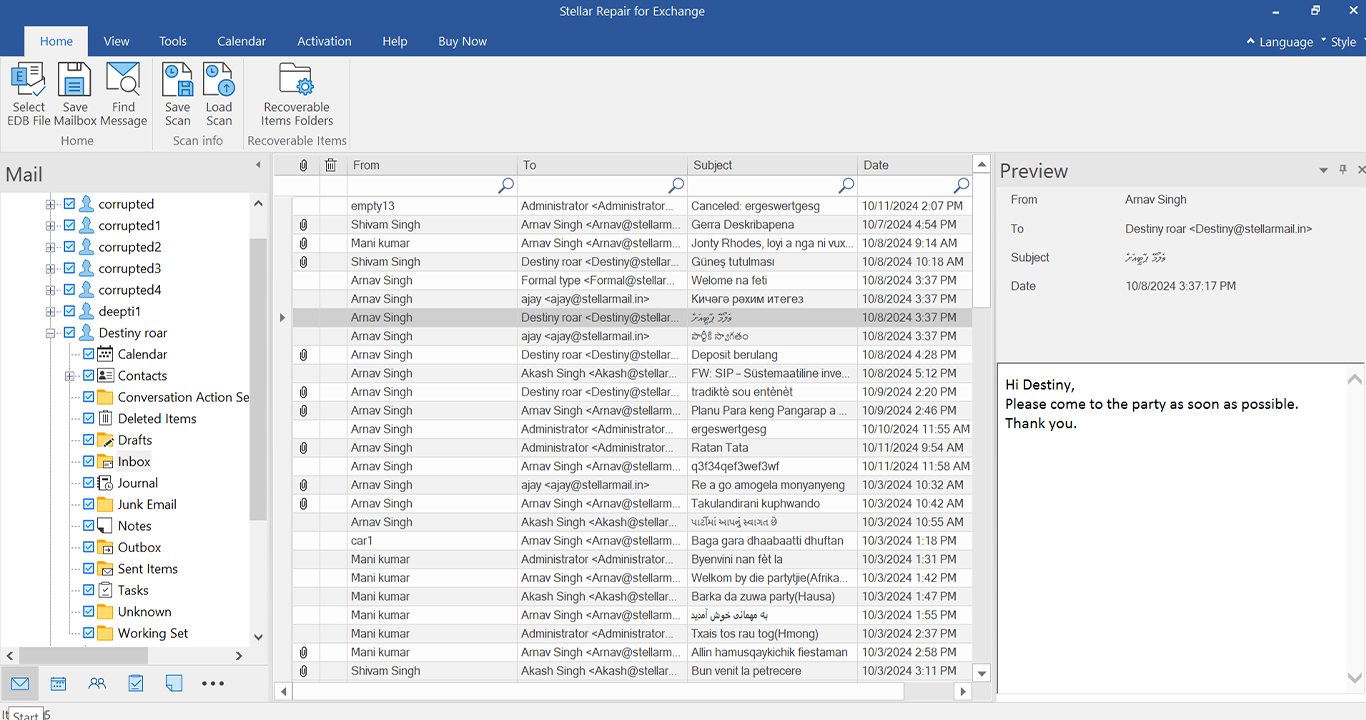
Stellar Repair for Exchange after a scan: recovered mailboxes and folders on the left, messages in the middle, the selected message on the right.
Stellar Repair for Exchange offers two scan depths. Quick Scan handles most corruption, and Extensive Scan digs deeper when mailboxes are missing. You can save a finished scan and reload it, which matters on a large database. After the scan it recovers mail, calendars, contacts, tasks, archive mailboxes, public folders and deleted items it can still read, and saves up to eight mailboxes at once in the priority order you set, so the people who need mail first get it first.
The export side is where it saves the most time. Besides PST, it maps mailboxes from a CSV and pushes them straight into a live Exchange server or a Microsoft 365 tenant, and an incremental export copies only what's missing if you run it again. That also solves the version problem: an Exchange 2010 or 2013 database can't be mounted on Exchange 2019 or SE, but its mailboxes can be exported into one.
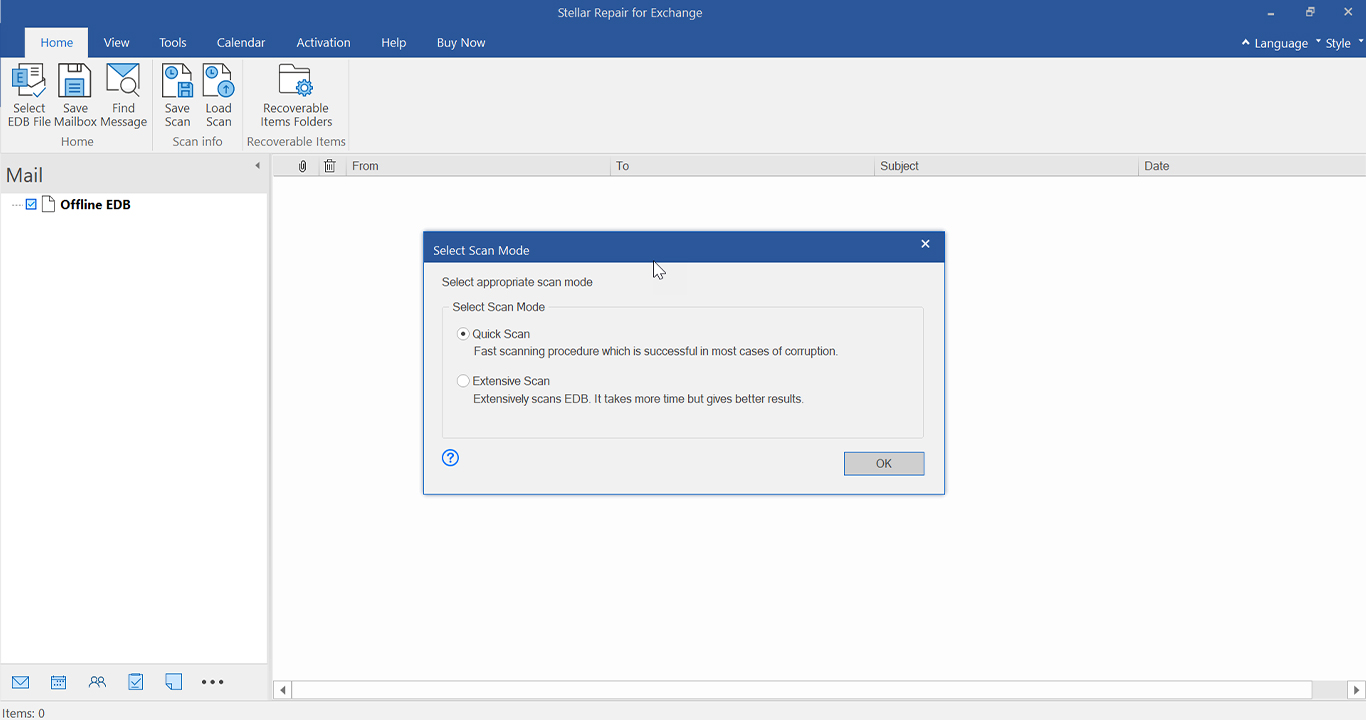
Stellar Repair for Exchange's scan choice: Quick Scan for most cases of corruption, Extensive Scan for heavier damage.
What we like
- Reads a corrupt EDB with no logs and no Exchange server
- Never modifies the original database
- Exports straight into Exchange 2019, SE or Microsoft 365, with mailbox mapping
- Eight mailboxes in parallel, in priority order
- Supports Exchange Subscription Edition
Watch out for
- The trial saves nothing, so you can only judge it from the preview
- Corporate stops at 100 mailboxes and expires after a year
- It gets the data out; it doesn't make the old EDB mountable again
- 64-bit Windows only, with 8 GB of RAM minimum (16 GB recommended)
- No refund if you buy without trying the trial first, and none on renewals
What users say about Stellar Repair for Exchange
Vladan.fr (Julian Becker, a sponsored post updated July 31, 2026) recovered a 60-70 GB Exchange 2016 database in a dirty shutdown with missing logs: "Eseutil couldn't help me, but Stellar Repair for Exchange recovered every mailbox I needed." His one con: "It's not cheap, especially for smaller firms."
WinBuzzer (Markus Kasanmascheff, August 26, 2026) compared it with Stellar's online repair service and concluded that "Stellar Repair for Exchange is the stronger tool when the incident demands control," while warning that "Neither route should be treated as a substitute for tested backups."
On Trustpilot, Peter Ritter (July 16, 2025, 5 stars) wrote: "Had a defective Exchange database. With Stellar repair for Exchange we were able to restore the mailboxes." Corndog Pieterse (May 4, 2024, 1 star) warned that "the software has lots of little niggles" and that it "does not repair edb files to remount". Stellar as a company scored 4.8 out of 5 from about 5,600 Trustpilot reviews across all its products when we looked.
Download Stellar Repair for Exchange Free TrialBuy Stellar Repair for Exchange Corporate
2. Stellar Converter for EDB: best for exporting a healthy EDB
- Price: $299 for one year at checkout, up to 50 mailboxes
- Runs on: 64-bit Windows 11, 10, 8.1 and 8, Windows Server 2012 to 2022
- Exchange: Subscription Edition, 2019 back to 5.5, offline EDB or a hosted server
- Version: 12.2.0.0, released June 2026
- Best for: migrating or archiving mailboxes from an EDB that isn't damaged
Stellar Converter for EDB is the straight EDB to PST converter in Stellar's range. It opens an offline EDB from a decommissioned server, or connects to a running Exchange server without dismounting the database, and exports mailboxes, archive mailboxes and public folders to PST, a live Exchange server or Microsoft 365. Public folders are the part Exchange's own PST export can't do.

Stellar Converter for EDB's Save As window for an offline EDB: export to a live Exchange server (live mailboxes, the in-place archive or a public folder), Microsoft 365, PST or other formats.
Stellar Converter for EDB shares Stellar Repair's interface and most of its export features: eight mailboxes in parallel with a priority queue, automatic PST splitting at about 45 GB, search by sender, subject, body or attachment name, and contacts (including the Global Address List) to CSV. What it doesn't have is the repair engine. Several one-star Trustpilot reviews come from buyers who needed a broken database fixed and bought the converter by mistake.
What we like
- $100 less than Stellar Repair for Exchange
- Hosted mode exports from a running server with no downtime
- Exports public folders and archive mailboxes
- No Exchange or Active Directory needed for an offline EDB
Watch out for
- Not a repair tool: a corrupt EDB needs Stellar Repair for Exchange
- Corporate covers only 50 mailboxes
- The trial saves nothing
- Hosted mode needs extra mailbox permissions first
What users say about Stellar Converter for EDB
On Trustpilot, Lance Warren (December 5, 2017, 4 stars) wrote: "We were able to use the product to extract the mailbox data direct from the edb files." Martijn Jager (July 23, 2020, 4 stars): "Stellar Converter for edb had no problem recovering the data from the same restored Exchange Mail Store."
The complaints are older or about the wrong job: Barnd (November 23, 2016, 1 star) said "Their edb Converter crashed on every recovery run", and Michael (October 4, 2022, 1 star) "quickly found out it didn't do what we needed it to do". Independent hands-on reviews of this product are scarce, so the trial preview on your own EDB matters more than usual.
Download Stellar Converter for EDB Free TrialBuy Stellar Converter for EDB Corporate
3. Kernel for Exchange Server Recovery: best free trial and oldest Exchange support
- Price: $299 for the Corporate license at checkout, perpetual with 1 year of upgrades (Technician: $499, lifetime upgrades)
- Runs on: Windows 11 back to XP, Windows Server 2022 back to 2003, 32-bit or 64-bit
- Exchange: 2019 back to 5.0
- Version: 25.0
- Best for: admins who want to see real recovered mail before paying
Kernel for Exchange Server Recovery does the same core job as Stellar Repair: it opens a corrupt, dismounted or offline EDB with no file size cap and no transaction logs, with a Standard Scan for minor corruption and a Deep Scan for severe damage. Its big practical difference is the trial. Kernel's free version saves the first 25 items from each folder, so you can open the exported PST in Outlook and check attachments and folder structure, where Stellar's trials only show a preview.
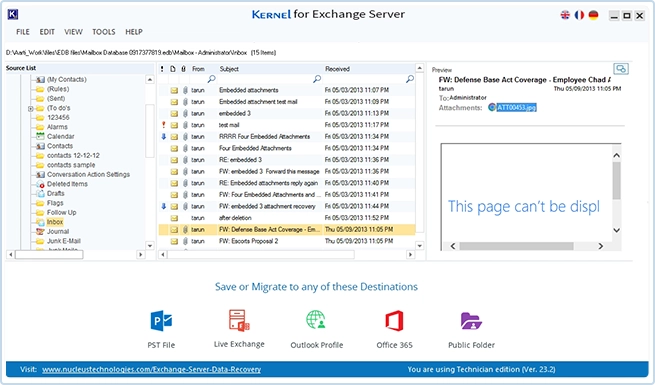
Kernel for Exchange Server Recovery previewing a recovered mailbox, with the export destinations (PST, live Exchange, Outlook profile, Office 365, public folder) along the bottom. This shot is from an older build, version 23.2.
Kernel for Exchange Server Recovery exports each mailbox to its own PST (handy for handing mail back to users), to a live Exchange server, an Outlook profile, or Office 365 private, archive and public folder mailboxes. Deleted items still in the retention period come back marked in red. It also includes a backup extractor that pulls Exchange database files out of old NTBackup BKF sets, something Stellar only offers inside its Toolkit.
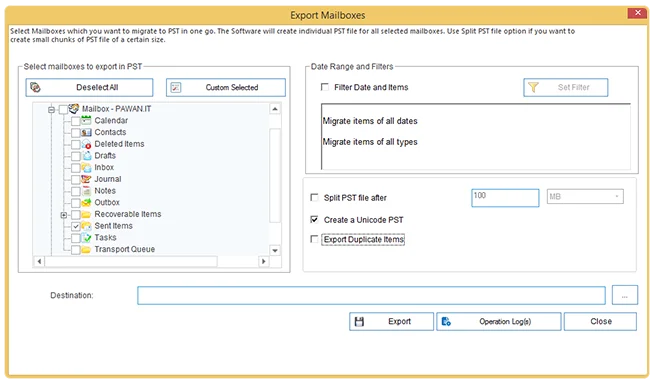
Kernel for Exchange Server Recovery's PST export dialog: folders to export, date and item filters, splitting the PST, Unicode output and the duplicate-items option.
What we like
- The trial saves 25 items per folder, so you can test real output
- Perpetual Corporate license, not a yearly one
- Runs on old 32-bit Windows and reads EDBs back to Exchange 5.0
- Reads Exchange databases inside BKF backups
Watch out for
- Exchange Subscription Edition isn't on its supported list (it ends at 2019)
- Exports include hidden system folders unless you deselect them
- Its Office 365 connection needs an Outlook profile
- A 137 MB installer and 4 GB of RAM minimum
What users say about Kernel for Exchange Server Recovery
Nuno Mota tested it on a database in a dirty shutdown state (Lets Exchange blog, July 18, 2018). He said the tool "can easily recover data from inaccessible EDB files" and called its item filtering "A really good feature indeed", but also noted: "A downside is that, by default, it also extracts all the system folders that are typically hidden from users."
Microsoft MVP Vikas Sukhija, quoted on KernelApps' page: "I have tested the SAVE it to PST option & it works like a charm". KernelApps shows 4.9 out of 5 from 539 reviews on its own site, while Softpedia's user score was 2.2 out of 5 from 27 votes when we looked. With numbers that far apart, the trial's 25 saved items are the better evidence.
Download Kernel for Exchange Server Recovery Free TrialBuy Kernel for Exchange Server Recovery
4. Stellar Toolkit for Exchange: best for IT providers
- Price: $699 for one year at checkout, or $999 for a lifetime license
- Mailboxes: unlimited
- Includes: Stellar Repair for Exchange, Stellar Converter for EDB, an Exchange backup extractor (BKF and VHDX), an OST converter and a Windows Server password tool
- Runs on: 64-bit Windows 11, 10, 8.1 and 8, Windows Server 2012 to 2022
- Best for: MSPs, consultants and admins who want every recovery path covered
Stellar Toolkit for Exchange bundles both Stellar tools above with three more: an extractor that reads mailboxes out of damaged BKF and VHDX backups, a batch OST to PST converter, and a Windows Server password reset. Every tool runs with unlimited mailboxes, which is the real reason to buy it: Corporate editions of the single tools cap out at 50 or 100.

Stellar Toolkit for Exchange's launcher: Repair EDB, Extract Mailbox, Convert OST, Extract from Backup and Recover Password, each opening its own tool.
The math is simple. If you have one corrupt database at one company, Stellar Repair for Exchange Technician ($599, lifetime, unlimited) does the same repair for less than the $999 lifetime Toolkit. The Toolkit earns its price when you also need to pull mail out of backups or convert OST files, or when you keep it on hand for whatever breaks next.
What we like
- Five tools, unlimited mailboxes, one license
- Gets mail out of damaged BKF and VHDX backups
- The lifetime license costs less than two years of renewals
Watch out for
- Most incidents need only one of the five tools
- The password tool lists Windows Server 2000 to 2012 only
- Same trial limit as the single tools: preview only
What users say about Stellar Toolkit for Exchange
Reviews of the bundle itself are few. On Trustpilot, Chris (August 24, 2021, 5 stars) wrote: "I have some problem with pro mailboxes (on Exchange Server). I bought Stellar Toolkit for Exchange to fix my issue." G2 had one review of the Toolkit, rated 4.5 out of 5, which praised how easy EDB to Outlook conversion was and named the price of the complete edition as the drawback.
Download Stellar Toolkit for Exchange Free TrialBuy Stellar Toolkit for Exchange
Repair or convert: the choice that matters most
Buy a repair tool (Stellar Repair for Exchange or Kernel for Exchange Server Recovery) whenever you aren't sure the EDB is healthy. A converter expects a clean database. Both repair tools also export a healthy EDB to PST, so they cover the converter's job too; the reverse isn't true. Stellar Converter for EDB is only the right buy when the database mounts, or mounted fine on its old server, and you just need the mailboxes somewhere else.
None of the four makes a broken EDB mountable again. They all copy the mail out into something new: PST files, a fresh database, a new Exchange server or Microsoft 365. Plan the destination before you start.
Stellar Repair vs Kernel: which repair tool?
| Question | Stellar Repair for Exchange | Kernel for Exchange Server Recovery |
|---|
| Can I test the output for free? | Preview only | ✓ 25 items per folder saved |
| License term | Corporate 1 year; Technician lifetime | Corporate perpetual with 1 year of upgrades; Technician lifetime upgrades |
| Exchange Subscription Edition | ✓ Listed | ✗ Not listed (2019 is the newest) |
| Old 32-bit Windows or Server 2003/2008 | ✗ 64-bit, Windows 8 / Server 2012 and newer | ✓ |
| Parallel export with priorities | ✓ Up to 8 mailboxes | Not listed |
| Reads Exchange data from BKF backups | Only in Stellar Toolkit | ✓ Built in |
Stellar Repair for Exchange is the better pick for a current Exchange 2019 or SE server and a large migration into Microsoft 365, where the parallel, prioritised export saves hours. Kernel for Exchange Server Recovery is the better pick when you want to prove the recovery works before paying, when the recovery PC is old, or when the database is from Exchange 2003 or earlier.
Which should you choose?
| Your situation | Pick | Why |
|---|
| Database won't mount, logs are gone, up to 100 mailboxes | Stellar Repair for Exchange Corporate | Built for dirty shutdowns, exports straight to Exchange or Microsoft 365 |
| Same, but more than 100 mailboxes | Stellar Repair for Exchange Technician | $599 once, unlimited mailboxes |
| You want to see real recovered mail before paying | Kernel for Exchange Server Recovery | Its trial saves 25 items per folder |
| Healthy EDB from an old server, moving to Microsoft 365 | Stellar Converter for EDB Corporate | Cheapest of the four, exports public folders |
| EDB from Exchange 2003 or earlier, or an old recovery PC | Kernel for Exchange Server Recovery | Supports Exchange 5.0 and 32-bit Windows |
| You fix Exchange servers for several clients | Stellar Toolkit for Exchange | Every tool, unlimited mailboxes, a lifetime option |
| Mounted, healthy database, a few PSTs needed | No purchase | New-MailboxExportRequest is free |
Who should skip each one: skip Stellar Converter for EDB if there's any chance the database is damaged. Skip Stellar Repair Corporate if you're near 100 mailboxes, since Technician costs $200 more and never expires. Skip Kernel if you run Exchange Subscription Edition and can't test it first. Skip the Toolkit if you only have one broken database today.
What commonly goes wrong
- Buying the converter for a corrupt database. It's the most common complaint in Stellar's one-star reviews. If the EDB won't mount, you need a repair tool.
- Expecting a mountable database. All four tools extract mailboxes; none hands back a fixed EDB that Exchange will mount.
- Running ESEUTIL /p first. The hard repair discards pages it can't fix. Copy the EDB before trying anything, and scan the copy.
- Running out of mailboxes mid-job. Stellar's Corporate editions cap at 50 (Converter) or 100 (Repair). Count the mailboxes in the trial preview, including shared and archive mailboxes, before you buy.
- Skipping the trial. Stellar won't refund a purchase made without trying the evaluation version, and doesn't refund renewals.
- Underpowered recovery PC. Stellar asks for 8 GB of RAM (16 GB recommended for repair) and parallel export scales with memory; a very large EDB on a small machine is slow with any tool.
- Export permissions. Exporting into live Exchange needs a domain-joined machine with administrative or impersonation rights, and target mailboxes created in advance. Microsoft 365 export needs an app registration.
FAQs
Can I convert an EDB file to PST for free?
Yes, if the database still mounts on a working Exchange server: New-MailboxExportRequest exports mailboxes to PST at no cost. For an offline, corrupt or orphaned EDB, you need a tool such as Stellar Converter for EDB or Kernel for Exchange Server Recovery, and Kernel's free trial saves 25 items per folder.
Do I need Exchange Server installed to open an EDB file?
No. Stellar Repair for Exchange, Stellar Converter for EDB and Kernel for Exchange Server Recovery all open an offline EDB without Exchange or Active Directory. You only need a live server when you're exporting straight into it.
Which EDB to PST tool works with Exchange Server Subscription Edition?
Stellar Repair for Exchange, Stellar Converter for EDB and Stellar Toolkit for Exchange list Exchange Server Subscription Edition. Kernel for Exchange Server Recovery lists versions up to Exchange 2019.
Can these tools recover deleted mailboxes and emails?
Stellar Repair for Exchange and Kernel for Exchange Server Recovery both recover deleted mailboxes and items that are still readable in the EDB; Kernel marks recovered deleted items in red. Mail purged beyond the retention period may not be recoverable by any tool.
How long does EDB recovery take?
Stellar Repair for Exchange's scan time depends on the database size, the damage, the scan mode and your hardware, and neither Stellar nor KernelApps gives a fixed figure. Run the trial scan on your real EDB: it shows both what's recoverable and roughly how long it takes.
Can I export EDB mailboxes straight to Microsoft 365?
Yes. Stellar Repair for Exchange, Stellar Converter for EDB and Stellar Toolkit for Exchange export to a Microsoft 365 tenant with mailbox mapping, and Kernel for Exchange Server Recovery exports to Office 365 mailboxes, which saves creating and importing PSTs.
Is the Stellar Corporate license a subscription?
Yes. Stellar Repair for Exchange Corporate and Stellar Converter for EDB Corporate are one-year licenses at checkout. Stellar Repair for Exchange Technician ($599) and the Stellar Toolkit lifetime license ($999) don't expire. Kernel for Exchange Server Recovery's Corporate license is perpetual, with one year of upgrades.
What's the difference between an EDB and an OST file?
An EDB is the Exchange server's mailbox database, holding many users' mail; an OST is one user's offline cache on a PC running Outlook. The tools here are for EDB files; for an OST, use a converter such as the ones in our OST to PST guide.