Kernel for Exchange Server Recovery: Pull Mailboxes Out of a Damaged EDB File
Kernel for Exchange Server Recovery is a $299 Windows tool from KernelApps that recovers mailboxes and public folders from corrupt, dismounted or offline Exchange EDB databases, even when the transaction logs are missing. It's for Exchange administrators who can't mount a database or can't afford what eseutil /p would throw away.
A failed database means a whole company without email, and the usual repair can cost you data. Kernel's trial lets you open the actual EDB and see the mailboxes first, and it saves 25 items per folder so you can test the output.
Quick facts
- Version: 25.0, listed by the vendor as October 2025
- Developer: KernelApps Pvt. Ltd. (Kernel Data Recovery)
- Platform: Windows 11, 10, 8.1 and older, Windows Server 2022 back to 2003
- Works with: Exchange Server 2019, 2016, 2013, 2010, 2007, 2003, 2000, 5.5 and 5.0
- Price: $299 for the Corporate License on the order page
- Trial: saves the first 25 items per folder
- Guarantee: 30 days money back, per the vendor's buy page
What we checked: installer file version 25.0 (136.6 MB, digitally signed by KernelApps Private Limited), and the order page, which showed $299 for the Corporate License, on November 9, 2026. We didn't run a recovery on a failed database, so results here are the vendor's and reviewers' reports.
Download Free TrialBuy Now
Overview
Exchange keeps every mailbox in a database file with the extension EDB. A dirty shutdown, a disk fault or missing logs can leave that file impossible to mount. Microsoft's eseutil can replay logs after a minor problem, but its hard repair mode, /p, removes the pages it can't fix, and that data doesn't return.
Kernel for Exchange Server Recovery goes around the problem. It opens the EDB offline, without needing a running Exchange server or the log files, and presents the mailboxes as a folder tree you can browse. Then you send them somewhere useful: a PST, a live Exchange server, an Outlook profile or Office 365.
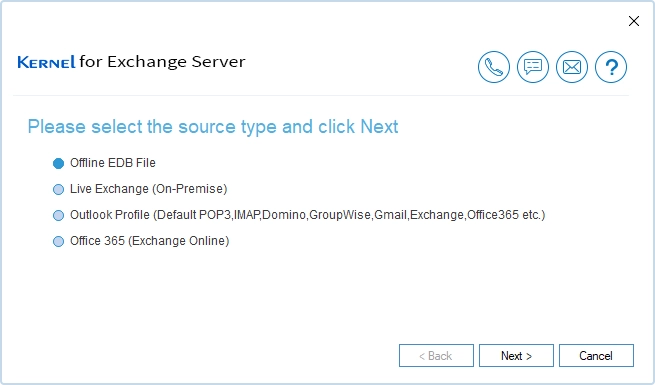
Choosing a source: an offline EDB file, live on-premises Exchange, an Outlook profile or Office 365.
Features
Recovers from corrupt and dismounted databases
Kernel for Exchange Server Recovery reads EDB files that won't mount, with no file size cap and no need for transaction logs. Standard Scan handles minor corruption and Deep Scan is for severe damage. It can also search a drive or network location for EDB files and add several for bulk recovery.
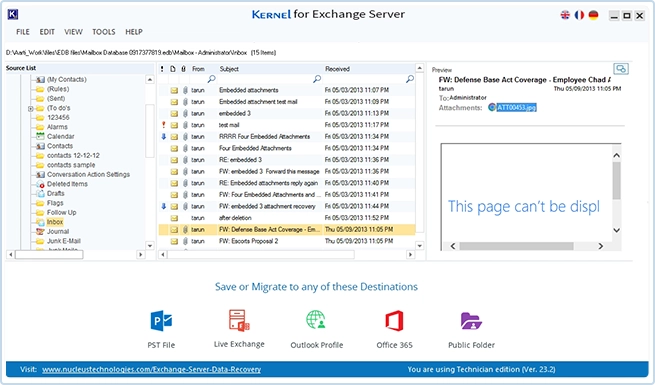
Previewing a mailbox before saving, with the destinations along the bottom. This shot comes from an older build, version 23.2.
Brings back deleted mailboxes and items
Kernel for Exchange Server Recovery restores deleted mail that's still within the retention period, and shows those items in red so you can tell them apart. It covers user, archive, shared and distribution mailboxes as well as public folders.
Saves to the place you need it
Kernel for Exchange Server Recovery exports to a new or existing PST, to a live Exchange server, to an Outlook profile, or to Office 365 private, archive and public folder mailboxes. Each mailbox can go to its own PST, which makes handing data back to users much easier.
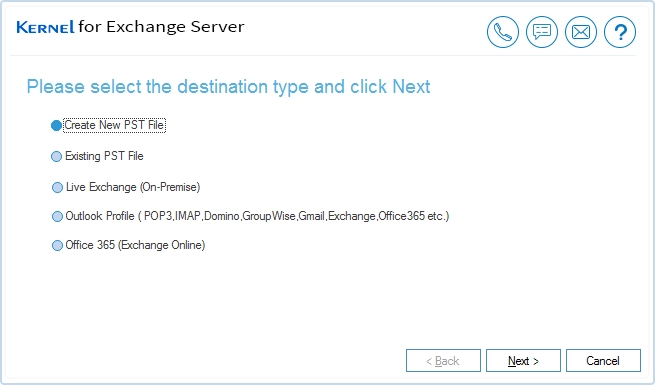
Choosing where the recovered data goes.
Filters, search and split PSTs
Kernel for Exchange Server Recovery filters exports by date range and item type, and its search looks through messages and attachments by body, type, size and date. Export settings include splitting large PSTs, creating Unicode PSTs and keeping or skipping duplicates.
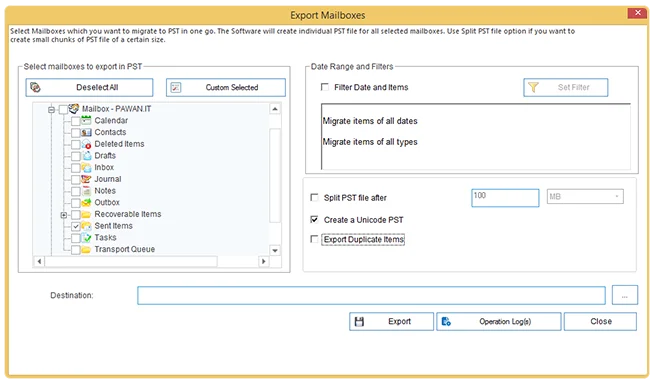
The export dialog, with the folder list, date and item filters, the PST split setting and Unicode output.
Reads Exchange data inside BKF backups
Kernel for Exchange Server Recovery includes a backup extractor that pulls Exchange database files such as Priv.edb, Pub.edb and Stm.edb from BKF backups, so an old NTBackup set doesn't need a full restore first. It also writes reports and operation logs for each job, which helps when someone asks what was recovered.
Benefits
- Less downtime pressure. You can start pulling out urgent mailboxes while the server problem is still open.
- An alternative to the destructive repair. You don't have to accept the pages eseutil /p discards.
- Granular control. Restoring one person's mailbox doesn't require a full server restore.
Real-World Uses
- A dirty shutdown: a power failure leaves the database inconsistent and the logs can't bring it back.
- A single mailbox request: pull one user's mail from a snapshot or offline copy for legal or HR.
- A retired server: extract mailboxes from an old EDB after the hardware is gone.
- A move to Microsoft 365: send recovered mailboxes straight to Office 365.
- Old backups: recover data from a BKF file from an earlier Exchange version.
Who It's For, and Who Should Skip It
Buy it if you run on-premises Exchange and a database is damaged, or you want it on the shelf for the day one is. For a business without mail, $299 is small.
Skip it if you have a clean, recent backup that restores properly, or if soft recovery with eseutil /r brings the database back. Companies entirely on Microsoft 365 have no EDB files to recover. Consultants working across several clients need the Technician license, and the product has no Mac version.
Usage Guide
- Copy the EDB to a working disk and leave the original alone.
- Install the free trial on a Windows machine with at least 4 GB of RAM, and launch it.
- Choose Offline EDB File as the source and add the database, or use the search to find it.
- Browse the recovered mailboxes in the left pane and check the messages in the preview.
- Select the mailboxes and choose a destination.
- Apply date and item filters, set the PST options and start the export.
- Buy a license if the trial's output looks right.
Before you buy
- Test with your own EDB. The trial opens the real database and saves 25 items per folder.
- Know the update term. The Corporate license is perpetual, with 1 year of product upgrades. Technician includes lifetime upgrades.
- Check the Corporate scope. It covers one organization, up to 100 systems at one office location.
Where it falls short
- The supported list ends at Exchange 2019. KernelApps doesn't name Exchange Server SE, so test it first if you're running that.
- System folders come along by default. Reviewer Nuno Mota found that exports include hidden system folders unless you deselect them.
- Office 365 connections have quirks. The same reviewer found that connecting needs an Outlook profile, and he questioned why credentials were still requested.
- It's a big download. The trial installer is 136.6 MB and the program asks for 4 GB of RAM.
What Users Say
The best outside review is a hands-on test by an Exchange specialist. It's from 2018, so details may have changed, but it's the most concrete account we found.
Nuno Mota's hands-on test (Lets Exchange blog, July 18, 2018)
Mota tested the tool on a database in a dirty shutdown state. He calls the interface "a very clean, modern and easy to use user interface," says the tool "can easily recover data from inaccessible EDB files," and describes the item filtering as "A really good feature indeed."
He's also direct about the rough edges: "A downside is that, by default, it also extracts all the system folders that are typically hidden from users." On connecting to Office 365: "The strange thing here, is that we need an Outlook profile." His verdict on its main job is that "it performs great in that field."
On the vendor's page
KernelApps shows 4.9 out of 5 from 539 reviews, plus quotes from Microsoft MVPs, all on its own site.
"I have tested the SAVE it to PST option & it works like a charm" - Vikas Sukhija, Microsoft MVP
"Kernel for Exchange Server recovery tool helps Exchange administrators to reduce the time and stress involved in the restoration of corrupt EDB files." - Adnan Rafique, Microsoft MVP
"Kernel for Exchange Server Recovery easyily scan and recovers data from my public and private EDB files. For me, the best feature was the option to directly restore mailboxes to Office 365 user mailboxes, as it saved me a lot of manual work." - James
Trustpilot and Softpedia
The company's Trustpilot page shows 4.9 out of 5 from 166 reviews, read through a page summarizer. One names the Exchange family directly:
"Exchange Suite allowed me to recover a mailbox from an offline EDB file." - Jon, September 21, 2026
Softpedia's user score tells a different story at 2.2 out of 5 from 27 votes, seen through a search summary. G2 lists the product but says it doesn't have enough reviews to rate.
The pattern: admins who tested it like the recovery and the filtering, and complain about small interface oddities. The gap between Kernel's 4.9 and Softpedia's 2.2 is a good reason to rely on the trial instead of either number.
Comparisons
Kernel for Exchange Server Recovery vs eseutil
eseutil ships with Exchange and costs nothing, so try a soft recovery with eseutil /r first when the logs are available. The hard repair, eseutil /p, discards pages it can't fix. Kernel for Exchange Server Recovery extracts the mail to a new destination instead, and needs no logs.
Corporate vs Technician vs Exchange Suite
Corporate is for one organization at one location. Technician is for service providers working at several, and adds lifetime upgrades. The Exchange Suite adds more migration tools for $569, which only makes sense if you're moving servers as well as recovering them.
Editions and Pricing
| License | Price | Upgrades | Scope |
|---|
| Corporate (this listing) | $299 | 1 year | One organization, 100 systems at one office |
| Technician | $499 | Lifetime | Multiple systems and office locations |
| Kernel Exchange Suite | $569 | 1 year | One organization, 100 systems at one office |
FAQs
Does Kernel for Exchange Server Recovery need transaction logs?
No. Kernel for Exchange Server Recovery recovers mailboxes from an EDB file without its log files, which is a large part of its value after a log loss.
Can Kernel for Exchange Server Recovery save each mailbox to its own PST?
Yes. Kernel for Exchange Server Recovery can export each mailbox to a separate PST file, and split them if they run large.
Does Kernel for Exchange Server Recovery need Exchange installed?
Not to read an offline EDB. Kernel for Exchange Server Recovery opens the file directly, and only needs a live server when that's where you're restoring to.
Which Outlook versions work with Kernel for Exchange Server Recovery?
KernelApps lists Office 365 and Outlook 2021, 2019, 2016, 2013, 2010, 2007, 2003, 2002, 2000, 98 and 97.
Can Kernel for Exchange Server Recovery restore public folders?
Yes. Kernel for Exchange Server Recovery recovers public folders from offline databases and can save them to a new PST or to Exchange Online public folders.
Does Kernel for Exchange Server Recovery handle Unicode mail?
Yes. Kernel for Exchange Server Recovery recovers Unicode characters and can write Unicode PST files.
System Requirements
- Windows 11, 10, 8.1 and older, Windows Server 2022, 2019, 2016, 2012, 2008 R2, 2008, 2003 R2 and 2003
- Intel Pentium compatible processor (x86 or x64) or equivalent
- 4 GB RAM minimum and 2 GB of disk space, plus room for the recovered mail
- Virtual environments listed by the vendor include VMware Server, Workstation, ESX and ESXi, and Microsoft Virtual PC 2007
Conclusion
Kernel for Exchange Server Recovery is worth $299 for anyone running on-premises Exchange with a database that won't mount. The reason to buy is that it gets mail out without logs and without the data loss of eseutil /p. The reason not to is a good backup or a working soft recovery, either of which costs nothing. Open your own EDB in the trial first and let the preview make the decision.
Download Free TrialBuy Now