Kernel Mac MBOX Converter: Apple Mail and Thunderbird Mail in Eight Formats
Kernel Mac MBOX Converter is a $39 macOS app from KernelApps that converts MBOX mailbox files from Apple Mail, Thunderbird, Gmail Takeout and about 20 other email clients into PST, PDF, EML, MSG, DOC, DOCX, MHT or HTML. It's for Mac users moving their old mail into Outlook, and for anyone who needs a mailbox as PDFs or documents, done on the Mac where the mail already sits.
MBOX is the format nearly every Mac and open-source mail client exports, and Google Takeout hands you Gmail in it too. Outlook can't import it, and opening a 6 GB MBOX in a text editor isn't a plan.
Quick facts
- Version: 26.0 (updated January 2026; installer package dated February 9, 2026)
- Developer: KernelApps Pvt. Ltd. (Kernel Data Recovery), Noida, India
- Platform: macOS Tahoe, macOS 15, 14, 13, 12, 11, 10.15 and older back to Mac OS X 10.8; the vendor lists an Intel processor and a JDK as requirements
- Input: MBOX files from Apple Mail, Thunderbird, Gmail backups, Eudora, Entourage, Postbox, Opera, The Bat!, SeaMonkey and others
- Output: PST, PDF, EML, MSG, DOC, DOCX, MHT, HTML
- Price: $39 Home, $199 Corporate, $299 Technician, one payment on the order page
- Trial: converts 25 items per folder
- Refund: 30-day money-back policy, limited to cases where the full version fails where the trial worked
What we checked: the installer package (173 MB, dated February 9, 2026) on the vendor's server, and the order page, which showed $39 for Kernel Mac MBOX Converter, $199 for the Corporate License and $299 for the Technician License on November 17, 2026. We didn't convert a mailbox ourselves, so the output quality described here is the vendor's and its users' claim.
Download Free TrialBuy Home LicenseBuy Corporate LicenseBuy Technician License
Overview
Kernel Mac MBOX Converter opens on a blue folder that says "Please add MBOX file(s)". Pick a single MBOX file or a whole folder of them, and it shows the mailbox tree (Inbox, Sent Items, Deleted Items and so on) in a Preview of MBOX Folder window. Set a date range if you want, click Start Migration, choose the output format and destination, and it writes the converted mail into a dated "Conversion" folder.
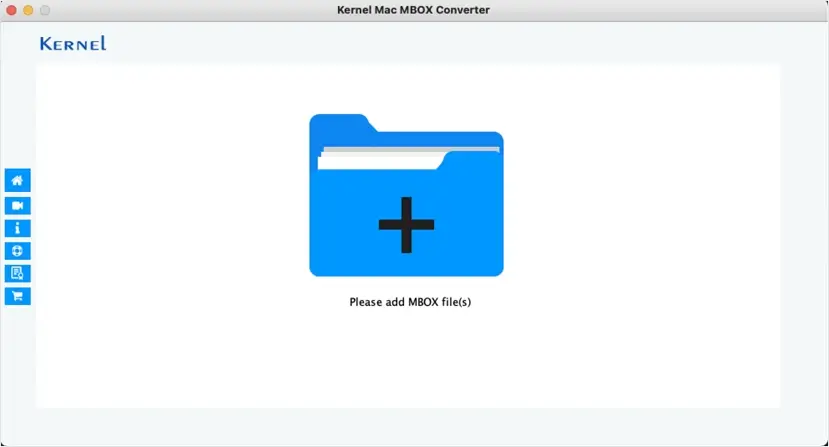
The start window. The side buttons lead to home, video help, info, support, the manual and the store.
The "preview" is the folder tree with its MBOX files, not a reader for individual messages, so you can check you've picked the right mailbox but not read an email before converting it.
Features
Eight output formats from one tool
Kernel Mac MBOX Converter saves to PST for Outlook, EML and MSG for other mail clients, PDF for archiving and legal hand-over, DOC and DOCX for editing, and MHT or HTML for reading in a browser. You pick one format per run.
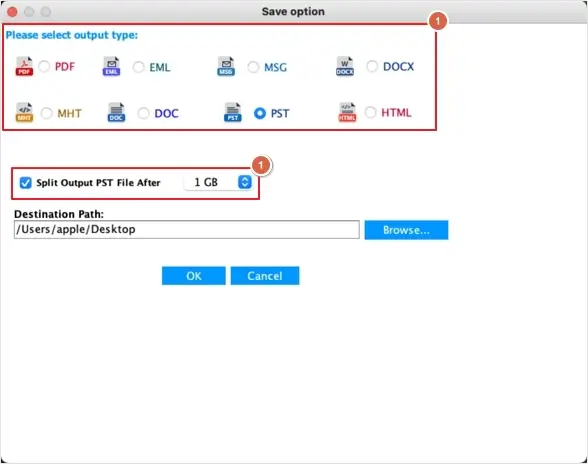
The Save option dialog: eight output types, the PST split size and the destination path.
MBOX from about 20 email clients
Kernel Mac MBOX Converter reads MBOX files from Apple Mail, Mozilla Thunderbird, Gmail backup (Google Takeout), Eudora, Entourage, Postbox, Netscape, PocoMail, Spicebird, Opera, PowerMail, Claws Mail, The Bat!, Evolution, SeaMonkey, Sylpheed, Mulberry, GyazMail and Sparrow, according to the vendor.
Whole folders and big files
Kernel Mac MBOX Converter takes a folder holding many MBOX files and keeps their hierarchy in the output, and the vendor states there's no file size limit. The licence sets how many files you may convert: 25 with Home, 100 with Corporate, unlimited with Technician.
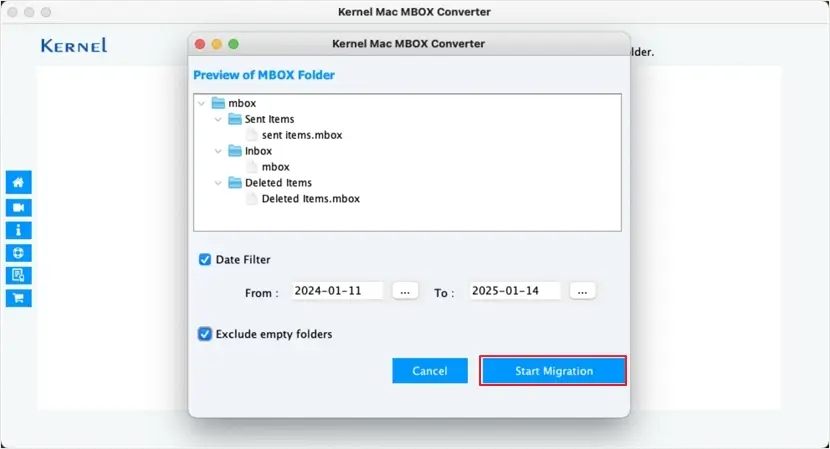
The Preview of MBOX Folder window, with the date filter and the Exclude empty folders option set.
Date filter and empty-folder skip
Kernel Mac MBOX Converter converts only the mail between two dates when you tick the Date Filter, and Exclude empty folders keeps the output tidy. There's no filter by sender, subject or item type.
PST split by size
Kernel Mac MBOX Converter can split the output PST once it reaches a size you choose (1 GB in the vendor's example). Smaller PST files are easier to copy and less likely to bog down Outlook.
Benefits
- One purchase covers several destinations. The same licence gives you PST for Outlook today and PDF for an archive tomorrow.
- Works from exported files. You don't need the original account or mail client, just the MBOX files.
- Runs on current macOS. The vendor lists macOS Tahoe and 15 alongside older releases, and the app was updated in January 2026.
- Cheap for personal moves. $39 for your own mailbox, compared with hours of drag-and-drop in Apple Mail.
Real-World Uses
- Leaving Apple Mail for Outlook on Windows. Export mailboxes from Apple Mail, convert them to PST on the Mac, and open the PST in Outlook on the new PC.
- Reading a Google Takeout archive. Turn Gmail's MBOX export into PST for Outlook or EML files you can open one by one.
- A PDF record of a mailbox. Convert a project's or a former employee's Thunderbird mail to PDF for the file or for a lawyer.
- One year only. Use the date filter to hand over the correspondence for a tax year or a dispute period.
Who It's For, and Who Should Skip It
It's for Mac users and Mac-based IT staff with MBOX files who need them in Outlook or as documents. The Home licence suits one person's own mail; a business converting staff mailboxes needs Corporate.
Skip it if you want to move mail straight into Microsoft 365 or Gmail: this app writes files, not to cloud mailboxes, and Kernel sells separate tools for that. If you work on Windows, Kernel's Windows MBOX to PST tool costs the same $39. And if you only need a few messages, dragging them out of Apple Mail as EML files costs nothing.
Usage Guide
- Download the trial package and open it with Installer (right-click, Open With, Installer). If macOS blocks it, go to System Settings, Privacy & Security and click Open Anyway.
- Launch Kernel Mac MBOX Converter and click the blue folder (Please add MBOX file(s)).
- Select an MBOX file or the folder that holds your exported mailboxes, and click Open.
- In Preview of MBOX Folder, check the tree, tick Date Filter and set From and To if you want, and tick Exclude empty folders.
- Click Start Migration, pick the output type, set the PST split size if you chose PST, click Browse for the destination, then OK.
- When "Conversion completed successfully" appears, open the destination folder shown in the message.
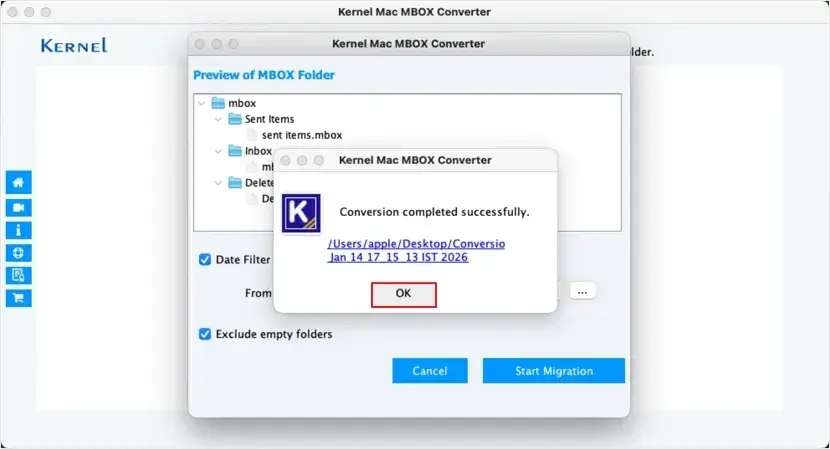
The finished conversion, with a link to the dated output folder on the Desktop.
Before you buy
- Try it on your own MBOX first. The trial converts 25 items per folder in any format, enough to check that your folders, attachments and accented characters come through.
- Intel and Java are listed requirements, even though the vendor also lists macOS Tahoe. On an Apple silicon Mac, confirm the trial runs before paying.
- The refund policy is narrow. Kernel refunds when the full version gives different results from the trial, after support has tried to fix it. Changing your mind, or finding the app won't run on a Mac you never tried it on, isn't covered.
- The Home licence is personal use, up to 25 files, and listed as valid for one year. Corporate and Technician are lifetime.
Download Free TrialBuy Home License
Where it falls short
- No message preview or search. You see folders and file names, not emails.
- Only a date filter. You can't pick by sender or subject.
- Files only. There's no direct upload to Office 365, Gmail or an IMAP server.
- One format per run. PST and PDF of the same mailbox means two conversions.
What Users Say
On the vendor's page
Kernel prints two testimonials for this app. Angela Clark, IT Systems Engineer: "As an IT administrator handling multiple Mac email clients, Kernel Mac MBOX Converter proved invaluable. It easily converted large MBOX files from Apple Mail and Thunderbird into PST format without data loss."
Barry Walker, Email Migration Consultant: "When I switched from Mac to Windows, I struggled to open my old MBOX files in Outlook. Kernel Mac MBOX Converter fixed my issue in minutes." Testimonials chosen by the vendor are, of course, the positive ones.
Trustpilot (KernelApps as a company)
KernelApps holds a 4.9 out of 5 TrustScore from 167 reviews on Trustpilot. None names the Mac app. The closest, from mckr in April 2026, is about the Windows MBOX tool: "Vikram was great with helping us solve an installation problem with Kernel MBOX to PST..." Most reviews there praise the support staff by name.
We found no independent hands-on review of Kernel Mac MBOX Converter. The theme across Kernel's reviews is responsive support for installation and conversion problems, with few complaints about the products themselves.
Comparisons
Kernel Mac MBOX Converter vs Kernel for MBOX to PST (Windows)
Both start at $39. The Windows tool runs on the PC you're moving to and can also send mail to Office 365; the Mac app runs where the MBOX files already are and adds PDF, DOC, DOCX, MHT and HTML output. Pick by which computer you'll do the work on.
Kernel Mac MBOX Converter vs Kernel Mac OLM Converter
Outlook for Mac saves OLM archives; Apple Mail, Thunderbird and Gmail Takeout produce MBOX. Use this app for MBOX, the OLM Converter for Outlook for Mac exports.
Editions and Pricing
| Licence | Price | Use | Files and validity | Buy |
|---|
| Home | $39 | Personal use only | 25 files, 1 year | Buy Home |
| Corporate | $199 | One organization | 100 files, lifetime | Buy Corporate |
| Technician | $299 | Service providers working for several organizations | Unlimited files, lifetime | Buy Technician |
Each is a one-time payment at checkout with no automatic renewal. The activation key arrives by email within about 15 minutes, and companies can pay by purchase order at checkout.
FAQs
Can Kernel Mac MBOX Converter convert a Gmail Takeout file?
Yes. Kernel Mac MBOX Converter accepts the MBOX file from a Gmail backup (Google Takeout) and converts it to PST, EML, MSG, PDF or the other formats.
Where do I find Apple Mail's MBOX files?
Kernel Mac MBOX Converter needs exported mailboxes. In Apple Mail, select a mailbox and use Mailbox, Export Mailbox; the export is a folder with an MBOX file inside, which you then add to the converter.
Does Kernel Mac MBOX Converter keep attachments?
Yes. Kernel Mac MBOX Converter carries messages with their attachments and properties into the output and keeps the folder hierarchy, according to the vendor. Check a few attachments with the trial if they matter to you.
Can I split a large PST?
Yes. Kernel Mac MBOX Converter has a Split Output PST File After option that starts a new PST at the size you choose.
Is there a Windows version?
Yes. Kernel's Mac MBOX Converter page offers a Windows download and a macOS download. This listing covers the macOS app.
Is the Home licence a subscription?
No. Kernel Mac MBOX Converter's Home licence is a single $39 payment with no automatic renewal. The vendor lists it as valid for one year and 25 files; Corporate and Technician are lifetime licences.
System Requirements
- macOS Tahoe, macOS 15, 14, 13, 12, 11, 10.15 and older, back to Mac OS X 10.8
- Mac with an Intel processor, JDK required (vendor's listing)
- 4 GB RAM minimum
- 100 MB of disk space for the app, plus room for the output
Conclusion
Kernel Mac MBOX Converter is worth $39 if you have Apple Mail, Thunderbird or Gmail MBOX files on a Mac and need them in Outlook or as PDFs or documents. The reason to buy it is range: eight output formats, about 20 source clients and a PST split option in one inexpensive app that was updated in January 2026. The reason to hesitate is that it's a converter, not a mail viewer: no message preview, only a date filter, and no direct cloud upload. Run the trial on your own mailbox, and if 25 items per folder come out right, the full version will do the rest.
Download Free TrialBuy Home LicenseBuy Corporate LicenseBuy Technician License