Kernel for VHD: Recover Files From Damaged Virtual Hard Disks
Kernel for VHD is a $99 Windows tool from KernelApps that recovers files from corrupt, deleted or formatted VHD and VHDX virtual hard disks. It's for anyone whose Hyper-V virtual machine won't start or whose virtual disk won't mount.
A virtual disk is one big file, so one bad sector or a crashed host can take a whole machine's data with it.
Quick facts
- Version: 19.12, released November 2019
- Developer: KernelApps Pvt. Ltd. (Kernel Data Recovery)
- Platform: Windows 11, 10, 8.1, 8, 7 and older, Windows Server 2022, 2019 and older
- Works with: VHD and VHDX files, FAT and NTFS volumes
- Price: $99 for the Home license on the order page
- Trial: saves up to 250 MB of recovered data
- Guarantee: 30 days money back
What we checked: installer size 4.2 MB, dated November 11, 2019 on the vendor's download server, and the order page, which showed $99 for Kernel for VHD - Home User, on November 10, 2026. We didn't recover a damaged virtual disk ourselves.
Download Free TrialBuy Now
Overview
Kernel for VHD (the vendor's page calls it Kernel for VHD Recovery) opens a VHD or VHDX file, shows its partitions, scans the one you choose, and lists the files it found. You tick what you want and save it elsewhere.
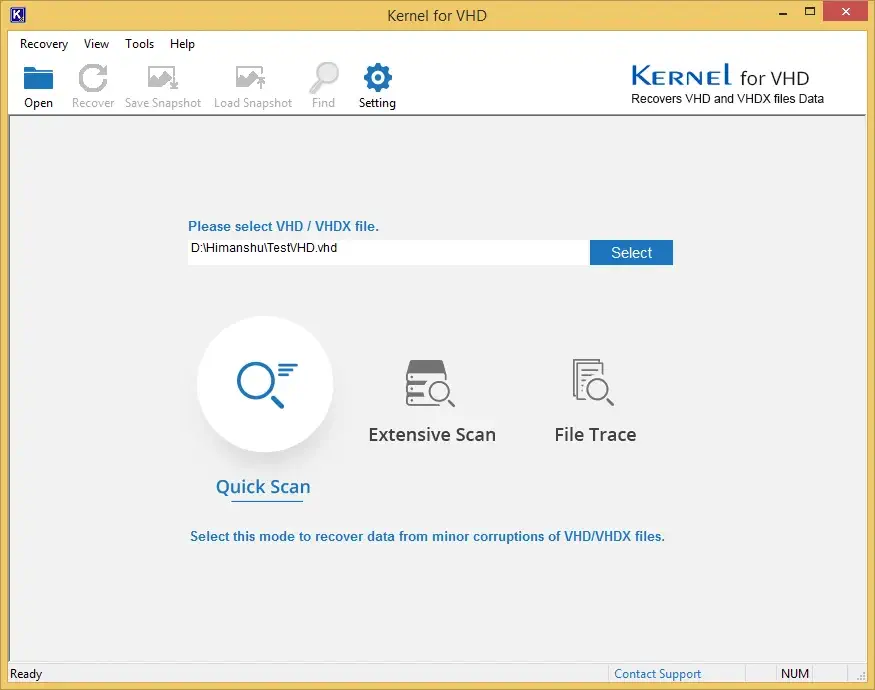
Choosing one of the three scan modes.
Features
Three scan modes
Kernel for VHD offers Quick Scan for mild damage, Extensive Scan for a deeper pass and File Trace for severe cases.
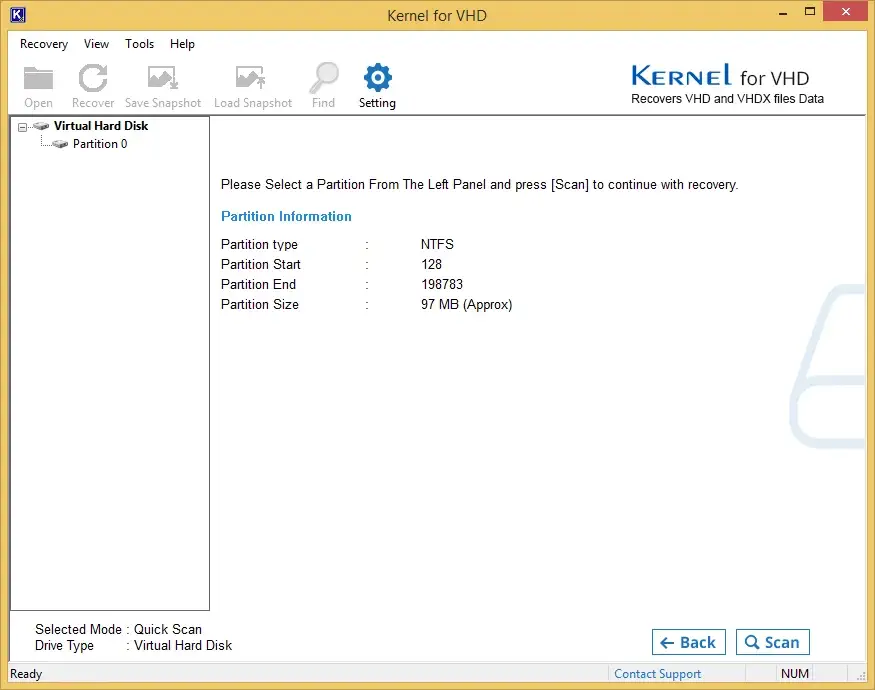
Partition details before the scan.
Recovers deleted and formatted data
Kernel for VHD finds files lost to deletion or formatting inside a virtual disk, on FAT and NTFS volumes.
Snapshots to resume later
Kernel for VHD can save its progress to a .nkfn file, so a long scan can continue another day.
Search and settings
Kernel for VHD can search recovered results by file type, such as *.xls, and has settings for including deleted files and handling name clashes.
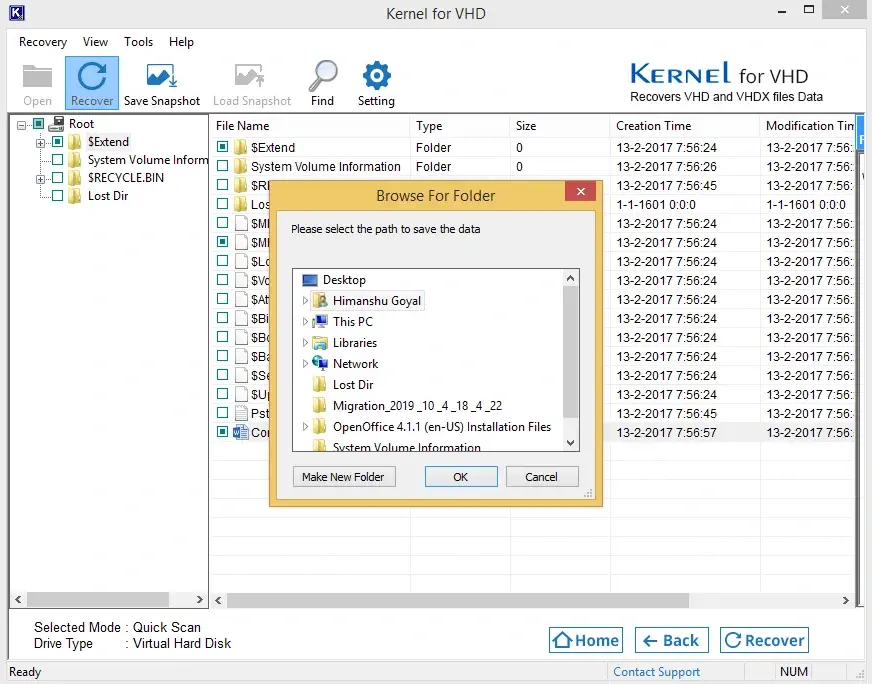
Selecting files and a save location.
Benefits
- You can test on your real file. The trial saves up to 250 MB of what it finds.
- No hypervisor needed. It reads the disk file directly.
- Selective restore. Take only what you need.
Real-World Uses
- A Hyper-V VM that fails with "The file or directory is corrupted and unreadable".
- A VHD accidentally deleted or reformatted.
- Getting documents out of a crashed virtual machine.
- Pulling one database out of a large VHDX.
Who It's For, and Who Should Skip It
Buy it if you have a broken VHD or VHDX and no usable backup. Skip it if your virtual disks use VMDK, since this Home edition is for VHD and VHDX, or if your VM uses a Linux file system, because the tool handles FAT and NTFS. Business users need a Corporate or Technician license.
Usage Guide
- Copy the VHD or VHDX to a healthy drive.
- Install the trial and open Kernel for VHD.
- Select the virtual disk file and a scan mode.
- Choose the partition and click Scan.
- Browse the recovered files and tick the ones you want.
- Click Recover and pick a destination on a different disk.
Before you buy
The trial saves up to 250 MB, enough to confirm real documents come back. The program dates from 2019, and the vendor lists Windows 11 and Windows Server 2022 as supported.
Where it falls short
- FAT and NTFS only, so Linux guest file systems are out of scope.
- The interface is simple but dated.
- Windows only.
What Users Say
On the vendor's page
Kernel's page shows 4.9 out of 5 from 459 reviews, collected on its own site.
"I found this tool through Google search. Kernel for VHD Recovery tool is capable of recovering data from VHD and VHDX. It also supports recovery from encrypted and compressed virtual hard disks. The recovered data can be saved in different file formats, including VHD, VHDX." Mathew
Independent sites
Reviews elsewhere are rare. The vendor's page carries a write-up by Microsoft MVP Ermanno Goletto, which is in Italian. Trustpilot rates the company 4.9 out of 5 from 166 reviews across its products.
Editions and Pricing
| Edition | Price | Who it covers |
|---|
| Home | $99 | Personal use |
| Corporate | $199 | A single organization |
| Technician | $299 | Service providers, multiple organizations |
FAQs
Does Kernel for VHD support VHDX files?
Kernel for VHD recovers both VHD and VHDX virtual disk files.
Which virtual machine platforms does Kernel for VHD work with?
Kernel for VHD supports disks created on Hyper-V Server and Windows Server 2016, 2012 R2, 2012, 2008 R2, and Windows 10, 8.1, 8 and 7.
Does the Kernel for VHD trial save anything?
Kernel for VHD trial saves up to 250 MB of recovered data.
Can Kernel for VHD recover from a Linux file system?
Kernel for VHD is built for FAT and NTFS, so a Linux guest's file system isn't covered.
Is there an educational discount for Kernel for VHD?
KernelApps says educational institutes can get discounts by contacting its sales team.
System Requirements
- Windows 11, 10, 8.1, 8, 7 and older; Windows Server 2022, 2019 and older
- Pentium-compatible processor
- 128 MB RAM minimum
- 50 MB of disk space
Conclusion
At $99, Kernel for VHD makes sense when a broken virtual disk holds data you have no backup of, and the 250 MB trial proves it can read your file. Don't buy it for Linux guests or VMDK disks. For a single small VM with a recent backup, restoring the backup is cheaper and quicker.
Download Free TrialBuy Now