Kernel Mac OLM Converter: Move Outlook for Mac Mail to a PST on the Mac Itself
Kernel Mac OLM Converter is a $39 macOS app from KernelApps that converts Outlook for Mac data files (OLM) into Outlook PST files, so your emails, contacts and calendars open in Outlook for Windows. It's for people leaving a Mac for a Windows PC, and for IT staff who are handed an OLM export and need a PST, without a Windows machine to do the conversion on.
Outlook for Windows can't open an OLM file, and Outlook for Mac can't save a PST. The usual workaround is to sync everything through an IMAP or Exchange account and wait, which falls apart when the account is gone and all you have is the archive.
Quick facts
- Version: 23.0 (installer package dated February 27, 2026)
- Developer: KernelApps Pvt. Ltd. (Kernel Data Recovery), Noida, India
- Platform: macOS (Mac OS X 10.8 and later), Mac with an Intel processor, Java (JDK) required
- Input: OLM files from Outlook for Mac 2016 (16.53.1) and earlier versions, including Outlook 2011
- Output: Outlook PST
- Price: $39 Home, $149 Corporate, $299 Technician, one payment on the order page
- Trial: saves 25 items per folder
- Refund: 30-day money-back policy, limited to cases where the full version fails where the trial worked
What we checked: the installer package (95 MB, dated February 27, 2026) on the vendor's server, and the order page, which showed $39 for Kernel Mac OLM Converter - Home User License, $149 for the Corporate License and $299 for the Technician License on November 17, 2026. We didn't run a conversion ourselves, so how well it handles a given OLM file is the vendor's and its users' claim.
Download Free TrialBuy Home LicenseBuy Corporate LicenseBuy Technician License
Overview
Kernel Mac OLM Converter is a single-purpose app with three screens. The first is an empty drop area that says "Add OLM file here to convert to PST". Add one or more OLM files with the plus button, click Set Filter and Migrate, choose what to include, and save. The result is a new PST file on a drive you pick, which you then copy to the Windows PC and open or import in Outlook.
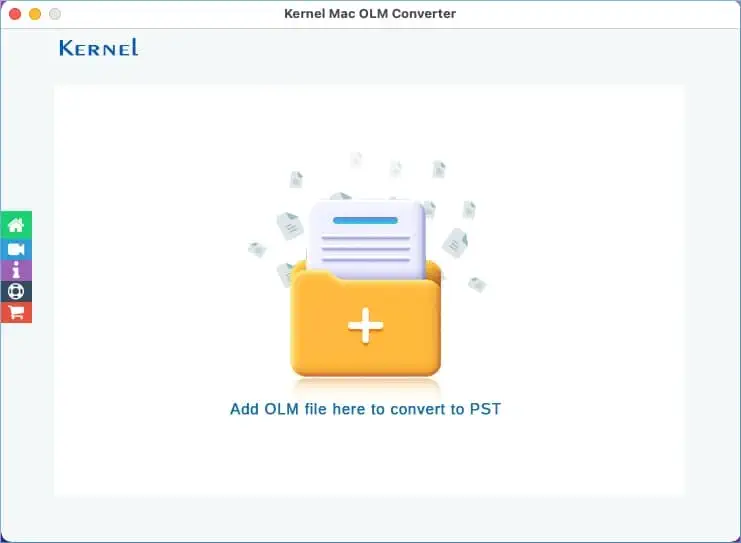
The start window: click the folder area to add OLM files. The side buttons open home, video help, info, support and the store.
There's no mailbox preview or search here, unlike Kernel's Windows OLM tools. This app is built to do one job, OLM in and PST out, and it does it on the Mac where the OLM file already lives.
Features
Every item type in the OLM file
Kernel Mac OLM Converter converts emails with their attachments, contacts, calendar appointments and meetings, tasks, notes and journal entries. Message headers (From, To, Cc, Bcc, Subject, Date), the folder tree (Inbox, Sent, Drafts, Deleted and your own folders) and the item properties are carried into the PST.
Several OLM files in one run, no size cap
Kernel Mac OLM Converter takes several OLM files at once and handles each in its own conversion, and the vendor states there's no file size limit. That suits a 30 GB archive or a folder of exports from several staff members. The licence, not the app, sets how many files you may convert: 25 with Home, 500 with Corporate, unlimited with Technician.
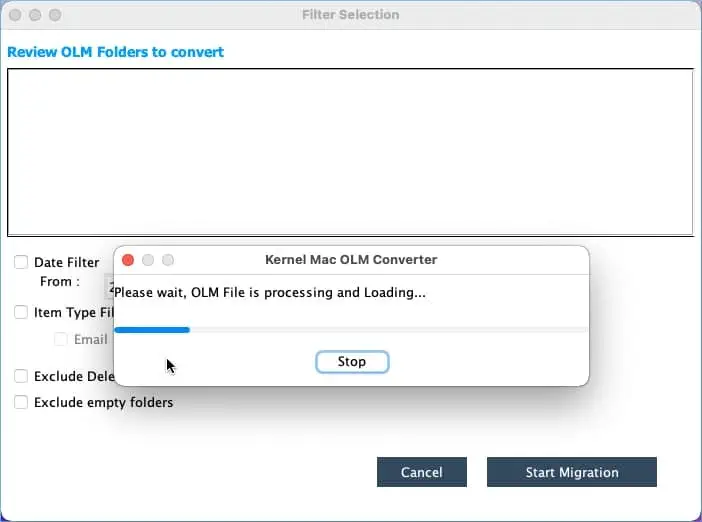
An OLM file added to the list. Plus and minus buttons add or remove files before you click Set Filter and Migrate.
Filters for a smaller PST
Kernel Mac OLM Converter's Filter Selection screen has a date range (From and To) and an item-type filter for Email, Journal, Task, Contacts and Calendar/Appointment. Two more boxes skip deleted folders and empty folders. Use them to hand over only last year's mail, or only the contacts, instead of the whole archive.
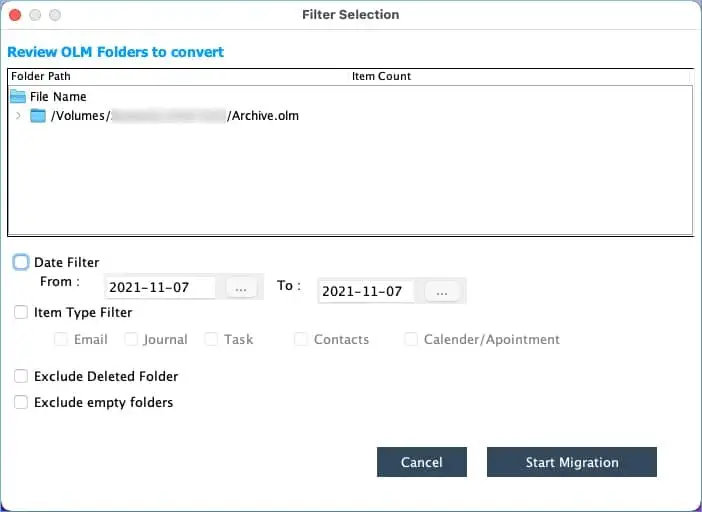
The Filter Selection screen: date range, item types (Email, Journal, Task, Contacts, Calendar/Appointment) and the two exclude options.
Named, tagged PST output
Kernel Mac OLM Converter writes a new PST to a folder and volume you choose, under a name you type, and can attach Finder tags to it. Tags sound minor, but they help when you convert a dozen archives for different people and need to find each one later.
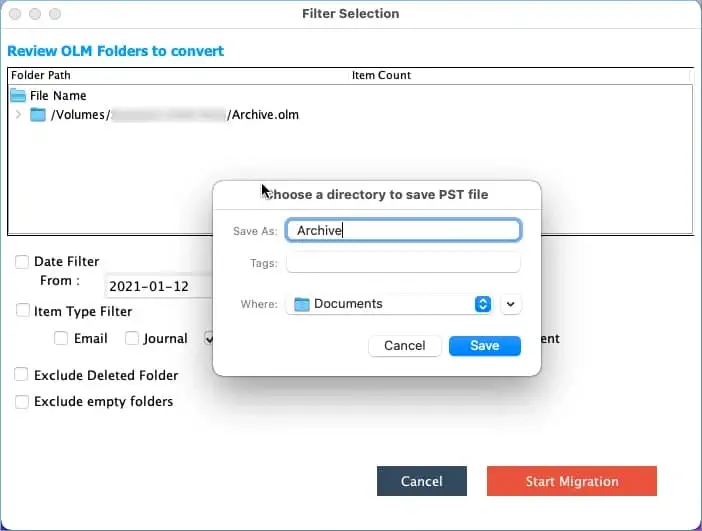
Saving the PST: a file name, optional Finder tags and the destination folder.
Benefits
- No Windows PC needed for the conversion. You do the work on the Mac that already has the OLM file, and copy one PST across.
- No live mailbox needed. It reads the archive file directly, so it works after the Exchange or IMAP account has been closed.
- Less to clean up afterwards. The filters keep junk, empty folders and old years out of the new PST.
- Cheap for a one-off move. $39 is less than an hour of a technician's time spent syncing mail through a temporary account.
Real-World Uses
- Switching from a Mac to a Windows laptop. Export your mail from Outlook for Mac as an OLM archive, convert it, and import the PST into Outlook on the new PC.
- A leaver's archive. IT receives an OLM export of a departing employee's mailbox and needs a PST that the Windows-based records team can open.
- Legal or HR requests. Convert only the emails from a date range into a smaller PST to hand over.
- Contacts and calendar only. Untick Email and convert just the address book and appointments.
Who It's For, and Who Should Skip It
It's for Mac users and Mac-based IT staff who have OLM files and need PST files, and who would rather not set up a Windows machine to do it.
Skip it if you already have a Windows PC handy: Kernel sells a Windows OLM to PST converter for the same $39 that can also export to Office 365, Exchange and Gmail. Skip it too if your target is Microsoft 365 rather than a PST file, since Kernel has a separate Mac OLM to Office 365 tool for that. And if your OLM comes from the newest Outlook for Mac builds, run the trial first (see below).
Usage Guide
- Download the trial package and open it with Installer (right-click, Open With, Installer). If macOS says the package can't be opened, go to System Settings, Privacy & Security and click Open Anyway.
- Make sure Java is installed, since the app needs a JDK, then launch Kernel Mac OLM Converter.
- Click the folder area or the plus button and select one or more OLM files.
- Click Set Filter and Migrate. Wait while the OLM file is processed and its folders load.
- Set the date range and item types, and tick the boxes to exclude deleted or empty folders if you want.
- Click Start Migration, type a name for the PST, add tags if you like, and pick the destination folder.
- When "Saving process successfully is completed" appears, copy the PST to the Windows PC and open it in Outlook (File, Open & Export, Open Outlook Data File).
Before you buy
- Intel Mac and Java. The vendor lists a Mac with an Intel processor and a JDK as requirements. On an Apple silicon Mac, try the trial first.
- Outlook for Mac versions. Support is listed up to Outlook for Mac 2016 build 16.53.1 and earlier versions. If your OLM was exported from a newer build, convert a sample with the trial before paying.
- The refund policy is narrow. Kernel refunds when the full version gives different results from the trial, after its support team has tried to fix the issue. Buying and then deciding you don't need it, or finding it won't run on your Mac without having tried the trial, aren't covered.
- The Home licence is for personal use and up to 25 files. A company converting staff archives needs the Corporate licence.
Download Free TrialBuy Home License
Where it falls short
- PST output only. The product page, the buy page and the app's screens show PST as the only format, with no direct export to Office 365 or Gmail. For Office 365, Kernel sells a separate Mac OLM to Office 365 tool.
- No mailbox preview. You see folder paths and item counts, not the messages, so you can't spot-check an email before converting.
- It looks dated. The listed requirements (Mac OS X 10.8, Intel, Java) and the Outlook 16.53.1 ceiling date from several years ago, even though the package itself was rebuilt in February 2026.
- Password protection is up to Outlook. The PST is saved unprotected; you add a password in Outlook's account settings afterwards.
What Users Say
The vendor's tally
Kernel's own order page for this app shows 4.9 out of 5 from 515 reviews. Those ratings are collected on the vendor's site, so read them as the vendor's count rather than an independent score.
Trustpilot (KernelApps as a company)
KernelApps holds a 4.9 out of 5 TrustScore from 167 reviews on Trustpilot. None of the recent reviews names the Mac OLM Converter: they cover Kernel's OST, MBOX, Exchange and migration tools, and most of them praise the support staff by name for patient, quick help with installation and conversion problems.
We found no independent hands-on review of the Mac app. The recurring theme across Kernel's reviews is fast, patient support, which matters for a tool where the refund depends on support first trying to fix the problem.
Comparisons
Kernel Mac OLM Converter vs Kernel for OLM to PST (Windows)
Both start at $39. The Windows tool runs on the PC you're moving to and can also send the mail to Office 365, Exchange or Gmail. The Mac app runs where the OLM already is and only makes a PST. If you have both machines, the Windows version gives you more; if you only have the Mac, this is the one that works.
Kernel Mac OLM Converter vs syncing through an IMAP account
Syncing through a mail account is free but slow, needs the account to still exist, and often drops contacts and calendars. The converter works offline from the archive and keeps all item types.
Editions and Pricing
| Licence | Price | Use | Files and validity | Buy |
|---|
| Home | $39 | Personal use only | 25 files, 1 year | Buy Home |
| Corporate | $149 | One organization | 500 files, 2 years | Buy Corporate |
| Technician | $299 | Consultants and service providers, multiple computers | Unlimited files, lifetime | Buy Technician |
Each is a one-time payment at checkout, with no automatic renewal. All three include free feature updates and 24x7 support by chat, email and phone, according to the vendor. The key arrives by email within about 15 minutes.
FAQs
Does Kernel Mac OLM Converter run on an M1, M2 or M3 Mac?
Kernel Mac OLM Converter lists a Mac with an Intel processor and a JDK as requirements and doesn't mention Apple silicon. Install the trial and convert a sample before buying; that's also what the refund policy expects.
How do I get an OLM file out of Outlook for Mac?
Kernel Mac OLM Converter needs an OLM archive as input. Create it with the Export command in Outlook for Mac, which saves the mailbox items you choose as an .olm file on your Mac.
Can Kernel Mac OLM Converter open an OLM from Outlook 2011 for Mac?
Yes. Kernel Mac OLM Converter supports OLM files from Outlook 2011 for Mac, even though Microsoft ended support for that version in 2017.
Can I read OLM files from a network share?
Yes. Kernel Mac OLM Converter can add OLM files from a network-shared folder, as well as from local and external drives.
Is the Home licence a subscription?
No. Kernel Mac OLM Converter's Home licence is a single $39 payment with no automatic renewal at checkout. The vendor's comparison lists it as valid for one year and 25 files, against two years for Corporate and lifetime for Technician.
Can I put a password on the converted PST?
Not in Kernel Mac OLM Converter itself. Open the PST in Outlook for Windows and set a password in the data file's account settings.
Can a company order it with a purchase order?
Yes. Kernel Mac OLM Converter can be ordered by companies, schools and government bodies with the Purchase Order payment option at checkout, or through Kernel's local resellers.
System Requirements
- Mac OS X 10.8 or later
- Mac computer with an Intel processor, JDK required
- 4 GB RAM minimum
- 1 GB of free disk space, plus room for the PST files
- OLM files from Outlook for Mac 2016 (16.53.1) and earlier versions
Conclusion
Kernel Mac OLM Converter is worth $39 if you're on a Mac, holding an OLM archive, and need a PST without borrowing a Windows PC or keeping an old mail account alive. It keeps every item type and the folder tree, and the filters let you hand over just the part that's needed. The reason to hesitate is age: Intel and Java requirements and an Outlook 16.53.1 ceiling. Run the trial on your own file first; if it shows your folders and items, the full version is a safe buy. If you have a Windows PC, Kernel's Windows OLM to PST converter does more for the same price.
Download Free TrialBuy Home LicenseBuy Corporate LicenseBuy Technician License