Kernel PDF Converter: Batch PDF to Word, Excel, Images and More
Kernel PDF Converter is a Windows tool from KernelApps, $29 for a one-year Home License, that converts PDF files in bulk to Word, Excel, PowerPoint, HTML, plain text, EPUB and seven image formats. It's for people who regularly need to get text, tables or pages out of a stack of PDFs and don't want to upload them to a website one at a time.
Free online converters are fine for one file. They're slow for 300, they cap file sizes, and they mean sending contracts and reports to someone else's server. A desktop converter keeps the files on your PC and does the whole folder in one pass.
Quick facts
- Version: 24.1 (released August 2024)
- Developer: KernelApps Pvt. Ltd. (Kernel Data Recovery), Noida, India
- Platform: Windows 11, 10, 8.1, 8, 7, Vista, XP and Windows Server 2022, 2019 and older
- Converts to: DOCX, DOC, XLSX, XLS, ODS, CSV, PPTX, XPS, HTML, TXT, JPEG, PNG, GIF, TIFF, BMP, EMF, SVG, EPUB, TEX
- Price: $29 Home (1 year), $99 Corporate (1 year), $199 Technician (1 year); 2-year licences $49, $179 and $359; one payment on the order page
- Trial: converts one PDF, with a watermark
- Refund: 30-day money-back policy, limited to cases where the full version fails where the trial worked
What we checked: the installer (206 MB, dated July 31, 2024) on the vendor's server, and the order page, which showed $29 for Kernel PDF Converter (Home User License) - 1 Year License and the five other licences at the prices in the table below, on November 17, 2026. We didn't convert files ourselves, so how faithfully layouts and tables come out is the vendor's and its users' claim.
Download Free TrialBuy Home LicenseBuy Corporate LicenseBuy Technician License
Overview
Kernel PDF Converter has one window. The left pane lists the PDFs you've added, with a Locked or Unlocked status for each. The right side shows a preview of the selected PDF, then Filter for Conversion: six format groups (Document, Spreadsheet, Presentation, Data, Image and Other), each with a drop-down for the exact format, and a page filter. Tick the files, choose the format, click Convert, pick a folder.
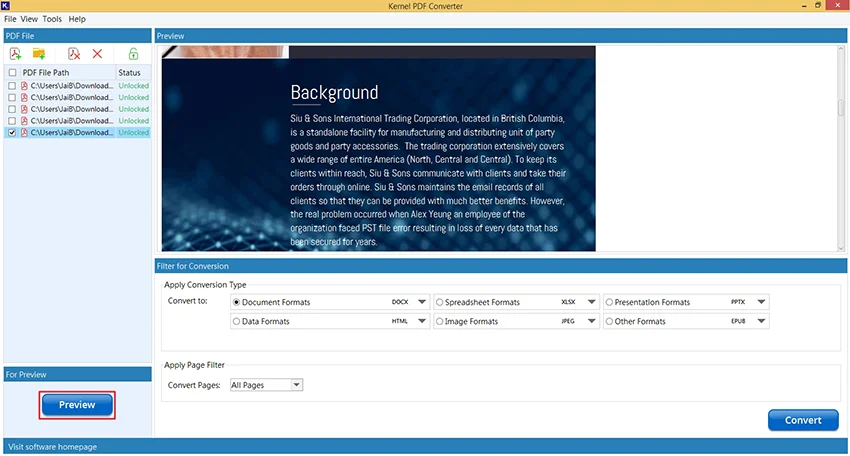
The main window: added PDFs on the left with their lock status, a preview of the selected file, and the format and page options below.
Features
Six format groups, 19 output formats
Kernel PDF Converter converts PDFs to documents (DOCX, DOC), spreadsheets (XLSX, XLS, ODS, CSV), presentations (PPTX, XPS), data formats (HTML, TXT), images (JPEG, PNG, GIF, TIFF, BMP, EMF, SVG) and other formats (EPUB for e-readers, TEX). One format per run.
Whole folders in one run
Kernel PDF Converter adds single PDFs or entire folders, with no limit on file size or count in the software itself, and you can remove the ones you don't want with the cross icon before converting. The licence sets how many files you may convert: 25 with Home, 100 with Corporate, unlimited with Technician.
Page filter
Kernel PDF Converter converts All Pages, Even Pages, Odd Pages, Page Ranges or specific Page Numbers. That's handy for pulling one table out of a 200-page report rather than converting all of it.
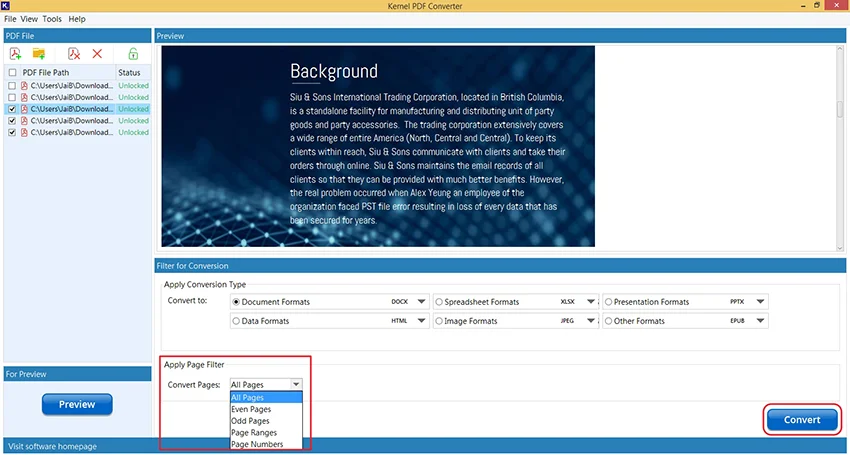
The page filter: all, even, odd, ranges or specific page numbers.
Password-protected PDFs, if you have the password
Kernel PDF Converter marks encrypted PDFs as Locked. Select one and enter its password, and it converts like any other. It doesn't remove or guess unknown passwords; Kernel sells a separate PDF Restriction Removal tool for owner restrictions.
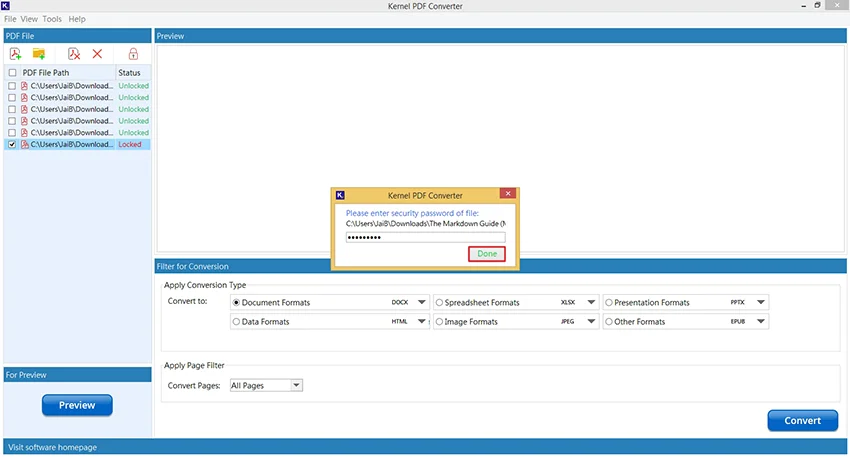
A locked PDF in the list and the password prompt that unlocks it for conversion.
Image options and a log
Kernel PDF Converter can write one image file per page, or for TIFF a single multi-page file per PDF; for HTML you can choose one file per PDF or one per page. After a batch, a log report lists each file's result, including the ones that failed.
Benefits
- Files stay on your PC. No uploads, which matters for contracts, medical records or client data.
- One tool instead of five. Word, Excel, PowerPoint, image and e-book output from the same window.
- Fast for batches. A folder of invoices to Excel or a stack of brochures to JPEG in one run.
- Low entry price. $29 for a year of personal use.
Real-World Uses
- Editing an old report. Convert the PDF to DOCX and update it in Word instead of retyping it.
- Getting tables into Excel. Convert bank statements or price lists to XLSX or CSV and work with the numbers.
- Images for the web. Turn each page of a catalogue into PNG or JPEG for a website or social media.
- Reading on an e-reader. Convert a PDF manual to EPUB.
- Archiving as text. Save PDFs as TXT or HTML so a search tool can index them.
Who It's For, and Who Should Skip It
It's for office workers, students and small businesses on Windows who convert PDFs often enough that a dedicated, offline tool saves time, and who mostly need Word, Excel or image output.
Skip it if you need to edit PDFs, create them, sign them or run OCR on scanned pages: this converts existing PDFs to other formats and nothing more, and the vendor doesn't list OCR, so a scanned page will come out as an image rather than editable text. Mac users need something else. And if you convert a few files a year, a free online converter or Word's own PDF opening will do.
Usage Guide
- Download and install the trial, then launch Kernel PDF Converter.
- Use the add-file or add-folder button at the top of the PDF File pane.
- For a Locked file, select it and enter its password.
- Select a file and click Preview to check it's the right one.
- Under Apply Conversion Type, pick a group and the exact format in its drop-down.
- Under Apply Page Filter, choose all pages or a subset, then click Convert.
- Choose the save folder. When "PDF Conversion Completed" appears, click the link to open the folder.
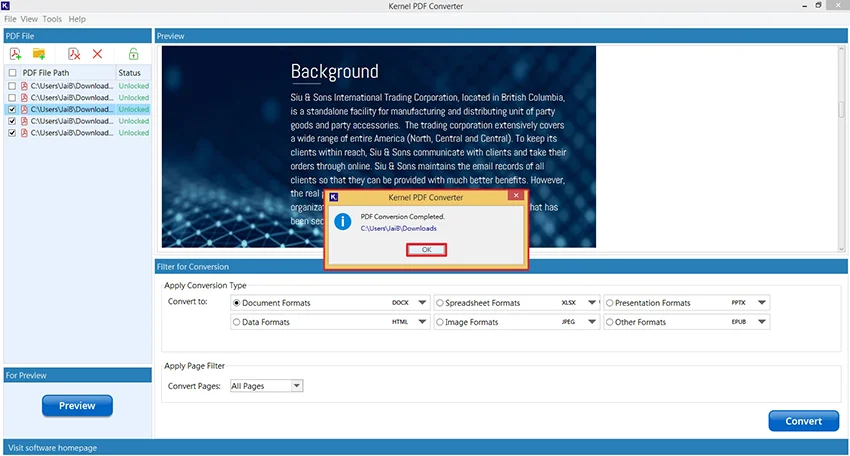
The finished conversion, with a link to the output folder.
Before you buy
- The trial is very short. It converts a single PDF with a watermark. Pick your hardest PDF, with tables or columns, for that one test.
- Licences are 1 or 2 years. The Home licence covers one year and 25 files. There's no automatic renewal at checkout, so you buy again when it runs out.
- File counts are low on Home. 25 files won't last a busy office; Corporate allows 100, Technician unlimited.
- The refund policy is narrow. Kernel refunds when the full version gives different results from the trial, after support has tried to fix it, not for a change of mind.
Download Free TrialBuy Home License
Where it falls short
- No OCR listed. Scanned PDFs are pictures of text, and without OCR they won't become editable Word or Excel text.
- Complex layouts. Like every PDF converter, multi-column pages, forms and tables drawn as graphics may need tidying afterwards.
- Time-limited and file-limited licences. Many rivals sell a perpetual licence; here even the $359 Technician option lasts two years.
- Windows only, and the installer is over 200 MB for a converter.
What Users Say
On the vendor's page
Kernel prints two customer quotes for this tool. James Norton, Germany: "This tool is the best solution to convert bulk PDF files. We had more than 300 PDFs that we needed to save as document formats and doing that with free online tool wasn't feasible."
Ana Dorris, Brazil, a graphic designer: "Due to the unavailability of reliable and precision-oriented solutions, I was worried about losing the formatting and integrity. But Kernel PDF Converter helped me with easy & accurate conversion of files." These are testimonials the vendor chose.
Trustpilot (KernelApps as a company)
KernelApps holds a 4.9 out of 5 TrustScore from 167 reviews on Trustpilot. None of the recent reviews names Kernel PDF Converter; they cover Kernel's email, Exchange and migration tools and mostly praise its support staff.
We found no independent hands-on review of Kernel PDF Converter. Treat the conversion quality claims as unproven until your own trial file comes out right.
Comparisons
Kernel PDF Converter vs free online converters
Online converters cost nothing and need no install, but handle one or a few files at a time and require uploading them. Kernel PDF Converter runs offline, handles folders, and covers more formats, for $29 a year.
Kernel PDF Converter vs Kernel Extractor for PDF
The converter turns whole pages into other file formats. The Extractor pulls the text and images out of PDFs as separate files. Same price, different job.
Editions and Pricing
Each Buy button orders that exact licence and term, as a one-time payment with no automatic renewal. Home is for personal use, Corporate for use within one organization, and Technician for consultants and service providers. All include 24x7 technical support by chat, email and phone, according to the vendor.
FAQs
Does Kernel PDF Converter do OCR on scanned PDFs?
Kernel PDF Converter doesn't list OCR among its features. A scanned PDF holds images of pages, so expect image output rather than editable text from it.
Can Kernel PDF Converter remove a PDF password?
No. Kernel PDF Converter converts a password-protected PDF only after you type its password. It doesn't recover or bypass unknown passwords.
Can I convert only some pages?
Yes. Kernel PDF Converter converts all pages, even or odd pages, page ranges or individual page numbers.
Does it make one image per page?
Yes. Kernel PDF Converter writes one image file per page, and for TIFF it can instead make one multi-page TIFF per PDF.
What happens when the licence year ends?
Kernel PDF Converter licences are bought for one or two years, with no automatic renewal at checkout. When the term ends, you buy a new licence to keep converting.
Is there a Mac version?
No. Kernel PDF Converter runs on Windows, from XP to Windows 11, and on Windows Server.
System Requirements
- Windows 11, 10, 8.1, 8, 7, Vista, XP or Windows 365; Windows Server 2022, 2019 and older
- Intel Pentium compatible (x86, x64) processor
- 64 MB RAM minimum
- 250 MB of disk space, plus room for the output (the installer itself is 206 MB)
Conclusion
Kernel PDF Converter is worth $29 if you're on Windows and turn PDFs into Word, Excel or images often enough to want a batch tool that keeps files off the internet. Its strength is breadth: 19 formats, folders in one run, and page-level filtering. Its weakness is the licensing: one or two years and a file cap, with no OCR for scanned documents. Use the one-file trial on your trickiest PDF; if the tables survive, buy the Home licence for personal use or Corporate for an office.
Download Free TrialBuy Home LicenseBuy Corporate LicenseBuy Technician License