Kernel Google Workspace Backup: Keep a Local Copy of Gmail, Drive and Calendars
Kernel Google Workspace Backup (formerly Kernel G Suite Backup) is a Windows tool from KernelApps, from $49 for one mailbox, that backs up Google Workspace and Gmail mail, contacts, calendars, Google Drive files and Google Groups to PST, PDF, EML, MSG and other files on your own drive. It's for small businesses and admins who want a copy of their Google data outside Google, and the Backup and Restore edition ($99) can also put PST and OST files back into Workspace mailboxes.
Google keeps deleted items for a limited time, and when an employee leaves and the account is deleted, that mailbox goes with it. A local PST of each mailbox is cheap insurance, and it's also the format a lawyer, an auditor or a new Outlook user can actually open.
Quick facts
- Version: 25.0 (installer dated December 17, 2025)
- Developer: KernelApps Pvt. Ltd. (Kernel Data Recovery), Noida, India
- Platform: Windows 11, 10, 8.1, 8, 7 and Windows Server 2022 back to 2003
- Backs up: Gmail mail, contacts, calendars, Google Drive and Shared Drives, Google Groups, from all Google Workspace plans and personal Google accounts
- Saves to: PST, EML, MSG, PDF, DOC, DOCX, HTML, MHT
- Price: $49 for one mailbox (Backup), $99 for one mailbox (Backup and Restore), up to $599 and $1,199 for 250 mailboxes, one payment on the order page
- Trial: backs up 10 items per folder and 5 documents per Google Drive
- Refund: 30-day money-back policy, limited to cases where the full version fails where the trial worked
What we checked: the installer (230 MB, dated December 17, 2025) on the vendor's server, and the order page, which showed $49 for Kernel G Suite Backup - Single User License and $99 for Kernel Google Workspace Backup and Restore - Single Mailbox, with every other mailbox tier priced as in the table below, on November 17, 2026. We didn't connect a Google Workspace account ourselves, so backup speed and completeness are the vendor's and its users' claim.
Download Free TrialBuy Backup (1 Mailbox)Buy Backup and Restore (1 Mailbox)
Overview
Kernel Google Workspace Backup opens on a menu of jobs: Mailboxes, Groups, Drive Backup, Google Docs & Sheets Backup, Google Chat Backup, Google Photos Backup, and Restore PST and OST Files. For the main backup you add a Google account, pick the mailboxes, choose folders and filters, choose an output format and a destination, and let it run. When it finishes, it can save a CSV report of what was backed up.
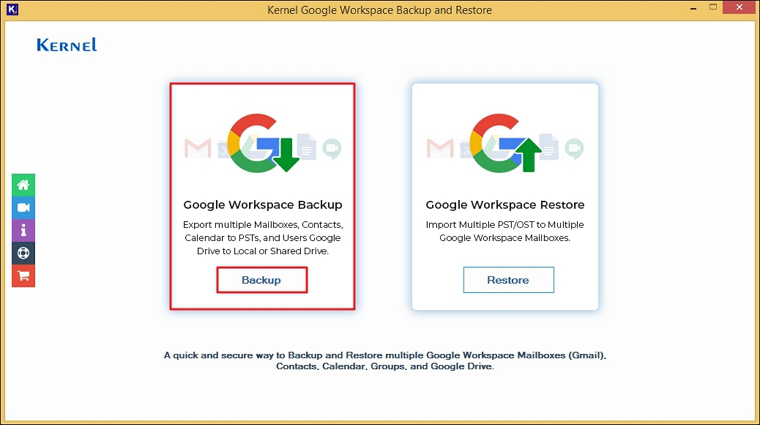
The start screen: the main mailbox, Groups and Drive backup, the Docs and Sheets, Chat and Photos modules, and Restore PST and OST Files.
It isn't a scheduled cloud service. It's a desktop app you run when you want a backup, on a Windows PC or server, and the files land wherever you point it: a local disk, an external drive or a NAS.
Features
One mailbox or a whole domain
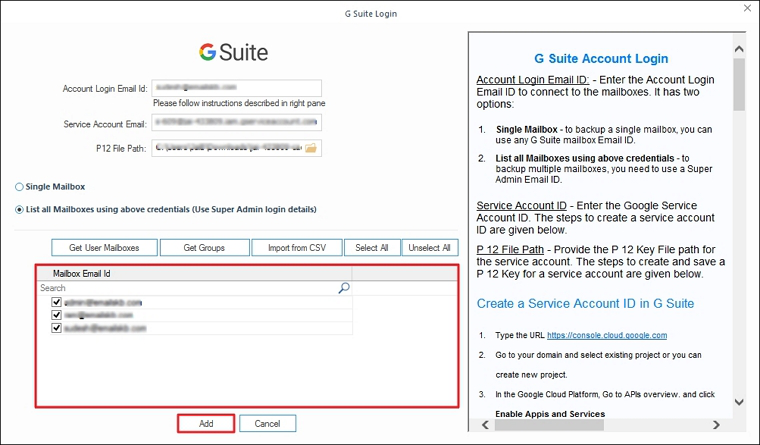
Kernel Google Workspace Backup signs in with a Google service account: an account login email, a service account email and a P12 key file. With a single mailbox's email it backs up that mailbox; with a super admin's email it lists every mailbox in the domain, including secondary domains and aliases, and you tick the ones you want or load them from a CSV file. A separate option covers personal Google accounts.
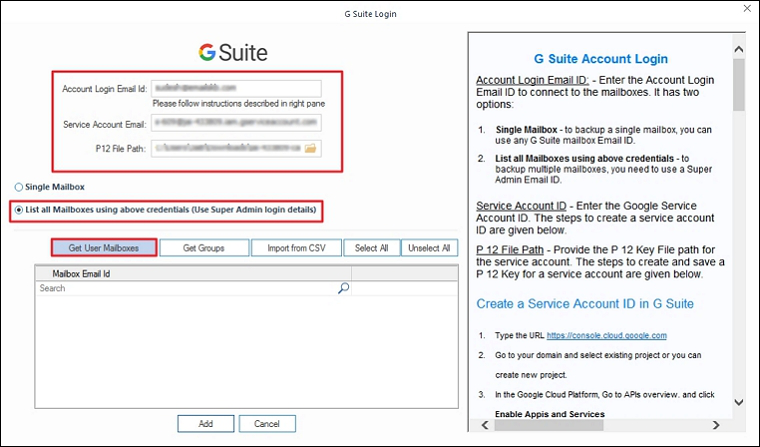
The login dialog: service account details on the left, Get User Mailboxes, Get Groups and Import from CSV below, and setup instructions on the right.
Mail, contacts, calendars, Drive and Groups
Kernel Google Workspace Backup saves Gmail folders and labels (Inbox, Sent, Trash, Drafts, Spam and your own) with read status and metadata, plus contacts, calendar appointments, Google Drive and Shared Drive files, and Google Groups with their members and settings. Drive files can be saved inside each user's mailbox folder so the links stay together.
Eight output formats and PST splitting
Kernel Google Workspace Backup writes PST for Outlook, EML and MSG for mail clients, PDF, DOC and DOCX for records, and HTML or MHT for a browser. For PST it can start a new file every 1, 2, 3 GB or more, which keeps huge mailboxes manageable in Outlook.
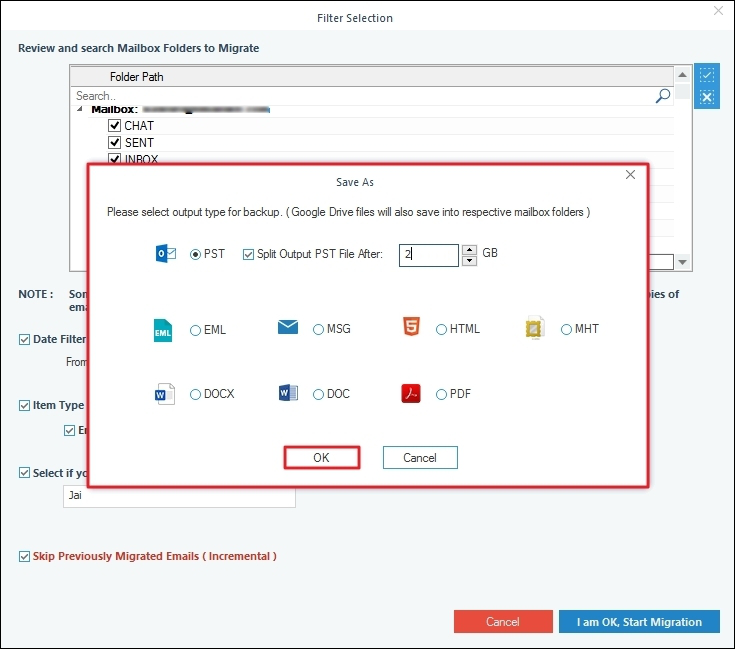
The Save As dialog: the eight output types and the PST split size.
Filters and incremental backups
Kernel Google Workspace Backup's filter page lets you search and tick folders, set a date range, choose item types (Email, Google Drive Files, Contacts, Calendar/Appointment), and put each user's data in a separate folder. Skip Previously Migrated Emails (Incremental) backs up only what's new since the last run, so a monthly backup doesn't copy the whole mailbox again.
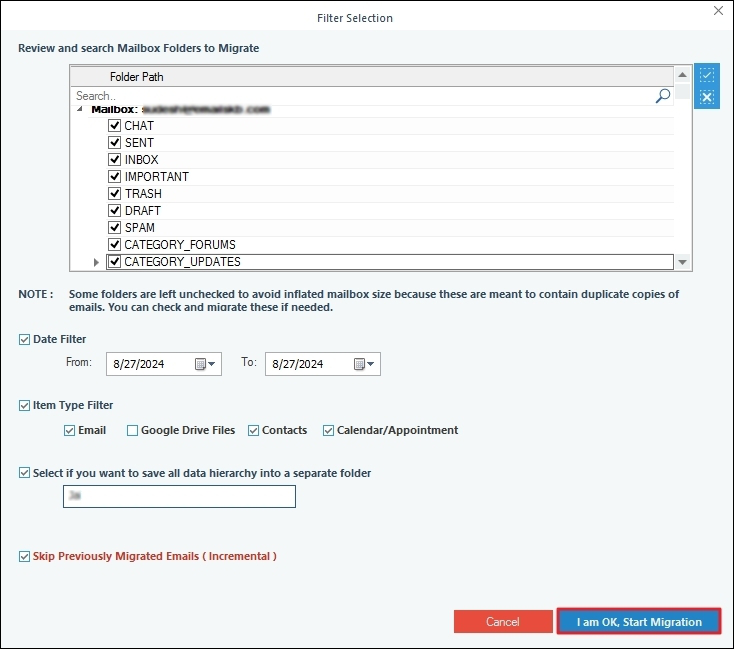
The Filter Selection page with the folder tree, date and item type filters, and the incremental option.
Restore PST and OST to Google Workspace (Backup and Restore edition)
Kernel Google Workspace Backup and Restore adds a restore module that imports healthy PST and OST files into Google Workspace mailboxes or Google Groups, mapping each file to a user, with the same filters. Outlook doesn't need to be installed. This is what the $99 edition adds over the $49 backup-only edition.
Benefits
- A copy Google can't delete. Files on your own storage survive an account deletion, a retention window expiring or a compromised admin account.
- Leaver mailboxes in one step. Back up a departing employee's mail and Drive to PST before you remove the licence.
- Formats people can open. PST for Outlook users, PDF for legal and HR requests.
- Priced per mailbox, paid once. $49 for one mailbox or $199 for 50, rather than a per-user monthly fee.
Real-World Uses
- Offboarding. Save a former employee's Gmail, contacts and Drive files to PST on the company NAS, then delete the account.
- Monthly backups for a small team. Run an incremental backup of 20 mailboxes each month from a CSV list.
- Leaving Google Workspace for Microsoft 365 or Outlook. Export each mailbox to PST to import elsewhere.
- A legal hold or audit request. Export one user's mail for a date range to PDF.
- Moving archived mail back in. With Backup and Restore, import old Outlook PST archives into new Workspace mailboxes.
Who It's For, and Who Should Skip It
It's for Google Workspace admins at small and mid-sized businesses, schools and non-profits (Kernel offers non-profits a 20% discount) who want on-premises copies of their Google data, and for individuals who want their own Gmail as a PST.
Skip it if you want automatic, scheduled, hands-off backup to the cloud with point-in-time restores: that's a SaaS backup service, not this. Skip it as well if setting up a Google Cloud service account and P12 key sounds beyond you; it's a one-time job but a technical one. And a single person who only needs a one-off copy of their own Gmail can use Google Takeout for free.
Usage Guide
- Create a Google service account in the Google Cloud console, enable the needed APIs and download its P12 key (the login dialog's right-hand pane walks you through it in the Google Cloud console).
- Install and launch Kernel Google Workspace Backup, then choose Mailboxes, Groups, Drive Backup.
- Click Add, enter the account login email, the service account email and the P12 file path. Choose Single Mailbox, or List all Mailboxes with a super admin login, and click Get User Mailboxes (or Import from CSV).
- Tick the mailboxes and click Add, then Set Filter and Migrate.
- Pick folders, set the date and item type filters, and tick Skip Previously Migrated Emails for an incremental run. Click I am OK, Start Migration.
- Choose the output format (and PST split size), pick the destination folder, and start.
- When it completes, save the report to CSV for your records.
Mailboxes added to the source list, ready for Set Filter and Migrate. Export mapped list to CSV saves the list for next time.
Before you buy
- Pick the right edition. Backup ($49 for one mailbox) only exports. If you'll ever need to put PST or OST data into Google Workspace, buy Backup and Restore ($99).
- Licences count mailboxes. One mailbox, 50, 100 or 250; more than 250 is a quote from Kernel's sales team.
- Docs, Sheets, Chat and Photos. The app shows modules for these, and Kernel also sells Google Docs Export, Google Sheet Export, Google Chat Export and Google Photos Backup as separate products. Test the module you need in the trial before relying on it.
- The refund policy is narrow. Kernel refunds when the full version gives different results from the trial, after support has tried to fix it, not for a change of mind.
Download Free TrialBuy Backup (1 Mailbox)Buy Backup and Restore (1 Mailbox)
Where it falls short
- No built-in scheduler. You start each backup yourself.
- Setup takes an admin. A service account, API access and a P12 key are needed before the first backup.
- Google's API quotas apply. The vendor's own guide shows how to raise API quotas in the Google Cloud console, a sign that large backups can hit Google's limits.
- Restore needs healthy files. The restore module takes healthy PST and OST files; a corrupt PST has to be repaired first.
- Windows only. There's no Mac version.
What Users Say
On the vendor's page
Kernel's page shows 4.9 out of 5 from 455 reviews, collected on its own site, so read that as the vendor's tally. The review it features, from Alexia Francis: "Kernel G Suite Backup proves to be an outstanding tool, efficiently splitting my sizable PST files and simplifying the entire process for me."
Trustpilot (KernelApps as a company)
KernelApps holds a 4.9 out of 5 TrustScore from 167 reviews on Trustpilot. None of the recent ones clearly names this tool, and most praise named support staff for patient help with setup and migrations.
Independent reviews of this tool are scarce, and the ones we could see were short. The common thread in what's out there is easy operation once it's connected and quick support; the setup of the Google service account is where people most often need that support.
Comparisons
Kernel Google Workspace Backup vs Google Takeout
Google Takeout is free and exports one account at a time to MBOX and other raw formats, with no filters and no incremental option. Kernel's tool backs up many mailboxes from one admin login, saves PST or PDF directly, filters by date and type, and skips what it already saved.
Backup vs Backup and Restore
Both editions export the same data in the same formats. Backup and Restore costs about twice as much and adds importing PST and OST files into Google Workspace mailboxes and Groups.
Editions and Pricing
| Edition | Licence | Price | Buy |
|---|
| Backup | Single mailbox | $49 | Buy |
| Backup | 50 mailboxes | $199 | Buy |
| Backup | 100 mailboxes | $299 | Buy |
| Backup | 250 mailboxes | $599 | Buy |
| Backup and Restore | Single mailbox | $99 | Buy |
| Backup and Restore | 50 mailboxes | $399 | Buy |
| Backup and Restore | 100 mailboxes | $599 | Buy |
| Backup and Restore | 250 mailboxes | $1,199 | Buy |
Each is a one-time payment at checkout with no automatic renewal. Each Buy button orders that exact edition and mailbox count. Non-profits get 20% off from Kernel, companies can pay by purchase order at checkout, and the key arrives by email within about 15 minutes.
FAQs
Does Kernel Google Workspace Backup work with a personal Gmail account?
Yes. Kernel Google Workspace Backup has a dedicated option for personal Google accounts, alongside Google Workspace Business, Enterprise, Essentials, Frontline, Individual and Education plans.
What credentials does Kernel Google Workspace Backup need?
Kernel Google Workspace Backup needs the account login email, a Google service account email and the service account's P12 key file. To back up many mailboxes, the login must be a super administrator.
Can it back up only Google Drive?
Yes. Kernel Google Workspace Backup can back up Drive alone: on the filter page, clear every item type and tick Google Drive Files only.
Are encrypted emails backed up?
Yes. Kernel Google Workspace Backup backs up encrypted emails and keeps their encryption in the backup, according to the vendor.
Can I restore a 28 GB PST into one Workspace account?
Yes, with the Backup and Restore edition, as long as the Google account has enough storage. Kernel Google Workspace Backup and Restore sets no size limit of its own.
Does it back up the Gmail and Drive Trash?
Yes. Kernel Google Workspace Backup can include the Gmail Trash folder and Drive trash with their attachments and properties.
Do I need Outlook installed?
No. Kernel Google Workspace Backup creates PST files and restores them without Outlook on the PC.
System Requirements
- Windows 11, 10, 8.1, 8, 7 or Windows 365; Windows Server 2022, 2019, 2016, 2012, 2008 R2, 2008, 2003
- Intel Pentium compatible (x86, x64) processor
- 128 MB RAM minimum
- 500 MB of disk space, plus room for the backups
- A Google service account with a P12 key; super admin rights to back up several mailboxes
Conclusion
Kernel Google Workspace Backup is worth buying if you run a small Google Workspace domain and want local, readable copies of mailboxes and Drive files, especially for leavers and legal requests. The one reason to buy it is the price model: a one-time $49 for a mailbox or $199 for 50, with PST, PDF and incremental runs included. The main reason not to is that it's a manual desktop tool with a technical first setup, not an automated backup service. Run the trial on one mailbox first, and buy Backup and Restore instead if you'll ever need to import PST data into Workspace.
Download Free TrialBuy Backup (1 Mailbox)Buy Backup and Restore (1 Mailbox)