Kernel for Lotus Notes to Outlook: Move NSF Mailboxes to PST or Exchange
Kernel for Lotus Notes to Outlook is a Windows migration tool from KernelApps, from $249 for up to 25 NSF files, that converts HCL (formerly IBM Lotus) Notes NSF files, Domino Server mailboxes and SmartCloud Notes or Verse data into Outlook PST files or straight into Exchange mailboxes. It's for IT staff and consultants moving a company off Notes, and for anyone who has to read an old Notes archive in Outlook.
Notes stores mail, contacts, calendars and to-dos in NSF databases that Outlook can't open, and there's no built-in export that keeps it all together. When the Notes licences run out or the Domino server is switched off, those NSF files need a new home.
Quick facts
- Version: 26.0 (installer dated September 14, 2026)
- Developer: KernelApps Pvt. Ltd. (Kernel Data Recovery), Noida, India
- Platform: Windows 11, 10, 8.1, 8, Windows 365, Windows Server 2025 back to 2008 R2
- Sources: local NSF files, Domino Server files, HCL SmartCloud Notes and Verse
- Targets: Outlook PST files or live Exchange mailboxes
- Needs installed: a 32-bit Notes client and Outlook
- Price: $249 for up to 25 NSF files on the order page
- Trial: converts 10 items from each folder
- Guarantee: 30 days money back
What we checked: installer file version 26.0 and size 32 MB, downloaded from the vendor's site, and the order page, which showed $249 for Kernel Lotus Notes to Outlook (up to 25 NSF files), on November 11, 2026. We didn't migrate a Notes mailbox ourselves, so conversion results here are the vendor's and its users' claims.
Download Free TrialBuy Now
Overview
Kernel for Lotus Notes to Outlook walks you through three steps on the left of its window: add the sources, preview them, then choose where to save. You add local NSF files, Domino files or a SmartCloud/Verse connection, preview a single NSF database if you want, then pick Outlook PST or Exchange as the target and map each source to its destination automatically or through a CSV file.
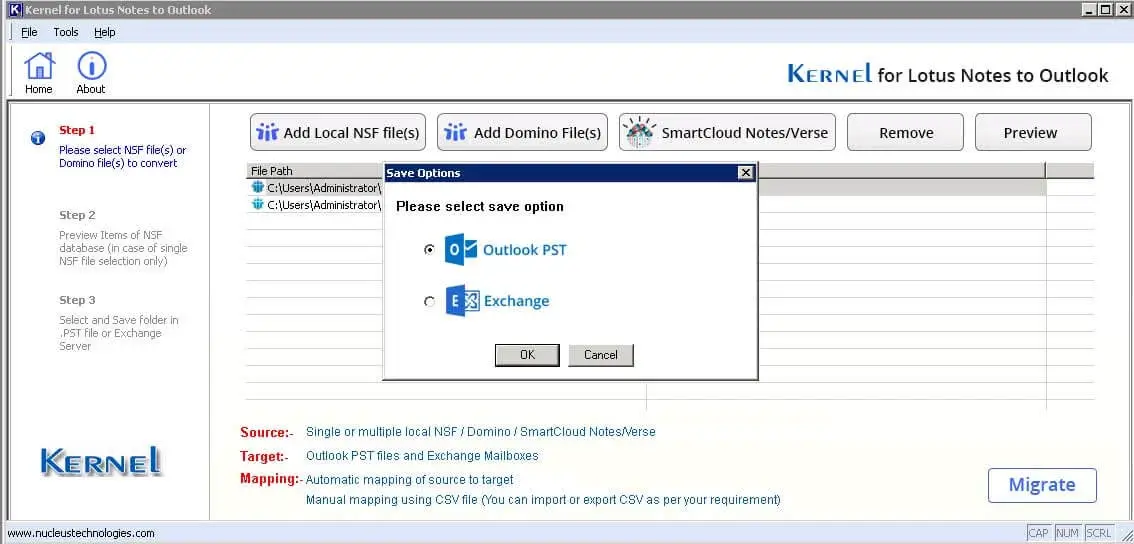
Choosing the target: Outlook PST or Exchange. The buttons above add local NSF files, Domino files or SmartCloud Notes/Verse.
The vendor page still shows version 22.4 in its specifications, but the installer it serves today is version 26.0.
Features
Every Notes item, folder structure kept
Kernel for Lotus Notes to Outlook converts emails with attachments, contacts, calendars, tasks and journals, and keeps the NSF folder hierarchy in the PST or Exchange mailbox. The vendor says metadata, timestamps and headers are preserved, which matters for legal holds and eDiscovery.
Local NSF, Domino Server and SmartCloud
Kernel for Lotus Notes to Outlook reads local NSF files, NSF files on a Domino Server and HCL SmartCloud Notes or Verse accounts, which it finds automatically or through an IP address and password.
Bulk migration with CSV mapping
Kernel for Lotus Notes to Outlook can take a CSV file listing the source NSF files and their target PST files or Exchange mailboxes. You can export the mapping to CSV, fill it in and import it again, instead of pairing dozens of mailboxes by hand.
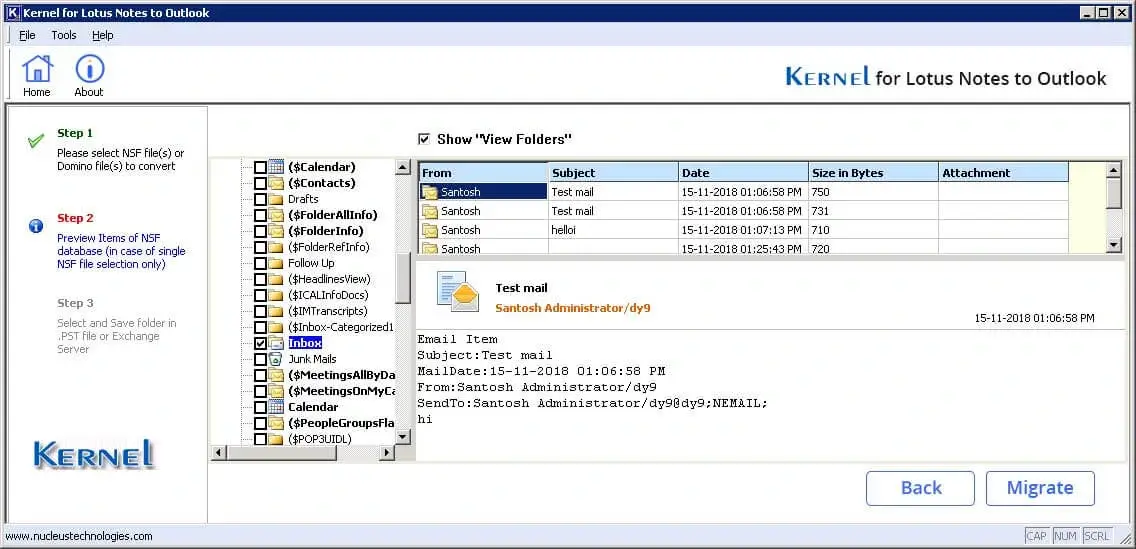
Previewing a single NSF database: Notes folders on the left, messages and the selected email on the right.
Filters, PST splitting and saving modes
Kernel for Lotus Notes to Outlook filters by date range, by category (mail, contacts, calendars, tasks) and by included or excluded folders. It splits the output PST at a size you set, and offers saving modes that store items as high- or low-quality RTF or as plain text, with read and unread marks kept or reset.
Migration report
Kernel for Lotus Notes to Outlook writes a log of each conversion with folder paths, NSF item counts, PST item counts and duplicates, so you can check that nothing went missing.
Benefits
The value for an IT team is doing a whole department's mailboxes in one batch, mapped by CSV, straight into Exchange or to PST for Office 365 import, with a report to show for it. For one person with a single old NSF archive, it's the difference between reading those emails in Outlook and keeping a Notes client alive just for them.
Real-World Uses
- Company leaving Notes: move 20 user mailboxes from the Domino server into Exchange in one mapped batch.
- Office 365 move: convert NSF files to PST, then import the PST files into Microsoft 365 mailboxes.
- Archive for compliance: keep a departed executive's NSF mail as a searchable PST with headers and timestamps.
- Consultant migrations: convert a client's NSF files on-site, split into PST files small enough to hand over.
Who It's For, and Who Should Skip It
Kernel for Lotus Notes to Outlook suits Notes and Exchange administrators, migration consultants and small businesses moving a handful of mailboxes to Outlook.
Skip it if you no longer have a Notes client: the tool needs a 32-bit Notes client and Outlook installed on the PC that runs it. If you're moving straight to Microsoft 365 without PST files in between, Kernel's separate Lotus Notes to Office 365 tool targets that directly. And for one or two small mailboxes on a tight budget, $249 is a lot; check whether your new mail provider offers a free migration service.
Usage Guide
- Install the 32-bit Notes client and Outlook on a Windows PC, then download and install the trial.
- Click Add Local NSF file(s), Add Domino File(s) or SmartCloud Notes/Verse to add your sources.
- Select one NSF file and click Preview to check its contents.
- Click Migrate and choose Outlook PST or Exchange.
- Map sources to targets, automatically or with a CSV file, and set filters, PST splitting and the saving mode.
- Start the conversion and check the migration report when it finishes.
Before you buy
The price depends on how many NSF files you'll convert: $249 for up to 25, $999 for up to 100 and $1,749 for up to 250, all one-time payments. For more files the vendor asks you to contact sales. The Notes Conversion Suite adds the Office 365 migration tool to the same file counts from $499. Non-profits get 20% off. Run the trial first: it converts 10 items per folder, enough to see how your mail comes out.
Where it falls short
- You need the Notes client and Outlook installed, unlike some converters that read NSF files on their own.
- Licensing by NSF file count adds up for large organizations.
- The interface is functional rather than modern.
What Users Say
On the vendor's page
Kernel's page shows 4.9 out of 5 from 507 reviews, collected on its own site, so read that as the vendor's tally. Emily Williams, an IT administrator, wrote: "We recently shifted towards Outlook from Lotus Notes, & this converter saved our countless hours. I was genuinely surprised by how smooth & precise the transfer was. Every email, attachment, & contact is saved perfectly in the PST file."
Independent sites
We found no independent hands-on review of this tool; HowTo-Outlook lists it with vendor information only, and AlternativeTo has a single short user entry. On Trustpilot, KernelApps as a whole holds 4.9 out of 5 from 166 reviews, mostly about its migration and conversion tools. Reviewers there keep mentioning support during migrations. One wrote: "Does exactly what is says, easy to use, and excellent support." (Andrew Murdoch)
Comparisons
Trial or full version
Both add local NSF, Domino and SmartCloud sources, preview, filter, map and save to PST or Exchange. The trial converts only 10 items from each folder; the license converts everything.
Lotus Notes to Outlook or Lotus Notes to Office 365
Kernel for Lotus Notes to Outlook saves to PST files or on-premises Exchange. Kernel's Lotus Notes to Office 365 tool migrates NSF data directly into Microsoft 365 mailboxes, at the same $249 starting price, and the Notes Conversion Suite bundles both.
Editions and Pricing
| License | Price | NSF files | Term |
|---|
| Lotus Notes to Outlook | $249 | Up to 25 | Lifetime |
| Lotus Notes to Outlook | $999 | Up to 100 | Lifetime |
| Lotus Notes to Outlook | $1,749 | Up to 250 | Lifetime |
| Notes Conversion Suite (PST + Office 365) | from $499 | Up to 25 | Lifetime |
FAQs
Does Kernel for Lotus Notes to Outlook work without Lotus Notes installed?
No. Kernel for Lotus Notes to Outlook needs a 32-bit Notes client (8.5 to 12.0.2) and Outlook installed on the PC that runs the conversion.
Which Notes versions does Kernel for Lotus Notes to Outlook support?
Kernel for Lotus Notes to Outlook supports HCL Notes and Domino 14, 12.0.2, 12.0.1 and 11, IBM Notes and Domino 10, 9 and 8.5.3 and earlier Lotus Notes versions, plus HCL SmartCloud Notes and Verse.
Can Kernel for Lotus Notes to Outlook migrate straight to Exchange?
Yes. Kernel for Lotus Notes to Outlook can save into live Exchange Server mailboxes (2019, 2016, 2013, 2010 and earlier) as well as to PST files.
Is there a size limit in Kernel for Lotus Notes to Outlook?
No. Kernel for Lotus Notes to Outlook has no NSF file size limit, and it can split large output PST files by size. The license limits the number of NSF files.
Can I convert only part of a mailbox with Kernel for Lotus Notes to Outlook?
Yes. Kernel for Lotus Notes to Outlook filters by date range, item type and included or excluded folders.
Which Outlook versions work with Kernel for Lotus Notes to Outlook?
Kernel for Lotus Notes to Outlook works with Outlook for Office 365, 2024, 2021, 2019, 2016, 2013 and 2010, in 32-bit and 64-bit.
System Requirements
- Windows 365, 11, 10, 8.1 or 8, or Windows Server 2025, 2022, 2019, 2016, 2012 or 2008 R2
- Intel Pentium-compatible processor (x86 or x64)
- 4 GB RAM, 16 GB recommended
- 500 MB of free disk space
- 32-bit Notes client 8.5 to 12.0.2 and Outlook 2010 to Office 365 installed
Conclusion
Kernel for Lotus Notes to Outlook is worth $249 if you have up to 25 NSF mailboxes to move and want them in Outlook or Exchange with the folder structure, contacts and calendars intact: the CSV mapping, filters and migration report are what a real migration needs. The main catch is that it needs the Notes client and Outlook installed, and per-file licensing gets expensive for big moves. Test a mailbox with the trial before you commit.
Download Free TrialBuy Now