Kernel for PowerPoint Repair: Get a Broken Presentation Back
Kernel for PowerPoint Repair is a $49 Windows tool from KernelApps that repairs corrupt PowerPoint presentations (PPT, PPTX, PPS and PPSX) and rebuilds the slides, text, images and charts into new files. It's for anyone facing "PowerPoint can't read" or a deck that crashes PowerPoint the moment it opens, with a meeting coming up.
Presentations break the same way other Office files do: a USB stick pulled out mid-save, a laptop that loses power, a sync conflict or a failing disk. PowerPoint's own repair prompt helps with light damage, and when it doesn't, you're left with a file that won't open at all.
Quick facts
- Version: 10.11.01 (installer dated December 10, 2024)
- Developer: KernelApps Pvt. Ltd. (Kernel Data Recovery), Noida, India
- Platform: Windows 11, 10, 8.1, 8, 7 and older, Windows 365, Windows Server 2022 and 2019 and older
- Formats: PPT, PPTX, PPS and PPSX from PowerPoint 95 to 2021
- Price: $49 for the Home License on the order page
- Trial: repairs and previews, but can't save
- Guarantee: 30 days money back
What we checked: installer size 3.3 MB and file date December 10, 2024 on the vendor's download server, and the order page, which showed $49 for Kernel Recovery for PowerPoint Home License, on November 11, 2026. We didn't repair a damaged presentation ourselves, so recovery results here are the vendor's and its users' claims.
Download Free TrialBuy Now
Overview
Kernel for PowerPoint Repair works in two steps. Browse to the damaged file, click Recover, choose a recovery mode and a destination, and the program scans the presentation, showing each slide and image as it's recovered. The result isn't a patched copy of your original file. It writes new files: one presentation with the recovered slides, a second with the text, and a folder with the pictures.
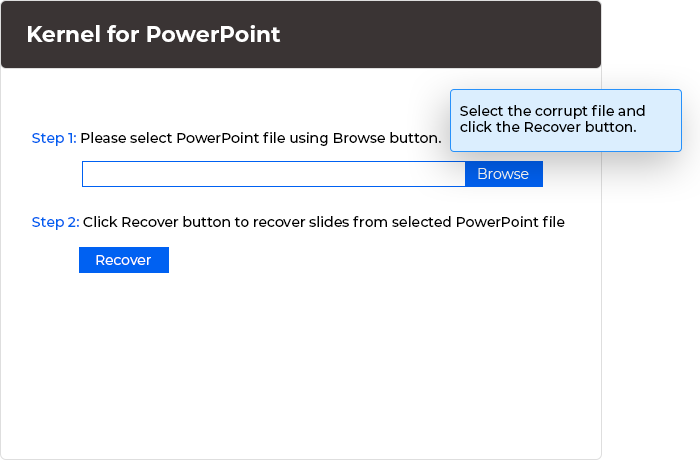
Step 1 and 2: select the corrupt presentation and click Recover. Vendor illustration of the program window, callout included.
Features
Two recovery modes
Kernel for PowerPoint Repair offers Standard mode for severe corruption and Integrated mode, a faster method for minor damage that the program itself warns may fail in some cases. The vendor recommends Standard mode whenever you're unsure how bad the damage is.
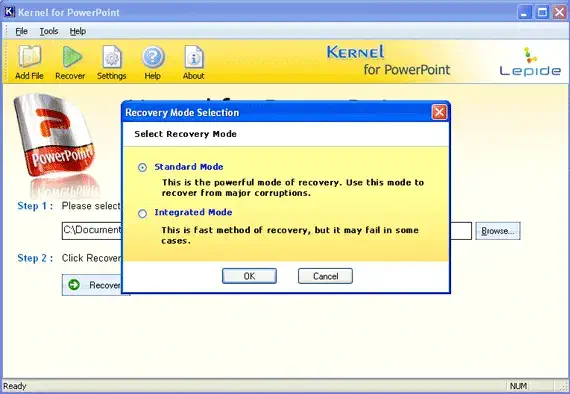
The recovery mode dialog, in an older version of the interface.
Recovers the content that matters
Kernel for PowerPoint Repair recovers text and formatting, tables, charts, headers and footers, hyperlinks, OLE objects, images, animations, basic shapes, callouts, WordArt and Media Player objects from the presentation.
Preview while it works
Kernel for PowerPoint Repair shows the recovered slides and images as thumbnails with a progress log during the scan, so you can see whether your content is coming back before you buy.
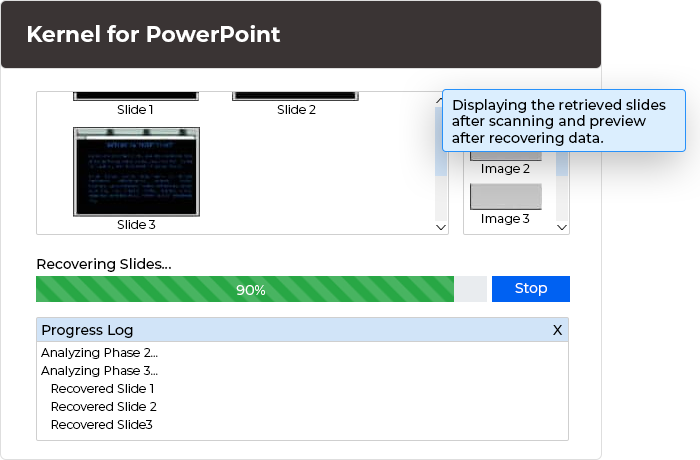
Slides and images appear as they're recovered, with a progress log underneath. Vendor illustration.
Old and new formats, protected files
Kernel for PowerPoint Repair handles PPT, PPTX, PPS and PPSX files from PowerPoint 95 through 2021, with no file size limit, and can repair password-protected presentations.
Benefits
The practical benefit is getting the content back without rebuilding a deck from memory and old email attachments. The trial matters here: because it previews the recovered slides for free, you know whether the $49 will actually get your presentation back before you pay.
Real-World Uses
- The night before a pitch: a deck saved to a USB stick that was pulled too early now refuses to open.
- Teacher's lesson slides: a PPTX on a failing laptop drive opens with errors and missing pictures.
- Old archive: PPT files from early-2000s projects show up damaged after a backup restore.
- Shared drive mishap: a sync conflict left a team presentation unreadable.
Who It's For, and Who Should Skip It
Kernel for PowerPoint Repair suits office workers, teachers and students on Windows with a PowerPoint file that PowerPoint's own repair can't open.
Skip it if PowerPoint's built-in repair prompt already opens the file, or if you have a recent backup or OneDrive version history to roll back to: both are free. It's Windows only, so Mac users with a damaged Keynote or PowerPoint file need something else.
Usage Guide
- Download the trial and install it on Windows.
- Make a copy of the damaged presentation and work on the copy.
- Open Kernel for PowerPoint Repair, click Browse and select the file.
- Click Recover, choose Standard mode and pick where to save.
- Watch the slides and images appear in the preview.
- With a license, open the saved files: the recovered slides, the text-only presentation and the pictures folder.
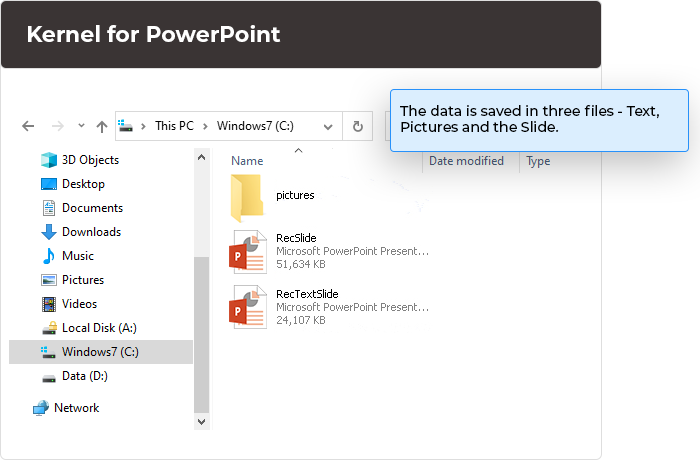
The output: RecSlide, RecTextSlide and a pictures folder. Vendor illustration.
Before you buy
The trial is the full program except for saving, so run it on your file and check the preview first. The Home License is $49, the Corporate License $99 for business use within one organization, and the Technician License $199 for service providers. All are lifetime licenses with the vendor's 30-day money-back guarantee.
Where it falls short
- The recovered deck comes out as new files, so expect to tidy up layout and re-apply your template rather than get a pixel-perfect copy.
- Integrated mode is quick but, as the program says, may fail; Standard mode is the reliable choice.
- The interface is plain and dated.
- Windows only.
What Users Say
On the vendor's page
Kernel's page shows 4.9 out of 5 from 244 reviews, collected on its own site, so read that as the vendor's tally. Tyra Gross wrote that it "fixed my messed-up presentation effortlessly. It is easy to use, reliable, and definitely worth the investment."
Independent sites
We found no independent reviews of this particular tool. On Trustpilot, the company as a whole holds 4.9 out of 5 from 166 reviews, mostly about its email conversion and migration tools, and the recurring praise is for support: "Does exactly what is says, easy to use, and excellent support." (Andrew Murdoch)
Comparisons
Trial or full version
Both repair and preview the presentation with every feature. Only the full version saves the recovered files.
Kernel for PowerPoint Repair or PowerPoint's own repair
PowerPoint offers to repair a file when it detects a problem, and it's worth trying first. Kernel for PowerPoint Repair is for when that fails or PowerPoint crashes outright: it reads the file itself and extracts what it can into new files.
Editions and Pricing
| Edition | Price | Who it covers | Validity |
|---|
| Home | $49 | Home users | Lifetime |
| Corporate | $99 | Business use within one organization | Lifetime |
| Technician | $199 | Service providers working for clients | Lifetime |
FAQs
How big a presentation can Kernel for PowerPoint Repair handle?
Kernel for PowerPoint Repair has no file size limit, and version 10.11.01 is described as quicker on large files.
Can Kernel for PowerPoint Repair fix a password-protected presentation?
Yes. Kernel for PowerPoint Repair repairs presentations whether or not they're password-protected.
Does Kernel for PowerPoint Repair change my original file?
No. Kernel for PowerPoint Repair saves the recovered slides, text and pictures as new files in the folder you choose.
Which mode should I use in Kernel for PowerPoint Repair?
Use Standard mode. Kernel recommends it for any corruption because Integrated mode may fail when the damage is severe.
Can Kernel for PowerPoint Repair recover PPS slide shows?
Yes. Kernel for PowerPoint Repair supports PPS and PPSX slide show files as well as PPT and PPTX.
Is there a Mac version of Kernel for PowerPoint Repair?
No. Kernel for PowerPoint Repair runs on Windows desktop and Server editions only.
System Requirements
- Windows 365, 11, 10, 8.1, 8, 7, Vista, XP and older, or Windows Server 2022, 2019 and older
- Intel Pentium-compatible processor (x86 or x64)
- 64 MB RAM, 128 MB recommended
- 50 MB of free disk space
Conclusion
Kernel for PowerPoint Repair is worth $49 when PowerPoint's own repair has failed and the deck matters: it pulls slides, text and images back into new files, and the free preview tells you whether it worked before you pay. Don't expect a perfect copy of the original layout, and try PowerPoint's repair and your version history first.
Download Free TrialBuy Now