Coolmuster PDF Converter Pro: One Windows Tool for Seven PDF Output Formats
Coolmuster PDF Converter Pro is a $29.95-a-year Windows program that converts PDFs to Word, Excel, PowerPoint, ePub, HTML, text or images, up to 200 files at a time.
One client needs a table in Excel, another wants slides, and a third wants a PDF on an e-reader. Buying a separate converter for each makes no sense, and that's the case this tool is built for.
Quick facts
- Version: 2.3.3 for Windows (February 2, 2026)
- Developer: Coolmuster
- Platforms: Windows 11, 10, 8, 7 (the Mac edition is a separate product at version 2.1.11, from January 2014)
- Output: Word, Excel, PowerPoint, ePub, HTML, text, and JPG, JPEG, PNG, TIFF, BMP or GIF
- Batch size: up to 200 PDFs at once
- Trial: free download, limits not published
- Price: $29.95 for one PC for one year at checkout, renewing automatically unless you cancel
- Refund: 30 days on one-year and lifetime licenses, 7 days on monthly ones
- What we checked: the trial installer from coolmuster.com (18.14 MB, server date February 2, 2026) and the $29.95 price on the order page on November 10, 2026. We read Coolmuster's specifications and user guide, but we didn't install the program or run it on our own files.
Before you buy
Check Excel and PowerPoint output on your own file. Tables and slides are the hardest PDF conversions for any tool, and Coolmuster's "100% original layout" line is marketing. OCR isn't on the feature list either, so scanned pages are a risk. On the order page this appears as "Coolmuster PDF Converter", and it's the same product.
Download Free TrialBuy Now
Overview
PDF Converter Pro puts seven PDF conversions into one window. You choose the output from a Convert drop-down, such as PDF to Word or PDF to Excel, add files, optionally narrow the page range, and press Start.
It's the broad member of Coolmuster's PDF range. The company also sells single-format tools for Word and JPG output at lower prices, so the extra cost only makes sense if you need several formats.
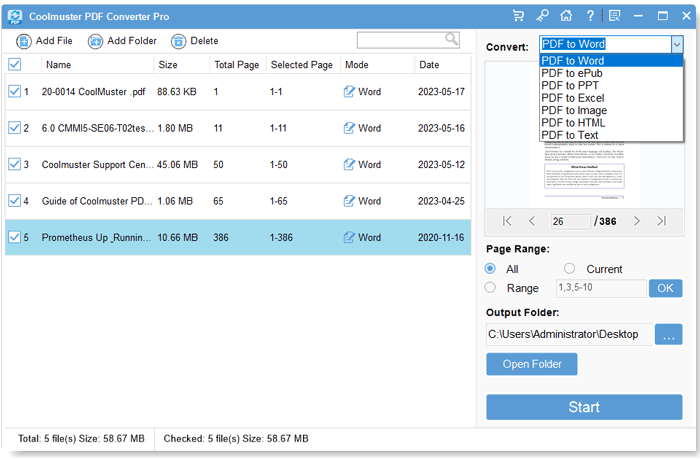
The Convert drop-down, listing the seven output types with a 386-page PDF in the preview.
Features
Seven output formats
Coolmuster PDF Converter Pro exports PDF to Word (.docx), Excel (.xlsx), PowerPoint (.pptx), ePub, HTML, plain text and images including JPG, PNG, TIFF, BMP and GIF.
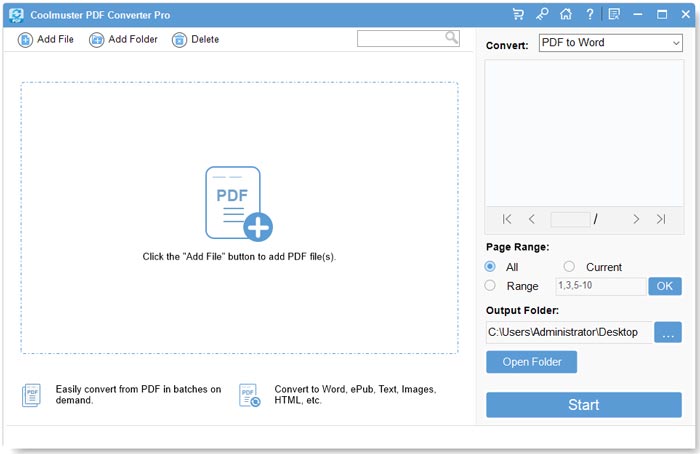
The start window, with the page range and output folder settings on the right.
Batch conversion of up to 200 files
PDF Converter Pro converts up to 200 PDFs per run. Right-clicking a single file lets you convert it alone instead.
Page ranges and preview
PDF Converter Pro previews any imported PDF when you double-click it, and accepts All, Current or a custom Range of pages so a 500-page file doesn't have to be converted whole.
Layout preservation
Coolmuster says PDF Converter Pro keeps text, layout, formatting, hyperlinks and images in the output. How closely it does so depends on your file, so use the trial to check it.
Benefits
- One license replaces several single-format converters.
- You can convert the same document to different formats without learning another program.
- Files are handled on your own PC.
Real-World Uses
- Moving a PDF table into Excel for analysis.
- Turning a PDF presentation back into PowerPoint for editing.
- Making an ePub from a PDF for reading on a phone or tablet.
- Publishing PDF content as HTML on an intranet.
Who It's For, and Who Should Skip It
It's for people who deal with PDFs from all directions and want Word, Excel and PowerPoint output from the same tool.
Skip it if you only need Word or images: the single-format Coolmuster tools cost $15.95. Skip it too if you need to edit, sign or OCR PDFs, since it only converts, and one independent review lists the lack of password protection or redaction tools as a limit.
Usage Guide
- Install PDF Converter Pro from the Download Free Trial button and launch it.
- Choose the target format from the Convert drop-down.
- Click Add File or Add Folder, or drag PDFs into the window.
- Set the page range if you don't want all pages, and pick an output folder.
- Click Start, and when the bar reaches 100 percent use Show in folder.
Where It Falls Short
- OCR isn't listed, so scans are a weak point.
- It converts only: no editing, signing or redaction.
- The Mac edition's last listed update is from January 2014, so treat it as out of date.
What Users Say
Coolmuster's site shows customer reviews, but it also runs a "Win Free Coolmuster License Code" offer for writing one, and many entries are short and unspecific. Treat them as a sign of what buyers care about, not as independent testing.
Reviews on Coolmuster's own site
- accurate "The preview and page range selection function allows me to accurately control the desired content." sense of balance, June 22, 2026
- Multi format one-stop solution "Strong! Integrated with multiple format conversion functions" DanielF12, July 28, 2026
- There is also a practical preview function "Started using this product when my old converter on my computer kept crashing while performing large file conversions." aemlTurner, February 6, 2026
- The converted file interface is clean and the content is accessible "The software occupies minimal space on the computer and processes documents quickly" Jae Noeg, May 20, 2026
- "I have tried to convert an almost 300-page PDF to Word format, only 1 or 2 minutes, all things have been done!" Quinn, undated on the product page
Independent coverage
Softpedia's editor review describes a straightforward tool with batch processing and a page range selector, suited to migrating PDFs into other formats. UpdateStar's review calls it a focused desktop tool for seven common formats, and lists price and the lack of password protection or redaction as cons.
On Coolmuster's page, buyers like the preview and the range of formats. Independent coverage calls it simple and capable, and points to what it doesn't do rather than to conversion failures.
Comparisons
PDF Converter Pro vs PDF to Word Converter
PDF Converter Pro costs $29.95 a year and covers seven outputs. PDF to Word Converter costs $15.95 and does Word only. If Word is all you need, the cheaper one does the same job for that format.
PDF Converter Pro vs Adobe Acrobat
Adobe Acrobat edits, signs and runs OCR as well as converting, on a subscription that costs far more. PDF Converter Pro makes sense when conversion is the whole job.
Editions and Pricing
| Seats | 1 month | 1 year | Lifetime |
|---|
| 1 PC | $19.95 | $29.95 | Not on the order page |
| 5 PCs (business) | $29.95 | $39.95 | $49.95 |
| 10 PCs (business) | $39.95 | $49.95 | $59.95 |
Prices are for the Windows version and exclude VAT. Monthly and yearly licenses renew automatically until you cancel, and the yearly plan includes free upgrades for that year.
FAQs
Is Coolmuster PDF Converter Pro the same as Coolmuster PDF Converter?
Yes. Coolmuster's site calls the product PDF Converter Pro, and its purchase page links to the checkout item labeled Coolmuster PDF Converter.
Can Coolmuster PDF Converter Pro convert scanned PDFs?
OCR isn't on the PDF Converter Pro feature list, so don't expect scanned pages to become editable text. Try one in the trial if that's what you need.
Does the one-year PDF Converter Pro license renew automatically?
Yes. The one-year PDF Converter Pro license at $29.95 renews automatically after 12 months, and Coolmuster's order page says you get a notification email before the renewal date and can cancel at any time. It includes free upgrades during that year.
What is the refund period for PDF Converter Pro?
PDF Converter Pro has a 30-day money-back guarantee on one-year and lifetime licenses and 7 days on monthly licenses. Orders can't be canceled once payment has gone through, because the license is issued right away, and a refund goes through support@coolmuster.com with your order ID or receipt.
Can I convert only part of a PDF with PDF Converter Pro?
Yes. PDF Converter Pro accepts a page range for any file, and it applies to every output format.
Is PDF Converter Pro available for Mac?
There's a separate Mac product, but Coolmuster's last listed Mac update is version 2.1.11 from January 2014, so it isn't a safe choice for a current Mac.
System Requirements
- Windows 11, 10, 8 or 7
- Intel or AMD processor faster than 750 MHz
- 512 MB RAM or more
- 1 GB of free disk space
Conclusion
Coolmuster PDF Converter Pro is worth $29.95 a year if you really do need several output formats and batch runs. Its value is breadth at a modest price.
The one reason to buy it is seven formats in one window. The main reason not to is that it only converts, with no OCR or editing, and buyers who need just Word or images can pay about half as much.
Download Free TrialBuy Now