Stellar Repair for Excel: Recover a Workbook Excel Says Is Corrupt
Stellar Repair for Excel is a $39-a-year Windows app that repairs Excel workbooks that won't open or come back mangled, and recovers their tables, formulas, charts, pivot tables and formatting into a new file. It's for anyone staring at "Excel found unreadable content" or "Excel cannot open the file" on a spreadsheet that matters: accounts, project plans, research data.
Excel's own Open and Repair often gets the file open by throwing things away: formulas turn into values, charts vanish, formatting goes. This app reads the damaged workbook itself, shows you the repaired sheets in a grid that looks like Excel, and saves a copy with as much of the original structure as it can rebuild.
Quick facts
- Version: 7.1.0.0, released October 2026
- Developer: Stellar, a data recovery and file repair company founded in 1993. Older versions were called Stellar Phoenix Excel Repair
- Platform: 64-bit Windows 11, 10, 8.1 and 8
- Repairs: .xls, .xlsx, .xlsm, .xltx and .xltm files from Office 365, Excel 2024, 2021, 2019 and older
- Price: $39 a year at checkout, for one PC
- Free trial: repairs and previews the workbook; saving needs a license
- What we checked: the installer (version 7.1.0.0, 11 MB, signed by Stellar Information Technology Private Limited) downloaded from the vendor, and a checkout price of $39.00 renewing every 12 months on November 17, 2026. We didn't repair a damaged workbook ourselves.
Before you buy
Run the trial on your broken workbook first. It repairs the file and previews it, so you can check your data is there before paying. Stellar's refund policy gives 30 days on a first purchase, but not if you skipped the trial, and not on renewals.
Close Excel before you start: the app won't run a repair while Excel is open. If Word, PowerPoint or PDF files are damaged too, Stellar's file repair toolkit includes this tool plus the other three for a little more.
Download Free TrialBuy Now
Overview
Stellar Repair for Excel uses a ribbon layout like Office. Select File opens a dialog where you browse to the workbook or click Find to search a drive or folder for Excel files. Tick one or many, click Repair, and each repaired workbook appears in the left pane with a sheet-by-sheet preview on the right and a log of formulas and sheets found at the bottom.
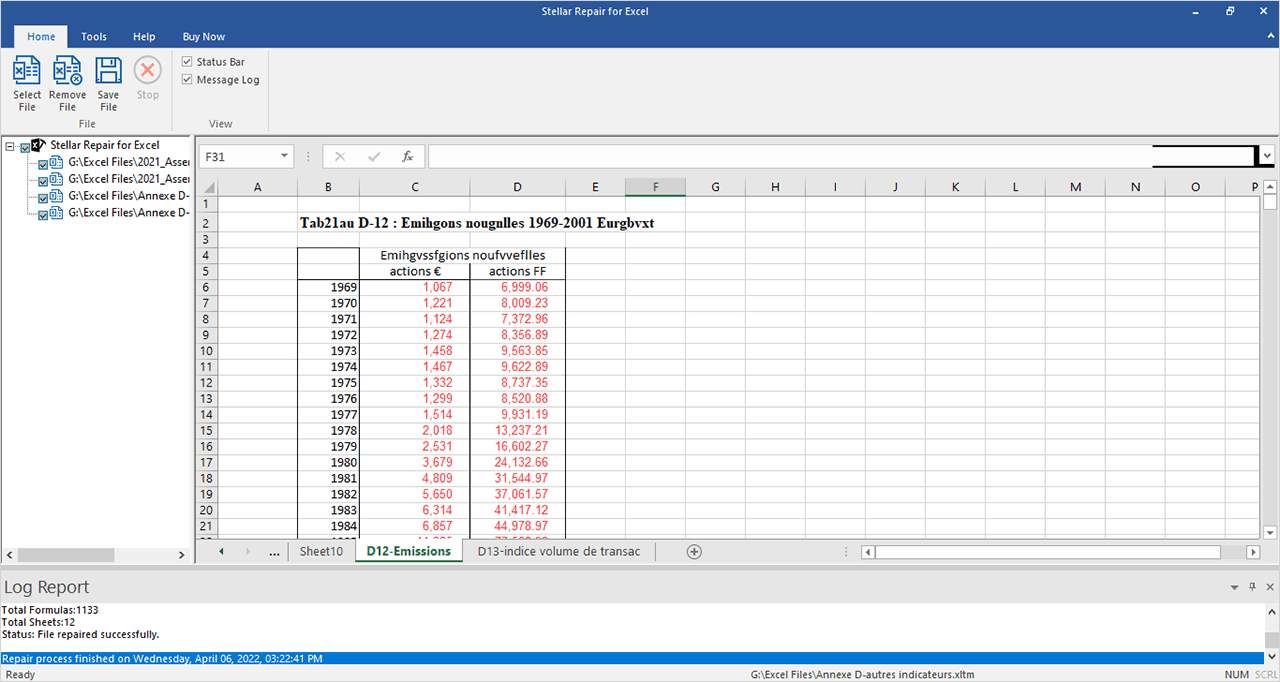
A repaired workbook in the preview: four files in the left pane, the selected sheet in an Excel-style grid, and the log showing 1,133 formulas and 12 sheets recovered.
Features
Fixes the common Excel corruption errors
Stellar Repair for Excel is built for the messages that block a workbook: "Excel found unreadable content", "Excel cannot open the file", "The file is corrupt and cannot be opened", "Unable to read file" and "File Error: Data May Have Been Lost". It works on files of any size.
Recovers formulas, charts and pivot tables
Stellar Repair for Excel restores tables, pivot tables, charts and chart sheets (including treemap, sunburst, histogram, waterfall and box-and-whisker charts), shared and engineering formulas, embedded functions, cell comments, conditional formatting, data validation, groups and subtotals, merged cells, hidden sheets, images and worksheet properties such as freeze panes.
Batch repair with Find
Stellar Repair for Excel repairs several workbooks in one run. If you don't know where the files are, Find lists every Excel file in a folder or drive so you can tick the ones to fix.
Preview before saving
Stellar Repair for Excel shows each repaired workbook in an Excel-like grid with its sheet tabs, so you can check the numbers and formatting before you save. A log report records each repair and can be saved as a text file.
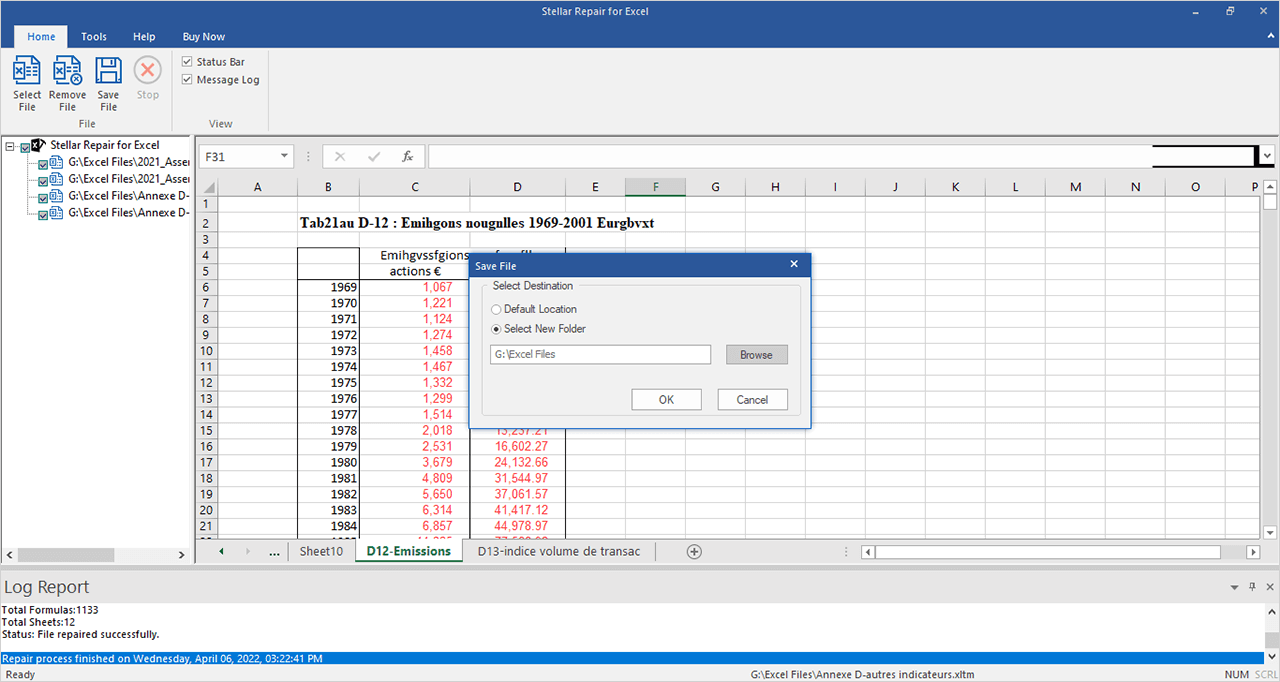
Saving: keep the repaired copy next to the original or pick a new folder.
Saves a separate repaired copy
Stellar Repair for Excel saves the repaired workbook as a new file with "Recovered" in its name, either in the original folder or in one you choose, so the damaged original stays as it was.
Benefits
- More than Open and Repair keeps. Formulas, charts and pivot tables come back, not just values.
- Check before you pay. The trial preview shows whether your sheets were recovered.
- Private. Workbooks with financial or client data never leave your PC.
- Cheap insurance. $39 is small next to rebuilding a quarter's accounts by hand.
Real-World Uses
- A finance workbook after a crash. Excel closes mid-save and the file now gives "unreadable content". Repair restores the formulas and pivot tables.
- A shared file damaged on a network drive. Find lists every copy on the share; repair the most recent one.
- Attachments that open as gibberish. A .xlsx from email won't open; the repaired copy brings back the sheets.
- Old .xls archives. Workbooks from Excel 2003 that newer Excel rejects can be repaired and saved again.
Who It's For, and Who Should Skip It
It suits accountants, analysts, small business owners and anyone whose work lives in Excel and can't afford to rebuild a broken workbook.
Skip it if:
- You use Excel on a Mac. This is a Windows app.
- The workbook is in OneDrive or SharePoint. Restore a previous version from version history first; it's free.
- The file was deleted. You need data recovery software first.
- Word, PowerPoint or PDF files are broken too. The file repair toolkit covers all four.
Usage Guide
- Close Excel, then install and launch Stellar Repair for Excel on 64-bit Windows.
- Select the file. Click Select File, then Browse, or Find to search a folder or drive. Tick the workbooks to repair.
- Repair. Click Repair. Time depends on file size and damage.
- Preview. Click each repaired file in the left pane and check its sheets.
- Activate and save. Enter the activation key from your order email, tick the files and click Save File. Choose the default location or a new folder.
- Workbooks with engineering formulas: enable Excel's Analysis ToolPak add-in before opening the repaired file.
Where it falls short
- Windows only. There is no Mac edition of the Excel repair tool.
- Limited trial preview. Stellar's user guide says the demo previews only the first sheet of each repaired workbook, so check that sheet carefully.
- A yearly license. It renews every 12 months; cancel the renewal after a one-off repair if you don't want to keep it.
- Excel must be closed. The repair won't start while any Excel window is open.
- Data that isn't in the file can't come back. If part of the workbook was overwritten, those cells are gone.
What Users Say
Stellar Repair for Excel has one of the longer review records among Stellar's repair tools.
Trustpilot: Stellar Repair for Excel
The product page has 4.8 out of 5 from 116 reviews (November 17, 2026), almost all four and five stars. Alfonso Cartagena wrote, "I have used Stellar Repair for Excel to repair a vital file quickly." allan soldouz described the usual path: "After using the tool, it successfully repaired my file and displayed all the data," and "I decided to purchase the software to save the repaired data, and it provided me with the restored file."
Buying and support get mentions too. Kiat (four stars) found it "easy to purchase and use online. can cancel using their online chat easily," and McLintock said the support "agent was knowledgeable, helpful and patient showing me how to resolve my issue." The lower ratings are mild: a four-star "support is good ,but sw need to chk twice" and a three-star "The live chat is helpful."
Trustpilot: Stellar as a company
Stellar overall scores 4.8 out of 5 from about 5,600 reviews across all its products, with 4% one-star reviews, mostly from buyers whose files could not be fixed. The recurring themes: it opens workbooks Excel gave up on, the preview builds trust, and support helps with activation. The complaints are about paying before you can save and about results on heavily damaged files.
Comparisons
Stellar Repair for Excel vs Excel's Open and Repair
Open and Repair is free and worth trying first. When it fails, or when it only extracts values and drops formulas and charts, this app is the next step, with a preview before saving.
Stellar Repair for Excel vs Stellar Toolkit for File Repair
The toolkit includes this same Excel repair along with Word, PowerPoint and PDF repair. If spreadsheets are your only problem, this tool on its own is the cheaper choice.
Editions and Pricing
| Edition | Price at checkout | License | Buy |
|---|
| Stellar Repair for Excel | $39 a year | One PC | Buy Now |
Price checked on November 17, 2026, the same as Stellar's own store.
FAQs
Can Stellar Repair for Excel fix "Excel found unreadable content"?
Yes. Stellar Repair for Excel is built for that error, and recovers the workbook's contents with their formatting instead of the stripped-down result Excel's own recovery can give.
Does Stellar Repair for Excel recover formulas or only values?
Stellar Repair for Excel recovers formulas, including shared and engineering formulas, along with charts, pivot tables and formatting. For engineering formulas, turn on Excel's Analysis ToolPak add-in.
Can Stellar Repair for Excel repair files from Excel 2024 and Microsoft 365?
Yes. Stellar Repair for Excel supports workbooks from Office 365 and Excel 2024, 2021, 2019, 2016 and older versions back to Excel 2000.
Does Stellar Repair for Excel overwrite my damaged workbook?
No. Stellar Repair for Excel saves the repaired workbook as a new file with "Recovered" in its name, in the original folder or one you pick.
Can I use Stellar Repair for Excel on more than one PC?
The license sold here covers one PC. Stellar sells a Technician license for several PCs at one location, and its file repair toolkit has its own Technician edition.
Is there a Mac version of Stellar Repair for Excel?
No. Stellar Repair for Excel runs on 64-bit Windows 8 to 11 only.
System Requirements
- 64-bit Windows 11, 10, 8.1 or 8
- Intel-compatible x64 processor
- 4 GB RAM minimum, 8 GB recommended
- 250 MB of free disk space
- Microsoft Excel to open the repaired workbook
Conclusion
Stellar Repair for Excel is worth $39 when a workbook you can't rebuild easily won't open, or Excel's own repair stripped out its formulas and charts. The one reason to buy it: the trial previews your repaired sheets first, so you only pay once you've seen your data.
The main reason not to: it's a yearly license for what is often a single rescue, and it's Windows only. Try Excel's Open and Repair and your version history first; if they fail, repair the file in the trial and buy if the preview looks right.
Download Free TrialBuy Now