Coolmuster Data Recovery: Four Scan Modes for Deleted, Formatted and Lost Files on Windows
Coolmuster Data Recovery is a $49.95-a-year Windows program that scans hard drives, USB sticks and memory cards for deleted or formatted files and saves what it finds to another drive. It's aimed at home users who lost photos or documents and want a simple scan-and-recover tool.
It comes in a 6 MB installer and has four modes on one screen, so you can be scanning within minutes of downloading it. As with any tool in this class, what you get back depends on how much of the drive has been written over since the loss.
Quick facts
- Version: 3.0.60 for Windows, released September 10, 2026
- Developer: Coolmuster
- Recovers from: internal and external hard drives, USB flash drives, memory cards, digital cameras, MP3/MP4 players
- Price: $49.95 for one year on one PC, $69.95 lifetime
- Trial: free download for scanning and previewing. Saving files needs a license
- What we checked: Windows version 3.0.60 in the vendor release notes, 6.3 MB installer from the vendor (file dated September 10, 2026), checkout price $49.95 on November 10, 2026. We worked from the vendor manual and its screenshots and did not run a recovery on a damaged drive.
Before you buy
- Stop using the affected drive and don't install the program on it, because new writes can destroy what you're trying to save. Save recovered files to a different drive, as the vendor also advises.
- Run the free scan first. Coolmuster's refund policy says refund requests for recovery products will not be approved, even though the product page advertises a 30-day guarantee.
- The one-year plan renews automatically until you cancel it.
Download Free Trial Buy Now
Overview
Coolmuster Data Recovery opens on a sidebar with four modes: Deleted Recovery, Formatted Recovery, Raw Recovery and Partition Recovery. You choose a mode, select a partition, and click Start Scan. Results appear in a tree you can browse by file type or by original location, and the vendor says it can identify more than 550 file formats.
Coolmuster describes the scan as read-only, so it doesn't change the source drive. The interface shows no advanced options for sector-level work or RAID, which keeps it simple and also marks its ceiling.
Features
Coolmuster Data Recovery offers four recovery modes
Deleted Recovery handles files removed from a disk or removable device. Formatted Recovery looks at formatted partitions, USB drives and camera cards. Raw Recovery is a deeper scan for when the file system itself is corrupted. Partition Recovery looks for lost, resized or damaged partitions, and the vendor recommends it for professional users only.
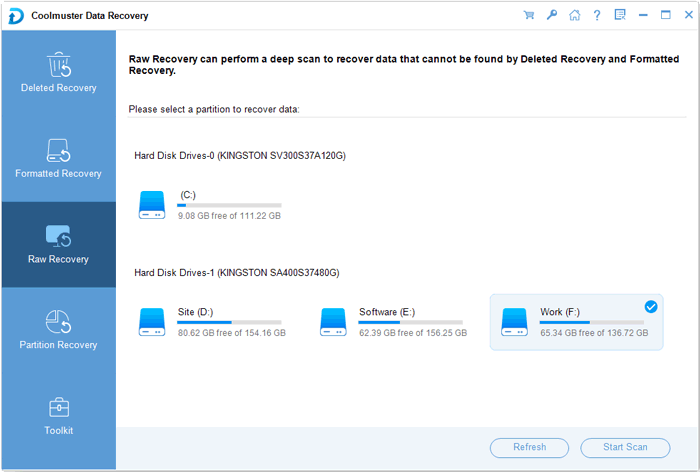
Raw Recovery mode selected, with the partitions listed on the right (from the vendor manual).
Browse results by file type or by original folder
Coolmuster Data Recovery sorts what it finds into a tree. File Type groups photos, video, audio, documents and other files. File Location rebuilds the folders it can still identify and puts orphaned items under Lost files.
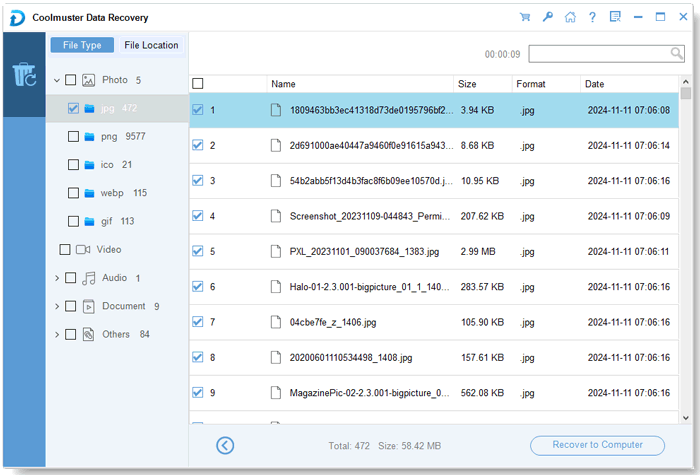
Results by file type, with name, size, format and date for each item.
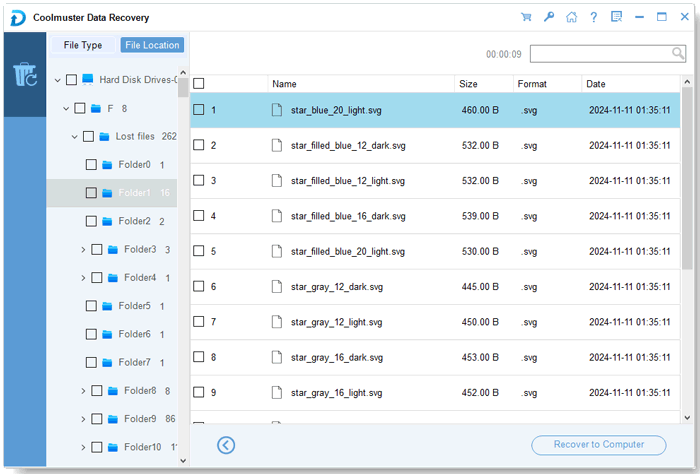
Results by location, with unidentified folders under Lost files.
Preview common files before you recover them
Coolmuster Data Recovery previews common images, Office documents, PDFs and archives, including BMP, GIF, PNG, JPG, DOCX, XLSX, PPTX, PDF, RAR and ZIP, according to the vendor. One independent reviewer could not get the preview to work (see What Users Say), so test it on your files with the free scan.
Covers more than the PC's internal disk
Coolmuster Data Recovery also scans USB flash drives, memory cards, digital cameras and media players that Windows can mount. It doesn't scan phones, which Coolmuster sells other tools for.
Benefits
- One screen and four named modes make it approachable for a first-time user in a stressful moment.
- You see the files before paying, so you can judge whether a license is worthwhile.
- The small installer is quick to fetch, and you can put it on a different drive from the one you're rescuing.
- Results by original location help when you need one folder, not every recoverable JPEG.
Real-World Uses
- You emptied the Recycle Bin and then realized a work folder was in it.
- A USB stick asks to be formatted when you plug it in, and you want the files off it first.
- You formatted a camera card by accident and need the shoot back.
- An external drive shows as RAW after an unsafe removal and you want to try a deep scan.
Who It's For, and Who Should Skip It
It suits home users with a straightforward loss: deleted files, a formatted card, a drive that lost its file system. The price is reasonable if you only need it once and cancel the renewal.
Skip it for a clicking drive, RAID arrays or anything with physical damage, which need a specialist or a professional tool. Don't buy it to scan a phone, either. Mac users need the separate Mac edition, whose own release notes stop in January 2019, so check its status before relying on it.
Usage Guide
- Install the program on a drive other than the one you're recovering from, then launch it.
- Pick a mode: start with Deleted Recovery or Formatted Recovery, and use Raw Recovery if those miss your files.
- Select the partition or device and click Start Scan.
- Browse the tree by File Type or File Location and tick what you want.
- Click Recover to Computer and choose a folder on a different drive. This step needs a license.
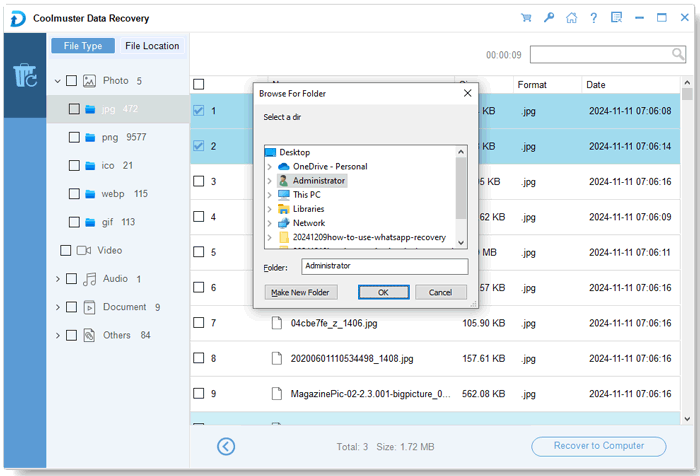
The output folder dialog appears when you click Recover to Computer.
Where it falls short
- Deep scans can be slow on large or old drives, and customers mention it.
- Some customers say a few files were missed, so don't assume a complete result.
- It won't rebuild RAID arrays or handle physically failing disks.
- The 3ptechies reviewer couldn't preview files before saving them, and needed a license to save anything.
What Users Say
The best-known independent write-up is a blog review from 3ptechies. Coolmuster runs a write-a-review-to-win-a-free-license promotion, so read the praise on its own site, and on small blogs, with that in mind.
On Coolmuster's product and review pages (41 reviews shown)
These appear on the vendor's own site, including some critical ones.
"Thank you Coolmuster for recovering my photos from my pen drive that was toast. My pen drive was inaccessible and wanted to be formatted. I knew the files were there but the drive was somehow corrupted."
Jan, vendor product page
"It did a good job restoring data from my old hard drive, but it missed a few files."
Emma Scott, December 26, 2025, vendor review page
"I used it on an old hard drive. Why does deep scanning take so long?"
Sarah Wilson, September 4, 2026, vendor review page
"Recovered lost photos from my USB drive easily. I wish it supported more file formats, though."
Sarah Miller, November 28, 2025, vendor review page
3ptechies (independent blog review)
By Samuel Odamah, who used a license from a giveaway. The article has no date and isn't marked as sponsored. He tested the Windows and Mac programs.
"Overall, it's a handy Windows/Mac utility software to recover lost files and photos"
Samuel Odamah, 3ptechies
"I was unable to preview the recovered files as the program features claim."
Samuel Odamah, 3ptechies
"you must first get a PRO license"
Samuel Odamah, 3ptechies, on saving recovered files
Trustpilot, for the Coolmuster company overall
Coolmuster scores 4.6 out of 5 from 223 Trustpilot reviews, read through a page summarizer. Most are about customer support and few name a product.
"Very serious and professional, they gave us correct directions and refunded us for unsuitable software."
Spea Web, September 11, 2025, Trustpilot (excerpt)
People value how easy it is and that it gets photos and documents back from USB sticks and cards. The complaints are about slow deep scans, a few missed files and a limited list of file types.
Comparisons
Coolmuster Data Recovery vs Coolmuster Lab.Fone for Android and iPhone Data Recovery
Those two scan phones. Data Recovery covers PCs and storage you can plug into one. Pick by where the data was, not by name.
Coolmuster Data Recovery vs free recovery tools
Free tools can handle a simple deleted-file case, so try one if the budget is tight. Coolmuster's advantages are the single screen and result browsing by location rather than any special scanning power.
Editions and Pricing
| Plan | Price | Term | Covers |
|---|
| 1 Year, 1 PC | $49.95 | 1 year, renews automatically | 1 PC |
| Lifetime, 1 PC | $69.95 | One payment, lifetime updates | 1 PC |
| 1 Year, 5 PCs | $59.95 | 1 year, renews automatically | 5 PCs |
| Lifetime, 5 PCs | $109.95 | One payment, lifetime updates | 5 PCs |
| 1 Year, 30 PCs | $199.95 | 1 year, renews automatically | 30 PCs |
| Lifetime, 30 PCs | $309.95 | One payment, lifetime updates | 30 PCs |
The one-year and lifetime single-PC plans are $20 apart. If you only need one rescue, the one-year plan works as long as you cancel the renewal.
FAQs
Can Coolmuster Data Recovery get files back from a formatted drive?
Yes, Coolmuster Data Recovery has a Formatted Recovery mode for partitions, USB drives and camera cards, though success depends on whether the space has been reused since.
Does Coolmuster Data Recovery work on SSDs?
Coolmuster Data Recovery will scan an SSD that Windows can see, but once TRIM has cleared deleted blocks, no software can bring those files back, so act quickly.
Is Coolmuster Data Recovery safe to run on the damaged drive?
Coolmuster describes Coolmuster Data Recovery as read-only, so scanning doesn't write to the source. Always save recovered files to a different drive.
Can Coolmuster Data Recovery recover files from my phone?
No. Coolmuster Data Recovery works on computer drives and devices Windows mounts as storage. Coolmuster sells Lab.Fone for Android and iPhone Data Recovery for phones.
Can I get a refund on Coolmuster Data Recovery if it doesn't recover my files?
Probably not. Coolmuster's refund policy lists Data Recovery under a 7-day guarantee and says refund requests for recovery products will not be approved, since recovery can be partial. Check the trial's scan results before buying.
Is Partition Recovery in Coolmuster Data Recovery a good first choice?
No. Coolmuster itself suggests Partition Recovery only for professional users, so try the Deleted, Formatted and Raw modes first.
System Requirements
- Windows 11, 10, 8 or 7
- 1 GHz CPU or faster, 32-bit or 64-bit
- 256 MB RAM, 1 GB recommended
- 200 MB free disk space
Conclusion
A fair buy for a simple loss on a Windows PC or USB device, once the free scan shows your files. The scan is free, the modes are easy to choose, and you only pay once you have seen results.
The main reason not to buy is if the drive is failing or the data is irreplaceable: then a specialist is the safer route, and this tool's limited refund terms leave you little recourse.
Download Free Trial Buy Now