Stellar Photo Recovery Professional: Recover Deleted Photos and Repair the Broken Ones
Stellar Photo Recovery Professional is a $59.99-a-year Windows tool for photographers that does two jobs in one window: it gets back deleted photos, videos and audio from memory cards and drives, and it repairs corrupt JPEG, HEIC, TIFF and camera RAW files that won't open or come back grey, pixelated or cut in half. It's the edition to pick when recovered photos aren't enough because some of them are damaged.
You know the moment: the card was formatted in the camera, or the files are back but half of them show a grey band across the bottom. The Standard edition stops at getting files back. Professional adds the repair module, so you can fix what you recovered without buying a second program.
Quick facts
- Version: 12.6.0.0 for Windows, released May 2026
- Developer: Stellar (Stellar Information Technology Pvt. Ltd.), in the data recovery business since 1993
- Platform: 64-bit Windows 11, 10, 8.1, 8 and Windows Server 2022, 2019, 2016. The Mac edition is a separate product
- Price: $59.99 for a one-year license on one computer
- What it adds over Standard: repair of corrupt photos and extraction of thumbnails from badly damaged ones
- Free trial: the full program; you can scan, preview found files and preview repairs, but saving them needs a license key
- Refunds: claims within 30 days of a first purchase, with exclusions (see Before you buy)
- What we checked: the trial installer (version 12.6.0.0, 112 MB, signed by Stellar Information Technology Private Limited) downloaded from the vendor, and a checkout price of $59.99 for the one-year license on November 11, 2026. We didn't run a recovery or a repair on damaged files ourselves.
Before you buy: run the trial on your own card first
Stop using the card or drive the moment you notice the loss, because every new photo can overwrite one you want back. Then install the trial on your PC (not on the drive you're recovering from), scan, and look at the previews. If your photos show up whole in the preview, the paid version will save them.
Stellar's refund policy only covers a first purchase within 30 days, and it excludes buyers who didn't download and use the trial first, purchases on a "Special Offer", renewals and parts of a bundle. Treat the trial as your real test, not the refund.
Download Free TrialBuy Now
Overview
Stellar Photo Recovery was called Stellar Phoenix Photo Recovery until its rename, and the recovery-plus-repair edition used to be sold as "Platinum". Today the Windows line has three paid tiers on Stellar's order page: Standard (recovery only), Professional (recovery plus photo repair) and Premium (adds video repair), with a Technician tier above them. Professional is the tier Stellar marks as best value.
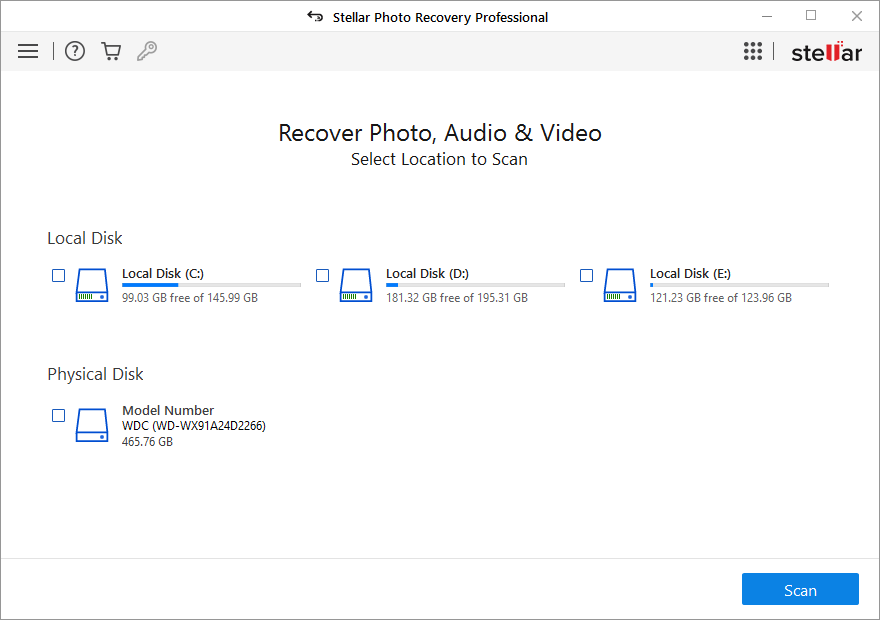
The program works in three steps. You choose what to recover (all data, or just photos, audio and videos), pick a drive, folder or physical disk, and scan. Found files appear in a tree sorted by type, with a preview window, and you tick what you want and click Recover. The repair module works on any photo you already have: one you just recovered, or one that's been sitting broken in a folder for years.
The What To Recover screen: recover everything, or tick Photos, Audio and Videos. The left menu also has Resume Recovery, disk image tools and Add Raw File Formats.
Features
Repair corrupt JPEG, HEIC, TIFF and RAW photos
Stellar Photo Recovery Professional repairs photos that open with errors or show up pixelated, grainy, broken, greyed out or cut off, and keeps the original resolution. Stellar lists JPEG/JPG, TIFF, HEIC and the RAW formats DNG, ARW, CR2, CRW, ERF, MRW, NEF, NRW, SRF, ORF, PEF, SR2, RW2 and RAF. You can repair many photos in one go, and when a file is too far gone, it can extract the embedded thumbnail so you at least keep a small copy of the shot.
Recovery from cards, drives, drones and CCTV storage
Stellar Photo Recovery Professional recovers deleted photos, videos and audio from SD, microSD and CF cards, USB sticks, internal and external hard drives and SSDs, CDs and DVDs, and the storage used by drones, dash cams and CCTV recorders. It reads NTFS, FAT32, exFAT, HFS+, APFS, Linux and BTRFS file systems, works on 4K-sector drives, and restores files with their original date and time stamps. It also recovers from a formatted card or a drive Windows calls inaccessible.
Camera RAW support, with room to add your own format
Stellar Photo Recovery Professional knows the RAW formats of Canon, Nikon, Sony, Fujifilm, Olympus, Panasonic, Kodak and other makers, plus GoPro, Polaroid and Instax models. If your camera writes something it doesn't list, the Add Raw File Formats setting lets you teach it the format from sample files (at least 10 of the same type), so a brand-new body isn't a dead end.
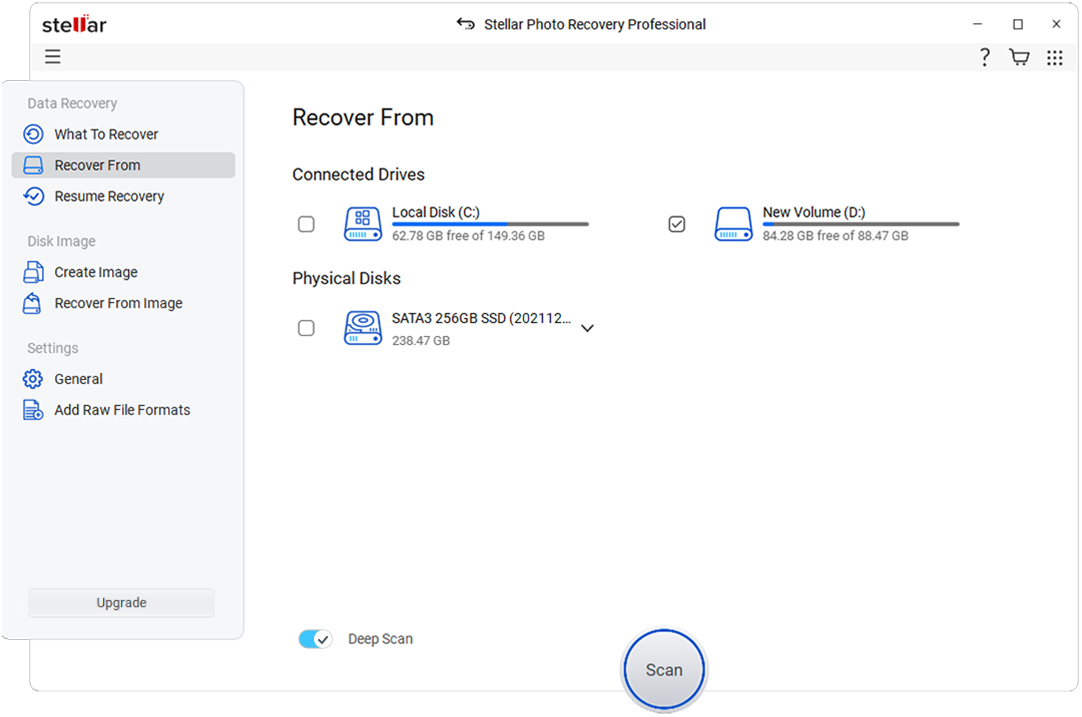
Recover From: pick a volume or a whole physical disk, and turn on Deep Scan for formatted or corrupted media.
Deep Scan, pause and resume, and preview while it scans
Stellar Photo Recovery Professional runs a quick scan by default and a Deep Scan that reads the media sector by sector for files the quick scan misses. A long scan can be paused and resumed later, and you can preview and save files while it's still running. Results come in three views (Classic List, File List and Deleted List), with a search box and a full-screen preview.
Disk images and drive health for failing media
Stellar Photo Recovery Professional can make a sector-by-sector image of a whole drive or a range of it, then recover from the image instead of the failing hardware, which spares a drive with bad sectors from repeated reads. Hovering over a drive shows its SMART health and temperature. It also scans BitLocker-encrypted drives once you enter the password.
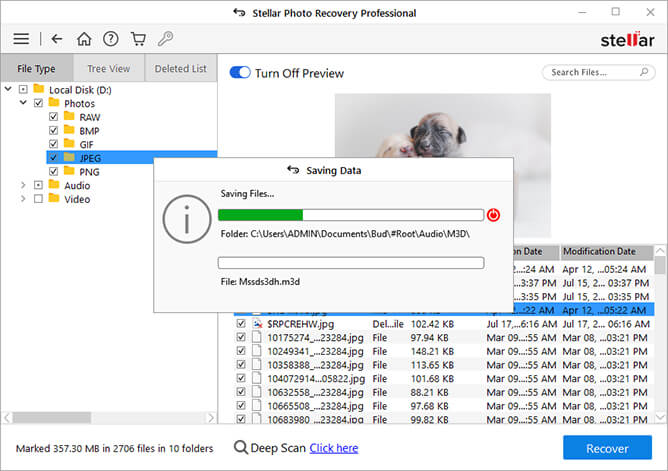
Scan results in File List view: found photos sorted into JPG, PNG, CR3, CR2, RAW and other folders, with a preview of the selected photo before you recover it.
Benefits
- One purchase covers the whole rescue. Recovered photos often come back partly damaged. With Professional you fix them in the same program instead of buying a separate repair tool.
- You see what you'll get before paying. The trial shows previews of found files, so you only buy when your photos are actually there.
- It's built around cameras, not office files. The RAW format list and the photo/video/audio filters keep a scan of a 256 GB card from drowning you in system files.
- It's gentle on a dying card. Imaging the media first means one read of the hardware and as many recovery attempts as you like.
Real-World Uses
- A card formatted in the camera by mistake. An in-camera format rarely wipes the data. A scan of the card brings back the JPEGs and RAW files from the shoot.
- Recovered wedding photos with grey bands. Files came back from a failing card but some open half grey. Run them through the repair module, and pull the thumbnails from any that can't be fixed.
- Old family scans that won't open. A folder of TIFFs or JPEGs from an old backup drive gives "invalid image" errors. Repair works on files you already have, not just freshly recovered ones.
- Drone or dash cam footage deleted to make room. Scan the microSD card for the deleted MP4 or MOV files before the device records over them.
- An external drive that clicks and stalls. Image it once with the disk imaging tool, then recover from the image while the drive rests.
Who It's For, and Who Should Skip It
It's for Windows users who shoot a lot (hobbyists, event and wedding photographers, drone pilots) and want both recovery and photo repair in one tool, and for anyone who already has damaged JPEG or RAW files that won't open.
Skip it if:
- You only need deleted files back. The Standard edition does the recovery part for less, and Stellar's free edition recovers up to 10 files of up to 100 MB each, which can be enough for a handful of photos.
- Your problem is corrupt videos. Professional repairs photos, not videos. Premium adds video repair.
- You're on a Mac. This license is for Windows; the Mac edition is sold separately.
- The drive is physically broken (not detected, clicking, water-damaged). No software can read a disk the PC can't see; that's a job for a recovery lab.
- You need it on several PCs. The license covers a single system.
Usage Guide
- Install it on the PC, not the card. Download the trial, run the installer and launch Stellar Photo Recovery. Never install or save anything onto the card or drive you're recovering from.
- Choose what to recover. Leave All Data ticked, or tick only Photos, Audio or Videos to make the scan faster and the results shorter.
- Pick the source. Select the card or drive under Connected Drives, or a whole disk under Physical Disks if the partition is gone. Turn on Deep Scan for a formatted or corrupted card.
- Scan and preview. Watch the results fill in by file type. Click a file to preview it; you can pause a long scan and resume later.
- Activate and recover. Enter your license key, tick the files you want and click Recover. Save them to a different drive.
- Repair what's damaged. Open the photo repair module, add the photos that show errors or grey areas, repair them and preview the results, then save. For files beyond repair, use the thumbnail extraction option.
Where it falls short
- Large RAW files are its weak spot. In Neocamera's test on a formatted FAT32 card, only 66% of the 505 JPG and RAW files it found were recovered correctly, and the reviewer saw it struggle with large images.
- Deep scans are slow. Stellar's own FAQ answers a question about a Deep Scan still running after 24 hours by suggesting you filter the scan to photos, videos or audio. Several reviewers call it slow but thorough.
- Repair doesn't fix everything. Larry Jordan's damaged TIFFs didn't come back with the trial. Badly damaged files may only give you their thumbnails.
- It's a yearly license. The $59.99 price is for one year on one PC, which matters if you want it as a tool you keep for emergencies.
- Upsells. The program nudges you toward higher editions and Stellar's lab services, which one reviewer found tiresome.
What Users Say
Photo magazines have reviewed Stellar Photo Recovery for years, and the picture is consistent: easy to use, very wide format support and strong results on formatted cards, with slow deep scans and mixed results on large or badly damaged files. Most reviews cover the product as a whole rather than the Professional tier alone.
Fstoppers (version 12)
Fred van Leeuwen, a photographer and filmmaker, used version 12 to recover files he had lost on an old hard drive, in a sponsored review from May 2025. He gave it 10/10:
"Stellar Photo Recovery has a fantastic, user-friendly interface."
"The software ran well on my Windows laptop and searched and recovered files with decent speed, too!"
"It took a while to recover, but I expect this was due to the age of the drive and the read/write speed of the USB-SATA adapter."
He also points out the edition split: "However, only the Professional and Technician tiers can repair corrupted photos and videos."
Neocamera (version 12)
Neocamera's July 2025 lab test compared it with PhotoRec on SDXC and XQD cards. On speed it was clear: "Clearly the winner in terms of speed is Stellar Photo Recovery."
On a formatted FAT32 card the result was weaker: "In this case, 66% of files were recovered correctly. This is lower than expected. It is apparent that this software struggles with large images." The review also notes that "The Professional version can attempt to repair corrupted photos, while the Premium version will do the same for videos."
Expert Photography
Christopher Bryan-Smith's review (updated December 2025) carries a "We Highly Recommend" badge and singles out the Professional tier: "The professional level of the Stellar Photo Recovery software is designed with photographers in mind." On repair: "When you use Stellar to repair corrupted files, it will repair the photo and restore the respective thumbnails."
His main con: "The recovery process is slow, and other brands of data recovery software may do deeper scans." And his summary of it: "The recovery process isn't quick, but it is reliable."
Photo Review (Premium 11.8)
Photo Review rated the Premium edition, version 11.8, 8.8 out of 10, with speed its lowest score. "The scanning process is slow but it's extremely thorough," it found, adding "We found the software to be capable of recovering files from an old CompactFlash card." Its advice on where it fits: "It's best used for recovering deleted or damaged files from individual memory cards with smaller storage capacities."
Digital Camera World and TechRadar
Ben Andrews at Digital Camera World (2021) filled a card with images, formatted it and scanned it straight away: "Stellar Photo Recovery restored 100% of the images on the card."
Mike Jennings at TechRadar (2022) calls it "one of the only tools on the market that's specifically designed for photographers and creatives." His reasons to buy: "Huge device and file format support", "Impressive repair features" and "Future-proofed"; his reasons to avoid: "Free version limited to 10 files for recovery" and "Doesn't retain file names".
The critical view: Larry Jordan
Larry Jordan tried the trial on a Mac in April 2022 to fix damaged TIFF images. It didn't work for him: "But, for me, it didn't bring any of my damaged TIFFs back to life." He was blunt about the trial too: "This trial feels more like a sales pitch than a repair program."
His verdict still leaves the door open: "It didn't work for me, it may work for you." and "If you have a crashed hard disk and need to recover images, Stellar may be worth considering."
Trustpilot
Stellar as a company scores 4.8 out of 5 on Trustpilot from about 5,600 reviews, covering all its products. The photo-related complaints there are about files that didn't come back; one reviewer in November 2026 wrote "I fortunately when try to recover my photos didn't get any photo" while adding "Also they have good customer service but couldn't do anything". Another buyer received the Mac version after meaning to buy the Windows one, so check the platform at checkout.
The recurring themes: people like the simple three-step interface, the camera RAW support and results on formatted cards. The complaints are slow deep scans, weaker results on large RAW files, and repair that can't save every file. That's why the trial preview matters so much here.
Comparisons
Professional vs Standard and Premium
Standard recovers photos, videos and audio but repairs nothing. Professional is the step up for photographers: it's $10 more than Standard and adds photo repair and thumbnail extraction. Premium, $10 above Professional, adds repair of corrupt videos (MOV, MP4, M4V, AVI, AVCHD and others), several at once, which is worth it if your camera footage is what's broken.
Stellar Photo Recovery vs PhotoRec
PhotoRec is free and open source, but it has no photo repair. In Neocamera's test it took 14 minutes on an SDXC card and 45 minutes on an XQD card, while Stellar was clearly faster and lets you preview photos during the scan, which Neocamera notes is impossible with PhotoRec. If you're comfortable with a bare-bones tool and only need deleted files back, PhotoRec costs nothing; if you want previews and repair, Stellar is the easier path.
Editions and Pricing
| Edition |
Price (1 year) |
Photo, video, audio recovery |
Photo repair |
Video repair |
| Standard |
$49.99 |
Yes |
No |
No |
| Professional |
$59.99 |
Yes |
Yes, plus thumbnail extraction |
No |
| Premium |
$69.99 |
Yes |
Yes |
Yes, several at once |
| Technician |
$99.99 |
Yes |
Yes |
Yes, more formats, for studios and agencies |
Prices are Stellar's one-year license prices for one Windows PC, as shown at checkout on November 11, 2026. Stellar's own order page also offers lifetime licenses at different prices.
FAQs
Can Stellar Photo Recovery Professional repair photos I didn't recover with it?
Yes. Stellar Photo Recovery Professional's repair module works on any corrupt photo you add to it, including old files on a backup drive or photos you recovered with another tool.
Does Stellar Photo Recovery Professional repair corrupt videos?
No. Stellar Photo Recovery Professional recovers deleted videos but only repairs photos. Video repair is in the Premium and Technician editions.
What happens when the one-year license runs out?
The Stellar Photo Recovery Professional license on this page is a one-year subscription for one computer. Plan on renewing it if you want the full program after the year, or buy when you need it, since the trial always shows if your files can be found.
Can I install Stellar Photo Recovery Professional on two computers?
No. Stellar Photo Recovery Professional's license covers a single system, so a second PC needs its own license.
Will it recover photos from my phone?
Stellar Photo Recovery Professional recovers from a phone's removable SD card connected to your PC, and from phone videos stored on cards and drives. For photos in the phone's own storage, Stellar sells separate iPhone and Android recovery tools.
My card isn't detected by Windows. Can it still help?
Stellar Photo Recovery Professional can only recover from a card or drive that shows up in its Recover From list. If Windows and the program can't see the device at all, or the drive is physically damaged, a recovery lab is the realistic option.
Is Stellar Photo Recovery Professional safe to install?
Yes. The Stellar Photo Recovery Professional installer we downloaded on November 11, 2026 was digitally signed by Stellar Information Technology Private Limited. You choose where recovered files are saved, so keep them off the card you're recovering from.
Does it keep the original file names?
Not always. TechRadar listed "Doesn't retain file names" as a drawback of Stellar Photo Recovery, so expect some recovered files to come back with generated names, especially after a format. Stellar says files are recovered with their original date and time stamps.
System Requirements
- Operating system: 64-bit Windows 11, 10, 8.1, 8, Windows Server 2022, 2019, 2016
- Processor: Intel-compatible x64
- Memory: 4 GB minimum, 8 GB recommended
- Disk space: 250 MB for installation, plus room on a separate drive for the recovered files
Conclusion
Stellar Photo Recovery Professional is worth $59.99 if you shoot a lot on Windows and want one tool that both finds deleted photos and fixes the ones that come back broken. The one reason to buy it is the photo repair module: for $10 more than Standard you get JPEG, HEIC and RAW repair plus thumbnail extraction, which is exactly what a formatted or failing card tends to need. The main reason not to is that it's a one-year license and results on large RAW files and badly damaged photos are mixed, so if you only need a few deleted files back, Standard or the free edition does that for less. Run the trial first: if your photos appear in the preview, Professional will get them back.
Download Free TrialBuy Now