Stellar Data Recovery Technician for Windows: File Recovery That Also Rebuilds a Failed RAID
Stellar Data Recovery Technician for Windows is a $99.99-a-year Windows program that recovers deleted and lost files from drives, cards and unbootable PCs, and adds what cheaper editions lack: it virtually rebuilds a failed RAID 0, 5 or 6 array from the bare disks, without the controller card, and recovers the data. It suits IT staff, repair shops and small businesses with a NAS or server array, and the free trial scans and previews before you pay.
When a RAID controller dies or a rebuild fails, the disks still hold the data, but no single disk is readable on its own. Technician reads all the member disks, works out the disk order, stripe size and parity (or guesses them for you), and presents the reconstructed volume as if the array were healthy again.
Quick facts
- Version: 14.0.0.0, released October 2026
- Developer: Stellar Data Recovery (this edition was once sold as Stellar Phoenix Windows Data Recovery Technician)
- Runs on: 64-bit Windows 11, 10, 8.1 and 8, and Windows Server 2022, 2019 and 2016
- RAID: RAID 0, 5, 6 and nested levels, hardware or software, HDD or SSD, NTFS, FAT and exFAT volumes
- Also: deleted and formatted file recovery, lost partitions, BitLocker drives, bootable recovery media, disk imaging and cloning, drive health monitor, photo and video repair
- Price: $99.99 for one year (lifetime $399)
- Free trial: scans and previews your recoverable files before you buy
- Refund: 30 days from the first purchase, with conditions
- What we checked: the trial installer on Stellar's server (194 MB, dated October 14, 2026), the edition features on Stellar's buy page, Stellar's refund policy, and the $99.99 one-year price on the order page on November 11, 2026. We didn't rebuild an array ourselves; results come from the reviewers and users quoted.
Before you buy
- You need every member disk. Stellar's FAQ says RAID recovery requires all the array's drives, connected to the PC, and their order matters.
- Logical damage only. Clicking, dead or burned-out drives need a lab, not software. Stop using a failing disk and image it first.
- No RAID? Save money. For a single drive, Stellar Data Recovery Professional ($79.99) or Standard ($59.99) does the same file recovery.
Download Free Trial Buy Now
Overview
The program starts with What to Recover: everything, or a mix of documents, email, audio, photos and video. Then you choose where: a drive, a folder, a non-booting PC, a disk image, or RAID Recovery. After the scan you get a folder tree, a file list and a preview, and you tick what to save to a different disk. A Deep Scan digs further when the quick scan misses files.
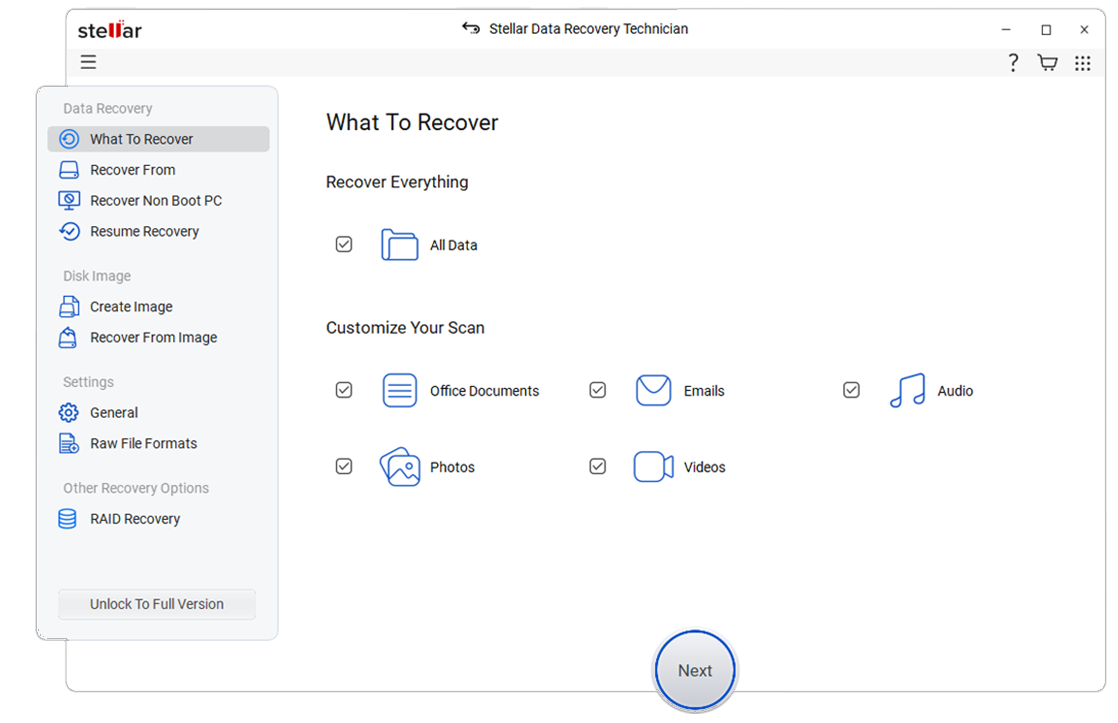
The first screen: recover everything, or pick documents, emails, audio, photos and videos. The side menu has disk imaging and RAID Recovery.
Features
Rebuilds RAID 0, 5 and 6 without the controller
Stellar Data Recovery Technician reconstructs an inaccessible RAID from its member disks, hardware or software, using the disk order, start sector, stripe size and parity you enter. If you don't know them, tick "Don't know" and it tries the probable combinations, then lists the constructions it found for you to scan.
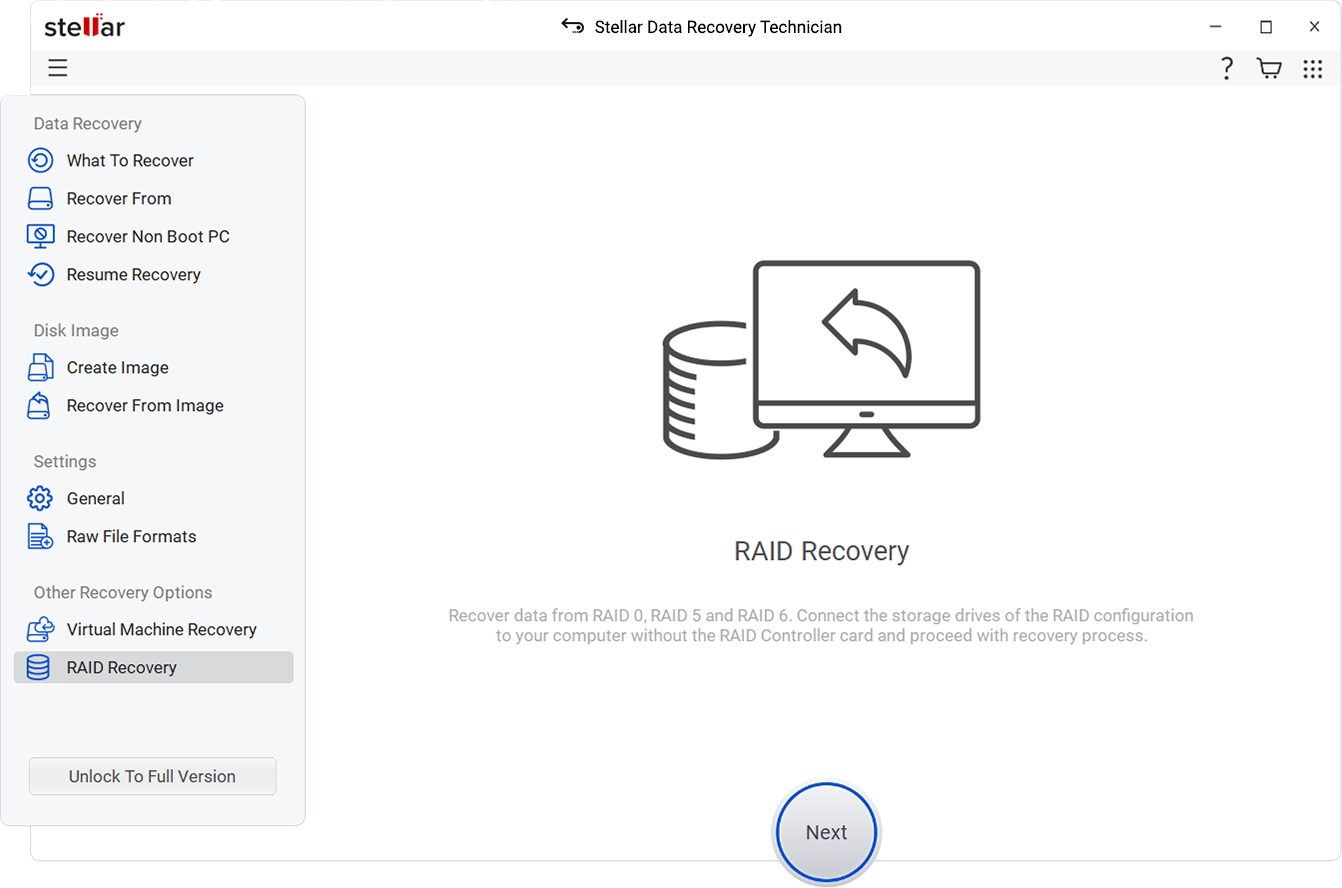
RAID Recovery: connect the array's disks to the PC and recover without the RAID controller.

RAID 5 reconstruction: set the disk order and let it determine the parameters, with the parity map shown on the left.
A virtual drive when the rebuild fails
Stellar Data Recovery Technician offers Create Virtual Drive when it can't find a probable construction or a volume. It then runs a raw, signature-based search over the virtual RAID image, so you can still get files back, though without their original names and folders.
Recovery from a PC that won't boot
Stellar Data Recovery Technician creates bootable USB recovery media, so you can start a crashed or blue-screened PC and copy its files to an external disk. It also handles BitLocker drives once you enter the password or recovery key.
Disk imaging, cloning and a health monitor
Stellar Data Recovery Technician images or clones a failing drive so you recover from the copy instead of stressing the original, and its Drive Monitor shows S.M.A.R.T. health, performance and temperature. It also repairs corrupt photos and videos, a feature it shares with the Professional edition.

Scan results: the recovered folder tree, the file list and a preview of the selected photo before you click Recover.
Benefits
The price is the headline: Technician costs $99.99 for a year, far less than sending an array to a recovery lab, and the free trial shows whether the array can be rebuilt before you spend anything. For an IT person, the same license also covers every everyday case: deleted folders, formatted cards, a laptop that won't boot.
Real-World Uses
- A small office server's RAID controller fails: connect the disks to a Windows PC, rebuild the RAID 5 virtually and copy the shares off.
- A RAID 5 rebuild went wrong after replacing a disk: Stellar's case studies describe recovering a 24 TB RAID 6 after a failed rebuild.
- A repair shop's daily work: recover a customer's deleted photos, a formatted SD card or a laptop that blue-screens.
- A failing drive: image it first, then recover from the image.
Who It's For, and Who Should Skip It
It's for IT staff, MSPs and repair shops, and for small businesses with a server or DAS array who'd rather try a $100 tool before paying a lab.
Skip it if you've never had a RAID: Professional does the same single-drive recovery for less. Skip it for NAS boxes formatted with BTRFS or ext4 (Synology, QNAP, ASUSTOR) and for virtual machine disks: those are covered by the higher Toolkit edition. And skip software altogether for physically damaged disks; every scan of a dying drive makes a lab recovery harder.
Usage Guide
- Install the trial on a Windows PC, not on the drive you're recovering from.
- For RAID, connect all member disks to the PC (directly or through USB docks).
- Choose what to recover, then RAID Recovery, and pick RAID 0, 5 or 6.
- Move the disks into the list in their order. Enter the parameters, or choose automatic detection.
- Click Build RAID, pick a probable construction, and scan the volume.
- Preview the files. If the structure is wrong, try another construction or Create Virtual Drive.
- Buy and activate, then save to a separate disk with enough space.
Where it falls short
- Deep scans are slow. KitGuru listed "Deep scans take some time" as a con, and multi-terabyte arrays take hours.
- RAID file systems: Stellar's RAID page lists NTFS, FAT and exFAT volumes. NAS volumes on BTRFS or ext4 need the Toolkit edition.
- Confusing editions. ITPro's one con: "Pricing and software options are confusing". Stellar now also points its Toolkit page at this edition's page, which doesn't help.
- Subscription. KitGuru: "Subscriptions are a little pricey."
What Users Say
Reviewers rate it well and the complaints are about price and scan time. G2 showed 4.8 out of 5 from three reviews of the Technician edition. Stellar as a company scored 4.8 out of 5 on Trustpilot from about 5,600 reviews across all products when we looked (read through a summarizer, since Trustpilot blocks direct downloads).
KitGuru (8.5/10)
Simon Crisp (October 13, 2023) reviewed the Technician edition and concluded: "KitGuru says Stellar Data Recovery Technician is an easy-to-use, but powerful data recovery tool" "that guides you through a tricky job with ease thanks to the use of check boxes and icons."
Pros he listed: "Large range of data recovery tools.", "Default scans are quick and efficient.", "Disk monitoring." and "Huge range of supported file types." Cons: "Deep scans take some time." and "Subscriptions are a little pricey."
ITPro (4/5)
Paul Kilinga (October 5, 2022) reviewed the Toolkit and Technician editions, version 10.2, and said they "can provide value for money and deliver adequate solutions for your data recovery needs", while preferring a competitor for speed and price: "AnyRecover is the overall better pick as it is faster, costs less, and has more features than Stellar Data Recovery." Pros included "Recovers external hard drives, SD cards, and more"; the con: "Pricing and software options are confusing".
Trustpilot
DJ Torres (February 26, 2025, 5 stars), titled "Their software just works": "Used it to recover data from a corrupted raid 1 where the missing cache caused normal recovery tools to fail."
Forrest Wilson (June 11, 2018, 5 stars): "I have Windows Data Recovery, SQL DB Repair, and SQL backup."
The themes: an approachable interface for a hard job, a wide range of tools in one license, and fair results; the drawbacks are slow deep scans, subscription pricing and a confusing line-up of editions. Independent tests of RAID rebuild success rates are scarce, so let the free trial decide.
Comparisons
Technician vs Professional
Technician is Professional plus RAID 0, 5 and 6 recovery and virtual RAID reconstruction, for $20 more a year. If there's any chance you'll face an array, the difference is small.
Technician vs Toolkit for Data Recovery
The Toolkit ($299 a year) adds recovery from Synology, QNAP and ASUSTOR NAS drives with BTRFS, from Linux and Mac drives, and from virtual machine disks (VMDK, VDI, VHD, VHDX). For Windows RAIDs and PCs, Technician covers it.
Editions and Pricing
| Edition | 1 year | What it adds |
|---|
| Standard | $59.99 | Deleted and formatted file recovery, partitions, BitLocker |
| Professional | $79.99 | Non-booting PCs, disk imaging, drive monitor, photo and video repair |
| Technician (this listing) | $99.99 | RAID 0, 5, 6 recovery and virtual RAID reconstruction |
| Toolkit for Data Recovery | $299 | NAS (BTRFS), Linux and Mac drives, virtual machine disks |
Technician is also sold as a $399 lifetime license and the Toolkit as a $599 lifetime license at checkout. Standard and Professional prices are from Stellar's buy page; all checked November 11, 2026.
FAQs
Does Stellar Data Recovery Technician need the RAID controller card?
Stellar Data Recovery Technician doesn't need the RAID controller card. It reads the member disks connected directly to a Windows PC and rebuilds the array in software.
What if I don't know the RAID stripe size or disk order?
Stellar Data Recovery Technician lets you tick "Don't know" for parameters such as stripe size, parity order and parity delay, then searches the possible combinations and offers probable constructions. Stellar warns that wrong values you enter yourself can mislead it.
Can Stellar Data Recovery Technician recover a RAID 5 with a missing disk?
Stellar Data Recovery Technician's FAQ says RAID recovery needs all the member drives. A RAID 5 is designed to tolerate one missing disk, but check with the free trial whether your array can be built without it before buying.
Can Stellar Data Recovery Technician recover a Synology NAS?
Stellar Data Recovery Technician handles NTFS, FAT and exFAT RAID volumes. Synology, QNAP and ASUSTOR volumes formatted with BTRFS are listed under the Toolkit for Data Recovery edition.
Is there a limit on how much data Stellar Data Recovery Technician recovers?
Stellar Data Recovery Technician recovers unlimited data in the paid version. The free trial is for scanning and previewing what can be recovered, so you can check your files before you pay.
Is the one-year Stellar Data Recovery Technician license worth it over lifetime?
Stellar Data Recovery Technician costs $99.99 for a year or $399 for a lifetime license at checkout. For a one-off rescue the yearly license is cheaper; turn off renewal if you don't need it again, since Stellar doesn't refund renewals. Repair shops that use it every week may prefer lifetime.
System Requirements
- 64-bit Windows 11, 10, 8.1 or 8, or Windows Server 2022, 2019 or 2016
- Intel-compatible x64 processor
- 4 GB of RAM minimum, 8 GB recommended
- 500 MB for installation, plus a separate disk for recovered files
Conclusion
Stellar Data Recovery Technician is worth $99.99 a year if you look after any Windows RAID, or simply want the most complete Windows edition for $20 more than Professional. The one reason to buy it is controller-free RAID reconstruction that guesses unknown parameters, tested in the free trial before you pay. The main reason not to is a NAS on BTRFS or a VM disk, which need the pricier Toolkit, or a physically failing drive, which needs a lab.
Download Free Trial Buy Now