Kernel Recovery for BKF: Get Files Back From a Damaged Windows Backup
Kernel Recovery for BKF is an $89 Windows tool from KernelApps that repairs corrupt BKF backup files and recovers the documents inside them. It's for anyone holding an old NTBackup or Veritas backup that Windows can't restore.
BKF files are often the only copy of old data, and they tend to surface years later, on an aging drive or tape, with CRC errors or the message that the backup "contains unrecognized data".
Quick facts
- Version: 15.10, released October 2015
- Developer: KernelApps Pvt. Ltd. (Kernel Data Recovery)
- Platform: Windows 11, 10, 8.1, 8, 7 and older, Windows Server 2022, 2019 and older
- Works with: BKF, CTF and FD files from NTBackup, Veritas, Symantec, HP Data Protector and ARCserve
- Price: $89 for the Home License on the order page
- Trial: saves up to 25 items per folder
What we checked: installer size 4.2 MB, dated October 9, 2015 on the vendor's download server, and the order page, which showed $89 for Kernel Recovery for BKF - Home License, on November 10, 2026. We didn't recover a damaged backup ourselves.
Download Free TrialBuy Now
Overview
Kernel Recovery for BKF (the vendor's site calls it Kernel for BKF Repair) looks like a file manager. You add one or more BKF files, choose a scan mode, browse what it found in a folder tree, tick what you want and save it.
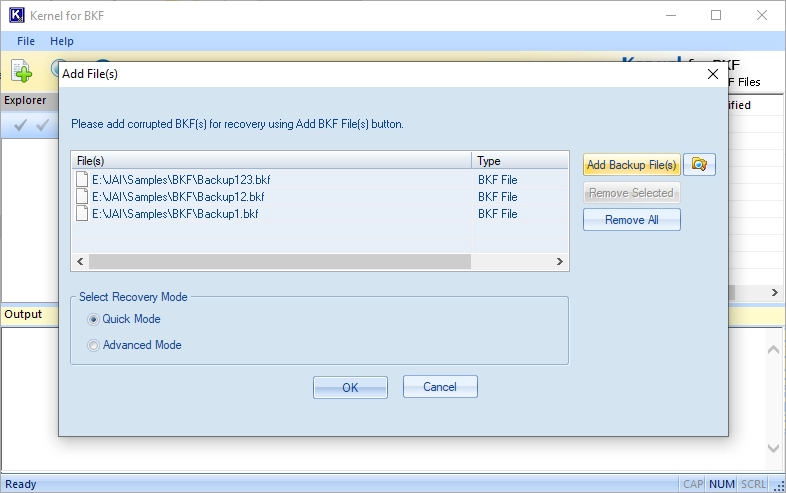
Adding BKF files and picking a scan mode.
Features
Quick and Advanced scans
Kernel Recovery for BKF uses Quick mode for mild damage and Advanced mode for severe corruption, including files with CRC errors.
Wide backup support
Kernel Recovery for BKF reads BKF files from NTBackup, Veritas Backup, Symantec Backup, HP Data Protector and ARCserve, and the vendor reports successful tests on files over 1 TB.
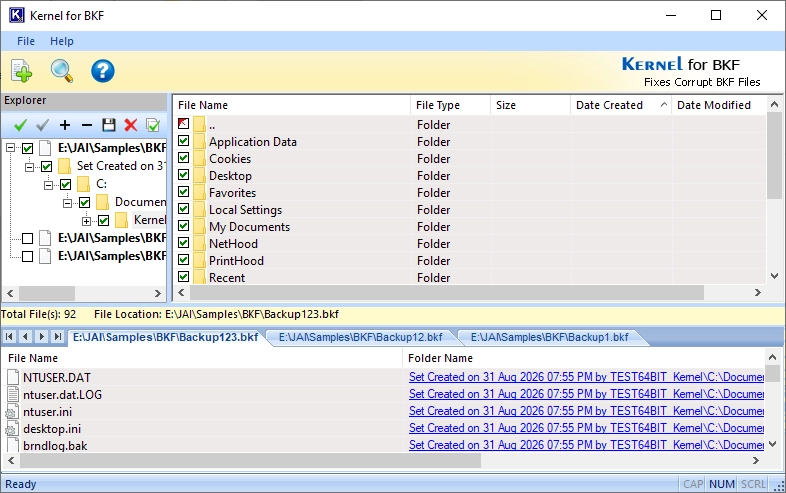
Browsing recovered folders inside the backup.
Pick only what you need
Kernel Recovery for BKF lets you check folders and files individually, so you can restore a single document from a huge backup.
Exchange backups
Kernel Recovery for BKF extracts Exchange NTBackup data with its EDB, STM and log files.
Snapshots and reports
Kernel Recovery for BKF can save a scan as a snapshot to reopen later, and writes an HTML report of what it recovered.
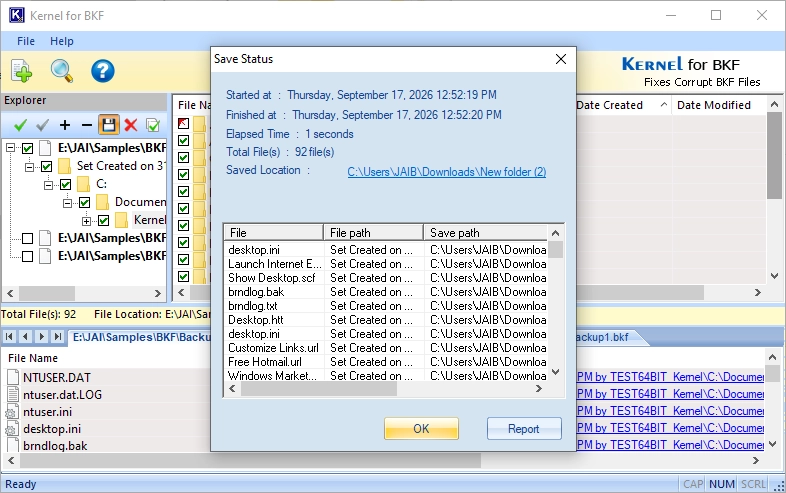
The save summary, with an option to open a report.
Benefits
- You see your files before you pay. The trial shows everything it can recover.
- No backup software needed. It reads BKF files directly.
- Handles old formats that current Windows no longer works with natively.
Real-World Uses
- A retired server's NTBackup that fails with an inconsistency error.
- An old tape image copied to disk with CRC errors.
- A corrupted Exchange backup from which you need the database.
- A single spreadsheet from a backup set you otherwise don't need.
Who It's For, and Who Should Skip It
Buy it if you have a BKF file that won't restore and the trial can see your files. Skip it if you only need a healthy BKF opened, or if your backups come from a modern tool such as Windows File History, which BKF software doesn't read. Businesses need the Corporate or Technician license. There's no Mac version.
Usage Guide
- Copy the BKF file to a healthy drive.
- Install the trial and open Kernel for BKF.
- Click to add one or more BKF files, or search a drive for them.
- Choose Quick or Advanced mode.
- Browse the results and tick the files you want.
- Save them to a new location, then review the report.
Before you buy
This is an old program: the current version dates from October 2015. The vendor still sells it, supports it on its current page, and lists Windows 11 as supported, so check it on your system with the trial.
Where it falls short
- No release in a decade, so expect a dated interface.
- Damage can be too severe for any tool. The trial is the only way to find out.
- Windows only.
What Users Say
On the vendor's page
Kernel's page shows 4.9 out of 5 from 547 reviews, gathered on its own site.
"I am really impressed with the BKF repair tool's performance! It effectively restored my extensive backup file, saving me a significant amount of time and relieving a ton of stress. Thank you very much!" Lucille Guzman
Independent sites
Independent reviews of this tool are hard to find. Trustpilot rates the company 4.9 out of 5 from 166 reviews, mostly about its email and migration products.
Editions and Pricing
| Edition | Price | Who it covers |
|---|
| Home | $89 | Personal use |
| Corporate | $129 | A single organization |
| Technician | $399 | Service providers, multiple organizations |
FAQs
Can Kernel Recovery for BKF fix "The backup file contains unrecognized data"?
Kernel Recovery for BKF targets that error, scanning past the damaged structure to recover the data.
Can I preview files in Kernel Recovery for BKF before saving?
Kernel Recovery for BKF shows files and folders in their original tree before you save.
Does Kernel Recovery for BKF work on Windows 11?
Kernel Recovery for BKF lists Windows 11, 10, 8.1, 8, 7 and older as supported.
Is Kernel Recovery for BKF the same as Kernel for BKF Repair?
Kernel Recovery for BKF is the checkout name of the product the vendor's site calls Kernel for BKF Repair.
System Requirements
- Windows 11, 10, 8.1, 8, 7 and older; Windows Server 2022, 2019 and older
- Pentium-compatible processor
- 64 MB RAM (128 MB recommended)
- 50 MB of disk space
Conclusion
At $89, Kernel Recovery for BKF is worth it when a damaged backup holds files you can't get anywhere else and the trial shows them. The main reason to hesitate is age: the program hasn't had a release since 2015. Try the trial first, since it saves up to 25 items per folder and gives you a real result.
Download Free TrialBuy Now