Short answer
Windows 10 and 11 can't open a BKF file: the NTBackup program that wrote them was dropped after Windows XP and Server 2003, and Microsoft never made a restore tool for anything newer than Windows 7. The free route is to restore it on an old XP or Windows 7 machine. On a current PC you need a BKF extractor: DataNumen BKF Repair ($149.95, one-time) is the stronger choice for damaged, compressed or multi-volume backups and for whole shelves of BKF files, and Kernel Recovery for BKF ($89) is the cheaper way to pick out a few files, with a trial that saves 25 items per folder.
Both extract plain files from healthy and damaged BKF files alike, without NTBackup or Backup Exec installed. Run both free demos on your file before paying.
At a glance
| DataNumen BKF Repair | Kernel Recovery for BKF |
|---|
| Price at checkout | $149.95, one-time (less per copy in volume) | $89 Home; Corporate $129, Technician $399 |
| Free demo | Lists every recoverable file, extracts none | Shows the files and saves up to 25 items per folder |
| Pick single files to restore | ✗ extracts the whole backup | ✓ |
| Batch of many BKF files | ✓ Batch Repair tab with drive search | ✓ add several files at once |
| Backup programs | NTBackup, Veritas Backup Exec, BackupAssist, Veeam and other BKF writers | NTBackup, Veritas, Symantec, HP Data Protector, ARCserve |
| Scan modes | Fast and accurate | Quick and Advanced |
| Current version | 4.0 (December 2023), installer 4.01 | 15.10 (October 2015) |
| Windows 11 | Tested by the vendor; official list stops at Windows 10 | Listed as supported |
| Admin rights needed | ✗ | Not stated |
What we checked
- We read Microsoft's support article for its Windows NT Backup Restore Utility to see what the free route can and can't do.
- We compared the two BKF tools on this site on their product pages, manuals and FAQs: supported backup programs, scan modes, demo limits, requirements and refund terms.
- We checked the installers on the vendors' servers: DataNumen BKF Repair at 14.19 MB, file version 4.01, digitally signed by DataNumen, and Kernel's 4.2 MB installer dated October 9, 2015.
- What we checked: on November 25, 2026 the order pages charged $149.95 for DataNumen BKF Repair (with volume prices from $119.95 per copy for 2-9 licenses) and $89 for Kernel Recovery for BKF Home License, with no Black Friday discount on either.
We compared features, demo limits and prices. We didn't run either tool on a damaged backup of our own, so recovery results come from the vendors and their customers.
Step 1: make sure it really is a BKF backup
A .bkf file is a backup archive in the Microsoft Tape Format. Windows wrote them with NTBackup, the backup tool in Windows 95 through Windows XP and Server 2003, and Veritas (later Symantec) Backup Exec, BackupAssist and a few other programs used the same format. They typically turn up on an old external drive, a retired server or a copy of a tape, years after anyone last used the program that made them.
Backups made by Windows 7's Backup and Restore, File History or Windows 11's Windows Backup are not BKF files, and BKF tools can't read them. If your backup folder holds VHD or ZIP files rather than a .bkf, restore it with the Windows tool that made it.
Step 2: copy the file and make room
Before trying anything, copy the BKF to a healthy local drive and work on the copy. If it sits on an old disk that clicks, makes noises or throws read errors, copy it first, because every scan reads the whole file again.
Then check the free space. DataNumen's guidance is that the output needs at least 1.1 times the BKF's size for an uncompressed backup and 5 times for a compressed one, so a 200 GB compressed backup can need a terabyte free. DataNumen also warns against writing the output to a network drive, which slows the job and can corrupt the results.
Step 3: the free way, if you still have an old Windows machine
The only free way to restore a BKF is NTBackup itself, on a Windows XP or Server 2003 computer or virtual machine. Microsoft also released a Windows NT Backup Restore Utility for Windows Vista and Windows 7 and Server 2008 R2. On Windows 7 it only restores (it can't make backups), it can't restore from tape because Windows 7 no longer includes Removable Storage Manager, and Microsoft says it isn't meant to stay installed. There is no version for Windows 10 or 11.
This route has two catches. You need an old Windows installation to run it on, and NTBackup only restores a healthy backup: a damaged file stops with errors such as "The backup file contains unrecognized data and cannot be used" or CRC errors partway through. When that happens, or when you have no old Windows at hand, use one of the tools below.
Step 4: extract the files with DataNumen BKF Repair
- Price: $149.95 for one license, one-time; $119.95 each for 2-9, down to $19.95 each for 500 or more
- Platform: Windows (32-bit program for 32 and 64-bit Windows); version 4.0
- Demo: lists every file it can recover, without extracting
- Best for: damaged, compressed or multi-volume server backups, and IT shops with many BKF files
DataNumen BKF Repair doesn't repair the BKF so another program can restore it; it reads the archive and writes its datasets, volumes, folders and files straight into an output folder, keeping the original structure. It handles compressed backups and backups that span several datasets or volumes, reads BKF files from NTBackup, every version of Backup Exec, BackupAssist and Veeam Backup & Replication, and runs without administrator rights.
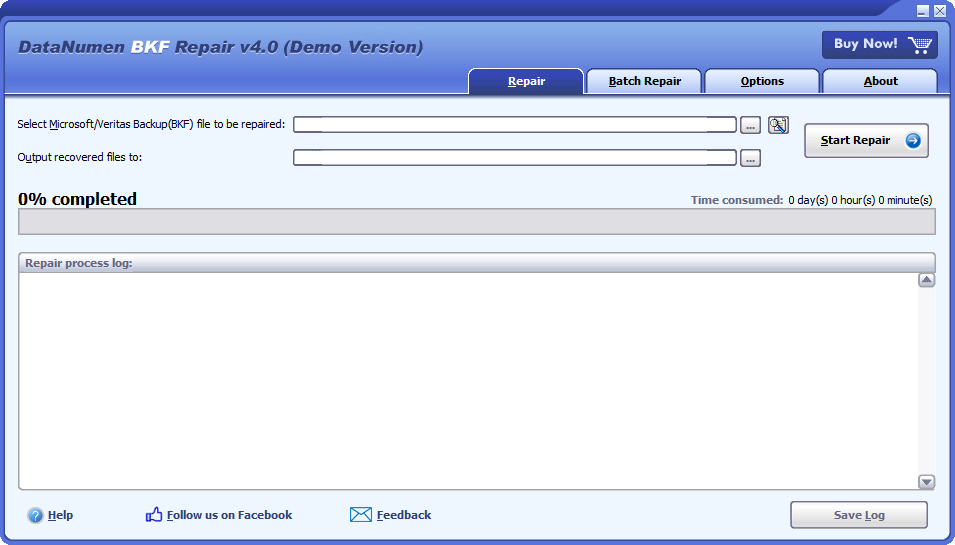
DataNumen BKF Repair 4.0 (demo version), Repair tab: the BKF file to repair, the output folder, the Start Repair button and the repair log.
- Install and launch the free demo, and close NTBackup or anything else that might touch the BKF.
- On the Repair tab, choose the BKF file, then the output folder on a local drive with enough space. By default it's a new folder named after the backup with "_recovered" added.
- Click Start Repair and watch the log. The demo ends with the list of recoverable items; that list is exactly what the full version will extract.
- If files you expected are missing, untick the fast scan on the Options tab and run the slower, more thorough scan.
- For several backups, add them on the Batch Repair tab, or let it search a drive for BKF files.
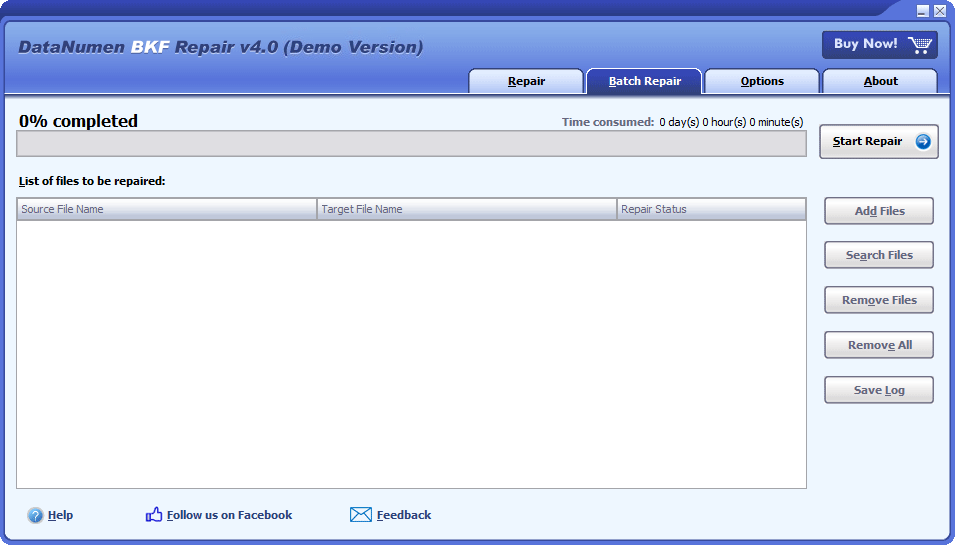
The Batch Repair tab: a list of source files, target names and repair status, with Add Files and Search Files buttons.
What we like
- Compressed, multi-dataset and multi-volume backups
- Widest list of backup programs, Veeam included
- Demo list matches what the full version extracts, backed by a refund if it doesn't
- One-time price, steep volume discounts
Watch out for
- Extracts the whole backup; no picking single files
- Demo extracts nothing
- Free updates for one month only
- Dated interface, no file preview
What users say
Independent reviews are scarce, as they are for most tools bought once in a crisis. DataNumen's product page shows 4.90 out of 5 from 1,643 votes it collects itself. Among the customer quotes it prints:
"Yesterday I got a 2TB corrupt Windows backup file from my customer, it is corrupt due to bad storage media. The customer said he cannot restore BKF file. With your file repair tool, I am able to extract all data from it." Tuğba Avcı, Turkey, November 15, 2019
"I encounter a Windows BKF file created by Windows NTBackup. But NTBackup refuses to restore the backup BKF file. With the help of your tool, I recovered BKF file data in it. The quick scanning mode is enough for my file." Liêm Tran, Vietnam, February 10, 2021
Download DataNumen BKF RepairBuy DataNumen BKF Repair
Step 4, the alternative: restore selected files with Kernel Recovery for BKF
- Price: $89 Home (personal use); Corporate $129; Technician $399
- Platform: Windows 11 back to older Windows, Windows Server 2022 and older; version 15.10
- Trial: shows everything it finds and saves up to 25 items per folder
- Best for: getting a few documents out of a backup at the lowest price
Kernel Recovery for BKF (the vendor's site calls it Kernel for BKF Repair) works like a file manager: you add one or more BKF files, choose Quick mode for mild damage or Advanced mode for severe corruption and CRC errors, browse the recovered folder tree, tick what you want and save it. That makes it the better tool when you need one spreadsheet from a 300 GB backup, and its trial actually saves files, so a small job may not need a license at all. It also extracts Exchange NTBackup data with its EDB, STM and log files, can save a scan as a snapshot to reopen later, and writes an HTML report.
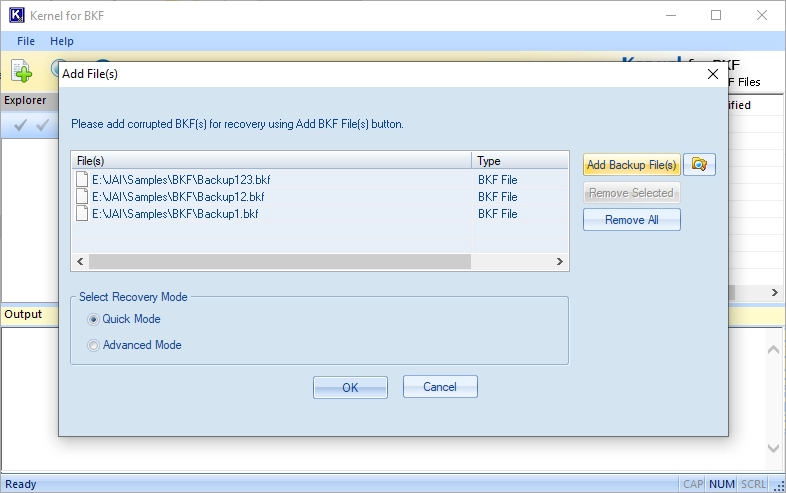
Kernel for BKF's Add File(s) dialog with three BKF files listed and the choice of Quick Mode or Advanced Mode.
- Install the trial and open Kernel for BKF.
- Click the add button and add one or more BKF files, or search a drive for them.
- Choose Quick Mode first; if files are missing, scan again in Advanced Mode.
- Browse the results in the Explorer tree and tick the folders and files you want.
- Save them to a folder on another drive, then open the report to see what was recovered.
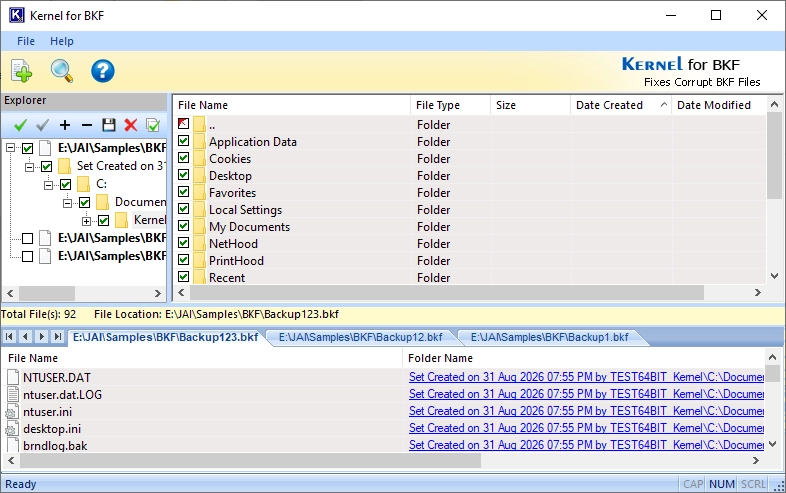
Kernel for BKF after a scan: the backup set's folder tree on the left, the recovered folders with checkboxes on the right, and the files from three BKF files in tabs below.
What we like
- $89, about 40% less than DataNumen
- Browse and restore single files
- Trial saves 25 items per folder
- Exchange backup extraction and scan snapshots
Watch out for
- No new version since October 2015
- Home license is for personal use only
- Fewer backup programs listed than DataNumen
What users say
Kernel's product page shows 4.9 out of 5 from 547 reviews gathered on its own site, and the company rates 4.9 on Trustpilot from about 167 reviews, mostly about its email tools. One customer on Kernel's page wrote:
"I am really impressed with the BKF repair tool's performance! It effectively restored my extensive backup file, saving me a significant amount of time and relieving a ton of stress. Thank you very much!" Lucille Guzman
Download Kernel Recovery for BKFBuy Kernel Recovery for BKF
Price for one license (USD)
Order-page prices, one-time
Kernel Recovery for BKF (Home)$89
Kernel Recovery for BKF (Corporate)$129
DataNumen BKF Repair (any use)$149.95
Home and Corporate prices from Kernel's edition table; DataNumen and Kernel Home checked on the order pages on November 25, 2026.
Which should you use?
| Your situation | Use | Why |
|---|
| Healthy BKF, an old XP or Windows 7 machine at hand | NTBackup or Microsoft's restore utility | Free |
| A few files from a backup, on Windows 10 or 11 | Kernel Recovery for BKF | Pick single files; the trial may be enough |
| Damaged, compressed or multi-volume server backup | DataNumen BKF Repair | Handles those backup shapes explicitly; maintained more recently |
| Backup Exec, BackupAssist or Veeam BKF | DataNumen BKF Repair | Lists those programs by name |
| A shelf of old BKF files to sort through | DataNumen BKF Repair | Batch Repair with drive search |
| Exchange server NTBackup | Kernel Recovery for BKF | Extracts EDB, STM and log files |
Skip both if your backup isn't a .bkf file (Windows 7 Backup and Restore, File History and modern imaging tools use other formats), or if the BKF is healthy and you still have an XP or Windows 7 machine to restore it on for free. Skip Kernel if a program without a release since 2015 makes you uneasy for a business-critical restore. Skip DataNumen if you only need one file, since it always extracts everything.
What commonly goes wrong
- Scanning the original on a failing disk. Each scan reads the whole file. Copy it to a healthy drive first.
- Running out of space halfway. A compressed backup can need five times its size in free space for the output.
- Writing the output to a network share. DataNumen warns this slows recovery and can corrupt the results; use a local drive.
- Expecting miracles from heavy damage. Whatever no scan can read is gone. Both demos show what's recoverable before you pay; if neither lists your files, a license won't change that.
- Buying the wrong license. Kernel's $89 Home license is for personal use; company data needs Corporate ($129) or Technician.
If the BKF sits on an external drive that Windows no longer recognizes, start with How to Recover Data From an External Hard Drive, and for other data loss see Best Data Recovery Software for Windows PCs and RAID Arrays.
FAQs
Can Windows 10 or Windows 11 open a BKF file?
No. Windows 10 and 11 have no NTBackup and no BKF reader, and Microsoft's free restore utility was made only for Windows Vista, Windows 7 and Server 2008 R2. On Windows 10 or 11 use DataNumen BKF Repair or Kernel Recovery for BKF.
Do these tools work on a BKF file that isn't damaged?
Yes. DataNumen BKF Repair and Kernel Recovery for BKF both extract the contents of healthy BKF files as well as damaged ones, so they also serve as BKF openers on a PC without NTBackup.
What does "The backup file contains unrecognized data and cannot be used" mean?
NTBackup shows that message when the BKF's structure is damaged, often by a failing disk or an interrupted copy. Kernel Recovery for BKF targets this error, and DataNumen BKF Repair scans past damaged structures; run both demos to see which lists more of your files.
Can I restore a BKF file for free?
Only a healthy one, with NTBackup on Windows XP or Server 2003 or with Microsoft's restore utility on Windows Vista or 7. Kernel Recovery for BKF's trial also saves up to 25 items per folder free, which can be enough for a handful of documents.
Can I extract a BKF file on a Mac?
Not directly. DataNumen BKF Repair and Kernel Recovery for BKF are Windows programs, so copy the BKF to a Windows PC, extract it there and copy the files back.
Can I get my money back if the full version recovers less than the demo?
Yes, with DataNumen BKF Repair: its "Try Before Buy" guarantee refunds the order if the full version's result doesn't match the demo's, and DataNumen's 30-day refund asks you to explain the reason in detail. For Kernel Recovery for BKF, read Kernel's refund policy before buying, and rely on its trial, which saves real files.
Is Kernel Recovery for BKF still supported on Windows 11?
Kernel lists Windows 11 among the supported systems for Kernel Recovery for BKF and still sells it, though the current version, 15.10, dates from October 2015. Test the trial on your own PC first.
Conclusion
To get files out of a BKF on Windows 10 or 11, DataNumen BKF Repair is the tool to rely on for a damaged, compressed or multi-volume backup, or for a batch of old backups: $149.95 once, the widest list of backup programs, and a demo whose file list tells you exactly what you'll get. Choose Kernel Recovery for BKF at $89 when you only need a few files and want to pick them, since its trial saves 25 items per folder. And if the backup is healthy and an old XP or Windows 7 machine is still around, NTBackup does it free.
Download DataNumen BKF RepairBuy DataNumen BKF Repair