Vovsoft Broken Link Detector: Find Dead Links on a Website, Sitemap or Bookmark File
Broken Link Detector is a $19 Windows program from Vovsoft that scans a website, a sitemap, a list of URLs, a local HTML page or a browser bookmark file, and shows the HTTP status of every link it finds, with the failures collected on an Errors tab. The $19 is a one-time lifetime license, and the free trial does the full scan but can't export the results.
Dead links annoy visitors and waste search engines' time, and on a site of a few hundred pages nobody finds them by clicking around.
Quick facts
- Version: 4.3, released March 6, 2025
- Developer: Vovsoft
- Platform: Windows 11, 10, 8/8.1, 7, Vista and XP, 32-bit and 64-bit. No Mac version
- Scans: a URL or list of URLs, sitemaps, local HTML files and JSON bookmark files
- Scope: domain only, subdomain only, or all domain names, with an optional recursive scan
- Filters: ignored URLs (with wildcards) and ignored file extensions
- Editions: installer (4.02 MB) and portable (2.98 MB), one license for both
- Price: $19, one-time payment, lifetime license with free updates
- Trial: free, scans fully, but exporting results and commercial use need a license
- What we checked: installer file version 4.3.0.0 (4,223,968 bytes) with a valid code signature, downloaded from the vendor on November 11, 2026, and $19.00 on the order page with no auto-renewal on November 11, 2026
Download Free TrialBuy Now
Overview
Type a site address into the URL List box (or paste several, or load a list), choose how far the scan may wander, and click Start. Broken Link Detector reads each page, collects the links on it, and requests every one, listing each URL with its status, such as HTTP/1.1 200 OK. Links that fail land on the Errors tab, and Export Results writes the list to a file.
Settings cover the connection and response timeouts, the user agent, and the URLs and extensions to skip, so social media links or large downloads don't slow the scan.
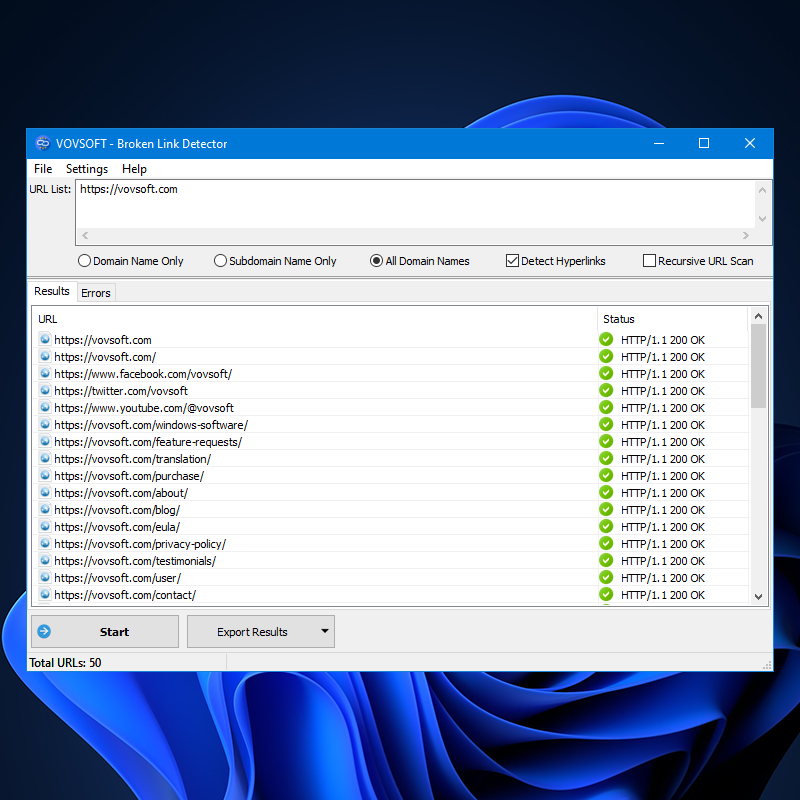
A scan of one site with All Domain Names and Detect Hyperlinks ticked: 50 URLs found, each with its HTTP status, plus an Errors tab and Export Results.
Features
Scope you can control
Broken Link Detector can stay on the domain name only, on the exact subdomain, or check links to all domains, which is how you catch dead links pointing to other sites. Recursive URL Scan follows the links it finds to scan further pages.
More than live websites
Broken Link Detector also grabs the links from any sitemap URL, from a local HTML file, and since version 4.3 from JSON bookmark files, so you can weed dead sites out of years of browser bookmarks. Mailto links are recognized rather than reported as errors.
Ignore lists with wildcards
Broken Link Detector skips URLs you list, with wildcard patterns, and file extensions you don't want fetched. That keeps Facebook and X share links, or big ZIP files, out of a scan.
Export for fixing
Broken Link Detector's licensed version exports the results to a file, so the list of failures can go to whoever maintains the site. The trial shows everything on screen but doesn't export.
Real-World Uses
- A blogger checking an old site for links to pages and sites that no longer exist.
- A web agency running a quick check on a client site before a handover.
- Cleaning up a browser bookmark export full of dead sites.
- Checking every URL in a sitemap after moving a site to a new address.
- Finding dead outbound links on other sites to suggest replacements, the broken-link building method Vovsoft describes on its blog.
Who It's For, and Who Should Skip It
Broken Link Detector suits owners of small and medium websites, bloggers and web freelancers who want a cheap, simple dead-link check on Windows.
Skip it if you run a large site: it checks one link at a time with no multi-threading, and it doesn't show which page a broken link sits on, which makes fixing slow. A full SEO crawler such as Screaming Frog, or a WordPress plugin if your site is on WordPress, reports the source page. Free online checkers handle a small site too.
Usage Guide
- Download the installer or the portable edition and start Broken Link Detector.
- Enter your site's address in the URL List box, or use File to load a URL list, sitemap, HTML file or bookmark file.
- Pick Domain Name Only, Subdomain Name Only or All Domain Names, and tick Recursive URL Scan to follow links further.
- Add ignored URLs and extensions, and adjust timeouts or the user agent in Settings if needed.
- Click Start, then open the Errors tab to see the failures, and Export Results to save them.
Before you buy
The trial does the whole scan, so you can see what it finds on your own site before paying; the license adds export and commercial use. One license covers one person on any number of their own computers. Vovsoft's general policy is no refunds once the key is delivered, since a free trial comes first (accidental orders are generally refunded, at its discretion, and PayPro Global has the final say on its orders).
Where it falls short
- It doesn't show the source page of a broken link, the most requested change.
- No multi-threading, so a big site takes a long time, as one happy user noted.
- Recursive scans have no depth limit, and with All Domain Names it can wander far beyond your site.
- No saved projects, no proxy support, and no HTML export of verified bookmarks yet.
- Users have asked for a way to check a million URLs, so very large lists are a problem.
What Users Say
On Vovsoft's site
Broken Link Detector's page shows 4.8 out of 5 from 4 ratings, with these comments.
"Used it to find broken links on my own website. Works as advertised but took a long time to search through the website. Found a lot of broken links that I did not know existed. Download was fast and so was installation. I give it five stars. Can be very useful if you are a webmaster or maintain a lot of websites for other people." Bill Morgan
"It is really good to strike effective, lightweight, Software that does a full size job." Tony LarrikinAussie Sargeant
"Useful for those with websites that want to check for errors in links." PhilS
"Great program. Blessings and thanks." John Dove
What users want changed
The feature request list is the criticism. The top requests, with three votes each, are showing the source page of each broken link, checking up to a million URLs, and exporting verified bookmarks as HTML. Depth control for recursive scans, saved projects and multi-threading have two votes each. Requests for bookmark files, local files, excluding social links and fixing the domain and subdomain options have been done.
Vovsoft as a company has a TrustScore of 4.6 out of 5 from 411 reviews on Trustpilot, read through a summarizer, with users mostly describing its tools as simple and dependable.
Comparisons
Broken Link Detector vs Screaming Frog SEO Spider
Screaming Frog crawls fast with many threads, shows which page each broken link is on and covers dozens of other SEO checks, free up to 500 URLs and a yearly license above that. Broken Link Detector is simpler and a one-time $19, but slower and without source pages.
Broken Link Detector vs Xenu's Link Sleuth
Xenu is a free, long-standing Windows link checker that's no longer updated. Broken Link Detector is maintained, handles modern HTTPS and GZIP servers, and adds bookmark and sitemap input.
Broken Link Detector vs Vovsoft External Link Detector
External Link Detector lists the links a site makes to other domains. Broken Link Detector checks whether links work.
Editions and Pricing
| Edition | Price | License | What you get |
|---|
| Trial | Free | Personal, non-commercial use | Full scans, results on screen only |
| Licensed | $19 one-time | Lifetime | Export to file, commercial use, no nag screen or ads, lifetime free updates |
The installer and portable editions use the same key, sent by email right after payment. Vovsoft's $99 Universal License covers all of its desktop programs.
FAQs
Does Broken Link Detector show which page a broken link is on?
No. Broken Link Detector lists the broken URLs and their status, but not the page linking to them. It's the top user request.
Can Broken Link Detector check my browser bookmarks?
Yes. Broken Link Detector 4.3 loads JSON bookmark files and HTML files, such as a bookmarks export, and checks every link in them.
Can Broken Link Detector check a sitemap?
Yes. Broken Link Detector can grab the links from any sitemap URL and check them.
Does Broken Link Detector work on WordPress sites?
Yes. Broken Link Detector checks any public website from the outside, whatever it's built with, and needs no plugin.
Can I export the broken link list with the free trial?
No. The Broken Link Detector trial shows the results on screen, and export to a file needs the $19 license.
Is the Broken Link Detector license a subscription?
No. The $19 license is a one-time payment that never expires and includes future updates.
System Requirements
- Windows 11, 10, 8/8.1, 7, Vista or XP, 32-bit or 64-bit
- About 5 MB of disk space
- An internet connection
Conclusion
Broken Link Detector is worth $19 for a small site or a bookmark cleanup: it's simple, cheap, and the trial lets you see every dead link before paying. The reason to buy is export plus sitemap and bookmark input in one small program. The reason not to: it's slow on big sites and won't tell you which page holds each broken link, so anyone maintaining a large site should use a proper SEO crawler.
Download Free TrialBuy Now