LinkAssistant: Desktop Link-Building Software for Prospecting, Outreach and Link Checks
LinkAssistant is a desktop link-building tool for Windows, macOS and Linux that finds link prospects, sends outreach email from inside the app, and checks that the links you earn stay in place. It has a free edition with limits. The paid Professional level isn't sold on its own: you get it inside SEO PowerSuite Professional at $349 a year, with Rank Tracker, WebSite Auditor and SEO SpyGlass.
Link building usually lives in a mess of spreadsheets, inboxes and browser tabs. LinkAssistant puts it in one project: find sites, sort them by quality, find a contact, send a templated pitch, and record the outcome.
Quick facts
- Version: 6.51.13 (installer dated October 26, 2026)
- Developer: Link-Assistant.Com, maker of SEO PowerSuite
- Platforms: Windows, macOS and Linux
- Prospecting: 10+ search methods, including guest posts, reviews, directories and competitor backlinks
- Email: built-in email client with editable templates
- Free edition: yes, 1 project with no saving
- Paid access: SEO PowerSuite Professional, $349 per year, billed annually
- Refunds: none for partial use or unused time. You can cancel the renewal at any time
What we checked: the Windows installer, version 6.51.13 (605.6 MB), on Link-Assistant's download server, and that the edition comparison on its site now leads only to the SEO PowerSuite plans, and "SEO PowerSuite Professional - Yearly" at $349 with a 12-month renewal on the order page, all on November 5, 2026. We didn't install it or run an outreach campaign.
Before you buy
You're buying the whole suite. Link-Assistant no longer lists a separate paid LinkAssistant plan, so the Buy button on this page leads to SEO PowerSuite Professional. That's good value if you'll also track rankings and audit sites, and poor value if outreach is all you do.
Try the free edition first. Link-Assistant gives no refunds for partial use, and subscriptions renew automatically, so test it on a real campaign before you pay and turn off renewal if you're unsure.
Download Free TrialBuy SEO PowerSuite
Overview
LinkAssistant covers the working steps of link building. It searches for sites by keyword and method, pulls in pages that link to your competitors, reads each site's quality factors, and looks for a contact address. You then write to prospects with the built-in email client, track replies and status, and later verify that each link is still live.
It has been around for a long time, and the vendor says over 2 million users have used it. It's one of four apps in SEO PowerSuite, and it works alongside SEO SpyGlass, which can feed it backlink data.
Features
Ten-plus ways to find link prospects
LinkAssistant searches for link opportunities by keyword, with methods for guest posting, reviews, commenting, giveaways and more, or a custom query limited by location and niche. You choose the method and it returns a list of sites to work through.
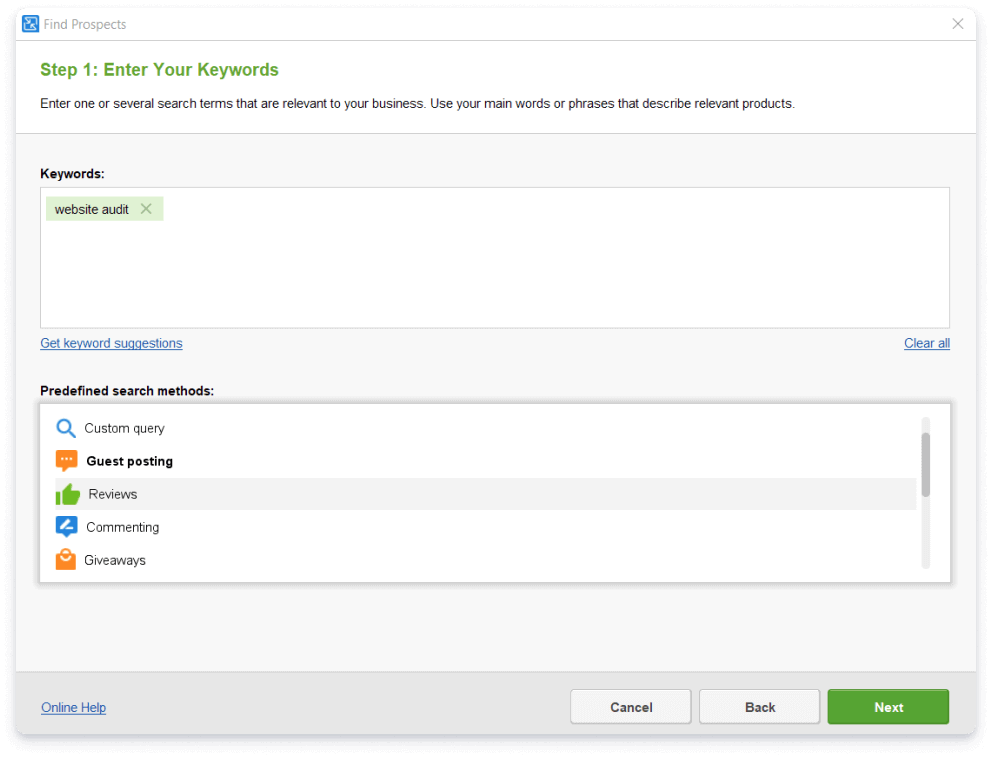
The Find Prospects dialog: enter keywords, then pick a method such as guest posting, reviews, commenting or giveaways.
Prospects from competitors' backlinks
LinkAssistant can start from up to 10 competitors' URLs and find the new backlinks they've earned in the last 90 days. It can also find broken-link chances and backlink gaps, so you pitch sites that already link to your topic.

Find Competitors' New Backlinks: paste up to 10 competitor URLs and LinkAssistant looks at links from the last 90 days.
Quality factors to sort the list
LinkAssistant shows factors such as Domain InLink Rank, domain age, organic traffic, Page Authority, social popularity and the number of pages indexed in Google. That lets you put a limited outreach budget on the sites worth pitching.
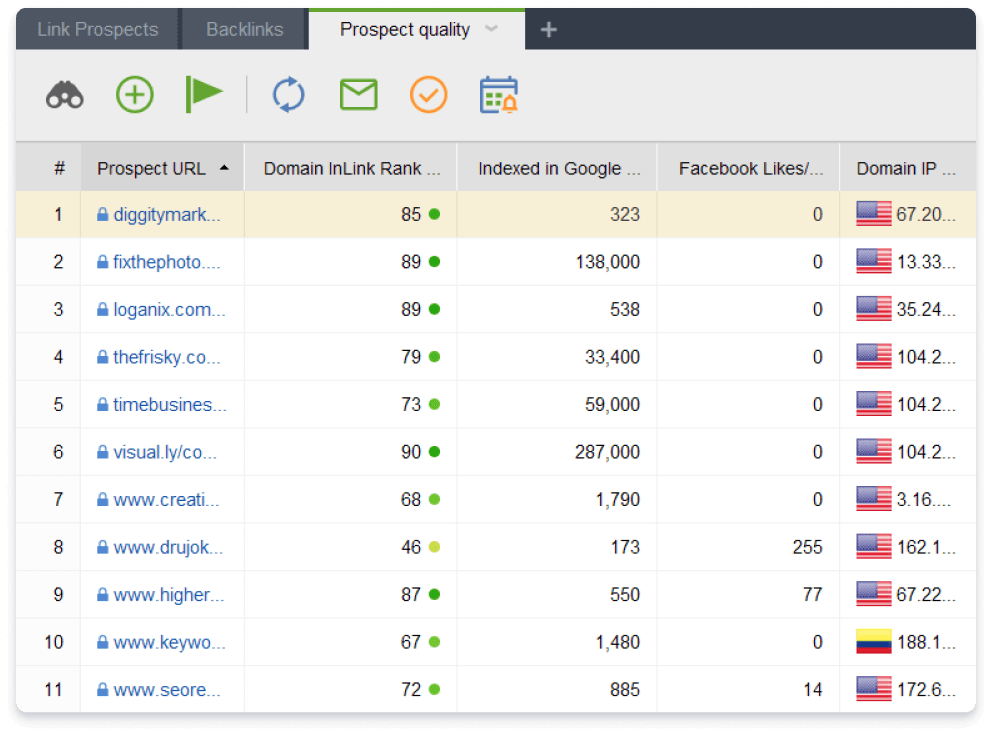
The Prospect quality tab: each site with its Domain InLink Rank, pages indexed in Google, social likes and domain IP.
Outreach email from inside the app
LinkAssistant has its own email client with templates for guest post inquiries, product reviews, link removals, reciprocal requests and broken link tips. You can send in bulk, track replies, flag messages and set a status for each prospect.

The Email Templates list in LinkAssistant's preferences: guest posting, product review, link removal and reminder templates you can edit or clone.
Link verification and reports
LinkAssistant rechecks the links you've built and tells you when one disappears, gets a nofollow tag or lands on a dead page, so you can contact the partner. It can also build reports on your link-building progress, though saving and emailing them needs Enterprise.

Link verification results: each backlink marked Yes, or No with a reason such as Link missing, Nofollow tag or Page not found.
Benefits
- One place for the whole job. Prospects, emails and link status sit in one project instead of three tools.
- Time back. Prospecting and contact-finding are the slow parts, and these are what it automates.
- Earned links stay earned. Link checks catch removals you'd otherwise never notice.
- A flat price. It doesn't charge per prospect or per email.
Real-World Uses
- A small business owner finds local directories and review sites and pitches them from templates.
- A content marketer starts from competitors' new backlinks to find sites covering the topic now.
- An SEO freelancer keeps one project per client, with status tracking on every prospect.
- An in-house team runs a monthly check on paid and earned links to find ones that have gone.
Who It's For, and Who Should Skip It
It's for site owners, freelancers and small teams who do their own outreach and want it in one tool, especially if they'll use the rest of SEO PowerSuite.
Skip it if you need team collaboration in the cloud, since this is desktop software. Skip it too if you only do a few links a year, because the free edition or a spreadsheet will do. If you pay an agency for links, it's of little use to you.
Usage Guide
- Download and install. Use the free download for Windows, macOS or Linux. The Windows installer is about 606 MB, because it includes its own Java runtime.
- Create a project. Launch the program and paste your website's URL. It collects a first set of prospects based on your competitors' backlinks.
- Set up email. Add your mail account in the preferences and edit the default templates so they sound like you.
- Find more prospects. Use Look for Prospects with the method that suits your goal, and move the best sites to the Prospects module.
- Send and track. Send emails in bulk, watch for replies, and set each prospect's status.
- Verify. Run link checks on a schedule and follow up on anything that fails.
Where It Falls Short
- No standalone paid plan. You pay for the whole suite even if outreach is all you need.
- A dated look and no cloud collaboration. Directory reviews say the interface looks old next to web tools, and there's no shared workspace.
- Reports cost more. Saving and emailing reports and data exports need Enterprise.
- Quality takes your judgment. Bulk templates make it easy to send poor pitches, and the tool can't write a good one for you.
- A heavy installer. At over 600 MB, it's a big download for a single tool.
What Users Say
Ratings
We found few independent reviews of LinkAssistant on its own: OMR shows a single rating of 3.0 and SourceForge none. Review sites rate the suite instead, and as listed in October 2026, SEO PowerSuite averages 4.5 out of 5 on G2 from 559 reviews and 4.5 out of 5 on Capterra from 382 reviews.
On Link-Assistant's site
"Using LinkAssistant was very effective for my niche. I built links on various websites, and was quite surprised as to how little effort it was." Sarah Wright, Owner, Latte Art
"LinkAssistant does everything I have been doing by hand for years. It finds link prospects from all over the internet, even in the forums that I would never find myself." Michael Anderson, SEO, Effective SEO
"No other tool I am aware of offers similar variety of link prospecting methods." Aaron Page, SEM Universe Tools
Trustpilot: happy users, angry renewals
Link-Assistant's Trustpilot page tells a different story, with a TrustScore of 3.0 from 416 reviews as of October 2026. Most one-star reviews are about billing rather than the tools:
"I was automatically charged 117.70 EUR for a subscription renewal I did not plan to keep." Denis Breus, 1 star
"The software itself has its place, but the billing and subscription model feels outdated and unnecessarily rigid." Indigo Cube, 1 star
The pattern: users like the variety of prospecting methods and having outreach in one place. The complaints are about automatic renewals, the no-refund policy, and a desktop app that feels dated.
Comparisons
LinkAssistant vs. spreadsheets and a mail client
A spreadsheet is free and fine for a handful of prospects. LinkAssistant earns its place when you're handling hundreds, because it finds the sites and contacts for you, keeps status with each prospect and rechecks links later.
LinkAssistant Free vs. Professional
The free edition lets you try the tools on one project, but you can't save it, so it's for evaluation rather than a running campaign. Professional removes the project limit and adds saving.
Editions and Pricing
LinkAssistant comes with every SEO PowerSuite plan, and the plans apply to all four apps in the suite.
| Edition | Price per year | Competitors per project | What it adds |
|---|
| Free | $0 | 1 | 1 project with no saving, 500-URL audits, 1,100 backlinks |
| Professional | $349 | 5 | Unlimited projects, keywords, pages and backlinks |
| Enterprise | $599 | 40 | White-label reports, saving and emailing reports, CSV, SQL and HTML exports, priority support |
| Max | $899 | 40 | Enterprise plus live onboarding, a success manager and other services |
FAQs
Can I buy LinkAssistant on its own?
No. Link-Assistant sells LinkAssistant as part of SEO PowerSuite, so the paid version comes with Rank Tracker, WebSite Auditor and SEO SpyGlass.
Is LinkAssistant free?
Yes, with limits. The free LinkAssistant has no time limit, but it works on one project and can't save it.
Does LinkAssistant send emails automatically?
LinkAssistant sends outreach email in bulk from its built-in client, using your own mail account and templates. You still choose the prospects and write the pitch.
Does LinkAssistant work on a Mac?
Yes. LinkAssistant runs on macOS 11 Big Sur or later, as well as Windows and 64-bit Linux.
What happens when my SEO PowerSuite license expires?
Your subscription renews automatically unless you cancel it. Link-Assistant doesn't refund partial use or unused time, so cancel before the renewal date if you don't plan to continue.
Is LinkAssistant the same company as Link-Assistant.Com?
Yes. LinkAssistant is the link-building app from Link-Assistant.Com, the company behind SEO PowerSuite.
System Requirements
- Windows: Windows 11 or 10, or Windows Server 2016 R2 or later, on an administrator account
- macOS: 11 Big Sur or later
- Linux: 64-bit
- Hardware: 1 GHz CPU (2 GHz dual-core recommended), 4 GB of RAM (8 GB recommended), 500 MB of disk space
Conclusion
LinkAssistant is worth having if you do your own link building and will use SEO PowerSuite as a whole: $349 a year covers outreach plus rank tracking, audits and backlink analysis, with no per-prospect charges. The main reason not to buy is that you can't get it alone, so it's expensive if outreach is all you want, and it's a dated desktop app with no shared workspace. Try the free edition on a small campaign first, and check the renewal date if you buy.
Download Free TrialBuy SEO PowerSuite