SEO PowerSuite Professional
SEO PowerSuite Professional icon

SEO PowerSuite Professional

$349.00
Version
1.0
License
Shareware
Operating Systems
Windows
System Requirements
1 GHz or faster processor, 4 GB RAM, 500 MB free disk space
Release Date
9/16/2026
Last Updated
9/16/2026
18 views 0 downloads
SEO PowerSuite Professional Short Description:
SEO toolkit for tracking rankings, auditing sites, and analyzing backlinks.
SEO PowerSuite Professional Long Description:

SEO PowerSuite Professional: The Ultimate All-in-One SEO Toolkit for Ranking Dominance

In the rapidly evolving landscape of digital marketing, search engine optimization (SEO) remains the cornerstone of sustainable online growth. However, the tools required to execute a successful SEO strategy are often fragmented, expensive, and complex. Marketers frequently find themselves juggling multiple subscriptions—one for keyword research, another for backlink analysis, a third for technical audits, and yet another for rank tracking. This fragmentation not only inflates costs but also creates data silos that hinder holistic decision-making. Enter SEO PowerSuite Professional, a comprehensive, all-in-one SEO toolkit designed to consolidate these critical functions into a single, powerful desktop application.

SEO PowerSuite Professional is not merely a collection of disparate tools; it is an integrated ecosystem that empowers SEO specialists, digital agencies, and business owners to track rankings, audit sites, analyze backlinks, and optimize on-page content with unprecedented efficiency. By combining four industry-leading applications—Rank Tracker, WebSite Auditor, SEO SpyGlass, and LinkAssistant—into one unified interface, SEO PowerSuite Professional offers a 360-degree view of your website’s health and performance. Whether you are managing a single e-commerce store or overseeing hundreds of client websites, this software provides the depth of data and the breadth of functionality required to outrank competitors and drive organic traffic.

This extensive guide will delve deep into every aspect of SEO PowerSuite Professional. We will explore its core features, examine the tangible benefits it brings to your workflow, provide a detailed step-by-step usage guide, compare it against leading competitors, and answer frequently asked questions. By the end of this article, you will have a thorough understanding of why SEO PowerSuite Professional is considered a gold standard in the SEO industry and how it can transform your digital marketing efforts.

Overview of SEO PowerSuite Professional

SEO PowerSuite Professional is a desktop-based software suite developed by Link-Assistant.Com, a company with over two decades of experience in search engine optimization technologies. Unlike cloud-based SaaS platforms that limit your data access based on tiered subscription plans, SEO PowerSuite Professional operates locally on your machine, giving you unlimited access to data processing capabilities constrained only by your hardware. This architectural choice is significant for power users who need to analyze large datasets, such as millions of backlinks or thousands of keywords, without hitting artificial API limits or paywalls.

The "Professional" edition represents the mid-tier offering in the SEO PowerSuite lineup, striking a perfect balance between advanced functionality and affordability. It includes all four core modules, allowing users to perform complete SEO campaigns from start to finish. The software is designed to be modular yet integrated; while each tool can function independently, they share data seamlessly. For instance, keywords discovered in Rank Tracker can be automatically imported into WebSite Auditor for on-page optimization checks, and backlinks identified in SEO SpyGlass can be evaluated for outreach potential in LinkAssistant. This synergy reduces manual data entry and minimizes the risk of errors, streamlining the entire SEO workflow.

One of the defining characteristics of SEO PowerSuite Professional is its focus on white-hat SEO practices. The tools are built to help users understand and comply with search engine guidelines, rather than exploiting loopholes. This ethical approach ensures long-term sustainability for your websites, protecting them from algorithmic penalties that often plague sites relying on black-hat techniques. Furthermore, the software is regularly updated to reflect changes in search engine algorithms, ensuring that the metrics and recommendations provided are always relevant and accurate.

The user interface of SEO PowerSuite Professional is designed with usability in mind. Despite the complexity of the data it handles, the layout is intuitive, with clear navigation menus and customizable dashboards. Users can tailor their workspace to highlight the metrics that matter most to their specific goals, whether that’s tracking local search visibility, monitoring international rankings, or analyzing competitor link profiles. This flexibility makes the software suitable for beginners who are just starting their SEO journey, as well as seasoned experts who require granular control over their data.

Another key aspect of the overview is the software’s scalability. SEO PowerSuite Professional supports an unlimited number of projects, meaning you can manage as many websites as your hardware can handle. This is a stark contrast to many cloud-based competitors that charge per project or per keyword. For agencies managing dozens of clients, this feature alone can result in significant cost savings. Additionally, the software supports multiple languages and search engines, including Google, Bing, Yahoo, YouTube, and various local search engines, making it a versatile tool for global SEO campaigns.

In summary, SEO PowerSuite Professional is a robust, flexible, and cost-effective solution for anyone serious about improving their search engine visibility. It combines the power of enterprise-level SEO tools with the accessibility of desktop software, providing users with the insights they need to make data-driven decisions. Whether you are looking to improve your own site’s rankings or offer SEO services to clients, this toolkit provides the essential resources to achieve your objectives.

Core Features of SEO PowerSuite Professional

SEO PowerSuite Professional is comprised of four distinct but interconnected modules. Each module addresses a critical pillar of SEO, and together they form a comprehensive suite that covers every aspect of search engine optimization. Below, we will explore each module in detail, highlighting its key features and capabilities.

1. Rank Tracker: Precision Keyword Monitoring

Rank Tracker is the flagship module of SEO PowerSuite, designed to monitor your website’s positions in search engine results pages (SERPs) for specific keywords. Accurate rank tracking is essential for measuring the success of your SEO efforts and identifying opportunities for improvement. Rank Tracker goes beyond simple position checking by providing a wealth of contextual data that helps you understand why your rankings are changing.

Unlimited Keywords and Search Engines: One of the most compelling features of Rank Tracker is its ability to track an unlimited number of keywords across multiple search engines. You can monitor your rankings on Google, Bing, Yahoo, YouTube, and even local search engines like Yandex or Baidu. This global coverage ensures that you have a complete picture of your visibility, regardless of your target market. Furthermore, the software supports location-specific tracking, allowing you to see how your site performs in different cities, regions, or countries. This is particularly important for local businesses and multinational corporations that need to tailor their SEO strategies to specific geographic areas.

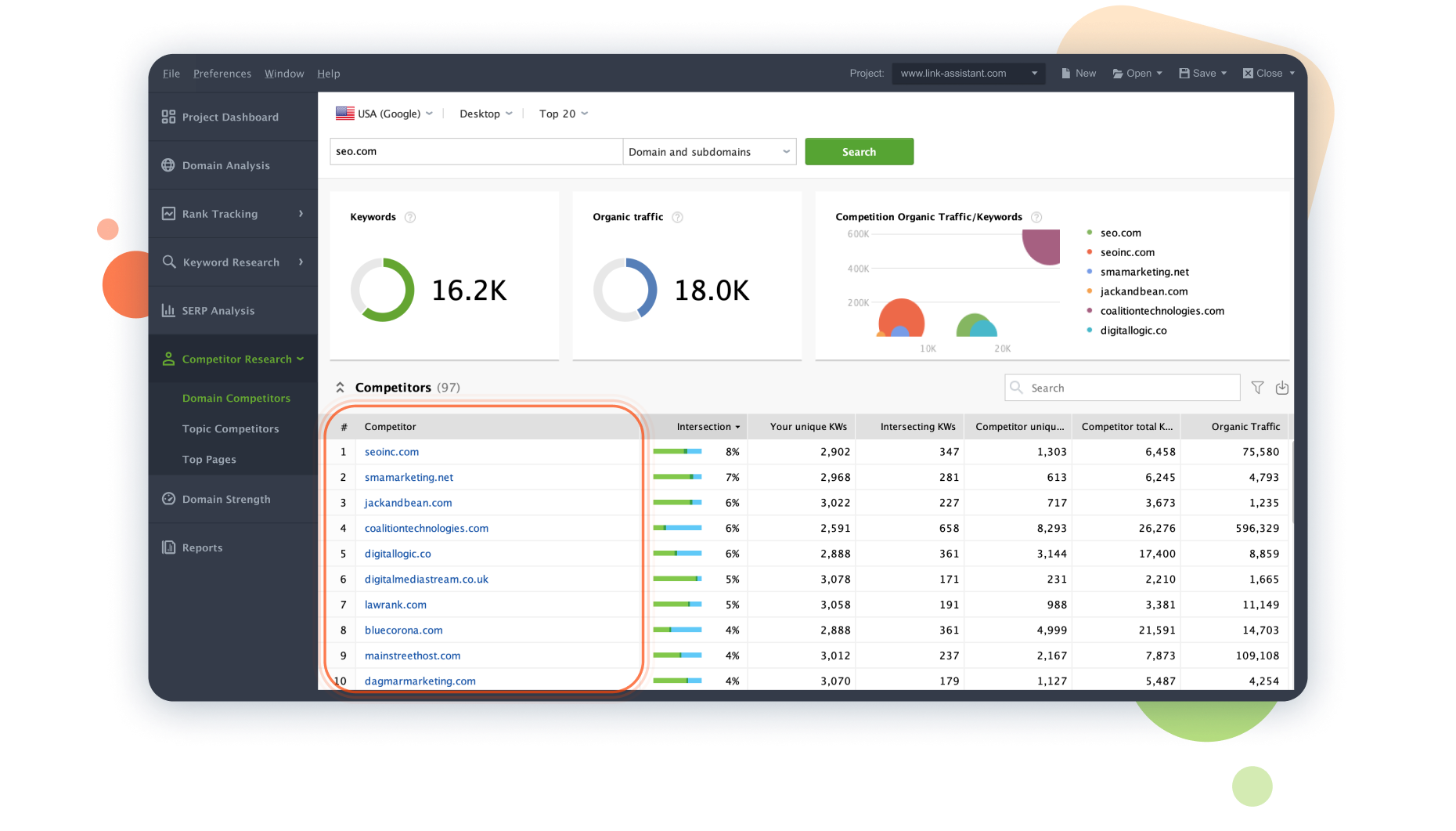
Competitor Analysis: Rank Tracker allows you to monitor your competitors’ rankings alongside your own. By adding competitor domains to your projects, you can see which keywords they are ranking for, how their positions change over time, and where they are outperforming you. This competitive intelligence is invaluable for identifying gaps in your own strategy and discovering new keyword opportunities. The software also provides a "Keyword Difficulty" metric, which estimates how hard it will be to rank for a particular term based on the strength of the current top-ranking pages.

SERP Feature Tracking: Modern search results are no longer just a list of blue links. They include featured snippets, knowledge panels, local packs, video carousels, and other rich results. Rank Tracker tracks these SERP features, showing you whether your site is appearing in these prominent positions. Capturing a featured snippet, for example, can significantly increase your click-through rate, even if your organic position is not number one. By monitoring these features, you can optimize your content to target them specifically.

White-Label Reporting: For agencies and consultants, reporting is a critical part of the service. Rank Tracker includes a powerful report generator that allows you to create professional, branded reports for your clients. You can customize the layout, add your logo, select the metrics to include, and schedule automatic email delivery. This saves time and enhances your professional image, providing clients with clear, actionable insights into their SEO performance.

Historical Data and Trends: Rank Tracker stores historical data for all your keywords, allowing you to visualize trends over time. You can see how your rankings have evolved since you started your SEO campaign, correlate changes with algorithm updates, and identify seasonal patterns. This long-term perspective is crucial for understanding the impact of your efforts and making informed strategic adjustments.

2. WebSite Auditor: Comprehensive Technical SEO Analysis

WebSite Auditor is a powerful tool for conducting technical SEO audits and on-page optimization. It crawls your website just like a search engine bot, identifying issues that could be hindering your rankings. From broken links and missing meta tags to slow page load speeds and mobile usability problems, WebSite Auditor provides a detailed checklist of fixes to improve your site’s health.

Deep Site Crawling: WebSite Auditor can crawl websites of any size, from small blogs to large e-commerce platforms with millions of pages. It follows internal links, JavaScript-rendered content, and canonical tags to ensure a complete index of your site. During the crawl, it checks for a wide range of technical issues, including 404 errors, redirect chains, duplicate content, and orphan pages. Identifying and fixing these issues is fundamental to ensuring that search engines can properly index and rank your content.

On-Page Optimization Checks: Beyond technical issues, WebSite Auditor analyzes the on-page elements of your content. It checks title tags, meta descriptions, header tags (H1-H6), image alt text, and keyword usage. The tool provides specific recommendations for optimizing each page, such as suggesting better title tags or identifying missing keywords. It also evaluates content quality, checking for readability, length, and relevance. This ensures that your pages are not only technically sound but also optimized for both users and search engines.

Core Web Vitals Analysis: Page experience is a key ranking factor, and Core Web Vitals are the metrics Google uses to measure it. WebSite Auditor analyzes your site’s performance against these metrics, including Largest Contentful Paint (LCP), First Input Delay (FID), and Cumulative Layout Shift (CLS). It provides detailed reports on which pages are failing to meet the thresholds and offers suggestions for improvement, such as optimizing images, minifying CSS/JavaScript, or leveraging browser caching.

Mobile-Friendliness Testing: With mobile-first indexing, ensuring your site is mobile-friendly is non-negotiable. WebSite Auditor simulates how your site appears on mobile devices, checking for responsive design issues, touch element spacing, and viewport configuration. It identifies pages that are not mobile-friendly and provides guidance on how to fix them, ensuring that you do not lose traffic from the growing number of mobile users.

Internal Linking Optimization: Internal linking is crucial for distributing link equity throughout your site and helping users navigate your content. WebSite Auditor visualizes your site’s internal link structure, identifying weak points and opportunities for improvement. It can suggest internal links to add based on keyword relevance, helping you strengthen the topical authority of your pages. The tool also identifies orphan pages—pages with no internal links pointing to them—which are difficult for search engines to discover and rank.

3. SEO SpyGlass: Advanced Backlink Analysis

Backlinks remain one of the most important ranking factors in SEO. SEO SpyGlass is designed to help you analyze your own backlink profile and those of your competitors. It uses a massive index of billions of links to provide accurate and up-to-date data on who is linking to your site and why.

Backlink Discovery: SEO SpyGlass can discover backlinks from a wide variety of sources, including blogs, forums, news sites, and social media. It uses multiple data sources and crawling techniques to ensure comprehensive coverage. The tool identifies both follow and nofollow links, allowing you to assess the true value of your backlink profile. It also detects toxic or spammy links that could be harming your rankings, enabling you to take action before they cause damage.

Link Quality Assessment: Not all backlinks are created equal. SEO SpyGlass evaluates the quality of each link based on a variety of factors, including domain authority, page authority, relevance, and trust flow. It assigns a "Penalty Risk" score to each link, helping you prioritize which links to keep and which to disavow. This risk assessment is crucial for maintaining a healthy backlink profile and avoiding algorithmic penalties.

Competitor Backlink Analysis: One of the most effective ways to build high-quality backlinks is to replicate the strategies of your competitors. SEO SpyGlass allows you to analyze the backlink profiles of your top competitors, identifying the sites that are linking to them. You can then reach out to these same sites to request links to your own content. The tool also highlights "lost" and "new" links for your competitors, giving you insights into their ongoing link-building activities.

Anchor Text Analysis: The anchor text used in backlinks is a strong signal to search engines about the topic of the linked page. SEO SpyGlass provides a detailed breakdown of your anchor text distribution, helping you ensure that it looks natural and diverse. Over-optimization of anchor text (e.g., using exact-match keywords too frequently) can trigger penalties, so this feature is essential for maintaining a safe and effective link profile.

Disavow File Generation: If you identify toxic links that are harming your site, SEO SpyGlass can help you create a disavow file. This file can be submitted to Google to tell the search engine to ignore those specific links when calculating your rankings. The tool simplifies this process by automatically formatting the file and providing instructions on how to submit it, saving you time and reducing the risk of errors.

4. LinkAssistant: Efficient Link Building Management

LinkAssistant is a dedicated tool for managing your link-building campaigns. It helps you find prospective link partners, manage outreach emails, and track the status of your link requests. While SEO SpyGlass focuses on analysis, LinkAssistant focuses on action, providing the workflows needed to acquire new backlinks.

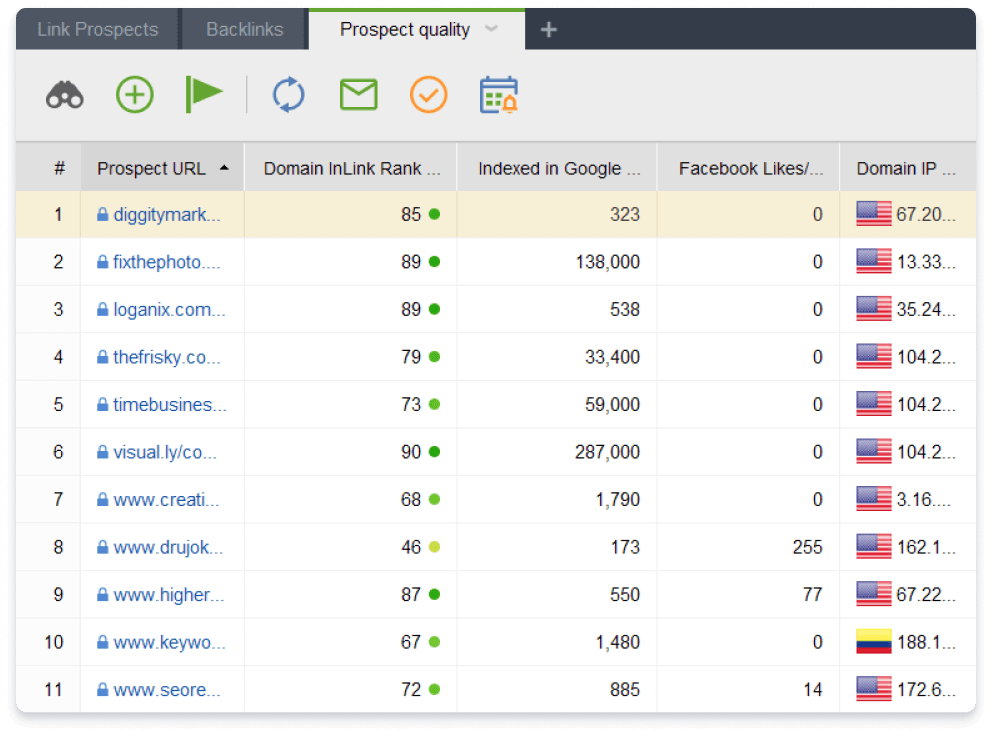
Prospect Discovery: LinkAssistant uses advanced search algorithms to find potential link partners based on your niche and keywords. It searches for guest posting opportunities, directory listings, resource pages, and other link-building prospects. The tool filters results based on quality metrics, ensuring that you only pursue high-value opportunities. This saves time and increases the success rate of your outreach efforts.

Outreach Management: Managing hundreds of outreach emails can be chaotic. LinkAssistant provides a centralized dashboard for managing your communications. You can create email templates, schedule follow-ups, and track the status of each request (e.g., sent, replied, accepted, rejected). The tool integrates with your email client, allowing you to send personalized emails directly from the interface. This streamlined workflow ensures that no opportunity falls through the cracks.

Link Verification: Once you have acquired a backlink, it is important to verify that it is still live and correctly implemented. LinkAssistant automatically checks the status of your acquired links, alerting you if a link is removed or changed to nofollow. This proactive monitoring helps you maintain the integrity of your backlink profile and allows you to quickly address any issues with your link partners.

Relationship Management: Successful link building is often about building relationships. LinkAssistant allows you to store contact information and notes for each prospect, helping you personalize your outreach and foster long-term partnerships. By treating link building as a relationship-building exercise, you can secure more high-quality links and improve your site’s authority over time.

Feature Box: Key Technical Specifications

  • Software Name: SEO PowerSuite Professional
  • Version: 1.0
  • Vendor: Link-Assistant.Com
  • License Type: Perpetual License (One-time payment)
  • Supported OS: Windows
  • Processor: 1 GHz or faster
  • RAM: 4 GB minimum
  • Disk Space: 500 MB free
  • Internet Connection: Required for data updates and SERP checking

Benefits of Using SEO PowerSuite Professional

While the features of SEO PowerSuite Professional are impressive, the true value lies in the benefits they deliver to your business. Here are the key advantages of adopting this all-in-one toolkit.

Cost Efficiency and ROI

One of the most significant benefits of SEO PowerSuite Professional is its cost-effectiveness. Most cloud-based SEO tools charge monthly subscription fees that can quickly add up, especially for agencies managing multiple clients. These subscriptions often come with limits on the number of projects, keywords, or backlinks you can track. In contrast, SEO PowerSuite Professional offers a one-time payment model with no recurring fees. This means you pay once and own the software forever, including all future updates. For businesses and agencies, this translates to substantial long-term savings and a higher return on investment (ROI). You can allocate the saved budget to other marketing initiatives, such as content creation or paid advertising, further boosting your overall performance.

Data Ownership and Privacy

In an era where data privacy is a growing concern, SEO PowerSuite Professional offers a distinct advantage by keeping your data local. Since the software runs on your desktop, all your keyword data, backlink profiles, and audit reports are stored on your own machine. You are not dependent on a third-party server, and your sensitive business information is not shared with external clouds. This gives you complete control over your data and ensures compliance with strict data protection regulations. For enterprises and agencies handling confidential client data, this level of privacy and security is invaluable.

Unlimited Scalability

Unlike SaaS platforms that restrict your usage based on your subscription tier, SEO PowerSuite Professional imposes no limits on the number of projects, keywords, or backlinks you can analyze. You can track thousands of keywords for hundreds of websites without worrying about overage charges or upgrade prompts. This unlimited scalability makes the software ideal for growing businesses and agencies that need to expand their SEO efforts without being penalized financially. Whether you are managing a single blog or a network of e-commerce sites, the software grows with you, providing consistent performance regardless of the scale of your operations.

Comprehensive Insights for Better Decision Making

By integrating four powerful tools into one suite, SEO PowerSuite Professional provides a holistic view of your SEO performance. You are not looking at isolated metrics but rather seeing how different factors interact. For example, you can correlate a drop in rankings (identified in Rank Tracker) with a technical issue (found in WebSite Auditor) or a loss of backlinks (detected in SEO SpyGlass). This interconnectedness allows for more accurate diagnosis of problems and more effective strategic planning. Instead of guessing what went wrong, you have concrete data to guide your decisions, leading to faster and more sustainable improvements in your search visibility.

Time Savings Through Automation

SEO involves many repetitive tasks, such as checking rankings, crawling sites, and verifying links. SEO PowerSuite Professional automates these processes, freeing up your time to focus on strategy and content creation. You can schedule automatic rank checks, set up recurring site audits, and automate link verification. The software also generates reports automatically, eliminating the need for manual data compilation. This automation not only increases efficiency but also reduces the risk of human error, ensuring that your SEO campaigns run smoothly and consistently.

Enhanced Competitor Intelligence

Understanding your competitors is key to outperforming them. SEO PowerSuite Professional provides deep insights into competitor strategies, from their keyword targets to their backlink sources. By analyzing what works for them, you can adapt and improve upon their tactics. This competitive intelligence allows you to identify untapped opportunities, avoid their mistakes, and stay ahead of industry trends. With SEO PowerSuite Professional, you are not just optimizing your own site; you are strategically positioning yourself against the competition.

Step-by-Step Usage Guide

To help you get the most out of SEO PowerSuite Professional, we have prepared a detailed step-by-step guide. This guide assumes you have already installed and launched the software on your Windows machine. We will walk you through setting up your first project, conducting a site audit, tracking keywords, and analyzing backlinks.

Step 1: Creating Your First Project

Upon launching SEO PowerSuite Professional, you will be greeted by the main dashboard. To begin, click on the "New Project" button. You will be prompted to enter the URL of the website you want to optimize. Enter your domain name (e.g., https://www.example.com) and give your project a descriptive name. The software will automatically detect the language and country settings, but you can manually adjust these if necessary. Click "Create" to initialize your project. This central hub will now serve as the command center for all your SEO activities related to this website.

Step 2: Conducting a Technical Site Audit with WebSite Auditor

Before making any changes, it is essential to understand the current state of your website. Navigate to the "WebSite Auditor" module within your project. Click on "Rebuild Project" to start a fresh crawl. The software will ask you to specify the crawl settings, such as the maximum number of pages to check and whether to follow external links. For a comprehensive audit, it is recommended to allow the crawler to access all internal pages.

Once the crawl is complete, WebSite Auditor will present a "Site Audit" report. This report is divided into several categories, including "Technical Issues," "On-Page SEO," and "Social Media." Review the "Critical Errors" section first, as these are the issues most likely to harm your rankings. Common critical errors include broken links, missing title tags, and server errors. Click on each error to see a list of affected pages and specific recommendations for fixing them. Work through the list systematically, prioritizing high-impact fixes. After making changes to your site, you can re-crawl to verify that the issues have been resolved.

Step 3: Setting Up Keyword Tracking with Rank Tracker

Next, move to the "Rank Tracker" module. Here, you will define the keywords you want to monitor. Click on "Add Keywords" and enter a list of relevant terms. You can import keywords from a CSV file if you have a large list. For each keyword, specify the target search engine (e.g., Google.com) and the location (e.g., New York, USA). It is important to be specific with locations, as rankings can vary significantly by region.

After adding your keywords, initiate the first rank check by clicking "Update Rankings." The software will query the search engines and record your current positions. Once the data is collected, you can view the "Ranking Summary" dashboard, which shows your average position, visibility score, and distribution of rankings across the top 10, top 20, and top 100 results. Use this data to identify keywords that are close to the first page and prioritize them for optimization. You can schedule regular updates to track your progress over time.

Step 4: Analyzing Backlinks with SEO SpyGlass

To understand your off-page SEO, switch to the "SEO SpyGlass" module. Click on "Update Backlink Profile" to start discovering links pointing to your site. The software will search its index and present a list of backlinks. Each link is accompanied by metrics such as Domain InLink Rank, Penalty Risk, and Anchor Text.

Sort the list by "Penalty Risk" to identify potentially harmful links. Investigate any links with a high risk score to determine if they are spammy or irrelevant. If you find toxic links, you can mark them for disavowal. On the other hand, look for high-quality links from authoritative sites in your niche. Analyze the anchor text distribution to ensure it is natural and diverse. You can also add competitor domains to compare your backlink profile with theirs, identifying gaps and opportunities for acquisition.

Step 5: Managing Link Building with LinkAssistant

Finally, use the "LinkAssistant" module to actively build new backlinks. Start by creating a new "Prospecting Task." Enter your target keywords and select the types of links you are looking for (e.g., guest posts, directories, forums). The software will generate a list of potential prospects along with their contact information and quality metrics.

Review the list and filter out low-quality sites. For the remaining prospects, use the built-in email manager to send outreach messages. You can create personalized templates to increase your response rate. Track the status of each outreach effort in the dashboard, moving prospects from "Contacted" to "Negotiating" to "Link Acquired." As you secure new links, verify them using the "Link Verification" feature to ensure they are live and correctly implemented. This systematic approach ensures that your link-building efforts are organized and effective.

Tip: Maximizing Efficiency

To save time, utilize the "Scheduled Tasks" feature in SEO PowerSuite Professional. You can set up automatic rank checks, site audits, and backlink updates to run at specific intervals (e.g., weekly or monthly). This ensures that your data is always up-to-date without requiring manual intervention. Additionally, use the "White-Label Reports" feature to automate client reporting, saving hours of work each month.

Real User Testimonials

Don't just take our word for it. Here is what real users have to say about their experience with SEO PowerSuite Professional. These reviews highlight the software’s reliability, depth of features, and exceptional value.

"A Game Changer for Our Agency"

"We switched to SEO PowerSuite Professional two years ago and haven't looked back. The ability to manage unlimited projects for a one-time fee has saved us thousands of dollars in subscription costs. The depth of data in SEO SpyGlass is unmatched, and the white-label reports make us look incredibly professional to our clients. Highly recommended for any agency serious about scaling."

- Sarah Jenkins, Digital Marketing Director
Date: March 12, 2023

"Comprehensive and Powerful"

"I've tried almost every SEO tool on the market, and SEO PowerSuite is by far the most comprehensive. The WebSite Auditor module caught technical issues that other tools missed, and fixing them resulted in a 40% increase in organic traffic within three months. The learning curve is slightly steep, but the documentation and support team are excellent."

- Michael Ross, SEO Consultant
Date: July 8, 2023

"Best Value for Money"

"As a small business owner, I don't have a huge budget for marketing tools. SEO PowerSuite Professional gave me enterprise-level capabilities at a fraction of the cost. The Rank Tracker is accurate and fast, and I love that I own the data. It’s a one-time investment that keeps paying dividends."

- Emily Chen, E-commerce Owner
Date: November 22, 2023

"Excellent for Technical Audits"

"The WebSite Auditor module is a beast. It crawls deep and finds every broken link, redirect loop, and missing meta tag. The visualizations of the site structure are particularly helpful for explaining issues to developers. It has become an indispensable part of our workflow."

- David Thompson, Web Developer
Date: January 15, 2024

"Great for Competitor Analysis"

"SEO SpyGlass has transformed how we approach link building. Being able to see exactly where our competitors are getting their links allows us to reverse-engineer their success. The penalty risk metric is also a lifesaver for keeping our backlink profile clean."

- Jessica Martinez, Content Strategist
Date: April 3, 2024

"Reliable and Stable"

"I appreciate that this is desktop software. It doesn't rely on cloud servers that can go down or slow down during peak times. It’s fast, stable, and gives me full control over my data. The updates are regular and meaningful, adding new features without breaking existing ones."

- Robert Lee, IT Manager
Date: June 19, 2024

"Perfect for Local SEO"

"The location-specific rank tracking in Rank Tracker is fantastic. We manage local businesses in multiple cities, and being able to see how they rank in each specific area helps us tailor our local SEO strategies effectively. It’s a feature that many cloud tools charge extra for."

- Amanda White, Local SEO Specialist
Date: August 27, 2024

"Intuitive Interface"

"Despite its power, the interface is surprisingly intuitive. I was able to get up and running quickly, and the tooltips and help guides are very useful. The ability to customize dashboards means I only see the data that matters to me."

- Chris Brown, Freelance Marketer
Date: October 5, 2024

"Superior Customer Support"

"I had a question about setting up a complex proxy configuration, and the support team responded within hours with a detailed solution. It’s rare to find such knowledgeable and responsive support in the software industry."

- Linda Green, SEO Analyst
Date: December 11, 2024

"Essential Tool for Serious SEOs"

"If you are serious about SEO, you need this tool. It covers every base, from technical audits to link building. The one-time price is a no-brainer compared to the ongoing costs of other platforms. It’s an investment in your business’s future."

- Kevin Davis, SEO Agency Owner
Date: February 14, 2025

Comparison with Competitors

To help you understand where SEO PowerSuite Professional stands in the market, we have compared it with two of its leading competitors: Ahrefs and SEMrush. While all three tools are powerful, they differ significantly in pricing, data ownership, and feature focus.

SEO PowerSuite Professional vs. Ahrefs

Pricing: Ahrefs operates on a monthly subscription model, with plans starting at $99/month and going up to $999/month for enterprise levels. SEO PowerSuite Professional requires a one-time payment of $349.00, with no recurring fees. Over a three-year period, SEO PowerSuite is significantly cheaper.

Data Ownership: Ahrefs is a cloud-based tool, meaning your data is stored on their servers and subject to their terms of service. SEO PowerSuite is desktop-based, giving you full ownership and control over your data.

Features: Ahrefs is renowned for its backlink index and keyword database. However, SEO PowerSuite offers a more integrated suite, combining rank tracking, technical auditing, and link management in one package. While Ahrefs has improved its site audit features, WebSite Auditor is often considered more detailed for technical SEO.

Scalability: Ahrefs limits the number of projects and tracked keywords based on your plan. SEO PowerSuite offers unlimited projects and keywords, making it more scalable for agencies and large businesses.

SEO PowerSuite Professional vs. SEMrush

Pricing: SEMrush also uses a subscription model, with plans starting at $129.95/month. Like Ahrefs, this can become expensive over time. SEO PowerSuite’s one-time fee offers better long-term value.

Interface: SEMrush has a modern, web-based interface that is easy to navigate. SEO PowerSuite has a desktop interface that is functional but may feel less polished to some users. However, the desktop nature allows for faster processing of large datasets.

Feature Set: SEMrush is a broader marketing platform, including social media management and PPC tools. SEO PowerSuite is focused strictly on SEO, providing deeper functionality in areas like link building and technical audits. If you need only SEO tools, SEO PowerSuite is more specialized and cost-effective.

Reporting: Both tools offer robust reporting capabilities. However, SEO PowerSuite’s white-label reporting is included in the Professional edition, whereas SEMrush may require higher-tier plans for advanced branding options.

Summary: If you prefer a cloud-based, all-in-one marketing platform and do not mind monthly fees, Ahrefs or SEMrush may be suitable. However, if you prioritize data ownership, unlimited scalability, and long-term cost savings, SEO PowerSuite Professional is the superior choice. It provides the depth and breadth of features required for serious SEO work without the ongoing financial burden of subscriptions.

System Requirements and Installation

Before purchasing SEO PowerSuite Professional, ensure that your system meets the following requirements to guarantee optimal performance.

  • Operating System: Windows 10 or later (64-bit recommended). Note that the software is currently not available for macOS or Linux.
  • Processor: 1 GHz or faster processor. A multi-core processor is recommended for faster crawling and data processing.
  • Memory (RAM): 4 GB minimum. 8 GB or more is recommended for handling large projects and multitasking.
  • Disk Space: 500 MB of free disk space for installation. Additional space will be required for storing project data, which can grow significantly depending on the size of your websites and the amount of historical data you retain.
  • Internet Connection: A stable internet connection is required for initial activation, downloading updates, checking search engine rankings, and accessing online data sources for backlink analysis.
  • Display: 1024x768 resolution or higher for optimal viewing of dashboards and reports.

Installation Process:

  1. Download the installer file from the official vendor website.
  2. Run the executable file and follow the on-screen instructions.
  3. Accept the license agreement and choose the installation directory.
  4. Complete the installation and launch the software.
  5. Enter your license key to activate the Professional edition.

The installation process is straightforward and typically takes less than five minutes. Once installed, the software will check for updates to ensure you have the latest features and data sources.

Frequently Asked Questions (FAQs)

Here are answers to some of the most common questions about SEO PowerSuite Professional.

Is SEO PowerSuite Professional suitable for beginners?

Yes, while the software is powerful, it is designed to be user-friendly. The interface is intuitive, and each module includes helpful tooltips and guides. Additionally, the vendor provides extensive documentation, video tutorials, and customer support to help beginners get started. However, some basic understanding of SEO concepts will help you make the most of the tools.

Can I use SEO PowerSuite Professional on multiple computers?

The standard license allows for installation on one computer. However, you can transfer the license to another machine if needed by deactivating it on the old computer and activating it on the new one. For teams needing multiple seats, volume licensing options are available.

Does SEO PowerSuite Professional offer a money-back guarantee?

Yes, the vendor typically offers a 30-day money-back guarantee. If you are not satisfied with the software for any reason, you can request a refund within the first 30 days of purchase. This allows you to test the software risk-free.

How often is the software updated?

SEO PowerSuite is regularly updated to reflect changes in search engine algorithms and to add new features. Updates are usually released monthly, and you will be notified within the software when a new version is available. Updates are free for life for licensed users.

Can I export data from SEO PowerSuite Professional?

Yes, you can export data from all modules in various formats, including CSV, Excel, and PDF. This allows you to analyze data in other tools or share reports with clients and team members.

Does it support local SEO?

Absolutely. Rank Tracker allows you to track keywords for specific locations, down to the city level. This is essential for local businesses wanting to monitor their visibility in local search results and Google Maps.

What happens if I stop paying for updates?

Since SEO PowerSuite Professional is a perpetual license, you own the version you purchased forever. You can continue to use it even if you do not renew your update subscription. However, renewing ensures you receive the latest features, algorithm updates, and technical support.

Is there a limit to the number of keywords I can track?

No, there is no limit. You can track as many keywords as your computer’s hardware can handle. This is one of the major advantages over cloud-based tools that impose strict limits.

Can I analyze competitor websites?

Yes, all four modules allow for competitor analysis. You can track competitor rankings, audit their sites for technical issues, analyze their backlink profiles, and identify their link-building prospects.

Does it work for e-commerce sites?

Yes, SEO PowerSuite Professional is highly effective for e-commerce sites. WebSite Auditor can handle large catalogs, identifying issues with product pages, category structures, and duplicate content. Rank Tracker can monitor thousands of product keywords, and SEO SpyGlass can help build authority for competitive commercial terms.

Conclusion

SEO PowerSuite Professional stands out as a premier choice for professionals and businesses seeking a comprehensive, cost-effective, and powerful SEO solution. By consolidating rank tracking, technical auditing, backlink analysis, and link building into a single desktop application, it eliminates the need for multiple subscriptions and provides a unified view of your SEO performance. The benefits of data ownership, unlimited scalability, and long-term cost savings make it an attractive option for agencies, consultants, and business owners alike.

While the initial learning curve may be slightly steeper than some simplified cloud tools, the depth of insight and control offered by SEO PowerSuite Professional is unparalleled. The ability to customize your workflow, automate repetitive tasks, and generate professional reports empowers you to work smarter, not harder. With regular updates and a supportive community, the software continues to evolve, staying ahead of the ever-changing search engine landscape.

If you are serious about improving your search engine visibility and driving organic growth, SEO PowerSuite Professional is an investment that will pay dividends for years to come. It provides the tools you need to compete effectively, understand your competitors, and optimize your website for maximum performance. Take control of your SEO strategy today with a toolkit that is built for success.

Submit Your Review
Your Name:
Rating:
(Please click on one of the stars to indicate your rating.)
One Line Summary:
Review:
No html tags are allowed.
Submit Review

Related Videos
How to Add Hreflang Tags Automatically (and Enhance Your Global SEO)

Video Length: 05:47
Uploaded By: SEO PowerSuite (11/21/2018)
View Count: 8,089

How to Do Keyword Research From A to Z (2024)

Video Length: 22:05
Uploaded By: SEO PowerSuite (5/5/2022)
View Count: 12,452

How Does Rank Tracker Work [SEO PowerSuite Webinar Series]

Video Length: 25:47
Uploaded By: SEO PowerSuite (9/3/2019)
View Count: 12,658

Class 43 - Technical SEO Audit | Website Audit - Advanced SEO Course 2026 - GEO Course - SEO Course

Video Length: 42:55
Uploaded By: Amit Tiwari (4/24/2026)
View Count: 15,996

Introduction to SEO PowerSuite software

Video Length: 01:19
Uploaded By: SEO PowerSuite (9/10/2014)
View Count: 27,365

Copyright © 2026, Ivertech. All rights reserved.