Short answer
To use Rank Tracker, create a project for your site (New, enter the URL), add the keywords you care about, pick the search engines and locations to check, then click Check Rankings in Rank Tracking > Tracked Keywords. Keyword Research finds new terms with KEI and difficulty scores, and the Reports module turns the results into a client report. The free version does all of this for one project, but it can't save the project or its ranking history, so to track rankings over weeks you need a license: Rank Tracker Professional at $179 a year, or SEO PowerSuite Professional at $349 a year if you also want the site audit, backlink and link-building tools. Agencies that save, email or schedule reports need an Enterprise license, such as SEO PowerSuite Enterprise.
At a glance: what each Rank Tracker license lets you do
| Task |
Free |
Professional |
Enterprise |
| Price at checkout (Rank Tracker alone) | $0 | $179 a year | $419 a year |
| Price in the full SEO PowerSuite | $0 | $349 a year | $599 a year |
| Projects | 1 at a time, can't be saved | Unlimited, saved with history | Unlimited, saved with history |
| Keywords and search engines | ✓ no keyword cap | ✓ unlimited | ✓ unlimited |
| Local, mobile and Google AI Overviews tracking | ✓ | ✓ | ✓ |
| Keyword research, KEI and keyword difficulty | ✓ | ✓ | ✓ |
| Competitors per project | 1 | 5 | 40 |
| Scheduled rank checks | ✗ | ✓ | ✓ |
| CAPTCHA-free checks (Safe Query Mode) | ✗ your own IP or proxies | ✓ | ✓ |
| Reports | View in the app | View, print with a watermark | Save as PDF/HTML, email, share, schedule, white-label |
| Export to CSV, SQL, HTML | ✗ | ✗ | ✓ |
What we checked
- Every step below against Link-Assistant's Rank Tracker user manual (project setup, rank checking, keyword research, SEO/PPC data, keyword difficulty, competitors, scheduling and reports).
- What the free version and each paid edition include, from the feature table and the standalone Rank Tracker plans on the vendor's pricing page.
- The prices on the order page for Rank Tracker Professional, Rank Tracker Enterprise, SEO PowerSuite Professional and SEO PowerSuite Enterprise.
- The current version in Rank Tracker's change list and the size of the Windows installer.
What we checked: Rank Tracker 8.51.13 (dated October 26, 2026) and its 606 MB Windows installer, and order-page prices of $179.00 (Rank Tracker Professional), $419.00 (Rank Tracker Enterprise), $349.00 (SEO PowerSuite Professional) and $599.00 (SEO PowerSuite Enterprise) a year on November 14, 2026, before sales tax. The screenshots come from Link-Assistant's manual and some show older versions of the app. We followed the manual and the plan tables, and didn't run a months-long tracking project ourselves.
Step 1: Download Rank Tracker and decide on a license
Rank Tracker is desktop software for Windows 10 and 11 (or Windows Server 2016 R2 and later), macOS 11 Big Sur or later and 64-bit Linux. The Windows download is about 606 MB because it bundles its own Java runtime, and it installs with an administrator account. The same download is the free version and the paid one: there's no separate trial build and no time limit. A license key just turns on the paid features.
If you've bought a license, open Help > Registration Info and paste the registration name and key from your order email exactly as written (both are case-sensitive). Each SEO PowerSuite tool has its own key, and the first two letters tell you which one: RT- keys are for Rank Tracker, WA- for WebSite Auditor, and so on. Paste the RT- key into Rank Tracker, not into another tool.

Rank Tracker's Help menu, where Registration Info opens the form for your license key (an older 8.36 build from the vendor's manual; the menu is in the same place today).
Step 2: Create a project for your site
Rank Tracker opens its project wizard on first launch; later, click New on the top bar. Enter the address you want to track, and what you enter decides which pages count as "yours":
- The homepage address (example.com) tracks rankings for every page on the site.
- A directory (example.com/blog/) only counts pages in that folder.
- One page address tracks a single landing page.
Click Finish and Rank Tracker reads the site and fills the project with the top 20 keywords it already ranks for, plus any meta keywords on the page. Tick Expert Options instead if you want to set things up yourself: the wizard then asks you to connect Google Search Console and Google Analytics (you can skip this and do it later under Preferences), type in your own keywords, and choose search engines.
In the free version, the project lives only in memory. When you close it, the keywords and every ranking you checked are gone, so the free version is for trying the tool and one-off checks, not for tracking progress.
Step 3: Pick search engines, devices and locations
Rank Tracker checks each search engine you add as its own column, so the choice here decides what you see. The wizard starts with Google and Yahoo for a US site; remove what you don't need and use Add More Search Engines for regional Googles, Bing, Google Maps, Google Images, YouTube, Yandex, Baidu, Naver and others. Mobile results are a separate engine (Google.com Mobile), so add it next to desktop Google if phone rankings matter to you. You can change the list later in Preferences > Preferred Search Engines.

The wizard's search engine step: Google and Yahoo selected on the left, and the full US list on the right with Google Maps, Google Mobile, Google Images and Bing, plus the Add Custom link for a local version of Google.
For local rankings (a city, a state or even a street address), hover over your regional Google in Preferred Search Engines, click Add Custom, set the Preferred Location and give it a short name such as "Google Austin". Leave the other custom settings alone. You can add several custom engines to compare neighborhoods or cities in one project, and Rank Tracker then checks the results as a searcher there would see them.
Step 4: Check your rankings and read the results
Open Rank Tracking > Tracked Keywords, select keywords and click Check Rankings. The dialog lists your project's search engines; tick the ones to check now, or switch to all keywords in the project. The Task Manager in the bottom-left corner shows progress and the estimated time. Pages that rank well finish fastest, because Rank Tracker stops scanning once it finds your site.
The workspace then shows your current position in each engine. Right-click any column header to add more columns, such as the ranking URL, the date of the last check, Difference (up, down, entered or dropped out of the top results) and Previous Rank. Rank Tracker keeps the results of every check in the project, so you can compare any two checks with Compare With.

The Keywords & rankings workspace with Google rank, Google difference, previous rank, number of searches, keyword difficulty, Yahoo rank, ranking page and visibility columns, and below it the Progress Graph for one keyword in Google (USA) with the 7d to 3y range buttons (from the vendor's manual).
Select a keyword and use the bottom tabs: Rank Progress > Progress Graph charts its position over any date range, Rank History lists every check with the date, rank and URL found, and SERP Details shows the result features on the page. Rank Tracker also records Google AI Overviews in a Google AIO column: a grey icon means an AI Overview appeared, green means it linked to your site. By default results are cached for 23 hours, so checking twice in one day only updates the keywords that didn't finish the first time.
Step 5: Find new keywords with the research modules
Keyword Research in the left menu holds Rank Tracker's research methods, and they work in the free version without a keyword cap:
- Ranking Keywords: the terms a domain, subdomain or single URL already ranks for in Google, yours or a competitor's.
- Keyword Gap: compare up to 5 domains to see which keywords they share and which you're missing.
- Search Console / Google Analytics: the queries your site already gets impressions for.
- Keyword Planner: Google Ads Keyword Planner ideas (through Link-Assistant's own index by default, no Ads account needed) and Yandex Wordstat.
- Autocomplete Tools, Related Searches and Related Questions: suggestions from Google, Bing, Yahoo, YouTube, Amazon and People Also Ask.
- TF-IDF Explorer and Keyword Combinations for topical terms and variations.
Everything you find lands in the Keyword Sandbox first, with search volume, expected visits, competition, cost per click, keyword difficulty and KEI. Group keywords there (drag them into folders, or right-click a group and choose Ungroup by Topic to cluster them automatically), then right-click a group and pick Start Rank Tracking to move it into your tracked keywords.

The Keyword Sandbox: each keyword with where it was found, number of searches, expected visits, competition, cost per click, keyword difficulty and the KEI column with its colored dots, and the Keyword Groups panel on the right (from the vendor's manual).
Step 6: Add KEI and keyword difficulty to your tracked keywords
KEI (Keyword Efficiency Index) is Rank Tracker's ratio of a keyword's search volume to its competition: the higher it is, the more traffic you can expect for the effort. Rank Tracker colors it, and green KEI values mark terms that are searched often but have little competition. Keyword difficulty is a separate 0-100 score built from the top 10 ranking pages' link strength (page and domain InLink Rank and link counts).
- In Rank Tracking > Tracked Keywords, select the keywords and click Update SEO/PPC Data. Tick KEI along with search volume, competition, expected visits and cost per click.
- Right-click a column header (or use the workspace column editor), find KEI on the left and tick it. Do the same for the Keyword Difficulty column for each search engine.
- For difficulty on many keywords at once, open Keyword Map and click Update Keyword Difficulty. It takes a while, since Rank Tracker analyzes the top 10 pages for each term.

The Tracked Keywords toolbar with Update SEO/PPC Data highlighted, next to Check Rankings, Update Traffic, Schedule Tasks & Alerts, Add Keywords and Show Competitors (from the vendor's manual).
To put KEI in a report, update the SEO/PPC data first so the column has values, then open Reports, hover over the template and click Edit. Each widget in a template lets you add and remove columns. Only Enterprise can save, email or schedule that report; Professional can print it with a watermark.
Step 7: Track competitors next to your own rankings
Rank Tracker checks competitors' positions for the same keywords when you add them under Preferences > Competitors. Click Add to enter a URL and short name, or Suggest to let Rank Tracker find the sites ranking for a few of your keywords. Check rankings again and their positions appear next to yours, and you can tick them on the Progress Graph. The free version allows 1 competitor per project, Professional 5 and Enterprise 40. Competitor Research (domain and topic competitors, top pages) helps you choose which ones to add.
Step 8: Schedule automatic checks
Scheduled tasks are what turn Rank Tracker into a tracker, and they need a paid license, because only saved projects can be scheduled. Click Schedule Tasks & Alerts (or Preferences > Scheduled Tasks & Alerts), click Add, pick the task type (update rankings, export data or publish a report), choose the project or a group of projects, then set the time and how often to repeat it. Optional email alerts tell you when rankings change sharply.
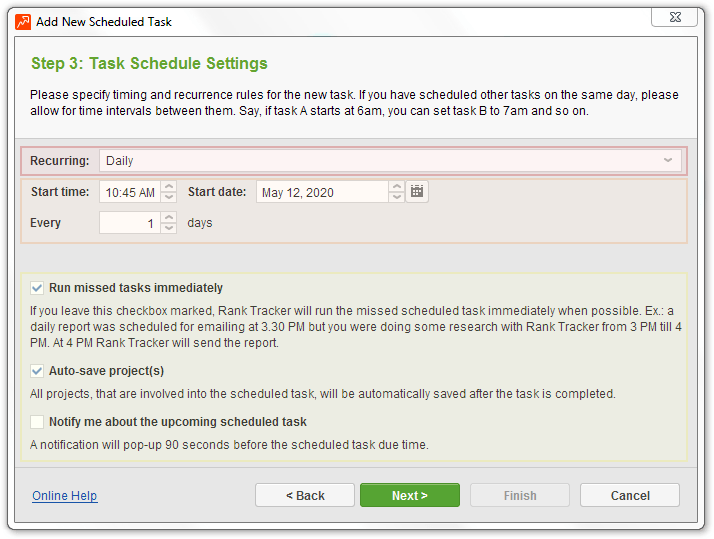
Step 3 of the scheduled task wizard: a daily recurrence with a start time, plus the Run missed tasks immediately and Auto-save project(s) options (from the vendor's manual, dated 2020).
Because Rank Tracker is desktop software, a schedule only runs while the app is open (minimized to the tray is fine) and the computer is awake. Keep "Run missed tasks immediately" ticked so a check that was due while the PC was off runs when you next open the app, and keep the project files where the task expects them.
Step 9: Build and send ranking reports
The Reports module turns your rankings into a report from ready-made templates such as Keyword Rankings and Visibility, Competition Rankings and an SEO Report. Click Edit on a template to add widgets from the list on the left and change their columns and sorting, or create your own template with your logo. What you can do with the finished report depends on the license:
- Free: view it in the app only.
- Professional: view and print it, with a watermark.
- Enterprise: print without a watermark, Quick Save as PDF or HTML, email it as an attachment, publish it at a shareable link, upload it by FTP, schedule delivery and white-label it. Set up the delivery method once under Preferences > Publishing Profiles.

The Reports module: the template list (Competition Rankings, Keyword Rankings and Visibility, grouped keyword rankings, SEO Report) with buttons to create or customize a template, and a report preview showing visibility in all search engines (from the vendor's manual, with 2019 sample data).
What the free version can and can't do
Free version: yes
- Check rankings for any number of keywords in 400+ search engines
- Local, mobile, SERP feature and Google AI Overviews tracking
- All 20 keyword research tools, with KEI and keyword difficulty
- One competitor per project
- Build and view reports in the app
- Your own proxies, if you have them
Free version: no
- Saving projects, so no ranking history between sessions
- Scheduled checks and alerts
- CAPTCHA-free Safe Query Mode (checks use your IP)
- Copying data to the clipboard
- Printing, saving, emailing or exporting reports and data
- Cloud storage for projects
The practical rule: the free version answers "where do I rank today, and which keywords should I target?". As soon as you want to know whether you're moving up over time, you need saved projects, and that means a license.
Rank Tracker
- Price: free version; Professional $179 a year, Enterprise $419 a year at checkout
- Platforms: Windows, macOS, 64-bit Linux
- Version: 8.51.13, October 26, 2026
- Best for: site owners and freelancers who only need rank tracking and keyword research
Rank Tracker's main strength is flat pricing: unlimited sites and keywords for one yearly fee, because the checks run on your computer. Cloud trackers usually charge by the number of keywords, so the more you track, the better this looks. Its weak spots come from the same design: projects live on one PC, schedules need that PC on, and checks without a license can hit Google CAPTCHAs.
What we like
- No keyword or project limits on paid plans
- Street-level local tracking through custom search engines
- Keyword research with KEI and difficulty in the same app
- A free version with every research tool
Watch out for
- Free projects can't be saved
- Saving, emailing and scheduling reports need Enterprise
- Yearly plans renew automatically, with no refunds
- Large checks keep your computer busy
What users say
"Great amazing rank tracker for a very affordable price. FAST! I love how fast it is!" (Tony H, G2, quoted on Link-Assistant's Rank Tracker page)
"With Safe Query Mode enabled, Rank Tracker failed to find my website for the keywords I was monitoring." (Matt Bianco, 1 star, Trustpilot)
Link-Assistant's Trustpilot score is 2.7 out of 5 from 417 reviews. Most of the 1-star reviews are about automatic renewals and refused refunds rather than the software, for example: "Similar to numerous other posts, we cancelled the subscription, we still got charged a month later." (Creativebug, 1 star, November 2026)
Download Rank Tracker FreeBuy Rank Tracker Professional
Rank Tracker Enterprise ($419 a year) has its own Buy button on the Rank Tracker page.
SEO PowerSuite Professional and Enterprise
$349 a year. Rank Tracker Professional plus WebSite Auditor, SEO SpyGlass and LinkAssistant, all unlimited, with 5 competitors per project and cloud storage for 20 projects.
Best for: doing all of your own site's SEO, not just rankings.
$599 a year. Everything in Professional with 40 competitors, white-label reports you can save, email, share and schedule, data export and priority support.
Best for: agencies and consultants reporting to clients.
SEO PowerSuite Professional beats Rank Tracker alone once you'd use a second tool: Rank Tracker Professional plus WebSite Auditor Professional cost $328 bought separately, only $21 less than the full four-tool suite at $349, and all four bought separately cost $586. The same holds at the Enterprise level, where Rank Tracker Enterprise alone is $419 and the full Enterprise suite is $599. Our SEO PowerSuite Professional vs Enterprise comparison covers the choice between the two suite editions in detail.
Buy SEO PowerSuite ProfessionalBuy SEO PowerSuite EnterpriseDownload SEO PowerSuite Free
Yearly price of a license with Rank Tracker (USD)
Rank Tracker Professional$179
SEO PowerSuite Professional (all 4 tools)$349
Rank Tracker Enterprise$419
SEO PowerSuite Enterprise (all 4 tools)$599
Order-page prices checked on November 14, 2026, before sales tax.
Which license should you choose?
| Your situation |
Pick |
Why |
| One-off check or keyword research | Rank Tracker free version | Every research tool is free; you just can't save |
| Tracking your own sites week by week | Rank Tracker Professional | Saved history, schedules and Safe Query for $179 |
| You also audit pages or check backlinks | SEO PowerSuite Professional | All four tools cost less than two bought separately |
| Ranking reports for clients | SEO PowerSuite Enterprise | Saved, emailed, scheduled white-label reports; only $180 more than Rank Tracker Enterprise |
| A team that needs one shared online dashboard | Skip Rank Tracker | Each license is for one user and projects live on a desktop |
Who should skip Rank Tracker: anyone who can't leave a computer running for scheduled checks, teams that want several people logged in to the same live data, and anyone who wants to pay month to month, since every paid plan is billed by the year.
What commonly goes wrong
- CAPTCHAs and temporary blocks in the free version. Without Safe Query Mode, Rank Tracker sends queries from your own IP. Link-Assistant's advice: keep both "Show Captcha" options on, turn on human emulation with 3-8 second pauses, and limit simultaneous tasks to 1 or 2.
- Losing a free-version project. Closing the project or the app deletes the keywords and results, and the free version can't copy, print or export them, so note the figures you need before you close it.
- Missed scheduled checks. The PC went to sleep or the app was closed. Allow the app to minimize to the tray and stop the computer from sleeping during the scheduled time.
- Rankings that don't match what you see in Google. Your own search is personalized and localized. Compare against a custom search engine set to the right location, and check the URL Found column to see which page ranked.
- The wrong license key. An SEO PowerSuite purchase comes with one key per tool, and only the RT- key unlocks Rank Tracker.
- An unwanted renewal. Plans renew automatically at the then-current price and Link-Assistant doesn't refund unused time. If you only want one year, turn off the renewal in your 2Checkout account after you buy.
FAQs
Is Rank Tracker free?
Yes, Rank Tracker has a free version with no time limit that checks rankings and runs every keyword research tool, but it works on one project you can't save and tracks only one competitor. Paid licenses start at $179 a year for Rank Tracker Professional.
Does Rank Tracker have a free trial of the paid version?
No, Rank Tracker doesn't offer a timed trial of Professional or Enterprise. Link-Assistant's answer to "can I try before I buy" is the free version, which has the same interface and research tools but without saving, scheduling or Safe Query Mode.
How much is a Rank Tracker license?
A Rank Tracker Professional license is $179 a year and Rank Tracker Enterprise is $419 a year at checkout, before tax. Both renew yearly. Rank Tracker is also included in every SEO PowerSuite plan: Professional $349, Enterprise $599 and Max $899 a year.
How do I add KEI to my Rank Tracker report?
To show KEI in Rank Tracker, run Update SEO/PPC Data on your tracked keywords with KEI ticked, add the KEI column to the workspace, then edit the report template in Reports and add the column to the keyword widget. Saving or emailing that report as PDF or HTML needs an Enterprise license.
Can I use one Rank Tracker license on two computers?
A Rank Tracker license covers one user. Link-Assistant's terms say that running it on several machines at the same time needs several licenses, so a second person or a second always-on PC needs its own license.
Does Rank Tracker work on a Mac?
Yes, Rank Tracker runs on macOS 11 Big Sur or later on both Intel and Apple silicon Macs, as well as on Windows 10 and 11 and 64-bit Linux. The same license key works on any of them.
Can Rank Tracker check rankings for a specific city?
Yes, Rank Tracker can check rankings as seen from a country, state, city or street address. Add a custom search engine under Preferences > Preferred Search Engines, set its Preferred Location, and check rankings in it like any other engine.
Is Rank Tracker the same as SEO PowerSuite?
Rank Tracker is one of the four SEO PowerSuite tools. You can buy it on its own or get it with WebSite Auditor, SEO SpyGlass and LinkAssistant in an SEO PowerSuite plan, which installs all four from one download.
Conclusion
Using Rank Tracker comes down to four moves: create a project, add keywords and search engines, check rankings, and research new keywords with KEI and difficulty to decide what to track next. Start with the free version to learn the workflow and see where you rank today. Buy Rank Tracker Professional ($179 a year) when you want saved history and automatic weekly checks, step up to SEO PowerSuite Professional ($349) if you'll use the audit and backlink tools too, and choose SEO PowerSuite Enterprise ($599) only if reports go to clients. Whatever you buy, note the renewal date, because the plan renews automatically and unused time isn't refunded.
Download Rank Tracker FreeBuy Rank Tracker Professional