SEO PowerSuite Enterprise: Desktop SEO Tools with White-Label Client Reports
SEO PowerSuite Enterprise is the agency edition of Link-Assistant.Com's desktop SEO suite. It bundles four apps, Rank Tracker, WebSite Auditor, SEO SpyGlass and LinkAssistant, for keyword research, rank tracking, site audits, backlink analysis and link building, and adds white-label reports you can schedule and send to clients. It runs on Windows, macOS and Linux and costs $599 a year.
If you look after several client sites, the work repeats every month: check rankings, audit the site, watch the backlinks, chase new links, then turn it all into a report the client understands. SEO PowerSuite runs those checks on your own computer with no limits on projects or keywords, and Enterprise is the edition that turns the results into branded reports and sends them for you.
Quick Facts
- Developer: Link-Assistant.Com
- Version: R103.11 (installer dated October 8, 2026)
- Apps included: Rank Tracker, WebSite Auditor, SEO SpyGlass, LinkAssistant
- Platforms: Windows 11, 10 and Windows Server 2016 R2 or later, macOS 11 Big Sur or later, 64-bit Linux
- Type: desktop software, with cloud storage for 400 projects and 4,000 reports
- Price: $599 per year, billed annually
- Free edition: yes, with limits (1 project and no saving)
- Refunds: none for partial use or unused time; you can cancel the renewal at any time
What we checked: the Windows installer, version R103.11 (605.5 MB), on Link-Assistant's download server on October 14, 2026, and "SEO PowerSuite Enterprise - Yearly" at $599.00 on the order page on October 14, 2026.
Before you buy
- It renews automatically, and refunds are rare. SEO PowerSuite is a yearly subscription sold through 2Checkout. Link-Assistant's policy is that it doesn't refund partial use or the time left on a subscription. On Trustpilot, most of the one-star reviews are from people charged for a renewal they didn't want. If you only need one year, cancel the renewal in your 2Checkout account soon after buying.
- Start with the free edition. It runs every app with limits, so you can check that the tools suit your workflow and your computer before paying.
- It works on your computer. Big crawls and rank checks use your machine and connection. A few reviewers call it slow on large jobs, and Link-Assistant recommends 8 GB of RAM.
- Enterprise is about reporting. If you don't need white-label, scheduled or exported reports, the cheaper Professional edition has the same unlimited projects, keywords and backlinks.
Download Free VersionBuy Now
Overview
SEO PowerSuite splits SEO into four desktop apps that share one license. Rank Tracker handles keywords and rankings, WebSite Auditor crawls and audits your site and its content, SEO SpyGlass analyzes backlinks, and LinkAssistant finds link prospects and manages outreach. Because it's installed software rather than a web service, there are no per-keyword or per-page credits: Enterprise allows unlimited projects, keywords, crawled pages and backlinks.
The Enterprise license adds what agencies need on top of the Professional edition: white-label, fully customizable reports, saving and emailing them as PDF or HTML, automatic scheduled delivery, one-click sharing by link, data export in CSV, SQL and HTML, 40 competitors per project instead of 5, and priority support.
Features
Rank Tracker: keyword research and rankings in hundreds of search engines
SEO PowerSuite's Rank Tracker tracks rankings for unlimited keywords in Google, Bing, Yahoo and hundreds of other search engines, including local, mobile and universal results, and now tracks whether you appear in Google AI Overviews. For research it has about 20 keyword tools, a keyword database of 216 million terms, keyword difficulty and search volume data, a Google penalty checker, and competitor rank tracking for up to 40 competitors per project in Enterprise.
WebSite Auditor: full-site crawls and content optimization
SEO PowerSuite's WebSite Auditor crawls entire websites to find technical problems, audits content, and includes an in-app content editor with as-you-type SEO recommendations based on the top 10 competing pages. It also generates XML sitemaps and robots.txt files.
SEO SpyGlass: backlink research from Link-Assistant's own index
SEO PowerSuite's SEO SpyGlass analyzes unlimited backlinks using Link-Assistant's link index (6.5 trillion backlinks, by the vendor's count) plus links from Google Search Console and Analytics. It audits links for penalty risk, builds a disavow file, and compares backlink profiles of up to 11 sites side by side.
LinkAssistant: link prospecting, outreach and link checks
SEO PowerSuite's LinkAssistant finds link-building prospects with 10 search methods, such as guest posting, reviews, commenting and giveaways, and scores each prospect site. A built-in email client sends outreach from templates with variables, and LinkAssistant tracks each prospect's status and verifies that the links you earned are still live.
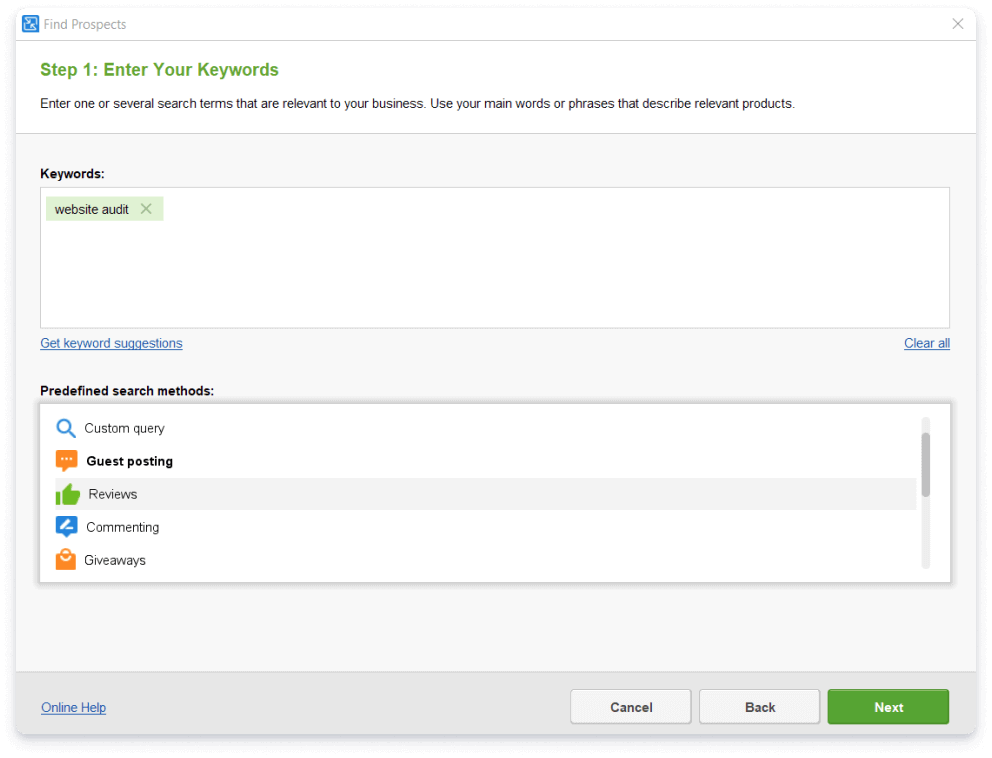
LinkAssistant's Find Prospects wizard, step 1: the keyword "website audit" entered and a list of predefined search methods (Custom query, Guest posting, Reviews, Commenting, Giveaways).
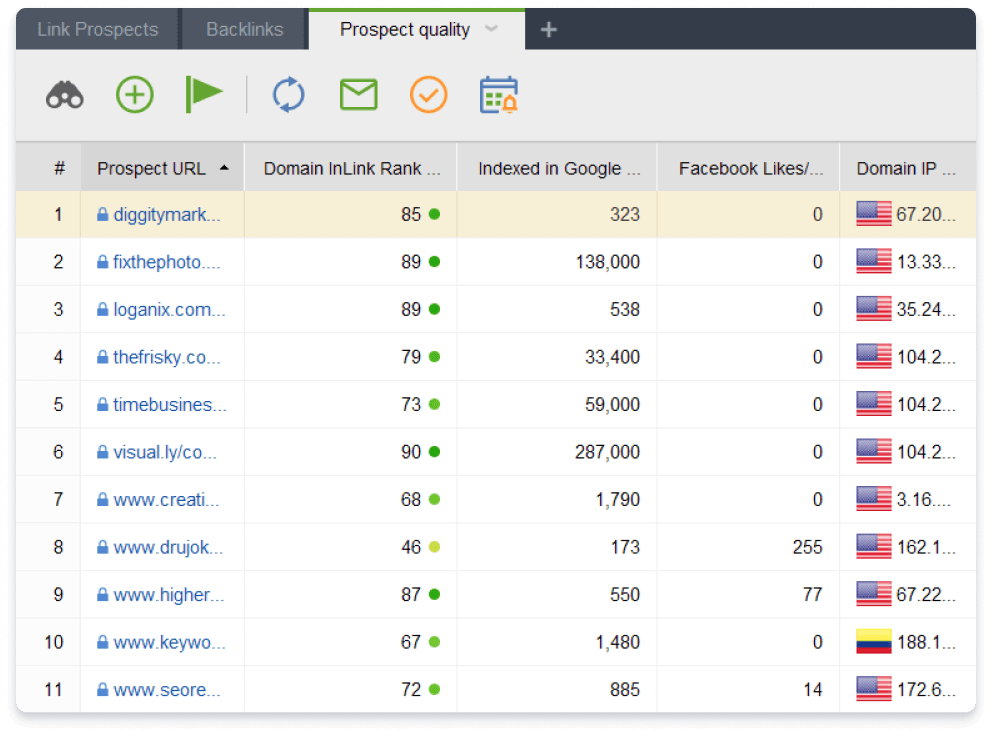
LinkAssistant's Prospect quality tab: 11 prospect sites with Domain InLink Rank, pages indexed in Google, Facebook likes and the domain's IP and country.
Enterprise reports: white-label, scheduled and exported
SEO PowerSuite Enterprise turns the data from all four apps into reports you can brand as your own, using fully customizable templates. You can save and email them as PDF or HTML, share them with a one-click link, and schedule them to be generated and delivered automatically. Data can be exported in CSV, SQL and HTML for your own spreadsheets or dashboards.
Scheduled tasks and captcha-free checks
SEO PowerSuite runs rank checks, audits and other jobs on a schedule, and all paid editions use Link-Assistant's query processing system, so search engine checks don't stop for captchas. Projects are saved with their history, and Enterprise includes cloud storage for 400 projects and 4,000 reports, plus Dropbox integration.
Benefits
- Flat cost as you grow. Adding clients, keywords or pages doesn't raise the price, which is the big difference from credit-based web tools.
- The whole SEO cycle in one license. Research, tracking, auditing, backlinks and outreach share one install and one bill.
- Reports that go out without you. Scheduled white-label reports take the monthly reporting chore off your desk.
- Your data stays local. Projects live on your computer, with cloud storage and Dropbox when you want them.
Real-World Uses
- Monthly client reporting: schedule a branded ranking and backlink report for each client to arrive by email on the first of the month.
- Pitching a new client: audit the prospect's site in WebSite Auditor and compare its backlinks with three competitors in SEO SpyGlass before the sales call.
- Recovering from a drop: run the Google penalty checker, audit backlinks for penalty risk and generate a disavow file.
- Link-building campaigns: find guest-post and review prospects in LinkAssistant, email them from templates and track who replied.
- Local SEO: track local and mobile rankings for a business across several cities.
Who It's For
SEO PowerSuite Enterprise is for SEO agencies, consultants and in-house teams who report to clients or managers and want unlimited projects without per-keyword fees. Solo site owners usually don't need Enterprise: the free edition or Professional covers one site's SEO, and Enterprise's extra value is almost all in reporting.
Usage Guide
- Install: download the installer for Windows, macOS or Linux (the Windows file is about 605 MB and installs all four apps). On Windows, install with an administrator account.
- Activate: open any of the apps and enter your Enterprise registration key.
- Create a project: enter your site's address. Each app creates its own project for that site.
- Add keywords and competitors in Rank Tracker, then run the first rank check.
- Audit the site in WebSite Auditor and review the issues it finds.
- Collect backlinks in SEO SpyGlass and run the penalty risk audit.
- Set up reports: customize a report template with your branding, then schedule it for automatic delivery.
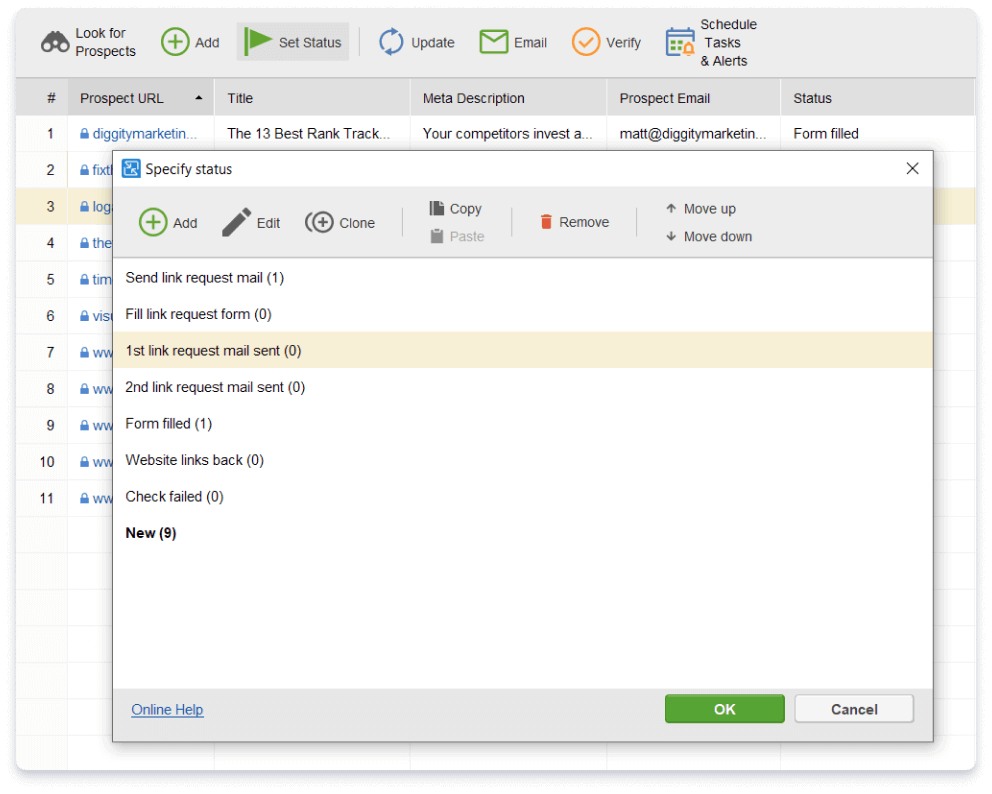
LinkAssistant's Specify status dialog over a prospect list, with outreach stages such as "Send link request mail", "1st link request mail sent", "Form filled" and "Website links back".
What Users Say
Ratings on software review sites
SEO PowerSuite averages 4.5 out of 5 on G2 (559 reviews) and 4.5 out of 5 on Capterra (382 reviews), where it scores 4.3 for ease of use and 4.4 for customer service. Reviewers there most often mention the price for what you get, data accuracy and ease of use. The usual criticisms are that it's desktop software rather than cloud-based, and that exporting data and reports needs the Enterprise edition.
What SEO professionals say on Link-Assistant's site
"I consider SEO PowerSuite to be central to my online business. I have been using the tools for a number of years and they have paid for themselves multiple times over." Matthew Woodward, Internet Marketer, Blogger
"Having helped countless companies unravel website issues through SEO auditing, it helps to know you have the best tools behind you, and that is exactly what I strive to find. SEO PowerSuite is certainly one tool that I can recommend to anyone who is serious about their SEO." Andy Drinkwater, SEO consultant
"Over the years, we've tried various SEO tools. None come close to SEO PowerSuite. These tools provide functionality we can't find anywhere else, at a price that is far less than other comparable solutions." Chuck Siegel, CEO Rule Your Kingdom
Trustpilot: happy users, angry renewals
Link-Assistant's Trustpilot page tells a different story: a TrustScore of 3.0 from 416 reviews, with 77% five-star and 13% one-star. The five-star reviews praise the software and support:
- "I love that it gives me access to multiple tools in one suite, so I can handle keyword research" Nicole Crocker, 5 stars
- "Excellent customer service. I contacted them regarding a billing issue with my subscription." Julie M, 5 stars
Most one-star reviews are about billing, not the tools:
- "I was automatically charged 117.70 EUR for a subscription renewal I did not plan to keep." Denis Breus, 1 star
- "I have no complaints about the SEO software itself, but I was very disappointed by the company's approach" Victoria, 1 star, in a review titled "No flexibility on accidental auto-renewals"
- "The software itself has its place, but the billing and subscription model feels outdated and unnecessarily rigid." Indigo Cube, 1 star
A few complain about the software itself: "Slow and clunky. Similar tools are worth the price difference." (Gavin Ramsey, 1 star), and a Rank Tracker Professional user who reported "inaccurate results and no refund" (Matt Bianco, 1 star).
The pattern
People who use SEO PowerSuite day to day rate it highly for value, depth and support. The complaints cluster around automatic renewals and the no-refund policy, with a smaller group finding it slow on big jobs. Turn off auto-renewal if you're not sure you'll keep it, and test it on your own sites with the free edition first.
Comparisons
Enterprise vs Professional vs Max
Professional and Enterprise share unlimited projects, keywords, pages and backlinks. Enterprise adds the reporting features (white-label, PDF/HTML saving and emailing, scheduling, sharing, CSV/SQL/HTML export), 40 instead of 5 competitors per project, comparison of 11 backlink profiles instead of 6, and priority support. Max adds services on top of Enterprise: a free first year of the RankDots Starter plan, live onboarding, a partner badge and directory listing, a guest post on Link-Assistant's blog, a dedicated customer success manager and one custom SEO question a month.
Desktop suite vs web-based SEO platforms
Web-based SEO platforms run in the browser and work from any device, but usually charge by keywords, projects or users. SEO PowerSuite is installed software: you're tied to computers where it's installed, but there are no usage limits in the paid editions, and the yearly price stays the same however many sites you manage.
Editions and Pricing
| Edition | Price per year | Competitors per project | What it adds |
|---|
| Free | $0 | 1 | 1 project with no saving, 500-URL audits, 1,100 backlinks |
| Professional | $349 | 5 | Unlimited projects, keywords, pages and backlinks, saving, scheduling |
| Enterprise | $599 | 40 | White-label, scheduled and exported reports, priority support |
| Max | €899 | 40 | Onboarding, success manager, partner perks |
The Professional and Enterprise prices are the checkout prices in US dollars. Link-Assistant's pricing page showed the Max price in euros from our location. Two-year and three-year plans cost less per year (20% and 34% off). The four apps are also sold separately if you only need one, such as Rank Tracker on its own.
FAQs
Can I get a refund for SEO PowerSuite Enterprise?
Usually not. Link-Assistant says it can't refund partial use of the service or the time left in a subscription. You can cancel the automatic renewal at any time in your 2Checkout account.
Does SEO PowerSuite Enterprise work on a Mac?
Yes. SEO PowerSuite runs on macOS 11 Big Sur or later, on both Intel and Apple Silicon Macs, as well as on Windows and 64-bit Linux.
Do I need to install Java for SEO PowerSuite?
No. SEO PowerSuite's installer includes the Java environment it needs.
Is SEO PowerSuite cloud-based?
No. SEO PowerSuite is desktop software that runs on your computer. Enterprise adds cloud storage for up to 400 projects and 4,000 reports and Dropbox integration, but the checks themselves run locally.
Can I upgrade from Professional to Enterprise later?
Yes. Link-Assistant offers an upgrade from SEO PowerSuite Professional to Enterprise, so you can start with Professional and move up when you need client reporting.
Does SEO PowerSuite Enterprise run on Linux ARM or Raspberry Pi?
No. SEO PowerSuite supports only 64-bit Linux on standard processors: Ubuntu 18.04 or later, Debian 10 or later, Fedora 38 or later, openSUSE 15.5 or later and Red Hat Enterprise Linux 8.9 or later.
How much disk space and memory does SEO PowerSuite need?
SEO PowerSuite needs about 500 MB of disk space for the full package and at least 4 GB of RAM, with 8 GB or more recommended for large projects.
System Requirements
- Windows 11, 10 or Windows Server 2016 R2 or later, with an administrator account
- macOS 11 Big Sur or later (Intel or Apple Silicon)
- 64-bit Linux: Ubuntu 18.04+, Debian 10+, Fedora 38+, openSUSE 15.5+, RHEL 8.9+
- 1 GHz single-core processor minimum, 2 GHz dual-core or better recommended
- 4 GB RAM minimum, 8 GB or more recommended
- About 500 MB of disk space for the full suite
- 1366 x 768 screen minimum, 1920 x 1080 recommended
Conclusion
SEO PowerSuite Enterprise gives an agency or consultant a full SEO toolkit with no caps on projects, keywords or backlinks, plus the branded, scheduled reporting that clients expect, all for one yearly price. It suits people who manage many sites and are happy to work in desktop software. Go in with your eyes open about the billing: it renews automatically and refunds are rare, so try the free edition first, and switch off auto-renewal if you're not sure you'll want a second year.
Download Free VersionBuy Now