Vovsoft EML Converter: Open, Search and Batch-Export EML Email Files on Windows
EML Converter is a $19 Windows program from Vovsoft that opens saved email files (EML, and also MSG, MBS and some Hotmail exports), shows each message as HTML or plain text, searches across them, and exports them in bulk to HTML, text, the original source or their attachments. The $19 is a one-time lifetime license, and there's a free trial.
It's for the moment you're handed a folder of .eml files, from a mail backup, an old server or a colleague, and no mail program wants to open them all.
Quick facts
- Version: 1.3, released May 4, 2026
- Developer: Vovsoft
- Platform: Windows 11, 10, 8/8.1, 7 and Vista, 32-bit and 64-bit. No Mac version
- Opens: EML, plus MSG, MBS (old Opera Mail) and some Hotmail exports
- Exports: HTML, TXT, the original source, or the attachments, one message or all of them
- Editions: installer (3.72 MB) and portable (2.51 MB), one license for both
- Price: $19, one-time payment, lifetime license with free updates
- Trial: free, views and converts messages, but batch export and commercial use need a license
- What we checked: installer file version 1.3.0.0 (3,902,096 bytes) with a valid code signature, downloaded from the vendor on November 11, 2026, and $19.00 on the order page with no auto-renewal on November 11, 2026
Download Free TrialBuy Now
Overview
Add files or a whole folder (or drag them onto the window), and EML Converter lists every message with its path and size. Click one and the right side shows it five ways: the rendered HTML, the plain Text part, the Original raw source, the MIME Parts, and the Attachments. A search box above the list filters the loaded messages by a word or phrase, and the Export button writes out what you've selected, or everything.
It's a viewer and exporter, not a mail client. It doesn't send mail, connect to an account or import into Outlook.
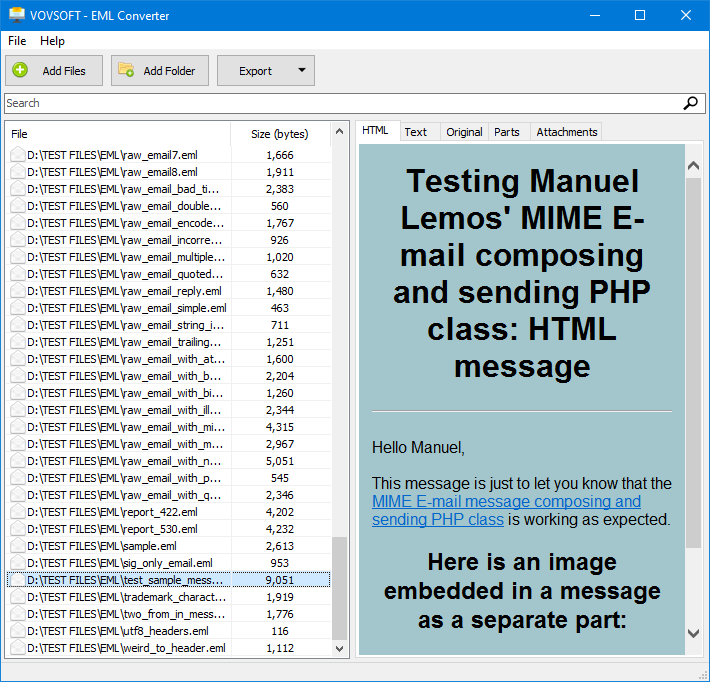
A folder of test EML files on the left, with the selected message rendered in the HTML tab. Text, Original, Parts and Attachments tabs sit beside it.
Features
Reads EML and a few related formats
EML Converter opens standard EML files and, since version 1.3, MSG files, MBS mailboxes from the old Opera browser's mail client, and some Hotmail exports, depending on how they're built inside. Files can also be passed to it on the command line.
Five views of every message
EML Converter shows the HTML and Text parts side by side in tabs, the raw Original source with all headers, the MIME Parts the message is built from, and its Attachments, which you can save individually.
Search across a whole folder of emails
EML Converter's search box filters the loaded list to the messages containing a keyword or phrase, which is quicker than opening hundreds of files one at a time to find the invoice or contract you're after.
Batch export to HTML, text or attachments
EML Converter's Export All, added in version 1.2, writes every loaded message out as HTML pages, plain text files, original source files, or just their attachments. This is the licensed part: the trial doesn't batch export.
Benefits
The value is speed with a pile of files. A mail program makes you import EML files one by one or into a mailbox; EML Converter loads a folder, lets you search it, and dumps the lot to a format any browser or text editor opens. Turning emails into HTML or text also makes them easy to archive, index or hand to someone without a mail program.
Real-World Uses
- Recovering the attachments from a few hundred EML files exported from a retired mail server.
- Searching an old email backup for one supplier's messages before a dispute.
- Converting a project's email trail to HTML files to store with the project documents.
- Reading an MSG file someone sent you when you don't have Outlook installed.
- Checking the raw headers of a suspicious email saved as EML.
Who It's For, and Who Should Skip It
EML Converter suits Windows users who deal with saved email files now and then and want to read, search and convert them without setting up a mail client.
Skip it if you need PDF or Word output, or need to move mail into Outlook PST or another account: it exports only HTML, text, source and attachments, and PDF and DOCX export are open requests from users. For a single message, Windows Mail, Thunderbird or a browser can open an EML file for free.
Usage Guide
- Download the installer or the portable edition and start EML Converter.
- Click Add Files or Add Folder, or drag EML files onto the window.
- Click a message to read it in the HTML, Text, Original, Parts or Attachments tab.
- Type in the search box to filter the list to matching messages.
- Use Export to save the selected message, or Export All to save every loaded message as HTML, text, source or attachments.
Before you buy
The free trial shows and converts messages but leaves out batch export, which is the main reason to buy. One license covers one person on any number of their own computers. Vovsoft's general policy is no refunds once the key is delivered, since a free trial comes first (accidental orders are generally refunded, at its discretion, and PayPro Global has the final say on its orders).
Where it falls short
- No PDF, DOCX, MSG or PST export. The top user requests are EML to DOCX and EML to PDF.
- MSG, MBS and Hotmail support depends on each file's internal structure, so some won't open.
- There's no header view outside the raw source, and exporting a table of subject, sender and recipient is still a request.
- It doesn't read mailbox formats like MBOX or PST, only individual message files (plus MBS).
What Users Say
Ratings
EML Converter is one of Vovsoft's newer tools, first released in March 2024, and has few public reviews so far. Its page on Vovsoft's site shows 4.5 out of 5 from 2 ratings, with no written comments.
Vovsoft as a company has a TrustScore of 4.6 out of 5 from 411 reviews on Trustpilot, read through a summarizer. Reviewers there mostly describe its tools as small, simple and dependable, and the complaints are about individual programs not doing a specific job well.
The clearest signal from users is the feature request list, where EML to DOCX (3 votes) and EML to PDF (2 votes) lead, and saving all attachments, an earlier request, has been added.
Comparisons
EML Converter vs a mail client (Thunderbird, Windows Mail)
A mail client opens an EML file for free and shows it properly, but one at a time, and won't export a folder of them to HTML or text. EML Converter is quicker for a batch and for searching across files, but can't reply, forward or file messages.
EML Converter vs EML-to-PST converters
Converters that move mail into Outlook PST or Microsoft 365 cost much more and do a different job, migration. EML Converter is for reading, searching and extracting, not for moving mail into another mailbox.
EML Converter vs Vovsoft Download Mailbox Emails
Download Mailbox Emails pulls messages from a mail account by IMAP or POP3 and saves them as EML files. EML Converter is what you'd use afterwards to read, search and convert those files.
Editions and Pricing
| Edition | Price | License | What you get |
|---|
| Trial | Free | Personal, non-commercial use | Views, searches and converts messages, no batch export |
| Licensed | $19 one-time | Lifetime | Batch export, commercial use, no nag screen or ads, lifetime free updates |
The installer and portable editions use the same key, sent by email right after payment. Vovsoft's $99 Universal License covers all of its desktop programs.
FAQs
Can EML Converter convert EML to PDF?
No. EML Converter exports to HTML, plain text, the original source and attachments. You can print an exported HTML file to PDF from a browser, and PDF export is a user request on Vovsoft's list.
Can EML Converter open Outlook MSG files?
Yes, EML Converter 1.3 added MSG support, though some MSG files won't open, depending on how they're structured inside.
Does EML Converter work with Thunderbird or Windows Live Mail EML files?
Yes. EML is a standard format, and EML Converter opens EML files saved by any mail program.
Does EML Converter need an email account or internet connection?
No. EML Converter works on files already on your disk. Only activation of a license key goes online, and there's an offline activation option.
Can I use EML Converter at work?
Yes, with a license. The free trial is for personal, non-commercial use only.
Is the EML Converter license a subscription?
No. The $19 license is a one-time payment that never expires and includes future updates.
System Requirements
- Windows 11, 10, 8/8.1, 7 or Vista, 32-bit or 64-bit
- About 4 MB for the program, plus space for exported files
Conclusion
EML Converter is worth $19 if you regularly end up with folders of EML files and want to search them and turn them into HTML, text or loose attachments in one go. That batch export is the reason to buy it. The reason not to: it won't give you PDF, Word or Outlook PST, and for opening one message now and then, a free mail client does the job.
Download Free TrialBuy Now