Coolmuster iPhone SMS + Contacts Recovery for Mac: Get Deleted iPhone Texts and Contacts Back Onto Your Mac
Coolmuster iPhone SMS + Contacts Recovery for Mac is a $35.95-a-year macOS app that scans an iPhone over USB, or an iTunes or Finder backup on your Mac, for deleted and existing contacts and text messages, and saves the ones you pick to the Mac. It also downloads your current iCloud contacts. Texts, contacts and SMS attachments are all it handles.
Unlike most of Coolmuster's single-purpose tools, this one is a real undelete tool for its two data types: the scan screens put contacts and messages under "Deleted & Existing Data (Support to recover deleted data)". If a deleted conversation or a lost contact is what you're after, that's the reason to look at it.
Quick facts
- Version: 5.0.15 for Mac, released March 3, 2026
- Developer: Coolmuster
- Runs on: macOS 10.10 or later. Intel build, so Apple silicon Macs run it through Rosetta 2
- Recovers: deleted and existing contacts and messages from the phone, plus SMS attachments from iTunes/Finder backups
- From iCloud: existing contacts only
- Price: $35.95 for one year (1 Mac, 3 devices), $45.95 lifetime
- Trial: free download that scans and previews, deleted items included. Saving needs a license
- What we checked: Mac version 5.0.15 in the vendor release notes and inside the downloaded app's Info.plist, the 22.5 MB disk image from the vendor (file dated March 3, 2026) with Intel-only program files, checkout price $35.95 on November 11, 2026. We didn't run a recovery on an iPhone; the screens shown are from the vendor's Mac manual.
Before you buy
- Deleted texts can be overwritten as the phone keeps being used. Stop using the iPhone and run the free scan as soon as you can.
- The iCloud mode downloads contacts that still exist in iCloud; it doesn't undelete there and doesn't read iCloud messages.
- Coolmuster puts this product under its 7-day guarantee for recovery products but says refund requests for recovery products will not be approved. The free scan shows what can be saved.
- The one-year plan renews automatically unless cancelled.
Download Free Trial Buy Now
Overview
The app has Coolmuster's four-part sidebar: Recover from iOS Device, Recover from iTunes Backup File, Recover from iCloud and Toolkit. It's the contacts-and-messages slice of the larger iPhone Data Recovery for Mac, for $14 less a year. The March 2026 update fixed an iCloud account login failure.
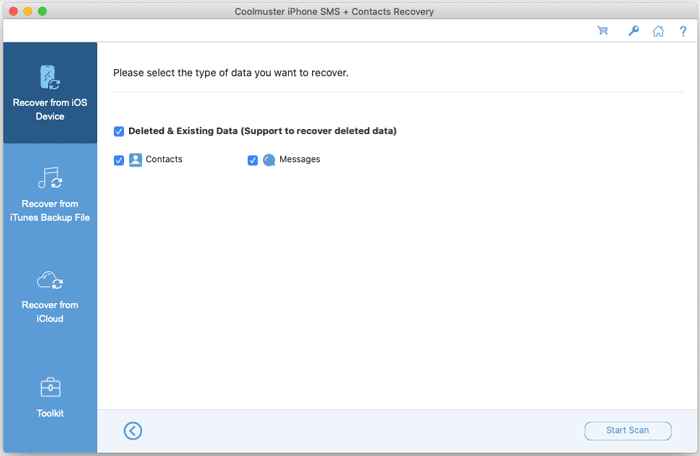
The device scan screen: contacts and messages under "Deleted & Existing Data (Support to recover deleted data)".
Features
Coolmuster iPhone SMS + Contacts Recovery for Mac scans the phone for deleted texts and contacts
Coolmuster iPhone SMS + Contacts Recovery for Mac connects over USB, asks you to tap Trust and enter the screen passcode, and lists contacts and messages with deleted entries included. A switch at the top, "Only display the deleted item(s)", hides everything that's still on the phone.
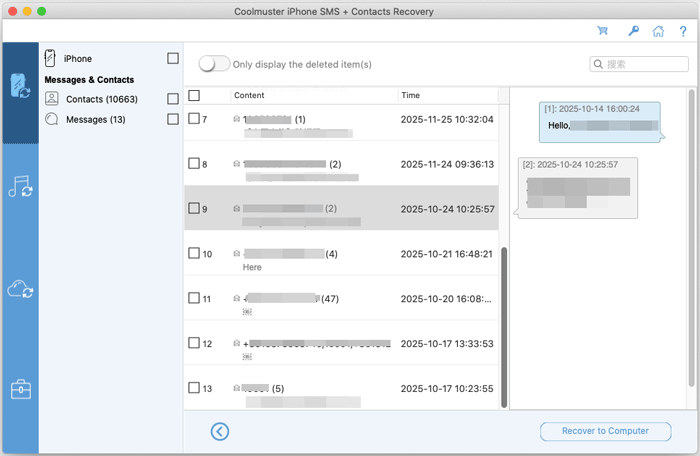
Message threads with counts and dates, the open conversation on the right, and the deleted-only switch at the top.
Reads iTunes and Finder backups, encrypted ones too
Coolmuster iPhone SMS + Contacts Recovery for Mac lists the backups in the default location and opens others with Select. It asks for the password of a protected backup. From a backup it searches contacts, messages and SMS attachments (the photos and files sent in texts) for deleted and existing items.
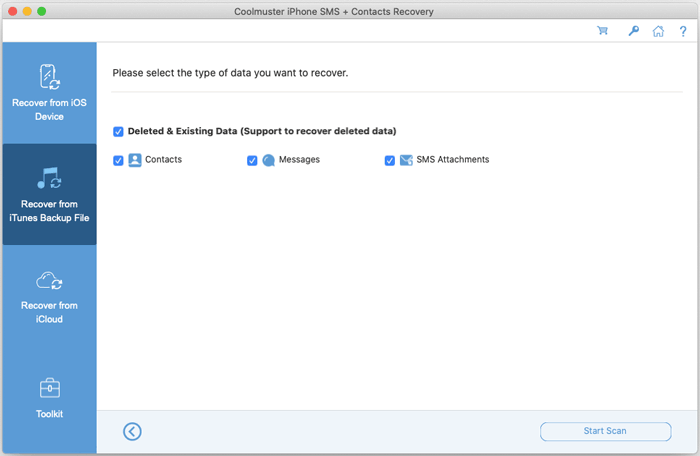
The backup scan adds SMS Attachments to the two types the device scan offers.
Downloads iCloud contacts without the phone
Coolmuster iPhone SMS + Contacts Recovery for Mac signs in to iCloud with an Apple ID and two-factor code and lists the contacts stored there, with their email addresses and groups, ready to save.
Keeps the contact details intact
Coolmuster iPhone SMS + Contacts Recovery for Mac saves contacts with their extra fields, such as email addresses, job titles and company names, rather than just names and numbers.
Benefits
- Three chances at the same contact or thread: the phone, a local backup and iCloud.
- Cheaper than Coolmuster's full iPhone Data Recovery when texts and contacts are all you lost.
- The base license covers three devices, handy when the whole family uses iPhones.
Real-World Uses
- You deleted a whole thread with a contractor and need the quote they texted you.
- A sync mishap wiped half your contacts, and last month's Finder backup still has them.
- You're keeping a copy of a parent's text messages from their iPhone after they've passed.
Who It's For, and Who Should Skip It
It's for Mac users who lost iPhone text messages or contacts and want the best odds of getting them back from the phone or a backup.
Skip it if you also want photos, notes, WhatsApp or call history: Coolmuster iPhone Data Recovery for Mac covers those for $14 more a year. Skip it too if you only need to export contacts that are already in iCloud on your own account; the Contacts app on your Mac does that free.
Usage Guide
- Open the .dmg, drag the app into Applications and launch it (Apple silicon Macs may install Rosetta 2 first).
- Connect the iPhone, tap Trust and enter the passcode, tick Contacts and Messages and click Start Scan. Or choose the backup or iCloud tab.
- Switch on "Only display the deleted item(s)" to see just what was lost.
- Tick the contacts or threads you want.
- Click Recover to Computer and pick a folder (licensed copies only).
Where it falls short
- Only contacts, messages and SMS attachments; iMessage photos on the phone itself aren't in the device scan list.
- Intel-only code on Apple silicon Macs.
- Buyers on Coolmuster's review page mention slow scans, too many clicks, and incorrect timestamps on recovered messages.
- Recovered data stays on the Mac; it isn't written back to the iPhone.
What Users Say
We found no independent review of the Mac edition. Coolmuster's review page (94 reviews) covers both editions; the company offers free licenses for reviews, so read it as a friendly sample. Several product-page testimonials date from the iOS 8 and iOS 9 era.
Praise
"Brought back contacts I accidentally deleted last month."
Oliver Hayes, July 17, 2026
"Got my contacts back from iCloud!"
Rachel Morgan, September 4, 2026
"Good option for data recovery without overwriting existing files."
Mark Johnson, February 2, 2026
"I lost all my contacts right after upgrading to iOS 9.0.1 today, and now I got all of them back by using your app."
Jason, Coolmuster product page
Complaints
"Got my deleted messages back, but why are timestamps incorrect?"
Ethan Clark, April 3, 2026
"Too many clicks for some tasks, but the recovery options are pretty useful overall."
Ryan Mitchell, October 19, 2026
"I hoped the scanning could be a little faster."
Jessica Miller, July 31, 2026
"Does what it promises, but pricing could be more flexible."
Sophia Martin, June 18, 2026
Coolmuster as a company holds 4.6 out of 5 from 223 Trustpilot reviews (read through a page summarizer), mostly for its support. On balance: contacts come back reliably, messages mostly, with gripes about speed, clicks and timestamps.
Comparisons
SMS + Contacts Recovery for Mac vs iPhone Data Recovery for Mac
Both recover deleted contacts and messages the same way. iPhone Data Recovery for Mac ($49.95 a year) adds export of photos, notes, WhatsApp, voice memos and more, and more iCloud data types.
SMS + Contacts Recovery for Mac vs Backup Extractor for Mac
Backup Extractor for Mac ($19.95 a year) recovers deleted contacts, messages and SMS attachments from backups too, but can't scan the phone or iCloud. If there's a backup from before the loss, it's the cheaper path.
Editions and Pricing
| Covers | 1 Year (renews) | Lifetime |
|---|
| 1 Mac, 3 devices | $35.95 | $45.95 |
| 3 Macs, 9 devices | $65.95 | $75.95 |
| 1 Mac, 30 devices | $189.95 | $289.95 |
The lifetime license costs $10 more than one year and includes lifetime updates.
FAQs
Does Coolmuster iPhone SMS + Contacts Recovery for Mac work with encrypted backups?
Yes. Coolmuster iPhone SMS + Contacts Recovery for Mac asks for the backup password and then scans it. It can't recover a forgotten password.
Can Coolmuster iPhone SMS + Contacts Recovery for Mac get text messages from iCloud?
No. Its iCloud mode downloads existing contacts only.
Does Coolmuster iPhone SMS + Contacts Recovery for Mac run on M-series Macs?
Yes, through Rosetta 2. Version 5.0.15 contains Intel program code only.
Is there a Windows version of Coolmuster iPhone SMS + Contacts Recovery?
Yes, sold separately with its own license. A Mac license doesn't activate the Windows program.
System Requirements
- macOS 10.10 or later (Intel, or Apple silicon with Rosetta 2)
- Intel Core 1 GHz or faster, 1 GB RAM, 1 GB free disk space
- USB cable, iPhone, iPad or iPod touch on iOS 5 through iOS 27
Conclusion
Worth it if you've lost iPhone texts or contacts and want to scan the phone, a Finder backup and iCloud contacts from your Mac. It's one of the few Coolmuster tools that genuinely recovers deleted data, and the free scan tells you before you pay.
The reason not to buy is breadth: if photos, notes or WhatsApp went missing too, the full iPhone Data Recovery for Mac costs only $14 more.
Download Free Trial Buy Now