Coolmuster iPhone WhatsApp Recovery: Export iPhone WhatsApp Chats and Attachments to a Windows PC
Coolmuster iPhone WhatsApp Recovery is a $35.95-a-year Windows program that reads WhatsApp chats and attachments from an iPhone or iPad over USB, or from an iTunes backup on the PC, and saves the chats you choose as HTML or CSV files with their photos, videos, voice notes and documents. It exports what exists on the phone or in the backup; it doesn't undelete chats from the phone.
That's the one thing to understand before paying. If a chat was deleted on the phone and you have an iTunes backup from before the deletion, this program can pull it out of that backup without restoring the whole phone. If there's no older backup, no setting in this program will bring it back.
Quick facts
- Version: 2.0.4 for Windows, released December 29, 2025
- Developer: Coolmuster
- Runs on: Windows 11, 10, 8 and 7 (a separate Mac edition is sold)
- Sources: the iPhone or iPad over USB, iTunes backups on the PC
- Saves: chats as HTML or CSV, attachments in their original formats
- Price: $35.95 for one year (1 PC, 3 devices), $45.95 lifetime
- Trial: free download that scans and previews. Saving needs a license
- What we checked: Windows version 2.0.4 in the vendor release notes, the 14.6 MB installer from the vendor (file dated January 29, 2026), checkout price $35.95 on November 11, 2026, and the vendor's own screenshots, where both scan modes are labelled "Existing Data Only". We didn't run it against an iPhone.
Before you buy
- Both the device scan and the iTunes backup scan are headed "Existing Data Only (Unable to recover deleted data)". A "recovered" chat is one that still exists in the source you scan.
- WhatsApp's own iCloud backup isn't read. You need the phone itself or an iTunes backup on this PC.
- Coolmuster iPhone Backup Extractor ($19.95 a year) and iPhone Data Recovery ($49.95) also export WhatsApp, along with other data.
- Coolmuster says refund requests for recovery products, this one included, will not be approved. The yearly plan renews automatically.
Download Free Trial Buy Now
Overview
The program has three sidebar entries, Recover from iOS Device, Recover from iTunes Backup File and Toolkit, and only two data types: WhatsApp and WhatsApp Attachments. It's Coolmuster's iPhone recovery engine trimmed to one app, which keeps the screens simple: pick a source, scan, read the chats, save.
The December 2025 release added export of Live Photos and fixed iCloud login and iOS driver installation problems.
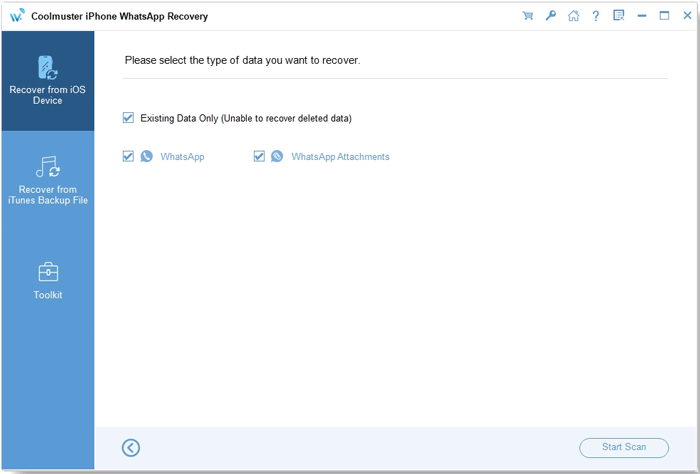
The device scan offers two data types, both under "Existing Data Only (Unable to recover deleted data)".
Features
Coolmuster iPhone WhatsApp Recovery reads chats straight from the iPhone
Coolmuster iPhone WhatsApp Recovery connects over USB, asks you to tap Trust, and prompts you to unlock the phone when it reads WhatsApp. Chats then appear as a list of conversations with message counts and the latest time, and the full thread shows in a preview pane on the right.
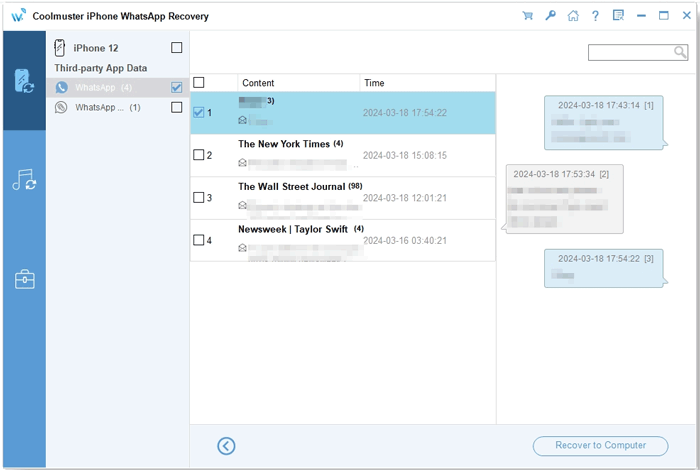
WhatsApp chats from an iPhone 12: conversations in the middle, the selected thread with timestamps on the right.
Pulls WhatsApp out of an older iTunes backup
Coolmuster iPhone WhatsApp Recovery lists the iTunes backups on the PC and opens one you pick, or one you browse to with Select. This is the route for chats deleted from the phone after the backup was made: they're still in the backup, and the program can export just them without overwriting the phone.
Saves attachments with their real file types
Coolmuster iPhone WhatsApp Recovery lists attachments with name, size, format and creation date, including JPG photos, PDF documents and OPUS voice notes, and saves them as normal files next to chats exported as HTML or CSV.
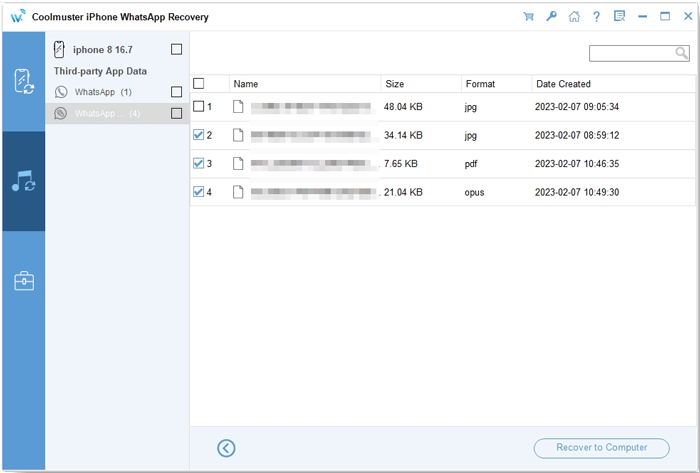
Attachments from an iOS 16.7 backup: JPG, PDF and OPUS files with sizes and dates.
Benefits
- A readable HTML copy of important WhatsApp threads that you can open, print or hand to someone without a phone.
- Selective export from an old backup, so the current phone isn't rolled back.
- The base license covers three devices on one PC.
Real-World Uses
- Keeping a printable record of a WhatsApp conversation for a landlord dispute or an insurance claim.
- Recovering a chat you deleted last week from the iTunes backup you made last month.
- Archiving years of family-group photos and voice notes to the PC before getting a new iPhone.
Who It's For, and Who Should Skip It
It suits Windows users who want WhatsApp chats out of an iPhone or an iTunes backup as files they can read and keep.
Skip it if you already need other data from the same backup: Coolmuster iPhone Backup Extractor exports WhatsApp plus messages, contacts and photos for $16 less a year. Skip it if your only backup is WhatsApp's iCloud backup, or if you hoped for undeletion from the phone itself; nothing here does that. Mac owners need the Mac edition.
Usage Guide
- Install the program from the .exe and launch it. Click Trial or register with your licensed email and code.
- For the phone: connect it by USB, tap Trust, select WhatsApp and WhatsApp Attachments, click Start Scan and unlock the phone when asked.
- For a backup: click Recover from iTunes Backup File, pick the backup (or click Select), and click Start Scan.
- Read through the chats and tick the ones you want.
- Click Recover to Computer and choose a folder. This step needs a license.
Where it falls short
- No undelete, despite the name.
- No access to WhatsApp's iCloud backup.
- On Coolmuster's own review page, buyers report slow scans and exports and chats appearing out of order.
- Exports go to the PC; there's no way to put chats back into WhatsApp on the phone.
- At $35.95 a year it costs more than Backup Extractor, which covers the same WhatsApp data in backups.
What Users Say
We found no independent review of this product. The quotes come from Coolmuster's review page (53 reviews) and product page; Coolmuster rewards reviews with free licenses, so the praise is a friendly sample. The complaints on the same page are telling.
Positive
"Successfully restored WhatsApp chats from iTunes backup, very helpful tool."
Kevin Smith, June 18, 2026
"It saved my WhatsApp history after switching to a new iPhone."
James Miller, February 2, 2026
"Got back important photos from WhatsApp. Really saved me."
Olivia Thompson, February 28, 2026
"Excels in selectively and conveniently retrieving my deleted WhatsApp attachments from my old iTunes BACKUPS."
Oderate .QC, Coolmuster product page (excerpt)
Critical
"Worked for my backup, but I had to wait quite a while before seeing results."
Andrew Wilson, September 4, 2026
"I recovered important chats from iTunes backup, but please improve the export speed."
Ava Martinez, July 17, 2026
"Some chats out of order..."
Chris Anderson, April 3, 2026
"Easy to use. Pricing could be lower though."
Matthew Reed, May 9, 2026
Coolmuster as a company has a 4.6 out of 5 TrustScore from 223 Trustpilot reviews (read through a page summarizer), mostly for support. The pattern for this product: it works best from an older iTunes backup, and people grumble about speed and price.
Comparisons
iPhone WhatsApp Recovery vs Coolmuster iPhone Backup Extractor
Backup Extractor ($19.95 a year) reads the same iTunes backups and exports WhatsApp, attachments, messages, contacts and more, but can't scan the phone. WhatsApp Recovery adds the phone scan.
iPhone WhatsApp Recovery vs Coolmuster iPhone Data Recovery
iPhone Data Recovery ($49.95 a year) scans the phone, backups and iCloud, and covers WhatsApp too. For $14 more you get every data type, which is better value if WhatsApp isn't the only thing you need.
Editions and Pricing
| Covers | 1 Year (renews) | Lifetime |
|---|
| 1 PC, 3 devices | $35.95 | $45.95 |
| 3 PCs, 9 devices | $65.95 | $75.95 |
| 1 PC, 30 devices | $189.95 | $289.95 |
Lifetime is only $10 more than a year for the basic license, so it's the better buy if you'll export more than once.
FAQs
Can Coolmuster iPhone WhatsApp Recovery recover WhatsApp chats deleted from my iPhone with no backup?
No. Coolmuster iPhone WhatsApp Recovery labels its device scan "Existing Data Only (Unable to recover deleted data)". A deleted chat can only be found in an iTunes backup made before it was deleted.
Does Coolmuster iPhone WhatsApp Recovery read WhatsApp's iCloud backup?
No. Coolmuster iPhone WhatsApp Recovery reads the phone over USB and iTunes backups on the PC only.
What format does Coolmuster iPhone WhatsApp Recovery save chats in?
Coolmuster iPhone WhatsApp Recovery saves chats as HTML or CSV files, and attachments such as photos, videos, voice notes and documents in their original formats.
Does Coolmuster iPhone WhatsApp Recovery work with Android phones?
No. It's for iPhone and iPad. Coolmuster sells a separate Android WhatsApp Recovery for Android phones.
How many iPhones does one Coolmuster iPhone WhatsApp Recovery license cover?
The basic license covers three devices on one PC. Larger licenses cover nine devices on three PCs, or 30 devices on one PC.
System Requirements
- Windows 11, 10, 8 or 7
- 750 MHz or faster CPU, 512 MB RAM, 1 GB free disk space
- USB cable, iPhone or iPad with WhatsApp, iOS 5 through iOS 27
Conclusion
Worth it if WhatsApp is the only thing you need and you want chats from the phone or an older iTunes backup saved as readable files on a PC. The free scan shows the chats before you pay, so you know what you'll get.
The reason not to buy is the name: it doesn't undelete, and for WhatsApp in a backup, Coolmuster's own Backup Extractor does the job for less.
Download Free Trial Buy Now