Vovsoft PDF to Text Converter: Plain Text Out of PDFs, in Batches
PDF to Text Converter is a $19 Windows program from Vovsoft that extracts the text from PDFs into TXT files, one at a time or in batches. It reads real text only, so scanned PDFs need OCR instead. The $19 is a one-time lifetime license, and there's a free trial.
The batch mode is the reason to pay: the free trial leaves it out.
Quick facts
- Version: 1.7, released October 20, 2026
- Developer: Vovsoft
- Platform: Windows 11, 10, 8/8.1 and 7, 32-bit and 64-bit. No Mac or Linux version
- Input and output: PDF in, TXT out
- Batch mode: Files or whole folders, licensed version only
- Command line: Files can be opened by parameter, such as pdf2text.exe C:\file1.pdf
- Editions: installer (5.34 MB) and portable (4.58 MB), one license for both
- Price: $19, one-time payment, lifetime license with free updates
- Trial: free to try. Single-file conversion, with a nag screen, no batch processing. It isn't allowed for commercial use
- Refunds: Vovsoft's general policy is no refunds, since a free trial comes first. An order placed by accident is generally refunded, at the company's discretion, and PayPro Global has the final say on orders placed through it
- What we checked: installer file version 1.7.0.0 (5,601,464 bytes) with a valid code signature, downloaded from the vendor on November 10, 2026, and $19.00 total on the order page with no auto-renewal on November 10, 2026. We didn't run an extraction ourselves
Download Free TrialBuy Now
Overview
Load PDFs and their text appears in an editable window with line numbers, ready to cut, copy and tidy before you save it. For volume, File > Batch Processing takes files or folders and writes one TXT per PDF to a folder you choose.
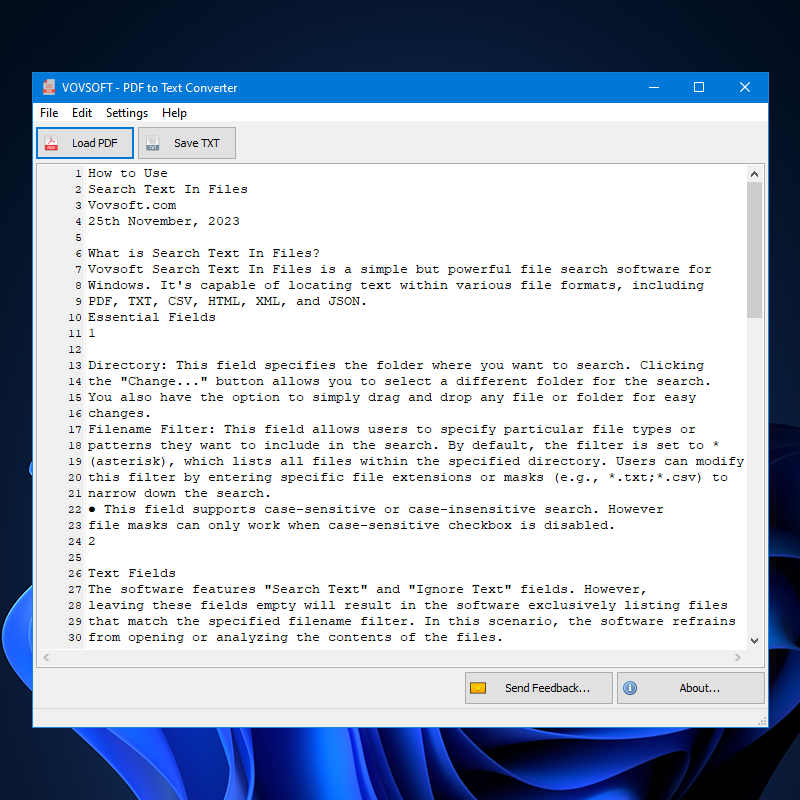
Extracted text in the editor with Load PDF and Save TXT buttons above it.
Features
An editor before you save
PDF to Text Converter shows the extracted text in its own window, so you can fix or trim it before writing the TXT file, instead of opening the output elsewhere.
Batch Processing for folders
PDF to Text Converter added batch conversion in version 1.7, in October 2026: add files or entire folders and each PDF becomes its own TXT in an output folder.
Headers when combining files
PDF to Text Converter can put nothing, the file name, the directory or the full path above each block of text, which helps when you load several PDFs in one session.
Who It's For, and Who Should Skip It
It suits people feeding many PDFs into search, analysis or an AI tool, and anyone who wants the text without the PDF's layout and without uploading the files.
Skip it if the PDF is a scan, since it has no OCR. For one document, selecting all and copying from Microsoft Edge or any PDF reader costs nothing, and Word opens most PDFs for editing.
Usage Guide
- Download the installer or the portable edition and start the program.
- Click Load PDF, or drag files onto the window.
- Check the text, edit it if you need to, and click Save TXT.
- For many files, use File > Batch Processing and pick an output folder.
Before you buy
One license covers one person on as many of their own computers as they use, or one shared workstation used by several people in turn. Using a key on too many computers at the same time can get it revoked.
Where it falls short
- Image-only PDFs return no text. Vovsoft's separate OCR Reader covers those, and adding OCR here is an open request.
- You can't choose which pages to extract.
- Columns, tables and page layout don't survive in plain text, so expect clean-up on complex documents.
- The interface is English only.
What Users Say
What reviewers say
Vovsoft's product page shows a rating of 4.3 out of 5 from 6 reviews, with this comment.
"Amazing customer service: My feature request took only 1 day to be implemented! Now, Pdf to Text Converter, almost perfect, is just perfect for me." Emile Jean Gras
Editions and Pricing
| Edition | Price | License | What you get |
|---|
| Trial | Free | Personal, non-commercial use | Single-file conversion, with a nag screen, no batch processing |
| Licensed | $19 one-time | Lifetime | Commercial use, no nag screen, lifetime free updates, all features |
The installer and portable editions use the same license key, and the key is delivered right after payment.
FAQs
Can PDF to Text Converter read scanned PDFs?
PDF to Text Converter can't. It extracts text that's stored in the PDF, so a scan needs an OCR program first.
Does PDF to Text Converter work offline?
PDF to Text Converter runs entirely on your PC, with no uploads to an online server.
Does the PDF to Text Converter trial include batch conversion?
PDF to Text Converter's trial converts single files. Batch Processing needs the $19 license.
System Requirements
- Windows 11, 10, 8/8.1 and 7, 32-bit or 64-bit
- 5.34 MB for the installer, 4.58 MB for the portable edition
Conclusion
Worth $19 if you have folders of text-based PDFs to convert. The reason to buy it is unattended batch output to TXT. The reason not to is scans, which it can't read, and single documents, where copying from a free PDF reader gets you the same words.
Download Free TrialBuy Now