Stellar Repair for MySQL: Fix Crashed InnoDB and MyISAM Tables When the Backup Won't Do
Stellar Repair for MySQL Technician is a $199-a-year Windows tool that repairs corrupt MySQL and MariaDB databases, InnoDB and MyISAM alike, and saves the recovered tables, keys, views and triggers back to a server or out to SQL script, CSV, HTML or Excel files. It's for web admins, developers and DBAs facing "table is marked as crashed" or an InnoDB that won't start, and the free trial runs the repair and previews the data before you pay.
MySQL's own tools cover the easy cases: REPAIR TABLE and myisamchk for MyISAM, innodb_force_recovery for InnoDB. When those fail, or innodb_force_recovery=6 still won't bring the server up, the usual answer is "restore from backup". If the backup is stale or missing, this program reads the data folder files directly.
Quick facts
- Version: 9.0.0.8, released January 2026 (formerly Stellar Phoenix Database Repair for MySQL)
- Developer: Stellar Data Recovery
- Runs on: 64-bit Windows 11, 10, 8.1 and 8
- Databases: MySQL 5.0 to 5.7.44, 8.0.40 to 8.0.44 and 9.4.0 to 9.5.0, and MariaDB up to 11.8.3
- Engines: InnoDB and MyISAM, including partitioned tables
- Saves to: MySQL, MariaDB, SQL script, CSV, HTML and XLS
- Price: $199 for one year
- Free trial: repairs and previews; saving needs a license
- What we checked: Stellar's current installer (11.3 MB, file version 9.0.0.8, dated January 13, 2026), the supported versions and editions on Stellar's product and buy pages, Stellar's refund policy, and the $199 one-year price on the order page on November 11, 2026. We didn't repair a database ourselves; results come from the reviewers and users quoted.
Before you buy
- Check the version ranges. Stellar lists MySQL 8.0.40 to 8.0.44, not every 8.0 release. If yours is older, ask Stellar or test with the trial.
- Repair on Windows. If your server runs Linux, copy the data folder to a Windows PC. A LinuxTLDR test found the Linux build failing where Windows worked.
- Test the save path in the trial. One buyer complained that save limitations only showed up after paying. Preview the exact tables you need and ask support about the save format before you buy.
Download Free Trial Buy Now
Overview
You point Stellar Repair for MySQL at a data folder, tick the databases inside it, and click Repair. When it finishes you get a tree of each database's tables, views and triggers on the left and the rows of the selected table on the right, with a Properties tab for the table definition. A log pane at the bottom records each step. Then you save to a running MySQL or MariaDB server, or to files you can open without a database at all.
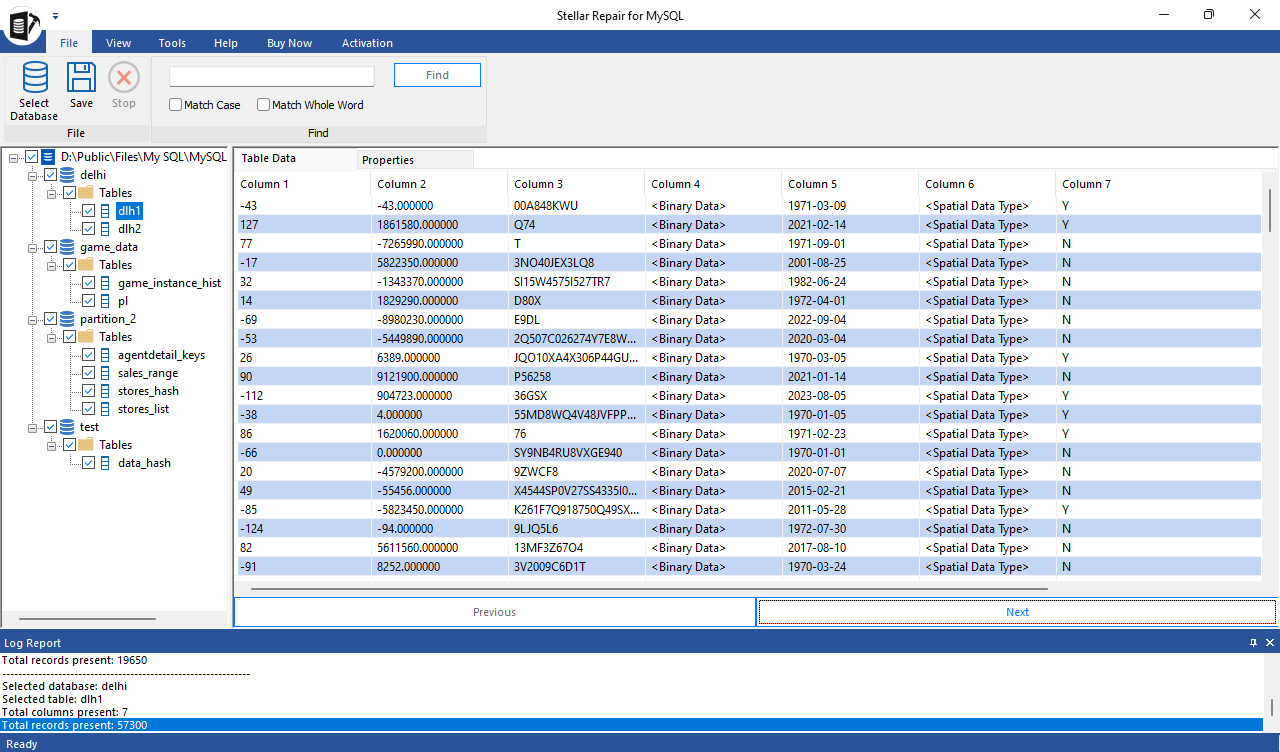
After a repair: databases and tables on the left, the selected table's data on the right, the log report below.
Features
InnoDB and MyISAM, from the raw files
Stellar Repair for MySQL repairs InnoDB and MyISAM tables from their .frm, ibdata, .ibd, .MYD and .MYI files, restoring table properties, relationships and primary, unique and foreign keys. For InnoDB, put the ibdata file in the same folder as the database. For MySQL 8, foreign key attributes are saved to a text file.
Several databases in one run
Stellar Repair for MySQL lists every database in the data folder and repairs all the ones you tick in one batch, which helps when a server crash damaged a whole instance rather than one table.
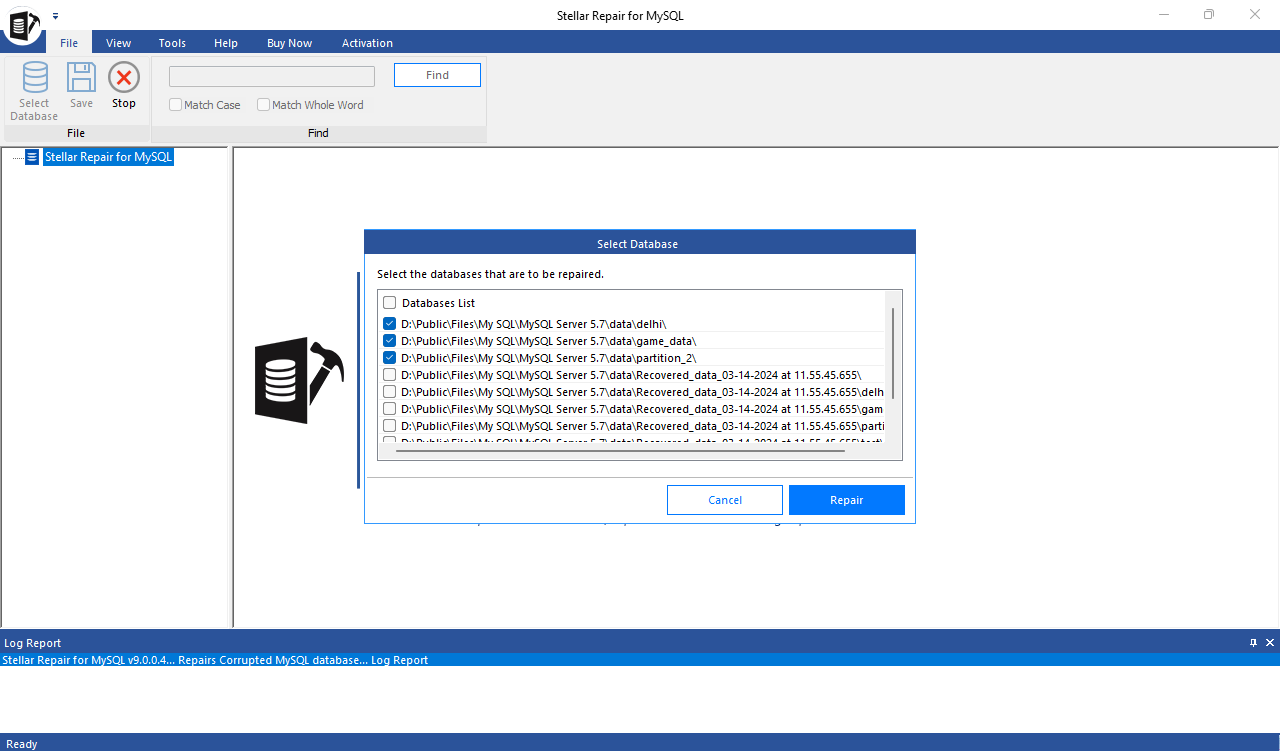
Choosing which databases in the data folder to repair in one batch.
All data types, partitions, views and triggers
Stellar Repair for MySQL handles numeric, string, date, spatial, JSON, BLOB, TEXT and Vector types and MySQL 9 collations, keeps auto-increment and default values, and repairs range, linear hash and list partitioned tables without the SQL error 1096 that manual REPAIR TABLE can hit.
Save to a server or to files
Stellar Repair for MySQL saves into a live MySQL or MariaDB server (host, user name and password), or to SQL script, CSV, HTML or XLS. The file options let you check or hand over the data without installing MySQL, and a SQL script can also help when moving to SQL Server.
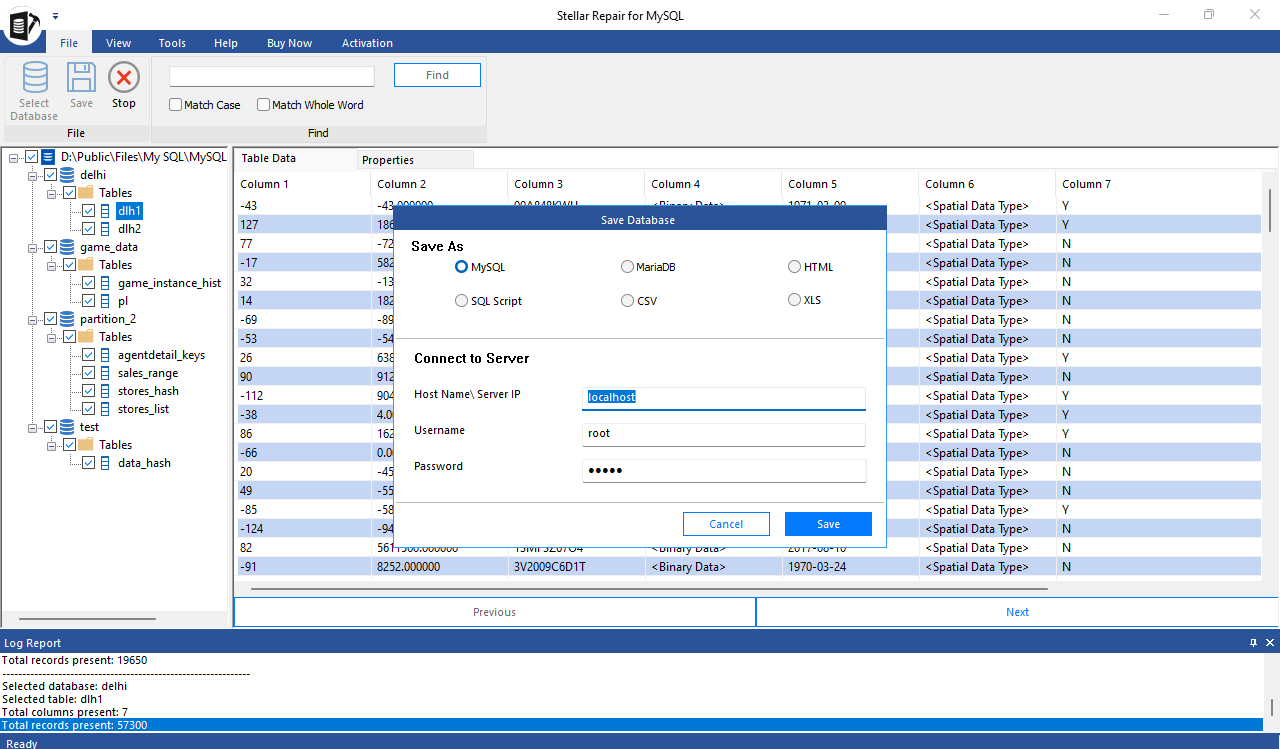
The save dialog: MySQL, MariaDB, SQL script, CSV, HTML or XLS, with the server connection details.
Benefits
It turns "we have no backup" from a disaster into an afternoon's work. You get to see the actual rows before paying, and the repair happens on a copy of the files, so you don't risk making the damage worse with a forced recovery mode on the live server. For agencies hosting many sites on one MySQL instance, the batch repair matters: one crash can damage dozens of databases at once.
Real-World Uses
- A WordPress or shop site shows "Error establishing a database connection" after a power cut: copy the data folder to a Windows PC, repair, and save back to the server.
- "Table is marked as crashed and should be repaired" on a MyISAM table: when REPAIR TABLE fails, repair it from the .MYD and .MYI files.
- InnoDB won't start even at force recovery level 6: pull the tables out of the ibdata and .ibd files instead.
- An agency server update corrupted many client databases: Stellar's case study describes GO Marketing's outage; batch repair handles them together.
Who It's For, and Who Should Skip It
It's for anyone responsible for self-hosted MySQL or MariaDB, from a freelance web developer to a DBA, who wants a fallback for when backups and built-in recovery fail.
Skip it if you have a recent mysqldump or snapshot: restoring is faster and complete. Skip it for managed services like Amazon RDS or Azure Database for MySQL, where you can't reach the data files. Linux-only shops should plan on copying files to Windows. And if you also want MySQL log analysis and database conversion, the Toolkit for MySQL ($499 a year on Stellar's site) includes this repair tool.
Usage Guide
- Stop MySQL and copy the whole data folder (with ibdata for InnoDB) to a 64-bit Windows PC.
- Install the trial and launch Stellar Repair for MySQL.
- In Select Data Folder, browse to the copied folder.
- Tick the databases to repair and click Repair.
- When "Repair Complete" appears, browse the tables and check the rows you need.
- Buy and activate the license, then Save to MySQL, MariaDB, SQL script, CSV, HTML or XLS.
- Check the restored database (row counts, a few queries) before pointing the application at it.
Where it falls short
- Saving can be the tricky part. Two Trustpilot reviewers needed support to save into a database; one fixed an ODBC driver mismatch with an older driver.
- Linux build. LinuxTLDR concluded "the Linux version of this tool is not fully ready and requires a workaround to function properly."
- Windows platform only for repairs. Stellar's pricing table says the Technician edition "Repairs database installed on Windows platform"; databases from Linux servers need copying over.
- Price for a one-off. LinuxTLDR also called the license expensive compared with alternatives.
What Users Say
Opinions are mixed but mostly positive, with support doing a lot of the work. Stellar as a company scored 4.8 out of 5 on Trustpilot from about 5,600 reviews across all its products when we looked (read through a summarizer, since Trustpilot blocks direct downloads). Independent reviews of this specific product are few.
Trustpilot
Rizvan Fujasuddin (May 25, 2023, 5 stars): "Managed to recover broken mysql 8. Good support team".
Rainier (December 1, 2025, 5 stars): "I used Stellar MySQL data recovery and I had a small problem that my ODBC driver was to recent." He added: "So an older one solved my problem. The support from Stellar was really quick and good".
Markus Andiel (September 6, 2024, 5 stars): "Immediately help by all of the service technicians, because it is dificult to save into database," and "There is a problem with the program".
Mark Roberts (November 4, 2022, 1 star): "We needed to recover some data from mySQL following a powercut." He complained that "the save option has limitations that you cannot identify until after you have purchased" and that "the quality (of the MYSQL software specifically) is very poor."
LinuxTLDR
LinuxTLDR's hands-on review (updated December 17, 2024) ran the tool on Linux and Windows. On Linux it hit "Either incorrect path or no tables in the database"; the same steps worked on Windows. Pros included that it "Efficiently can repair the latest version of MySQL and MariaDB databases" and its exports and log report. The test used an undamaged database, so it didn't measure repair quality.
The themes: it recovers MySQL 8 databases that native tools couldn't, and support responds quickly, but saving back into a database can need help, and the Linux build lags the Windows one.
Comparisons
Stellar Repair for MySQL vs REPAIR TABLE, myisamchk and innodb_force_recovery
The built-in tools are free and should be tried first, on a copy. REPAIR TABLE and myisamchk only cover MyISAM; innodb_force_recovery gets you a read-only server at best and can lose data at higher levels. Stellar handles both engines from the files, with a preview of the result.
Technician vs Toolkit for MySQL
The Toolkit adds MySQL log analysis for forensics and conversion between MySQL, SQL Server, Access, SQLite and SQL Anywhere. For repairs alone, Technician is enough.
Editions and Pricing
| Edition | Price | License | What it covers |
|---|
| Technician (this listing) | $199 | 1 year, single system | MySQL and MariaDB repair, batch repair, all save formats |
| Toolkit for MySQL | $499 on Stellar's site | 1 year | Adds log analysis and database conversion |
Prices checked on November 11, 2026.
FAQs
Does Stellar Repair for MySQL work with MariaDB?
Stellar Repair for MySQL repairs MariaDB databases up to version 11.8.3 and can save the result to a MariaDB server.
Can Stellar Repair for MySQL repair a database from a Linux server?
Stellar Repair for MySQL runs on Windows. Copy the Linux server's data folder to a Windows PC and repair it there; that's also what LinuxTLDR found worked.
Does Stellar Repair for MySQL need the ibdata file?
Stellar Repair for MySQL needs the ibdata file in the same folder as the database to repair InnoDB tables, according to Stellar's FAQ.
Do I need MySQL installed to use Stellar Repair for MySQL?
Stellar Repair for MySQL needs a MySQL or MariaDB server only if you save the repaired data back into a database. CSV, HTML, XLS and SQL script saves work without one.
What does the Stellar Repair for MySQL trial do?
Stellar Repair for MySQL's free trial repairs the database and previews all recoverable objects. Saving them needs a license.
Can I get a refund on Stellar Repair for MySQL?
Stellar Repair for MySQL is covered by Stellar's 30-day refund policy on a first purchase when it can't do the job and support has no fix, or the result after activation differs from the trial. Purchases made without trying the trial, and renewals, aren't refundable.
System Requirements
- 64-bit Windows 11, 10, 8.1 or 8
- Intel-compatible x64 processor
- 2 GB of RAM minimum, 4 GB recommended
- 250 MB of free disk space
- MySQL 5.0 to 9.5 or MariaDB up to 11.8.3 databases
Conclusion
Stellar Repair for MySQL is worth $199 a year when a MySQL or MariaDB database is corrupt, the built-in recovery has failed and there's no usable backup. The one reason to buy it is that it handles both InnoDB and MyISAM from the raw files and shows you the repaired rows in the trial first. The main reason to hesitate is the save step: test it on your own data and Windows setup before paying, because that's where users report trouble.
Download Free Trial Buy Now