Nero Burning ROM 2027: The Classic Windows Disc Burner, Still Going
Nero Burning ROM 2027 is a $55.95 one-time purchase for Windows 10 and 11 that burns, copies and rips CDs, DVDs and Blu-ray discs, and locks data discs with 256-bit SecurDisc encryption. It's for anyone who still archives files, makes audio CDs or rips a music collection, and it includes Nero Express and Nero CoverDesigner.
Windows can write a basic data disc on its own, but it can't copy a disc, rip a whole shelf of CDs with album details, burn a Blu-ray video structure, or password-protect a backup DVD. That's the gap Burning ROM has filled since the 1990s.
Quick facts
- Developer: Nero AG
- Version: 29.0.1.18 (Nero Burning ROM & Express 2027)
- Platform: Windows 11 and Windows 10, 1 PC
- Price: $55.95, one-time (lifetime license of the 2027 version)
- Includes: Nero Burning ROM, Nero Express, Nero CoverDesigner
- Media: CD-R/RW, DVD±R/RW, DVD-RAM, DVD±R DL, BD-R/RE, BD-R/RE DL and BDXL
- Guarantee: 30-day money-back guarantee
- What we checked: the order page price of $55.95 as a lifetime license, Nero's update service listing build 29.0.1.18 of Burning ROM & Express 2027 (88.6 MB), and the free trial button on nero.com, which serves an 8 MB web installer labelled Burning ROM 2026 (NeroInstaller 3.0.2.25), all on November 13, 2026. We didn't burn test discs.
Buy NowDownload Free Trial
Overview
Nero Burning ROM is the program the Nero name grew from. The workflow hasn't changed much, which is the point: pick a disc project (data, audio, video, image), drag files into the compilation, watch the capacity bar so you don't overfill the disc, and burn. The 2027 release adds batch ripping of several audio CDs with new options, according to Nero's update notes.
Two smaller programs come with it. Nero Express is a wizard for quick everyday burns, and Nero CoverDesigner designs covers, inlays and disc labels for what you've burned.
Features
Burn every disc type, including Blu-ray and BDXL
Nero Burning ROM burns data discs (ISO, UDF or both), audio CDs, mixed-mode and CD Extra discs, Video CD, Super Video CD, DVD-Video, AVCHD and BDMV discs. It writes and burns ISO and Nero NRG images, imports CUE images, and can split a large data set across several discs with Nero DiscSpan. Supported media run from CD-R to quad-layer BDXL.
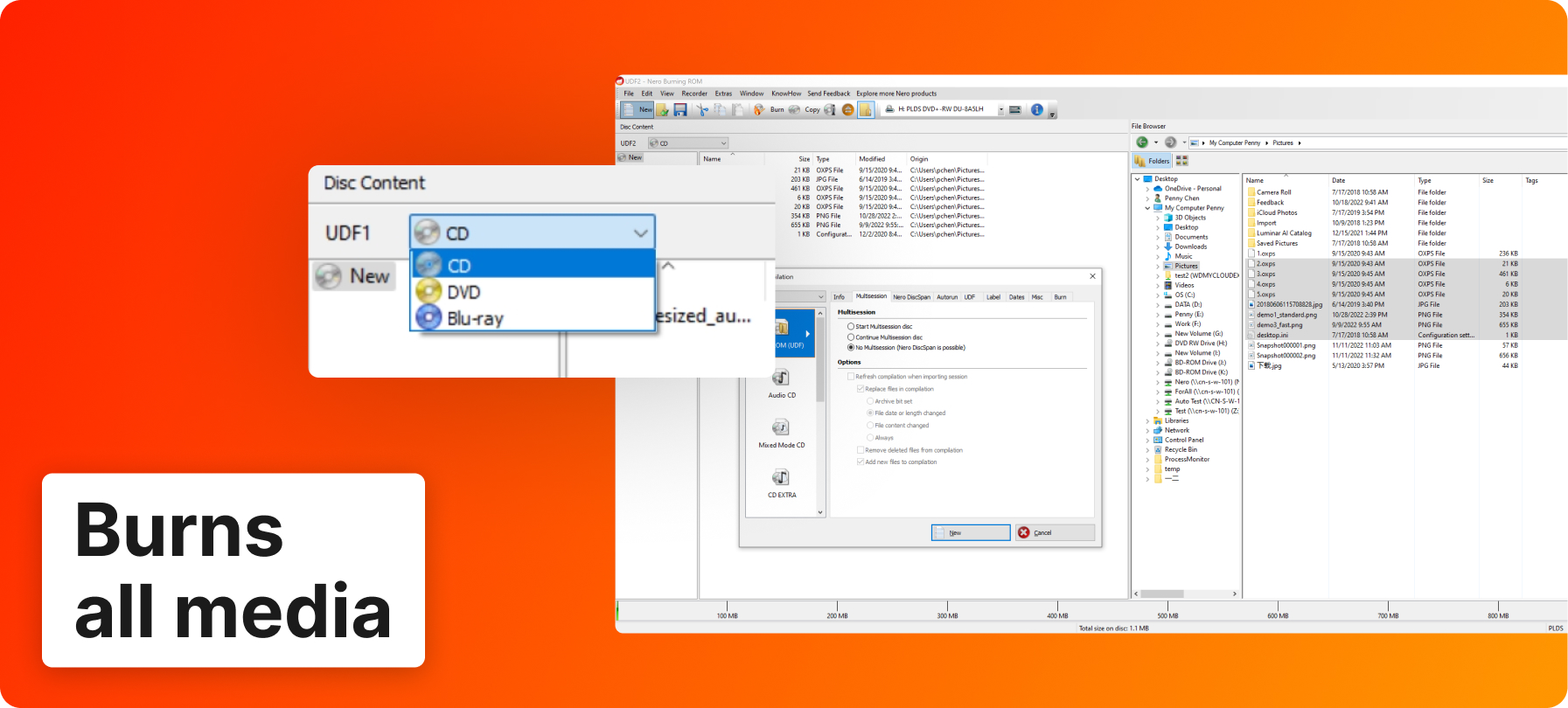
Nero's annotated screenshot: a UDF data compilation with the disc type menu (CD, DVD, Blu-ray) and the file browser on the right.
Rip audio CDs with album details and cover art
Nero Burning ROM rips audio CDs to MP3, MP3 PRO, AAC, FLAC and APE, filling in titles, artist, album, year and genre through Gracenote and embedding the album cover. The 2027 version can rip several CDs in one batch. Nero also notes that while Windows is dropping its own CD information service, Burning ROM keeps full music CD support through Gracenote.
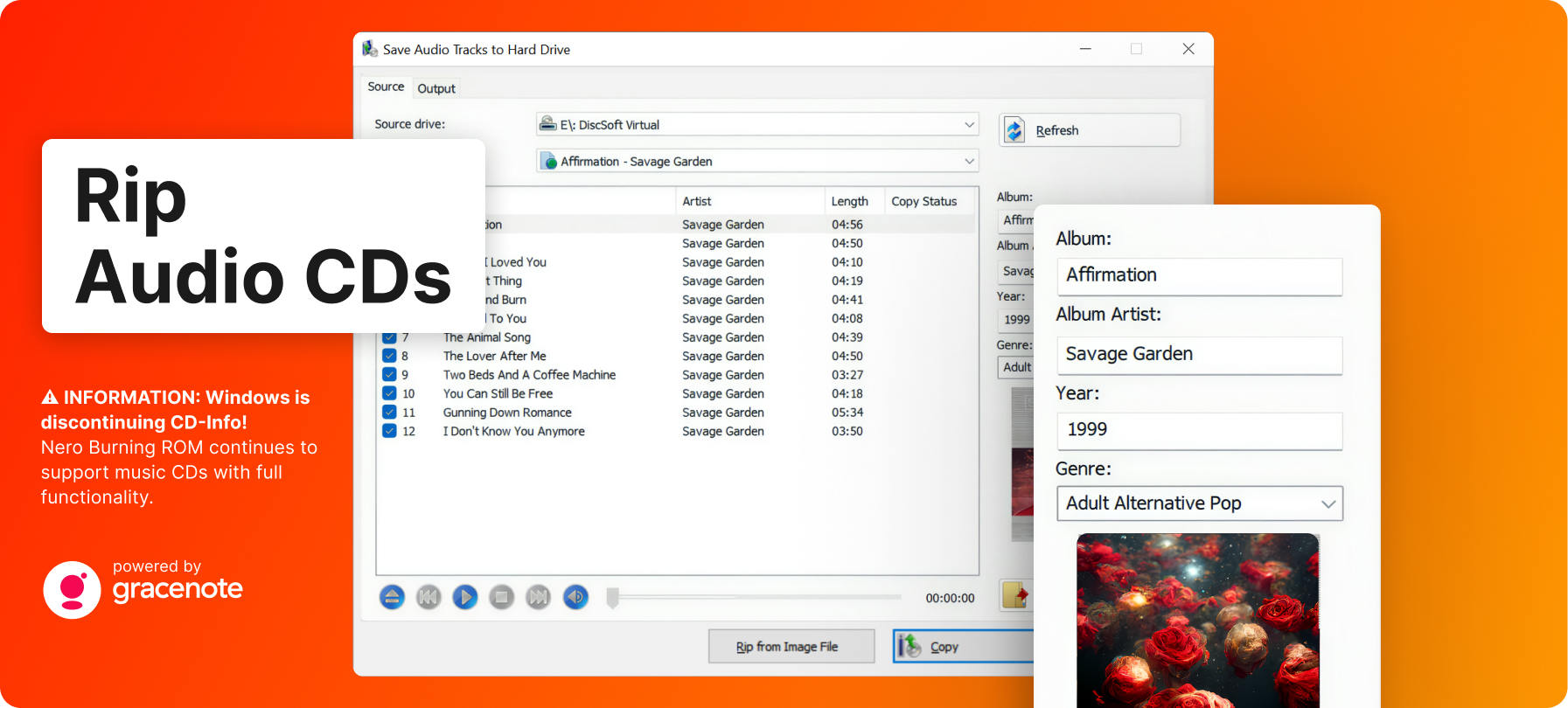
Nero's annotated screenshot of the "Save Audio Tracks to Hard Drive" dialog, with the track list, album details from Gracenote and the cover image.
Lock and protect data discs with SecurDisc 4.0
Nero Burning ROM's SecurDisc 4.0 encrypts a data disc with 256-bit encryption and a password, adds a digital signature so you can tell whether the files were changed, and adds adjustable redundancy so a scratched disc can still be read.
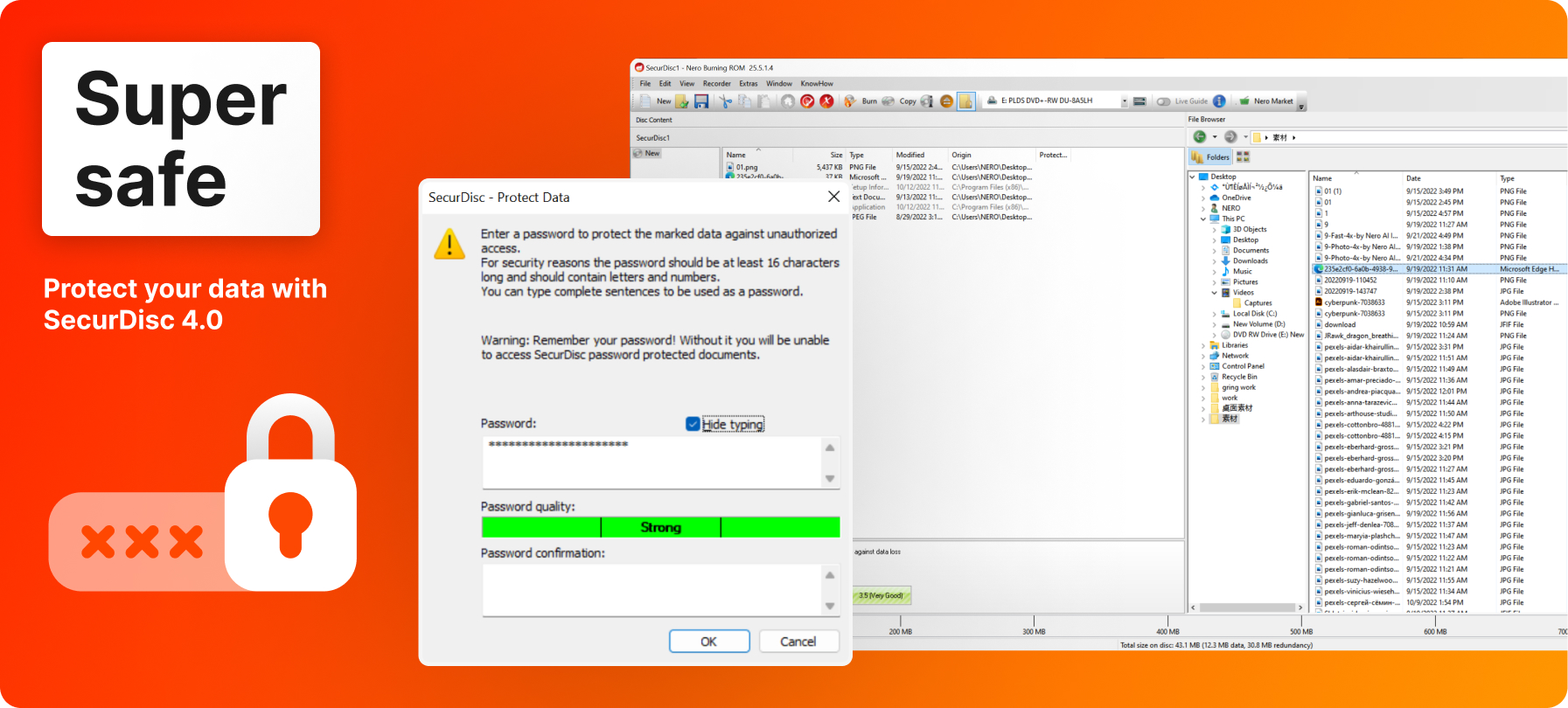
Nero's annotated screenshot of the "SecurDisc - Protect Data" dialog, where you set and confirm the disc password with a strength meter.
Copy discs and improve burned audio
Nero Burning ROM copies CDs, DVDs and Blu-ray discs, or saves them as an image file to burn later. For audio CDs it offers filters and automatic sound improvement, and it can write album art to MP3 CDs and DVDs for car stereos that display it.
Benefits
- You own it. $55.95 once, no renewal, unlike Nero's yearly suite plan.
- Archives you can trust. Verification, encryption and redundancy matter more for a 10-year backup disc than burn speed.
- One tool for the whole disc job: burn, copy, rip and print the cover without switching programs.
Real-World Uses
- Tax and photo archives: burn a password-protected SecurDisc DVD or Blu-ray of a year's documents or photos and keep it off-site.
- Car CDs: make an audio CD from MP3s for an older car, or an MP3 CD with album art for a newer stereo.
- Digitize your music shelf: batch-rip a stack of CDs to FLAC with titles and covers filled in.
- Distribute ISO images: burn a Linux or recovery ISO to a bootable disc.
- Gifts: burn a wedding video to DVD and print a matching cover in CoverDesigner.
Who It's For, and Who Should Skip It
Good fit: Windows users with an optical drive who burn discs more than now and then, rip CDs, or need encrypted archive discs, and who want a supported, one-time-purchase tool.
Skip it if:
- You burn one disc a year: Windows' built-in burning or a free burner covers simple data discs.
- You're on a Mac: there's no Mac version.
- You want video editing or backup too: Nero Platinum Suite 2027 includes Burning ROM along with Nero Video, BackItUp and about 15 other programs for $59.95 a year, so it's better value if you'd use more than the burner.
Usage Guide
- Download the free trial web installer (8 MB) from Nero and run it; it downloads and installs the program.
- Activate with the license from your order. Nero programs need an internet connection to verify the license.
- Start Nero Burning ROM, choose the disc type (CD, DVD or Blu-ray) and a project, such as Data, Audio CD or Image.
- Drag files from the browser on the right into the compilation, watching the capacity bar at the bottom.
- For a protected disc, turn on SecurDisc and set a password.
- Insert a blank disc and click Burn.
Before you buy
- You need a disc burner. Many new PCs have none; a USB DVD or Blu-ray writer works.
- The trial installer on nero.com is still labelled 2026. It's a small web installer; the purchase is the 2027 version.
- One PC per license, activated online.
- 30-day money-back guarantee.
Buy NowDownload Free Trial
Where it falls short
- Support and accounts. Nero's Trustpilot reviews complain about slow email support and the Nero account sign-in that now sits in front of Nero programs.
- Drive problems. A burner that Windows doesn't recognize properly won't work in Nero either; Nero asks for current WHQL drivers.
What Users Say
Recent independent reviews of Burning ROM on its own are rare, since most coverage is of the Platinum Suite it's part of. Here's what we found.
TechRadar
Binay Gupta's TechRadar review (September 2020) called Nero Burning ROM "a top-notch app with a range of outstanding features, backed with excellent customer support to boot." He praised its "sleek and user-friendly interface with well-defined menus and clearly labeled functions" and said "For the money, it represents great value for those looking for a fully-fledged application to deal with all their disc burning needs." His one listed minus was a 100 MB burn limit in the trial at the time.
Reviews of the suite's burning tools
- Steve Litchfield, reviewing Nero Platinum Suite 2026 on his blog in May 2026, said the classic modules, Burning ROM included, "all work as well as they ever did, hence my enthusiasm for the suite as a whole."
- Marty Hovey (Trustpilot, 5 stars, November 2026): "I usually try Nero first for a solution to a project." He uses Nero for burning, ripping and converting.
- Dmytro Danko (Trustpilot, 3 stars, August 2026): "I bought the CD-writer and license for Nero and Nero not working, it's irritated."
Nero as a company on Trustpilot
Nero's Trustpilot page, which covers all its products, shows 3.0 out of 5 from about 350 reviews, with 49% one-star. Most of the one-star reviews are about subscription renewals and slow support rather than the burning software, for example Kevin Blunt (October 2025): "Customer service is shocking and if I do get a response it could take up to two weeks or more". Burning ROM is a one-time purchase, so the renewal complaints don't apply to it.
The pattern: reviewers rate the burning engine well and have for years; the complaints are about support and Nero's account system, not about discs coming out wrong.
Comparisons
Nero Burning ROM vs Nero Platinum Suite 2027
Nero Burning ROM 2027 costs $55.95 once. Nero Platinum Suite 2027 costs $59.95 a year, renews automatically, and includes the same Burning ROM plus Nero Video, BackItUp, Recode, MediaHome, the AI photo tools and more. Buy Burning ROM alone if burning and ripping is all you do; take the suite if you'd also edit video or run backups.
Nero Burning ROM vs free burners
Nero Burning ROM costs money where free burners don't, but adds SecurDisc encryption and redundancy, Gracenote album details when ripping, batch CD ripping, disc copying, CoverDesigner and vendor support in one program. For an occasional data disc, a free tool is enough.
Editions and Pricing
| Edition |
Price on the order page |
License |
Includes |
| Nero Burning ROM 2027 |
$55.95 once |
1 PC, lifetime, no renewal |
Burning ROM, Nero Express, CoverDesigner |
FAQs
Is Nero Burning ROM 2027 a subscription?
No. Nero Burning ROM 2027 is a one-time purchase for 1 PC; the order page lists it as a lifetime license with no renewal.
Does Nero Burning ROM include Nero CoverDesigner?
Yes. Nero Burning ROM 2027 comes with Nero CoverDesigner for disc covers, inlays and labels, and with Nero Express for quick burns.
Will Nero Burning ROM still find album names when I rip a CD?
Yes. Nero Burning ROM looks up titles, artist, album and cover art through Gracenote, so it keeps working while Windows drops its own CD information service.
Can I try Nero Burning ROM before buying?
Yes. Nero Burning ROM has a free trial from nero.com, and the purchase comes with a 30-day money-back guarantee.
Does Nero Burning ROM work with an external USB burner?
Yes, Nero Burning ROM works with any CD, DVD or Blu-ray recorder that Windows recognizes, internal or USB.
Does Nero Burning ROM run on Windows 7?
No. Nero Burning ROM 2027 lists only Windows 11 and Windows 10.
Is Nero Burning ROM included in Nero Platinum Suite?
Yes. Nero Platinum Suite 2027 includes Nero Burning ROM, Nero Express and CoverDesigner along with about 15 other Nero programs, on a yearly plan.
System Requirements
- Windows 11 or Windows 10
- 2 GHz AMD or Intel processor, 1 GB RAM
- CD, DVD or Blu-ray recordable or rewritable drive for burning
- Internet connection to verify the license
Conclusion
Nero Burning ROM 2027 is worth $55.95 if discs are still part of your routine: archive DVDs and Blu-rays, audio CDs, or a CD collection to rip. The one reason to buy it is that it does every disc job well in one program, with SecurDisc encryption that free burners don't match, and you pay once. The main reason not to is that you may not need it: for an occasional data disc, Windows does the job, and if you'd also use a video editor or backup tool, Nero Platinum Suite gives you Burning ROM and much more for about the same money per year.
Buy NowDownload Free Trial