Short answer: it depends on what kind of disc you're making, and there's a clear pick for each. To burn data, audio CDs, ISO images and Blu-ray discs, buy Nero Burning ROM 2027 ($55.95 once): it does every disc job, rips CDs with album details and encrypts archive discs. BurnAware Premium ($29.95) is the light, cheaper alternative, and BurnAware Professional is the edition for business use. To turn videos into a DVD that plays on a TV, with a menu and chapters, get Cisdem DVD Burner for Windows ($59.99 once) for the best menu designer and preview, Leawo DVD Creator if you also want photo slideshows ($39.95 lifetime), or Aiseesoft DVD Creator if you still run an older version of Windows.
First: data disc or video DVD?
"DVD burning software" covers two different jobs, and buying the wrong kind is the most common mistake:
- A data disc stores files as files: photos, documents, MP4s, an ISO image. A computer reads it, and some players read MP4 files from it, but most living-room DVD players won't play it. Nero Burning ROM and BurnAware are built for this, plus audio CDs, disc copies and Blu-ray.
- A video DVD (DVD-Video) is converted to the format every DVD player understands, with a menu and chapters. Cisdem DVD Burner, Leawo DVD Creator and Aiseesoft DVD Creator do this conversion for you. The result is always standard definition (720 x 480 NTSC or 720 x 576 PAL), whatever resolution your video was.
At a glance
| Nero Burning ROM 2027 | BurnAware Premium | Cisdem DVD Burner | Leawo DVD Creator | Aiseesoft DVD Creator |
|---|
| Main job | Data, audio, ISO, copy, rip | Data, audio, ISO, copy | Video DVD with menus | Video DVD with menus | Video DVD with menus |
| Price at checkout (1 PC) | $55.95 once | $29.95 once (1 year of updates) | $59.99 once | $29.95 a year or $39.95 lifetime | $39.96 once |
| Windows | 10 and 11 | Vista to 11 | 10 and 11, 64-bit | 7 to 11 | XP to 11 |
| Blu-ray | ✓ Data and BDMV video | ✓ Data and BDMV | ✗ DVD only | ✗ DVD only | ✗ DVD only |
| Copy a disc | ✓ | ✓ | ✗ | Separate Leawo module | ✗ |
| DVD menus and chapters | Burns DVD-Video folders, no menu design | Simple menu since 19.5, no chapters | ✓ 50+ templates, chapters, preview | ✓ Templates, chapters | ✓ Templates, chapters |
| Photo slideshows | ✗ | ✗ | ✗ | ✓ | Images accepted as input |
| Extras | SecurDisc encryption, CD ripping with Gracenote, CoverDesigner | Disc spanning, M-Disc and BDXL, verify | Trim, crop, rotate, subtitles | Editor, 2D to 3D, slideshows | Trim, crop, extra audio and subtitle tracks |
| Free trial | ✓ | 7 days, full features | First 5 minutes of each video | First 5 minutes of content | ✓ |
How we picked and what we checked
- We started from the disc burners in our CD Burners category that are still sold and updated, and split them into data burners and video DVD makers.
- We read each vendor's product page, user guide, trial terms and refund policy for the table above.
- We checked prices on each order page in US dollars and the current version from each vendor's installer or update notes.
- We read Trustpilot for each vendor on the same day, plus the reviews gathered on our own product pages (TechRadar, FileHorse, ghacks, Giveaway of the Day and others).
What we checked: order-page prices on November 20, 2026 (Nero Burning ROM 2027 $55.95; BurnAware Premium $29.95 and Professional $39.95; Cisdem DVD Burner $59.99; Leawo DVD Creator $29.95 a year or $39.95 lifetime; Aiseesoft DVD Creator $39.96 after a $9.99 discount); the BurnAware 19.5 Premium installer (file version 19.5.0.0, released November 10, 2026) and the Leawo installer (file version 13.0.1.8, dated November 16, 2026), both downloaded on November 20, 2026; Nero's update service listing build 29.0.1.18 on November 13, 2026; and Trustpilot scores on November 20, 2026. We compared features, prices and trials. We didn't burn test discs, so burn quality and player compatibility come from the vendors and the reviews quoted.
Nero Burning ROM 2027: best for data, audio CDs and Blu-ray
- Price: $55.95 at checkout, a one-time lifetime license for the 2027 version on 1 PC
- Version: build 29.0.1.18 of Burning ROM & Express 2027
- Runs on: Windows 11 and 10
- Includes: Nero Burning ROM, Nero Express and Nero CoverDesigner
- Refunds: 30-day money-back guarantee
Best for: anyone who still archives files, makes audio CDs or rips a CD collection
Nero Burning ROM 2027 is the burner the Nero name grew from, and it still covers more disc jobs than anything else here. It burns data discs (ISO, UDF or both), audio CDs, mixed-mode discs, Video CD, DVD-Video, AVCHD and BDMV, from CD-R up to quad-layer BDXL. It writes and burns ISO and NRG images, copies CDs, DVDs and Blu-rays, and splits a large backup across several discs with DiscSpan.
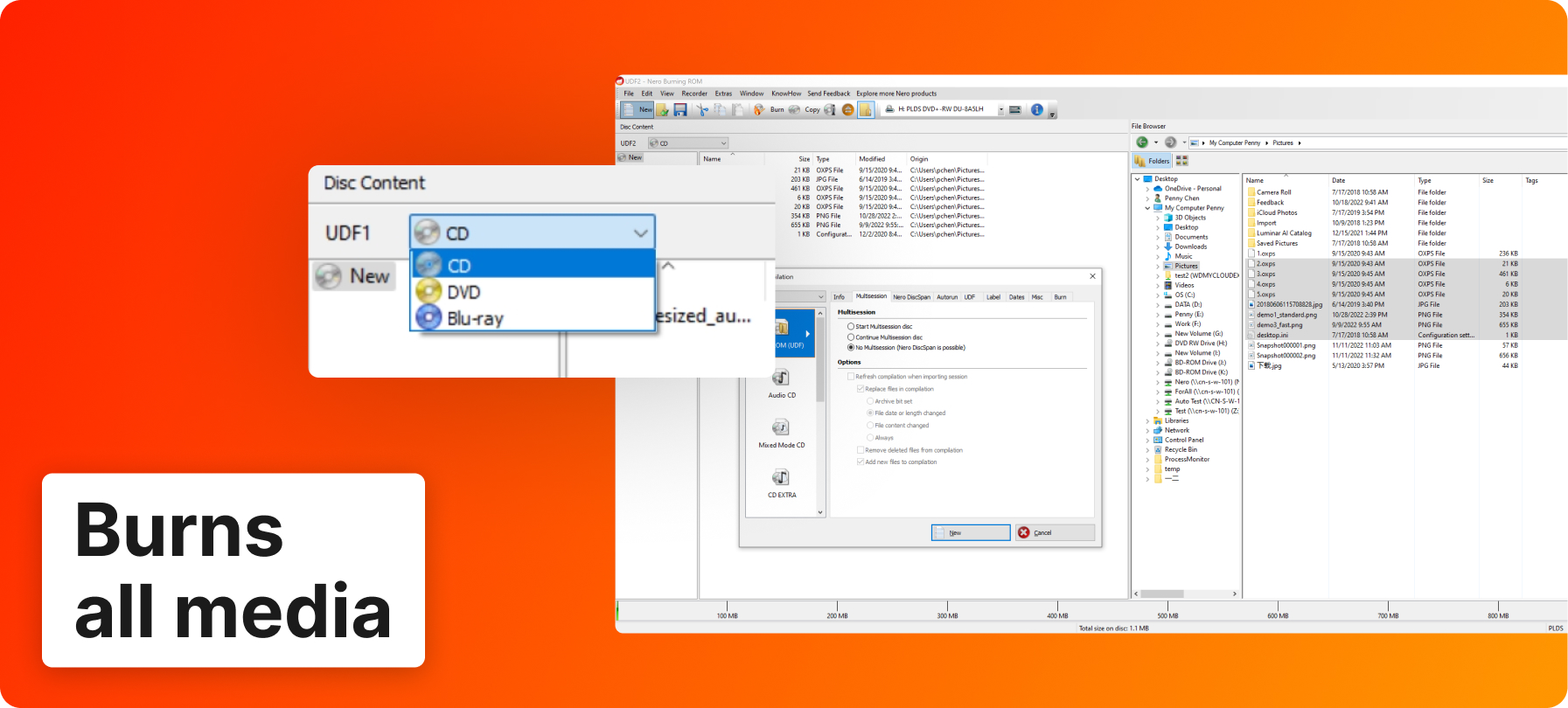
Nero's annotated screenshot of Nero Burning ROM: a UDF data compilation with the disc type menu (CD, DVD, Blu-ray) enlarged, the New Compilation dialog and the file browser on the right.
Two things set it apart from the cheaper burners. SecurDisc 4.0 encrypts a data disc with 256-bit encryption and a password, signs it so you can tell if files were changed, and adds redundancy so a scratched disc can still be read: useful for tax records or photo archives kept off-site. And its CD ripper fills in titles, artist, album and cover art through Gracenote, now in batches of several CDs, to MP3, AAC, FLAC or APE. CoverDesigner prints the inlay and label.
The weak spots are Nero as a company and its account system: Trustpilot reviewers complain about slow email support and the Nero sign-in that now sits in front of its programs. The free trial download on nero.com is still a small web installer labelled 2026; the purchase is the 2027 version.
What we like
- Every disc type, including Blu-ray, BDXL and BDMV
- SecurDisc encryption and redundancy for archive discs
- Batch CD ripping with Gracenote album details
- Disc copying, DiscSpan and CoverDesigner included
- One payment, no renewal
Watch out for
- Windows 10 and 11 only, no Mac version
- No menu design for video DVDs
- Needs an internet connection to verify the license
- Nero's support has poor reviews
What reviewers say about Nero Burning ROM
TechRadar's Binay Gupta (September 2020) called it "a top-notch app with a range of outstanding features, backed with excellent customer support to boot."
Marty Hovey on Trustpilot (5 stars, November 2026): "I usually try Nero first for a solution to a project."
Nero as a company scored 2.9 out of 5 from 351 Trustpilot reviews on November 20, 2026. Most one-star reviews are about subscription renewals of other Nero products and slow support; Burning ROM is a one-time purchase.
Download Nero Burning ROM Free TrialBuy Nero Burning ROM 2027
BurnAware Premium and Professional: best light, low-cost burner
- Price: $29.95 once with 1 year of updates, or $89.95 with lifetime updates, on BurnAware's order page
- Version: 19.5, released November 10, 2026
- Runs on: Windows Vista, 7, 8, 10 and 11, 32-bit and 64-bit
- License: one person, up to 3 computers, non-commercial use
- Trial: 7 days, fully functional; refunds within 14 days only if the key wasn't activated
Best for: home users who burn discs now and then and want a fast, simple tool
BurnAware Premium opens on a launcher with one icon per job (Data Disc, Audio CD, MP3 Disc, Video DVD, Burn ISO, Copy Disc and so on), and that's the whole learning curve. It burns data discs to CD, DVD, Blu-ray, M-Disc and 100 GB BDXL, writes audio CDs with CD-Text from MP3, FLAC and other files, makes and burns ISO images, copies discs, and spans a big backup across several discs. Its DVD-Video converter turns MP4, MKV and other files into a playable DVD, and version 19.5 added an option to create a simple menu for it.
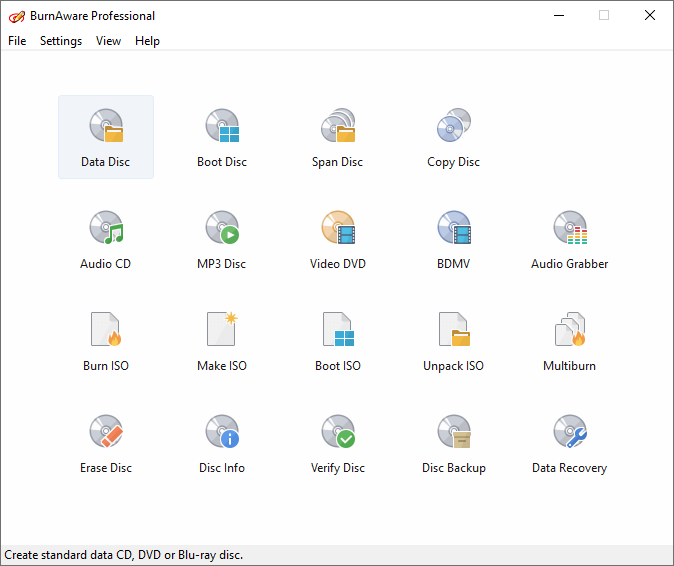
The BurnAware launcher (Professional edition shown): Data Disc, Boot Disc, Span Disc, Copy Disc, Audio CD, Video DVD, ISO tools and utilities. Premium has the same layout without Console Burner, Audio Grabber, Multiburn and Data Recovery.
BurnAware Professional ($39.95, or $99.95 with lifetime updates) adds the right to use it at work, data recovery from damaged or multisession discs, an audio CD grabber for ripping tracks, and Multiburn, which writes one image to several recorders at once. BurnAware also offers a free edition for basic data, audio and ISO burning; Premium earns its price only if you need copying, spanning or the DVD-Video converter.
What we like
- Light and quick to learn
- M-Disc and 100 GB BDXL support for long-term archives
- Disc copying, spanning and byte-by-byte verification
- License covers up to 3 home PCs
- Updated in November 2026
Watch out for
- Premium is non-commercial only
- Video DVDs get only a simple menu, no chapters or templates
- No disc encryption
- Refund only while the key is unused
What reviewers say about BurnAware
TechRadar (Binay Gupta, review of BurnAware Free): "BurnAware is a smartly implemented and uncomplicated piece of disc burning software."
ghacks.net (Martin Brinkmann, March 2016): "BurnAware is a lightweight streamlined burning software for Windows that gets the job done and is simple to use."
FileHorse's review of BurnAware Professional lists "No built-in media editing tools" and "No support for disc encryption" among its cons. BurnAware has no Trustpilot page with reviews to compare.
Download BurnAware Premium Free TrialBuy BurnAware PremiumBuy BurnAware Professional
Cisdem DVD Burner for Windows: best for video DVDs with menus
- Price: $59.99 at checkout, a one-time license for one PC
- Version: 4.0.0.4000, released May 28, 2026
- Runs on: Windows 11 and 10, 64-bit only
- Output: DVD disc, DVD folder (VIDEO_TS) or ISO, on DVD-5, DVD-9 or DVD-10
- Free trial: every feature, but each video is cut to its first 5 minutes
Best for: wedding, family and event videos for people who only use a DVD player
Cisdem DVD Burner for Windows keeps the job in four tabs: Source, Menu, Preview and Burn. You drop in MP4, MKV, MOV, AVI, AVCHD or other files, trim, crop or rotate them, add SRT subtitles and chapters, and pick one of more than 50 menu templates. The menu designer is the strongest of the three DVD makers here: change the background to your own photo, edit the text, frames and buttons, move the layout and add music.

The Cisdem DVD Burner Menu tab: templates on the left, the Spring menu in the middle with two video frames and Next and Play buttons, and the Background, Element, Layout and Audio settings on the right.
The Preview tab plays the disc as a DVD player would, with titles and chapters, so you catch a broken menu button before you use up a blank. The limits: it needs 64-bit Windows 10 or 11, it burns video only (no photo slideshows on Windows), and it makes DVDs, not Blu-rays.
What we like
- Best menu designer here, with your own photos and music
- Chapters and a DVD-style preview before burning
- Takes most video formats without converting first
- One payment
- Updated in May 2026
Watch out for
- Most expensive of the DVD makers
- 64-bit Windows 10 and 11 only
- No photo slideshows on Windows
- Reviews are mostly on Cisdem's own site
What reviewers say about Cisdem DVD Burner
Cisdem as a company scored 4.9 out of 5 from 306 Trustpilot reviews on November 20, 2026; Trustpilot notes the company hasn't invited customers recently. Cisdem's own page shows 4.9 out of 5 from 35 reviews of the Windows version.
Charlotte, on Cisdem's review page (July 20, 2026): "The chapter feature is great because I can label each clip so when we stick the DVD in the player, the kids can jump straight to the bit they want"
Philip, on Cisdem's review page (June 20, 2026): "Does what it says on the tin — burns DVDs quickly and reliably. My only gripe is the menu template selection is a bit limited."
Download Cisdem DVD Burner Free TrialBuy Cisdem DVD Burner
Leawo DVD Creator: best value, with photo slideshows
- Price: $29.95 for one year (renews) or $39.95 lifetime, one PC
- Version: 13.0.1.8 (installer dated November 16, 2026)
- Runs on: Windows 7, 8, 8.1, 10 and 11 (Mac edition sold separately)
- Output: DVD-5 or DVD-9 disc, DVD folder or ISO, NTSC or PAL
- Free trial: every feature, but only the first 5 minutes of content are burned
Best for: home video and photo slideshow DVDs on a budget
Leawo DVD Creator burns videos and photo slideshows to a DVD with a menu, chapters and subtitles, which makes it the pick when your disc mixes clips and pictures. Its editor trims, crops, adds watermarks and effects, removes noise, and has a 2D-to-3D option; chapters can be added by hand or automatically. It installs as Leawo Prof. Media 13, a suite window where your license activates the Burn tab.

Leawo Prof. Media 13 on the Burn tab: the Childhood menu template in the preview, built-in templates on the right, and the disc capacity bar (3.32 GB of 4.38 GB) at the bottom.
Buy the lifetime license: at $39.95 it costs $10 more than one year, and Leawo's 1-year licenses stop working when they lapse unless you renew. Older user reviews (a 2015 giveaway) complained about thin menu design and awkward chapters; Leawo's own review page is almost all 5 stars, so make a 5-minute test disc and play it on the actual player first. Refunds cover bugs Leawo can't fix and hardware incompatibility, not a change of mind.
What we like
- Cheapest lifetime DVD maker here ($39.95)
- Photo slideshows with background music
- Chapters, subtitles and an editor
- Runs on Windows 7 to 11
- Updated in November 2026
Watch out for
- 1-year license stops working if not renewed
- Opens inside a bigger suite window
- Large download (about 218 MB)
- Older reviews criticize menu design
What reviewers say about Leawo DVD Creator
Leawo scored 4.6 out of 5 from 150 Trustpilot reviews on November 20, 2026, covering all its products.
Anthony Botello, on Leawo's review page (April 2019): "I've used this software for a couple of years and have to say honestly - It's very fast."
Brian, on Giveaway of the Day (October 2015, version 7.3): "Compared to other software of this type I have tried, sadly this program is lacking in features such as menu design, adding chapter marks and no preview of the menu before writing to a disc."
Download Leawo DVD Creator Free TrialBuy Leawo DVD Creator
Aiseesoft DVD Creator: for older Windows PCs
- Price: $39.96 at checkout ($49.95 less a $9.99 discount), lifetime license for 1 PC
- Version: 5.2.72 (installer dated February 2025)
- Runs on: Windows 11, 10, 8.1, 8, 7, Vista and XP (Mac version sold separately)
- Output: DVD disc, DVD folder or ISO, DVD-5 or DVD-9
- Refunds: 30 days, for quality problems
Best for: simple menu DVDs, including on a PC still running Windows 7 or older
Aiseesoft DVD Creator does the same core job as Cisdem and Leawo in one window: add videos, pick a menu template (Animal, Scenery, Festival, Plant, City and more), add background music, a background picture or an opening film, choose audio tracks and subtitles, and burn to disc, folder or ISO. The editor trims, crops, changes the aspect ratio and adds a watermark. It's the only one here that still lists Windows XP and Vista.
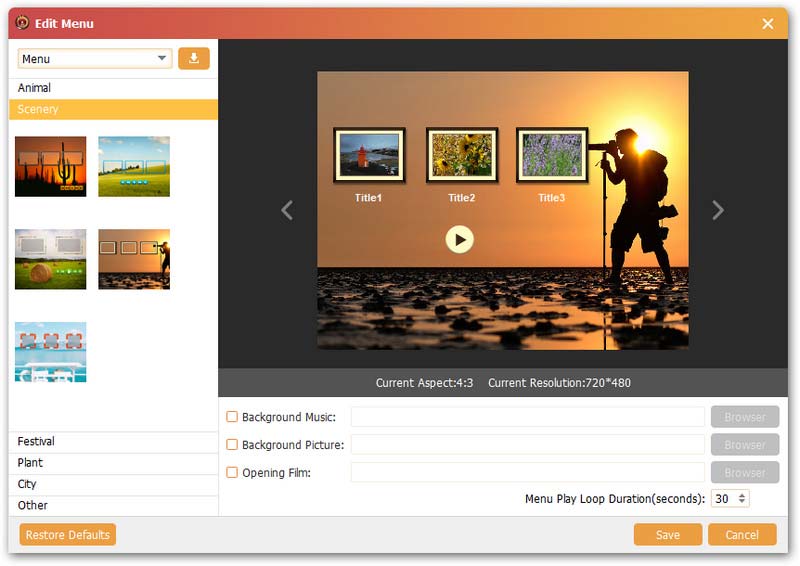
The Aiseesoft DVD Creator Edit Menu window: Scenery templates on the left, a three-title menu preview at 720x480, and the Background Music, Background Picture and Opening Film options.
The catches: the installer dates from February 2025, so it's the least recently updated program here, and it makes DVDs only (Aiseesoft sells Burnova for Blu-ray). If you buy on Aiseesoft's own purchase page instead, a Blu-ray Player trial that renews at $31.20 a month is ticked by default; untick it.
What we like
- Runs on everything from Windows XP to 11
- Menu templates with your own music, picture and opening film
- Extra audio tracks and subtitles
- One payment
Watch out for
- Least recently updated (February 2025 installer)
- DVD only, no Blu-ray
- No disc copying or ripping
- Refunds only for quality problems
What reviewers say about Aiseesoft DVD Creator
Aiseesoft Studio scored 3.9 out of 5 from 611 Trustpilot reviews on November 20, 2026, across all its products; the one-star reviews are mostly about refunds.
Juliet Kotze, quoted on Aiseesoft's product page: "It worked really easy to burn MP4 videos into a DVD folder."
caitlin hardwick on Trustpilot (1 star, October 2026): "They refuse any refund unless faulty."
Download Aiseesoft DVD Creator Free TrialBuy Aiseesoft DVD Creator
Can you burn a DVD for free on Windows?
Yes, for data. Windows 10 and 11 can burn files to a CD or DVD from File Explorer, and burn an ISO image by right-clicking it and choosing Burn disc image. BurnAware's free edition adds audio CDs, MP3 discs and bootable discs. What Windows no longer does is make a video DVD with a menu that plays in a DVD player: that's the gap Cisdem, Leawo and Aiseesoft fill. Going the other way, ripping a DVD to MP4, is covered in our DVD ripper comparison.
Price and ratings compared
One-time license for one PC (USD)
BurnAware Premium (1 year of updates)$29.95
Aiseesoft DVD Creator$39.96
Leawo DVD Creator (lifetime)$39.95
BurnAware Professional (1 year of updates)$39.95
Nero Burning ROM 2027$55.95
Cisdem DVD Burner for Windows$59.99
Order-page prices checked on November 20, 2026. Every license here keeps working after its update period ends; Leawo also sells a $29.95 one-year license that doesn't.
Trustpilot score (out of 5)
Aiseesoft Studio (611 reviews)3.9
Read on Trustpilot on November 20, 2026. All four scores cover the whole company (billing, support and other products), not just the burner. BurnAware has no Trustpilot score to compare.
Which DVD burning software should you choose?
| Your situation | Pick | Why |
|---|
| Back up files or photos to DVD, Blu-ray or M-Disc | Nero Burning ROM 2027 | Every disc type, verification, and SecurDisc encryption for archive discs |
| Make audio CDs or rip a CD collection | Nero Burning ROM 2027 | Audio CDs, batch ripping with Gracenote album details, CoverDesigner |
| Occasional burning, copying an old disc, lowest price | BurnAware Premium | $29.95, light and simple, covers up to 3 home PCs |
| Burning discs at work or for clients | BurnAware Professional | Commercial license, multi-drive burning and disc data recovery |
| A wedding or family video DVD with a custom menu | Cisdem DVD Burner for Windows | Best menu designer, chapters and a DVD-player preview |
| A DVD mixing video clips and photo slideshows | Leawo DVD Creator | Slideshows with music, chapters, $39.95 lifetime |
| A menu DVD on a Windows 7, Vista or XP PC | Aiseesoft DVD Creator | The only one here that still lists those versions |
Our picks: Nero Burning ROM 2027 if you burn data, audio and Blu-ray discs, and Cisdem DVD Burner for Windows if you're making a video DVD for someone to watch on a TV. If you only burn a data disc once a year, use Windows' own burning or BurnAware's free edition.
Who should skip each one
- Skip Nero Burning ROM if you only make video DVDs with menus (a DVD maker is easier), or burn one disc a year.
- Skip BurnAware Premium if you burn for work (buy Professional) or want a designed menu with chapters.
- Skip Cisdem DVD Burner if you run 32-bit Windows or anything older than Windows 10, or want photo slideshows.
- Skip Leawo DVD Creator if you'd buy the 1-year license: the lifetime one is only $10 more.
- Skip Aiseesoft DVD Creator if you're on Windows 10 or 11 and want the most actively updated tool; Cisdem or Leawo fit better.
What commonly goes wrong
- The disc won't play in the DVD player. It was burned as a data disc. Use a DVD maker (Cisdem, Leawo, Aiseesoft) or BurnAware's Video DVD compilation, and test with the trial's 5-minute disc on the actual player.
- The DVD looks soft on a big TV. DVD-Video is standard definition by design, so 1080p and 4K footage comes out at 720 x 480 or 720 x 576. For HD on a disc you need Blu-ray (BDMV), which Nero and BurnAware burn.
- No drive. Most new laptops have no disc drive. A USB DVD or Blu-ray writer works with every program here, and all three DVD makers can save an ISO or DVD folder to burn later.
- Coasters from a particular drive. Old BurnAware user reviews blame failed burns on particular drives, and Nero asks for current drive drivers. Update the drive's driver, try another brand of blanks and turn on verification.
- Wrong license. BurnAware Premium is non-commercial, Leawo's 1-year license stops working when it lapses, and each license here covers one PC except BurnAware Premium (up to 3).
- An unwanted add-on. Aiseesoft's own purchase page pre-ticks a Blu-ray Player trial that renews monthly; untick it if you buy there.
FAQs
What is the best DVD burning software for Windows 11?
Nero Burning ROM 2027 is the best all-round burner for Windows 11 for data, audio CDs and Blu-ray. For video DVDs that play on a TV, Cisdem DVD Burner for Windows is our pick, with Leawo DVD Creator the better value if you want photo slideshows.
Can Windows 11 burn a DVD without extra software?
Yes, but only a data disc. Windows 11 burns files and ISO images from File Explorer. It can't make a video DVD with a menu that plays in a DVD player, which is what Cisdem DVD Burner, Leawo DVD Creator and Aiseesoft DVD Creator do.
How do I burn an MP4 to a DVD that plays on a TV?
Use a DVD maker such as Cisdem DVD Burner for Windows or Leawo DVD Creator: add the MP4, choose a menu (or no menu), set NTSC or PAL for your country, and burn. Both convert the MP4 to DVD-Video for you. Burning the MP4 as a file only plays on players that read data discs.
Is Nero Burning ROM a subscription?
No. Nero Burning ROM 2027 is a one-time purchase at $55.95 for one PC. Nero's yearly subscription is Nero Platinum Suite, a different product that includes Burning ROM.
Which DVD burner can make Blu-ray discs?
Nero Burning ROM 2027 and BurnAware Premium both burn data Blu-rays and BDMV video structures, and both support BDXL. Cisdem DVD Burner, Leawo DVD Creator and Aiseesoft DVD Creator make DVDs only; their vendors sell separate Blu-ray products.
What's the difference between BurnAware Premium and Professional?
BurnAware Professional ($39.95) adds a commercial license, data recovery from damaged discs, an audio CD grabber and Multiburn to several recorders at once. BurnAware Premium ($29.95) is for home use on up to 3 PCs.
Do I need a DVD drive to use DVD burning software?
You need a DVD or Blu-ray writer to put anything on a disc, and a USB writer works with all of these programs. Without one, Cisdem DVD Burner, Leawo DVD Creator, Aiseesoft DVD Creator and Nero Burning ROM can still save an ISO image or DVD folder to burn later.
Can I copy a DVD with these programs?
Nero Burning ROM 2027 copies unprotected CDs, DVDs and Blu-rays, and BurnAware Premium copies data and audio discs, disc to disc or to an image file. The three DVD makers here don't copy discs.