BurnAware Premium: A Lightweight Windows Disc Burner That Copies, Spans and Converts Video
BurnAware Premium is a $29.95 Windows program for burning CDs, DVDs and Blu-ray discs at home. It does everything the free BurnAware does (data, audio, bootable and ISO discs) and adds disc-to-disc copying, disc spanning, a DVD-Video converter and a 64-bit build. The license is perpetual for personal use on up to three PCs, with one year of updates included.
If you still burn discs, you probably want three things: a program that starts fast, does not try to be a media suite, and does not turn your blanks into coasters. BurnAware has been that kind of tool since the late 2000s. Premium is the edition for people who also need to copy a disc, split a big folder across several discs or turn a phone video into a DVD the living room player will read. It was called BurnAware Home Edition until version 6.0 in February 2013, when the vendor renamed it Premium.
Quick facts
- Version: 19.5, released November 10, 2026
- Developer: Burnaware (BURNAWARE SL, Marbella, Spain)
- Platform: Windows Vista, 7, 8, 10 and 11, separate 32-bit and 64-bit installers
- Media: CD, DVD, Blu-ray, double-layer discs, M-Disc and 100 GB BDXL
- Price: $29.95 (perpetual license, 1 year of free updates), or $89.95 with lifetime updates
- License: one person, up to 3 computers, non-commercial use only
- Trial: free, fully functional, 7 days
- Refund: within 14 days, only if the license key has not been activated
- What we checked: the 64-bit Premium installer (30.8 MB, file version 19.5.0.0, digitally signed by BURNAWARE SL) downloaded from burnaware.com, and the prices on BurnAware's order page, $29.95 for the 1-year-updates license and $89.95 for the lifetime-updates license, both on November 20, 2026. We didn't burn a test disc.
Before you buy
- Premium is for home use. The license forbids commercial use. If you burn discs at work, for clients or in an office, you need BurnAware Professional ($39.95).
- Run the trial with your own burner first. The trial is identical to the paid version, and BurnAware asks buyers to confirm their drive works with it before paying. The refund window is 14 days and only applies while the key is still unused, so the trial is your real test.
- Check that you need Premium at all. BurnAware Free already burns data, audio, MP3, video, bootable and ISO discs. Premium earns its price only if you need copying, spanning, the DVD-Video converter or the 64-bit build.
Download Free TrialBuy Now
Overview
BurnAware opens on a launcher: one icon per job, grouped into Data, Multimedia, ISO Images and Utilities. You click a task, a compilation window opens, you drag files in and press Burn. There are no wizards, no media library and no video editor. The vendor's pitch is low CPU use and a stable burning process, and that matches what reviewers have said about it for more than a decade.
The program comes in three editions built on the same engine. Free covers the basic burning jobs. Premium adds the copy, spanning and video tools most home users eventually want. Professional adds data recovery, an audio CD grabber, multi-drive burning and the right to use it in a business.
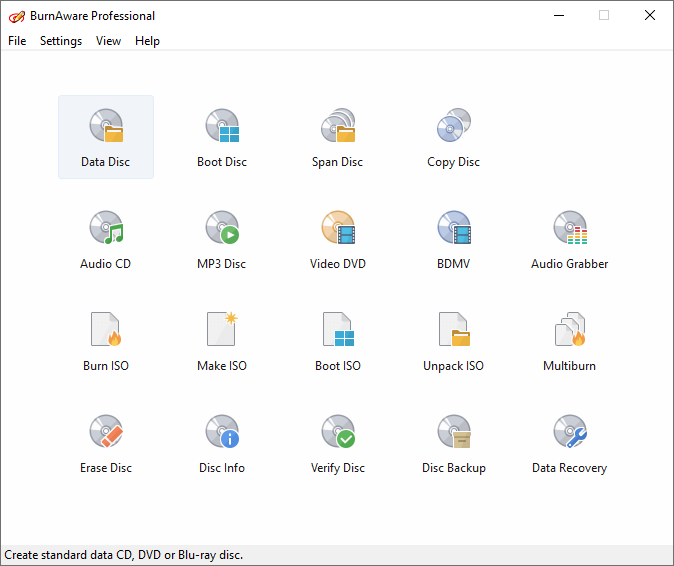
The BurnAware launcher, shown here in the Professional edition. Premium has the same layout without four Professional-only tools: Console Burner, Audio Grabber, Multiburn and Data Recovery.
Features
Copy a disc straight to another disc
BurnAware Premium's Copy Disc tool copies a data or audio disc from one drive to another. With two drives it can copy directly; with Direct Copy turned off (or one drive) it first saves a temporary ISO image to your hard drive, burns it to the new blank and deletes the temporary file. It also has Copy to ISO, which saves an exact image of a disc for later, and audio CDs are saved as a BIN/CUE pair.
Spread one big backup across several discs
BurnAware Premium's Span Disc compilation takes a set of files and folders larger than one disc and burns it across as many discs as it needs, asking for the next blank when one is full. It's the simplest way to archive a photo library or a project folder to a stack of DVDs or Blu-rays without splitting it by hand. Verification after burning and buffer underrun protection are available, as in the other data compilations.
Turn ordinary video files into a playable DVD
BurnAware Premium includes a DVD-Video converter. Add AVI, MOV, MPG, VOB, MP4, WMV or MKV files and it converts them to DVD-Video format, then burns the disc; version 19.4 added PAL and NTSC options, and version 19.5 (November 2026) added an option to create a menu for the disc and fixed an audio and video sync issue. If you already have a VIDEO_TS folder from authoring software, it can burn that directly instead. Beyond that simple menu there are no chapters or design tools, so this is for "make it play on the TV", not DVD authoring.
Burn data to anything up to 100 GB BDXL and M-Disc
BurnAware Premium writes data discs in UDF, ISO9660 or both (ISO+UDF), with multisession support so you can add files to a disc later, and an option to finalize it. It handles CD, DVD and Blu-ray, double-layer media, M-Disc archival discs and BDXL discs up to 100 GB. The Boot Disc compilation makes a bootable CD or DVD from a boot image file.
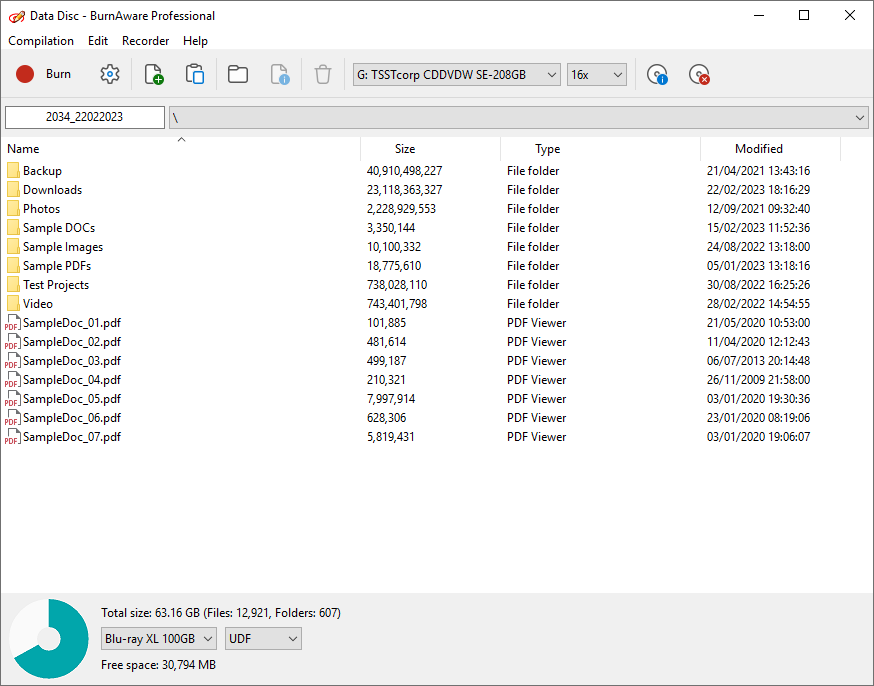
A Data Disc compilation (Professional title bar) with 63.16 GB of folders and PDFs queued for a Blu-ray XL 100 GB disc in UDF, showing the free space left.
Audio CDs with CD-Text, and MP3 discs
BurnAware Premium's Audio CD compilation converts MP3, WAV, WMA, OGG, M4A, AAC and FLAC files (or an M3U playlist) into a standard audio CD. It can write CD-Text so newer players show the album and track names, burns in disc-at-once or track-at-once mode, and lets you set or remove the pause between tracks. The MP3 Disc compilation puts many more songs on a CD or DVD as MP3 or WMA files, for players that read them.

An Audio CD compilation (Professional title bar) mixing MP3, FLAC, WMA, APE, OGG, AAC, AC3, M4A and WAV tracks, with 35:19 used of an 80-minute CD.
ISO tools and disc utilities
BurnAware Premium can make an ISO from files on your drive, make a bootable ISO, burn ISO, CUE and BIN images, and unpack an ISO to pull individual files out without burning it. The utilities erase rewritable discs (quick, or complete with zero overwrite), show drive and disc details (firmware, free space, sessions, file system) and verify a disc byte by byte, listing any file that can't be read.
Benefits
- It stays out of your way. One click per task and a short options panel. You don't have to learn a suite to burn one disc.
- It is light. The installer is about 30 MB, and reviewers from ghacks to TechRadar single out how little it asks of your PC while burning.
- You own the version you buy. There is no subscription. After the included year of updates you keep using your version for as long as you like.
- Modern media is covered. M-Disc and BDXL support matter if you archive to optical media for the long term, and many free burners don't list them.
Real-World Uses
- Archiving a family photo library: span 200 GB of photos across a few BDXL or M-Disc discs, with verification after each one.
- Making a DVD for grandparents: drop a few MP4 clips from your phone into the DVD-Video compilation and get a disc their DVD player plays.
- Duplicating a disc you rely on: copy an old software CD or a home-made audio CD before the original gets scratched, or keep it as an ISO.
- Car CD mixes: burn an audio CD with CD-Text from a playlist of FLAC and MP3 files, or an MP3 disc that holds far more songs.
- Rescue media: burn a bootable ISO of a recovery tool or an operating system installer.
Who It's For, and Who Should Skip It
BurnAware Premium fits a home user on Windows who burns discs now and then and has outgrown the free edition, most often because they want to copy discs, span backups or make video DVDs. It's also the edition to pick if you want a 64-bit build.
Skip it if:
- You use it for work. Premium's license is non-commercial. Buy Professional instead, which also adds data recovery and multi-drive burning.
- You only burn data or ISO discs. BurnAware Free does that, and it's what most of the independent reviews actually tested.
- You want real DVD authoring with menus, chapters and editing. Premium converts and burns video and can add a simple menu, but it has no chapters, templates or editing; a dedicated DVD authoring tool fits better.
- You're on a Mac or Linux. BurnAware is Windows only.
- You need to rip audio CDs to files or recover a damaged disc. Those tools are only in Professional.

The dark-theme launcher (Professional title bar) with the Data group open: Data Disc, Boot Disc, Span Disc and Copy Disc, the last two being Premium and Professional tools.
Usage Guide
- Install the trial. Download the 64-bit (or 32-bit) Premium installer from the vendor and run it. The trial has every Premium feature for 7 days.
- Pick a task on the launcher, for example Data Disc, Span Disc or DVD-Video.
- Choose the file system for a data disc (UDF, ISO or ISO+UDF; UDF suits DVDs and Blu-rays).
- Add files with Add Files or by dragging them from Windows Explorer. The bar at the bottom shows how much of the disc you've used.
- Set options: tick "Verify data on disc after burning", and "Finalize disc" if you won't add more later.
- Click Burn. For a spanned set, insert the next blank when prompted.
- Register: after buying, enter the license key in the installed trial. The key arrives by email right after payment.
Where it falls short
- Burning failures are usually about the drive or media, and BurnAware's support pages list error codes rather than fixes. Older user reviews of the free edition report coasters and an ignored burn-speed setting on some machines, which is why the trial matters.
- The DVD-Video converter is basic: a simple menu since version 19.5, but no chapters or trimming, and the vendor itself recommends authoring software for players that don't read data DVDs.
- Audio track order on MP3 discs is alphabetical only; you can reorder tracks only in an Audio CD compilation.
- "Invalid license key" errors usually mean the wrong edition is installed (Premium vs Professional) or the program needs to run as administrator, per the vendor's FAQ.
- Third-party reviews are thin for the paid editions; most independent coverage is of BurnAware Free.
What Users Say
BurnAware has been reviewed for close to two decades, but almost all independent reviews test the free edition. Premium runs the same burning engine and interface, so those verdicts carry over to it, but they don't cover Premium's extra tools.
Editors and tech sites
TechRadar (Binay Gupta, review of BurnAware Free): "BurnAware is a smartly implemented and uncomplicated piece of disc burning software." Its verdict: "BurnAware Free makes a good case for itself with an impressive range of features, and a commendable attitude in terms of user-friendliness." The review also notes the minimal menus: "some might even describe the interface as sparse".
FileHorse (Sophia Jones, review of BurnAware Professional) lists as pros a "Simple and user-friendly interface", "Fast and reliable burning process" and "Low resource consumption", and as cons "No built-in media editing tools", "No support for disc encryption", "Lacks direct cloud backup options" and "Occasional compatibility issues".
BetaNews (February 6, 2013) covered the release in which the paid home edition got its current name: BurnAware 6.0 "also available with additional features as BurnAware 6.0 Premium (rebadged from Home Edition)".
Craving Tech (Michael Aulia, September 2008) liked the program's focus, "BurnAware is not bloated. It's created solely to burn data onto a media", but complained that copying was held back for the paid editions: "you need to upgrade your edition to either Home (for USD $29.95) or Professional Edition (for USD $39.95)." That's still true, and still the same prices.
Quoted on BurnAware's reviews page
ghacks.net (Martin Brinkmann, March 2016): "BurnAware is a lightweight streamlined burning software for Windows that gets the job done and is simple to use. It does not bombard you with technical terms but makes those available to users who require them."
Softpedia (Madalina Boboc, February 2017): "BurnAware remains a top pick when it comes to burning solutions. The very strong feature pack coupled with a great ease of use can definitely make this utility a good choice for all users."
CNET (Chris Page, December 2013, on BurnAware Free): "It does it with a straightforward interface and even lets you start from scratch with its deletion feature."
Snapfiles user reviews (BurnAware Free, 4 stars average from 6 reviews)
busybusy (February 2022, v15.0): "For people still burning CD/DVDs this program will fit the bill for most people. The features provide everything you need and all for free. I'm impressed with the simplicity of the interface to the final product."
Protocom (September 2014, v7.4): "Downloaded, installed, ran, select function, select files, burn. Never even needed to look for instructions, it just worked and did exactly what I needed."
gimpguy (August 2012, v5.1): "After a few years of using it, only had a couple of coasters, nothing more or less than any other software (likely a couple of bad CDs) so it's doing well."
bobfromhull (November 2009, v2.4.1): "The burn speed setting is always ignored and all I have got from it is high speed coasters. Never Again!"
smoozdog (November 2008, v2.1.7): "version 2 has only created coasters for me. It's unfortunate because it WAS a great program."
The pattern across two decades is consistent: people like BurnAware because it's simple, quick and light, and the complaints are about failed burns on particular drives, mostly with versions from 2008-2009. Snapfiles lists Premium itself with an editor rating but no user reviews yet. The trial on your own hardware is the best evidence you'll get.
Comparisons
BurnAware Premium vs BurnAware Free
Both burn data, audio, MP3, video, bootable and ISO discs and back up a disc to an image. Premium adds the 64-bit build, the DVD-Video converter, disc spanning and disc-to-disc copying. Free is for personal use only too, so the choice is purely about those four tools.
BurnAware Premium vs BurnAware Professional
Professional ($39.95) adds Data Recovery (extract files from multisession or unreadable discs), the Audio Grabber (rip audio CD tracks), Console Burner and Multiburn (one ISO to several recorders at once), and, most importantly for many buyers, a license that allows business use. For $10 more, Professional is the one to buy if any of that applies.
Editions and Pricing
| Edition |
Price |
Updates |
Use |
Adds |
| Free | $0 | Free | Personal, at home | Data, audio, video, boot and ISO burning |
| Premium | $29.95 | 1 year | 1 person, up to 3 PCs, non-commercial | 64-bit, copy, spanning, DVD-Video converter |
| Premium Lifetime | $89.95 | Lifetime | 1 person, up to 3 PCs, non-commercial | Same as Premium, all future versions |
| Professional | $39.95 | 1 year | 1 person, up to 3 PCs, commercial allowed | Data recovery, audio grabber, Multiburn, Console Burner |
All paid licenses are perpetual: the 1-year option means one year of free upgrades, after which you keep your version and can simply turn off the update reminder. Businesses that need many seats can ask Burnaware for a quote on a pre-activated multi-user Professional license.
Buy Premium, 1 year of updates ($29.95)Buy Premium with lifetime updates ($89.95)
FAQs
What happens to BurnAware Premium after the first year of updates?
BurnAware Premium keeps working. The license is perpetual, so you can use the version you have for as long as you like; you only lose access to newer versions. You don't need to buy an update subscription.
Is the $89.95 lifetime license worth it over the $29.95 one?
BurnAware Premium's lifetime license costs three times as much and only adds future upgrades. Since the 19.4 and 19.5 updates were DVD-Video converter improvements and bug fixes, most home users are fine with the $29.95 license and can upgrade later if they need a new feature.
Can I install BurnAware Premium on my laptop and desktop?
Yes. A single-user BurnAware Premium license lets one person use it on up to three computers, for non-commercial use.
I had BurnAware Home Edition. Is Premium the same product?
Yes. BurnAware Home Edition was renamed BurnAware Premium with version 6.0 in February 2013. It still sits between the free edition and Professional and still costs $29.95.
How do I upgrade from the trial to the paid version?
BurnAware Premium's license key arrives by email as soon as payment goes through. Enter it in the trial you already installed; there's no separate download. To update a registered copy later, install the newest trial over it. If the key doesn't arrive, check your spam folder.
Can I get a refund on BurnAware Premium?
BurnAware offers refunds within 14 days of purchase, but only if the license key hasn't been used or activated. Once you've registered it, treat the purchase as final, which is why the vendor asks you to test the trial with your hardware first.
My DVD player won't play a disc BurnAware made. What should I do?
BurnAware Premium's DVD-Video "Convert and Burn" option writes MPEG-2 video as a data DVD (ISO+UDF 1.02), which most players read. If yours doesn't play data DVDs, prepare a VIDEO_TS folder with DVD authoring software and use "Burn VIDEO_TS". Some players also refuse DVD-RW, so use DVD-R.
Does BurnAware Premium have a command line?
BurnAware's data disc and audio CD tools accept command-line arguments for burning from a batch file, but the dedicated Console Burner tool is only in Professional.
System Requirements
- Windows Vista, 7, 8, 10 or 11
- 32-bit installer (26.7 MB) or 64-bit installer (30.8 MB)
- A CD, DVD or Blu-ray recorder; BDXL and M-Disc need a drive that supports them
Conclusion
BurnAware Premium is worth $29.95 if you burn discs at home and need one of its four extras: copying, spanning, the DVD-Video converter or the 64-bit build. You pay once, it stays fast and simple, and it handles M-Disc and BDXL. The main reason to pass is that BurnAware Free already covers basic burning; the second is the license, since any work use needs Professional. Skip the $89.95 lifetime option unless you're sure you'll want every future version. Install the 7-day trial, burn one real disc on your drive, and buy only if that goes cleanly.
Download Free TrialBuy Now