BurnAware Professional: The BurnAware Edition for Work, Disc Recovery and Multi-Drive Burning
BurnAware Professional is a $39.95 Windows disc burner licensed for business use. It has every burning, copying and ISO tool of BurnAware Premium, plus Data Recovery for unreadable and multisession discs, an Audio Grabber that rips CD tracks, Multiburn for writing one ISO to several drives at once, and a Console Burner for scripted burning. The license is perpetual, with one year of updates included.
Offices that still ship software, records or patient files on disc, studios that send audio CDs to clients and IT staff who keep a shelf of boot media all have the same problem: consumer burning suites are bloated, and the free tools are licensed for home use only. BurnAware Professional is the small, fast answer to that, and the only BurnAware edition you're allowed to use at work.
Quick facts
- Version: 19.4, released September 17, 2026
- Developer: Burnaware (BURNAWARE SL, Marbella, Spain)
- Platform: Windows Vista, 7, 8, 10 and 11, separate 32-bit and 64-bit installers
- Media: CD, DVD, Blu-ray, double-layer discs, M-Disc and 100 GB BDXL
- Price: $39.95 (perpetual license, 1 year of free updates), or $99.95 with lifetime updates
- License: one person, up to 3 computers, commercial use allowed; multi-user business licenses by quote
- Trial: free, fully functional, 7 days
- Refund: within 14 days, only if the license key has not been activated
- What we checked: the 64-bit Professional installer (32.4 MB, file version 19.4.0.0, digitally signed by BURNAWARE SL) downloaded from burnaware.com, and the prices on the order page, $39.95 for the 1-year-updates license and $99.95 for the lifetime-updates license, both on November 8, 2026. We didn't burn or recover a test disc.
Before you buy
- One license covers one person, not one office. A standard Professional license lets a single user run it on up to three of their own PCs. For several staff, ask Burnaware for a business license; it can come pre-activated with customizable options.
- Test with your actual drives. The trial is the full program, and Multiburn in particular depends on how many recorders you have and how they're connected. The refund window is 14 days and only while the key is unused, so the trial is where you find out.
- Data Recovery reads what the disc still holds. It extracts files from sessions and discs Windows can't open, but it can't bring back data from a physically destroyed disc.
Download Free TrialBuy Now
Overview
BurnAware Professional is the top of a three-edition line (Free, Premium, Professional) that shares one engine and one interface. The launcher shows 20 tools in four groups, and each opens its own compilation window with a toolbar, a drive and speed selector, and a capacity bar. The vendor's focus is a stable, low-CPU burning process and broad media support, from CD-R to 100 GB BDXL and M-Disc archival discs.
What separates Professional is the set of tools for people who handle a lot of discs: getting files off discs that won't open, ripping audio tracks, writing the same image to several recorders at once and burning from a script. And, just as important for many buyers, the license that makes using it at work legitimate.
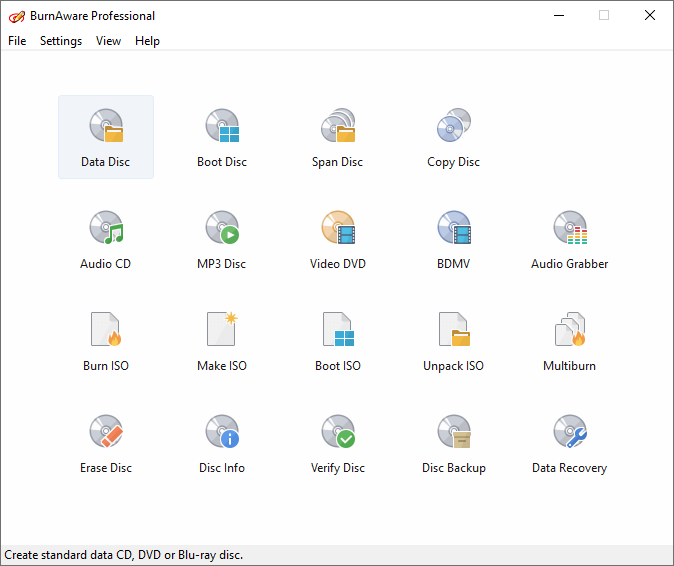
The BurnAware Professional launcher. The Professional-only tools are Console Burner (top right), Audio Grabber, Multiburn and Data Recovery.
Features
Pull files off discs Windows can't read
BurnAware Professional's Data Recovery tool opens a disc, lists its sessions on the left and the files of the selected session on the right, and extracts what you pick to a folder. That's useful for multisession discs where Windows only shows the last session, and for discs with read errors. With an audio CD inserted, the same tool extracts single tracks or copies the whole disc to a CUE image. It's the main reason to choose Professional over Premium for anyone who keeps an archive of old discs.
Write one ISO to several recorders at once
BurnAware Professional's Multiburn burns a single ISO image to multiple drives simultaneously. If you hand out installation discs, training material or the same data set to several people, a PC with two to four burners turns a morning of swapping discs into a few batches. Each drive still needs its own blank, and the speed depends on your hardware and connections.
Script your burning from the command line
BurnAware Professional adds a Console Burner, and its compilations accept command-line arguments. A data disc call takes the file system (iso, udf or isoudf), a source folder or a .bafl file list, the recorder's drive letter, switches such as -b to burn and -m to load the last session, a disc label and -x to exit when done. Audio CDs can be burned the same way from a PLS or M3U playlist. That lets you put a nightly archive-to-disc job in a batch file.
Rip audio CD tracks with the Audio Grabber
BurnAware Professional includes an Audio Grabber for extracting tracks from audio CDs, a tool neither Free nor Premium has. Combined with the Audio CD compilation, which writes CD-Text and burns in disc-at-once mode, it covers the full round trip of reading and producing audio CDs, for example for a radio station, church or band that still works with CDs.
Everything Premium does: copy, span, convert and burn
BurnAware Professional also includes all of Premium: direct disc-to-disc copying, disc spanning across several blanks, the DVD-Video converter (AVI, MOV, MPG, VOB, MP4, WMV and MKV to DVD-Video, with PAL and NTSC options added in version 19.4), and the standard data, bootable, MP3, BDMV and ISO tools, plus erase, disc info and byte-by-byte verification.

A BurnAware Professional Data Disc compilation: 12,921 files in 607 folders (63.16 GB) queued for a Blu-ray XL 100 GB disc in UDF.
Benefits
- A legal license for work at a small price. Free and Premium forbid commercial use. Professional costs $10 more than Premium and removes that restriction.
- Less time spent feeding discs. Multiburn and command-line burning take the repetitive part out of making many copies.
- A way back into old discs. Data Recovery and the Audio Grabber read archives you'd otherwise have to open on another machine or with another tool.
- Nothing to renew. The license is perpetual, so a team can standardize on a version and keep it.
Real-World Uses
- A small software or training company burns 40 copies of an installer ISO on a PC with four DVD writers using Multiburn.
- An accountant's office archives each year's client files to M-Disc, spanning them across discs and verifying each one.
- An IT technician recovers the files from an old multisession backup DVD that Windows only shows the last session of.
- A recording studio rips a client's reference CD with the Audio Grabber and burns review CDs with CD-Text track names.
- A scheduled job burns a folder to a UDF disc every Friday from a batch file, using the command-line switches.
Who It's For, and Who Should Skip It
BurnAware Professional is for anyone who burns discs as part of their job, and for home users who need disc recovery or audio ripping. It suits small offices, freelancers, technicians and studios that want a light, scriptable tool rather than a media suite.
Skip it if:
- You only burn at home and don't need recovery, ripping or Multiburn. BurnAware Premium ($29.95) or the free edition is enough.
- You need a full CD ripper with metadata lookup, tagging and format presets. A dedicated audio ripper does that job better than a grabber inside a burning tool.
- You need disc encryption, cloud backup or media editing. BurnAware has none of these.
- You need an industrial duplicator workflow with robotic loaders or disc printing. Multiburn drives several standard recorders, not duplication towers.
- You're on a Mac or Linux. BurnAware is Windows only.
Usage Guide
- Install the trial. Download the 64-bit (or 32-bit) Professional installer from the vendor and run it. Every tool works for 7 days.
- Recover files from a disc: click Data Recovery, pick a session on the left, select files on the right and click Extract, then choose a destination folder.
- Burn one image to several drives: make or pick an ISO, open Multiburn, select the recorders and start the burn.
- Burn from a script: call the data disc program with arguments, for example the file system, the source folder, the drive letter and
-b -x to burn and exit. The online manual lists every switch.
- Everyday burning: pick Data Disc, choose UDF, ISO or ISO+UDF, drag in files, tick "Verify data on disc after burning" and click Burn.
- Register: the license key arrives by email after payment. Enter it in the installed trial, and make sure you installed Professional, not Premium, or the key is rejected.

A BurnAware Professional Audio CD compilation mixing MP3, FLAC, WMA, APE, OGG, AAC, AC3, M4A and WAV tracks, with 35:19 of an 80-minute CD used.
Where it falls short
- The Professional-only tools are lightly documented. The online manual gives Multiburn one sentence, and the Data Recovery page is a three-step outline. Expect to learn them by trying.
- Burn failures are mostly about drives and media, and BurnAware's support offers an error-code list and a contact form rather than phone support. Older user reviews of the free edition mention coasters and an ignored burn-speed setting on some machines.
- FileHorse's review lists "Occasional compatibility issues" and no encryption, cloud backup or media editing.
- No volume pricing on the order page. Multi-user licenses are by quote, so a team purchase takes an email exchange.
What Users Say
BurnAware has a long review history, but independent reviewers mostly test the free edition. Professional runs the same engine and interface, so their findings on speed, stability and ease of use apply to it; the Professional-only tools get far less coverage.
Reviews of BurnAware Professional
FileHorse (Sophia Jones, review of BurnAware Professional 19.4) calls it software "intended for users who need maximum control over every aspect of the burning process and use multiple burners for mass-production of various discs and quick creation of disc-to-disc copies." Pros: "Simple and user-friendly interface", "Fast and reliable burning process", "Low resource consumption", "Advanced disc copying and recovery". Cons: "No built-in media editing tools", "No support for disc encryption", "Lacks direct cloud backup options", "Occasional compatibility issues".
TheTechLounge (June 2020, quoted on BurnAware's reviews page): "BurnAware is excellent for both home users and "professionals" alike, provided burning DVDs for profit is still a thing, and it will help you in any type of endeavor that involves DVDs and CDs, ranging from burning tasks such as image creation, backup, basic disc burning, erasing, copying and audio track extraction to data recovery."
Reviews of the shared engine (BurnAware Free)
TechRadar (Binay Gupta): "Another benefit of BurnAware Free is that it's less demanding on your device's system resources compared to some apps, not using up much of your CPU's power. The burning process itself is also commendably stable." The review also notes that "ripping audio tracks, copying one disc to another, or recovering data from unreadable discs are reserved for the premium versions of BurnAware."
ghacks.net (Martin Brinkmann, March 2016, quoted on BurnAware's reviews page): "Best of all, it is light on resources during operations so that your system does not get bogged down when you are burning discs."
MadDownload (May 2021, quoted on BurnAware's reviews page): "The creator of the program strives to continually provide new functionalities to make BurnnAware even better responding to the suggestions of the community."
Snapfiles user reviews (BurnAware Free, 4 stars average from 6 reviews)
gimpguy (August 2012, v5.1): "I have it installed on 3 systems plus many people who I suggested this to and they are still happy with it."
Charcar682 (March 2009, v2.3.1): "For burning CD's I have found this easier to use that the two programs I paid for. It is very fast for simple CD burning."
bobfromhull (November 2009, v2.4.1): "Uncomplicated and unbloated software is always welcome but it is pre-requisite that it works. This program doesn't. The burn speed setting is always ignored and all I have got from it is high speed coasters."
Across the reviews, BurnAware's strengths are consistent: it's light, stable and easy, and Professional's recovery and copy tools are counted among its advantages. The complaints are about failed burns on particular hardware (mostly older versions) and about what it doesn't try to do, such as encryption, cloud backup and editing.
Comparisons
BurnAware Professional vs BurnAware Premium
Premium ($29.95) has the same burning, copying, spanning and DVD-Video tools, but not Data Recovery, the Audio Grabber, Multiburn or Console Burner, and its license is for non-commercial use only. If you use it for work, Professional is the only correct choice; at home, pick Professional only for those four tools.
BurnAware Professional vs BurnAware Free
Free burns data, audio, video, bootable and ISO discs, but has no copying, spanning, video converter or 64-bit build, and it's for personal use at home only. For a business it isn't an option at all.
Editions and Pricing
| License |
Price |
Updates |
Who can use it |
| Professional | $39.95 | 1 year | 1 person, up to 3 PCs, commercial use allowed |
| Professional Lifetime | $99.95 | Lifetime | 1 person, up to 3 PCs, commercial use allowed |
| Business license | By quote | By agreement | Several users in a company, pre-activated |
| Premium (for comparison) | $29.95 | 1 year | 1 person, up to 3 PCs, non-commercial only |
Every paid license is perpetual. The 1-year option includes a year of free upgrades; after that you keep using your version, and the update reminder can be turned off.
Buy Professional, 1 year of updates ($39.95)Buy Professional with lifetime updates ($99.95)
FAQs
Can I use BurnAware Professional in my business with one license?
Yes. BurnAware Professional's standard license allows commercial use by one person on up to three computers. If several employees need it, the vendor sells a multi-user business license by quote.
Does BurnAware Professional stop working after the first year?
No. BurnAware Professional's license is perpetual; the first year only covers free upgrades. After it ends you keep using your version, and you don't have to buy an update subscription.
Can BurnAware Professional recover a scratched DVD?
BurnAware Professional's Data Recovery can extract files from discs Windows won't open and from earlier sessions of a multisession disc. It reads what the drive can still read; it doesn't repair the disc surface, so badly damaged areas stay unreadable.
I bought Premium. Can I upgrade to Professional?
The BurnAware order page only sells new Premium and Professional licenses; there's no listed upgrade price from Premium. Contact Burnaware support before buying if you want to ask about one.
Why does BurnAware say my license key is invalid?
BurnAware Professional keys only work in the Professional installer. Check you didn't install Premium, and run the program as administrator when entering the key, as the vendor's FAQ advises.
Can I get a refund on BurnAware Professional?
Burnaware refunds within 14 days of purchase only if the license key is still unused and unactivated. Run the 7-day trial on your own hardware before you buy.
How do I update BurnAware Professional to a new version?
Download the newest Professional trial from the vendor and install it over your registered copy; your key keeps working while your update period lasts. The settings are kept in an INI file in your Application Data folder.
System Requirements
- Windows Vista, 7, 8, 10 or 11
- 32-bit installer (28.8 MB) or 64-bit installer (32.4 MB)
- A CD, DVD or Blu-ray recorder; Multiburn needs two or more recorders, BDXL and M-Disc need drives that support them
Conclusion
BurnAware Professional is worth $39.95 for anyone who burns discs for work: it's the only BurnAware edition you're licensed to use commercially, and it costs less than most burning suites while staying fast and simple. Data Recovery and Multiburn are the features that justify it for heavy disc users at home too. The main reason not to buy it is if you only burn discs for yourself and don't need those tools, in which case Premium or the free edition does the job. Choose the $39.95 license over the $99.95 lifetime one unless you know you'll want every future version, and test it with your drives during the 7-day trial first.
Download Free TrialBuy Now