Aiseesoft DVD Creator: Burn Your Videos to a DVD That Plays on Any Player
Aiseesoft DVD Creator is a Windows program that turns MP4, MKV, MOV, AVI and other videos into a DVD disc, a DVD folder or an ISO file, with a menu, chapters, subtitles and extra audio tracks. A lifetime license for one PC costs $39.96 at checkout.
It's for anyone who still needs a disc: a wedding video for grandparents who only have a DVD player, a school concert to hand out, or home movies to store on something that isn't a phone. Windows no longer includes a DVD maker, and this fills that gap.
Quick facts
- Current version: 5.2.72 for Windows
- Developer: Aiseesoft Studio
- Runs on: Windows 11, 10, 8.1, 8, 7, Vista and XP. A separate Mac version is sold on its own.
- Output: DVD disc (DVD-R/RW, DVD+R/RW, DVD+R DL, DVD-R DL, DVD-5, DVD-9), DVD folder (VIDEO_TS) or ISO image
- Input: 300+ video formats, including MP4, MKV, MOV, AVI, WMV, FLV, MTS, M2TS and TS, plus audio and images
- Price: $39.96 for a lifetime license on 1 PC (list price $49.95)
- Refunds: 30-day money-back guarantee for quality problems
- Download: 41 MB installer
- What we checked: the installer we downloaded from Aiseesoft on October 20, 2026 is version 5.2.72 (41 MB), and the order page showed Aiseesoft DVD Creator at $49.95 with a $9.99 discount, $39.96 to pay, on October 20, 2026. We didn't burn a disc with it.
Before you buy
On Aiseesoft's purchase page, a 7-day free trial of Aiseesoft Blu-ray Player is ticked by default next to the Buy Now button. If you leave it ticked, that trial renews monthly at US$31.20 unless you cancel. Untick it before you pay if you don't want it. Also note that the current installer dates from February 2025, and the license covers Windows only.
Download Free TrialBuy Now
Overview
Aiseesoft DVD Creator works in one window. The toolbar has Add Files, Edit, Audio Track, Subtitle, Remove and Preferences. Your videos go in the list on the left, a menu and preview panel sits on the right, and the bottom bar sets the destination (a disc drive, a folder or an ISO file), the volume label, writing speed, copies and DVD type (D5 4.7 GB or D9), with a capacity bar that shows how full the disc will be.
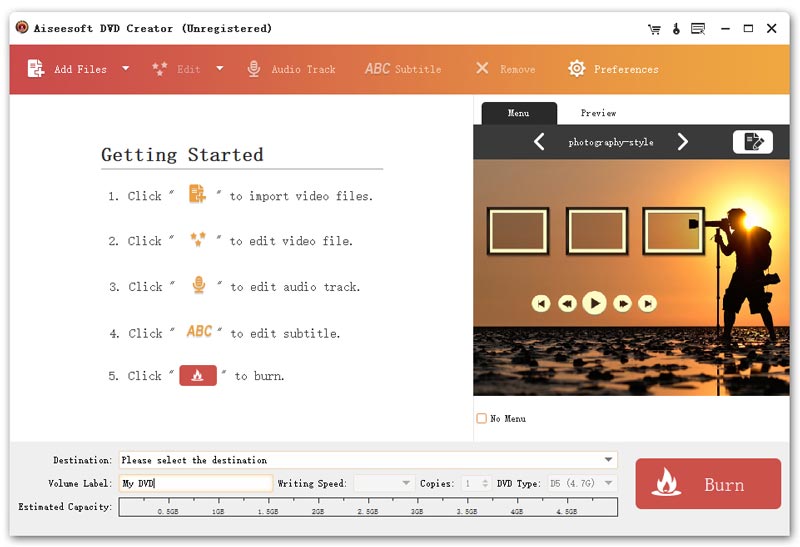
The main window of the unregistered app, from Aiseesoft's site: five Getting Started steps, the "photography-style" menu template on the right, and the Destination, Volume Label, DVD Type and capacity bar above the Burn button.
Features
Burn to disc, DVD folder or ISO
Aiseesoft DVD Creator writes to single- and dual-layer DVD-R, DVD+R and rewritable discs, or saves the same DVD as a VIDEO_TS folder or an ISO image on your hard drive. The folder and ISO options are handy when you don't have a blank disc yet, or want to burn several copies later.
Menu templates you can customize
Aiseesoft DVD Creator comes with menu templates grouped by theme (Animal, Scenery, Festival, Plant, City and Other), with more free templates to download. You can add background music, a background picture and an opening film from your own files, edit the button and title text, and set how long the menu loops. Tick "No Menu" for a disc that just plays.
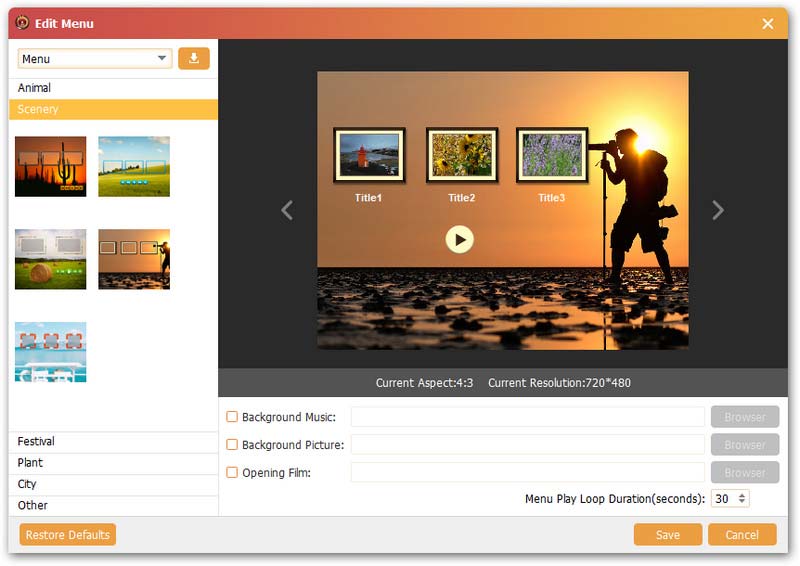
The Edit Menu window, from Aiseesoft's site: Scenery templates on the left, a three-title menu preview at 720x480, and the Background Music, Background Picture and Opening Film options.
Audio tracks and subtitles
Aiseesoft DVD Creator lets you pick which audio track and subtitle each video keeps, and add new ones: audio from MP3, AAC, FLAC, M4A, WMA, WAV or OGG files, and subtitles from SRT, SUB, SSA or ASS files, with the position, delay and font adjustable. That's how you make a disc with two languages from your own files.
Edit videos before burning
Aiseesoft DVD Creator's editor trims the start and end of clips, crops, changes the aspect ratio, adjusts brightness, saturation and contrast, and adds a text or image watermark, with a real-time preview. Hardware acceleration speeds up the conversion when your graphics card supports it.
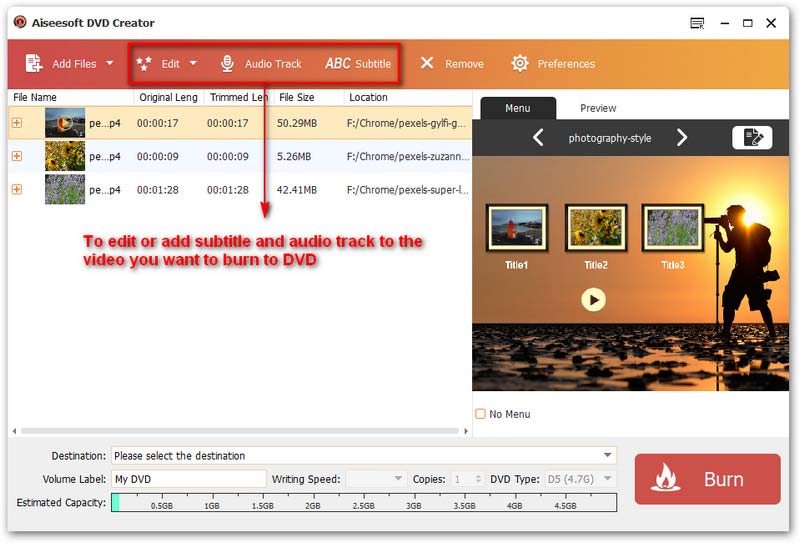
Three MP4 files loaded with their length and size, from Aiseesoft's guide, with the Edit, Audio Track and Subtitle buttons outlined and the menu titles shown on the right.
Benefits
- A disc anyone can play. A standard DVD works in living-room players and older laptops, no apps or accounts needed.
- Looks finished. A menu with your own music and photo makes a gift disc feel personal.
- Backups without discs. ISO and folder output keep a ready-to-burn copy on a drive.
- Pay once. A lifetime license, not a subscription.
Real-World Uses
- Family videos for grandparents: burn phone clips from a holiday to a DVD with a Festival menu and background music.
- School or church events: make an ISO once, then burn ten copies for families.
- Wedding videographers: deliver a DVD with chapters and a custom opening film alongside the digital files.
- Bilingual home movies: add a second audio track and English subtitles to a camcorder video.
Who It's For, and Who Should Skip It
Aiseesoft DVD Creator suits Windows users who need to make good-looking DVDs from their own videos now and then, without learning authoring software.
Skip it if you need Blu-ray discs (Aiseesoft's Burnova does that), if you're on a Mac (buy the Mac version instead), or if you want to copy or rip existing DVDs, which this program doesn't do. If you only need a plain data disc of video files, Windows can burn that for free.
Usage Guide
- Install and register. Download and install Aiseesoft DVD Creator, then register with your email address and the registration code from your order.
- Insert a disc. To burn straight to DVD, put a blank disc in the drive.
- Add files. Click Add Files and load your videos, audio or pictures.
- Edit (optional). Use Edit, Audio Track and Subtitle to trim, crop, add watermarks, tracks and subtitles.
- Choose a menu. Pick a template on the right, or click the edit icon to customize it.
- Burn. Choose the destination (disc, DVD folder or ISO), the DVD type and copies, and click Burn.
Where it falls short
- DVD only. No Blu-ray, and DVD video is standard definition (720x480 menus), so HD footage loses detail on disc.
- Not a ripper or copier. It creates DVDs from your files, but can't copy or convert an existing DVD.
- Slow update pace. The current Windows build is from February 2025.
- Strict refunds. Aiseesoft refunds for quality problems within 30 days, and Trustpilot reviewers say other refund requests are refused.
What Users Say
On Aiseesoft's product page
Aiseesoft shows 215 reviews for DVD Creator and quotes a few, chosen by the vendor:
- Juliet Kotze: "I have Windows 8 and therefore this is why I bought the product, since Windows Movie Maker does not support a burn to DVD option anymore. It worked really easy to burn MP4 videos into a DVD folder."
- Ethan Lee: "I've tried several DVD creation apps, and this one is the best. The customization options are fantastic, and the burning process is smooth and efficient. Highly recommended!"
- Olivia Johnson: "This DVD Creator app is incredible. It allows me to create DVDs with high-quality videos and menus. The interface is user-friendly and intuitive."
Trustpilot: Aiseesoft as a company
Aiseesoft scores 3.8 out of 5 from 605 reviews on Trustpilot, with ratings split between 60% five-star and 34% one-star. The reviews cover all Aiseesoft products. Fans praise easy, subscription-free software and quick support, while the one-star reviews are mostly about refunds:
- Doug (5 stars, July 2026): "I love that this app is simple to use and does not require a subscription."
- caitlin hardwick (1 star, October 2026): "They refuse any refund unless faulty."
The pattern: people who need a quick, menu-driven DVD find it easy. Complaints are about the company's refund policy rather than the burning itself, so use the trial before buying.
Comparisons
Aiseesoft DVD Creator vs. Burnova
Burnova is Aiseesoft's bigger burner: it adds Blu-ray disc, folder and ISO output, more video effects (rotate, flip, 21 filters), menu editing with movable scenes and your own templates, chapter merging and splitting, and saving a project to finish later. Choose DVD Creator for plain DVDs, and Burnova if you have a Blu-ray burner or want finer control over the menu.
FAQs
Does Aiseesoft DVD Creator work on Windows 11?
Yes. Aiseesoft DVD Creator supports Windows 11, 10, 8.1, 8 and 7, and still lists Vista and XP.
Do I need a DVD burner to use Aiseesoft DVD Creator?
Only for discs. Aiseesoft DVD Creator can save a DVD folder or ISO file without any drive, and you burn it later on a PC that has one.
Is Aiseesoft DVD Creator a one-time purchase?
Yes. The Aiseesoft DVD Creator license sold here is a lifetime license for one PC at $39.96, with free upgrades. Just untick the Blu-ray Player trial on the purchase page if you don't want a monthly charge.
Can Aiseesoft DVD Creator make a dual-layer DVD?
Yes. Aiseesoft DVD Creator supports DVD+R DL and DVD-R DL discs and the DVD-9 type, which hold about twice as much as a standard 4.7 GB DVD-5.
Will the DVD play on a TV DVD player?
Aiseesoft DVD Creator makes standard DVD-Video discs with a VIDEO_TS structure, which home DVD players are built to read. Use good-quality blank discs and a moderate writing speed for the best compatibility.
Does the Windows license work on a Mac?
No. Aiseesoft sells DVD Creator for Mac separately, with its own license.
System Requirements
- Operating system: Windows 11, 10, 8.1, 8, 7, Vista or XP
- Processor: 1 GHz Intel or AMD CPU or faster
- Memory: 1 GB RAM or more
- Drive: a DVD burner to write discs (not needed for DVD folders or ISO files)
Conclusion
Aiseesoft DVD Creator is worth $39.96 if you're on Windows and need to turn your own videos into playable DVDs with a proper menu, without learning authoring software. The one reason to buy it is how quickly it gets a finished-looking disc out of a folder of MP4s. The main reasons to hesitate are that it does DVD only (no Blu-ray, no ripping) and that the purchase page pre-ticks a paid monthly add-on. Untick that, try the free download first, and it's a fair one-time price for the job.
Download Free TrialBuy Now